Personalize this lesson
Adapt explanations and teaching visuals to your background and preferred voice.
Which thread should own ? One thread can compute it, four neighboring answers can share one thread's accumulators, or a warp can cooperate on a whole tile. The answer remains the same, but the memory requests, reuse, and precision contract change. We'll build and inspect those choices on a GPU, starting with scalar CUDA and ending with Tensor Cores. Predict addresses and values first; a speed claim comes from the device measurements.
The previous GPU compiler lesson separated source language, generated code, and target architecture. In the kernel engineering lab, memory access, occupancy, and synchronization became tuning decisions. Finally, the profiling lesson required correctness before speed. Keep all three contracts active here.
We build one operation, , through five successive kernel stages. This represents the , case of general matrix-matrix multiplication (GEMM), , where we don't read the old output buffer. Matrix has shape , has shape , and has shape . All lab buffers use row-major storage, so neighboring columns occupy neighboring memory addresses.
The complete CUDA source is available as gemm_lab.cu. Its kernels are intentionally educational. A production library has more schedules, layout transforms, epilogues, and hardware-specific paths than one chapter should hide inside a code listing.
You'll trace warp addresses, distinguish shared broadcasts from bank conflicts, test padding and swizzling on a pattern that actually conflicts, explain both barriers, and check a padded WMMA layout. Host C++ checks and CPU models run without a GPU. CUDA compilation, kernel execution, sanitizers, and hardware timings require a compatible development system and device.
Compute one output before launching a warp
Start with matrices small enough to multiply on paper:
is and is , so must be . Entry takes row 1 of and column 0 of :
Applying the same dot product to each output gives:
GEMM performs multiplications and about the same number of additions. Performance tools conventionally count floating-point operations (FLOPs), including one multiply and one add for each inner-loop step. Our tiny product therefore counts FLOPs.
In naive scalar code, each thread computes a single output . For each step along , the thread fetches one float from (4 bytes) and one float from (4 bytes), performing one fused multiply-add (2 FLOPs). That yields an arithmetic intensity of:
This is per-thread operand demand, excluding the final output store. It isn't measured HBM traffic: requests for the same address can merge, and L1/L2 caches can reuse inputs. Multiplying 0.25 by HBM bandwidth therefore doesn't establish the kernel's real ceiling or an idle-hardware percentage. Keep the memory boundary attached to every intensity calculation.
The script below reproduces the hand calculation and compares two traffic models. Its first model assumes every output reloads two input values for every . An optimistic second model counts each input and output element once, giving a lower bound for a cold, standalone operation rather than a claim about a real cache.
A = [[1.0, 2.0, 0.0], [-1.0, 3.0, 2.0]]
B = [[2.0, -1.0], [1.0, 4.0], [3.0, 0.0]]

M, K, N = len(A), len(B), len(B[0])
C = [
    [sum(A[row][k] * B[k][col] for k in range(K)) for col in range(N)]
    for row in range(M)
]

flops = 2 * M * N * K
scalar_bytes = 4 * M * N * (2 * K + 1)
unique_bytes = 4 * (M * K + K * N + M * N)

print(f"C={C}")
print(f"flops={flops}")
print(f"scalar_load_model={flops / scalar_bytes:.3f} FLOP/B")
print(f"perfect_reuse_bound={flops / unique_bytes:.3f} FLOP/B")C=[[4.0, 7.0], [7.0, 13.0]]
flops=24
scalar_load_model=0.214 FLOP/B
perfect_reuse_bound=0.375 FLOP/BThose intensities are small because the matrices are small. For a square FP32 GEMM with , the unique-byte model becomes:
When , FLOP/B. Large square GEMMs contain abundant reuse to become compute-bound, but only if the kernel captures that reuse on chip. The roofline model bounds attainable compute rate by the lower of peak arithmetic throughput and memory bandwidth multiplied by arithmetic intensity.[1] It tells us whether reducing bytes can still move the ceiling.
Why is 0.375 FLOP/B an optimistic bound for the tiny product rather than a measured intensity?
Answer
It counts every A, B, and C element exactly once. A real kernel may fetch cache lines it only partly uses, reload evicted data, or move padding and metadata. A warm cache can also reduce DRAM traffic for one launch, so measure device traffic and record cache conditions.
A correct thread can still request the wrong addresses
The first CUDA kernel assigns one thread to one output. Each thread runs the same -step dot product:
__global__ void gemm_scalar_strided(const float* A, const float* B, float* C,
                                    int M, int N, int K) {
    int row = blockIdx.x * blockDim.x + threadIdx.x;
    int col = blockIdx.y * blockDim.y + threadIdx.y;
    if (row >= M || col >= N) return;

    float acc = 0.0f;
    for (int k = 0; k < K; ++k) {
        acc += A[row * K + k] * B[k * N + col];
    }
    C[row * N + col] = acc;
}
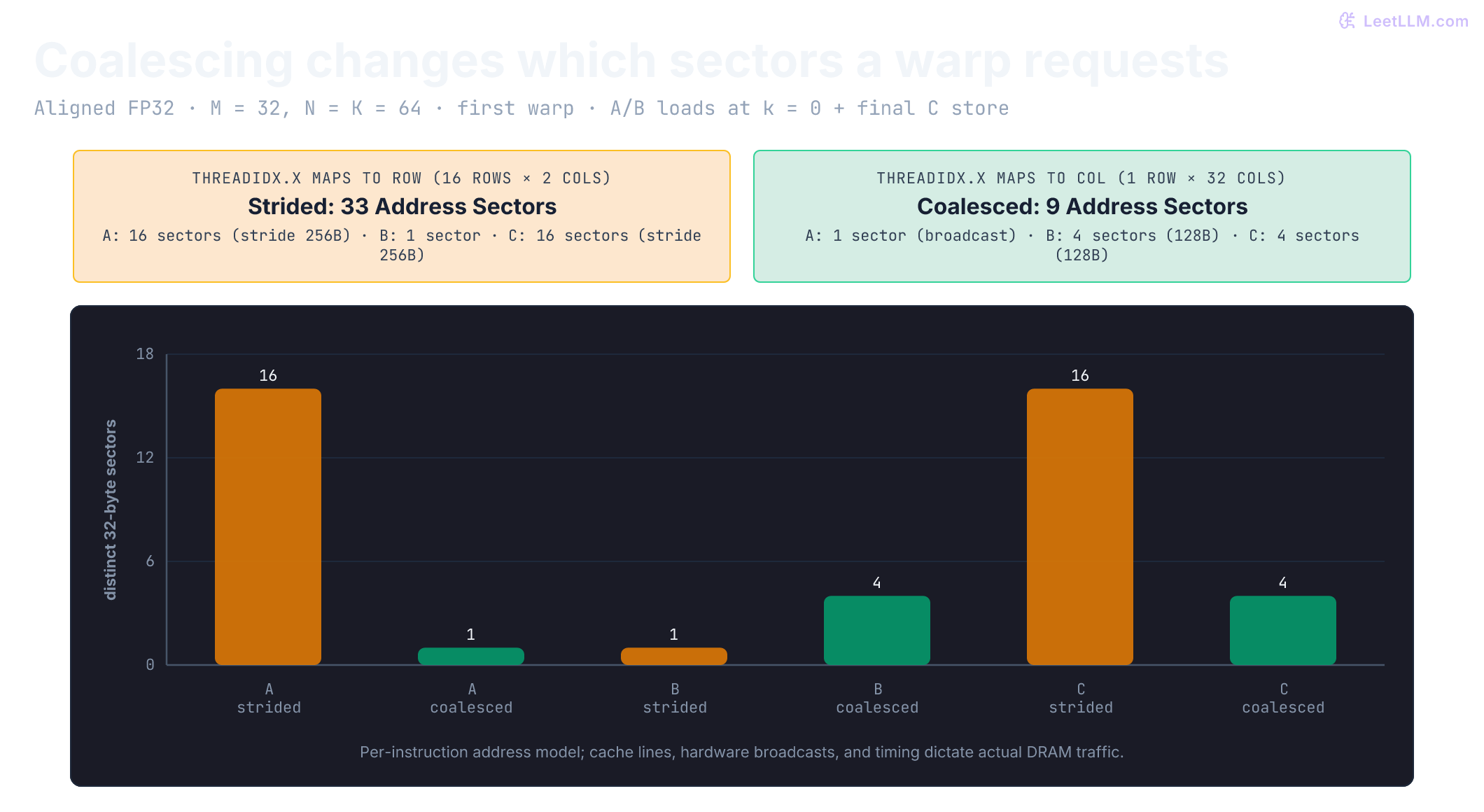
CUDA linearizes threadIdx.x first across warp lanes 0 through 31. In this strided kernel with a block, lanes 0 through 15 own rows 0 through 15 of column 0, while lanes 16 through 31 own rows 0 through 15 of column 1. Because is stored row-major, row begins elements ( bytes) after row .
With aligned buffers and , lane 0's A request is at byte 0, lane 1's at byte 256, and lane 2's at byte 512. The first 16 lanes cover 16 distinct 32-byte address sectors. The next 16 repeat those A addresses: there are 16 sectors across the full warp, not 32. Its C store also covers 16 sectors because each pair of neighboring columns fits in the same sector. These counts describe requests, not measured cache misses or HBM transactions.
Swap index assignments so threadIdx.x selects col:
__global__ void gemm_scalar_coalesced(const float* A, const float* B, float* C,
                                      int M, int N, int K) {
    int row = blockIdx.y * blockDim.y + threadIdx.y;
    int col = blockIdx.x * blockDim.x + threadIdx.x;
    if (row >= M || col >= N) return;

    float acc = 0.0f;
    for (int k = 0; k < K; ++k) {
        acc += A[row * K + k] * B[k * N + col];
    }
    C[row * N + col] = acc;
}
With the coalesced kernel's block, a full warp owns one row and 32 consecutive columns. All A requests address the same float, covering one sector. B loads and C stores each cover four sectors in this aligned fixture. Other leading dimensions, alignment, and edge masks can change those counts.[2]
| Mapping | Adjacent lanes vary | A load at k=0 | B load at k=0 | C store after the loop | Sum across these three instructions |
|---|---|---|---|---|---|
| scalar strided | row within each 16-lane half | stride (16 sectors) | two columns per warp (1 sector) | stride (16 sectors) | 33 sectors |
| scalar coalesced | output column | shared row (1 broadcast sector) | contiguous 32 floats (4 sectors) | contiguous 32 floats (4 sectors) | 9 sectors |
The three shown instructions cover 33 versus 9 sectors in total, 72.7% fewer in this address model. The C store happens once after the K loop, not once per iteration. Both kernels still execute two scalar operand loads per output per k, but that doesn't imply identical HBM bytes. Shared tiling makes reuse explicit instead of relying only on hardware merging and caches.
Turn global loads into shared tiles
Pick a output tile. One threadblock loads a tile of and a tile of into fast, on-chip shared memory, computes 256 partial dot products, then advances 16 positions along . Every loaded value feeds 16 output columns, and every loaded value feeds 16 output rows.

Two block-wide barriers form correctness boundaries:
- Read-After-Write (RAW) barrier: Prevents any thread from reading a shared tile before all threads finish loading it from global memory.
- Write-After-Read (WAR) barrier: Prevents fast threads from looping around and overwriting shared memory before slower threads finish consuming the current tile.
Cooperative staging reuses loaded operands across outputs within a block. Its effect on HBM traffic still depends on caches and the complete workload.[2]
constexpr int TILE = 16;

__global__ void gemm_shared(const float* A, const float* B, float* C,
                            int M, int N, int K) {
    __shared__ float As[TILE][TILE];
    __shared__ float Bs[TILE][TILE];

    int row = blockIdx.y * TILE + threadIdx.y;
    int col = blockIdx.x * TILE + threadIdx.x;
    float acc = 0.0f;

    for (int k0 = 0; k0 < K; k0 += TILE) {
        int ak = k0 + threadIdx.x;
        int bk = k0 + threadIdx.y;
        As[threadIdx.y][threadIdx.x] =
            (row < M && ak < K) ? A[row * K + ak] : 0.0f;
        Bs[threadIdx.y][threadIdx.x] =
            (bk < K && col < N) ? B[bk * N + col] : 0.0f;
        __syncthreads();

#pragma unroll
        for (int k = 0; k < TILE; ++k) {
            acc += As[threadIdx.y][k] * Bs[k][threadIdx.x];
        }
        __syncthreads();
    }

    if (row < M && col < N) C[row * N + col] = acc;
}
Edge handling preserves cooperative loads and barrier participation. A thread outside can still own a B load needed by valid rows; an out-of-range output column can still own an A load. Returning based only on output validity skips that work. Keep this algorithm's threads active through both barriers and predicate the final C store. CUDA's barrier waits for non-exited threads; an early exit isn't inherently a guaranteed hang. Conditional barriers with nonuniform participation are a separate invalid synchronization pattern.[3]
For each tile step, the block performs FLOPs. It loads two 256-element FP32 tiles ( bytes) from global memory. Arithmetic intensity at the global-to-shared boundary jumps to:
This is a reduction in nominal operand-load bytes per output compared with independent scalar loading. It excludes output stores, partial tiles, and caches; it doesn't establish a reduction in measured HBM traffic.
An edge thread has row >= M. Why must it still reach both barriers inside the K loop?
Answer
Other threads in the block may need its B load and its barrier participation. The edge thread still performs both predicated loads, zero-fills only invalid source coordinates, reaches each block-wide barrier, and skips its final out-of-range store.
Find a bank conflict before fixing it
Shared memory isn't an unconstrained cache. On modern NVIDIA architectures, shared memory is divided into 32 independent memory banks, interleaved cyclically in 4-byte (32-bit) words:
For the scalar FP32 model, different words in the same bank require separate conflict-free service groups. Multiple lanes reading the same word can broadcast without a conflict. A conflict degree isn't a complete instruction latency in clock cycles or a kernel slowdown factor.[2]
Examine the inner loop access pattern in gemm_shared:
acc += As[threadIdx.y][k] * Bs[k][threadIdx.x];With the shown block, one warp spans two rows, not 32 rows. Sixteen lanes read As[0][k], and sixteen read As[1][k]: two broadcasts to different banks. B's sixteen distinct words are each requested twice, also without conflicts. A block would put the warp in one row, making its A read a single broadcast. Changing the array size alone doesn't create a 32-way column access.
Now construct a different pattern: lane reads word of a array. These are 32 different row addresses, all mapping to bank . This is a 32-way conflict. Padding to [32][33] gives bank , eliminating the conflict for this scalar access. It adds 128 bytes (3.125%); a [16][17] array instead adds 64 bytes (6.25%). Row starts with a 33-float stride aren't all 16-byte aligned.
An XOR permutation can also spread this column: store logical (row,col) at physical column col ^ row, and apply that mapping to both producers and consumers. It uses the same number of words. But it permutes logical vector components: row 1's columns 0,1,2,3 become 1,0,3,2. You can't assume a float4 starting at the first mapped word preserves alignment and logical order. Production layouts must match the specific vector, ldmatrix, or MMA access pattern.
def service_groups(words):
    banks = {}
    for word in words:
        banks.setdefault(word % 32, set()).add(word)
    return max(map(len, banks.values()))

k = 3
shown_a = [(lane // 16) * 16 + k for lane in range(32)]
shown_b = [k * 16 + lane % 16 for lane in range(32)]
column = [32 * lane + k for lane in range(32)]
padded = [33 * lane + k for lane in range(32)]
old_xor = [32 * row + (k ^ ((row // 4) % 8)) for row in range(32)]
scalar_xor = [32 * row + (k ^ row) for row in range(32)]
counts = [service_groups(words) for words in
          (shown_a, shown_b, column, padded, old_xor, scalar_xor)]
assert counts == [1, 1, 32, 1, 4, 1]
assert [col ^ 1 for col in range(4)] == [1, 0, 3, 2]
print("model groups: shown A/B=1/1; column=32; padded=1; old XOR=4; scalar XOR=1")
print("row 1 XOR vector: [1, 0, 3, 2]; logical vector order isn't preserved")model groups: shown A/B=1/1; column=32; padded=1; old XOR=4; scalar XOR=1
row 1 XOR vector: [1, 0, 3, 2]; logical vector order isn't preservedThe old XOR expression's eight bank choices leave four different words per bank in the column example. Merely naming a transformation “swizzling” doesn't prove it fixes the access. These are scalar address calculations, not GPU cycle measurements or a tested Tensor Core layout.
Let each thread keep more than one answer
In gemm_shared, each thread reads two shared floats for one multiply-accumulate: 8 bytes of per-thread operand demand for 2 FLOPs, or 0.25 FLOP/B. This doesn't establish physical shared-memory traffic or saturation because broadcasts and generated instructions also matter.
Register blocking gives each thread a 2D tile of outputs held in local registers. In our lab kernel, each thread computes 4 horizontal outputs ( tile):
float acc[4] = {0.0f, 0.0f, 0.0f, 0.0f};

#pragma unroll
for (int k = 0; k < TILE; ++k) {
    float a = As[threadIdx.y][k];
#pragma unroll
    for (int j = 0; j < 4; ++j) {
        acc[j] += a * Bs[k][threadIdx.x + j * TILE];
    }
}
A single float loaded from As into register a now feeds 4 independent multiply-adds. In an register tile (), a thread loads 8 values from and 8 values from (16 floats = 64 bytes), then executes FMAs (128 FLOPs):
The hypothetical register tile reduces nominal per-thread operand loads by . The lab's tile instead performs 8 FLOPs from five floats (20 bytes), or 0.4 FLOP/B, a improvement over 0.25. Neither ratio alone establishes a bandwidth reduction or speedup.
More registers aren't free. Accumulators and input temporaries can reduce block residency or require spills. A100's 65,536-register budget gives an upper bound of 1,024 threads at 64 registers each, before other allocation/resource limits; other Ampere targets have different warp limits. Spills don't inevitably erase every reuse benefit. Compare the compiled resource report, target occupancy, and measurements, as in the compiler lesson. CUTLASS's pipelined GEMMs can have relatively low occupancy and still perform well.[4]
| Kernel layer | Primary reuse location | Accumulator owner | Added constraint |
|---|---|---|---|
| scalar coalesced | Hardware L1/L2 caches | One thread, one output | Repeated global loads |
| shared | Threadblock shared memory | One thread, one output | Barriers, shared capacity, bank conflicts |
| register | Shared memory plus registers | One thread, four outputs | Register pressure and occupancy limits |
| Tensor Core WMMA | Fragment registers / MMA pipes | One warp, tile | Precision, alignment, and fragment layout |
Hand a tile to Tensor Cores
Tensor Cores are specialized execution units designed for matrix multiply-accumulate operations. NVIDIA introduced Volta Tensor Cores through the Warp Matrix Multiply Accumulate (WMMA) API in CUDA 9. Rather than having individual threads execute scalar FMAs, all 32 lanes in a warp cooperate to multiply fragments of matrices:
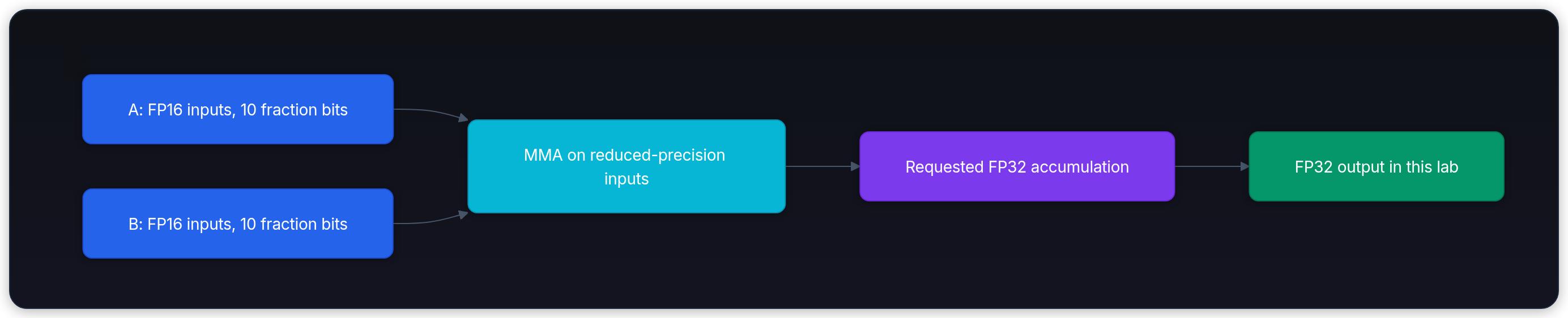
For FP16 inputs, a standard fragment represents a matrix tile, accumulating into FP32 accumulators.[5]
Three rules prevent bugs when programming WMMA:
- Full warp cooperation: All 32 lanes must participate with matching matrix shapes and types. A diverged or partially active warp produces undefined results.
- Strict pointer and stride alignment: For FP16 inputs,
load_matrix_syncrequires a 32-byte-aligned base pointer and a leading dimension divisible by 8 elements (16 bytes). The FP32 output store requires 32-byte pointer alignment and a leading dimension divisible by 4 elements (16 bytes). - Valid full-fragment storage: These WMMA load/store calls don't supply element masks. The lab pads all three dimensions to multiples of 16, zero-fills inputs, and crops the output. Another design can stage aligned full shared-memory fragments with guarded global edge loads and stores; padding the entire global tensor isn't mandatory.[3]
The lab kernel uses row-major FP16 inputs, FP32 accumulation, and one warp per tile:
__global__ void gemm_wmma_aligned(const half* A, const half* B, float* C,
                                  int M, int N, int K) {
#if defined(__CUDA_ARCH__) && __CUDA_ARCH__ < 700
    asm("trap;");  // Never silently execute an empty unsupported kernel.
#else
    using namespace nvcuda;
    int row = blockIdx.y * 16;
    int col = blockIdx.x * 16;

    wmma::fragment<wmma::accumulator, 16, 16, 16, float> c_frag;
    wmma::fill_fragment(c_frag, 0.0f);

    for (int k0 = 0; k0 < K; k0 += 16) {
        wmma::fragment<wmma::matrix_a, 16, 16, 16, half,
                       wmma::row_major> a_frag;
        wmma::fragment<wmma::matrix_b, 16, 16, 16, half,
                       wmma::row_major> b_frag;
        wmma::load_matrix_sync(a_frag, A + row * K + k0, K);
        wmma::load_matrix_sync(b_frag, B + k0 * N + col, N);
        wmma::mma_sync(c_frag, a_frag, b_frag, c_frag);
    }
    wmma::store_matrix_sync(C + row * N + col, c_frag, N,
                            wmma::mem_row_major);
#endif
}
Because host setup pads all dimensions to multiples of 16 (), the grid launches only complete tiles.
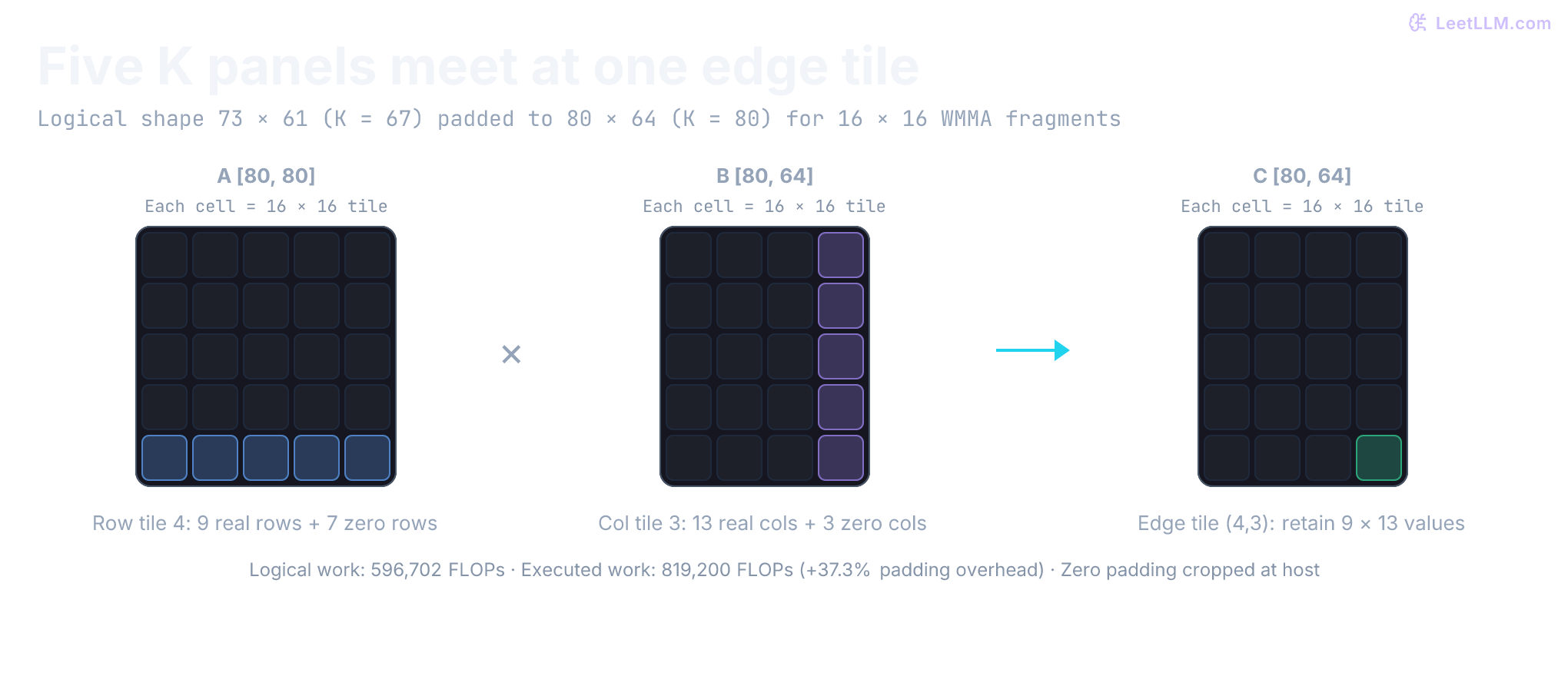
Padding adds explicit arithmetic overhead. For default shapes , WMMA executes on :
Use logical operations () for useful-work TFLOP/s. Also report nominal padded operations when explaining instruction overhead, and label the two rates separately.
Layout is part of the type
A[row * K + k] and B[k * N + col] assume row-major storage. Changing a fragment tag changes how memory is interpreted; it doesn't transpose the bytes. Data and leading dimensions must match the intended operand layout. Special symmetric inputs can hide a mismatch, so use nonsymmetric fixtures.
Always specify and verify:
- Logical shapes , , ;
- Storage order (row-major or column-major);
- Leading dimensions and memory strides;
- Memory alignment and padding multiples;
- Input, accumulator, and output data types.
What FP32 accumulation preserves, and what it can't recover
The lab requests FP16 inputs and FP32 accumulation. Some supported Tensor Core operations also allow FP16 accumulation; FP32 isn't a universal hardware requirement. Input format doesn't imply the product is rounded to that format: PTX specifies at least single-precision multiplication for its FP16 MMA operations, with accumulation precision depending on the instruction's type. Order, rounding, and subnormal behavior also depend on the documented operation.[6]
Consider the IEEE 754 half-precision (FP16) format:
- 1 sign bit, 5 exponent bits, 10 mantissa bits;
- Machine epsilon ;
- Dynamic range: minimum subnormal , maximum finite value .
Immediately above , adjacent FP16 values are spaced by 1. A positive 0.25 update rounds away under round-to-nearest, while FP32 can preserve it. This is absorption by rounding, not subnormal underflow. Below 1,024 the spacing is 0.5, so a negative 0.375 update gives 1,023.5; “every product smaller than 0.5 disappears” would be wrong. Reduction length alone doesn't establish the magnitude of partial sums or model divergence.
In contrast, single precision (FP32) provides:
- 8 exponent bits, 23 mantissa bits;
- Machine epsilon ;
- Dynamic range up to .
Immediately above , FP32's spacing is approximately . Updates smaller than its own rounding threshold can still disappear, and wider accumulation can't recover information already rounded out of FP16 inputs.
import struct

def rounded(value, code):
    return struct.unpack(code, struct.pack(code, value))[0]

half_update = rounded(1024.0 + 0.25, "e")
float_update = rounded(1024.0 + 0.25, "f")
negative_update = rounded(1024.0 - 0.375, "e")
assert (half_update, float_update, negative_update) == (1024.0, 1024.25, 1023.5)
assert rounded(1.0001, "e") == 1.0
print(f"positive update: FP16={half_update}, FP32={float_update}")
print(f"negative update: FP16={negative_update}; rounded input 1.0001 -> 1.0")positive update: FP16=1024.0, FP32=1024.25
negative update: FP16=1023.5; rounded input 1.0001 -> 1.0Python's struct provides IEEE binary16 and binary32 storage here.[7] This demonstrates representable spacing and rounding, not a Tensor Core accumulation emulator.
The two-reference testing protocol
Use two references to answer different numerical questions. They can be computed on CPU or with a suitable higher-precision implementation:
- Arithmetic correctness reference: Convert FP32 inputs to FP16, convert them back to FP32, and accumulate in FP64. This reference isolates kernel arithmetic and accumulation fidelity from input quantization loss.
- Original-input reference: Accumulate original FP32 inputs in FP64. Comparing against it measures input-quantization plus kernel-arithmetic change, not downstream application quality by itself.
Predict the two errors for a one-output GEMM: and . FP16 rounds both entries of A to 1. Can a perfectly computed rounded-input result still have 100% relative error against the original-input result?
a = [rounded(1.0001, "f"), rounded(1.0, "f")]
b = [1.0, -1.0]
aq = [rounded(value, "e") for value in a]
original_ref = sum(x * y for x, y in zip(a, b))
rounded_ref = sum(x * y for x, y in zip(aq, b))
candidate = 0.0  # Exact result for this rounded-input fixture, not a GPU run.
arithmetic_error = abs(candidate - rounded_ref)
original_error = abs(candidate - original_ref)
assert arithmetic_error == 0 and original_ref > 0
assert original_error / abs(original_ref) == 1
print(f"original-input reference={original_ref:.8f}; rounded-input reference={rounded_ref:.8f}")
print(f"arithmetic error={arithmetic_error:.8f}; original-input relative error=100%")original-input reference=0.00010002; rounded-input reference=0.00000000
arithmetic error=0.00000000; original-input relative error=100%Cancellation makes the original output small, so input quantization can dominate its relative error even though the kernel exactly satisfies the rounded-input arithmetic contract. Wider accumulation can't restore the discarded difference. This example separates the errors; it doesn't establish an acceptable application tolerance.
We check kernel correctness against Reference 1 using absolute and relative error bounds:
The lab gates WMMA against Reference 1 with and , then separately reports error against the original-input reference. These are fixture tolerances, not universal bounds for every shape or input range. Absolute tolerance handles values near zero; relative tolerance scales with output magnitude. Validate long reductions and the application's own quality requirements separately.
The hardware roofline across kernel stages
First put the memory boundary back into the calculation. For a full output tile of , an operand-load model counts input elements per K panel. Ignoring stores and tails, its intensity is , where is bytes per input element.
| Lab stage | Input bytes/element | Nominal operand-load intensity | What this model omits |
|---|---|---|---|
| Scalar strided | 4 | 0.25 FLOP/B per thread | Merged requests, caches, output store |
| Scalar coalesced | 4 | 0.25 FLOP/B per thread | Different sectors and merging, caches, output store |
| Shared | 4 | 4 FLOP/B per block panel | Stores, tails, cross-block/cache reuse |
| Register | 4 | 6.4 FLOP/B per block panel | Stores, tails, broadcasts and generated loads |
| WMMA | 2 | 8 FLOP/B per warp panel | FP32 output stores, padding, caches |
The FP16 WMMA panel has 8,192 FLOPs and 1,024 input bytes, not the FP32 panel's 2,048 bytes. Including its final FP32 tile store gives FLOP/B for an unpadded full output tile under this load model. It is 4 at K=16 and approaches 8 for large K.
For a concrete hardware ceiling, NVIDIA lists these specifications for A100 80GB SXM, distinct from the PCIe and 40GB variants:[8]
- HBM2e bandwidth: GB/s.
- Peak FP32 CUDA core throughput: TFLOP/s.
- Peak dense FP16 Tensor Core throughput: TFLOP/s (624 with supported structured sparsity).
At the HBM boundary, the roofline is . Its knee identifies where the ideal memory ceiling meets the compute ceiling; crossing it doesn't guarantee peak performance:
Use measured HBM bytes for , with the same operation count and time scope. Source-load ratios can't simply be substituted: L2 reuse across threadblocks can change HBM demand substantially. A FP16 block tile has a panel-load intensity of only 85.3 FLOP/B, below the 153 HBM knee, yet that doesn't establish its measured HBM intensity or its bottleneck. Additional pipeline stages can hide latency; they don't by themselves increase tile reuse. Shared-memory bandwidth, dependencies, occupancy, and launch overhead can impose lower ceilings.[4]
def panel_intensity(bm, bn, item_bytes):
    return 2 * bm * bn / (item_bytes * (bm + bn))

assert panel_intensity(16, 16, 4) == 4
assert panel_intensity(16, 64, 4) == 6.4
assert panel_intensity(16, 16, 2) == 8
fp32_knee, fp16_knee = 19500 / 2039, 312000 / 2039
wide_tile = panel_intensity(128, 256, 2)
assert wide_tile < fp16_knee
assert 8 * 16 / (16 + 16) == 4  # WMMA inputs plus the FP32 output store.
logical_work = 2 * 73 * 61 * 67
padded_work = 2 * 80 * 64 * 80
assert logical_work == 596702 and padded_work == 819200
padding_extra = 100 * (padded_work / logical_work - 1)
print("panel-load model: shared=4.0, register=6.4, WMMA=8.0 FLOP/B")
print(f"HBM knees: FP32={fp32_knee:.2f}, dense FP16={fp16_knee:.1f} FLOP/B")
print(f"128x256 FP16 panel={wide_tile:.1f} FLOP/B; stages alone don't change reuse")
print(f"odd shape: logical={logical_work}, padded={padded_work}, extra={padding_extra:.1f}%")panel-load model: shared=4.0, register=6.4, WMMA=8.0 FLOP/B
HBM knees: FP32=9.56, dense FP16=153.0 FLOP/B
128x256 FP16 panel=85.3 FLOP/B; stages alone don't change reuse
odd shape: logical=596702, padded=819200, extra=37.3%Run the lab and keep the receipt
Save the download as assets/gemm_lab.cu relative to your working directory. Check the installed toolkit and device first. Set GPU_ARCH to an architecture supported by both the device and compiler, such as sm_80 on an Ampere GPU:
nvidia-smi --query-gpu=name,compute_cap --format=csv
nvcc --version
nvcc --list-gpu-code

: "${GPU_ARCH:?Set GPU_ARCH to your device's supported target, such as sm_80}"
nvcc -O3 -std=c++17 -lineinfo -arch="$GPU_ARCH" \
  assets/gemm_lab.cu -o gemm_lab
./gemm_lab 257 263 251 20
WMMA hardware support began at compute capability 7.0, but toolkit support is a separate constraint. CUDA 13.0 removed offline compilation for architectures below 7.5; a Volta sm_70 exercise needs a compatible CUDA 12.x toolchain. A binary targeting sm_80 doesn't become a Hopper-specialized TMA kernel merely by running on newer hardware.[9]
The CLI rejects nonpositive or malformed dimensions, padded buffers exceeding signed 32-bit index ranges, and unsupported grid sizes. Those checks don't guarantee enough device memory. The host FP64 reference also costs : start with small correctness shapes before attempting large matrices.
Exact latency and throughput require device measurements. This is the output schema when every kernel passes:
device=<GPU name> cc=<major.minor> shape=257x263x251 iterations=20
scalar_strided       PASS max_abs=<measured> max_rel=<measured> mean_ms=<measured> tflop_s=<measured>
scalar_coalesced     PASS max_abs=<measured> max_rel=<measured> mean_ms=<measured> tflop_s=<measured>
shared_16x16         PASS max_abs=<measured> max_rel=<measured> mean_ms=<measured> tflop_s=<measured>
register_16x64       PASS max_abs=<measured> max_rel=<measured> mean_ms=<measured> tflop_s=<measured>
wmma_f16_f32         PASS max_abs=<measured> max_rel=<measured> mean_ms=<measured> tflop_s=<measured>
wmma_vs_original_fp32 max_abs=<measured> max_rel=<measured>
wmma_padding=272x272x256 logical_flops=33930682 executed_flops=37879808
After one poisoned-output correctness launch, the program performs five warmups and records CUDA events around repeated launches in one stream. It excludes allocation, transfers, FP16 conversion, padding, reference computation, and cropping. Short kernels can include host-launch gaps. The initial check doesn't inspect every timed output, and reused buffers don't establish cache residency. WMMA checks the logical crop against the rounded-input reference and all padded outputs for finiteness, not every padded value for zero. Repeat whole runs to assess distributions of their means; those aren't individual-launch tail samples.
Use a structured row so someone else can reproduce the comparison:
{
  "hardware": {"gpu": "record nvidia-smi name", "compute_capability": "record it"},
  "software": {"driver": "record it", "cuda": "record nvcc version", "git_commit": "record it"},
  "workload": {"M": 257, "N": 263, "K": 251, "warmups": 5, "iterations": 20},
  "path": {"kernel": "register_16x64", "input": "fp32", "accumulator": "fp32", "layout": "row-row-row"},
  "timing": {"method": "CUDA events in one stream", "buffer_policy": "reused; residency not established"},
  "correctness": {"reference": "CPU fp64 on fp32 inputs", "atol": 0.0002, "rtol": 0.0002},
  "result": {"status": "fill after run", "mean_ms": "fill after run", "tflop_s": "fill after run"}
}
Don't write 4.2x faster unless the receipt names both kernels, same shape, same device state, same timing method, same precision contract, and equivalent correctness. Compare against a tuned library such as cuBLAS or a CUTLASS profiler kernel before calling a handwritten kernel competitive.
The lab's FP16 WMMA row and FP32 scalar rows have different input precision. Their timing ratio alone isn't a same-precision optimization result. Use rounded inputs and an explicitly matched library compute mode for a controlled comparison.
Check the exercised paths with Compute Sanitizer. These tools cover different hazards; a clean run doesn't prove every input or scheduling path safe. A nonzero error exit code makes a gate actionable:
compute-sanitizer --error-exitcode 99 --tool memcheck ./gemm_lab 31 29 37 1
compute-sanitizer --error-exitcode 99 --tool racecheck ./gemm_lab 31 29 37 1
compute-sanitizer --error-exitcode 99 --tool synccheck ./gemm_lab 31 29 37 1
Nsight Compute can then explain timing changes. Start with a small metric set:
ncu --set basic --kernel-name regex:gemm_register_blocked --launch-count 1 \
  ./gemm_lab 512 512 512 2
This command captures the first matching launch. The basic set is a starting capture. Add sections for memory sectors, occupancy, registers, shared memory, and tensor-pipe activity as needed.[10]
Check the index model without a GPU
Download gemm_index_check.py alongside the CUDA file. It executes the two scalar ownership maps, cooperative shared loads, four-output register layout, and zero-padding/crop algebra on six integer fixtures, including and . It assumes both block barriers work; it can't detect real scheduling races, floating-point error, or WMMA instruction behavior.
import runpy

runpy.run_path("assets/gemm_index_check.py", run_name="__main__")PASS 6 shapes: scalar ownership, shared/register indices, padding/crop
first-warp sectors (A, B, C): strided=(16, 1, 16), coalesced=(1, 4, 4)
CPU integer fixtures only; no CUDA, floating-point, barrier, or speed validation.The CUDA download also exposes a host-only build that checks its actual argument parser, index-overflow guards, reference multiplication, NaN rejection, and tolerance comparison. It excludes every CUDA declaration:
clang++ -x c++ -std=c++17 -Wall -Wextra -Werror -DGEMM_HOST_CHECK \
  assets/gemm_lab.cu -o gemm_host_check
./gemm_host_check
Where asynchronous copies and TMA take over
The shared and WMMA kernels issue a load, wait, compute, and repeat. A pipelined main loop instead prepares tile while computing tile :
acquire_empty(stage[0])
issue_copy(input_tile=0, destination=stage[0])

for t in 0 .. k_tiles-1:
    current = stage[t % 2]
    wait_copy_complete_for_all_consumers(current)
    if t + 1 < k_tiles:
        next = stage[(t + 1) % 2]
        acquire_empty(next)
        issue_copy(input_tile=t+1, destination=next)
    accumulate(accumulator, current)
    wait_all_consumers_finished(current)
    release_empty(current)
The two slots must not alias. Copy completion makes a tile readable; consumer completion makes its storage reusable. An asynchronous MMA can still read shared memory after issue, so releasing a stage at instruction issue is unsafe.
NVIDIA documents three distinct hardware boundaries:
| Hardware Mechanism | First Architecture | Data Movement Path | Kernel Programming Model |
|---|---|---|---|
| Synchronous cooperative load | Pre-Ampere | GMEM Regs SMEM | Explicit thread loads and __syncthreads() |
cp.async (LDGSTS) | Ampere (CC 8.0) | GMEM SMEM directly | Bypasses register file; async pipeline tokens |
| Tensor Memory Accelerator (TMA) | Hopper (CC 9.0) | Multi-D GMEM SMEM | Hardware descriptor; transaction barriers |
Ordinary explicit global loads followed by shared stores route data through registers. The exact instruction count and width depend on generated code; it isn't universally two instructions per 16 bytes.
Ampere introduced cp.async (hardware instruction LDGSTS), copying data directly from global memory into shared memory without touching registers. This frees registers for accumulators and lets data movement proceed in the background while math units execute compute instructions.
Hopper introduces two further leaps:
- Warpgroup MMA (
wgmma): Four warps (128 threads) cooperate. B is described in shared memory; supported forms take A from shared memory or registers. Accumulators remain distributed in registers. This can reduce operand staging, not guarantee half the register allocation. Volta predatesldmatrix; WMMA's opaque fragments don't promise one instruction sequence on every target.[6] - Tensor Memory Accelerator (TMA): Descriptor-based asynchronous tensor copies can move data between global and shared memory. A single thread can issue a transfer, with documented bounds-fill behavior for loads. Descriptor alignment, strides, completion barriers, and storage lifetime still need correct setup; TMA isn't a general bounds check for arbitrary kernel pointers.[11]
Blackwell introduces another contract through tcgen05 instructions and dedicated Tensor Memory, including matrix accumulators. Don't transplant Hopper's register/layout assumptions onto that path. The lab deliberately retains WMMA; newer production instructions need their own architecture-specific study.[12]
CUTLASS and CuTe expose composable C++ layouts (Tensor, Layout, TiledCopy, TiledMMA) and architecture-specific kernel schedules. Choose a supported schedule for multistage pipelining or warp specialization; a layout declaration alone doesn't guarantee either.[13] Use the CUTLASS profiler to collect library receipts:
./tools/profiler/cutlass_profiler \
  --operation=Gemm --m=2048 --n=2048 --k=2048 \
  --A=f16:row --B=f16:row --C=f32:row \
  --accum=f32 --alpha=1 --beta=0 --verification-enabled=true
An async-copy kernel returns correct values but matches the synchronous kernel's timing. Why isn't the API name proof that transfer overlapped arithmetic?
Answer
A high-level copy can fall back to a synchronous path when its alignment or size contract isn't met. Even with an asynchronous instruction, too little independent computation, too few pipeline stages, or waits in the wrong place can remove overlap. Inspect the emitted instruction path and stall metrics before changing the stage count.
Diagnose the first bad signal
| Symptom | Likely cause | First check | Repair |
|---|---|---|---|
| Wrong values only on bottom or right edge | Missing predicate or crop | Run | Zero-fill input tails and guard output stores |
| Hang or synchronization error in shared kernel | Nonuniform conditional barrier | Run synccheck on an edge shape | Keep this kernel's cooperative loads and barriers outside output-validity conditions |
| Transposed-looking output | Physical layout disagrees with fragment layout | Check indices and leading dimensions | Make layout contract explicit or transform data |
| WMMA illegal memory access | Invalid full-fragment storage or bad alignment | Print fragment coordinates, strides, and pointers | Provide valid aligned fragments, using padding or guarded shared staging |
| Shared kernel throughput falls | Conflicts, barriers, or another resource limit | Trace actual lane addresses and source-attributed counters | Change the layout only if its access pattern conflicts |
| WMMA passes small K but drifts at large K | Tolerance ignores reduction length | Compare rounded-input reference across K sweep | Set evidence-based tolerance or stronger accumulation |
| Coalesced kernel isn't faster | Cache already hid loads or shape is too small | Inspect sectors and repeat distribution | Keep evidence; don't assume mapping change must win |
| Register kernel slows down | Spills or lower useful occupancy | Inspect registers and local-memory traffic | Reduce per-thread tile or retune block shape |
| No tensor-pipe activity | Binary, dtype, layout, or path missed Tensor Cores | Record architecture and instruction metrics | Compile correct target and verify selected kernel |
| Async version matches synchronous timing | Copy didn't overlap or fell back | Inspect instruction path and stall reasons | Meet alignment contract and pipeline enough work |
Every row starts from a symptom, not a favorite optimization. If correctness fails, stop timing. If timing moves without the expected counter change, revisit the hypothesis.
Your challenge: identify the limiting boundary
Try three experiments rather than assuming the last kernel wins:
- Compare with . Predict padding work, then inspect correctness and useful-work timings. Separately measure conversion/padding/cropping if those operations belong to your application's path.
- For a fixed shape and FP32 contract, compare scalar mappings, shared tiling, and register blocking. Do request-sector counts and measured HBM bytes change together? Use a source-attributed capture to explain caches or another limiting boundary when they don't.
- Hold M=N=64 and sweep K through 32, 256, and 4096. Compare WMMA error against both references, then use a library with matched rounded inputs and compute mode. Does longer accumulation change error, useful rate, or both?
Give another reader the source revision, exact flags, device/software versions, shapes, precision/tolerances, timer boundaries, reused-buffer policy, and named profiler evidence. State which observations support the claimed improvement and which remain unresolved. A measured result for one shape is the beginning of an explanation, not a ranking of kernel techniques.