Personalize this lesson
Adapt explanations and teaching visuals to your background and preferred voice.
Imagine an incident response agent investigating failed deployment RUN-842. It keeps blaming a database migration lock that telemetry ruled out eight turns ago. The disproof sits inside the prompt, yet the agent keeps recommending database rollbacks. The request fits inside a hypothetical 128k-token window. Stale, contradictory context is one plausible contributor to this failure; the symptoms alone don't establish its cause.
We'll use this failed canary rollout throughout: a release test reports authentication errors, and the agent must isolate the root cause from deploy records, runbooks, and request traces before proposing a rollback.
Compare two implementations. A reactive buffer trimmer waits until a token ceiling is reached, then slices history with a sliding window, FIFO eviction, or blunt summarization. If the application fails to protect its instructions and task definition, naive eviction can remove them while keeping repetitive failure traces. These are implementation mistakes, not the definition of context management, which also includes proactive techniques.
Context engineering is proactive working-set architecture. It designs the request payload for every inference step from first principles. It treats the context window like a high-speed scratchpad, curating high-signal evidence, gating tools by phase, isolating exploratory subtasks behind typed worker boundaries, aligning static prefixes for KV cache reuse, and persisting state in verified checkpoints outside the prompt.
Capacity asks whether a request fits inside the model's token limit. Curation asks whether the request contains sufficient, unpoisoned evidence for the model's next decision.
What does working-set design add to a reactive buffer trimmer?
Answer
It asks what each decision needs before the buffer fills: relevant evidence, phase-specific tools, checked findings, and protected instructions. Context engineering overlaps with context management; reactive trimming alone doesn't answer those design questions.
What long-context evaluations reveal
Anthropic frames context engineering as the successor to prompt engineering: not just tweaking phrasing, but curating every single token present during inference, including tool definitions, retrieved documents, message history, and memory.[1]
Anthropic's practical objective is to minimize context while retaining the information that helps achieve the desired outcome.[1] Minimal isn't always shortest: removing a required evidence span defeats the objective.
A 2025 survey organizes the field into context retrieval and generation, processing, and management, then examines systems that combine them.[2] A model may accept a very large input without using every part of it equally well.
Two historical findings and a benchmark distinction show why capacity alone doesn't guarantee reliability. They don't establish one common causal mechanism:
- Position sensitivity: Liu et al.'s TACL 2024 study tested multi-document question answering and key-value retrieval. Performance was often strongest when the relevant material appeared near the beginning or end, then fell when that material moved into the middle.[3] This measured behavior doesn't establish one attention-head explanation or describe every current model.
- Length and distractor sensitivity: Chroma's 2025 Context Rot report evaluated 18 models while varying input length, needle similarity, distractors, and document structure. Its tested models became less reliable as inputs grew, and related distractors compounded errors.[4] Those results motivate fresh application evaluations; they aren't September 2026 scores for today's models.
- Single-fact retrieval doesn't establish evidence synthesis: A single-needle NIAH probe asks a model to retrieve one inserted fact. Kamradt's current repository also supports multi-needle and chained retrieval tasks, so name the variant when reporting results.[5] Our fictional
RUN-842requires linking an authentication callback timeout intrace-17at 20% depth with an OAuth scope change indeploy-recordat 60% depth while rejecting a database-lock distractor. A strong single-needle score doesn't establish that synthesis or prove that the scope change caused the incident.
Adding tokens can therefore add useful evidence, but it also adds retrieval work and more opportunities for a plausible distractor to win. Measure the complete task on the context distribution your application actually sends.
Why could a model pass a single-needle probe yet fail on an incident like RUN-842?
Answer
Single-needle benchmarks test extraction of one isolated fact. Incident investigation requires multi-document evidence synthesis: correlating clues across varying depths while filtering distractors. Success on the retrieval probe doesn't establish success on that harder reasoning task.
Four failure modes in long prompts
Before picking a mitigation, inspect the prompt and its outputs. Drew Breunig's four-part taxonomy is a useful diagnostic lens, not an exhaustive standard or proof of a model's internal mechanism.[6] Here are illustrative RUN-842 symptoms:
| Failure mode | Observable pattern | Symptom in RUN-842 |
|---|---|---|
| Poisoning | An erroneous claim or hallucination enters the prompt and gets cited repeatedly | An early guess about a database migration lock keeps getting cited as root cause |
| Distraction | Low-value history dominates later plans | The agent re-runs failed search queries instead of checking fresh trace spans |
| Confusion | Irrelevant content or overlapping tool descriptions influence an inappropriate choice | With 40 tools loaded, the agent calls cluster_admin instead of trace_lookup |
| Clash | Contradictory instructions or policies compete within the active window | A retrieved runbook demands XML output while the system directive enforces JSON |
Appending an apology or corrective note to a poisoned prompt doesn't guarantee that the false claim stops influencing later output. Remove the poisoned span and any summary derived from it before the model generates its next plan, while preserving a verified note that records the negative finding.
Contradictory instructions create clashes, not different data representations. An XML trace snippet inside a JSON-only system prompt isn't a clash if the model treats the XML as passive evidence. The clash happens when a tool description or retrieved runbook tries to dictate output schemas that conflict with the application's system prompt.
The four context moves
When you've diagnosed a failure mode, apply the four structural moves grouped by LangChain: write, select, compress, and isolate.[7] We call the tokens assembled for the immediate model step its working set.
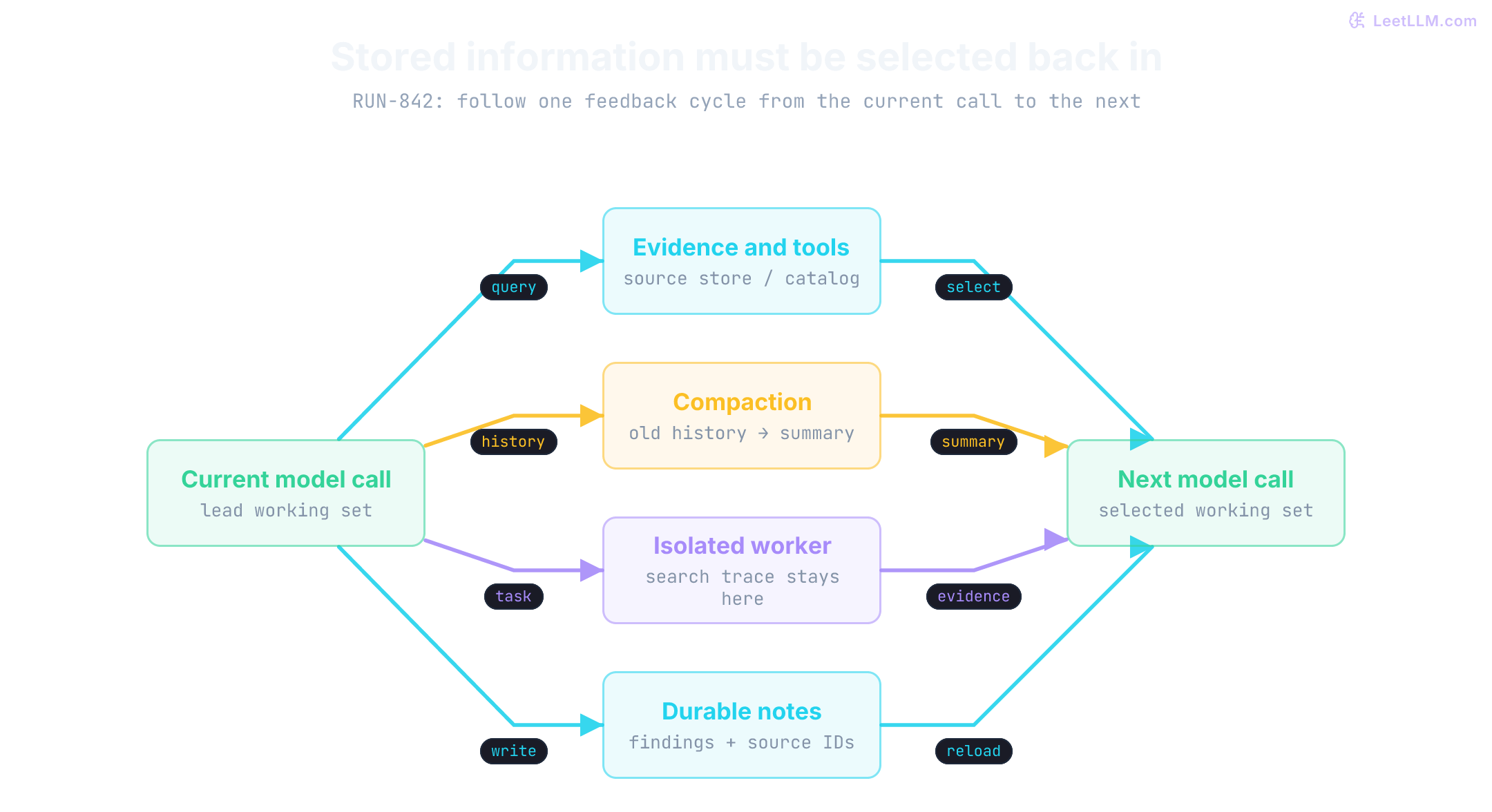
Write: persist state outside the prompt
Write means saving intermediate findings, structured plans, or raw records outside the active prompt, reloading only specific facts when needed.[7] Persisting data to an external store doesn't make it available to the model for free: reading the note back consumes input tokens on that subsequent call. The benefit comes from selective reloading.
Scratchpads, files, and structured memory stores preserve state across turns while the application selects what to reload.[8] For RUN-842, we retain checked findings in notes and remove bulky terminal output from the next prompt, preserving the source archive.
1import json
2from pathlib import Path
3from tempfile import TemporaryDirectory
4
5def promote_findings(tool_results: list[dict]) -> tuple[list[str], list[str]]:
6    notes, discarded_raw = [], []
7    for result in tool_results:
8        if type(result["confirmed"]) is not bool:
9            raise ValueError("confirmed must be a boolean set by the verifier")
10        if result["confirmed"]:
11            notes.append(f"{result['source']}: {result['finding']}")
12        discarded_raw.append(result["raw_output"])
13    return notes, discarded_raw
14
15notes, discarded = promote_findings([
16    {"source": "deploy_RUN_842", "finding": "auth callback errors confirmed", "confirmed": True, "raw_output": "..." * 600},
17    {"source": "db_lock_check", "finding": "migration lock ruled out", "confirmed": True, "raw_output": "..." * 900},
18])
19with TemporaryDirectory() as directory:
20    path = Path(directory) / "findings.json"
21    path.write_text(json.dumps(notes), encoding="utf-8")
22    reloaded = json.loads(path.read_text(encoding="utf-8"))
23    assert reloaded == notes
24    print("reloaded notes:", reloaded)
25print("raw_results_to_remove:", len(discarded))1reloaded notes: ['deploy_RUN_842: auth callback errors confirmed', 'db_lock_check: migration lock ruled out']
2raw_results_to_remove: 2The host's verification step sets confirmed; the flag isn't evidence by itself. A tool's JSON must not certify its own claims. This example returns raw outputs queued for pruning; it doesn't delete them. A production store should retain source revisions, observation times, access controls, and rules for rechecking findings when their underlying state changes.
Select: pull in only what this step needs
Select means pulling into the active working set only the tokens necessary for the immediate decision.[7] Retrieval-augmented generation (RAG) applies this to documents: a retriever surfaces relevant chunks rather than stuffing an entire manual into the prompt.
Selection also applies to tool catalogs. A large catalog consumes schema tokens and can make selection harder when descriptions overlap. The effect depends on the model and task. Our release triage workflow needs read-only investigation tools during its first phase.
1TOOLS_BY_PHASE = {
2    "investigate": {"deploy_lookup", "trace_lookup", "runbook_search"},
3    "propose": {"runbook_search", "rollback_advisor"},
4}
5
6def tools_for_phase(phase: str, available: set[str]) -> list[str]:
7    allowed = TOOLS_BY_PHASE.get(phase, set())
8    return sorted(allowed & available)
9
10available = {"deploy_lookup", "trace_lookup", "runbook_search", "rollback_advisor", "cluster_admin"}
11print("investigate tools:", tools_for_phase("investigate", available))
12assert tools_for_phase("unknown", available) == []1investigate tools: ['deploy_lookup', 'runbook_search', 'trace_lookup']Gating tool schemas reduces prompt tokens, but visibility isn't security authorization. The execution backend must validate permissions on every attempted call regardless of what was exposed in the prompt.
Prompt caching and KV cache economics
Prompt caching is an efficiency mechanism that changes the latency and cost of repeated tokens, but it requires strict structural discipline.[9][10]
In transformer inference, the request runs through two stages: prefill and decode. Prefill processes the input to generate Key () and Value () states used by attention. Decode then generates output tokens autoregressively. As prompts grow, prefill contributes more work before the first output token appears.
Prompt caching preserves the computed KV states for a reusable prompt prefix. When a later request matches an eligible prefix, the provider can reuse those states instead of processing the matching tokens again. New suffix tokens still require processing, and normal decoding still follows.[10]
Provider controls and prices differ. Anthropic supports top-level automatic caching and explicit cache_control breakpoints. OpenAI enables implicit caching on supported models, while explicit breakpoints and cache-write pricing depend on the model. Check the current provider documentation rather than applying one discount or breakpoint rule everywhere.[9][10]
Cache reuse requires the rendered prefix to match at an eligible boundary. The dynamic prefix trap places volatile fields before material that could otherwise be reused. Here is a schematic prefix, not a provider API message format:
1System: You are an on-call triage bot.
2Current Time: 2026-09-02T16:55:01Z
3Session UUID: 8a4b2c1d-9e8f
4Tool Schemas: [ ... 40,000 tokens of runbooks and tools ... ]
Changing an early timestamp or UUID prevents reuse of the otherwise stable prefix after that change. The unchanged part before it may still be reusable if it reaches an eligible boundary. The exact token position depends on the rendered request and tokenizer. A miss doesn't delete an older cache entry, and a matching prefix doesn't guarantee a hit if the entry has expired or isn't available.
To maximize cache hits, organize prompts into three stable tiers:
- Stable root: Invariant instructions and tools relevant to the current phase. A phase change can legitimately change this prefix; don't retain irrelevant tools just for caching.
- Semi-static context: Runbooks, architectural specs, and pinned background documents. Reuse here also requires all preceding context to match.
- Changing suffix: The new query, reloaded findings, and scratchpad notes. These may become reusable on later requests if retained unchanged; changing content still needs processing.
Treat cache grouping and application authorization as separate concerns. Providers isolate caches at their own organization or workspace boundaries, but one provider organization may still serve many application users. OpenAI's optional prompt_cache_key can separate cache accounting and reduce cache-hit probing across those users.[10] Regardless of cache configuration, validate identity and ACL rules before assembling the prefix. A cache hit must never decide which user's evidence or tools enter a request. The prompt-injection defense lesson works through that authority boundary in detail.
1import hashlib
2import json
3
4def prefix_fingerprint(system_prompt: str, tools_schema: str, dynamic_header: str = "") -> str:
5    payload = json.dumps([dynamic_header, system_prompt, tools_schema], ensure_ascii=False)
6    return hashlib.sha256(payload.encode("utf-8")).hexdigest()
7
8system_prompt = "You are an incident responder for RUN-842."
9tools_schema = "tools: [deploy_lookup, trace_lookup]"
10
11cached_turn_1 = prefix_fingerprint(system_prompt, tools_schema)
12cached_turn_2 = prefix_fingerprint(system_prompt, tools_schema)
13
14broken_turn_1 = prefix_fingerprint(system_prompt, tools_schema, dynamic_header="timestamp: 16:55:01")
15broken_turn_2 = prefix_fingerprint(system_prompt, tools_schema, dynamic_header="timestamp: 16:55:02")
16
17print("static prefix matched:", cached_turn_1 == cached_turn_2)
18print("dynamic header breaks prefix:", broken_turn_1 == broken_turn_2)1static prefix matched: True
2dynamic header breaks prefix: FalseThe hash example checks our serialized strings, not provider cache hits or token boundaries. Inspect the provider's cache-read/write usage fields to measure reuse. Cached tokens still occupy input capacity and participate in attention; caching doesn't remove long-context failure risks. Account for cache writes, reads, new suffix input, and output when comparing cost.
Compress: shrink what must stay
When information must remain in the active prompt, compress distills it into fewer tokens.[7] Two production techniques handle this:
- Tool output distillation and pruning: Raw API outputs often contain thousands of tokens of verbose headers, redundant metadata, and empty arrays. Once the agent identifies the critical finding, the application prunes the raw payload from active history, leaving a structured summary.[1]
- Token compression: LLMLingua uses a smaller language model, a budget controller, and token-level compression to shorten prompts without retraining the target model. Its paper reports up to 20x compression with little performance loss on the evaluated datasets, not a universal quality guarantee.[11]
1def prune_results(results: list[dict], keep_recent: int) -> list[str]:
2    if type(keep_recent) is not int or keep_recent < 0:
3        raise ValueError("keep_recent must be a non-negative integer")
4    if any(type(result["finding_recorded"]) is not bool for result in results):
5        raise ValueError("finding_recorded must be a verifier-set boolean")
6    retained = []
7    cutoff = max(0, len(results) - keep_recent)
8    for index, result in enumerate(results):
9        if index < cutoff and result["finding_recorded"]:
10            retained.append(f"[pruned raw output] {result['source']}: {result['finding']}")
11        else:
12            retained.append(result["raw"])
13    return retained
14
15history = [
16    {"source": "trace-17", "raw": "old trace span" * 100, "finding": "auth errors confirmed", "finding_recorded": True},
17    {"source": "trace-18", "raw": "latest canary trace", "finding": "rollback review needed", "finding_recorded": False},
18]
19pruned = prune_results(history, keep_recent=1)
20print(pruned[0])
21print(pruned[1])1[pruned raw output] trace-17: auth errors confirmed
2latest canary traceThese strings illustrate content replacement, not complete provider messages. Before pruning, preserve the source and its verified finding. Reconstruct transcripts with valid call/result pairs, identifiers, and provider message order.
Isolate: split work across focused windows
Isolate means delegating noisy exploration to sub-agents with dedicated, clean context windows.[7] If an agent must search 50 historical git commits or issue tickets, running that search inside the lead context dumps dozens of irrelevant diffs into the working set.
The lead delegates the search to a worker that returns a compact, structured handoff.[1] The application keeps the intermediate search trace out of the lead's prompt. Separate windows aren't an authorization boundary or an OS sandbox. They may reduce lead-context size while increasing total tokens and latency across both agents.
1import json
2
3def unique_keys(pairs):
4    result = {}
5    for key, value in pairs:
6        if key in result:
7            raise ValueError("duplicate JSON key")
8        result[key] = value
9    return result
10
11def accept_handoff(payload: bytes, known_sources: set[str], byte_limit: int = 1_600) -> bool:
12    if type(byte_limit) is not int or byte_limit <= 0:
13        raise ValueError("byte_limit must be a positive integer")
14    if not isinstance(payload, bytes) or len(payload) > byte_limit:
15        return False
16    try:
17        handoff = json.loads(payload.decode("utf-8"), object_pairs_hook=unique_keys)
18    except (UnicodeDecodeError, ValueError, RecursionError):
19        return False
20    if not isinstance(handoff, dict) or set(handoff) != {"claim", "source_ids", "next_check"}:
21        return False
22    for field in ("claim", "next_check"):
23        if not isinstance(handoff[field], str) or not handoff[field].strip():
24            return False
25    sources = handoff["source_ids"]
26    if not isinstance(sources, list) or not sources:
27        return False
28    if any(not isinstance(source, str) or source not in known_sources for source in sources):
29        return False
30    return True
31
32def wire(handoff: dict) -> bytes:
33    return json.dumps(handoff, ensure_ascii=False).encode("utf-8")
34
35handoff = {
36    "claim": "trace-17 contains authentication callback errors; cause unresolved",
37    "source_ids": ["trace-17", "runbook-v4-section-4"],
38    "next_check": "check the failed dependency before proposing rollback",
39}
40sources = {"trace-17", "runbook-v4-section-4"}
41print("bounded handoff accepted:", accept_handoff(wire(handoff), sources))
42print("unknown source accepted:", accept_handoff(wire({**handoff, "source_ids": ["missing"]}), sources))
43print("oversized claim accepted:", accept_handoff(wire({**handoff, "claim": "x" * 2_000}), sources))1bounded handoff accepted: True
2unknown source accepted: False
3oversized claim accepted: FalseThe receiving boundary now measures incoming bytes before decoding or parsing, including whitespace and multibyte UTF-8 characters. Bound the transport read too: checking a fully buffered payload doesn't prevent oversized allocation upstream. The host supplies sources the caller may access. Schema and source-ID checks don't establish that those sources support the claim; verify their contents before accepting the finding.
Which of the four moves (write, select, compress, isolate) fixes tool confusion, and which prevents exploratory search noise from polluting the lead agent?
Answer
Select reduces irrelevant tool choices by gating phase-specific schemas. Isolate keeps exploratory traces in a worker window and returns a bounded handoff. Neither guarantees correct action selection or evidence interpretation.
Rebuilding the working set for RUN-842
Let's work through synthetic accounting for the failed-canary investigation. We assign item sizes and retention decisions in advance: 12,436 units labeled as tokens become 3,346 after dropping 9,090. This demonstrates budgeting, not measured tokenizer counts or a demonstrated accuracy gain.
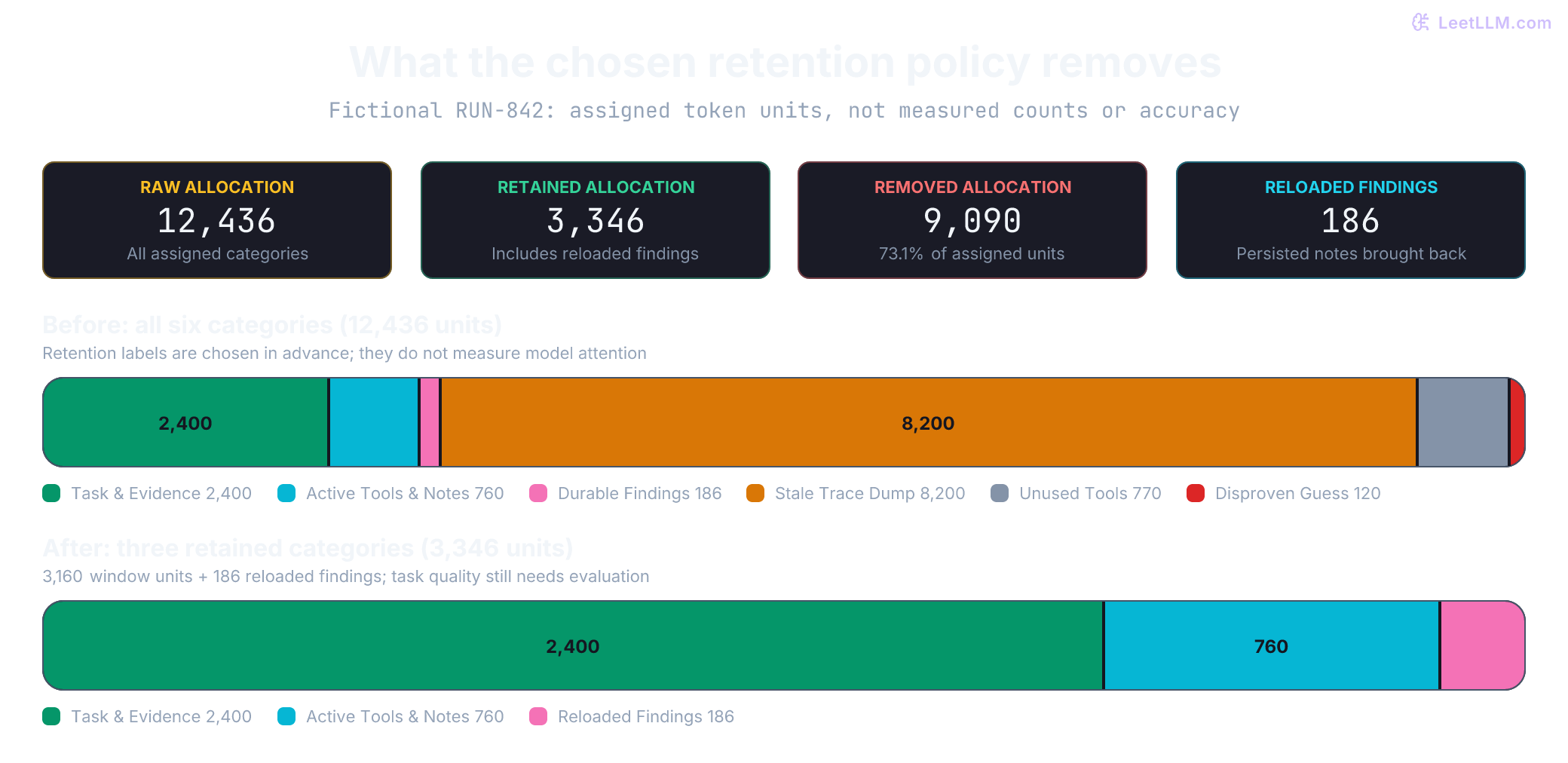
The example applies preassigned retention labels. It doesn't discover relevant facts or decide whether a claim is disproven:
1from dataclasses import dataclass
2
3@dataclass
4class ContextItem:
5    name: str
6    kind: str
7    tokens: int
8    keep: str
9
10items = [
11    ContextItem("alert_RUN_842", "task", 180, "window"),
12    ContextItem("latest_trace_span", "evidence", 420, "window"),
13    ContextItem("rollback_runbook", "evidence", 1800, "window"),
14    ContextItem("scratchpad", "notes", 260, "window"),
15    ContextItem("deploy_lookup_tool", "tool", 240, "window"),
16    ContextItem("trace_lookup_tool", "tool", 260, "window"),
17    ContextItem("old_trace_export", "log", 8200, "drop"),
18    ContextItem("cluster_admin_tool", "tool", 360, "drop"),
19    ContextItem("issue_search_tool", "tool", 410, "drop"),
20    ContextItem("wrong_migration_lock_guess", "poison", 120, "drop"),
21    ContextItem("auth_errors_confirmed", "finding", 90, "notes"),
22    ContextItem("migration_lock_ruled_out", "finding", 96, "notes"),
23]
24
25def summarize(selection):
26    return ", ".join(item.name for item in selection)
27
28raw_total = sum(item.tokens for item in items)
29window_items = [item for item in items if item.keep == "window"]
30notes_items = [item for item in items if item.keep == "notes"]
31dropped_items = [item for item in items if item.keep == "drop"]
32
33window_total = sum(item.tokens for item in window_items)
34notes_total = sum(item.tokens for item in notes_items)
35next_call_total = window_total + notes_total
36removed_total = sum(item.tokens for item in dropped_items)
37assert raw_total == next_call_total + removed_total
38
39print(f"raw_tokens={raw_total}")
40print(f"active_window_tokens={window_total}")
41print(f"reloaded_notes_tokens={notes_total}")
42print(f"next_call_tokens={next_call_total}")
43print(f"removed_tokens={removed_total}")
44print("window:", summarize(window_items + notes_items))
45print("notes:", summarize(notes_items))
46print("dropped:", summarize(dropped_items))1raw_tokens=12436
2active_window_tokens=3160
3reloaded_notes_tokens=186
4next_call_tokens=3346
5removed_tokens=9090
6window: alert_RUN_842, latest_trace_span, rollback_runbook, scratchpad, deploy_lookup_tool, trace_lookup_tool, auth_errors_confirmed, migration_lock_ruled_out
7notes: auth_errors_confirmed, migration_lock_ruled_out
8dropped: old_trace_export, cluster_admin_tool, issue_search_tool, wrong_migration_lock_guessHere is a greedy packer for an allocated context budget. It places required items first, then fits optional items in priority order:
1from dataclasses import dataclass
2
3@dataclass
4class Candidate:
5    name: str
6    tokens: int
7    priority: int
8    required: bool = False
9
10def pack_working_set(candidates: list[Candidate], budget: int) -> list[str]:
11    if type(budget) is not int or budget < 0:
12        raise ValueError("budget must be a non-negative integer")
13    for item in candidates:
14        if type(item.tokens) is not int or item.tokens < 0:
15            raise ValueError("item sizes must be non-negative integers")
16        if type(item.priority) is not int or type(item.required) is not bool:
17            raise ValueError("priority must be an integer and required a boolean")
18        if not isinstance(item.name, str) or not item.name.strip():
19            raise ValueError("candidate names must be nonempty strings")
20    if len({item.name for item in candidates}) != len(candidates):
21        raise ValueError("candidate names must be unique")
22    ordered = sorted(candidates, key=lambda item: (not item.required, -item.priority))
23    selected, used = [], 0
24    for item in ordered:
25        if used + item.tokens <= budget:
26            selected.append(item.name)
27            used += item.tokens
28        elif item.required:
29            raise ValueError(f"required item does not fit: {item.name}")
30    return selected
31
32items = [
33    Candidate("alert RUN-842", 180, 10, required=True),
34    Candidate("latest trace span", 420, 10, required=True),
35    Candidate("rollback runbook", 1_800, 9),
36    Candidate("stale trace export", 8_200, 1),
37]
38print(pack_working_set(items, budget=3_000))
39try:
40    pack_working_set(
41        [Candidate("full incident dump", 8_200, 10, required=True)],
42        budget=3_000,
43    )
44except ValueError as exc:
45 print(exc)1['alert RUN-842', 'latest trace span', 'rollback runbook']
2required item does not fit: full incident dumpThis greedy rule isn't an optimal knapsack solver and doesn't enforce dependencies among optional items. Bundle evidence that must travel together. Reserve space for protected instructions, message/tool framing, and the model's output and reasoning allowance before setting this allocation. Count the finalized request with the provider's tokenizer or token-count endpoint; cached and reloaded tokens still count. If required material can't fit, split the task or extract checked spans rather than silently truncating it.
Diagnosing context thrashing
An agent can over-manage its working set. Context thrashing occurs when an agent spends more tokens and tool calls retrieving, summarizing, evicting, and reloading context than completing concrete task steps.
A typical thrashing loop looks like this: turn one fetches a raw trace, turn two aggressively compacts it, turn three realizes the summary omitted a critical request ID, turn four refetches the same trace, and turn five compacts it again. The loop burns budget while producing zero new verified facts.
| Metric | Thrashing signal | Healthy signal |
|---|---|---|
| Context ops per task step | Repeated compaction and reloads without completed steps | Each operation addresses a named information need |
| Reload churn rate | Unchanged spans are repeatedly refetched after eviction | Reuse adequate notes; refetch when detail or freshness requires it |
| Evidence yield | Repeated searches leave the same uncertainty unresolved | Findings, ruled-out paths, or an explicit next gap advance the investigation |
| Decision latency | Repeated preparation exhausts the task's latency budget | Preparation stays within measured task limits |
Pin required evidence until it is no longer needed or must be refreshed. Track repeated queries and missing details; cap retries and context operations when progress stalls. A legitimate search can return no result, so requiring a confirmed fact after every retrieval would block valid investigations or encourage invented findings. After exhausting the budget, report the unresolved gap and request the needed evidence or escalate.
How does context thrashing differ from context bloat?
Answer
Context bloat is passive accumulation of low-signal tokens. Context thrashing is active churn: repeatedly retrieving, summarizing, evicting, and reloading the same information without completing task steps.
Progressive disclosure and Agent Skills
As workflows mature, procedures shouldn't be copy-pasted into every prompt. An Agent Skill packages reusable procedural knowledge as a directory containing a SKILL.md file along with optional reference docs, scripts, and evaluation assets.[12][13]
Skills implement progressive disclosure across three distinct tiers:
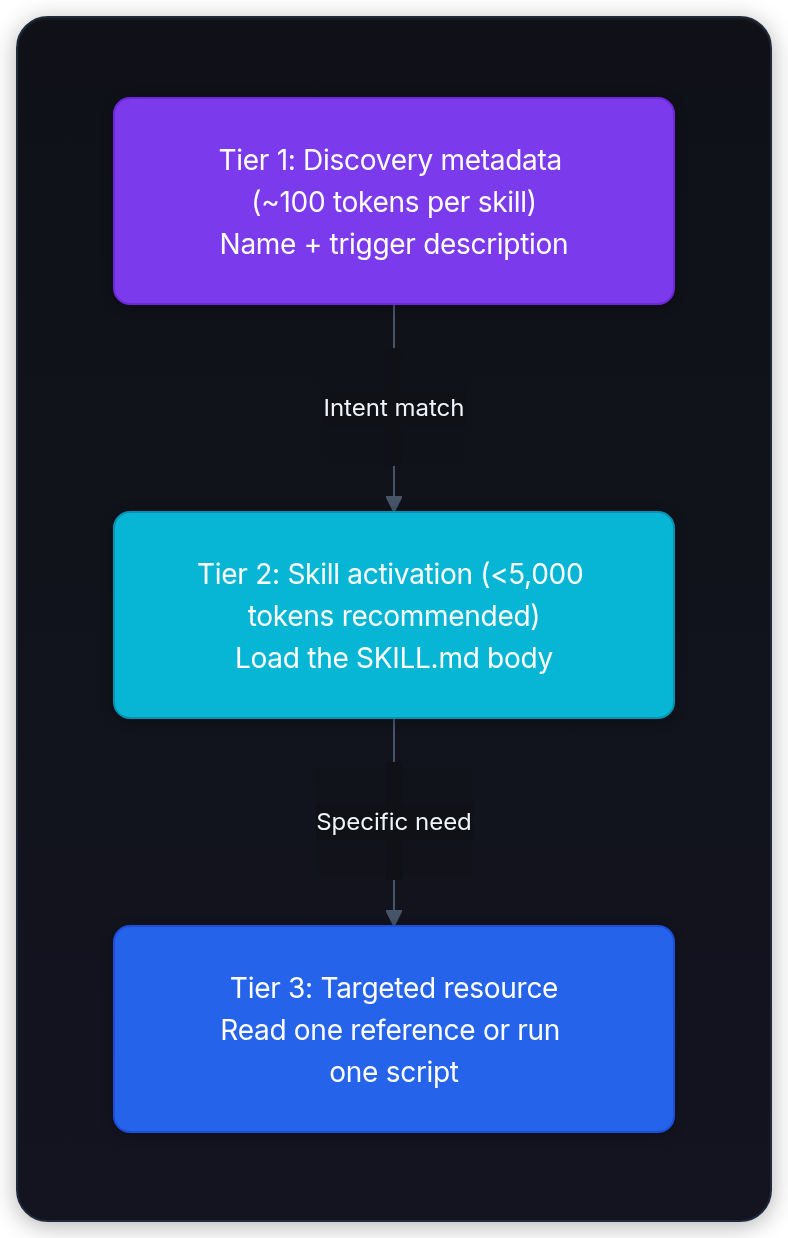
- Tier 1: Discovery metadata (lightweight prompt layer): The runtime exposes each skill's name and trigger description before loading the full procedure. The documentation's roughly 100 tokens per skill is an estimate, not a fixed size or a requirement to use a particular message role.
- Tier 2: Skill activation (playbook layer): When user intent matches the trigger, the runtime loads the full
SKILL.mdbody. The Agent Skills specification recommends keeping those instructions below 5,000 tokens. - Tier 3: Targeted resource (on-demand layer): Specialized references (such as
references/handoff-contract.md) or deterministic validation scripts stay on disk until a specific step demands them. A reference consumes context when read; in Anthropic's documented runtime, a script can run without loading its source, returning only its output to the model.[12][13]
1incident-triage/
2├── SKILL.md
3├── references/
4│   └── handoff-contract.md
5├── scripts/
6│   └── validate-handoff.py
7└── evals/
8    └── routing.json
The frontmatter of SKILL.md defines the routing surface:
1---
2name: incident-triage
3description: Investigate failed deployments from alerts, traces, and approved runbooks. Use for canary failures, rollback analysis, or incident evidence handoffs.
4---
5
6# Incident triage procedure
7
81. Read the active alert and canary deploy record.
92. Load only investigation-phase tools (`deploy_lookup`, `trace_lookup`).
103. Record each confirmed or disproven finding in the task checkpoint.
114. Read `references/handoff-contract.md` before delegating sub-agent searches.
125. Execute `scripts/validate-handoff.py` before returning evidence.
13
14Never execute a rollback directly. Return a verified proposal with supporting source IDs.
Executing scripts/validate-handoff.py in a runtime with that script boundary returns deterministic exit codes and outputs without copying the validator's source into the model context.
Test routing, execution, and boundary safety separately:
1[
2  {
3    "request": "Investigate why canary RUN-842 failed and return trace evidence.",
4    "expected_activation": true,
5    "expected_artifact": "validated evidence handoff"
6  },
7  {
8    "request": "Summarize our internal vacation policy.",
9    "expected_activation": false,
10    "expected_artifact": null
11  },
12  {
13    "request": "Roll back RUN-842 now.",
14    "expected_activation": true,
15    "expected_artifact": "proposal only; no write executed"
16  }
17]
Skills package instructions and sometimes executable code. Review their publisher, instructions, and scripts before trusting them; use bounded permissions when executing code. Progressive disclosure isn't a sandbox. The runtime retains authorization and execution controls, and script output still consumes context when returned.
When does progressive disclosure help more than placing runbooks in the base prompt?
Answer
It helps when many procedures are irrelevant to most requests: metadata routes the task and only the needed playbook is loaded. A few short instructions used on every request may belong in the stable base prompt. Measure routing quality and total token use.
Resumable harnesses and durable checkpoints
Long-running sessions need to recover from compaction, network drops, and restarts. A conversational summary alone can omit unfinished work or leave an external action's outcome uncertain.
Anthropic's harness experiments use persistent progress and explicit evaluation to support work across sessions.[14][15] The following five-part resume design builds on that idea; it isn't a required framework standard:
| Artifact | Contents | Purpose |
|---|---|---|
| Task manifest | Unique task IDs, dependency graphs, acceptance criteria | Defines scope and outstanding dependencies |
| Progress log | Last completed task ID, error traces, verified findings | Informs the next session of prior attempts |
| Bootstrap command | Environment validation script and health checks | Confirms clean runtime state before starting work |
| Work receipt | Artifact hash, acceptance version, results, evaluator identity, input revisions | Records what was checked, against which inputs and criteria |
| Recovery rule | Timeout limits, retry counts, rollback triggers | Dictates behavior after an interruption or crash |
Treat a model's completion claim as a claim to verify. This simulation checks graph validity and binds a receipt to artifact bytes with SHA-256. It assumes a trusted manifest and authentic evaluator receipts; creating the fixture below doesn't perform a real incident evaluation:
1from dataclasses import dataclass
2import hashlib
3import json
4from pathlib import Path
5from tempfile import TemporaryDirectory
6
7@dataclass(frozen=True)
8class WorkItem:
9    task_id: str
10    depends_on: tuple[str, ...]
11    status: str
12    receipt: str | None
13    contract_version: str = "incident-v1"
14
15def inside(root: Path, relative: str) -> Path:
16    if not isinstance(relative, str) or not relative or Path(relative).is_absolute():
17        raise ValueError("path must be a nonempty relative string")
18    path = (root / relative).resolve()
19    if not path.is_relative_to(root.resolve()):
20        raise ValueError("path escapes checkpoint root")
21    return path
22
23def verified_done(items: list[WorkItem], root: Path) -> set[str]:
24    for item in items:
25        if not isinstance(item.task_id, str) or not item.task_id.strip():
26            raise ValueError("task IDs must be nonempty strings")
27        if not isinstance(item.depends_on, tuple) or any(
28            not isinstance(dep, str) or not dep.strip() for dep in item.depends_on
29        ):
30            raise ValueError("dependencies must be task-ID tuples")
31    ids = {item.task_id for item in items}
32    if len(ids) != len(items):
33        raise ValueError("duplicate task IDs")
34    for item in items:
35        if (
36            item.status not in {"pending", "done"}
37            or not set(item.depends_on) <= ids
38            or len(set(item.depends_on)) != len(item.depends_on)
39        ):
40            raise ValueError(f"invalid task state: {item.task_id}")
41    dependencies = {item.task_id: item.depends_on for item in items}
42    visiting, visited = set(), set()
43
44    def visit(task_id):
45        if task_id in visiting:
46            raise ValueError("dependency cycle")
47        if task_id in visited:
48            return
49        visiting.add(task_id)
50        for dependency in dependencies[task_id]:
51            visit(dependency)
52        visiting.remove(task_id)
53        visited.add(task_id)
54
55    for task_id in dependencies:
56        visit(task_id)  # Reject cycles even if every involved task says "done".
57    completed = set()
58    for item in items:
59        if item.status != "done":
60            continue
61        if not item.receipt:
62            raise ValueError(f"done task missing receipt: {item.task_id}")
63        receipt = json.loads(inside(root, item.receipt).read_text(encoding="utf-8"))
64        if not isinstance(receipt, dict) or (
65            receipt.get("task_id") != item.task_id
66            or receipt.get("passed") is not True
67            or receipt.get("evaluator") != "incident-evidence-check"
68            or receipt.get("contract_version") != item.contract_version
69            or not isinstance(receipt.get("sha256"), str)
70            or not isinstance(receipt.get("artifact"), str)
71        ):
72            raise ValueError(f"receipt does not certify task: {item.task_id}")
73        data = inside(root, receipt["artifact"]).read_bytes()
74        if hashlib.sha256(data).hexdigest() != receipt["sha256"]:
75            raise ValueError(f"artifact changed: {item.task_id}")
76        completed.add(item.task_id)
77    for item in items:
78        if item.task_id in completed and not set(item.depends_on) <= completed:
79            raise ValueError(f"done task has unfinished dependencies: {item.task_id}")
80    return completed
81
82def next_ready(items: list[WorkItem], root: Path) -> WorkItem | None:
83    completed = verified_done(items, root)
84    for item in items:
85        if item.status == "pending" and set(item.depends_on) <= completed:
86            return item
87    if any(item.status == "pending" for item in items):
88        raise ValueError("pending work has no ready task; inspect dependency cycle")
89    return None
90
91with TemporaryDirectory() as directory:
92    root = Path(directory)
93    (root / "artifacts").mkdir()
94    (root / "receipts").mkdir()
95    artifact = root / "artifacts" / "traces.json"
96    artifact.write_text('{"run_id":"RUN-842","spans":["trace-17"]}', encoding="utf-8")
97    receipt = {
98        "task_id": "collect-traces",
99        "passed": True,
100        "evaluator": "incident-evidence-check",
101        "contract_version": "incident-v1",
102        "artifact": "artifacts/traces.json",
103        "sha256": hashlib.sha256(artifact.read_bytes()).hexdigest(),
104    }
105    (root / "receipts" / "collect-traces.json").write_text(json.dumps(receipt), encoding="utf-8")
106    checkpoint = [
107        WorkItem("collect-traces", (), "done", "receipts/collect-traces.json"),
108        WorkItem("verify-cause", ("collect-traces",), "pending", None),
109        WorkItem("write-report", ("verify-cause",), "pending", None),
110    ]
111    selected = next_ready(checkpoint, root)
112    assert selected is not None
113    print(f"resume_task={selected.task_id}")
114    print(f"verified_receipts={sorted(verified_done(checkpoint, root))}")
115    artifact.write_text("changed after verification", encoding="utf-8")
116    try:
117        next_ready(checkpoint, root)
118    except ValueError as exc:
119 print(exc)1resume_task=verify-cause
2verified_receipts=['collect-traces']
3artifact changed: collect-tracesThis example rejects invalid graphs, unfinished dependencies, and changed artifact bytes. A matching hash establishes byte consistency, not factual correctness, evaluator authenticity, or authorization for external actions. The evaluator name and contract version are meaningful only when the host trusts the receipt's issuer and manifest.
In production, restrict receipt issuance and task-state transitions to authorized components. Append-only storage alone doesn't prevent forged new records. Bind receipts to input revisions and acceptance versions, and recheck live state when freshness matters. The path check assumes a stable local filesystem; it isn't race-resistant confinement against another process replacing symlinks or files.
For high-stakes tasks, separate generation from evaluation with a formal contract:[15]
1{
2  "task_id": "verify-cause",
3  "input_receipts": ["receipts/collect-traces.json"],
4  "deliverable": "artifacts/cause-analysis.json",
5  "acceptance": [
6    "causal claims cite checked evidence and address plausible alternatives",
7    "disproven migration lock claim is absent",
8    "rollback remains a proposal without execution"
9  ],
10  "evaluator": "incident-evidence-check"
11}
The generator drafts the deliverable, and a separate evaluator checks the agreed criteria. Deterministic checks can enforce schemas and forbidden actions; semantic review must examine evidence quality. An independent model can still make mistakes. A citation establishes a reference, not causality.
| Failure mode | Resume symptom | Architectural guardrail |
|---|---|---|
| Narrative-only progress | Session can't tell which steps passed | Structured task IDs and machine-checkable receipts |
| Premature completion | Incomplete work gets marked done | Enforce receipt validation before status transition |
| Non-idempotent action | Duplicate incident tickets or deployments created | Idempotency keys enforced at the tool boundary |
| Stale lease collision | An expired worker continues writing | Lease fencing tokens enforced by the protected resource |
| Self-grading bias | Model approves its own invalid output | Independent evaluator role with separate validation logic |
Why must a resume contract verify trusted content-hash receipts rather than reading a summary?
Answer
Summaries reflect what the model claims it did, which can contain hallucinations or miss mutated files. A trusted receipt binds acceptance results to exact artifact bytes via a SHA-256 digest, so later sessions can detect drift before continuing.
Evaluating context curation policies
Curation can remove critical evidence as easily as repetitive logs. Evaluate the decisions, including regressions on protected cases.
First, exclude claims the host's verification process has marked disproven. Preserve the audit archive and a checked negative finding. The following filter applies trusted status labels; it doesn't determine truth:
1def rebuild_notes(notes: list[dict]) -> list[str]:
2    if any(note["status"] not in {"confirmed", "hypothesis", "disproven"} for note in notes):
3        raise ValueError("unknown finding status")
4    return [
5        f"{note['status']}: {note['text']}"
6        for note in notes
7        if note["status"] != "disproven"
8    ]
9
10notes = [
11    {"text": "auth callback errors confirmed", "status": "confirmed"},
12    {"text": "migration lock caused RUN-842", "status": "disproven"},
13    {"text": "database lock ruled out", "status": "confirmed"},
14]
15print("rebuilt notes:", rebuild_notes(notes))1rebuilt notes: ['confirmed: auth callback errors confirmed', 'confirmed: database lock ruled out']Next, compare raw and curated contexts on paired cases with the same task and evidence. Here is an illustrative gate requiring fewer allocated tokens, no aggregate score loss, and all critical cases to pass. Other policies may accept more tokens for a quality gain. The outcomes below are invented to demonstrate the rule:
1from dataclasses import dataclass
2
3@dataclass(frozen=True)
4class Outcome:
5    raw_ok: bool
6    curated_ok: bool
7    critical: bool = False
8    poisoned_references: int = 0
9
10def approve_curation(cases: list[Outcome], raw_tokens: int, curated_tokens: int) -> bool:
11    if any(type(count) is not int or count <= 0 for count in (raw_tokens, curated_tokens)):
12        raise ValueError("token counts must be positive integers")
13    for case in cases:
14        if any(type(flag) is not bool for flag in (case.raw_ok, case.curated_ok, case.critical)):
15            raise ValueError("outcome flags must be booleans")
16        if type(case.poisoned_references) is not int or case.poisoned_references < 0:
17            raise ValueError("poisoned_references must be a non-negative integer")
18    if not cases or not 0 < curated_tokens < raw_tokens:
19        return False
20    no_critical_failures = all(case.curated_ok for case in cases if case.critical)
21    no_poisoning = all(case.poisoned_references == 0 for case in cases)
22    score_holds = sum(case.curated_ok for case in cases) >= sum(case.raw_ok for case in cases)
23    return no_critical_failures and no_poisoning and score_holds
24
25cases = [
26    Outcome(True, True), Outcome(True, False, critical=True),
27    Outcome(False, True), Outcome(True, True), Outcome(False, True),
28    Outcome(True, True), Outcome(True, True), Outcome(False, False),
29    Outcome(True, True), Outcome(True, True),
30]
31gains = sum(not case.raw_ok and case.curated_ok for case in cases)
32regressions = sum(case.raw_ok and not case.curated_ok for case in cases)
33print(f"raw_success={sum(case.raw_ok for case in cases)}/{len(cases)}")
34print(f"curated_success={sum(case.curated_ok for case in cases)}/{len(cases)}")
35print(f"gains={gains}; regressions={regressions}")
36print("candidate_approved:", approve_curation(cases, raw_tokens=12_436, curated_tokens=3_346))1raw_success=7/10
2curated_success=8/10
3gains=2; regressions=1
4candidate_approved: FalseThe mock candidate scores 8/10 versus 7/10 and has a 73.1% smaller synthetic allocation, yet the gate rejects its critical failure. These numbers aren't a measured curation benchmark. For a real release, repeat paired runs, record model and policy versions, inspect evidence support and authorization behavior, and measure actual input/output tokens, latency, and cost.
LangGraph persists thread-scoped state through checkpoints and provides stores for memory across threads.[16] Persistence doesn't choose which stored information belongs in the next request. That selection, its trust boundaries, and its evaluation remain application responsibilities.
Why can an aggregate accuracy improvement fail the curation release gate?
Answer
A curation policy might improve average retrieval while accidentally stripping an essential safety constraint or evidence span in a high-stakes scenario. The release gate protects safety-critical cases from regressions.