Personalize this lesson
Adapt explanations and teaching visuals to your background and preferred voice.
Quantization maps floating-point tensors onto a smaller set of representable values. Packing those values can reduce weight storage and memory traffic. Speed depends on what the runtime does with the packed artifact: its kernels, batch size, context state, and hardware all matter.
Start with a rounded, hypothetical 27-billion-weight budget. BF16 payload alone is 54 GB; four-bit codes take 13.5 GB. Adding one FP16 scale per 128 weights gives 13.922 GB, or 12.966 GiB. That estimate makes a 24 GB GPU worth investigating. It doesn't promise ten gigabytes of usable context memory: preserved floating-point tensors, zero-points, padding, cache, and workspace still need a budget.
For a real example, Qwen3.6-27B's model card lists a 27B language component with a vision encoder and a hybrid recurrent/attention layout.[1] Inspect the actual tensor inventory and runtime state rather than treating the name as an exact count of uniformly quantizable weights.
Three widely cited names dominate this space, but they solve different problems. GPTQ is Hessian-aware post-training quantization; AWQ is activation-aware weight quantization. Both are algorithms that decide which integer codes replace original floating-point weights. GGUF is a portable local inference container format designed by the llama.cpp project that packages extensible key-value metadata and typed tensors. Comparing GPTQ with GGUF without naming the underlying tensor encoding and execution engine confuses an algorithm with a container format.
We'll build a tiny packed format, follow one Hessian correction, and search channel scales. Then we'll separate an artifact's storage cost from its execution cost and test what a quantized model actually preserves.
You need matrix multiplication and the distinction between weights, activations, and the KV cache. For a linear layer, weights are the fixed coefficients; activations are the input values that multiply them. The cache holds attention state from earlier tokens. Quantizing weights doesn't automatically compress activations or the cache.
From floating-point values to four-bit codes
Suppose a weight is and each integer step represents . Dividing by that scale yields ; rounding stores integer code ; multiplying back recovers . The discarded difference, , is the rounding error.
A general affine quantizer formalizes this conversion with a positive scale factor and an integer zero-point :
Scale sets grid spacing, while zero-point maps real zero to a representable integer code. Clipping bounds the code within to prevent integer overflow, though clipping extreme values can introduce far more distortion than rounding. The reconstructed value approximates the original weight, but rarely matches it perfectly.
Rounding isn't packing
Rounding maps continuous floats to discrete integer values; packing packs those integers into compact memory blocks.
The following script implements a symmetric signed INT4 format over the narrow range . Four bits can encode 16 states ( in two's complement), but this format sets aside so positive and negative limits have equal magnitude. Notice how Python's round uses round-half-to-even. Two signed 4-bit nibbles pack into each byte (low nibble first), with an extra zero nibble appended if the tensor length is odd.
import math
import struct

def encode(weights):
    weights = list(weights)
    if not weights or not all(math.isfinite(w) for w in weights):
        raise ValueError("weights must be nonempty and finite")
    maximum = max(abs(w) for w in weights)
    scale = maximum / 7 if maximum else 1.0
    if not math.isfinite(scale) or scale <= 0:
        raise ValueError("scale is not representable as positive FP64")
    codes = [max(-7, min(7, round(w / scale))) for w in weights]
    if not all(math.isfinite(q * scale) for q in codes):
        raise ValueError("reconstruction exceeds finite FP64")
    # Low nibble first; two's-complement encoding preserves negative codes.
    nibbles = [q & 15 for q in codes]
    if len(nibbles) % 2:
        nibbles.append(0)
    payload = bytes(nibbles[i] | (nibbles[i + 1] << 4)
                    for i in range(0, len(nibbles), 2))
    # A four-byte count and an eight-byte scale make this example self-contained.
    return struct.pack("<Id", len(weights), scale) + payload

def decode(blob):
    if len(blob) < 12:
        raise ValueError("truncated header")
    count, scale = struct.unpack("<Id", blob[:12])
    if count == 0 or not math.isfinite(scale) or scale <= 0:
        raise ValueError("invalid header")
    if len(blob) != 12 + (count + 1) // 2:
        raise ValueError("payload length mismatch")
    codes = []
    for byte in blob[12:]:
        for q in (byte & 15, byte >> 4):
            codes.append(q - 16 if q >= 8 else q)
    codes = codes[:count]
    if -8 in codes:
        raise ValueError("unused code in narrow-range format")
    restored = [q * scale for q in codes]
    if not all(math.isfinite(w) for w in restored):
        raise ValueError("reconstruction exceeds finite FP64")
    return codes, restored

weights = [0.15, -1.22, 2.40, -0.45, 0.73]
blob = encode(weights)
codes, restored = decode(blob)
assert codes == [0, -4, 7, -1, 2]
assert decode(encode([0.0, 0.0]))[1] == [0.0, 0.0]
assert decode(encode([-7.0, 7.0]))[0] == [-7, 7]
assert decode(encode([7.0, 0.5, 1.5]))[0] == [7, 0, 2]
assert decode(encode(iter([-7.0, 7.0])))[0] == [-7, 7]
try:
    encode([float.fromhex("0x0.0000000000001p-1022")])
except ValueError:
    pass  # Dividing the smallest positive FP64 value by seven underflows.
else:
    raise AssertionError("unrepresentable scale accepted")
for invalid in (b"", blob[:-1], blob + b"\x00", struct.pack("<Id", 1, 1e308) + b"\x07"):
    try:
        decode(invalid)
    except ValueError:
        pass
    else:
        raise AssertionError("invalid payload accepted")

print("codes:", codes)
print("payload:", blob[12:].hex(), f"({len(blob) - 12} bytes)")
print("restored:", [round(w, 3) for w in restored])
print("mean absolute error:", round(sum(abs(w - r) for w, r in zip(weights, restored)) / len(weights), 3))
print("total with header:", len(blob), "bytes")codes: [0, -4, 7, -1, 2]
payload: c0f702 (3 bytes)
restored: [0.0, -1.371, 2.4, -0.343, 0.686]
mean absolute error: 0.091
total with header: 15 bytesThe three payload bytes (0xC0, 0xF7, 0x02) occupy four-bit storage. A Python list holds object references rather than packed nibbles; its overhead depends on the implementation and integer sharing. Our 12-byte count/FP64-scale header also matters: the 15-byte artifact is barely smaller than five raw FP32 floats (20 bytes). This teaching codec rejects scales that underflow and reconstructions that overflow; it isn't a production checkpoint format.
![A CPU teaching codec maps five weights to narrow signed INT4 codes [0, -4, 7, -1, 2] at scale 2.4/7. Low-nibble-first packing produces C0, F7, 02; decoded weights have mean absolute error 0.091. No GPU unpacking is executed.](/cdn/content-image/fundamentals/model-quantization-gptq-awq-gguf/illustrations/_generated/quantization_pipeline_dark.png?v=89c4bac33de6)
Symmetric and asymmetric grids
Symmetric quantization forces zero-point , centering the integer grid around real zero:
For a single scale shared across the reduction, computing factors as:
There is no zero-point subtraction. However, isn't necessarily an integer dot product: W4A16 kernels commonly reconstruct floating-point weights and multiply by floating-point activations. Per-group scales along the reduction belong inside the sum, unless the kernel accumulates and scales each group separately.
Asymmetric quantization allows , shifting the grid to cover an uneven interval :
Include zero in the calibrated interval, set and , and for use:
The term matters for signed codes. An all-zero interval needs a separate positive-scale convention. Rounding the zero-point means arbitrary endpoints needn't reconstruct exactly. Asymmetric grids can help skewed distributions, including nonnegative ReLU outputs. SiLU can be negative; its range isn't ReLU's range.
For weights sharing one scale and zero-point, the offset appears as:
The correction can be fused with dequantization; this equation doesn't require a separate activation-sum pass or extra global-memory reads. Both symmetric and asymmetric weight formats are used. The original GPTQ experiments use asymmetric grids, and Hugging Face's AWQ configuration example enables zero-points.[2][3]
Try changing the unsigned range to signed . The real interval stays , so the zero-point changes from to , while reconstructed values stay the same. Values outside that interval clip.
import math

low, high = -1.0, 2.0  # Includes zero; unsigned codes are 0..15.
scale = (high - low) / 15
zero_point = round(-low / scale)
values = [-2.0, -1.0, 0.0, 0.73, 2.0, 3.0]
codes = [max(0, min(15, round(w / scale) + zero_point)) for w in values]
restored = [round(scale * (q - zero_point), 2) for q in codes]
assert zero_point == 5 and codes[2] == zero_point
assert restored[0] == -1.0 and restored[-1] == 2.0
signed_zero = -8 - round(low / scale)
signed_codes = [max(-8, min(7, round(w / scale) + signed_zero)) for w in values]
assert signed_zero == -3
assert [round(scale * (q - signed_zero), 2) for q in signed_codes] == restored
assert -1.0 / (1.0 + math.exp(1.0)) < 0  # SiLU(-1).
print("zero point:", zero_point)
print("codes:", codes)
print("restored:", restored)
print("signed zero point:", signed_zero)zero point: 5
codes: [0, 0, 5, 9, 15, 15]
restored: [-1.0, -1.0, 0.0, 0.8, 2.0, 2.0]
signed zero point: -3Granularity: per-tensor, per-channel, and per-group
Quantization grid parameters can be shared across different tensor slices:
- Per-tensor quantization assigns a single scale and zero-point to an entire weight matrix. A single outlier weight forces an oversized scale , flattening small weights into zero.
- Per-channel quantization assigns distinct scales to each output channel (row) or input channel (column). In linear projections, giving each row its own scale accommodates neurons with different dynamic ranges with negligible memory overhead ( scalars).
- Per-group quantization divides each row into contiguous blocks of weights (commonly , , or ). Each group gets its own scale and optional zero-point. Outliers remain contained within their 128-element slice, preventing them from distorting the rest of the layer.
Smaller groups protect dynamic range, but require storing more scale factors. At , storing one FP16 scale (16 bits) per 128 weights adds bits per weight (a tiny storage increase over 4 bits).
Two artifacts both claim INT4 precision, but one checkpoint file is 10% larger on disk. What would you inspect before calling it a packaging bug?
Answer
Compare tensor counts and encodings, group sizes, zero-point storage, preserved floating-point layers, padding, and container metadata. Those can explain a size difference. The label alone can't establish the cause or rule out a packaging mistake.
Serving realities: memory-bound decode versus compute-bound prefill
A common question is why teams compress weights to 4 bits if matrix multiplication still executes in 16-bit floating point. The answer lies in the physics of GPU memory bandwidth and arithmetic intensity.
What W4A16 can save during decoding
For a small-batch dense linear layer, suppose each active weight is read once from HBM and contributes one multiply-add. Embedding lookups, inactive experts, on-chip reuse, and attention/cache traffic don't satisfy that simplified whole-model picture. Let count weights in the linear work we're estimating.
Calculate the arithmetic intensity of this decode step:
For BF16 weights, this estimate is FLOP/byte. An A100 80GB SXM lists 312 dense FP16 Tensor Core TFLOPS and 2,039 GB/s of HBM bandwidth.[4] Its nominal ridge point is FLOPs/byte. The bandwidth ceiling at intensity one is about of that compute peak. That rate ratio isn't a measurement of idle time; the selected kernel may use different execution units and additional traffic.
W4A16 (4-bit weights with 16-bit activations) directly attacks this memory bottleneck:
- Four-bit codes need one quarter of BF16's raw weight bytes, before metadata.
- A fused kernel can unpack and rescale those codes near computation instead of writing a full floating-point weight matrix to global memory.
- W4A16 then computes with 16-bit activations; its implementation may use Tensor Cores or other instructions, depending on shape and backend.
Unpacking, scale loads, register pressure, and kernel efficiency still cost work. Some workloads benefit substantially; others slow down. A fourfold code-size reduction isn't a fourfold token-rate guarantee.
When weight traffic stops being the bottleneck
Prefill reuses weights across prompt tokens, often increasing arithmetic intensity. Whether it is compute-bound depends on GEMM dimensions, attention, batching, and kernels. A large prompt doesn't establish full compute utilization.
A W4A16 path that dequantizes into FP16 doesn't acquire a native INT4 arithmetic peak. It can still improve latency through reduced traffic or a better fused implementation. It can also lose to BF16 when conversion costs dominate.
Quantizing activations opens additional arithmetic paths, with a new accuracy and conversion budget:
- Integer W8A8 / W4A4 uses compatible integer kernels. The A100 specification lists 624 dense INT8 TOPS versus 312 FP16 TFLOPS; this hardware comparison doesn't predict an application's speedup.[4]
- Activation outliers can make a shared grid coarse. SmoothQuant transfers part of that range into weights with an equivalent rescaling before W8A8 quantization.[5]
- FP8 is a separate floating-point route on supported hardware, with its own scaling recipe and kernels. Wider arithmetic throughput doesn't guarantee twice the prefill speed.[6]
- KV cache precision is independent of weight precision. Current vLLM documentation describes FP8 cache formats and calibration; per-head scaling has backend restrictions. Check the selected release/backend rather than assuming generic INT8 cache support.[7]
This budget assumes every weight is quantizable, groups are fully packed, and scales are FP16. Actual grouping occurs within tensor rows, so partial groups can add overhead. It excludes zero-points and every other allocation.
parameters = 27_000_000_000
for bits in (16, 8, 4, 3):
    payload = (parameters * bits + 7) // 8
    print(f"{bits:2}-bit payload: {payload / 1e9:.3f} GB = {payload / 2**30:.3f} GiB")
scale_bytes = ((parameters + 127) // 128) * 2
print(f"INT4 scale overhead: {scale_bytes / 1e9:.3f} GB")
assert parameters * 4 // 8 + scale_bytes > 13_500_000_00016-bit payload: 54.000 GB = 50.291 GiB
8-bit payload: 27.000 GB = 25.146 GiB
4-bit payload: 13.500 GB = 12.573 GiB
3-bit payload: 10.125 GB = 9.430 GiB
INT4 scale overhead: 0.422 GB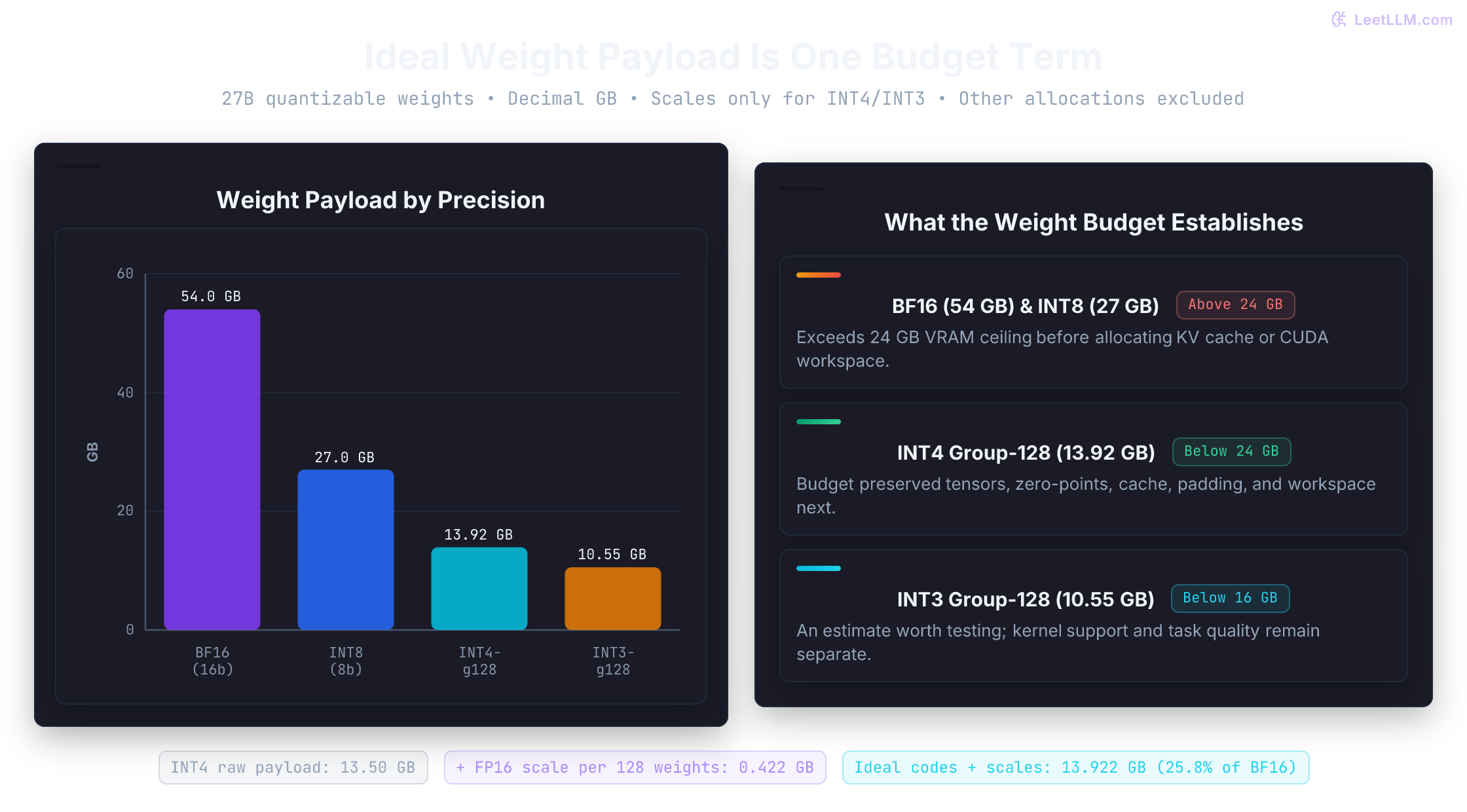
GPTQ: second-order error compensation via Hessian curvature
Rounding each weight to its nearest discrete code minimizes individual parameter error, but models don't use weights in isolation. They multiply weights against activation vectors and sum them across thousands of channels. An error of on a channel with tiny activations has almost zero effect on layer output, while that same error on a high-magnitude channel can severely distort subsequent token probabilities.
The layer reconstruction objective
Let be a weight matrix and columns of be calibration inputs. GPTQ targets squared layer-output error, using sequential rounding and compensation rather than solving the discrete problem to a guaranteed global minimum:[2]
For a single weight row , define the error vector . Expanding the squared error yields:
Here is the Hessian of this fixed-input linear objective. Its diagonal measures uncentered activation energy; off-diagonal entries measure cross-channel products. Correlated channels can offer another weight a way to compensate for a rounding decision.
Cholesky updates and lazy block batching
For the OBS compensation step, let contain the still-free columns, including the column we're about to round. Let and . For this single constraint, the optimal continuous correction is:
Under the local quadratic objective, its cost is . The active inverse changes as columns are fixed. Reusing the original full inverse at every step would give the wrong correction.
Inverting a shrinking matrix from scratch after every column would cost . GPTQ avoids that route:
- Factor once. The reference code adjusts dead columns, adds damping to , then computes an upper Cholesky factor with . Its sequential update uses times the remaining entries of row of . Damping is often 1% of the mean diagonal. A strictly positive damping term makes an exact positive-semidefinite matrix positive definite; a relative term can be zero, and finite-precision failures still require checks.[8]
- Batch deferred corrections. Within a block, process rounding decisions in order. Apply the accumulated correction to later columns with GEMM after the block. This improves hardware use without changing the sequential dependency or promising a fixed compression time.[2]
The act-order heuristic and calibration drift
Act-order sorts columns by descending before quantization. This is second-moment energy, not variance unless the inputs are centered. Earlier columns have more free coordinates available for compensation.[8]
Permutation can complicate group layouts. Static grouping and runtime support affect the cost, so inspect the artifact's group indices and backend rather than assuming act-order always breaks packing or always improves quality.
The following script walks through a Hessian compensation step, showing how adjusting unquantized parameters reduces calibration error while demonstrating the danger of calibration drift on held-out inputs.
import numpy as np

w = np.array([1.2, 0.61])
X = np.array([[5.0, 4.0], [1.0, 1.0]])
H = 2 * X @ X.T
H_inv = np.linalg.inv(H)  # Small nonsingular example; use stable factorizations at scale.
q_first = np.rint(w[0])
updated = w - (w[0] - q_first) / H_inv[0, 0] * H_inv[:, 0]
# At the first column, the upper-factor update gives the same correction.
U = np.linalg.cholesky(H_inv).T
assert np.allclose(U.T @ U, H_inv)
assert np.allclose(w - (w[0] - q_first) / U[0, 0] * U[0, :], updated)
naive = np.rint(w)
compensated = np.array([q_first, np.rint(updated[1])])

def error(candidate, inputs):
    return float(np.sum(((w - candidate) @ inputs) ** 2))

assert np.allclose(updated, [1.0, 1.51])
assert error(compensated, X) < error(naive, X)
e = w - naive
assert np.isclose(error(naive, X), e @ (X @ X.T) @ e)
# Identical input channels make the undamped Hessian singular.
rank_deficient = np.ones((2, 3))
np.linalg.cholesky(2 * rank_deficient @ rank_deficient.T + 0.01 * np.eye(2))
# A different input distribution need not favor the same correction.
held_out = np.eye(2)
print("updated weights:", np.round(updated, 3).tolist())
print("naive calibration SSE:", round(error(naive, X), 3))
print("compensated calibration SSE:", round(error(compensated, X), 3))
print("held-out SSE:", round(error(naive, held_out), 3), "vs", round(error(compensated, held_out), 3))updated weights: [1.0, 1.51]
naive calibration SSE: 0.54
compensated calibration SSE: 0.5
held-out SSE: 0.192 vs 1.972Notice that compensation reduced error on the calibration inputs from to , but worsened error on the held-out identity distribution ( to ). Calibration doesn't train model weights with loss gradients, yet its input distribution determines which errors the quantizer works hardest to neutralize. Calibrate on text that reflects target deployment domains, and always reserve separate test sets for evaluation.
Current Transformers documentation uses the gptqmodel package and says AutoGPTQ is no longer supported. It also warns that GPTQModel's asymmetric format isn't backward-compatible with legacy GPTQ models.[9] An algorithm name isn't sufficient to establish packing or kernel compatibility.
AWQ: activation-aware protection via channel scaling
While GPTQ compensates for error after rounding through sequential updates, AWQ takes a completely different path: it preconditions the weight matrix before rounding to protect critical channels.[10]
Salient channels and the equivalent transformation
The AWQ paper's INT3 experiments show that keeping a small activation-selected fraction of weights in FP16 can markedly improve perplexity. That observation motivates scaling; it isn't a universal top-1% rule or an accuracy guarantee.[10]
How should a quantizer identify which weights are salient? Looking at weight magnitudes alone fails because large weights often reside on channels with tiny activations. Instead, AWQ identifies salient channels by measuring average absolute activation magnitude across calibration inputs:
With our input convention, channel has:
Channels with the largest values are salient.
Separate floating-point exceptions complicate a uniform low-bit kernel. They don't inherently force warp divergence or destroy coalescing; that depends on representation and execution.
AWQ avoids mixed precision through an exact mathematical identity. For any diagonal scaling matrix with positive entries:
This identity holds over real arithmetic. Finite-precision rescaling needn't preserve every bit. After rounding, the two paths can differ:
If the scaled group uses step , channel sees effective step after undoing the scale. Increasing can help, but can also increase and damage other channels.
Eligible graphs absorb inverse scaling into preceding normalization parameters or linear weights and biases. Bias alone can't rescale a linear output. The reference implementation also wraps some activation functions with an explicit scaling operation. Fusion depends on graph structure, and packed weights still require dequantization.[11]
Search a small family, then check unseen inputs
Scaling weight column up protects that channel, but can also widen the group's overall dynamic range, penalizing neighboring non-salient weights in the same group.
AWQ balances this trade-off by parameterizing the scale vector with an exponent :
At , relative channel scaling is uniform; at , it follows mean absolute magnitude. The paper searches this family and applies clipping.[10] The reference code tests 20 exponents for each searched module, clamps/normalizes scales, and selects by output MSE. Clipping is a separate stage.[11]
A restricted search can reduce fitting freedom. It doesn't make calibration overfitting impossible. Group-wise weight quantization and module-level exponent search are different granularities.
This miniature experiment tests four predeclared scale vectors. It illustrates the trade-off, rather than implementing AWQ's full exponent search and clipping.
import numpy as np

W = np.array([[0.3, 2.0]])
calibration = np.array([[10.0, 8.0, -10.0, -8.0], [1.0, -1.0, 1.0, -1.0]])
held_out = np.array([[9.0, -9.0], [0.5, -0.5]])

def reconstruct(factor):
    a = np.array([factor, 1.0])
    assert np.allclose((W * a) @ (calibration / a[:, None]), W @ calibration)
    scaled = W * a
    maximum = np.max(np.abs(scaled))
    step = maximum / 7 if maximum else 1.0
    return np.clip(np.rint(scaled / step), -7, 7) * step / a

def mse(candidate, X):
    return float(np.mean(((W - candidate) @ X) ** 2))

candidates = [(factor, reconstruct(factor)) for factor in (1, 2, 4, 8)]
best_factor, best_W = min(candidates, key=lambda item: mse(item[1], calibration))
for factor, candidate in candidates:
    print(f"factor {factor}: calibration MSE {mse(candidate, calibration):.6f}")
print("selected factor:", best_factor)
print(f"held-out MSE: {mse(best_W, held_out):.6f}")
assert mse(best_W, calibration) <= mse(reconstruct(1), calibration)
assert mse(best_W, held_out) < mse(reconstruct(1), held_out)factor 1: calibration MSE 0.016735
factor 2: calibration MSE 0.016735
factor 4: calibration MSE 0.016735
factor 8: calibration MSE 0.003265
selected factor: 8
held-out MSE: 0.000816Factors two and four leave the first weight reconstructed as , just like factor one: rescaling didn't change its effective rounding result. At factor eight, reconstructs exactly, but the other weight moves from to about . Try extending the search to 32. Protecting one channel can become expensive for its neighbor.
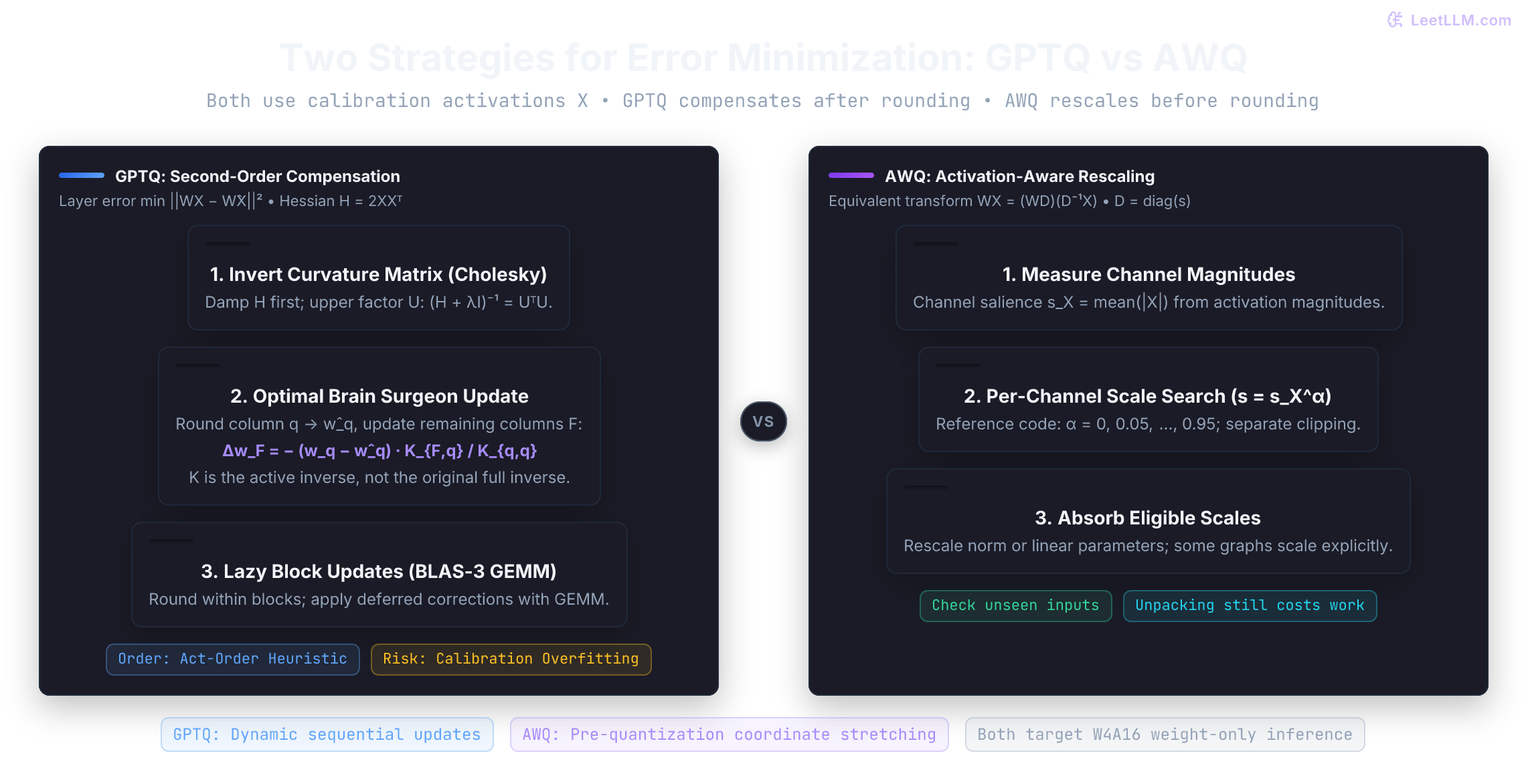
AutoAWQ was archived on May 11, 2025. Its notice points to vLLM's LLM Compressor and lists Torch 2.6.0/Transformers 4.51.3 as its last tested configuration.[12] Transformers' AWQ loading guide still includes AutoAWQ dependencies and version warnings; a built-in configuration class doesn't establish an independent maintained kernel stack.[3] Check the selected runtime's support for your model, packing, group size, and zero-points before choosing an exporter.
GGUF container architecture and layer offloading
Engineers frequently ask whether they should choose AWQ or GGUF. That question mixes categories. AWQ is a quantization algorithm that generates quantized weights; GGUF is an extensible binary container format created by Georgi Gerganov and the llama.cpp project.[13]
A GGUF file can store unquantized BF16 weights, standard INT4 tensors, or custom k-quant formats.
| Name | Role in Stack | Concrete Purpose |
|---|---|---|
| GGUF | Binary Container | Stores key-value metadata, tensor descriptors, and aligned payloads; models can also be sharded.[14] |
| Q4_K | Block Tensor Type | Stores 256 weights with four-bit codes and hierarchical scale/minimum metadata.[15] |
| Q4_K_M | Model-Level Preset | Primarily Q4_K, with selected higher-precision tensors under architecture-dependent heuristics.[16] |
| llama.cpp | Inference Engine | C++ execution runtime that memory-maps GGUF files and offloads layers across CPU, CUDA, Metal, and ROCm. |
The extensible metadata store and memory mapping
GGUF replaces older untyped hyperparameter lists with extensible typed metadata. Readers still need support for the architecture, required keys, tensor encodings, and format version; self-description doesn't guarantee every runtime can execute every GGUF.[14]
A model GGUF can package:
- Architecture specifications (tensor names, normalization epsilon, context lengths, RoPE frequency constants)
- Tokenizer information (vocabulary, applicable merge rules, special token IDs, and chat templates)
- Tensor descriptors (names, dimensions, types, and aligned payload offsets)
Alignment defaults to 32 bytes and can be specified in metadata. A compatible CPU path can view memory-mapped file data without an initial copy into a separate host buffer. Pages still need to be read and made resident as used; discrete-GPU placement generally needs transfers. Mapping an address range isn't the same as loading fourteen gigabytes or completing the first request. Page faults and eviction can dominate a cold run.
Hierarchical k-quant blocks and layer presets
Traditional block quantization applies a single scale per block of 32 weights. The k-quant family (such as Q4_K and Q5_K) uses hierarchical super-blocks:
Q4_Kgroups 256 weights into a super-block.- The super-block divides into 8 sub-blocks of 32 weights each.
- Each sub-block has a six-bit scale and six-bit minimum coefficient, packed into twelve metadata bytes across the super-block.
- Two FP16 values scale the scale coefficients and minimum coefficients, respectively.
The block is exactly bytes for 256 weights: 4.5 bits per weight, including 0.5 metadata bits. Its reconstructed value has form ; the offset isn't necessarily an integer zero-point on the code grid.[15]
Q4_K_M is a preset, not a tensor type. The inspected quantizer upgrades selected value/down projections to Q6_K, with additional model-specific exceptions. That is a heuristic tensor mixture, not a universal ranking of projection sensitivity.[16] Inspect the emitted tensors when estimating size or comparing presets.
Granular CPU-GPU layer offloading
When an LLM exceeds available GPU memory, llama.cpp enables split CPU-GPU execution through the -ngl (--n-gpu-layers) flag.
Offloading selects a trailing portion, rather than the first blocks. Counting is version-sensitive: the source inspected on September 22, 2026 includes the output layer in the count. For a simple 40-block model with a GPU backend, -ngl 24 selects blocks 17 through 39 plus the output layer. The input-layer assignment stays on CPU.[17]
blocks, requested = 40, 24
start = max(blocks + 1 - requested, 0)  # Includes output slot `blocks`.
gpu_blocks = [i for i in range(blocks) if i >= start]
output_on_gpu = blocks >= start
assert gpu_blocks == list(range(17, 40)) and output_on_gpu
assert len(gpu_blocks) + int(output_on_gpu) == requested
print("GPU blocks:", gpu_blocks[0], "through", gpu_blocks[-1])
print("repeating blocks:", len(gpu_blocks), "output layer:", output_on_gpu)GPU blocks: 17 through 39
repeating blocks: 23 output layer: TrueThe graph and backend determine activation transfers, cache placement, and which operations run on which device. GPU placement doesn't guarantee Tensor Core execution or peak speed. Check your installed version's help and allocation logs, especially with tensor overrides or multiple devices.
Partial offload can make a larger artifact usable, with CPU work and transfers in the latency budget. Different backends can also differ numerically. Measure task quality as well as memory and speed.
This separate toy budget packs trailing block payloads until an explicit reserve is reached. It doesn't implement llama.cpp's allocator or its output-layer counting. The assumed 2,000 MB reserve stands in for all other device allocations; a real reserve needs measurements.
layer_mb = [1000, 2000, 1500, 500]  # Explicit hypothetical sizes in decimal MB.
device_mb, reserve_mb = 6000, 2000
available = device_mb - reserve_mb
assert available >= 0
used = 0
gpu_layers = []
for index in reversed(range(len(layer_mb))):
    size = layer_mb[index]
    if used + size > available:
        break
    gpu_layers.append(index)
    used += size
cpu_layers = [i for i in range(len(layer_mb)) if i not in gpu_layers]
assert sorted(gpu_layers) == [1, 2, 3]
assert sum(layer_mb[i] for i in cpu_layers) + used == sum(layer_mb)
assert used + reserve_mb <= device_mb
print("CPU layers:", cpu_layers, "MB:", sum(layer_mb[i] for i in cpu_layers))
print("GPU layers:", sorted(gpu_layers), "MB:", used)
print("GPU total including reserve:", used + reserve_mb, "MB")CPU layers: [0] MB: 1000
GPU layers: [1, 2, 3] MB: 4000
GPU total including reserve: 6000 MB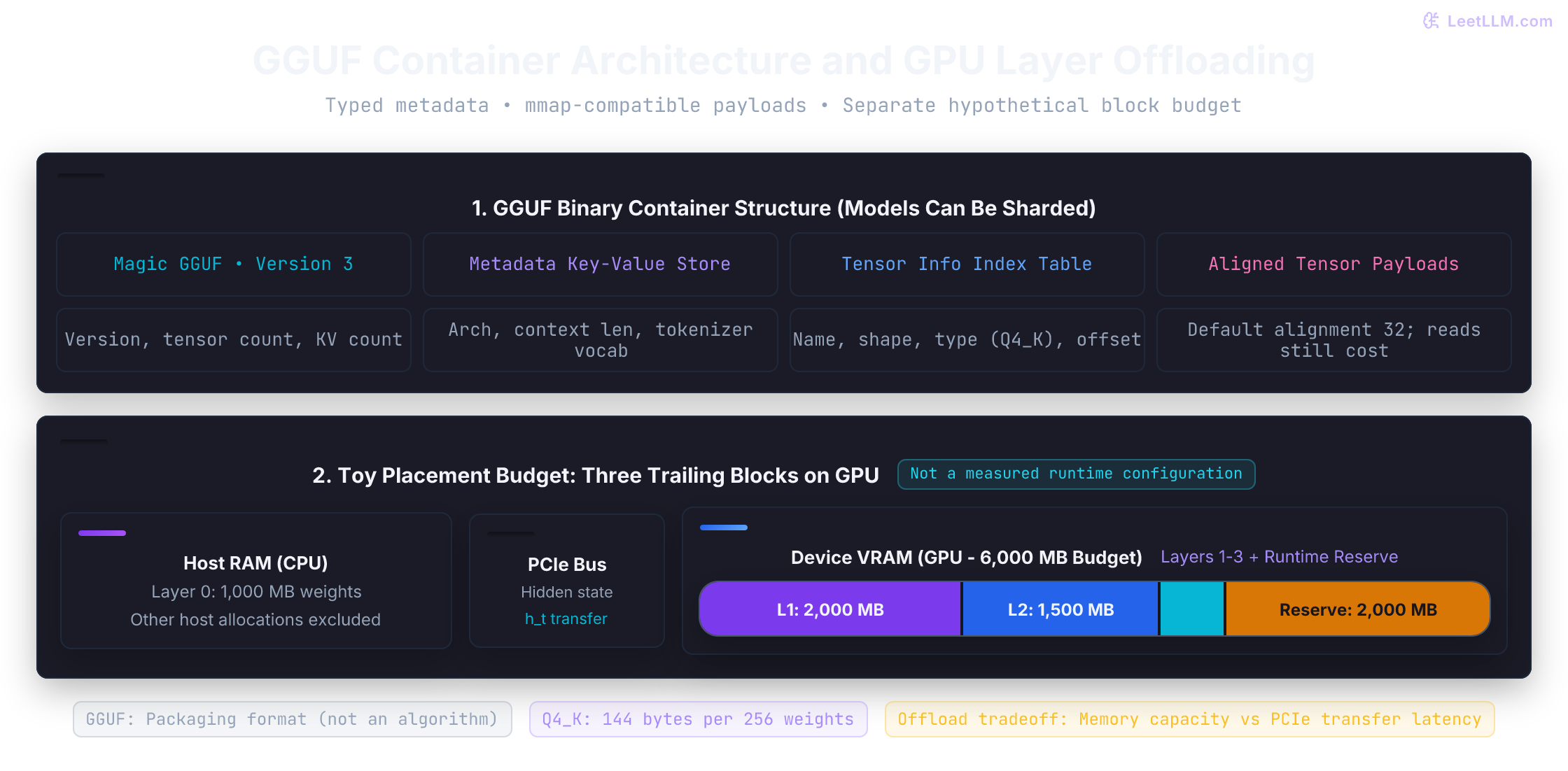
From a llama.cpp source checkout with its conversion dependencies installed, a supported checkpoint's conversion and quantization are separate commands:
python convert_hf_to_gguf.py /path/to/checkpoint --outfile model-bf16.gguf --outtype bf16
./build/bin/llama-quantize model-bf16.gguf model-Q4_K_M.gguf Q4_K_M
Keep the unquantized BF16 GGUF intact so you can re-quantize to alternative presets without re-downloading or cascading quantization noise.[18]
For multimodal use, the encoder/projector may need a separate mmproj artifact. Converting only the language component doesn't preserve image/audio input support, and those additional tensors need their own memory budget.[18]
Evaluating quantized artifacts beyond perplexity
Perplexity is the exponentiated average negative log-likelihood on a specified tokenized dataset; lower is better. A small relative change in prose perplexity doesn't establish preserved code correctness, schema adherence, or reasoning. The dataset, tokenizer, context policy, and task matter.
This four-weight fixture compares reconstruction grids on three held-out activation columns. It computes output MSE and ideal code-byte counts. The NumPy arrays remain floating-point; this snippet doesn't pack bytes or execute low-bit kernels.
import numpy as np

W = np.array([[0.3, -1.2, 2.0, 0.7]])
X = np.array([[2.0, -1.0, 3.0], [1.0, 2.0, -1.0],
              [-1.0, 0.5, 2.0], [0.2, -2.0, 1.0]])
for bits in (2, 4, 8):
    qmax = 2 ** (bits - 1) - 1
    scale = float(np.max(np.abs(W))) / qmax
    restored = np.clip(np.rint(W / scale), -qmax, qmax) * scale
    mse = float(np.mean(((W - restored) @ X) ** 2))
    payload_bytes = (W.size * bits + 7) // 8
    print(f"{bits}-bit: payload {payload_bytes} bytes, held-out output MSE {mse:.6f}")
assert np.all(np.abs(restored) <= np.max(np.abs(W)))2-bit: payload 1 bytes, held-out output MSE 1.007200
4-bit: payload 2 bytes, held-out output MSE 0.067010
8-bit: payload 4 bytes, held-out output MSE 0.000204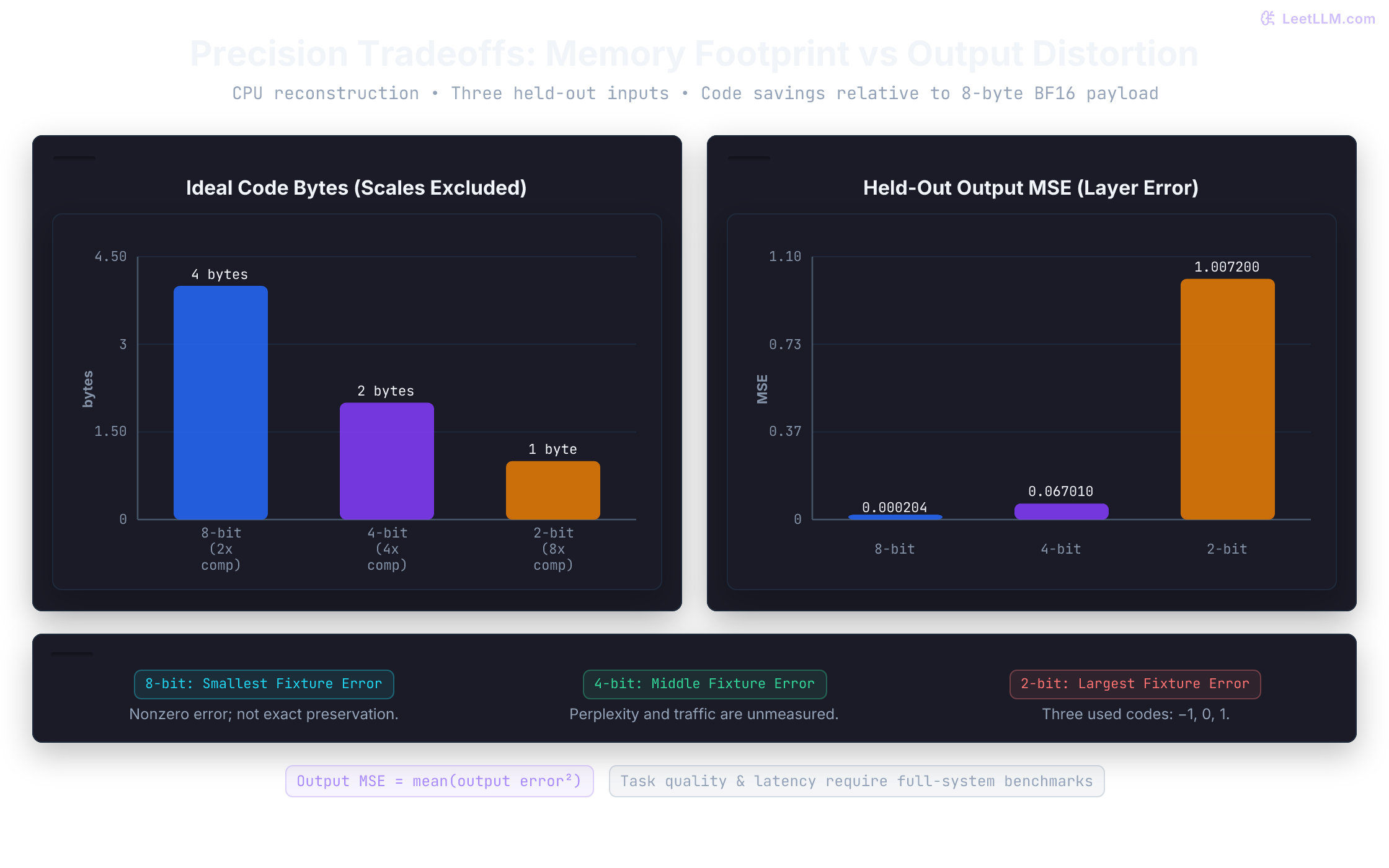
The perplexity trap in downstream tasks
Why does the two-bit result change so much? This narrow symmetric quantizer has only three used codes, , with step two. Try another group size or asymmetric grid. The example measures a linear-layer error, not language-model perplexity or a general representation-collapse threshold.
Task evaluation should include executable code tests, parsed/schema-validated outputs, and scored instruction constraints. Probability changes can alter generated tokens; a failure doesn't uniquely identify a particular projection or calibration domain. With unconstrained generation, fluent prose and malformed JSON can coexist.
Controlled paired benchmarking
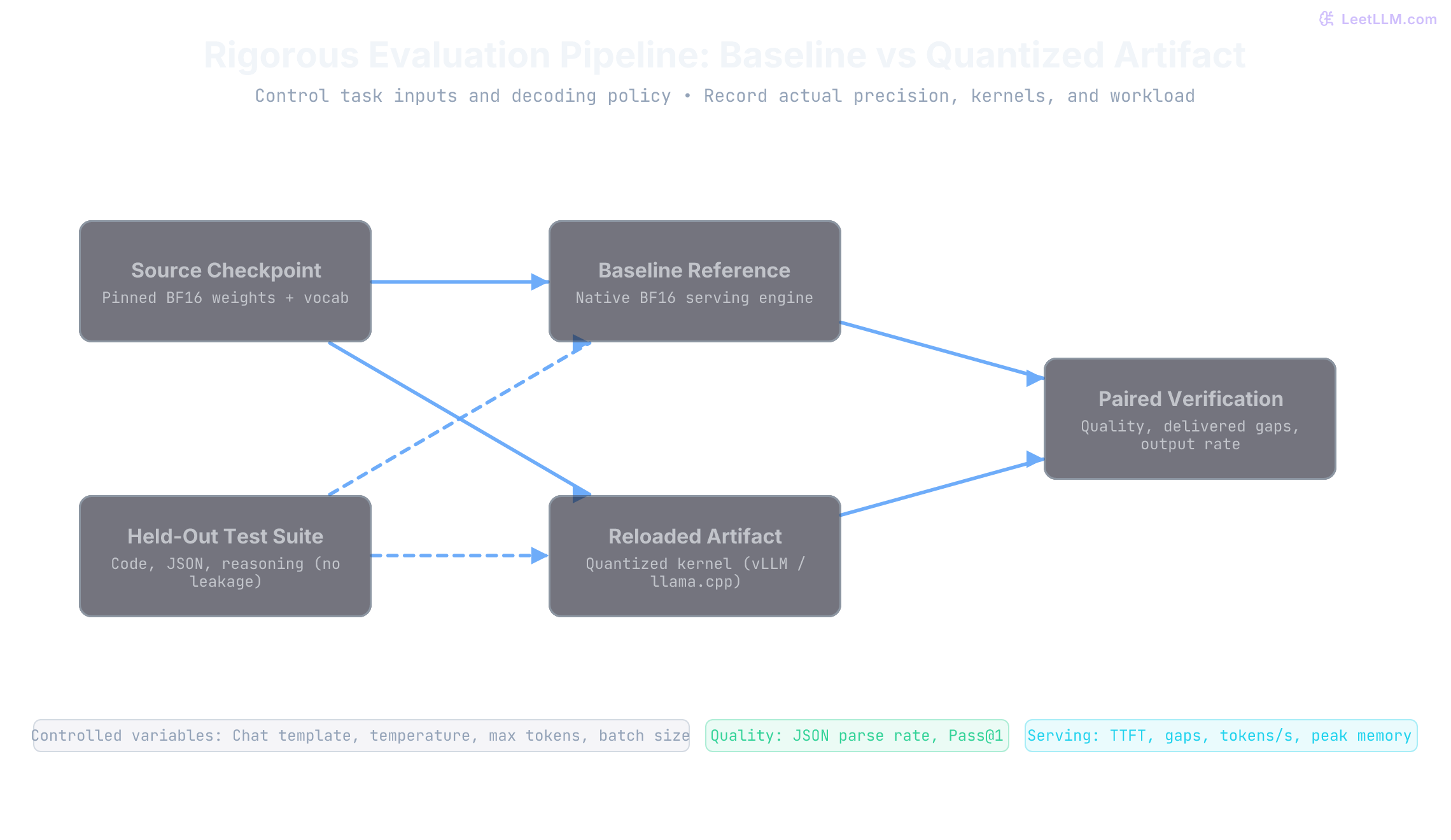
Reload the exported artifact and compare it with its source model. Keep task inputs and decoding policy controlled while recording each path's actual kernels and precision:
- Control variables: Pin tokenizer vocabulary, chat templates, system prompts, sampling temperature, and repetition penalties.
- Held-out task evaluation: Test on realistic validation suites (such as HumanEval code generation, JSON parsing benchmarks, and multi-turn dialog) completely disjoint from calibration datasets.
- Runtime latency profiling: Measure end-to-end TTFT, delivered inter-token gaps, aggregate output tokens/s, and peak device memory under chosen batch/context distributions. TTFT includes queueing and other work beyond prefill. ITL isn't aggregate throughput. Separate cold loading/JIT from warmed service, and record cache settings.
Use seeds and repeated trials for stochastic decoding; a shared seed needn't force identical outputs across backends. Report quality differences alongside speed and memory. A successful export or a smaller file isn't evaluation evidence.
Diagnostic troubleshooting playbook
Use symptoms to choose checks, rather than to declare a root cause:
- Symptom: JSON parsing fails or code syntax breaks while English answers look fluent. Check reload, tokenizer/template, decoding constraints, and paired held-out task results first. If calibration drift is supported by evidence, change its domain mix and evaluate again. No fixed code/JSON percentage guarantees recovery. A llama.cpp preset isn't an interchangeable GPTQ/AWQ repair.
- Symptom: High decode latency despite 4-bit weight compression. Inspect device placement, actual kernel dispatch, unpacking/conversion, cache traffic, batching, and queueing. Compare with BF16 under the same workload. Supported fused kernels help only when their savings exceed their costs.
- Symptom: High prefill latency during prompt ingestion. Profile GEMM, attention, conversion, and scheduling. If arithmetic is limiting, compare a supported W8A8/FP8 path with an explicit quality budget. If queueing or cache work dominates, a different weight encoding may barely change TTFT.