Personalize this lesson
Adapt explanations and teaching visuals to your background and preferred voice.
A small incident assistant helps engineers with CI failures, rollbacks, access requests, and log triage. A launch review asks for 5,000 synthetic requests before traffic arrives. Each request contributes four measurements: it either resolves or escalates, takes one route, makes a nonnegative number of tool calls, and takes a positive number of seconds.
Now choose how to draw those four values. A wrong choice can make an average look reasonable while hiding retry bursts, producing impossible negative latency, or inventing a route that never appears in the taxonomy. Before trusting a simulator, name the claim behind each draw and the trace that could falsify it.
In Statistics and Uncertainty, 16 abuse labels out of 100 reviewed flags became a point estimate plus an interval. That asked how much a finite sample supports one unknown rate. Simulation reverses the direction: start with a process, draw new samples, and ask whether the resulting traces look like the system you intend to model.
A probability distribution specifies the allowed values of a random quantity and how probability is assigned to them. We'll start with those allowed values, then check the frequencies, tails, and dependencies that a simulator produces.
The numbers below are planning assumptions, not measured production results. A real launch would estimate them from logged, reviewed traffic. The standard-library examples need Python 3.12 or later because they use Random.binomialvariate. Record the interpreter version along with the seed; distribution-sampling algorithms can change between versions.[1]
Four measurements from one request
| Quantity from one request | Example value | Value shape | First simulation model | Summary to report |
|---|---|---|---|---|
| Resolved without a human | 1 or 0 | binary | Bernoulli | resolution rate |
| Request route | ci_failure, rollback, access_request, log_triage | one label | categorical | label mix |
| Tool calls made | 0, 1, 2, ... | count | Poisson baseline | mean and share above a cost threshold |
| End-to-end response time | 7.4 seconds | positive continuous | lognormal baseline | median and p95 |
The first simulation model column is a claim about shape, not a default. If traces disagree, you revise the model instead of defending the convenient formula.
Discrete values versus continuous time
The first split is between discrete and continuous quantities.
| Kind | Meaning | In the incident assistant |
|---|---|---|
| Discrete | values are separate outcomes you can enumerate | resolved or escalated, one intent label, number of tool calls |
| Continuous | values live on a measured range | response time in seconds |
For a discrete quantity you can ask for the probability of one exact value, such as P(tool_calls = 2). For a continuous response time, one infinitely precise instant has probability zero under the model. Ask for a range or a percentile instead: P(time > 15 seconds) or the p95 response time.
The allowed values are the distribution's support. Route labels need a finite set of names, tool calls need nonnegative integers, and response time needs nonnegative seconds. A measured zero may mean a duration was rounded below the clock's resolution; a negative duration is a different problem.
Before sampling, write down four things:
- What values are allowed?
- Which parameter sets the rate, center, or spread?
- Which tail or threshold would hurt users or cost?
- What observation would prove this model is a poor fit?
For example, ten tool calls may be rare under a baseline but common during retry loops. That observation should change the model, not just the seed.
PMF, PDF, and CDF
Use the kind of quantity to choose the probability object. For the binary resolution variable R, the two masses are P(R = 0) = 0.28 and P(R = 1) = 0.72. A probability mass function (PMF) lists those probabilities for each discrete value. The masses add to 1.
Response time needs different language. A probability density function (PDF) describes how densely probability is spread across possible times; area over an interval gives its probability. Its height isn't the probability of one exact time and may exceed 1. For instance, a uniform duration between 0 and 0.5 seconds has density 2 per second, but total area 2 × 0.5 = 1.
A cumulative distribution function (CDF) gives the chance of finishing by a deadline. Let T mean response time and t the chosen deadline:
Read the CDF as an operations question: F_T(10) is the chance a response finishes within 10 seconds, while 1 - F_T(15) is the chance it exceeds 15 seconds. For the smooth latency model below, p95 is the time where the CDF reaches 0.95. Discrete distributions have CDFs too, but those rise in steps and can jump past 0.95.[2]
A chart or API that says "probability" is easy to misread. A PMF bar is a probability. A PDF curve needs an interval before it becomes one. A CDF's height is already accumulated probability.
The probability chapter treated a distribution as a function over a known sample space. Here you pick a named family, sample from it, and check whether traces match the family.
Inverse CDF transform: how computers sample continuous variables
How does a random-number generator turn deterministic code into smooth, continuous response times? A computer's core RNG primitive only knows how to produce uniform numbers between zero and one: .
The mathematical bridge from uniform numbers to any continuous distribution is the inverse CDF transform (also known as the probability integral transform). Because a continuous CDF is strictly increasing from 0 to 1, its inverse exists. If you draw , the transformed variable follows the target distribution exactly:
To see how that works analytically, consider an exponential service duration with completion rate :
Because is also distributed uniformly on , code can draw and compute . For a lognormal variable with median and log-spread , you invert standard normal noise: draw , find the standard normal quantile , and exponentiate: .
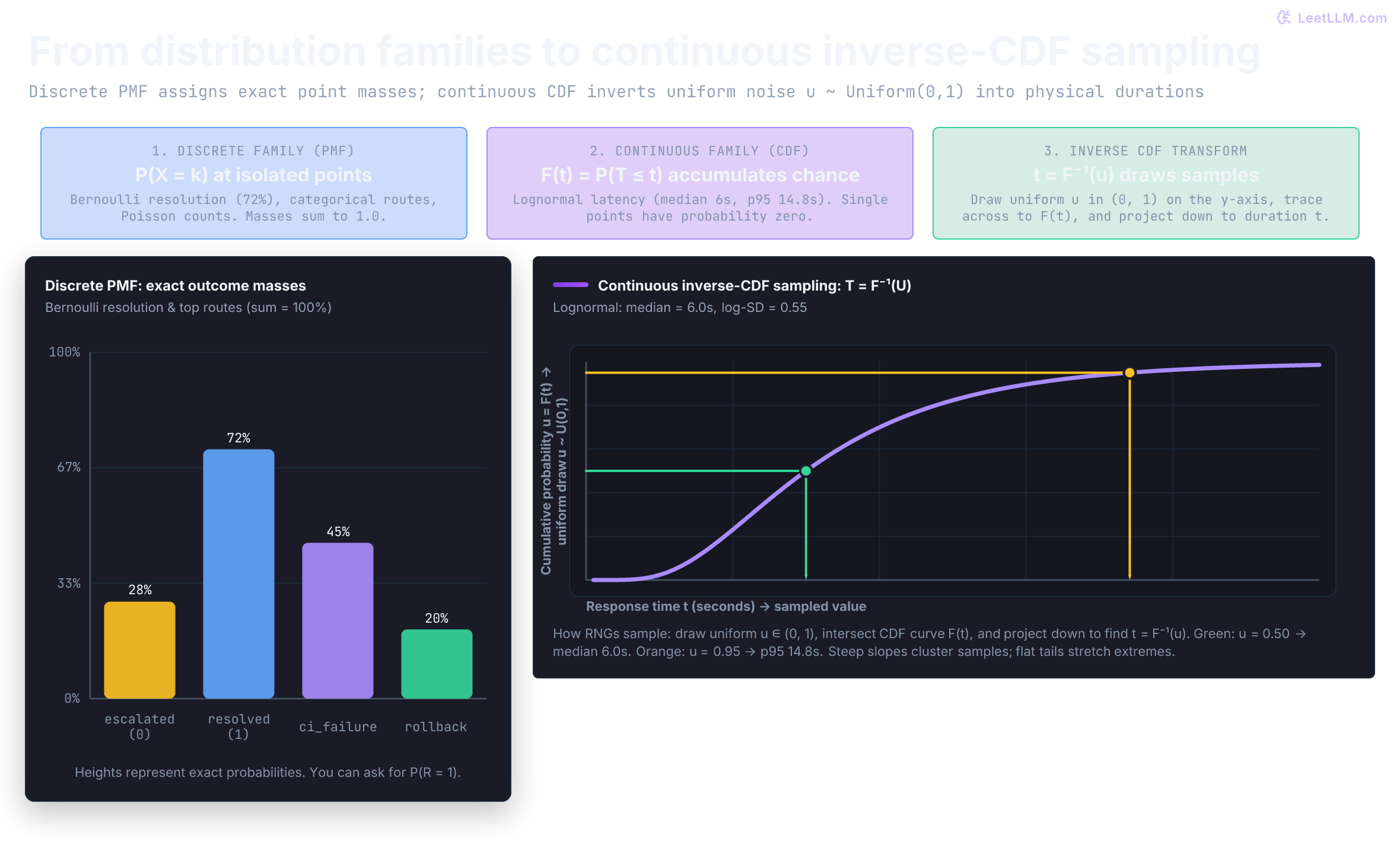
Notice the geometry in the plot: where the CDF is steep (near the 6-second median), a wide swath of uniform draws projects into a narrow slice of time. Where the CDF flattens out (the right tail), a tiny 5% sliver of uniform draws () stretches out across all latencies beyond 14.8 seconds.
Before running the snippet below, predict the output: 5,000 inverted uniform draws should land very close to the theoretical 0.05-second exponential mean, the 6.0-second lognormal median, and the 14.83-second p95 threshold.
1from math import exp, log
2from random import Random
3from statistics import NormalDist, median
4
5rng = Random(42)
6rate = 20.0
7uniform_draws = [rng.random() for _ in range(5_000)]
8exp_samples = [-log(1.0 - u) / rate for u in uniform_draws]
9
10mu = log(6.0)
11sigma = 0.55
12standard_normal = NormalDist(0, 1)
13lognormal_samples = [
14    exp(mu + sigma * standard_normal.inv_cdf(u)) for u in uniform_draws
15]
16
17print(f"exponential mean: {sum(exp_samples) / len(exp_samples):.3f}s (target: {1/rate:.3f}s)")
18print(f"lognormal median: {median(lognormal_samples):.2f}s (target: 6.00s)")
19p95_index = int(0.95 * len(lognormal_samples))
20print(f"lognormal p95: {sorted(lognormal_samples)[p95_index]:.2f}s (target: 14.83s)")1exponential mean: 0.050s (target: 0.050s)
2lognormal median: 6.03s (target: 6.00s)
3lognormal p95: 14.85s (target: 14.83s)Bernoulli: resolved or escalated
Begin with the smallest distribution. Let R = 1 if the assistant resolves a request without a human, and R = 0 if it escalates. The planning value is p = 0.72.
| Outcome | R | Probability |
|---|---|---|
| escalation | 0 | 0.28 |
| resolved | 1 | 0.72 |
The expected value is:
Because R is encoded as 0 or 1, its long-run average is the resolution rate. Calculate that weighted average directly:
1p_resolved = 0.72
2outcomes = {"escalated": 0, "resolved": 1}
3probabilities = {"escalated": 1 - p_resolved, "resolved": p_resolved}
4
5expected_value = sum(
6    outcomes[name] * probabilities[name] for name in outcomes
7)
8
9print(f"P(resolved):  {probabilities['resolved']:.2f}")
10print(f"P(escalated): {probabilities['escalated']:.2f}")
11print(f"E[R]:         {expected_value:.2f}")
12
13assert expected_value == p_resolved1P(resolved): 0.72
2P(escalated): 0.28
3E[R]: 0.72One request is now a coin with a known bias. The next question is what happens when you count many of those coins.
Binomial: resolutions in a 100-request batch
If you count resolutions across n = 100 independent requests that all share p = 0.72, the count X has a binomial distribution. A single request is Bernoulli; the sum of these 100 outcomes is binomial.[3]
Its expected count is np = 72, and its variance is np(1-p) = 20.16. The count can land anywhere from 0 to 100, even though 72 is the center of the model.
One particular arrangement of 72 resolutions and 28 escalations has probability 0.72^72 × 0.28^28. There are many arrangements with that same count. The binomial coefficient counts them, giving:
The binomial model is a sum of independent Bernoulli trials. If requests arrive in correlated incident waves, or if each request has a different resolution probability, this simple count model needs a richer design.
Before running the snippet, predict its shape: six rates should scatter around .72, not all equal .72. The code checks the formula, then draws six independent 100-request batches while holding p = 0.72 fixed. Random.binomialvariate is the standard-library binomial sampler.
1from math import comb
2from random import Random
3
4n = 100
5p = 0.72
6k = 72
7p_exact = comb(n, k) * (p**k) * ((1 - p) ** (n - k))
8
9print(f"P(X={k}) = {p_exact:.3f}")
10print(f"E[X] = {n * p:.0f}")
11print(f"Var(X) = {n * p * (1 - p):.2f}")
12
13rng = Random(12)
14resolved_per_batch = [rng.binomialvariate(n, p) for _ in range(6)]
15rates = [count / n for count in resolved_per_batch]
16
17print("resolved counts:", resolved_per_batch)
18print("batch rates:    ", [round(rate, 2) for rate in rates])
19print(f"range: {min(rates):.2f} to {max(rates):.2f}")1P(X=72) = 0.089
2E[X] = 72
3Var(X) = 20.16
4resolved counts: [72, 70, 75, 69, 71, 78]
5batch rates: [0.72, 0.7, 0.75, 0.69, 0.71, 0.78]
6range: 0.69 to 0.78A confidence interval from the last chapter uses a finite sample to quantify uncertainty about an unknown rate. A distribution does the opposite: it assumes a process, then generates the samples you might see. The interval asks what the data support; the simulator asks what the assumption would produce.
What is the difference between p = 0.72 and a sampled batch rate of 0.68?
Answer
p = 0.72 is the assumed long-run resolution probability in the simulator. 0.68 is one finite batch generated under that assumption. A different batch can land above or below 0.72.
Binary resolution is only one label. Real traffic is split across several routes.
Categorical: one route per request
An incident-assistant request isn't always binary. It may be exactly one of several route labels. For this planning mix:
| Intent | Probability | Expected count among 500 requests |
|---|---|---|
| ci failure | 0.45 | 225 |
| rollback | 0.20 | 100 |
| access request | 0.20 | 100 |
| log triage | 0.15 | 75 |
The four probabilities sum to 1.00 because every request receives one route in this simplified taxonomy. A categorical distribution draws one of those labels according to the supplied weights.
One request gives one categorical outcome. If 500 requests are independent and use this same route mix, the four counts together follow a multinomial distribution. Their sum must be 500, so the counts aren't independent of one another. This sampler draws requests one at a time, then counts labels.
Predict before running it: the observed counts should be near 225, 100, 100, and 75, but they don't need to match those expected counts exactly. Sampling variation is the behavior we want to inspect.
1from random import Random
2
3intents = ["ci_failure", "rollback", "access_request", "log_triage"]
4probabilities = [0.45, 0.20, 0.20, 0.15]
5requests = 500
6
7assert abs(sum(probabilities) - 1.0) < 1e-12
8
9rng = Random(21)
10sampled = rng.choices(intents, weights=probabilities, k=requests)
11expected = {
12    intent: int(requests * probability)
13    for intent, probability in zip(intents, probabilities)
14}
15observed = {intent: sampled.count(intent) for intent in intents}
16
17print("expected counts:", expected)
18print("sampled counts: ", observed)
19print("all labels known:", set(sampled).issubset(set(intents)))1expected counts: {'ci_failure': 225, 'rollback': 100, 'access_request': 100, 'log_triage': 75}
2sampled counts: {'ci_failure': 218, 'rollback': 105, 'access_request': 106, 'log_triage': 71}
3all labels known: TrueThe sampled counts needn't equal the expectations. That's ordinary variation. An unknown label such as database_restore would be a different problem: the taxonomy or the sampler contract is wrong. choices accepts relative weights, so [45, 20, 20, 15] would encode the same distribution; our explicit probabilities make the planning assumptions easier to inspect.[1]
Routes tell you what kind of request arrived. Tool calls tell you how expensive that request was to serve.
Poisson counts, then a bursty counterexample
Tool calls are counts. A simple baseline is a Poisson distribution with parameter lambda, written . If lambda = 2.2, the simulated agent makes 2.2 tool calls per request on average.
With a mean of 2.2, a Poisson model predicts about 26.8% of requests will make exactly two calls. To calculate that value, let C denote the count and k one nonnegative integer. In the formula below, k! means the factorial (2! = 2 × 1), and e is the base of natural logarithms:
With and :
The loop below prints a few more masses, including the expensive tail P(C > 5).
1from math import exp, factorial
2
3lam = 2.2
4
5def poisson_probability(k: int) -> float:
6    if k < 0:
7        raise ValueError("k must be nonnegative")
8    return lam**k * exp(-lam) / factorial(k)
9
10for k in range(5):
11    print(f"P(calls = {k}): {poisson_probability(k):.3f}")
12
13share_above_5 = 1 - sum(poisson_probability(k) for k in range(6))
14print(f"P(calls > 5): {share_above_5:.3f}")
15
16try:
17    poisson_probability(-1)
18except ValueError as error:
19 print(error)1P(calls = 0): 0.111
2P(calls = 1): 0.244
3P(calls = 2): 0.268
4P(calls = 3): 0.197
5P(calls = 4): 0.108
6P(calls > 5): 0.025
7k must be nonnegativeThe Poisson model makes a stronger claim than "counts can't be negative." Its mean and variance are both .[4] A Poisson process produces such counts in a fixed exposure window when events arrive independently at a constant rate. Tool calls within a request aren't automatically such a process: the agent often decides its next call based on a previous result. Here Poisson is a candidate count distribution, not a fact implied by the data type.
An agent can break that assumption. A difficult rollback may trigger a deploy lookup, a runbook lookup, a retry, and a handoff together. Those bursts create overdispersion, where variance is much larger than the mean.
Both streams in the next fixture have a mean near 2.2. The mixed stream uses ordinary requests 88% of the time and hard requests 12% of the time. Its exact expected count is 0.88 × 1.2 + 0.12 × 10 = 2.256, close to the baseline's 2.2.
Predict what a good Poisson fit would show: a variance-to-mean ratio near 1 and a share above five calls near .025. The transparent product-based sampler below is restricted to small rates for this exercise. For general-purpose simulation, use a tested library sampler such as NumPy's Generator.poisson, not this loop at large rates.
1from math import exp
2from random import Random
3
4def sample_poisson(rng: Random, lam: float) -> int:
5    if not 0 <= lam <= 20:
6        raise ValueError("this teaching sampler requires 0 <= lambda <= 20")
7    threshold = exp(-lam)
8    count = 0
9    product = 1.0
10    while True:
11        product *= rng.random()
12        if product <= threshold:
13            return count
14        count += 1
15
16def mean(xs: list[float]) -> float:
17    return sum(xs) / len(xs)
18
19def pop_variance(xs: list[float]) -> float:
20    center = mean(xs)
21    return sum((x - center) ** 2 for x in xs) / len(xs)
22
23rng = Random(31)
24steady = [sample_poisson(rng, 2.2) for _ in range(5_000)]
25bursty = []
26for _ in range(5_000):
27    hard_request = rng.random() < 0.12
28    bursty.append(sample_poisson(rng, 10.0 if hard_request else 1.2))
29
30def report(name: str, counts: list[int]) -> None:
31    average = mean(counts)
32    variance = pop_variance(counts)
33    above_five = sum(count > 5 for count in counts) / len(counts)
34    print(
35        f"{name:>6}: mean={average:.2f} variance={variance:.2f} "
36        f"variance/mean={variance / average:.2f} share>5={above_five:.3f}"
37    )
38
39report("steady", steady)
40report("bursty", bursty)1steady: mean=2.23 variance=2.20 variance/mean=0.98 share>5=0.025
2bursty: mean=2.29 variance=10.66 variance/mean=4.65 share>5=0.115| Metric | Steady Poisson () | Bursty Mixture () | Operational Diagnosis |
|---|---|---|---|
| Theoretical Mean | 2.20 calls | 2.256 calls | Averages appear almost identical |
| Sample Variance | 2.20 | 10.66 | Mixture variance is nearly higher |
| Variance / Mean ratio | 0.98 | 4.65 | Severe overdispersion signals retry storms |
| Costly tail ( calls) | 2.5% | 11.5% | higher risk of exhausting tool quotas |
The mixed sample has both excess variance and a larger expensive-tail share. Overdispersion alone doesn't determine every tail probability, and a tiny sample can have an unstable variance estimate. Inspect the count frequencies and the actual threshold you care about. Also separate request types or incident waves before deciding whether one distribution should describe them all.
Why isn't a Poisson distribution automatically correct for agent tool calls just because tool calls are counts?
Answer
Poisson is a useful first count model, but it assumes the variance matches the mean. Agent retries and difficult request clusters can create much larger variance and a heavier expensive tail. Check the observed count shape before relying on the baseline.
Counts are only half of the cost story. The other half is how long the request occupies a worker.
Lognormal response time
End-to-end response time can't be negative. Some requests can also take much longer than the typical request, forming a right tail. A lognormal distribution is one candidate for positive, right-skewed values; positivity alone doesn't establish that it's the right family.
A normal distribution is the familiar symmetric bell-shaped model, described by a mean and standard deviation. A variable is lognormal when its natural logarithm is normal. For this example, take the logarithm of the numerical duration expressed in seconds.
random.lognormvariate(mu, sigma) takes the mean and standard deviation of those log values, not of the durations. Set mu = log(6) for a six-second median and sigma = 0.55 for log-space spread. This gives a mean near 6.98 seconds. The conversion rules are:[5]
To find F_T(10), measure how many log-space standard deviations 10 seconds lies above the center. This standardized distance is a z-score:
The normal CDF with mean zero and standard deviation one gives about 0.823 at this z-score. Thus roughly 82% finish within 10 seconds. Its 95th-percentile z-score is about 1.645, so the model's p95 is exp(log(6) + 0.55 × 1.645) ≈ 14.83 seconds. A finite sample needn't hit either value exactly.
Predict before sampling: the median should stay near 6 seconds, p95 should land near 14.8 seconds, and no draw should be nonpositive. The output below checks those three consequences.
⚠️ Common mistake: Passing
6.0asmudoes not make the median six seconds. It makes the median seconds. NumPy'sGenerator.lognormal(mean, sigma)uses the same log-spacemean.
1from math import log
2from random import Random
3from statistics import NormalDist, fmean, median
4
5def percentile(values: list[float], q: float) -> float:
6    ordered = sorted(values)
7    position = (len(ordered) - 1) * q / 100
8    lower = int(position)
9    upper = min(lower + 1, len(ordered) - 1)
10    return ordered[lower] + (ordered[upper] - ordered[lower]) * (position - lower)
11
12median_seconds = 6.0
13sigma = 0.55
14mu = log(median_seconds)
15
16rng = Random(44)
17response_seconds = [rng.lognormvariate(mu, sigma) for _ in range(5_000)]
18
19print(f"target median seconds: {median_seconds:.2f}")
20print(f"sample median seconds: {median(response_seconds):.2f}")
21print(f"sample mean seconds:   {fmean(response_seconds):.2f}")
22print(f"sample p95 seconds:    {percentile(response_seconds, 95):.2f}")
23print(f"nonpositive values:    {sum(t <= 0 for t in response_seconds)}")
24print(f"model P(T <= 10): {NormalDist(mu, sigma).cdf(log(10)):.3f}")1target median seconds: 6.00
2sample median seconds: 5.94
3sample mean seconds: 6.94
4sample p95 seconds: 14.80
5nonpositive values: 0
6model P(T <= 10): 0.823The median describes a typical request. p95 tells you about a noticeably slow slice. Reporting only the mean would hide the operational question customers feel: how long do the slow responses take?
A normal model can go negative
The normal distribution's support extends across the whole real line. It can model signed quantities, such as a measurement error around zero. It can also approximate a positive quantity when the chance of a negative draw is negligible for the task, but that needs checking.
With mean 8 seconds and standard deviation 6 seconds, negative response times are far from negligible. Generate 5,000 durations and check support before accepting the plausible-looking mean or p95:
1from random import Random
2from statistics import fmean
3
4def percentile(values: list[float], q: float) -> float:
5    ordered = sorted(values)
6    position = (len(ordered) - 1) * q / 100
7    lower = int(position)
8    upper = min(lower + 1, len(ordered) - 1)
9    return ordered[lower] + (ordered[upper] - ordered[lower]) * (position - lower)
10
11rng = Random(44)
12bad_response_seconds = [rng.gauss(8.0, 6.0) for _ in range(5_000)]
13
14print(f"minimum seconds:    {min(bad_response_seconds):.2f}")
15print(f"share below zero:   {sum(t < 0 for t in bad_response_seconds) / len(bad_response_seconds):.3f}")
16print(f"p95 seconds:        {percentile(bad_response_seconds, 95):.2f}")
17print(f"sample mean:        {fmean(bad_response_seconds):.2f}")
18
19assert any(t < 0 for t in bad_response_seconds)1minimum seconds: -15.70
2share below zero: 0.095
3p95 seconds: 17.85
4sample mean: 8.09About 9.5% of this sample is physically impossible. Clipping every negative draw to zero would create a pile of zero-duration requests and change the distribution, not establish a fit. A positive family, a justified truncated model, or sampling representative empirical durations are alternatives to evaluate against actual traces.
Even a plausible distribution for isolated durations misses another source of latency: waiting behind other requests. First distinguish time spent doing work from time spent in a queue.
Exponential service time
An exponential distribution models a duration with a constant completion rate, conditional on not having finished yet. It's the waiting-time distribution between arrivals in a constant-rate Poisson process. Using it for service time is a separate modeling assumption.
For a toy single-server service, let S be service time and μ = 20 completions per second when the server is busy. The mean duration is 1 / 20 = 0.05 seconds. This 50 ms service is a separate queueing example, not a new parameter for the six-second agent response-time model.
Its density and CDF are:
At 20 requests per second, P(S > 0.10) = e^{-20 \times 0.10} \approx 0.135. The distribution is memoryless: after a request has already taken 50 ms, its remaining service-time distribution is still the same as at the start. That makes it a useful queueing baseline, not a claim that real tool work forgets its elapsed time.[2][6]
Before running the sampler, predict a mean near .05 seconds and a share near .135 above .10 seconds. Random.expovariate(mu) takes the rate μ; NumPy's Generator.exponential takes the mean duration as scale = 1 / μ. Passing 20 as the scale instead of 0.05 makes the mean 400 times larger. Although exact zero has probability zero in the mathematical model, a finite-precision sampler can return it, so the support check allows zero.[1]
1from math import exp
2from random import Random
3from statistics import fmean
4
5rate_per_second = 20.0
6scale_seconds = 1 / rate_per_second
7rng = Random(66)
8service_seconds = [rng.expovariate(rate_per_second) for _ in range(5_000)]
9
10print(f"target mean seconds: {scale_seconds:.3f}")
11print(f"sample mean seconds: {fmean(service_seconds):.3f}")
12print(f"P(S > 0.10) formula: {exp(-rate_per_second * 0.10):.3f}")
13print(f"sample share > 0.10: {sum(t > 0.10 for t in service_seconds) / len(service_seconds):.3f}")
14print(f"min seconds: {min(service_seconds):.6f}")
15
16assert all(t >= 0 for t in service_seconds)1target mean seconds: 0.050
2sample mean seconds: 0.049
3P(S > 0.10) formula: 0.135
4sample share > 0.10: 0.132
5min seconds: 0.000025The sample follows the chosen model. It doesn't show that real service times are exponential. Repeated simulation can estimate a model's tail probability more precisely without improving the model's fit to reality.
More draws reduce simulation noise
Monte Carlo simulation means using repeated random samples to approximate a quantity you care about. Here the quantity is the resolution rate, estimated from repeated simulated batches.
For N = 100 independent Bernoulli requests with p = 0.72, the batch-rate standard deviation is sqrt(0.72 × 0.28 / 100) ≈ 0.045. With N = 10,000, it's about 0.0045. This is the earlier standard-error formula: sqrt(p(1-p)/N). Multiplying the sample size by 100 divides this uncertainty by 10, not by 100.
Predict the three standard deviations before running the cell: they should be roughly .045, .014, and .0045. That pattern is convergence under the assumption, not evidence that the assumption came from production.
1from random import Random
2
3def mean(xs: list[float]) -> float:
4    return sum(xs) / len(xs)
5
6def pop_std(xs: list[float]) -> float:
7    center = mean(xs)
8    return (sum((x - center) ** 2 for x in xs) / len(xs)) ** 0.5
9
10rng = Random(55)
11p_resolved = 0.72
12
13for batch_size in [100, 1_000, 10_000]:
14    repeated_rates = [
15        rng.binomialvariate(batch_size, p_resolved) / batch_size
16        for _ in range(2_000)
17    ]
18    print(
19        f"N={batch_size:>5}: mean={mean(repeated_rates):.3f} "
20        f"sd_of_rates={pop_std(repeated_rates):.4f}"
21 )1N= 100: mean=0.720 sd_of_rates=0.0457
2N= 1000: mean=0.720 sd_of_rates=0.0140
3N=10000: mean=0.720 sd_of_rates=0.0045Simulation answers a conditional question: "What happens if these assumptions are the generating process?" It doesn't validate p = 0.72, lambda = 2.2, or the latency parameters. Those must come from data, review design, and production measurement.
To investigate a surprising run, record enough information to replay it rather than hoping the next random draw looks better.
Recorded seeds replay a stream
Random(seed) creates a deterministic pseudo-random stream. In the same environment, reusing the seed and draw order recreates a run. Record the code, Python and library versions, parameters, and number of draws too. The seed alone isn't a promise that every distribution sampler produces identical results across upgrades.[1]
A seed doesn't make observations independent, and it doesn't repair a wrong model. Independence is a modeling assumption; separate streams help avoid accidentally replaying the same sequence across replicas.
For parallel replications, create separate Random objects and record each stream ID. The snippet derives two IDs from one root label. NumPy's Generator.spawn offers a designed child-stream mechanism for parallel work; distinct streams avoid replaying identical pseudo-observations as if they were new evidence.[7]
1from random import Random
2
3root = "incident-sim-2026"
4replica_one = Random(f"{root}:replica-1")
5replica_two = Random(f"{root}:replica-2")
6counts_one = [replica_one.binomialvariate(20, 0.72) for _ in range(4)]
7counts_two = [replica_two.binomialvariate(20, 0.72) for _ in range(4)]
8
9replay_one = Random(f"{root}:replica-1")
10replay_two = Random(f"{root}:replica-2")
11replayed_one = [replay_one.binomialvariate(20, 0.72) for _ in range(4)]
12replayed_two = [replay_two.binomialvariate(20, 0.72) for _ in range(4)]
13
14print("replica 1:", counts_one)
15print("replica 2:", counts_two)
16print("replay matches:", counts_one == replayed_one and counts_two == replayed_two)
17
18assert counts_one == replayed_one
19assert counts_two == replayed_two1replica 1: [16, 14, 16, 12]
2replica 2: [14, 16, 13, 17]
3replay matches: TrueReplay is a reporting contract. It also helps inspect a more difficult sampling problem: a Bayesian posterior that can't be sampled directly.
Sample a posterior when direct draws aren't available
Bayesian Inference from Evidence updated a Beta(2, 2) prior with eight passes and two failures to obtain an exact Beta(10, 4) posterior. That direct update worked because the prior and likelihood were conjugate. A richer agent model might include several interacting skill parameters or task-difficulty effects without a convenient closed-form posterior.
Markov chain Monte Carlo (MCMC) addresses that harder case by constructing a sequence of dependent parameter states whose long-run distribution matches the desired posterior. Unlike the independent Monte Carlo draws above, each new state starts from the previous state.[2]
Metropolis-Hastings proposes a candidate state, then either moves to it or stays at the current state. Start with a concrete comparison: the Beta(10, 4) posterior's unnormalized density is about 2.642 times as high at 0.6 as at 0.5. With a symmetric proposal, accept the move to 0.6 with probability 1; accept the reverse move with probability 1 / 2.642 ≈ 0.379.
Here symmetric means the proposal is equally likely in either direction, as with a normal step centered on the current value. If denotes the target density and a proposed value, this rule is:[8]
The unknown normalization constant in cancels in the ratio. The earlier Beta(10, 4) result lets us check the mechanics even though this posterior can be sampled directly with betavariate. Its density is proportional to for 0 < p < 1. An asymmetric proposal needs an additional reverse-to-forward proposal-density ratio; don't reuse the simplified rule unchanged.
The next cell checks both directions with a fixed comparison value of 0.4. Predict why that value accepts the forward move but rejects the reverse move. This is one deterministic acceptance check; a complete sampler must draw a fresh comparison value at every iteration.
1def unnormalized_posterior(probability: float) -> float:
2    return probability**9 * (1 - probability) ** 3
3
4forward_ratio = unnormalized_posterior(0.6) / unnormalized_posterior(0.5)
5reverse_ratio = 1 / forward_ratio
6comparison = 0.4
7
8print(f"forward acceptance: {min(1.0, forward_ratio):.3f}")
9print(f"reverse acceptance: {min(1.0, reverse_ratio):.3f}")
10print(f"reverse accepted at u=0.4: {comparison < reverse_ratio}")1forward acceptance: 1.000
2reverse acceptance: 0.379
3reverse accepted at u=0.4: FalseA rejection must remain in the chain as another copy of the current state. Keeping only accepted moves would sample a different process. This complete teaching sampler uses log densities to avoid underflow, rejects proposals outside [0, 1], and compares four starting points with the known posterior mean 10 / 14:
1from math import log, log1p
2from random import Random
3from statistics import fmean
4
5def log_target(p):
6    if not 0 < p < 1:
7        return float("-inf")
8    return 9 * log(p) + 3 * log1p(-p)
9
10def sample_chain(seed, start, warmup=2_000, kept=10_000):
11    rng = Random(seed)
12    current = start
13    draws = []
14    accepted = 0
15    for step in range(warmup + kept):
16        proposal = current + rng.gauss(0, 0.15)
17        log_ratio = log_target(proposal) - log_target(current)
18        # 1-random() lies in (0, 1], so log is defined.
19        if log(1 - rng.random()) < min(0.0, log_ratio):
20            current = proposal
21            if step >= warmup:
22                accepted += 1
23        if step >= warmup:
24            draws.append(current)  # include repeats after rejection
25    return draws, accepted / kept
26
27for seed, start in enumerate([0.1, 0.4, 0.7, 0.95], start=101):
28    draws, acceptance = sample_chain(seed, start)
29    center = fmean(draws)
30    variance_sum = sum((p - center) ** 2 for p in draws)
31    lag_one = sum((a - center) * (b - center)
32                  for a, b in zip(draws[:-1], draws[1:])) / variance_sum
33    print(f"start={start:.2f} mean={center:.3f} "
34          f"acceptance={acceptance:.3f} lag1={lag_one:.3f}")
35    assert abs(center - 10 / 14) < 0.02  # a loose known-target smoke check
36print(f"exact posterior mean: {10 / 14:.3f}")1start=0.10 mean=0.708 acceptance=0.644 lag1=0.715
2start=0.40 mean=0.712 acceptance=0.637 lag1=0.720
3start=0.70 mean=0.716 acceptance=0.637 lag1=0.720
4start=0.95 mean=0.711 acceptance=0.632 lag1=0.726
5exact posterior mean: 0.714Early warmup or burn-in states can reflect initialization rather than the posterior. Discarding them doesn't guarantee that later states explore well. The printed lag-one correlation measures similarity between adjacent draws; it can stay large even when the sample mean looks right.
Autocorrelation reduces the information in many ordinary chains. Effective sample size estimates precision for a particular quantity relative to independent draws; chain length alone doesn't determine it. Established tools report rank-normalized split R-hat, which compares variation within and between chains, alongside effective sample sizes. Passing the loose mean assertion above is a code smoke check against a known answer, not a convergence proof.[9]
Gibbs sampling instead updates one variable from its conditional distribution given the current values of the others. Exact conditional draws can still produce a strongly correlated chain. Neither method establishes that the underlying statistical model represents the real system.
Posterior-sampling diagnostics qualify uncertainty about model parameters. They still say nothing about queues, which is where isolated latency samples go wrong.
Waiting time when the server fills up
A simulation that samples latency in isolation ignores how requests interact. Suppose three requests arrive at 0, 10, and 20 ms, and each needs 50 ms on one server. The first starts immediately. The second waits until 50 ms, and the third until 100 ms. Their total times are therefore 50, 90, and 130 ms, even though each does the same amount of work.
That is queueing delay: time waiting to start, separate from service time. A probabilistic queueing model adds random arrivals and service durations to this same mechanism.
Little's Law states that the average number of requests in a stable system equals the arrival rate times the average time a request spends in the system:
For an M/M/1 baseline, assume constant-rate Poisson arrivals, independent exponential service times, one server, first-come-first-served processing, unlimited waiting space, and no abandonment. The two Ms denote the memoryless arrival and service models. At a steady arrival rate of 15 requests per second and a service rate of 20 per second, the server is busy on average 15 / 20 = 75% of the time.
Write utilization as . A steady-state distribution requires . Here counts arrivals per second; the earlier tool-count parameter 2.2 counted calls per request. The same Greek letter doesn't imply the same units.[10]
Average total time in the system and average time waiting in the queue are:
As utilization approaches 100%, both quantities rise sharply. Consider a service with a mean service time of 50 ms ( requests/second):
| Arrivals | Utilization | Total time | Queue time |
|---|---|---|---|
| 15 req/s | 0.75 | 0.20 s | 0.15 s |
| 19 req/s | 0.95 | 1.00 s | 0.95 s |
The service time stays at 50 ms in both rows, but moving from 75% to 95% utilization lifts average total time from 0.20 to 1.00 seconds. Queueing, not slower work, caused the jump.
These are steady-state averages, not predictions for a three-request burst or a p99 latency. At or above λ = μ, this model has no finite steady-state mean waiting time; plugging those values into the formula is invalid. Little's Law alone doesn't cause the sharp increase: that shape comes from the M/M/1 assumptions. Real batching, parallel workers, deadlines, and dependent retries need a different queueing model.
Two ways a latency simulator can lie are already on the table: the wrong positive-time family, and a missing queue. The last diagnostic uses the CDF you already have.
Score a candidate with the CDF
Before using a simulator for planning, compare it with representative held-out traces, including difficult requests and timeouts. A quantile-quantile (Q-Q) plot compares observed quantiles against candidate quantiles; disagreement near the high end exposes a tail mismatch. A timeout recorded at its deadline is a censored observation, not necessarily a completed response at exactly that duration.
The empirical CDF at a deadline is simply the fraction of recorded durations at or below it. If 160 of 200 completed responses finish within 10 seconds, it equals 0.80 there. A candidate CDF of 0.823 has a gap of 0.023 at that deadline.
The Kolmogorov-Smirnov (KS) distance takes the largest such vertical gap over all deadlines. In the notation below, sup means the largest gap, F_n is the empirical CDF, and F is the candidate CDF:
On the same sample, a larger D means a larger worst-case CDF discrepancy. It isn't a verdict on every operational risk: two models can differ mainly in a rare tail that contributes little to D. Keep your explicit timeout and costly-tail checks.
The ordinary one-sample KS p-value assumes independent observations from a continuous distribution whose parameters were specified in advance. Fitting parameters on the same observations needs a calibration procedure that accounts for fitting, such as a parametric bootstrap. SciPy's goodness_of_fit implements this approach.[11] This example only calculates distances, not p-values.
This check specifies both candidates first, using the same lognormal planning values as the rest of the chapter, then scores them against 200 positive draws. The normal candidate gets the lognormal's mean and standard deviation, so the comparison tests shape beyond those summaries. We expect the generating lognormal model to fit better on average, though a finite sample doesn't guarantee that ordering.
1from math import erf, exp, log, sqrt
2from random import Random
3
4def normal_cdf(x: float, mu: float, sigma: float) -> float:
5    z = (x - mu) / sigma
6    return 0.5 * (1.0 + erf(z / sqrt(2.0)))
7
8def lognormal_cdf(t: float, mu: float, sigma: float) -> float:
9    if t <= 0:
10        return 0.0
11    return normal_cdf(log(t), mu, sigma)
12
13def ks_distance(samples: list[float], cdf) -> float:
14    if not samples:
15        raise ValueError("KS distance needs at least one observation")
16    ordered = sorted(samples)
17    n = len(ordered)
18    distance = 0.0
19    for index, value in enumerate(ordered, start=1):
20        fitted = cdf(value)
21        distance = max(
22            distance,
23            abs(index / n - fitted),
24            abs((index - 1) / n - fitted),
25        )
26    return distance
27
28mu = log(6.0)
29sigma = 0.55
30rng = Random(88)
31observed_traces = [rng.lognormvariate(mu, sigma) for _ in range(200)]
32
33normal_mean = exp(mu + sigma**2 / 2)
34normal_std = sqrt((exp(sigma**2) - 1) * exp(2 * mu + sigma**2))
35
36d_norm = ks_distance(
37    observed_traces,
38    lambda x: normal_cdf(x, normal_mean, normal_std),
39)
40d_log = ks_distance(
41    observed_traces,
42    lambda t: lognormal_cdf(t, mu, sigma),
43)
44
45print(f"normal D:    {d_norm:.3f}")
46print(f"lognormal D: {d_log:.3f}")
47print(f"normal mean: {normal_mean:.2f}s std: {normal_std:.2f}s")1normal D: 0.135
2lognormal D: 0.056
3normal mean: 6.98s std: 4.15sThe lognormal gap is smaller in this seeded run. A finite sample still doesn't give D = 0. This is a check that our comparison can distinguish the known generating shape from an alternative, not validation against actual service traces.
Build a launch-simulation report
Now put the four request fields together. This is deliberately an independent-field baseline: it draws each field without conditioning on the others. It has no arrivals, worker limits, or queue, so it describes synthetic requests, not system capacity. Keep that limitation attached to the report.
1from math import exp, log
2from random import Random
3from statistics import fmean, median
4
5def sample_poisson(rng: Random, lam: float) -> int:
6    if not 0 <= lam <= 20:
7        raise ValueError("this teaching sampler requires 0 <= lambda <= 20")
8    threshold = exp(-lam)
9    count = 0
10    product = 1.0
11    while True:
12        product *= rng.random()
13        if product <= threshold:
14            return count
15        count += 1
16
17def percentile(values: list[float], q: float) -> float:
18    ordered = sorted(values)
19    position = (len(ordered) - 1) * q / 100
20    lower = int(position)
21    upper = min(lower + 1, len(ordered) - 1)
22    return ordered[lower] + (ordered[upper] - ordered[lower]) * (position - lower)
23
24def simulate_incident_agent(seed: int, n_requests: int) -> dict[str, float]:
25    if n_requests <= 0:
26        raise ValueError("n_requests must be positive")
27
28    rng = Random(seed)
29    resolved = [rng.binomialvariate(1, 0.72) for _ in range(n_requests)]
30
31    intents = ["ci_failure", "rollback", "access_request", "log_triage"]
32    intent_probs = [0.45, 0.20, 0.20, 0.15]
33    routed = rng.choices(intents, weights=intent_probs, k=n_requests)
34
35    tool_calls = [sample_poisson(rng, 2.2) for _ in range(n_requests)]
36    response_seconds = [
37        rng.lognormvariate(log(6.0), 0.55) for _ in range(n_requests)
38    ]
39
40    return {
41        "resolution_rate": fmean(resolved),
42        "rollback_share": routed.count("rollback") / n_requests,
43        "mean_tool_calls": fmean(tool_calls),
44        "share_over_5_tools": sum(count > 5 for count in tool_calls) / n_requests,
45        "median_seconds": median(response_seconds),
46        "p95_seconds": percentile(response_seconds, 95),
47        "nonpositive_times": float(sum(t <= 0 for t in response_seconds)),
48    }
49
50report = simulate_incident_agent(seed=7, n_requests=5_000)
51for name, value in report.items():
52    print(f"{name:>20}: {value:.3f}")
53
54assert report["nonpositive_times"] == 0
55assert report["p95_seconds"] > report["median_seconds"]1resolution_rate: 0.718
2 rollback_share: 0.202
3 mean_tool_calls: 2.206
4 share_over_5_tools: 0.024
5 median_seconds: 6.070
6 p95_seconds: 15.688
7 nonpositive_times: 0.000Use that output as a simulator report, not a production claim. The rate, label mix, count tail, and latency tail are only as credible as their fitted parameters and assumption checks.
This fixture samples each field separately from one generator. It therefore treats resolution, route, tool count, and response time as independent once their parameters are fixed.
A shared random-number generator (RNG) makes the run replayable; it doesn't create or prove independence. Real rollback requests may use more tools and take longer. Preserve that relationship with conditional sampling, such as drawing route first, then drawing tool count and latency from models for that route.
To see what separate summaries miss, compare two four-request datasets. They have identical tool counts and identical durations, but pair those values differently. Predict how often a request is both expensive and slow:
1tools = [1, 1, 6, 6]
2aligned_seconds = [2, 2, 20, 20]
3reversed_seconds = [20, 20, 2, 2]
4
5def joint_share(counts, seconds):
6    return sum(c > 5 and t > 15 for c, t in zip(counts, seconds, strict=True)) / len(counts)
7
8assert sorted(aligned_seconds) == sorted(reversed_seconds)
9print(f"aligned expensive-and-slow:  {joint_share(tools, aligned_seconds):.2f}")
10print(f"reversed expensive-and-slow: {joint_share(tools, reversed_seconds):.2f}")1aligned expensive-and-slow: 0.50
2reversed expensive-and-slow: 0.00Every one-field histogram, mean, and percentile is identical between these datasets. Yet the joint threshold shares differ. Matching each marginal distribution separately doesn't validate the relationships among fields, which matter for timeouts and simultaneous resource demand.
Those checks apply to the simulator's fields. The same categorical math appears inside the model that writes the assistant's answer.
Next tokens: categorical draws, temperature scaling, and the Gumbel-Max trick
The incident-assistant labels form a categorical distribution because one label is selected from a finite list. An LLM uses the same family over a much larger vocabulary. At each step it produces a logit, an unnormalized score, for each candidate token. Softmax exponentiates those scores and divides by their sum, producing probabilities. A decoder may sample one token from that distribution.[12]
Take a tiny continuation for the prompt Deploy is. Four tokens are enough to see the mechanics. approved has the largest probability, but a sample can still choose pending; predict that distinction before running the cell.
1from math import exp
2from random import Random
3
4tokens = ["approved", "pending", "blocked", "coupon"]
5logits = [2.2, 1.5, 0.2, -1.5]
6
7def stable_softmax(values: list[float]) -> list[float]:
8    shifted = [value - max(values) for value in values]
9    weights = [exp(value) for value in shifted]
10    total = sum(weights)
11    return [weight / total for weight in weights]
12
13probabilities = stable_softmax(logits)
14rng = Random(5)
15chosen = rng.choices(tokens, weights=probabilities, k=1)[0]
16
17for token, probability in zip(tokens, probabilities):
18    print(f"{token:>8}: {probability:.3f}")
19print("sampled token:", chosen)
20print("probabilities sum to one:", abs(sum(probabilities) - 1.0) < 1e-12)1approved: 0.604
2 pending: 0.300
3 blocked: 0.082
4 coupon: 0.015
5sampled token: pending
6probabilities sum to one: Trueapproved is the mode, the most probable outcome, but this draw returned pending. Greedy decoding would choose approved; sampling can select any token with nonzero probability. Subtracting the largest logit before exponentiating prevents overflow for these finite inputs without changing the probability ratios. Displayed rounded probabilities may add to 1.001; the unrounded values still sum to one.
Reshaping entropy with temperature scaling
Before feeding logits into softmax, generation runtimes introduce a positive temperature parameter that scales logits: .
Dividing logits by temperature alters the distribution's entropy without changing which token has the highest score:
- Low temperature (, such as ): Logit gaps stretch wider. Dividing by 0.3 multiplies differences by . Exponentiating those stretched gaps concentrates almost all mass on the top token (
approvedclimbs from 60.4% to 91.1%), squashing competitor probabilities. As , categorical sampling converges to deterministic greedy argmax. - Baseline temperature (): Softmax evaluates raw logits directly, preserving the model's calibrated uncertainty.
- High temperature (, such as ): Logit gaps shrink toward zero. The probabilities flatten toward a uniform distribution (), making generation exploratory and diverse, but increasing the risk of low-probability hallucinated tokens like
coupon.
GPU-parallel sampling with the Gumbel-Max trick
On GPU hardware serving thousands of concurrent requests, how does code draw a categorical sample from 128,000 candidate tokens?
Computing a cumulative probability array (CDF) and performing sequential binary search requires expensive prefix sums and branches that cause GPU thread divergence. Instead, production runtimes use the Gumbel-Max trick.
Draw an independent standard Gumbel noise value for each vocabulary token from uniform random numbers:
Add that Gumbel noise directly to the temperature-scaled logits, then take the parallel argmax:
A celebrated result in extreme value theory proves that the probability of token achieving the highest perturbed score equals its softmax probability exactly:
This reparameterization turns sampling into a parallel vector addition and an argmax reduction, running at native GPU memory bandwidth.
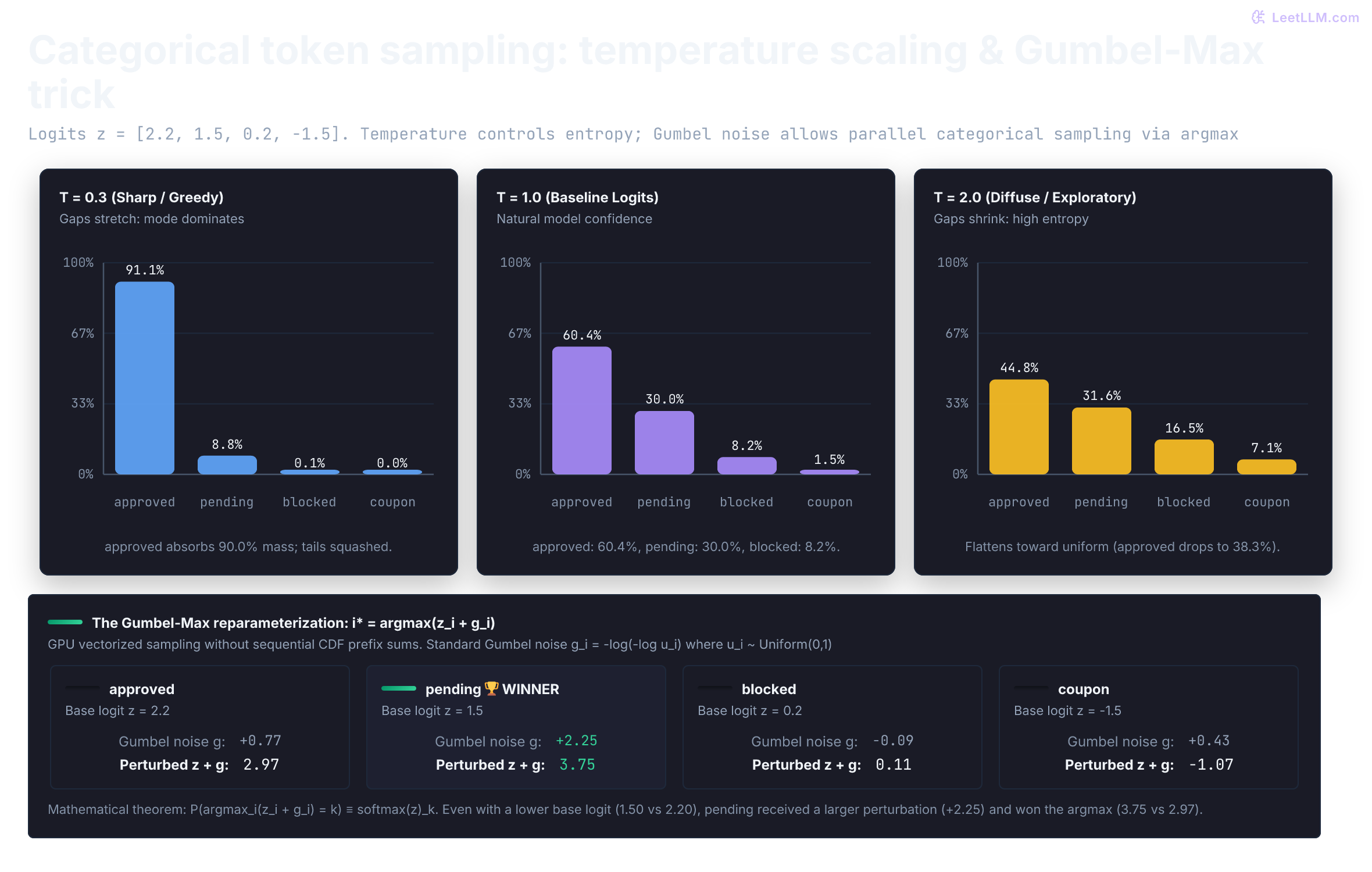
In the bottom panel, notice how token pending had a lower base logit (1.50) than approved (2.20). But because pending drew a lucky Gumbel perturbation (+2.25 versus +0.77), its perturbed score reached 3.75, winning the argmax. Across thousands of draws, each token wins with an empirical frequency that mirrors its softmax probability.
The next snippet verifies that equivalence across 10,000 Gumbel-Max draws at both baseline and sharp temperatures:
1from math import exp, log
2from random import Random
3
4def stable_softmax(logits: list[float], temperature: float = 1.0) -> list[float]:
5    scaled = [z / temperature for z in logits]
6    max_z = max(scaled)
7    weights = [exp(z - max_z) for z in scaled]
8    total = sum(weights)
9    return [w / total for w in weights]
10
11def gumbel_sample(rng: Random, logits: list[float], temperature: float = 1.0) -> int:
12    # Standard Gumbel noise: g = -log(-log(u)) where u ~ Uniform(0, 1)
13    perturbed = []
14    for z in logits:
15        u = 1.0 - rng.random()  # strictly in (0, 1]
16        g = -log(-log(u))
17        perturbed.append(z / temperature + g)
18    return max(range(len(logits)), key=lambda i: perturbed[i])
19
20tokens = ["approved", "pending", "blocked", "coupon"]
21logits = [2.2, 1.5, 0.2, -1.5]
22
23rng = Random(42)
24n_draws = 10_000
25
26for temp in [1.0, 0.3]:
27    expected_probs = stable_softmax(logits, temperature=temp)
28    samples = [gumbel_sample(rng, logits, temperature=temp) for _ in range(n_draws)]
29    observed_shares = [samples.count(i) / n_draws for i in range(len(tokens))]
30
31    print(f"Temperature T={temp:.1f}:")
32    for token, p_exp, p_obs in zip(tokens, expected_probs, observed_shares):
33 print(f" {token:>8}: softmax={p_exp:.3f} gumbel_share={p_obs:.3f}")1Temperature T=1.0:
2 approved: softmax=0.604 gumbel_share=0.610
3 pending: softmax=0.300 gumbel_share=0.292
4 blocked: softmax=0.082 gumbel_share=0.084
5 coupon: softmax=0.015 gumbel_share=0.014
6Temperature T=0.3:
7 approved: softmax=0.911 gumbel_share=0.902
8 pending: softmax=0.088 gumbel_share=0.097
9 blocked: softmax=0.001 gumbel_share=0.001
10 coupon: softmax=0.000 gumbel_share=0.000Later chapters teach decoding controls in depth. A sampling decoder doesn't choose from raw logits directly. It draws from a probability distribution derived from those logits. A greedy decoder is different: it selects the highest-probability token instead of drawing a sample. For open-ended text generation, nucleus sampling chooses a dynamic high-probability token set and renormalizes it before sampling, rather than sampling from an unreliable long tail.[13]
Keep the simulation honest
Before believing output from a random simulator, write down its contract:
| Quantity | Model used | Report | Challenge before trusting it |
|---|---|---|---|
| resolved without human | Bernoulli | rate | is one request one binary decision? |
| request route | categorical | proportions | are all real route labels represented? |
| tool calls | Poisson baseline | mean and share above 5 | is variance near mean, or are calls bursty? |
| response time | lognormal baseline | median and p95 | is any time nonpositive, and does the tail resemble traces? |
| next token | categorical from softmax | sampled token and probabilities | does decoding alter the candidate set or distribution? |
The seed also belongs in the report. It makes one simulated run reproducible, but it doesn't make an incorrect model correct.
Practice: challenge a candidate launch model
A teammate proposes this incident-assistant simulator:
| Quantity | Proposed model | Claim |
|---|---|---|
| resolution | Bernoulli with p = 0.78 | 78 percent resolves automatically |
| request type | categorical with no log_triage label | covers incoming requests |
| tool calls | Poisson with mean 2.0 | estimates tool cost |
| response time | normal with mean 7 seconds and standard deviation 8 seconds | estimates p95 latency |
Write a review with four parts:
- Name one parameter that needs evidence from logs or reviewed traffic.
- Identify the impossible or missing state.
- State one count diagnostic for the tool-call assumption.
- State which latency summary should appear in the report.
What is a strong answer to the practice review?
Answer
The resolution probability needs evidence from a representative set of requests. The categorical model is missing log_triage, so it can't represent every stated route. Tool-call counts should be checked for overdispersion by comparing variance with mean and reporting the share above a costly threshold. A normal response-time model can create negative seconds when spread is large; use a positive baseline and report median plus p95.
Before trusting a simulator, build a launch-model worksheet from one seeded run. Record each assumed parameter, check labels and support, compare count variance with the mean, and report median, p95, and costly-tail rates. Use the worksheet to reject or revise assumptions before simulated capacity or cost numbers reach a design review.