Personalize this lesson
Adapt explanations and teaching visuals to your background and preferred voice.
An AI platform has 10,000 incident reports, runbooks, and trace summaries. An on-call engineer asks: "Why did inference-api breach the latency service-level objective (SLO) during release 2026.06.14?" Ordinary retrieval quickly finds the write-up about that service.
Then an analyst asks: "What are the top three recurring reasons model-serving incidents breach latency SLOs across the fleet?" A small top-k result set can look convincing while covering only a couple of incidents from the same cluster. Similarity doesn't by itself give you theme coverage over an entire corpus.
The previous chapter made retrieval-augmented generation (RAG) adaptive: rewrite queries, generate hypothetical evidence, critique retrieved context, and retry when evidence falls short. GraphRAG changes the representation layer. It indexes relationship structure, entity graphs, and community summaries alongside text so a system can retrieve connected evidence or corpus-level themes, at the cost of extra extraction and query compute.
The engineering decision is knowing when that tradeoff complements vector search and when it adds work you don't need.
Microsoft's GraphRAG architecture builds a graph index of entities and relationships, pregenerates hierarchical community reports, and embeds those artifacts for retrieval [1][2][3]. The same index supplies structured artifacts for entity-focused local context.
The original paper evaluates global sensemaking on podcast and news corpora using LLM judges, showing notable gains in comprehensiveness and diversity over a vector RAG baseline. Those preferences don't establish factual accuracy, exact incident counts, or superiority on every question.[1]
A broader roadmap by Pan et al. places this work in the wider effort to combine LLMs with structured knowledge graphs [4].
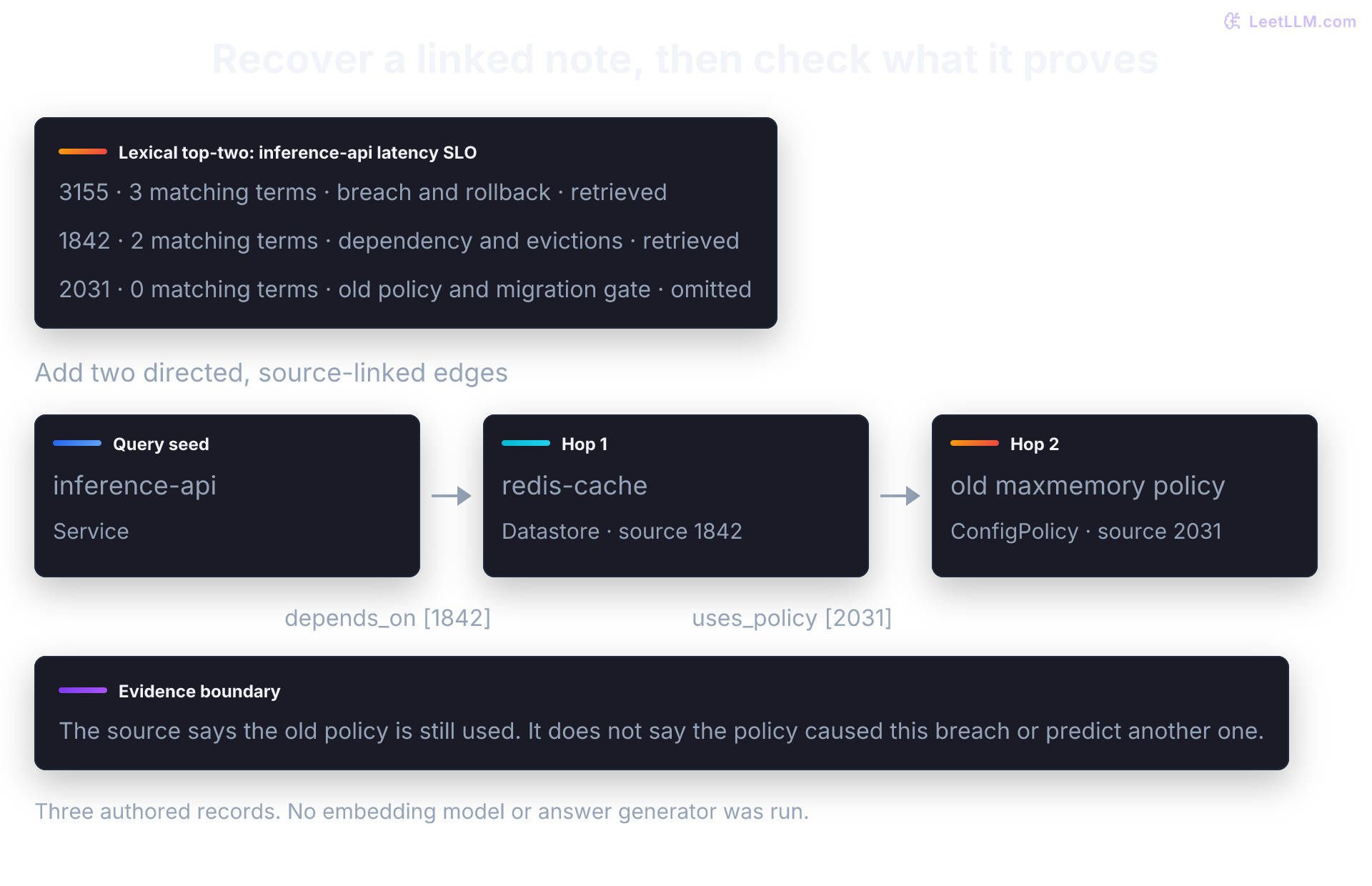
Vector search ranks chunks that resemble the question. A graph index adds entity relationships and summary layers for cases where evidence spans multiple incidents. Standard GraphRAG local search builds ranked mixed context from graph and text artifacts. The small examples below use a custom directed, typed property graph so you can inspect each hop. Microsoft's standard entity graph instead represents relationships with descriptions and weights; it doesn't supply this application-specific traversal contract. If your product needs an explicit path walk, implement that policy and test it.[3][5]
Why small top-k retrieval can be insufficient
The global query problem
Keep those 10,000 incident reports, runbooks, traces, and postmortems as the running corpus. First ask what shape of evidence each question needs.
Local queries (vector search handles well)
For a specific question about one issue, vector search usually earns its keep:
"What is the timeout for the embeddings API?" Retrieval path: top-5 similar documents, then answer from local context. This works because the needed evidence is concentrated in a few chunks.
The question is self-contained. A few chunks about the API contract and runbook contain everything the system needs.
Global queries (small top-k retrieval misses coverage)
For a question that must synthesize across the entire corpus, small top-k vector retrieval runs into a different problem:
"What are the top 3 recurring reasons model-serving incidents breach the latency SLO?" Failure mode: no single chunk contains a cross-corpus summary, and a top-5 result set is unlikely to represent themes across 10,000 documents. The resulting answer can be incomplete or misleading.
Before raising k, predict what changes: coverage may grow, but top-k alone doesn't count every theme. Community reports broaden the evidence considered, yet they also compress and omit details. If "top three" means most frequent, define an incident taxonomy, label and deduplicate incidents, and count them. Report salience scores aren't frequency estimates.
Why similarity-only retrieval struggles
Similarity ranking doesn't guarantee a representative set. Three different failures deserve separate remedies:
- Scattered evidence: Individual write-ups may never state a fleet-wide theme. A summary question needs aggregation across records, not just the passage nearest to its wording.
- Repeated incidents: Near-duplicate gateway reports can occupy several result slots when they rank closest to the query. Nearest-neighbor search follows distance to the query; it doesn't always select the densest cluster. Deduplication and diversity ranking can improve coverage, but don't turn top-k into a statistical sample.
- A limited context budget: Raising can recover missing evidence. It also adds serialized text, with token growth depending on chunk lengths and packing. Long-context models may underuse information in some positions; the "lost in the middle" experiments demonstrate this risk, not an inevitable failure of every large prompt.[6]
Standard GraphRAG moves graph clustering and community summarization offline. Global search then distributes report batches across bounded prompts and reduces their partial answers. This broadens the summary units considered, but extraction and report compression can still omit facts. It neither guarantees complete source coverage nor computes the most frequent causes automatically.[1]
Its additional indexing stages are:
- Entity extraction across the entire corpus
- Relationship modeling between entities
- Community detection to find natural clusters of related information
- Hierarchical summarization at different levels of abstraction
| Feature | Vector Search (Standard RAG) | GraphRAG |
|---|---|---|
| Available artifacts | Ranked text chunks | Text units, entities, relationships, community reports |
| Natural starting point | Specific evidence lookup ("What is X?") | Entity-focused or thematic analysis ("What are the trends?") |
| Context construction | Similarity-ranked chunks | Ranked graph/text context or report map-reduce |
| Indexing work | Embedding and optional sparse index | Additional extraction, clustering, reports, and embeddings |
| Query work | Retrieval plus generation | Depends on search mode; global search adds map-reduce calls |
A concrete multi-hop example
Before naming graph pieces, predict what each route can see. Compare the two approaches on this tiny incident corpus:
Incident 1842: "inference-api depends on redis-cache. Release 2026.06.14 of inference-api ran in us-east-1. Cache evictions and increased p95 latency were observed during the release." Incident 2031: "redis-cache in us-east-1 still uses the old maxmemory policy. The config migration is blocked by a compatibility test." Incident 3155: "inference-api breached the inference latency SLO twelve minutes after deploy. Rollback restored latency."
The decision question is:
"Why did inference-api breach the latency SLO, and is this likely to happen again?"
Suppose a top-two retriever returns Incident 3155 and Incident 1842 but misses Incident 2031. That's an assumed result for comparing evidence paths, not an executed vector-search benchmark. A semantic retriever needn't require the service's exact name. Later, a small lexical baseline makes this particular miss reproducible.
That answer can identify the rollout and cache eviction while missing the unresolved maxmemory policy.
Now add graph structure. Suppose extraction produced these entities and relationships, with source-chunk provenance:
(inference-api) --[ran_in]--> (us-east-1)(inference-api) --[depends_on]--> (redis-cache)(inference-api) --[released_as]--> (release 2026.06.14)(redis-cache) --[located_in]--> (us-east-1)(redis-cache) --[uses_policy]--> (old maxmemory policy)(old maxmemory policy) --[migration_blocked_by]--> (compatibility test)
An evidence-backed traversal can start at inference-api, follow depends_on to redis-cache, and retrieve evidence about both the eviction event and the unresolved maxmemory policy.
It may report the observed latency, cache evictions, dependency, and still-active policy. Those facts justify investigating the cache path, but they don't identify the policy as the cause or estimate the probability of another breach. Even a triggered_by label would remain an extraction claim that needs source support.
This is relationship-heavy retrieval: useful evidence is connected through entities that weren't all present in the query.
Microsoft's standard local-search dataflow ranks graph and text artifacts into a context window; it isn't a promise that every answer executes a deterministic path. If explicit multi-hop paths matter, preserve edge provenance and test the traversal policy. First check a smaller condition: does a proposed path connect, and do its source IDs resolve? This doesn't judge whether the sources entail the edge labels.
from dataclasses import dataclass

@dataclass(frozen=True)
class Edge:
    source: str
    relation: str
    target: str
    source_chunks: tuple[str, ...]

def cited_path(edges: list[Edge], known_chunks: set[str]) -> tuple[bool, list[str]]:
    if not edges or any(not edge.source_chunks for edge in edges):
        return False, []
    if any(left.target != right.source for left, right in zip(edges, edges[1:])):
        return False, []
    if any(chunk not in known_chunks for edge in edges for chunk in edge.source_chunks):
        return False, []
    citations = sorted({chunk for edge in edges for chunk in edge.source_chunks})
    return True, citations

path = [
    Edge("inference-api", "depends_on", "redis-cache", ("incident-1842",)),
    Edge("redis-cache", "uses_policy", "old maxmemory policy", ("incident-2031",)),
]
unsupported_path = path + [
    Edge("old maxmemory policy", "will_cause", "future SLO breach", ()),
]

known_chunks = {"incident-1842", "incident-2031"}
print("connected path with known sources:", cited_path(path, known_chunks))
print("uncited prediction rejected:", cited_path(unsupported_path, known_chunks))
assert not cited_path([], known_chunks)[0]
assert not cited_path(list(reversed(path)), known_chunks)[0]
assert not cited_path([Edge("a", "uses", "b", ("invented",))], known_chunks)[0]connected path with known sources: (True, ['incident-1842', 'incident-2031'])
uncited prediction rejected: (False, [])Entities, edges, and provenance
A knowledge graph represents information as a network of entities (nodes) and relationships (edges). A vector index ranks embeddings; its records can also carry metadata and links. The graph makes selected relationships explicit instead of relying on similarity alone.
The graph's extra value is the connection between facts.
The basic unit is the triple: (Subject) - [Predicate] -> (Object). Edge direction should follow the meaning of the relation, not a generic left-to-right habit.
From our running example:
(inference-api) --[depends_on]--> (redis-cache)(redis-cache) --[uses_policy]--> (old maxmemory policy)(old maxmemory policy) --[migration_blocked_by]--> (compatibility test)
This application uses a property graph rather than bare triples. Nodes and edges carry metadata such as type, description, source_chunk_ids, timestamps, or confidence. RDF-based knowledge graphs can also express provenance; property graphs aren't a requirement for graph-assisted retrieval.
Those fields are what you filter, cite, and rank at query time.
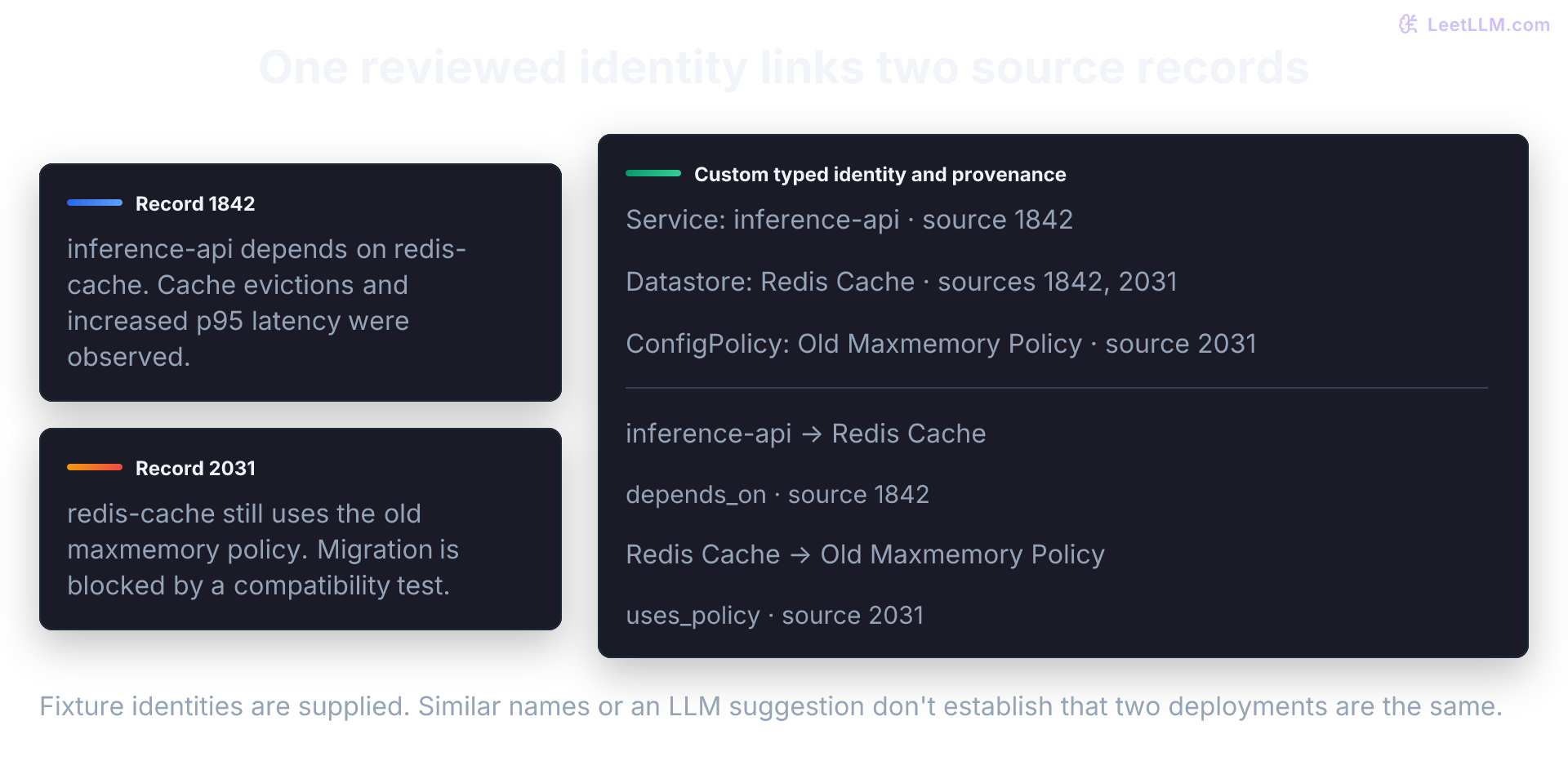
Within this single-environment fixture, use (canonical_title, canonical_type), not a title-only key. A real index also needs stable IDs scoped by tenant, environment, and source identity: even two Service:gateway records may name different services. Keep endpoint types and reviewed aliases, and reject ambiguous or unknown references. Case and whitespace normalization is a declared local convention; stripping punctuation would silently merge names such as a-bc and ab-c.
This graph structure mirrors how an on-call engineer traces an incident. When a query mentions redis-cache, typed relationships and provenance can separate service dependencies, region-specific incidents, config drift, and release side effects.
Service-name similarity alone can't do that.
Graph traversal isn't learned message passing
Following inference-api -> redis-cache -> old maxmemory policy traverses existing relationships and returns their cited source chunks. That lookup doesn't train a model or update a node embedding.
A graph neural network (GNN) adds a separate learned model that combines node features, edges, and usually neighboring information to predict properties such as incident impact or service relevance.[7]
A message-passing neural network (MPNN) makes that distinction concrete: each layer computes messages from neighboring node features, aggregates them, and updates the destination node's learned representation.[8]
Suppose redis-cache and another dependency contribute scalar messages 0.4 and 0.8; mean aggregation produces 0.6, which becomes an input to the next inference-api update. That learned update can help rank candidates, but it doesn't establish source provenance or prove a predicted relationship is true.
Standard GraphRAG can extract entities, follow stored edges, cluster communities, and prepare reports without training either a GNN or an MPNN.
What makes a knowledge graph useful beyond storing triples?
Answer
The graph connects entities through typed relationships and provenance. Retrieval can then follow meaningful paths, filter by metadata, and explain which source chunks support the path.
The GraphRAG pipeline
Phase 1: Graph construction (indexing)
The indexing phase turns raw document chunks into a structured graph index.
Microsoft's default dataflow extracts entities and relationships, optionally extracts claims (covariates), uses entity resolution to identify descriptions of the same object, builds hierarchical communities, generates community reports, and embeds the artifacts used at query time [2][3]:
Step 1: Entity & relationship extraction
Start with one text unit. Standard GraphRAG prompts an LLM to name entities and describe their relationships. Entity types can be tuned to the domain; a prompt's type list isn't an enforced ontology or proof of a clean graph. For this application, choose types such as Service, Datastore, Region, Release, ConfigPolicy, and TestGate, then validate them. Broad extraction can introduce low-information hubs; an overly narrow schema can lose useful connections. FastGraphRAG instead uses NLP noun-phrase extraction and co-occurrence edges, while still using an LLM for reports.[9]
This application-specific prompt proposes directed relation labels and typed endpoints. It isn't Microsoft's default extraction format:
EXTRACTION_PROMPT = """
Extract all entities and relationships from the following text.

Entities should include: services, datastores, regions, releases, config policies, and test gates.
Relationships may include: ran_in, depends_on, released_as, located_in, uses_policy, migration_blocked_by.
Extract only relationships asserted by the text. Preserve negation and uncertainty.
Co-occurrence and temporal order do not establish a dependency or a cause.

Text: {chunk_text}

Output as JSON:
{
  "entities": [
    {"name": "...", "type": "...", "description": "..."}
  ],
  "relationships": [
    {
      "source": "...",
      "source_type": "...",
      "target": "...",
      "target_type": "...",
      "type": "...",
      "description": "...",
      "strength": 1.0
    }
  ]
}
"""
That prompt isn't a parser. Use structured output when supported, or parse and validate the chosen format before indexing. A schema-valid object can still contain an unsupported relationship. Attach the input's source ID outside the model response. This application's contract requires typed entities and typed endpoints: source: "gateway" is ambiguous when both a Service and a Datastore use that title. The {chunk_text} marker is conceptual; if you interpolate this with Python's str.format, escape the literal JSON braces.
Entity resolution needs more than a plausible name match. The original GraphRAG experiments use exact string matching, and the dataflow docs describe merging entities with the same title and type.[1][3] They don't promise to establish that redis-cache, Redis Cache, and redis-prod identify one deployment. An LLM summary of merged descriptions isn't authoritative and can conceal contradictions. Preserve conflicting claims and their dates and sources.
The custom resolver below accepts only supplied aliases and rejects ambiguous references. In production, stable identifiers and reviewed alias rules should establish identity within the tenant and environment before descriptions are combined.
The executable version accepts only two exact fixture texts whose relationships were specified for this example. Changed or unknown text is rejected. Its rules aren't an NLP extractor, and its numeric weights aren't calibrated probabilities. A real extractor needs schema validation plus reviewed tests for negation, uncertain claims, incorrect merges, and missing relationships.
After per-chunk extraction, GraphRAG merges entities that share a title and type, concatenates their descriptions, then asks a model to compress that list into one description per entity and relationship [3]. The merge below does the bookkeeping; the LLM summary is the step you'd swap in later. It uses a typed canonical key, carries endpoint types on every edge, and fails closed when an untyped name matches more than one entity.
from collections import defaultdict
from dataclasses import dataclass, field

@dataclass
class Entity:
    name: str
    type: str
    description: str
    source_chunk_ids: list[int] = field(default_factory=list)
    aliases: list[str] = field(default_factory=list)

@dataclass
class Relationship:
    source: str
    source_type: str
    target: str
    target_type: str
    type: str
    description: str
    confidence: float
    source_chunk_ids: list[int] = field(default_factory=list)

def canonicalize(value: str) -> str:
    normalized = " ".join(value.casefold().split())
    if not normalized:
        raise ValueError("entity names and types must be nonempty")
    return normalized

def entity_key(name: str, entity_type: str) -> tuple[str, str]:
    """Identify an entity by canonical title and canonical type."""
    return canonicalize(name), canonicalize(entity_type)

def extract_from_chunk(chunk_id: int, chunk: str) -> tuple[list[Entity], list[Relationship]]:
    reviewed_texts = {
        1842: "inference-api depends on redis-cache. Release 2026.06.14 of inference-api ran in us-east-1. Cache evictions and increased p95 latency were observed during the release.",
        2031: "redis-cache in us-east-1 still uses the old maxmemory policy. The config migration is blocked by a compatibility test.",
    }
    if reviewed_texts.get(chunk_id) != chunk:
        raise ValueError("unknown or changed fixture text requires relationship review")
    chunk = chunk.casefold()
    entities: list[Entity] = []
    relationships: list[Relationship] = []

    if "inference-api" in chunk:
        entities.append(Entity("inference-api", "Service", "Inference API service", [chunk_id]))
    if "redis-cache" in chunk:
        entities.append(Entity("Redis Cache", "Datastore", "Shared cache dependency", [chunk_id]))
    if "us-east-1" in chunk:
        entities.append(Entity("US East 1", "Region", "Production region", [chunk_id]))
    if "release 2026.06.14" in chunk:
        entities.append(Entity("Release 2026.06.14", "Release", "Inference API deployment", [chunk_id]))
    if "old maxmemory policy" in chunk:
        entities.append(Entity("Old Maxmemory Policy", "ConfigPolicy", "Policy still in use", [chunk_id]))
    if "compatibility test" in chunk:
        entities.append(Entity("Compatibility Test", "TestGate", "Migration-blocking test", [chunk_id]))

    entity_keys = {entity_key(entity.name, entity.type) for entity in entities}
    if {entity_key("inference-api", "Service"), entity_key("Redis Cache", "Datastore")} <= entity_keys:
        relationships.append(
            Relationship(
                source="inference-api", source_type="Service",
                target="Redis Cache", target_type="Datastore",
                type="depends_on", description="Service uses cache",
                confidence=1.0, source_chunk_ids=[chunk_id],
            )
        )
    if {entity_key("inference-api", "Service"), entity_key("US East 1", "Region")} <= entity_keys:
        relationships.append(
            Relationship(
                source="inference-api", source_type="Service",
                target="US East 1", target_type="Region",
                type="ran_in", description="Service ran in region",
                confidence=0.9, source_chunk_ids=[chunk_id],
            )
        )
    if {entity_key("inference-api", "Service"), entity_key("Release 2026.06.14", "Release")} <= entity_keys:
        relationships.append(
            Relationship(
                source="inference-api", source_type="Service",
                target="Release 2026.06.14", target_type="Release",
                type="released_as", description="Service release observed in source",
                confidence=0.8, source_chunk_ids=[chunk_id],
            )
        )
    if chunk_id == 2031 and {entity_key("Redis Cache", "Datastore"), entity_key("US East 1", "Region")} <= entity_keys:
        relationships.append(
            Relationship(
                source="Redis Cache", source_type="Datastore",
                target="US East 1", target_type="Region",
                type="located_in", description="Cache region",
                confidence=0.8, source_chunk_ids=[chunk_id],
            )
        )
    if {entity_key("Redis Cache", "Datastore"), entity_key("Old Maxmemory Policy", "ConfigPolicy")} <= entity_keys:
        relationships.append(
            Relationship(
                source="Redis Cache", source_type="Datastore",
                target="Old Maxmemory Policy", target_type="ConfigPolicy",
                type="uses_policy", description="Cache still uses the old policy",
                confidence=0.8, source_chunk_ids=[chunk_id],
            )
        )
    if {entity_key("Old Maxmemory Policy", "ConfigPolicy"), entity_key("Compatibility Test", "TestGate")} <= entity_keys:
        relationships.append(
            Relationship(
                source="Old Maxmemory Policy", source_type="ConfigPolicy",
                target="Compatibility Test", target_type="TestGate",
                type="migration_blocked_by", description="Migration from this policy is blocked by the test",
                confidence=0.7, source_chunk_ids=[chunk_id],
            )
        )

    return entities, relationships

def deduplicate_entities(entities: list[Entity]) -> list[Entity]:
    merged: dict[tuple[str, str], Entity] = {}
    for entity in entities:
        key = entity_key(entity.name, entity.type)
        if key not in merged:
            merged[key] = Entity(
                name=entity.name,
                type=entity.type,
                description=entity.description,
                source_chunk_ids=sorted(set(entity.source_chunk_ids)),
                aliases=list(entity.aliases),
            )
            continue
        existing = merged[key]
        existing.source_chunk_ids = sorted(set(existing.source_chunk_ids + entity.source_chunk_ids))
        existing.aliases = sorted(set(existing.aliases + entity.aliases))
        if entity.name != existing.name and entity.name not in existing.aliases:
            existing.aliases.append(entity.name)
        if entity.description not in existing.description:
            existing.description = f"{existing.description}; {entity.description}"
    return [merged[key] for key in sorted(merged)]

def index_entities(
    entities: list[Entity],
) -> tuple[dict[tuple[str, str], Entity], dict[str, list[Entity]]]:
    by_key = {entity_key(entity.name, entity.type): entity for entity in entities}
    if len(by_key) != len(entities):
        raise ValueError("deduplicate identities before resolving references")
    by_name: dict[str, dict[tuple[str, str], Entity]] = defaultdict(dict)
    for entity in entities:
        key = entity_key(entity.name, entity.type)
        by_name[canonicalize(entity.name)][key] = entity
        for alias in entity.aliases:
            by_name[canonicalize(alias)][key] = entity
    return by_key, {name: list(candidates.values()) for name, candidates in by_name.items()}

def resolve_entity(
    name: str,
    entity_type: str | None,
    by_key: dict[tuple[str, str], Entity],
    by_name: dict[str, list[Entity]],
) -> Entity:
    """Resolve a typed reference, or reject an ambiguous untyped reference."""
    if entity_type:
        candidates = [candidate for candidate in by_name.get(canonicalize(name), [])
                      if canonicalize(candidate.type) == canonicalize(entity_type)]
        if len(candidates) != 1:
            raise ValueError(f"Unknown or ambiguous typed entity: {name!r} ({entity_type})")
        return candidates[0]

    candidates = by_name.get(canonicalize(name), [])
    if not candidates:
        raise ValueError(f"Unknown entity reference: {name!r}")
    if len(candidates) > 1:
        candidate_types = ", ".join(sorted({candidate.type for candidate in candidates}))
        raise ValueError(
            f"Ambiguous entity reference {name!r}; endpoint type required ({candidate_types})"
        )
    return candidates[0]

def resolve_relationships(
    relationships: list[Relationship],
    entities: list[Entity],
) -> list[Relationship]:
    """Resolve both endpoints by typed identity and merge duplicate edges."""
    by_key, by_name = index_entities(entities)
    merged: dict[tuple[tuple[str, str], tuple[str, str], str], Relationship] = {}
    for relationship in relationships:
        source = resolve_entity(relationship.source, relationship.source_type, by_key, by_name)
        target = resolve_entity(relationship.target, relationship.target_type, by_key, by_name)
        edge_key = (
            entity_key(source.name, source.type),
            entity_key(target.name, target.type),
            canonicalize(relationship.type),
        )
        resolved = Relationship(
            source=source.name,
            source_type=source.type,
            target=target.name,
            target_type=target.type,
            type=relationship.type,
            description=relationship.description,
            confidence=relationship.confidence,
            source_chunk_ids=sorted(set(relationship.source_chunk_ids)),
        )
        if edge_key not in merged:
            merged[edge_key] = resolved
            continue
        existing = merged[edge_key]
        existing.source_chunk_ids = sorted(
            set(existing.source_chunk_ids + resolved.source_chunk_ids)
        )
        existing.confidence = max(existing.confidence, resolved.confidence)
        if resolved.description not in existing.description:
            existing.description = f"{existing.description}; {resolved.description}"
    return [merged[key] for key in sorted(merged)]

def extract_graph_elements(chunks: dict[int, str]) -> tuple[list[Entity], list[Relationship]]:
    all_entities: list[Entity] = []
    all_relationships: list[Relationship] = []

    for chunk_id, chunk in chunks.items():
        entities, relationships = extract_from_chunk(chunk_id, chunk)
        all_entities.extend(entities)
        all_relationships.extend(relationships)

    deduped_entities = deduplicate_entities(all_entities)
    return deduped_entities, resolve_relationships(all_relationships, deduped_entities)

chunks = {
    1842: "inference-api depends on redis-cache. Release 2026.06.14 of inference-api ran in us-east-1. Cache evictions and increased p95 latency were observed during the release.",
    2031: "redis-cache in us-east-1 still uses the old maxmemory policy. The config migration is blocked by a compatibility test.",
}

entities, relationships = extract_graph_elements(chunks)
relationship_types = {rel.type for rel in relationships}

print(
    "entity identities:",
    ", ".join(sorted(f"{entity.type}:{entity.name}" for entity in entities)),
)
print("relationships:", ", ".join(sorted(relationship_types)))
print(
    "resolved edges:",
    ", ".join(
        sorted(f"{rel.source} -[{rel.type}]-> {rel.target}" for rel in relationships)
    ),
)

ambiguous_entities = deduplicate_entities(
    [
        Entity("gateway", "Service", "API gateway", [8]),
        Entity("gateway", "Datastore", "Gateway state store", [9]),
    ]
)
try:
    resolve_relationships(
        [
            Relationship(
                source="gateway",
                source_type="",
                target="gateway",
                target_type="Service",
                type="depends_on",
                description="Untrusted untyped source",
                confidence=0.5,
                source_chunk_ids=[10],
            )
        ],
        ambiguous_entities,
    )
except ValueError as error:
print("ambiguous endpoint rejected:", error)entity identities: ConfigPolicy:Old Maxmemory Policy, Datastore:Redis Cache, Region:US East 1, Release:Release 2026.06.14, Service:inference-api, TestGate:Compatibility Test
relationships: depends_on, located_in, migration_blocked_by, ran_in, released_as, uses_policy
resolved edges: Old Maxmemory Policy -[migration_blocked_by]-> Compatibility Test, Redis Cache -[located_in]-> US East 1, Redis Cache -[uses_policy]-> Old Maxmemory Policy, inference-api -[depends_on]-> Redis Cache, inference-api -[ran_in]-> US East 1, inference-api -[released_as]-> Release 2026.06.14
ambiguous endpoint rejected: Ambiguous entity reference 'gateway'; endpoint type required (Datastore, Service)Why should extracted relationships store source chunk IDs and endpoint types?
Answer
Graph paths still need evidence and unambiguous endpoints. Source chunk IDs let the answer cite the text that produced each edge, while endpoint types let the resolver distinguish same-titled entities such as a Service and a Datastore. If an edge omits a type and the title has multiple candidates, reject the edge instead of guessing.
Step 2: Build the knowledge graph
In this custom application, store the resolved elements as a directed property graph. Nodes hold type and description; edges hold relation type, weight, and source chunk IDs.
Later retrieval can follow relationships that never appeared together in one chunk.
The next function builds a small adjacency structure. It keeps typed canonical IDs internally and uses display names only when printing. Microsoft GraphRAG also stores structured artifacts in tables; its relationship schema and context policy differ from this sketch.[10]
from collections import defaultdict
from dataclasses import dataclass, field

@dataclass
class Entity:
    name: str
    type: str
    description: str
    source_chunk_ids: list[int] = field(default_factory=list)

@dataclass
class Relationship:
    source: str
    source_type: str
    target: str
    target_type: str
    type: str
    description: str
    confidence: float
    source_chunk_ids: list[int] = field(default_factory=list)

def canonicalize(value: str) -> str:
    normalized = " ".join(value.casefold().split())
    if not normalized:
        raise ValueError("entity names and types must be nonempty")
    return normalized

def entity_key(name: str, entity_type: str) -> tuple[str, str]:
    return canonicalize(name), canonicalize(entity_type)

def build_knowledge_graph(
    entities: list[Entity],
    relationships: list[Relationship],
) -> dict:
    """Store a directed property graph as nodes plus typed outbound edges."""
    nodes = {
        entity_key(entity.name, entity.type): {
            "name": entity.name,
            "type": entity.type,
            "description": entity.description,
            "source_chunk_ids": entity.source_chunk_ids,
        }
        for entity in entities
    }
    out_edges: dict[tuple[str, str], list[dict]] = defaultdict(list)
    if len(nodes) != len(entities):
        raise ValueError("deduplicate reviewed identities before graph construction")
    for rel in relationships:
        source_key = entity_key(rel.source, rel.source_type)
        target_key = entity_key(rel.target, rel.target_type)
        if not rel.source_chunk_ids:
            raise ValueError("edge has no source provenance")
        if source_key not in nodes or target_key not in nodes:
            raise ValueError(f"relationship references unknown entity: {rel.source} -> {rel.target}")
        out_edges[source_key].append(
            {
                "target": target_key,
                "type": rel.type,
                "description": rel.description,
                "weight": rel.confidence,
                "source_chunk_ids": rel.source_chunk_ids,
            }
        )
    return {"nodes": nodes, "out_edges": dict(out_edges)}

entities = [
    Entity("inference-api", "Service", "Inference API service", [0]),
    Entity("Redis Cache", "Datastore", "Shared cache dependency", [0]),
    Entity("US East 1", "Region", "Production region", [0, 1]),
]
relationships = [
    Relationship(
        "inference-api", "Service", "Redis Cache", "Datastore",
        "depends_on", "Service uses cache", 1.0, [0]
    ),
    Relationship(
        "inference-api", "Service", "US East 1", "Region",
        "ran_in", "Service ran in region", 0.9, [0]
    ),
]

graph = build_knowledge_graph(entities, relationships)
edge_tuples = sorted(
    (graph["nodes"][source]["name"], edge["type"], graph["nodes"][edge["target"]]["name"])
    for source, edges in graph["out_edges"].items()
    for edge in edges
)
depends_on = next(
    edge["weight"]
    for edge in graph["out_edges"][entity_key("inference-api", "Service")]
    if edge["type"] == "depends_on"
)

print("nodes:", sorted(node["name"] for node in graph["nodes"].values()))
print("edges:", edge_tuples)
print("US East 1 node type:", graph["nodes"][entity_key("US East 1", "Region")]["type"])
print("depends_on weight:", depends_on)nodes: ['Redis Cache', 'US East 1', 'inference-api']
edges: [('inference-api', 'depends_on', 'Redis Cache'), ('inference-api', 'ran_in', 'US East 1')]
US East 1 node type: Region
depends_on weight: 1.0Step 3: Community detection (Leiden algorithm)
For this custom graph, one possible clustering input is an undirected projection. Retain the original directed records for retrieval rather than trying to reconstruct their types afterward. Microsoft's clustering code normalizes endpoint direction, deduplicates edge pairs, and passes weights to hierarchical Leiden; its optional largest-connected-component filter can omit smaller components.[11]
Clusters can suggest operational themes such as cache pressure versus eval harness flakiness. They depend on extracted topology and weights, not a test that members share a root cause.
Leiden addresses a defect of Louvain: moving a bridge node can leave an internally disconnected community. Leiden adds a refinement phase and guarantees connected communities under the paper's assumptions. Stronger guarantees require iteration; connectedness doesn't establish shared meaning or prevent a summarizer from inventing connections.[12]
Leiden can optimize different objectives, including modularity and the Constant Potts Model.[12] Microsoft's inspected wrapper chooses modularity with resolution 1.0.[13] Modularity compares within-community adjacency against a degree-based null model; a high score isn't a semantic quality or extraction-accuracy score.
For a simple, unweighted, undirected graph with and resolution 1:
Breaking down each term reveals the intuition:
- is the actual adjacency matrix entry (1 if an edge connects nodes and , and 0 otherwise).
- and are the degrees of nodes and .
- is the total number of undirected edges ( is the sum of all node degrees).
- is the null model's expected adjacency contribution. It can exceed 1, so it isn't a probability of an edge in a simple graph.
- is the Kronecker delta (1 if nodes and belong to the same community, 0 otherwise).
Each same-community pair contributes a surplus or deficit. requires a positive total, not one pair exceeding expectation. Putting all nodes in one community gives for this definition.
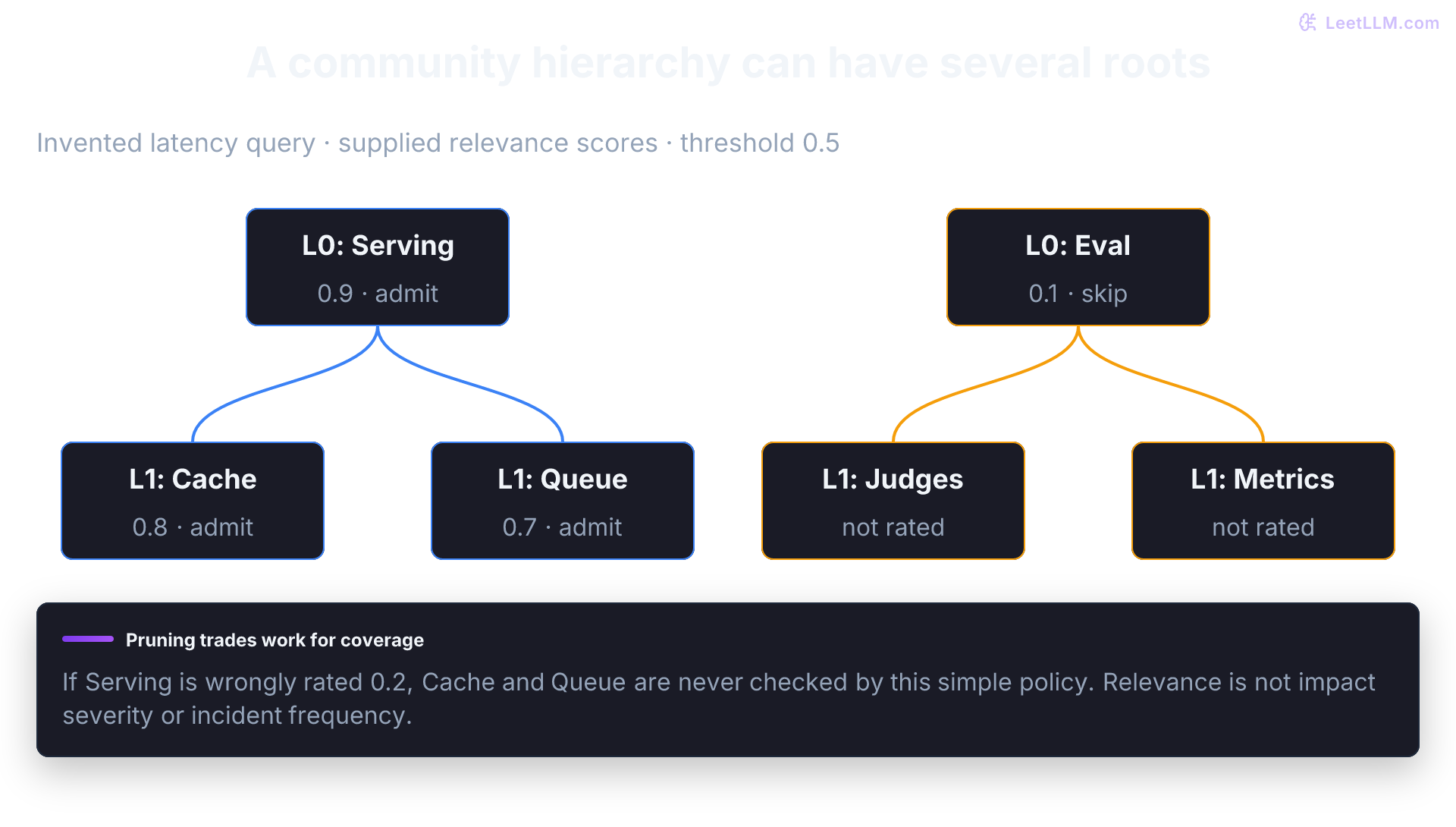
Microsoft's hierarchical Leiden flow recursively splits communities toward a configured size threshold.[3] Don't confuse those recursive subdivisions with the aggregation phase inside a Leiden run. The hierarchy is a forest: Level 0 can contain several communities, and branches needn't reach the same depth. The original paper reports 34 Level-0 communities for its podcast corpus and 55 for its news corpus, not one all-corpus root.[1]
In an invented example, Level 0 might contain Serving & Latency and Quality & Tooling. A split of Serving & Latency could create Level-1 Cache and Queue communities. Those names and boundaries must be inferred and reviewed, not assumed from the level number.
What does high modularity mean in a GraphRAG entity graph?
Answer
Entities inside the same community connect more densely than random chance would predict in the extracted graph. Validate the entity and edge evidence before treating that cluster as a real topic.
Score two candidate partitions of the same undirected graph. The cache group contains five of six edges; the separate eval pair contains one. With no cross-group edge, their contributions are 5/6 - (10/12)^2 and 1/6 - (2/12)^2, totaling about 0.278. These two groups were chosen by hand. The code evaluates modularity; it doesn't run Leiden, find an optimum, or generate a hierarchy.
from collections import defaultdict

def modularity(
    nodes: list[str],
    undirected_edges: list[tuple[str, str]],
    community: dict[str, str],
) -> float:
    """Newman modularity Q for an unweighted undirected graph."""
    if len(set(nodes)) != len(nodes) or set(community) != set(nodes):
        raise ValueError("unique nodes and one community label per node are required")
    if not undirected_edges:
        raise ValueError("modularity is undefined for a graph with no edges")
    seen = set()
    adjacency: dict[str, set[str]] = defaultdict(set)
    degree: dict[str, int] = {node: 0 for node in nodes}
    for source, target in undirected_edges:
        edge = frozenset((source, target))
        if source not in degree or target not in degree or source == target or edge in seen:
            raise ValueError("expected a simple graph: known endpoints, no loops or duplicate edges")
        seen.add(edge)
        adjacency[source].add(target)
        adjacency[target].add(source)
        degree[source] += 1
        degree[target] += 1
    two_m = 2 * len(undirected_edges)
    total = 0.0
    for i in nodes:
        for j in nodes:
            if community[i] != community[j]:
                continue
            a_ij = 1.0 if j in adjacency[i] else 0.0
            total += a_ij - (degree[i] * degree[j]) / two_m
    return total / two_m

nodes = [
    "inference-api",
    "redis-cache",
    "us-east-1",
    "old-maxmemory",
    "compatibility-test",
    "eval-harness",
    "flaky-judge",
]
edges = [
    ("inference-api", "redis-cache"),
    ("inference-api", "us-east-1"),
    ("redis-cache", "us-east-1"),
    ("redis-cache", "old-maxmemory"),
    ("old-maxmemory", "compatibility-test"),
    ("eval-harness", "flaky-judge"),
]
one_bucket = {node: "all" for node in nodes}
split = {
    "inference-api": "cache",
    "redis-cache": "cache",
    "us-east-1": "cache",
    "old-maxmemory": "cache",
    "compatibility-test": "cache",
    "eval-harness": "eval",
    "flaky-judge": "eval",
}

print("one community Q:", round(modularity(nodes, edges, one_bucket), 3))
print("cache vs eval Q:", round(modularity(nodes, edges, split), 3))one community Q: 0.0
cache vs eval Q: 0.278Hierarchical clustering creates nested groups, which can be summarized at several levels. Static global search uses reports at a chosen level. Dynamic community selection rates branches and descends selectively, skipping branches irrelevant to the user's question.
Step 4: Community summarization
Eligible communities become precomputed Community Reports. The inspected default prompt requests a descriptive title, summary, findings, a 0–10 impact severity rating, and a rating explanation.[14] The title is generated prose, not a canonical entity ID. Findings refer to supplied entity, relationship, and claim record IDs; resolve those records back to their text units before verifying source support.
The rating is a prompt-defined model judgment of impact or importance. It isn't calibrated outage severity, probability of recurrence, query relevance, or an incident count. A high-impact security community may be irrelevant to a latency query. Conversely, a low-impact configuration note may contain the exact evidence needed.
These precomputed reports become first-class retrieval artifacts. At query time, Global Search maps over these reports rather than digging through thousands of raw document chunks. The adapter below lists supplied evidence lines to illustrate the interface. Replacing it with an LLM summarizer requires verifying that every generated claim preserves its source chunk citations.
from dataclasses import dataclass
from typing import Protocol

@dataclass(frozen=True)
class Entity:
    name: str
    description: str
    source_chunk_ids: tuple[int, ...]

@dataclass(frozen=True)
class Relationship:
    source: str
    type: str
    target: str
    source_chunk_ids: tuple[int, ...]

class CommunitySummarizer(Protocol):
    def summarize(self, prompt: str) -> str: ...

class EvidenceListingSummarizer:
    def summarize(self, prompt: str) -> str:
        return "\n".join(line for line in prompt.splitlines() if line.startswith("- "))

def summarize_community(
    community_entities: list[Entity],
    community_relationships: list[Relationship],
    level: int,
    summarizer: CommunitySummarizer,
) -> str:
    if (not community_entities or not community_relationships
        or any(not entity.source_chunk_ids for entity in community_entities)
        or any(not rel.source_chunk_ids for rel in community_relationships)):
        raise ValueError("report requires source-linked entity and relationship evidence")
    entity_lines = "\n".join(
        f"- {entity.name}: {entity.description} [chunks: {entity.source_chunk_ids}]"
        for entity in community_entities
    )
    relationship_lines = "\n".join(
        f"- {rel.source} {rel.type} {rel.target} [chunks: {rel.source_chunk_ids}]"
        for rel in community_relationships
    )
    prompt = (
        f"Community level: {level}\n"
        f"Entities:\n{entity_lines}\n"
        f"Relationships:\n{relationship_lines}\n"
        "Summarize the main operational pattern."
    )
    return summarizer.summarize(prompt)

summary = summarize_community(
    [Entity("Redis Cache", "Cache in us-east-1", (2031,))],
    [Relationship("Redis Cache", "uses_policy", "Old Maxmemory Policy", (2031,))],
    level=0,
    summarizer=EvidenceListingSummarizer(),
)

print(summary)- Redis Cache: Cache in us-east-1 [chunks: (2031,)]
- Redis Cache uses_policy Old Maxmemory Policy [chunks: (2031,)]Authorization continuity for graph artifacts
Community reports aggregate dozens or hundreds of text units into a single summary. This creates a critical security risk: indirect information leakage. If any single text unit in that community is restricted, a global-search answer that synthesizes the report can leak confidential facts to callers who lack permission to read the original document, even when chunk-level vector search enforces strict access control lists (ACLs).
Suppose three text units land in one Leiden community:
| Text unit | ACL | Fact in unit |
|---|---|---|
tu-public-slo | all-staff | p95 latency SLO is 200 ms |
tu-security-key | security-only | production key rotation requires break-glass approval |
tu-public-runbook | all-staff | restart cache before scale-out |
An offline report over all three chunks can include the restricted key-rotation requirement. If global search admits that report for an unauthorized caller, the protected information has entered model context even though leaf retrieval blocked tu-security-key. Whether the final answer repeats it doesn't repair that access violation.
Admit a derived report only when the caller can read every contributing source at its current version. Sources may have different ACLs; a caller authorized for all of them can read the combined report. The report's permitted audience is their intersection, not their union. Output scrubbing cannot repair admitting an unauthorized source.
These are deployment controls to add and verify, not built-in authorization guarantees of the reference examples. Carry access grants through every tier of the graph index:
- Text units: Every chunk maintains tenant and principal ACL metadata (the standard contract for enterprise RAG).
- Entities and edges: Authorize the exact evidence used to construct each returned node description and relationship. A public endpoint doesn't make a restricted edge public. Similarly, an authorized fact about an entity doesn't grant access to descriptions merged from restricted documents.
- Community reports: Reject reports with any contributing source the caller cannot read. To serve different audiences, choose and evaluate a conservative pattern:
- Equivalence-class partitioning: Build separate community hierarchies and reports strictly within homogeneous ACL boundaries (e.g. an
all-staffreport built exclusively fromall-staffchunks). - Per-principal dynamic recomputation: At query time, filter the caller's authorized text units and generate community summaries on the fly from that permitted subset.
- Fail-closed drop with local fallback: Drop any community report that contains one or more unauthorized source units from the map-reduce pool. If too many reports are dropped, fall back to local entity search over authorized nodes.
- Equivalence-class partitioning: Build separate community hierarchies and reports strictly within homogeneous ACL boundaries (e.g. an
- Cascading revocation and deletion: Block dependent graph artifacts and cached contexts as soon as a source version or permission changes. Check current versions and grants on reads, then rebuild affected artifacts asynchronously. Track transitive dependencies through child reports too. A stale report must remain unreadable while rebuilding; asynchronous regeneration isn't permission to keep serving it.
The next lesson, RAG Security & Access Control, deepens prefilter vs post-filter vector search and operationalizes graph-artifact authorization. All graph retrieval modes require the same fail-closed principle: authz before map-reduce, not after the summary is already written into context.
Why can community reports leak data even when vector search is ACL-aware?
Answer
A summary can carry restricted facts without retrieving the original chunk at query time. Check every contributing source before admitting it. Mixed ACL labels aren't themselves a denial condition; the caller must have all required permissions.
Phase 2: Query processing (runtime)
At runtime, GraphRAG exposes Basic Search, Local Search, Global Search, and DRIFT Search. Local search builds mixed context for entity-centric questions, while global search synthesizes over community reports.
Basic Search is a text-unit vector baseline. DRIFT (Dynamic Reasoning and Inference with Flexible Traversal) starts from community reports, then uses local-search follow-ups [5][15][16].
Local search (specific questions)
Local search isn't just named-entity matching plus one-hop neighbors. In Microsoft's docs, it maps the query into semantically related entities first.
It then ranks a mixed context from connected entities, relationships, community reports, linked text units, and optionally covariates if claim extraction is on [5].
The runnable example below is a bounded neighborhood walk for intuition. For the incident question, predict that two hops from inference-api reach Redis Cache and Old Maxmemory Policy. The walk expands candidates; ranking and provenance still decide what enters context. It isn't a copy of GraphRAG's context builder or ranking policy:
class EntityStore:
    def __init__(self, entity_names: list[str]) -> None:
        self.entity_names = entity_names

    def exact_name_matches(self, query: str, k: int = 10) -> list[str]:
        if type(k) is not int or k < 0:
            raise ValueError("k must be a nonnegative integer")
        query_lower = query.lower()
        matches = [
            entity for entity in self.entity_names if entity.lower() in query_lower
        ]
        return matches[:k]

def neighbors(graph: dict, node: str) -> set[str]:
    names = {edge["target"] for edge in graph["out_edges"].get(node, [])}
    for source, edges in graph["out_edges"].items():
        for edge in edges:
            if edge["target"] == node:
                names.add(source)
    return names

def expand_entity_neighborhood(graph: dict, entity_names: list[str], hops: int = 1) -> set[str]:
    if type(hops) is not int or hops < 0:
        raise ValueError("hops must be a nonnegative integer")
    nodes: set[str] = set(entity_names)
    frontier: set[str] = set(entity_names)
    for _ in range(hops):
        next_frontier: set[str] = set()
        for node in frontier:
            next_frontier.update(neighbors(graph, node))
        frontier = next_frontier - nodes
        nodes.update(frontier)
    return nodes

def collect_relationships(graph: dict, nodes: set[str]) -> list[tuple[str, str, str]]:
    return sorted(
        (source, edge["type"], edge["target"])
        for source, edges in graph["out_edges"].items()
        if source in nodes
        for edge in edges
        if edge["target"] in nodes
    )

def local_search(
    query: str,
    entity_store: EntityStore,
    graph: dict,
    text_units: dict[str, list[str]],
    community_reports: dict[str, list[str]],
) -> str:
    mapped_entities = entity_store.exact_name_matches(query, k=10)
    neighborhood_entities = sorted(expand_entity_neighborhood(graph, mapped_entities, hops=2))
    relationships = collect_relationships(graph, set(neighborhood_entities))
    context = "\n".join(
        [
            f"Entities: {neighborhood_entities}",
            f"Relationships: {relationships}",
            f"Text units: { {entity: text_units.get(entity, []) for entity in neighborhood_entities} }",
            f"Reports: { {entity: community_reports.get(entity, []) for entity in neighborhood_entities} }",
        ]
    )
    return f"Candidate context only (no generated answer):\n{context}"

graph = {
    "out_edges": {
        "inference-api": [{"target": "Redis Cache", "type": "depends_on"}],
        "Redis Cache": [{"target": "Old Maxmemory Policy", "type": "uses_policy"}],
    }
}

answer = local_search(
    "Why did inference-api breach the latency SLO?",
    EntityStore(["inference-api", "Redis Cache", "Old Maxmemory Policy"]),
    graph,
    text_units={"inference-api": ["inference-api breached the latency SLO after release 2026.06.14."]},
    community_reports={"Redis Cache": ["The cache still uses the old maxmemory policy; migration is blocked."]},
)

print(answer)Candidate context only (no generated answer):
Entities: ['Old Maxmemory Policy', 'Redis Cache', 'inference-api']
Relationships: [('Redis Cache', 'uses_policy', 'Old Maxmemory Policy'), ('inference-api', 'depends_on', 'Redis Cache')]
Text units: {'Old Maxmemory Policy': [], 'Redis Cache': [], 'inference-api': ['inference-api breached the latency SLO after release 2026.06.14.']}
Reports: {'Old Maxmemory Policy': [], 'Redis Cache': ['The cache still uses the old maxmemory policy; migration is blocked.'], 'inference-api': []}This name matcher isn't semantic search. Its neighborhood function considers incoming and outgoing edges for candidate discovery while retaining each relation's original direction. The printed string is context, not an answer, and this isolated sketch has no ACL or source-content checks. The integrated exercise below adds those controls.
The actual context-builder problem includes a token budget: entities, relationships, text units, and reports compete for room. The next greedy packer uses hypothetical scores and token counts. It doesn't optimize total utility; count the fully serialized context with the target tokenizer and reserve instructions, query, and output space separately.
from dataclasses import dataclass
import math

@dataclass(frozen=True)
class Candidate:
    source: str
    score: float
    tokens: int
    citation: str

def pack_context(candidates: list[Candidate], token_budget: int) -> list[Candidate]:
    if type(token_budget) is not int or token_budget < 0:
        raise ValueError("budget must be a nonnegative integer")
    if len({item.source for item in candidates}) != len(candidates):
        raise ValueError("deduplicate candidate identities before packing")
    if any(type(item.tokens) is not int or item.tokens <= 0 or not item.citation
           or not math.isfinite(item.score) for item in candidates):
        raise ValueError("candidates need positive token counts, finite scores, and citations")
    selected: list[Candidate] = []
    used = 0
    for candidate in sorted(candidates, key=lambda item: item.score, reverse=True):
        if used + candidate.tokens <= token_budget:
            selected.append(candidate)
            used += candidate.tokens
    return selected

candidates = [
    Candidate("relationship: depends_on", 0.98, 30, "incident-1842"),
    Candidate("text: maxmemory issue", 0.91, 55, "incident-2031"),
    Candidate("report: cache overview", 0.62, 80, "community-7"),
]
selected = pack_context(candidates, token_budget=90)

print("selected:", [item.source for item in selected])
print("citations:", [item.citation for item in selected])
print("tokens:", sum(item.tokens for item in selected))selected: ['relationship: depends_on', 'text: maxmemory issue']
citations: ['incident-1842', 'incident-2031']
tokens: 85Global search (broad questions)
For questions that need cross-corpus coverage, GraphRAG uses a map-reduce over community reports at a chosen hierarchy level. The docs batch reports and produce rated intermediate points during map.
Map calls process separate report batches; reduce then selects rated points across those batches for the final answer. A point's rating is a relevance judgment, not an incident count or proof that its claim is true.[1][15]
The next synthetic fixture adds four report strings to expose map and reduce mechanics. A keyword rule assigns fixed ratings, and ties preserve input order. This is neither LLM summarization nor a ranking by incident frequency. It selects up to three matching reports and retains their report IDs; those IDs still need source-level provenance in a real index.
from dataclasses import dataclass

@dataclass(frozen=True)
class RatedPoint:
    text: str
    rating: int
    report_id: str

def batch_reports(reports: list[tuple[str, str]], batch_size: int = 2) -> list[list[tuple[str, str]]]:
    if type(batch_size) is not int or batch_size <= 0:
        raise ValueError("batch_size must be a positive integer")
    return [reports[index:index + batch_size] for index in range(0, len(reports), batch_size)]

def map_report_batch(query: str, report_batch: list[tuple[str, str]]) -> list[RatedPoint]:
    points: list[RatedPoint] = []
    query_lower = query.lower()
    asks_about_latency = any(term in query_lower for term in ("latency", "slo", "miss", "delay"))
    for report_id, report in report_batch:
        report_lower = report.lower()
        if asks_about_latency and any(term in report_lower for term in ("latency", "slo", "queue", "eviction")):
            points.append(RatedPoint(report, rating=9, report_id=report_id))
        elif "security" in query_lower and "credential" in report_lower:
            points.append(RatedPoint(report, rating=6, report_id=report_id))
    return points

def select_top_points(points: list[RatedPoint], top_k: int) -> list[RatedPoint]:
    if type(top_k) is not int or top_k < 0:
        raise ValueError("top_k must be a nonnegative integer")
    return sorted(points, key=lambda point: point.rating, reverse=True)[:top_k]

def global_search(
    query: str,
    reports_by_level: dict[int, list[tuple[str, str]]],
    level: int,
) -> str:
    """Select report-level candidates; no semantic synthesis is performed."""
    batches = batch_reports(reports_by_level[level], batch_size=2)
    mapped_points = [
        point
        for batch in batches
        for point in map_report_batch(query, batch)
    ]
    top_points = select_top_points(mapped_points, top_k=3)
    bullets = "\n".join(f"- [{point.report_id}] {point.text}" for point in top_points)
    return f"Selected synthetic report points for '{query}':\n{bullets or '(none)'}"

reports_by_level = {
    1: [
        ("report-cache", "Latency breaches cluster around cache eviction storms."),
        ("report-queue", "GPU queue starvation delays batch inference jobs."),
        ("report-eval", "Evaluation failures cluster around flaky judge prompts."),
        ("report-config", "SLO breaches recur after cache config drift."),
    ]
}

answer = global_search(
    "What are the main reasons services miss the latency SLO?",
    reports_by_level,
    level=1,
)

print(answer)Selected synthetic report points for 'What are the main reasons services miss the latency SLO?':
- [report-cache] Latency breaches cluster around cache eviction storms.
- [report-queue] GPU queue starvation delays batch inference jobs.
- [report-config] SLO breaches recur after cache config drift.The level argument exposes a cost choice. Static global search builds token-bounded batches of eligible reports at the chosen level and runs map calls over those batches. Fifty reports don't imply fifty calls: packing, filtering, report lengths, and configured limits determine the batch count. Parallelism affects elapsed time, not the total number of billed calls.[17]
Dynamic community selection rates reports against the query before map-reduce. It starts with the Level-0 communities, explores children of admitted communities, and can exclude irrelevant branches.[18][19] In the illustrated latency example, Serving passes and its Cache and Queue children are rated; Eval fails and its children are skipped. These are supplied judgments, not conclusions from an executed model.
Predict the cost and recall consequence before running this custom policy. It admits only relevant leaf reports and has no recovery pass. Microsoft's selector has additional behavior, including a fallback when no relevant community is found; this cell isolates the pruning risk rather than copying that implementation.
import math

roots = ["serving", "eval"]
children = {
    "serving": ["cache", "queue"],
    "eval": ["judges", "metrics"],
}

def select_leaf_reports(scores, threshold=0.5):
    if not math.isfinite(threshold) or not 0 <= threshold <= 1:
        raise ValueError("invalid threshold")
    visited, selected = [], []

    def visit(report):
        score = scores[report]
        if not math.isfinite(score) or not 0 <= score <= 1:
            raise ValueError("invalid authored relevance score")
        visited.append(report)
        if score < threshold:
            return
        descendants = children.get(report, [])
        if not descendants:
            selected.append(report)
        for child in descendants:
            visit(child)

    for root in roots:
        visit(root)
    return visited, selected

# Authored query-relevance inputs, not calibrated probabilities or severity.
scores = {"serving": 0.9, "eval": 0.1, "cache": 0.8, "queue": 0.7}
visited, selected = select_leaf_reports(scores)
print("rated:", visited)
print("selected:", selected)

missed_parent = dict(scores, serving=0.2)
visited, selected = select_leaf_reports(missed_parent)
assert "cache" not in visited and scores["cache"] >= 0.5
print("parent false negative:", visited, "selected:", selected)rated: ['serving', 'cache', 'queue', 'eval']
selected: ['cache', 'queue']
parent false negative: ['serving', 'eval'] selected: []Microsoft's November 15, 2024 AP News experiment reports 77% lower average token cost for dynamic versus static Level-1 search on 50 global questions. The LLM-judge comparisons found no statistically significant difference on the reported quality criteria; this isn't a proof of equivalent factual accuracy.[18]
The deeper Level-3 comparison used the 29 of 50 questions for which it included more reports than static Level 1. Table 1 reports a 58.8% comprehensiveness win rate on that subset and 34% higher average cost. Neither result is a fixed saving for this incident example or an unbiased all-question estimate of deeper-search quality.[18]
Rating calls also cost tokens and time. Measure saved map work and missed evidence together: an inexpensive false negative at a parent can conceal a useful descendant.
DRIFT search
DRIFT (Dynamic Reasoning and Inference with Flexible Traversal) bridges global thematic search with fine-grained local search [16].
DRIFT combines community context with iterative local-search follow-ups:
- Thematic primer: It uses semantically related community reports to build initial answers and follow-up questions.
- Follow-up query generation: Based on the primer, the engine generates targeted follow-up questions to drill into specific ambiguities or entity details.
- Local searches: It builds ranked local context for follow-up questions and can generate further questions. This isn't necessarily an explicit directed path traversal.
- Answer synthesis: The system merges the resulting question-answer tree into a final response grounded in both high-level context and low-level source citations.
Use DRIFT when a query spans both macro-level themes and micro-level entity facts, and benchmark its latency and token spend against standard local search on representative workloads.
Hybrid graph-vector architecture
Don't treat vector search and GraphRAG as mutually exclusive. The GraphRAG stack already mixes graph structure with embeddings during both indexing and query-time context building [2][5]. One hybrid architecture looks like this:
A router is a policy to evaluate, not a guarantee. Measure supported-answer accuracy, p95 latency, and spend for each query class. In a workload dominated by direct evidence lookups, a text route may cover most requests; an analyst-heavy workload may justify more graph/report queries. The numbers below are hypothetical gate inputs, not measurements from executed retrievers. The function only checks the threshold policy and returns no route if none qualifies.
from dataclasses import dataclass
import math

@dataclass(frozen=True)
class RouteResult:
    route: str
    query_class: str
    supported_accuracy: float
    p95_ms: int

def release_route(
    results: list[RouteResult],
    query_class: str,
    minimum_accuracy: float,
    maximum_p95_ms: int,
) -> str | None:
    if not math.isfinite(minimum_accuracy) or not 0 <= minimum_accuracy <= 1 or not math.isfinite(maximum_p95_ms) or maximum_p95_ms < 0:
        raise ValueError("invalid quality or latency threshold")
    if any(not math.isfinite(r.supported_accuracy) or not 0 <= r.supported_accuracy <= 1
           or not math.isfinite(r.p95_ms) or r.p95_ms < 0 for r in results):
        raise ValueError("invalid evaluation metric")
    eligible = [
        result for result in results
        if result.query_class == query_class
        and result.supported_accuracy >= minimum_accuracy
        and result.p95_ms <= maximum_p95_ms
    ]
    if not eligible:
        return None
    return max(
        eligible,
        key=lambda result: (result.supported_accuracy, -result.p95_ms),
    ).route

results = [
    RouteResult("basic", "fact_lookup", 0.96, 95),
    RouteResult("local", "fact_lookup", 0.96, 240),
    RouteResult("basic", "corpus_trend", 0.61, 92),
    RouteResult("global", "corpus_trend", 0.91, 580),
]

print("fact route:", release_route(results, "fact_lookup", 0.90, 200))
print("trend route:", release_route(results, "corpus_trend", 0.90, 700))fact route: basic
trend route: globalOne subtle detail: GraphRAG the technique doesn't require a dedicated graph database. Microsoft's reference implementation writes structured output tables to disk and builds query context from those artifacts directly. A graph database like Neo4j or Neptune becomes useful when you need custom traversals, shared KG infrastructure, or analyst-facing graph queries outside the stock pipeline [10].
Query expansion and context bridging
Beyond simple routing, the knowledge graph layer can enrich vector results after initial retrieval.
Query expansion uses entities found in initial vector results to expand the search query, finding semantically related but textually distinct content.
Context bridging matters when two retrieved chunks don't directly connect. If edges retain supporting chunks, a traversal can identify intermediate entities for retrieval and citation.
For example, if one chunk mentions "inference-api depends on redis-cache" and another mentions "redis-cache still uses the old maxmemory policy," a policy can inspect inference-api -> redis-cache -> old maxmemory policy, then fetch source text before making a claim about the latency incident.
Result ranking can boost text results with short, supported paths to query entities. Treat this as a ranker feature to evaluate, not proof that a nearby node supports the answer.
What the extra index costs
Indexing cost
The biggest barrier to a standard GraphRAG index is the offline bill. Compared with vector-only RAG, its standard pipeline adds LLM-heavy graph extraction, summarization, community report generation, and multiple embedding passes [1][3].
Whether the resulting query quality justifies that work is an evaluation question.
Mitigation strategies
To keep indexing affordable, start cheap. Microsoft recommends fast, inexpensive models while you learn the system [20]. Their indexing-methods docs estimate that graph extraction (entity and relationship extraction plus their summarization) is roughly 75% of standard indexing cost [9].
If your use case is mostly global summarization, benchmark FastGraphRAG. It replaces LLM entity extraction with NLP noun phrases and defines edges by co-occurrence within a text unit. Co-occurrence doesn't assert a dependency or cause. It still generates community reports with an LLM; actual savings and graph usefulness depend on the corpus and configuration.[9]
LazyGraphRAG in practice
Microsoft Research introduced LazyGraphRAG in November 2024 [21]. It targets a central cost concern with standard GraphRAG: paying for an LLM-driven index before knowing how often graph-assisted queries will run.
A June 6, 2025 editor's note reports integration into Microsoft Discovery and Azure Local services. That's historical product evidence, not a feature contract for the open-source CLI. Current Microsoft documentation calls the local offering Agentic Retrieval in Foundry Local and marks it as preview; verify the intended product's supported search modes before selecting an implementation.[22]
LazyGraphRAG defers LLM use to query time. Its index uses NLP noun-phrase extraction and graph statistics for community structure, without entity summaries or precomputed community reports.
In Microsoft's reported experiment, indexing cost matched the vector RAG setup and was about 0.1% of full GraphRAG indexing cost [21]. Treat that as a benchmark result, not a constant for every corpus.
At query time, LazyGraphRAG blends vector similarity with community structure and exposes a relevance test budget that trades query cost for quality.
In the same write-up, a low-budget setting was comparable to GraphRAG global search on global queries at more than 700 times lower query cost, and a higher budget (about 4% of global-search query cost at community level 2) beat the tested alternatives on both local and global criteria [21]. Those comparisons used LLM-as-judge win rates on 100 synthetic queries over 5,590 AP news articles.
Precomputed community reports aren't the only candidate for global sensemaking. If the corpus changes frequently or global queries are rare, benchmark alternative architectures against standard GraphRAG.
LightRAG: Dual-level retrieval and incremental updates
LightRAG (Guo et al., first posted October 2024) extracts entities and relationships and creates text profiles for graph records. Its dual-level retrieval concerns query keywords: low-level keywords retrieve entity detail, while high-level keywords retrieve broader relationships. It combines graph records and linked source chunks without standard GraphRAG's hierarchy of community reports.[23]
High-level retrieval isn't a separate set of community-report-like topic nodes, nor does it count every corpus theme. The paper's incremental algorithm extracts a new document's graph and merges its nodes and edges into the existing graph. This avoids report regeneration, but doesn't make additions free or establish correct deletion, revocation, and contradiction handling.[23]
Compare what each design does, rather than assigning universal quality or cost rankings:
| Design | Indexing distinction | Query evidence | Maintenance question |
|---|---|---|---|
| Vector RAG | Chunk embeddings, optionally sparse indexing | Ranked source chunks; expansion can add hops | Can corrected and deleted chunks be withdrawn promptly? |
| Standard GraphRAG | LLM graph extraction and reports | Basic, local, global, or DRIFT context | Which merges, communities, and reports change after an update? |
| FastGraphRAG | NLP co-occurrence graph plus LLM reports | Report synthesis or configured graph/text context | Are noisy noun phrases and report dependencies manageable? |
| LazyGraphRAG | NLP concept graph; no precomputed reports | Budgeted relevance tests and query-time synthesis | Does deferred work suit query volume and refresh cadence? |
| LightRAG | LLM graph records and profiles; no community-report hierarchy | Entity and relationship retrieval plus source chunks | Are incremental merges and source removal auditable? |
If reusable community reports are a core product requirement, the standard index provides structured summary artifacts that alternative paths intentionally omit.
Use observed quality and workload volume to compare indexing strategies rather than choosing from architecture labels:
from dataclasses import dataclass
import math

@dataclass(frozen=True)
class Strategy:
    name: str
    index_cost: float
    query_cost: float
    supported_accuracy: float

def choose_strategy(
    strategies: list[Strategy], query_count: int, accuracy_floor: float
) -> tuple[str, float] | None:
    if type(query_count) is not int or query_count < 0 or not math.isfinite(accuracy_floor) or not 0 <= accuracy_floor <= 1:
        raise ValueError("invalid workload or quality threshold")
    if any(not all(math.isfinite(value) for value in (s.index_cost, s.query_cost, s.supported_accuracy))
           or min(s.index_cost, s.query_cost) < 0 or not 0 <= s.supported_accuracy <= 1 for s in strategies):
        raise ValueError("invalid cost or quality input")
    passing = [
        strategy for strategy in strategies
        if strategy.supported_accuracy >= accuracy_floor
    ]
    if not passing:
        return None
    winner = min(
        passing,
        key=lambda strategy: strategy.index_cost + query_count * strategy.query_cost,
    )
    total_cost = winner.index_cost + query_count * winner.query_cost
    return winner.name, total_cost

# Hypothetical cost units and quality inputs, not measured product results.
strategies = [
    Strategy("lazy", index_cost=1.0, query_cost=1.7, supported_accuracy=0.91),
    Strategy("precomputed_reports", index_cost=200.0, query_cost=0.8, supported_accuracy=0.93),
]

print("few queries:", choose_strategy(strategies, query_count=10, accuracy_floor=0.90))
print("many queries:", choose_strategy(strategies, query_count=500, accuracy_floor=0.90))few queries: ('lazy', 18.0)
many queries: ('precomputed_reports', 600.0)What part of LazyGraphRAG makes its reported indexing cost close to the vector RAG comparison?
Answer
It skips LLM entity and relationship summarization and doesn't precompute community reports. Its index uses NLP noun-phrase extraction plus graph statistics, while LLM work happens at query time. The exact cost ratio still depends on the evaluated corpus and configuration.
Query cost
Total cost depends on index refreshes and query volume, not just one indexing bill. Runtime queries can also cost more than a simple vector baseline:
- Local search: Usually moderate. You still have to build a mixed context from entity embeddings, graph neighborhoods, text units, and community reports, but the response path is much narrower than global search [5].
- Global search: Potentially expensive. Cost grows with the number of community-report batches you need to map over and the hierarchy level you choose [15].
Mitigation strategies
At query time, evaluate whether coarse reports answer adequately before paying for finer context. Larger level numbers mean deeper subdivisions; more reports can increase map work, while missing reports and unbalanced branches complicate coverage. Greater depth doesn't guarantee a better answer.[1][15]
Graph maintenance
Knowledge graphs aren't static; they must evolve as the underlying document corpus changes. Keeping the graph in sync with a live, mutating dataset adds engineering complexity.
Current GraphRAG releases expose explicit update flows and standard-update / fast-update methods. The output tables also include fields used for incremental update merges [24][10].
- Additions: When new documents arrive, the system must extract entities and relationships, then merge them into the existing graph. New connections can shift community structure, requiring reclustering and regeneration of affected reports.
- Deletions: Removing a document isn't as simple as deleting a row in a database. The system must trace and remove nodes or edges supported solely by that document. If removed evidence changes graph structure, communities and reports may need recomputation.
- Strategy: Even with update support, a deployment may prefer scheduled refreshes for structural artifacts. Entity merges, community boundaries, and report summaries can shift when new documents arrive, so online reclustering is harder to operate than plain vector re-indexing.
When to use GraphRAG
GraphRAG isn't a default replacement for retrieval. It adds indexing and maintenance for analytical workloads. Label real queries before committing to the architecture:
| Scenario | Start with vector RAG | Add GraphRAG when |
|---|---|---|
| Fact lookup ("What is the embeddings API timeout?") | Strong, cheap baseline | Extra structure rarely pays off |
| Entity investigation ("Why did inference-api breach the SLO?") | Works if evidence sits in similar chunks | Linked entities or reports recover missing hops |
| Global summary ("What are the top 3 SLO reasons?") | Small top-k underrepresents themes | Community reports are built for this class |
| Relationship-heavy question ("How does Redis config drift affect inference latency?") | Needs expansion or luck | Graph-linked evidence can help; test path policy |
| Corpus change rate | Frequent edits, direct lookups | Stable corpus, reusable reports, or rare global queries that still matter |
The pragmatic path: start with vector search. Add a graph layer only when you can show a failure that reports or cited paths fix:
- Users ask questions that need synthesis across many documents
- You need to trace influence chains (what depends on what) with provenance
- Global sensemaking is a core use case, not an edge case
- The corpus is large and stable enough that indexing cost can amortize
Failures after the 200-document sandbox
A 200-document prototype hides different classes of failure. Once it leaves the sandbox, diagnose each trap as symptom, cause, and fix.
Mistake 1: "Use a bigger context window"
-
Symptom: You stuff 100,000 tokens into a long-context model and ask for a summary. The output misses key themes or contradicts itself.
-
Cause: A 1M token context window doesn't automatically solve global sensemaking. You still have to decide what to include, very large prompts are expensive to run, and models can still underuse information buried in the middle of long contexts [6].
-
Fix: Benchmark selective retrieval and structured indexing against long-context prompting. Standard GraphRAG is one candidate when repeated global questions justify precomputed reports; it isn't required for every long document.
Mistake 2: Treating GraphRAG as a replacement for vector search
-
Symptom: You replace your entire vector index with a knowledge graph. Simple lookups become slow and expensive.
-
Cause: GraphRAG is complementary, not substitutive. Local search uses entity-description embeddings and linked text units as part of context construction. Global search adds report synthesis for questions that require coverage across many documents.
-
Fix: Use a hybrid router. Route simple fact lookups to vector search, entity questions to local search, and global summaries to global search.
Mistake 3: Ignoring entity resolution
-
Symptom: Your graph has three separate nodes for
RedisCache,redis-cache, andredis.internal. Queries that should traverse through the cache dependency fail because the path is broken. -
Cause: Entity extraction from unstructured text is inherently noisy. Skipping deduplication leaves near-duplicate nodes that fragment the graph.
-
Fix: Use
(canonical title, canonical type)as the entity key, carry both endpoint types on every edge, and reject unknown or ambiguous references. Candidate aliasing can use embeddings or string distance within one tenant and environment, but stable identifiers, source provenance, and a human-reviewed policy must authorize each merge. A model suggestion alone can't authorize a cross-tenant or cross-environment merge.
Mistake 4: Extracting every noun as a node
-
Symptom: The graph balloons to millions of nodes, most of them useless. Common words like "service," "alert," and "team" become nodes with thousands of meaningless edges.
-
Cause: Broad entity selection and poor normalization can introduce low-information hubs. This isn't an inevitable result of omitting a strict ontology; FastGraphRAG deliberately uses noun phrases.
-
Fix: Evaluate domain-relevant types such as
Service,Datastore,Region,Incident,ConfigPolicy, andRunbook. Inspect high-degree nodes and review filtering against evidence recall so cleanup doesn't remove meaningful connections.
Mistake 5: Underestimating indexing cost
-
Symptom: The prototype works on 200 documents, then the first full-corpus run burns budget on extraction, summarization, and embedding passes.
-
Cause: Standard GraphRAG does much more than embed chunks. It asks models to extract entities, extract relationships, summarize repeated descriptions, generate community reports, and embed several downstream artifacts.
-
Fix: Measure indexing cost before committing to the architecture. Start with a small representative corpus, use inexpensive models while tuning prompts, consider FastGraphRAG for global-summary-heavy workloads, and set a refresh cadence instead of pretending every graph update is free.
Mistake 6: Ignoring graph maintenance
-
Symptom: Search results become stale or paths break after documents are added, deleted, or corrected.
-
Cause: A graph index has structure. New evidence can merge entities, change edge weights, move community boundaries, and invalidate old community reports.
-
Fix: Treat graph refresh as a product requirement. Track provenance with
text_unit_ids, run incremental update flows where they are good enough, and schedule full rebuilds when entity resolution or community boundaries drift.
Run one retrieval comparison
The earlier cells isolate mechanisms and run on CPU without credentials. Download the complete incident graph lab to execute the same three-record example end to end with uv run incident_graph_lab.py. It performs lexical top-two retrieval, follows two directed fixture edges, and returns source IDs. No embedding model, LLM extractor, Leiden optimizer, or answer generator is invoked.
The expected evidence set {1842, 2031, 3155} is a test-author annotation for the incident question. Each edge stores its supporting quotation and source-text hash. Before following it, retrieval checks the caller's group, the source version, and the quotation. A hash binds an edge to a version; it doesn't independently establish semantic support.
After saving the download under assets/, this cell runs its checks:
import runpy

runpy.run_path("assets/incident_graph_lab.py", run_name="__main__")lexical top-two: [1842, 3155] evidence recall: 0.667
graph expansion: [1842, 2031, 3155] evidence recall: 1.0
false causal edge with genuine quote: source checks pass; claim remains unsupported
source mutation, deletion, revocation, direction, hop, and report-admission checks passThe lexical baseline retrieves 1842 and 3155, so annotated evidence recall is 2/3. Graph expansion adds 2031 through the explicitly supplied dependency path, raising recall to 3/3 on this one fixture. Removing an edge loses that gain. Revoking, editing, or deleting 2031 blocks both its graph contribution and any report derived from its old version.
The lab also replaces the reviewed policy edge with inference-api --[will_cause]--> future SLO breach, keeping the genuine quotation and matching source hash. That false edge still adds record 2031 in one hop. Its source checks pass because the code verifies identity, version, access, and quotation presence, not whether the quotation entails the relation. A valid citation can therefore accompany a false claim. Measure extraction precision/recall and answer support separately on reviewed examples. The group argument also assumes an already authenticated caller; it isn't an authentication service or a complete multi-tenant policy engine.
Try it yourself
Stay with the three incidents from the opening. Work this on paper before reading the sketch.
Queries
- "What is the timeout for the embeddings API?"
- "Why did inference-api breach the latency SLO, and is this likely to happen again?"
- A staff user (not security) asks for "top recurring operational themes." One Leiden community mixed
tu-public-slo,tu-security-key, andtu-public-runbook.
For each query, name the search mode you'd run first, which artifacts you'd admit into context, and what you must not claim.
Solution sketch
-
Basic / vector search. The timeout is a local fact. Don't pay for community map-reduce.
-
Local search with provenance. Retrieve the dependency from 1842, policy use from 2031, and observed breach and rollback from 3155. State the observations and the unresolved migration. These records don't establish why the breach occurred or a recurrence probability. An uncited
will_causeedge would add no support. -
Fail closed before map-reduce. Drop the mixed community report. Use an
all-staffequivalence-class report, recompute a per-principal view withouttu-security-key, or fall back to authorized local search. Don't generate the mixed report and scrub the answer afterward.
When the graph earns its cost
The runnable comparison recovered one deliberately linked note. Now remove the dependency edge, add a false edge, and paraphrase the question. Record which failures belong to retrieval, extraction, or answer support rather than counting every retrieved ID as a correct answer.
Before choosing a production route, review real fact lookups, entity investigations, and corpus-wide questions separately. Compare cited-answer quality, source-access failures, latency, and total refresh-plus-query cost against the simpler baseline. One successful fixture doesn't establish a release threshold.