Personalize this lesson
Adapt explanations and teaching visuals to your background and preferred voice.
A request takes 5 seconds, but a model predicts 6. The model's rule is simple: multiply the number of 100-token blocks by an adjustable number. For this 200-token request, that number is currently 3. Should we increase it or decrease it to make a better prediction?
The NumPy lesson taught how to organize and calculate with model inputs. Training adds another step: use a prediction's error to decide how the model's stored numbers should change. Start with just one number so you can trace the whole update by hand.
A model with one adjustable number
A parameter is a stored number a model adjusts as it learns from data. Start with a single parameter, w: predicted response seconds per 100 input tokens. Tokens are the text chunks processed by a language model. This latency predictor is intentionally stripped down so you can trace every moving piece without getting lost in tensor bookkeeping.
For one completed request:
| Quantity | Meaning | Value |
|---|---|---|
x | prompt length in hundreds of tokens | 2.0 |
y | observed response seconds | 5.0 |
w | current seconds-per-100-token-block parameter | 3.0 |
prediction = w * x | model estimate | 6.0 |
loss = (prediction - y)² | penalty for being wrong | 1.0 |
The loss measures prediction error with one number. Squaring makes both a one-second overestimate and a one-second underestimate cost 1; an error of two seconds costs 4. Zero means a perfect prediction for this row. This squared-error loss has squared-seconds units rather than seconds. Lowering it improves our prediction of latency, not the service's actual response time.
Before running the cell, predict its two printed values. The table already gives you enough: the rule predicts 3 * 2 = 6, so the error is one second.
1def squared_loss(weight: float, token_blocks: float, actual_seconds: float) -> float:
2    prediction = weight * token_blocks
3    return (prediction - actual_seconds) ** 2
4
5w = 3.0
6x = 2.0
7y = 5.0
8prediction = w * x
9loss = squared_loss(w, x, y)
10
11print("prediction_seconds", prediction)
12print("loss", loss)1prediction_seconds 6.0
2loss 1.0That code scores a model, but it doesn't yet learn. The loss tells us how wrong its prediction is; the next question is directional: should w go up or down?
Read a slope by nudging one weight
Change only w by a tiny amount and recompute the loss. Before looking at the second row, predict what should happen: the current prediction is already too high, so an upward nudge should make the miss worse.
| Weight | Prediction | Loss | What changed? |
|---|---|---|---|
3.000 | 6.000 | 1.000000 | starting point |
3.001 | 6.002 | 1.004004 | weight moved upward |
Loss increased by 0.004004 when the weight increased by 0.001. Divide the change in loss by the change in weight:
A positive slope means increasing w makes loss worse near this point. To lower the loss, move w down. The sign gives a direction; the size estimates the change in loss per unit change in weight. Check that ratio with the same nudge in Python:
1def loss(weight: float) -> float:
2    return (weight * 2.0 - 5.0) ** 2
3
4w = 3.0
5eps = 0.001
6slope_estimate = (loss(w + eps) - loss(w)) / eps
7
8print("loss_before", loss(w))
9print("loss_after_nudge", loss(w + eps))
10print("slope_estimate", round(slope_estimate, 3))1loss_before 1.0
2loss_after_nudge 1.0040039999999995
3slope_estimate 4.004This is a finite difference, a practical approximation to a derivative. A forward evaluation means running the prediction and loss calculation at chosen parameters. A one-sided check needs a new evaluation for each parameter you nudge; a centered check needs two. That becomes expensive for large models, but it's useful for checking a small formula.
The derivative gives the exact local slope
The nudge estimated 4.004. What would remain if we made the nudge smaller and smaller? A derivative is the slope that the difference ratio approaches, when that limit exists.[1] At our current w = 3, a nudge of size h gives prediction 6 + 2h, error 1 + 2h, and loss (1 + 2h)². Expand the square and divide the loss change by h:
For h = 0.001, this is 4.004, exactly the estimate above. As h approaches zero, 4h vanishes and the slope approaches 4. We never divide by zero; we ask what the ratio approaches for nonzero nudges.
Now write a rule that works at other weights too. Let L name the loss:
For any error e, the same expansion gives ((e + h)² - e²) / h = 2e + h, which approaches 2e. That's why the derivative of a square is twice its input. Our error is e = 2w - 5, which changes twice as fast as w. Multiply those two sensitivities:
Read dL/dw as "the derivative of loss with respect to weight." Differentiating the square gives the first factor. The final 2 comes from the prediction 2w: changing w by a small amount changes the prediction by twice that amount. This multiplication is the chain rule: combine sensitivities along a sequence of dependent calculations.[2]
At w = 3:
The finite-difference estimate was 4.004; the derivative is exactly 4 at this point. Check it by comparing losses on both sides of w. The two weights are 2 * eps apart, so divide by that distance:
1def loss(weight: float) -> float:
2    return (weight * 2.0 - 5.0) ** 2
3
4def analytical_gradient(weight: float) -> float:
5    prediction = weight * 2.0
6    return 2 * (prediction - 5.0) * 2.0
7
8w = 3.0
9eps = 1e-5
10centered = (loss(w + eps) - loss(w - eps)) / (2 * eps)
11exact = analytical_gradient(w)
12
13print("analytical_gradient", exact)
14print("finite_difference", round(centered, 6))
15print("agree", abs(centered - exact) < 1e-6)1analytical_gradient 4.0
2finite_difference 4.0
3agree TrueA centered finite difference uses the losses at w + eps and w - eps. For this quadratic, the extra nudge terms cancel exactly in real arithmetic; the remaining discrepancy comes from floating-point rounding. For general smooth functions, it usually reduces approximation error compared with the same-sized one-sided nudge.
Gradient descent takes a downhill step
With one parameter, the derivative is the one-entry gradient. Its sign tells whether increasing w raises or lowers loss locally. Gradient descent moves opposite that slope. A learning rate is the number we choose to scale the update.
Here the slope is positive. Adding the slope would move right, toward higher loss, so the update must subtract it.
With w = 3, derivative 4, and learning rate 0.1:
Now the prediction is 2.6 * 2 = 5.2, and loss is (5.2 - 5)² = 0.04. One update reduced the loss from 1.0 to 0.04. Repeat the calculation, recomputing the slope at the new weight each time. Each printed row shows the state before its update:
1w = 3.0
2x = 2.0
3y = 5.0
4learning_rate = 0.1
5
6print("step weight prediction loss gradient")
7for step in range(5):
8    prediction = w * x
9    loss = (prediction - y) ** 2
10    gradient = 2 * (prediction - y) * x
11    print(step, round(w, 4), round(prediction, 4), round(loss, 6), round(gradient, 4))
12 w = w - learning_rate * gradient1step weight prediction loss gradient
20 3.0 6.0 1.0 4.0
31 2.6 5.2 0.04 0.8
42 2.52 5.04 0.0016 0.16
53 2.504 5.008 6.4e-05 0.032
64 2.5008 5.0016 3e-06 0.0064Read down the rows rather than only the final weight. Each update lowers the loss, and the gradient shrinks as w approaches 2.5. At that weight, the prediction is exactly 5, loss is zero, and the slope is zero. This is a minimum because squared loss can't be negative. In other functions, a zero derivative alone doesn't prove you've found a minimum.
At w = 3, the derivative is positive 4. Why does the update subtract it?
Answer
A positive derivative says that increasing w raises loss locally. Subtracting it moves w downward, from 3.0 to 2.6, and lowers this row's loss from 1.0 to 0.04.
The slope is local. It doesn't tell you how far to walk.
A correct gradient can still take a bad step
Calculus supplies direction. It doesn't choose a safe learning rate for you.
Keep the starting point and gradient fixed, then change only the learning rate. Predict the failure before calculating it: a rate ten times larger follows the same downhill direction, but travels much farther.
From the same starting point, a learning rate of 1.0 produces:
The new prediction is -2 seconds and loss becomes (-2 - 5)² = 49. The derivative was right; the step jumped straight past the good region.
1def one_step(learning_rate: float) -> tuple[float, float]:
2    w, x, y = 3.0, 2.0, 5.0
3    prediction = w * x
4    gradient = 2 * (prediction - y) * x
5    updated_w = w - learning_rate * gradient
6    updated_loss = (updated_w * x - y) ** 2
7    return updated_w, updated_loss
8
9for lr in (0.1, 0.125, 1.0):
10    updated_w, updated_loss = one_step(lr)
11 print("lr", lr, "new_w", updated_w, "new_loss", round(updated_loss, 4))1lr 0.1 new_w 2.6 new_loss 0.04
2lr 0.125 new_w 2.5 new_loss 0.0
3lr 1.0 new_w -1.0 new_loss 49.0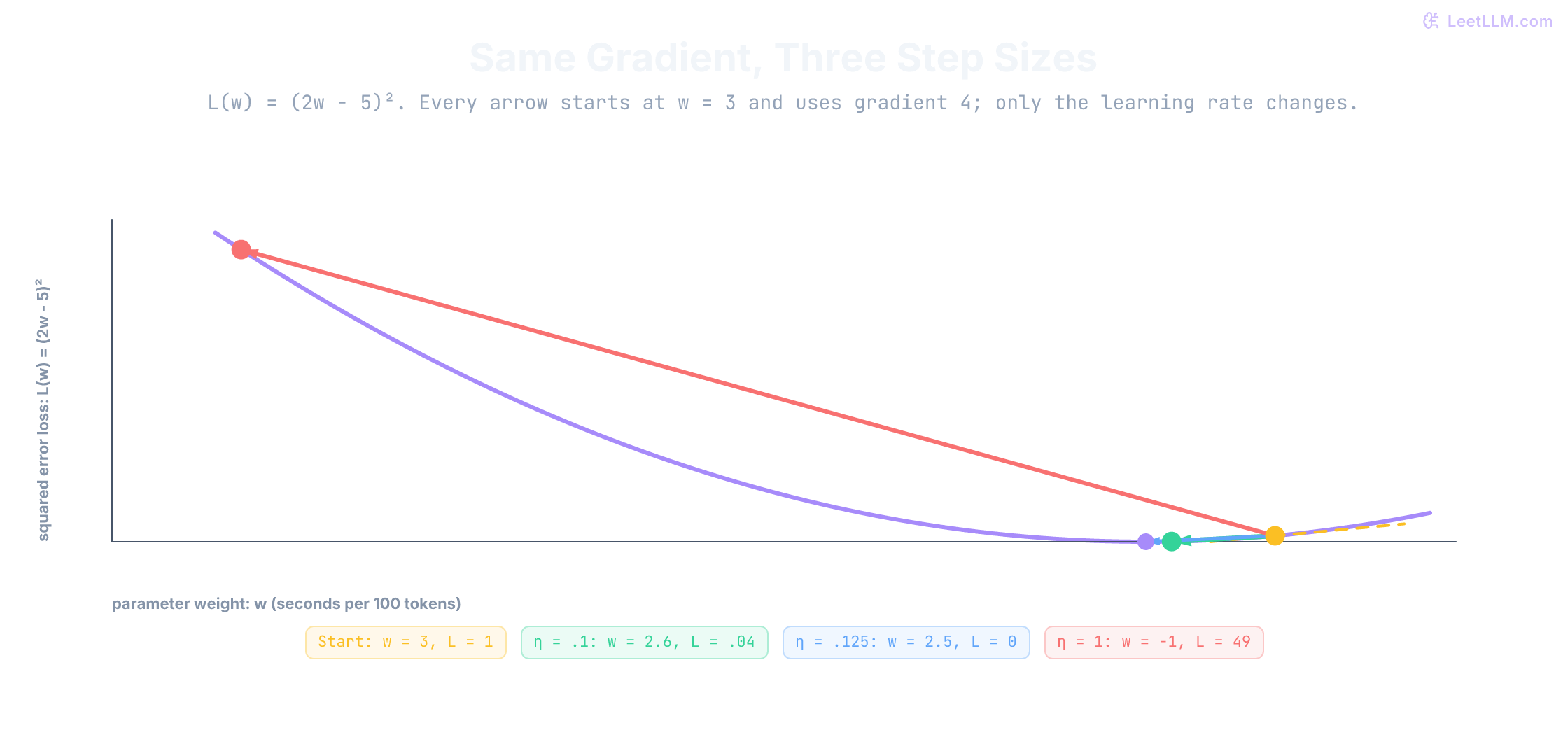
Why 0.125? The minimum is 0.5 weight units below the start, so the required step satisfies learning_rate * 4 = 0.5. Try 0.25 in the cell: it moves to w = 2, where loss is back to 1. Following the correct gradient direction doesn't guarantee that a finite step lowers loss.
In a real training loop, treat a non-finite loss such as NaN or infinity as a diagnosis signal. It can come from an unstable step or invalid input. Later optimization chapters will cover adaptive optimizers and schedules; first you need a backward calculation you can trust.
One weight was enough to see a downhill step. A latency model still needs to separate prompt work from queue delay.
Two weights, two slopes
The same request has one second of recorded queue delay. Add a second parameter to scale that delay, and reset the two weights to [2, 2]. The prediction is 2 * 2 + 2 * 1 = 6, still one second too high. In notation, let x_p count prompt blocks, x_q record queue seconds, and put a hat on y to distinguish the prediction from the observed time:
Here w_p has units of seconds per prompt block, while w_q is a unitless multiplier on queue seconds. The feature values are 2 and 1, so in these chosen units the same loss signal produces a prompt slope twice as large. A larger numerical gradient doesn't by itself mean a more important feature: changing the feature's units changes its gradient.
| Value | Number |
|---|---|
prompt blocks x_p | 2 |
queue delay x_q | 1 |
current weights [w_p, w_q] | [2, 2] |
| prediction | 2*2 + 2*1 = 6 |
| actual seconds | 5 |
| error | 1 |
| squared loss | 1 |
A partial derivative measures sensitivity to one parameter while holding the others fixed. The symbol ∂ replaces d to show that the loss has several adjustable inputs:
Collect those slopes in parameter order and you have the gradient: [4, 2]. This ordered list is a vector; no extra machinery is needed yet. Apply the same update rule separately to each weight:
1x_prompt = 2.0
2x_queue = 1.0
3w_prompt = 2.0
4w_queue = 2.0
5actual_seconds = 5.0
6
7prediction = w_prompt * x_prompt + w_queue * x_queue
8error = prediction - actual_seconds
9grad_prompt = 2 * error * x_prompt
10grad_queue = 2 * error * x_queue
11updated_prompt = w_prompt - 0.1 * grad_prompt
12updated_queue = w_queue - 0.1 * grad_queue
13new_loss = (updated_prompt * x_prompt + updated_queue * x_queue - actual_seconds) ** 2
14
15print("prediction", prediction)
16print("gradient", [grad_prompt, grad_queue])
17print("updated_weights", [updated_prompt, updated_queue])
18print("new_loss", new_loss)1prediction 6.0
2gradient [4.0, 2.0]
3updated_weights [1.6, 1.8]
4new_loss 0.0For this row and learning rate, the update lands exactly on the target. But [2, 1] and [1.5, 2] would both predict 5 too. One row can't tell us how much prompt length and queue delay should each contribute across future requests. We'll need more rows after we've checked how these two slopes were calculated.
The two slopes aren't a special two-weight trick. They are the chain rule, written backward.
Backpropagation is chain-rule bookkeeping
The two-parameter gradient came from a chain of small operations:
- Predict:
prediction = w_p * x_p + w_q * x_q - Subtract target:
error = prediction - y - Square error:
loss = error ** 2
During the forward pass, these operations produce prediction = 6, error = 1, and loss = 1. Now predict the first signal sent backward: differentiating error² should give 2 * error = 2. Start at the scalar loss and move backward:
| Local step | Derivative | Value |
|---|---|---|
loss = error² | d loss / d error = 2 * error | 2 |
error = prediction - y | d error / d prediction | 1 |
prediction = w_p*x_p + w_q*x_q | d prediction / d w_p = x_p | 2 |
| same prediction | d prediction / d w_q = x_q | 1 |
Multiply local factors along each path. Prompt length gets 2 * 1 * 2 = 4; queue delay gets 2 * 1 * 1 = 2. The route tells you which feature scales each parameter's correction. At the loss itself, start with dL/dL = 1: a unit change in loss changes loss by one unit.
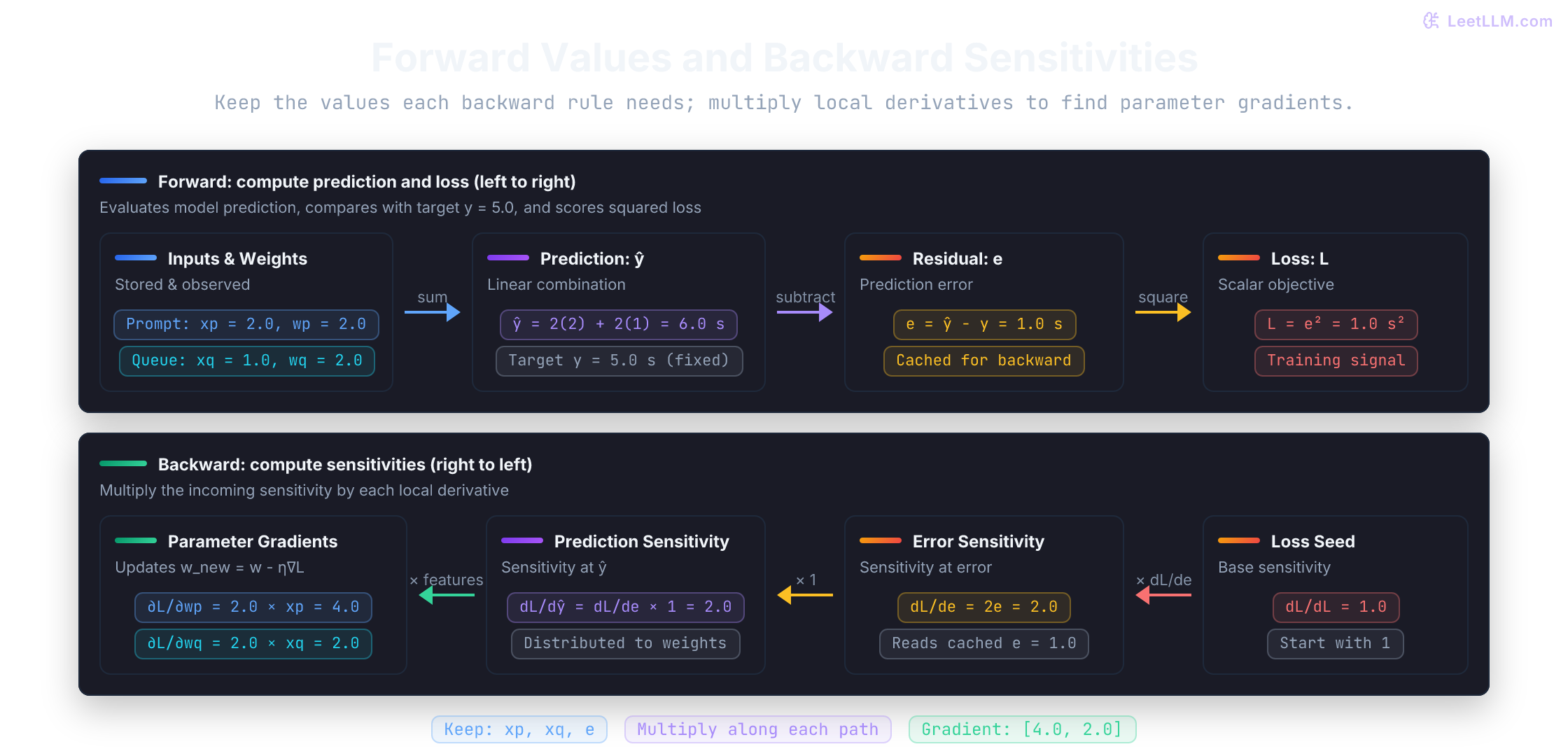
Backpropagation is that reverse walk through the computation. Operations retain the forward values their backward rules need, then multiply the arriving signal by a local derivative. Rumelhart, Hinton, and Williams used back-propagated error derivatives to learn internal representations in multilayer networks in their 1986 Nature paper.[3] The explicit calculation below keeps each factor visible:
1x_prompt = 2.0
2x_queue = 1.0
3w_prompt = 2.0
4w_queue = 2.0
5actual = 5.0
6
7prediction = w_prompt * x_prompt + w_queue * x_queue
8error = prediction - actual
9loss = error ** 2
10
11d_loss_d_error = 2 * error
12d_error_d_prediction = 1.0
13d_prediction_d_prompt_weight = x_prompt
14d_prediction_d_queue_weight = x_queue
15
16d_loss_d_prompt_weight = d_loss_d_error * d_error_d_prediction * d_prediction_d_prompt_weight
17d_loss_d_queue_weight = d_loss_d_error * d_error_d_prediction * d_prediction_d_queue_weight
18
19print("forward", prediction, error, loss)
20print("prompt_path", d_loss_d_error, "*", d_prediction_d_prompt_weight, "=", d_loss_d_prompt_weight)
21print("queue_path", d_loss_d_error, "*", d_prediction_d_queue_weight, "=", d_loss_d_queue_weight)1forward 6.0 1.0 1.0
2prompt_path 2.0 * 2.0 = 4.0
3queue_path 2.0 * 1.0 = 2.0The same bookkeeping works when an extra operation sits between a weight and the loss. So far, every predicted term changes proportionally with its weight. An operation with different behavior on different parts of its input range is nonlinear.
For example, wrap the prompt term in ReLU (rectified linear unit), max(0, h). It passes a positive input and returns zero for a negative input. Name the value before ReLU h and the value after it z:
ReLU's local derivative is 1 when h > 0: a small increase passes through unchanged. It's 0 when h < 0: a small increase still leaves the output at zero. At h = 0, the left and right slopes disagree, so there's no ordinary derivative. This code uses a backward value of 0 at the corner, matching PyTorch's convention.[4]
Keep the same latency row, with w_p = 2 so h = 4 stays positive. The ReLU is a pass-through, and the prompt weight still receives 4.
Now flip the prompt weight to -0.5. h goes negative, ReLU outputs 0 seconds from the prompt path, and that weight gets no update. Predict that zero before running the cell.
1x_prompt = 2.0
2x_queue = 1.0
3w_queue = 2.0
4actual = 5.0
5
6def relu(pre_activation: float) -> float:
7    return max(0.0, pre_activation)
8
9w_prompt = 2.0
10h = w_prompt * x_prompt
11z = relu(h)
12prediction = z + w_queue * x_queue
13error = prediction - actual
14loss = error ** 2
15d_loss_d_prediction = 2 * error
16d_z_d_h = 1.0 if h > 0 else 0.0
17d_loss_d_w_prompt = d_loss_d_prediction * d_z_d_h * x_prompt
18
19print("forward", h, z, prediction, loss)
20print("dL_dw_prompt", d_loss_d_w_prompt)
21
22w_prompt_off = -0.5
23h_off = w_prompt_off * x_prompt
24z_off = relu(h_off)
25prediction_off = z_off + w_queue * x_queue
26d_z_d_h_off = 1.0 if h_off > 0 else 0.0
27d_loss_d_w_prompt_off = (2 * (prediction_off - actual)) * d_z_d_h_off * x_prompt
28print("relu_off", h_off, z_off, prediction_off, d_loss_d_w_prompt_off)1forward 4.0 4.0 6.0 1.0
2dL_dw_prompt 4.0
3relu_off -1.0 0.0 2.0 -0.0The printed -0.0 compares equal to zero; its sign comes from multiplying a negative loss signal by zero. Later deep-learning lessons stack many such local factors. The rule stays the same: store needed forward values and multiply local derivatives on the way back.
In ŷ = ReLU(w_p x_p) + w_q x_q with squared loss, what happens to ∂L/∂w_p when h = w_p x_p is negative?
Answer
It becomes zero for that example because ReLU's local derivative is zero. The upstream loss signal is multiplied by that zero before it reaches w_p.
When paths meet, add their signals
The example above sends the loss signal to two different parameters. A computation graph can also use the same parameter more than once. Changing a shared parameter changes both paths, so their contributions to the loss must add.
For this example only, tie the two numerical coefficients to one stored value w. Treat the inputs as normalized numbers: x_p is prompt length divided by 100 tokens, x_q is queue time divided by one second, and the output is measured in seconds. Both inputs are then unitless, so a shared seconds-valued coefficient is consistent:
With w = 2, x_p = 2, x_q = 1, and y = 5, prediction is 6 and error is 1. The prompt path contributes 2 * 1 * 2 = 4; the queue path contributes 2 * 1 * 1 = 2. Both paths reach w, so its gradient is 4 + 2 = 6.
You can also combine the forward terms first: w * 2 + w * 1 = w * 3. Its local derivative is 3, so the complete derivative is 2 * error * 3 = 6. The two routes agree. Verify the separate contributions in code:
1w = 2.0
2x_prompt = 2.0
3x_queue = 1.0
4actual = 5.0
5
6prediction = w * x_prompt + w * x_queue
7error = prediction - actual
8prompt_path = 2 * error * x_prompt
9queue_path = 2 * error * x_queue
10gradient = prompt_path + queue_path
11
12print("prediction", prediction)
13print("path_contributions", [prompt_path, queue_path])
14print("shared_weight_gradient", gradient)
15assert gradient == 6.01prediction 6.0
2path_contributions [4.0, 2.0]
3shared_weight_gradient 6.0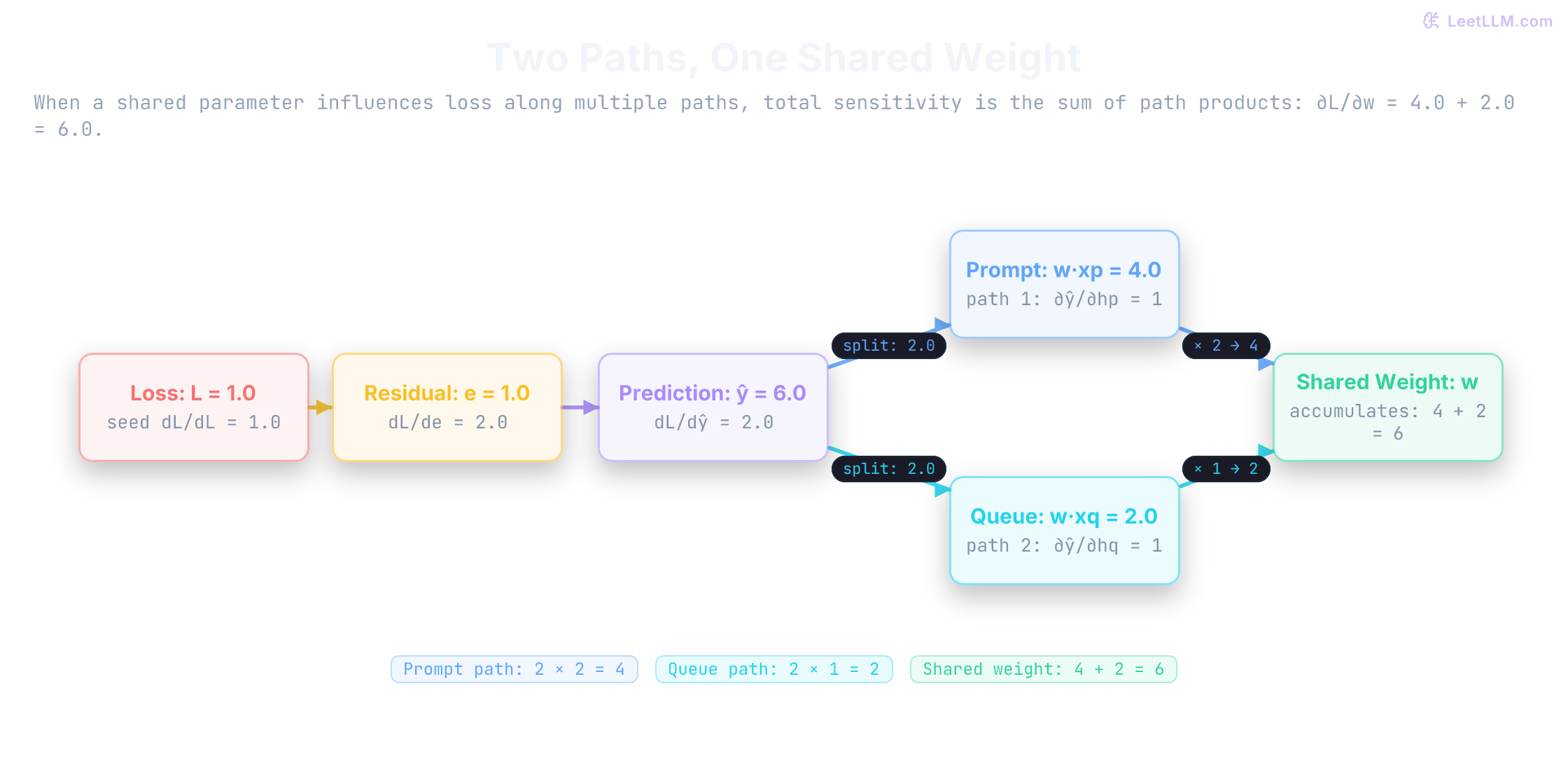
This scalar rule is deliberately small. Larger models reuse parameters across many rows or token positions, and branches can merge inside a graph. The next batch example combines row contributions too, then divides by the number of rows because its loss is a mean.
Four completed requests
Return to two independent weights and use four completed requests. Each row has prompt length and queue delay, and the target is observed response seconds. These are constructed data: targets follow the rule 2 * prompt_blocks + queue_seconds exactly.
| Request | Prompt blocks | Queue seconds | Observed seconds |
|---|---|---|---|
| 0 | 1 | 0.5 | 2.5 |
| 1 | 2 | 1 | 5 |
| 2 | 3 | 0.5 | 6.5 |
| 3 | 4 | 2 | 10 |
Use the mean squared error: compute each row's squared error, add them, then divide by four. Its gradient follows the same pattern. Compute 2 * error * feature for each row, add the contributions for each weight, and divide by four.
At initial weights [0, 0], all predictions are zero. The prompt-weight contributions are [-5, -20, -39, -80], whose mean is -36. The queue-weight contributions are [-2.5, -10, -6.5, -40], whose mean is -14.75. With learning rate 0.03, the first updated weights must be [1.08, 0.4425].
In NumPy, store the four rows as X with shape (4, 2). From the earlier array lesson, X @ weights multiplies each row's two features by the corresponding weights and adds them, giving four predictions. The gradient below uses explicit feature columns, so you can match it to the arithmetic above:
1import numpy as np
2
3X = np.array([
4    [1.0, 0.5],
5    [2.0, 1.0],
6    [3.0, 0.5],
7    [4.0, 2.0],
8])
9y = np.array([2.5, 5.0, 6.5, 10.0])
10weights = np.array([0.0, 0.0])
11learning_rate = 0.03
12
13print("step loss weights")
14for step in range(101):
15    predictions = X @ weights
16    errors = predictions - y
17    loss = float(np.mean(errors ** 2))
18    gradient = np.array([
19        np.mean(2 * errors * X[:, 0]),
20        np.mean(2 * errors * X[:, 1]),
21    ])
22    if not np.isfinite(loss) or not np.all(np.isfinite(gradient)):
23        raise FloatingPointError("non-finite loss or gradient")
24    if step in (0, 1, 10, 100):
25        print(step, round(loss, 6), np.round(weights, 4).tolist())
26    weights = weights - learning_rate * gradient
27
28print("learned_weights", np.round(weights, 4).tolist())
29print("final_predictions", np.round(X @ weights, 3).tolist())1step loss weights
20 43.375 [0.0, 0.0]
31 9.852759 [1.08, 0.4425]
410 0.003643 [2.0574, 0.8557]
5100 0.000709 [2.0259, 0.9364]
6learned_weights [2.0257, 0.937]
7final_predictions [2.494, 4.988, 6.546, 9.977]The known weights are [2, 1], but 101 updates stop near that solution rather than landing on it. The loss falls quickly at first, then more slowly. A fixed iteration count is a stopping choice, not a promise that optimization has finished. Close predictions on these four training rows also don't tell us how well the rule predicts unseen requests.
You'll often see the two column means written compactly as (2 / len(X)) * (X.T @ errors). Here X.T has shape (2, 4): each row now holds one feature's values across the four requests. Multiplying by the four errors adds feature-weighted errors, then 2 / len(X) supplies the square's factor and the mean. Both versions compute the same two slopes; the next linear-algebra lessons develop that notation further.
A finite-value guard doesn't make training stable by itself. It stops the loop before a NaN or infinity update silently corrupts the weights. If it fires, inspect the learning rate and input scale first.
This is still a tiny model, not a production latency service. Its value is transparency: every prediction, loss, derivative, and update fits into code you can explain.
A manual backward formula can silently omit a factor. Before trusting it on a larger batch, compare each parameter's formula to a nudge.
Gradient checking catches backward bugs
For each parameter, nudge only that value by eps, compute the two losses, and compare the numerical slope to the formula from your backward pass. Use weights [1.3, 1.1], away from the minimum so the check tests nonzero slopes. The two gradients should agree component by component, not just in overall direction.
1import numpy as np
2
3X = np.array([[1.0, 0.5], [2.0, 1.0], [3.0, 0.5], [4.0, 2.0]])
4y = np.array([2.5, 5.0, 6.5, 10.0])
5weights = np.array([1.3, 1.1])
6
7def mean_squared_loss(current: np.ndarray) -> float:
8    errors = X @ current - y
9    return float(np.mean(errors ** 2))
10
11errors = X @ weights - y
12manual_gradient = (2 / len(X)) * (X.T @ errors)
13
14eps = 1e-5
15numerical_gradient = np.zeros_like(weights)
16for i in range(len(weights)):
17    direction = np.zeros_like(weights)
18    direction[i] = eps
19    numerical_gradient[i] = (
20        mean_squared_loss(weights + direction) - mean_squared_loss(weights - direction)
21    ) / (2 * eps)
22
23print("manual", np.round(manual_gradient, 6).tolist())
24print("numerical", np.round(numerical_gradient, 6).tolist())
25print("check_passed", np.allclose(manual_gradient, numerical_gradient, atol=1e-6))
26assert np.allclose(manual_gradient, numerical_gradient, atol=1e-6)1manual [-9.9, -3.925]
2numerical [-9.9, -3.925]
3check_passed TrueTry removing the factor 2 from manual_gradient and rerun the cell. The assertion should fail: numerical differences are evaluating the actual squared loss, not your proposed derivative. Restore the factor before continuing. Passing at one point supports the formula for that case; it isn't a proof for every input.
That comparison is only trustworthy in enough precision. Single-precision floats can make a correct backward rule look wrong.
Catastrophic cancellation in single precision
Use double precision (float64) for these small gradient checks. The check subtracts nearly equal loss values, and those values have already been rounded by floating-point arithmetic. After the matching leading digits cancel, the tiny difference can contain a large relative error. This is catastrophic cancellation.
Making eps smaller reduces approximation error only until rounding starts to dominate. Keep the one-weight latency loss and use the same eps = 1e-6 in two dtypes. Both analytical derivatives are 4, but the numerical checks needn't be equally accurate:
1import numpy as np
2
3for dtype in (np.float64, np.float32):
4    w = np.array([3.0], dtype=dtype)
5    eps = np.array([1e-6], dtype=dtype)
6    loss_plus = (2 * (w + eps) - 5) ** 2
7    loss_minus = (2 * (w - eps) - 5) ** 2
8    numerical = float(((loss_plus - loss_minus) / (2 * eps))[0])
9    print(dtype.__name__, "numerical", round(numerical, 6))
10 print("close to 4?", abs(numerical - 4) < 1e-5)1float64 numerical 4.0
2close to 4? True
3float32 numerical 3.814697
4close to 4? FalseThe formula hasn't changed, only its numerical evaluation. Framework gradient checkers face the same limit: PyTorch's gradcheck defaults are intended for double-precision inputs.[5] Also avoid testing exactly at ReLU's corner, where no ordinary derivative exists.
Let PyTorch repeat the backward pass
The manual check agrees. Now let a framework repeat the same calculation. Reverse-mode automatic differentiation propagates chain-rule products backward from outputs to inputs. It's especially useful when one scalar loss depends on many parameters, which is the training shape we have here.[6]
PyTorch arrays are called tensors. Its autograd system records differentiable operations on tensors that request gradients, then computes the reverse pass when you call backward().[4] Setting requires_grad=True on the weights asks for their derivatives. This cell repeats the four-row latency table and checks PyTorch against the manual NumPy derivative.
The weights are a leaf tensor: we created them directly, rather than calculating them from another tracked tensor. PyTorch stores their derivatives in .grad. Calling backward again adds to that buffer; it doesn't replace it. Predict the second value before running the cell. The detach().clone() calls below save independent snapshots of the gradient without tracking the copies themselves.
1import numpy as np
2import torch
3
4X_np = np.array([[1.0, 0.5], [2.0, 1.0], [3.0, 0.5], [4.0, 2.0]], dtype=np.float32)
5y_np = np.array([2.5, 5.0, 6.5, 10.0], dtype=np.float32)
6w_np = np.array([1.3, 1.1], dtype=np.float32)
7
8manual = (2 / len(X_np)) * (X_np.T @ (X_np @ w_np - y_np))
9
10X = torch.tensor(X_np)
11y = torch.tensor(y_np)
12w = torch.tensor(w_np, requires_grad=True)
13loss = torch.mean((X @ w - y) ** 2)
14loss.backward()
15first_backward = w.grad.detach().clone()
16
17same_loss_again = torch.mean((X @ w - y) ** 2)
18same_loss_again.backward()
19after_second_backward = w.grad.detach().clone()
20
21w.grad = None
22fresh_loss = torch.mean((X @ w - y) ** 2)
23fresh_loss.backward()
24after_reset_backward = w.grad.detach().clone()
25
26def rounded(values: torch.Tensor | np.ndarray) -> list[float]:
27    return [round(float(value), 3) for value in values]
28
29print("loss", round(float(loss.item()), 6))
30print("manual", rounded(manual))
31print("first_backward", rounded(first_backward))
32print("agree", np.allclose(manual, first_backward.numpy(), atol=1e-6))
33print("after_second_backward", rounded(after_second_backward))
34print("after_reset_backward", rounded(after_reset_backward))1loss 3.268751
2manual [-9.9, -3.925]
3first_backward [-9.9, -3.925]
4agree True
5after_second_backward [-19.8, -7.85]
6after_reset_backward [-9.9, -3.925]The second backward pass doubles the stored numbers because it adds the same gradient again. A training loop normally calls optimizer.zero_grad() before the next batch, or sets buffers to None, unless accumulating across several batches is intentional.[7]
Adding contributions within one backward pass follows the chain rule. Keeping contributions across separate backward calls is a framework accumulation policy. Both use addition, but clearing .grad controls only the second behavior. Also notice that backward() hasn't updated w: an optimizer or explicit subtraction must apply the gradient afterward.
In-place writes can break the backward pass
PyTorch tracks operations on tensors to construct the computation graph for backpropagation. In-place writes can invalidate saved values or mutate aliased tensors.[4]
To compute some derivatives, autograd saves forward-pass values. Overwriting a saved value before .backward() can make that derivative impossible to compute correctly, so PyTorch checks for changes and raises when the backward pass needs an invalidated value. Not every in-place operation is forbidden; the dependency on the overwritten value determines the problem.
Views are a second trap, similar to the shared buffers in NumPy. Expanding a size-1 axis with .expand() uses an array stride of 0, so several output indices refer to the same memory location. Updating all those entries at once with add_() would write repeatedly to that location. PyTorch rejects this overlapping write; use .clone() first when you need independent entries.[8]
The two cells below isolate storage behavior rather than fit latency. The first uses sigmoid, a smooth function that squashes a number into the range (0, 1). If its output is b, its derivative is b * (1 - b), so backward needs the original b. Changing that output breaks the dependency. The second cell writes through a view whose entries share storage. Read each error as a diagnosis of a different problem.
1import torch
2
3# Trap 1: Mutating a variable needed for backward in-place
4a = torch.tensor([2.0], requires_grad=True)
5b = torch.sigmoid(a)
6c = b * 3
7b.add_(1.0)  # Mutates b in-place
8try:
9    c.backward()
10except RuntimeError as error:
11    print("Trap 1 error:", str(error).split("\n")[0])
12else:
13    raise AssertionError("Expected backward to reject the overwritten sigmoid output")
14
15# Trap 2: Mutating an expanded view sharing storage in-place
16x = torch.tensor([1.0], requires_grad=True)
17y = x * 2
18z = y.expand(3)  # Expanded view (stride 0)
19try:
20    z.add_(1.0)  # Try to mutate expanded view in-place
21except RuntimeError as error:
22    print("Trap 2 error:", str(error).split("\n")[0])
23else:
24 raise AssertionError("Expected the overlapping in-place write to fail")1Trap 1 error: one of the variables needed for gradient computation has been modified by an inplace operation: [torch.FloatTensor [1]], which is output 0 of Sigmoid, is at version 1; expected version 0 instead. Hint: enable anomaly detection to find the operation that failed to compute its gradient, with torch.autograd.set_detect_anomaly(True, check_nan=False).
2Trap 2 error: unsupported operation: more than one element of the written-to tensor refers to a single memory location. Please clone() the tensor before performing the operation.Test the loop on another request
Try one more latency row before opening the solution sketches: x_prompt = 3, x_queue = 1, actual seconds y = 7, and weights [w_prompt, w_queue] = [2, 2].
- Compute prediction, error, and squared loss.
- Compute both partial derivatives by multiplying
2 * errorby the relevant feature. - Apply one gradient-descent update with learning rate
0.05. What is the new prediction and loss? - If a centered finite-difference check for the prompt parameter returns
5.99999while your manual derivative says6, is that evidence of a bug? - If loss becomes
NaNafter a very large update, what two things should you inspect first?
Solution sketches
- Prediction is
2*3 + 2*1 = 8, error is8 - 7 = 1, and loss is1. - The prompt partial is
2*1*3 = 6; the queue partial is2*1*1 = 2. The gradient is[6, 2]. - New weights are
[2 - 0.05*6, 2 - 0.05*2] = [1.7, 1.9]. Prediction is1.7*3 + 1.9 = 7.0, so loss is0. - Not by itself. The absolute difference is about
0.00001, or roughly0.00017%of the derivative. Compare it with your chosen absolute and relative tolerances; matching signs alone would not be enough. The NumPy check above accepts this difference with its default relative tolerance. - Inspect the learning rate and the scale or validity of input values. A huge step or non-finite data can make the forward loss invalid before a later optimizer can help.
Keep evidence from each update
When a training step misbehaves, leave a trail you can inspect:
| Step | Question you can answer |
|---|---|
| Forward pass | What prediction did current parameters make? |
| Loss | How wrong was that prediction? |
| Derivative | How would loss respond to a small change in one parameter? |
| Gradient | What is the correction signal for every parameter? |
| Backpropagation | How do local derivatives carry that signal backward? |
| Gradient check | How do I test a handwritten backward formula? |
Before trusting an update, verify four things: the forward loss is finite, the gradient has the expected sign and shape, a centered finite difference agrees within tolerance, and one small step lowers loss on the checked example.
If those checks pass but training diverges, inspect the learning rate and input scale before rewriting backpropagation. Practice the sequence on the latency table: compute one finite-difference check, then confirm that the step lowers loss.
Momentum, Adam, and learning-rate schedules control how to use gradients over many steps. Those tools wait until vectors, matrices, and deeper linear algebra are in place. Next you need names for the lists you just computed.