Personalize this lesson
Adapt explanations and teaching visuals to your background and preferred voice.
A teammate clones access-rag, finds the three eval rows and scripts/score_access_requests.py, and still can't reprint 0.667. Their Python version, OS packages, or filesystem permissions differ from yours. Git carried the files. It didn't pin how they run.
The scorer compares a predicted label with an expected label on each row. Two matches out of three give 2/3, displayed as 0.667. Nothing about that calculation should depend on a teammate's Python setup.
Docker packages Python, its dependencies, and application files in a container image, the stored artifact produced by docker build. Its filesystem is assembled from reusable layers. A container is an isolated instance of that image, created by docker run. Ours runs one scorer process; other applications may start child processes too.
When the scorer exits, --rm removes the stopped container and its writable layer, not the image it came from. Another run can reuse the image. A Linux image packages application code and user-space tools, including Python and Debian libraries, but no kernel. Containers share the Linux kernel of the machine running Docker Engine. With Docker Desktop's Linux containers, that machine is a Linux virtual machine (VM), so a Mac container doesn't share the macOS kernel.[1]
Use the access-rag/ directory from Git, Shell, and Linux for Reproducible AI. Run the commands in a Bash-compatible terminal with Docker Engine running, or Docker Desktop set to Linux containers. On Windows, use a WSL terminal. docker version should show both a client and a server; a client alone can't build or run an image.
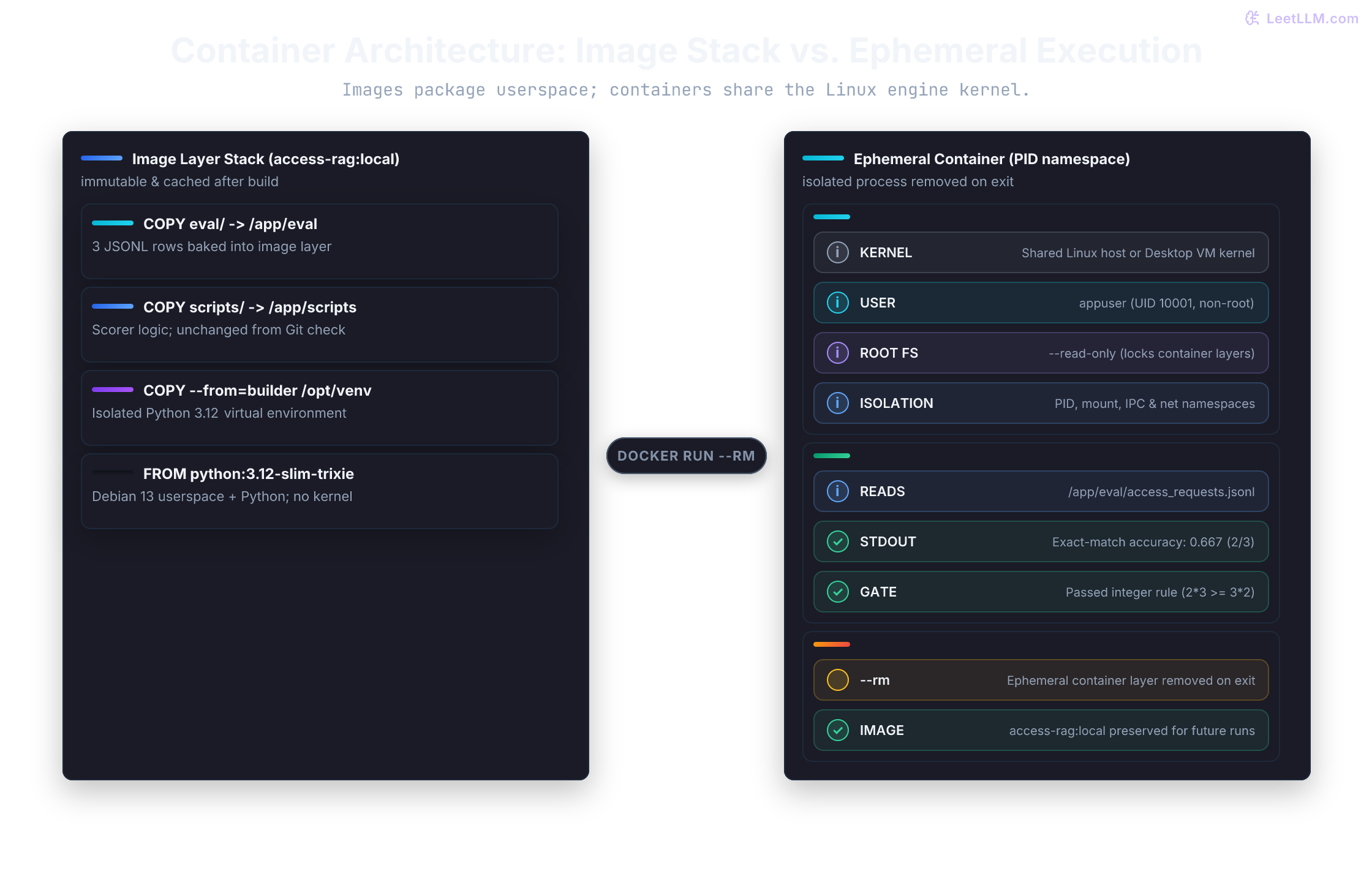
--rm removes the container on exit while preserving the image.Where each input lives
The scorer needs Python and its own files every time. The eval data may change between runs, and future API keys shouldn't travel with the image at all. A Dockerfile is the build recipe; it chooses which inputs become part of the image. The rest arrive when a container starts:
| Boundary | Question | Repo answer |
|---|---|---|
| Base image | Which Python, OS, and CPU architecture run the code? | A version-constrained base image such as python:3.12-slim-trixie; add a digest and an explicit target platform when a release needs a fixed artifact |
| Dependencies | Which packages are installed? | A checked-in lock or fully pinned, hashed requirements file copied before application code |
| Build context | Which files may the builder read? | .dockerignore that excludes secrets, caches, model weights, and virtualenvs |
| Runtime user | Which identity runs the process? | A non-root user; add a named volume or temporary filesystem only when it must write |
| Data | Where does eval data live? | Tiny fixtures can be copied; changing host data uses a bind mount, and container-managed caches use named volumes |
| Secrets | How does an API key arrive? | A runtime secret file or platform secret manager, never ARG, ENV, or COPY .env |
Don't solve every placement with COPY. A bind mount exposes a specific host path inside a container. A named volume is storage Docker manages, which suits caches or state that should outlive one container without depending on a teammate's directory layout.
Build-time and run-time inputs also have different lifetimes. Stable inputs become image layers. Run-specific data and configuration join only when a container starts, and Docker can reuse an earlier layer when its inputs didn't change.[2]
Suppose you fix a line in the scorer but leave its packages alone. Docker should reuse the installed packages and rebuild only the application-dependent steps. That reuse is the build cache:
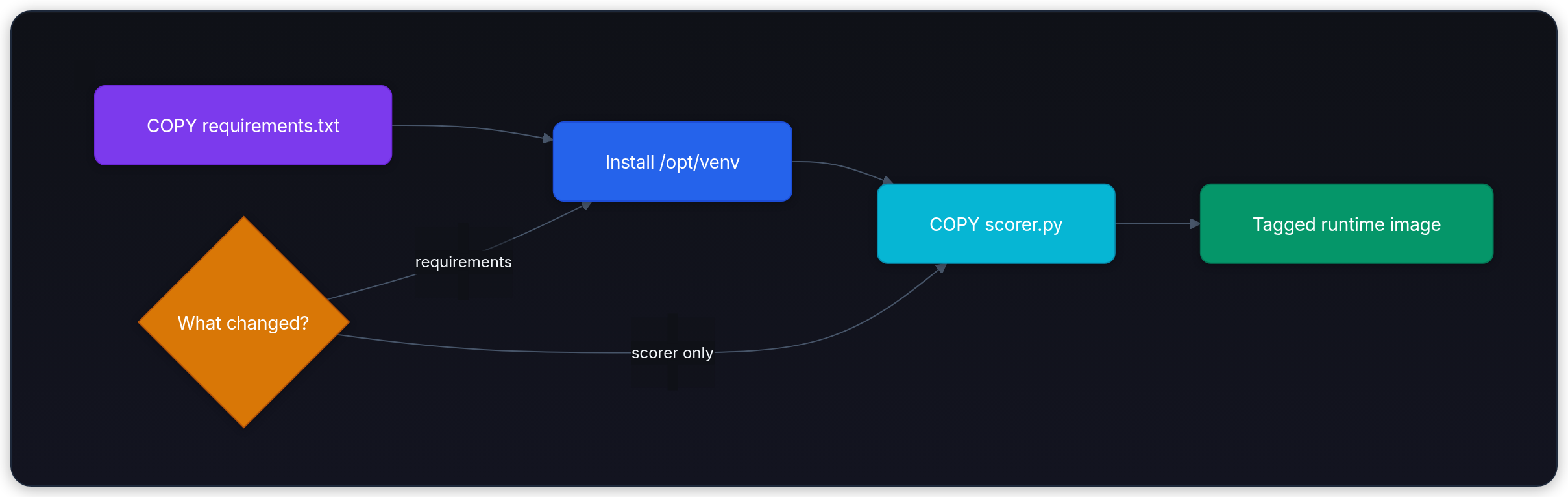
Edit the scorer and the dependency layer can stay cached. Change requirements.txt and its installation must run again, so the stable file goes in first. The Dockerfile below separates installation and execution into stages while preserving that dependency order.
Start with .dockerignore
The build context is the first boundary. If access-rag/ contains a model cache, a local index, and .env, docker build . can make all of them available to the builder before the Dockerfile chooses what to copy. Which paths should never cross that boundary?
Create .dockerignore at the root of access-rag/, next to .gitignore:
1# .dockerignore - keep the build context tiny and secret-free
2.env
3.env.*
4*.pem
5secrets/
6.git/
7.github/
8.venv/
9.docker-lab/
10__pycache__/
11*.py[cod]
12*.egg-info/
13node_modules/
14models/
15*.gguf
16*.safetensors
17*.bin
18chroma/
19faiss_index/
20*.db
21runs/
22eval_cache/
23wandb/
24mlruns/
25.DS_Store
26.idea/
27.vscode/
28*.swp
Docker removes matching paths before it sends the build context to the builder. Without that filter, .env, cached model files, local indexes, notebooks, and virtualenvs can reach a local or remote builder even when the Dockerfile never meant to copy them. A later broad COPY . /app can also bake them into a layer.[2]
Build context and image contents aren't the same thing. Context is everything the builder is allowed to read; COPY and ADD decide which of those files become layers. If a path matches .dockerignore, it never enters the context. Now choose which of the remaining files the scorer actually needs.
Reuse the scorer you already tested
The previous chapter committed scripts/score_access_requests.py and eval/access_requests.jsonl. Wrap those same files; don't write a second implementation just to please Docker. One scorer gives the container a result we can compare with the Git check.
The Git scorer falls back to assets/access_requests.jsonl when eval/ is missing. Copying eval/ into the image is enough for the primary path, so you don't need assets/ in the image. requirements.txt can stay empty until the scorer gains third-party packages.
Check that you're in the project root, create the empty dependency file if needed, and run the scorer once outside Docker:
1test -f scripts/score_access_requests.py
2test -f eval/access_requests.jsonl
3touch requirements.txt
4python3 scripts/score_access_requests.py1Eval rows: 3
2Exact-match accuracy on tiny fixture: 0.667 (2/3)
3Gate passed. You may commit.That output is the baseline the image must preserve. The next step gives it a runtime without changing the scorer or fixture.
Give the scorer its own Python environment
Start with a CPU image. The three-row scorer doesn't need a GPU, so prove the container contract on an ordinary laptop before adding NVIDIA runtime setup.
Each FROM starts a build stage, a separate filesystem based on the named image. The first stage installs packages into a virtual environment, a directory containing a Python environment isolated from other packages. The second copies that environment and runs the scorer. This two-stage pattern becomes useful when installation needs compilers or other tools that the running application doesn't need. Our empty dependency file doesn't need those tools yet, so two stages aren't inherently smaller here.
Create this Dockerfile:
1# syntax=docker/dockerfile:1
2# Tag is fine for learning. For exact rebuilds, pin both stages by digest, e.g.:
3# FROM python:3.12-slim-trixie@sha256:<verified-digest> AS builder
4FROM python:3.12-slim-trixie AS builder
5
6ENV PYTHONDONTWRITEBYTECODE=1 \
7 PYTHONUNBUFFERED=1 \
8 PIP_NO_CACHE_DIR=1 \
9 PIP_DISABLE_PIP_VERSION_CHECK=1
10
11RUN python -m venv /opt/venv
12ENV PATH="/opt/venv/bin:$PATH"
13
14COPY requirements.txt /tmp/requirements.txt
15# Empty requirements are fine here. Once packages appear, export every
16# transitive dependency with hashes or use a lock-aware frozen install.
17RUN python -m pip install --no-cache-dir --require-hashes -r /tmp/requirements.txt
18
19FROM python:3.12-slim-trixie AS runtime
20
21ENV PYTHONDONTWRITEBYTECODE=1 \
22 PYTHONUNBUFFERED=1 \
23 PATH="/opt/venv/bin:$PATH"
24
25RUN useradd --create-home --no-log-init --user-group --uid 10001 --shell /usr/sbin/nologin appuser
26
27WORKDIR /app
28
29COPY /opt/venv /opt/venv
30COPY scripts/score_access_requests.py scripts/score_access_requests.py
31COPY eval/ eval/
32
33USER appuser
34
35ENTRYPOINT ["python", "scripts/score_access_requests.py"]Read the runtime stage from top to bottom. WORKDIR /app sets the directory for later relative paths. COPY --from=builder transfers the installed environment, while the next two COPY instructions bring in the scorer and fixture. USER appuser selects the identity for the running process. ENTRYPOINT supplies its default command, so docker run doesn't need to repeat the Python filename.
Both stages use the same base image and /opt/venv path to keep the copied environment compatible. If later packages need shared OS libraries, those libraries must also exist in the runtime stage. Copying a virtual environment alone doesn't copy every system dependency.
COPY defaults to root ownership. Root-owned files with world-readable permissions can still be read by appuser, but COPY --chown=appuser:appuser makes ownership explicit and avoids permission failures when files have restrictive modes or the application later needs to write its own files.
| Dockerfile section | Purpose |
|---|---|
builder stage | installs packages once into a reusable virtualenv |
runtime stage | runs only the existing scorer, fixture, and installed environment |
The official Python image manifest maps python:3.12-slim-trixie to the Python 3.12 line on Debian 13 (trixie).[3][4] That constrains the Python minor line and Debian release, but it doesn't pin exact bytes. Image tags are mutable, so a later rebuild can pick up a new Python patch or rebuilt OS packages.[2]
Dependency pins need the same care. package==1.2.3 fixes a version, but an installer may still choose among wheels (prebuilt packages) and source archives. A hash identifies an allowed downloaded artifact. For a release, export all dependencies, including dependencies of dependencies, with hashes and keep --require-hashes. Alternatively, use a package-manager lockfile with its frozen install command. An empty requirements.txt passes because there are no packages to verify. Adding an unhashed package makes the build fail instead of silently weakening the policy.[5]
python:3.12-slim-trixie is a multi-platform tag. Docker normally selects the variant that matches the host. An Apple Silicon laptop can build linux/arm64 while an x86 CI worker builds linux/amd64. Those are compatible recipes, not identical image bytes. Predict which architecture your release needs, inspect the available variants, then set the deployment target:
1docker buildx imagetools inspect python:3.12-slim-trixie
2docker build --platform linux/amd64 -t access-rag:local .For a fixed release, copy a verified sha256:... digest from the inspection into both FROM lines. A digest identifies content, unlike a tag that can be reassigned. A multi-platform index digest fixes a set of platform variants; a platform manifest digest fixes one variant. Keep --platform in the build command to select the intended architecture. Emulating linux/amd64 on an Arm laptop can be much slower than a native build, especially when packages compile code.[6]
Once that target is explicit, cache behavior becomes easier to reason about. A package change invalidates the dependency layer and later layers; editing scripts/score_access_requests.py won't force a full package reinstall, because the Dockerfile installs requirements first.
Why does the Dockerfile copy requirements.txt before the scorer source?
Answer
Dependency installation stays in an earlier cacheable layer. Editing scorer code can then reuse the dependency layer instead of reinstalling every package.
Build, run, and inspect the artifact
From the project root, check the Dockerfile and then build the artifact. The first command reports Dockerfile findings without producing an image; the second creates the tagged image. The final . selects the current directory as the build context, and -t gives the image its local name.
1docker build --check .
2docker build -t access-rag:local .docker build --check exits nonzero when a check reports a finding. A regular build can report those findings as warnings, so running the check separately makes the policy explicit.[7]
Run the image without any host mount first. Will --read-only break the scorer? It only reads the fixture, and the Dockerfile disables Python bytecode writes, so making the container's root filesystem read-only should preserve the result:
1docker run --rm --read-only access-rag:localExpected output:
1Eval rows: 3
2Exact-match accuracy on tiny fixture: 0.667 (2/3)
3Gate passed. You may commit.Inspect the artifact as well as its stdout:
1docker image inspect access-rag:local \
2  --format 'platform={{.Os}}/{{.Architecture}} user={{json .Config.User}} entrypoint={{json .Config.Entrypoint}}'
The platform should match the build target, the configured user should be appuser, and the entrypoint should name the scorer. --read-only proves this workload doesn't need to mutate its container filesystem. PYTHONDONTWRITEBYTECODE=1 keeps Python from trying to write .pyc files when that filesystem is locked.
The printed score is rounded for humans. Keep the gate on integer counts, the same rule the Git scorer uses (correct * 3 >= total * 2), not equality to the decimal 0.667. This tiny check makes that distinction visible:
1matches, total = 2, 3
2score = matches / total
3
4assert 0 <= matches <= total
5print(f"score={score:.3f} ({matches}/{total})")
6print("gate_passed:", matches * 3 >= total * 2)1score=0.667 (2/3)
2gate_passed: TrueA bind mount obscures the copied eval
A green run proves the image can read its baked fixture. But editing the host's eval/ won't change those copied files: they're a snapshot from build time. A bind mount lets us supply new data without rebuilding the scorer.
Run the image against host data:
1docker run --rm \
2  --read-only \
3  --mount type=bind,source="$PWD/eval",target=/app/eval,readonly \
4  access-rag:local
A bind mount at /app/eval obscures the image's copied files for that run. Docker doesn't merge the two directories. --mount is the better default here because it fails when the host source path is missing. -v can silently create a missing source as an empty directory. If the score changes, compare the mounted fixture with the committed one before changing the image.[1]
The source path must exist where the Docker daemon runs. Docker Desktop handles sharing your local project into its Linux virtual machine. With a remote daemon or another VM setup, a path that exists in your terminal may still be unavailable to Docker; check file sharing before changing the scorer.
The mount is read-only from inside the container, but file permissions still apply. appuser must be able to traverse the mounted directories and read the fixture. For writable data, a named volume removes the dependency on a particular host path, not the need for correct ownership. Initialize its directory for the application's user, or document the numeric user and group IDs (UID/GID) required on a bind-mounted path. Switching to root hides that setup problem.[8]
Turn one boundary into a failure
Test the mount behavior without renaming or deleting the committed fixture. Create an empty scratch directory and mount it over /app/eval:
1mkdir -p .docker-lab/empty-eval
2docker run --rm --read-only \
3  --mount type=bind,source="$PWD/.docker-lab/empty-eval",target=/app/eval,readonly \
4  access-rag:local
The scorer should fail with a missing-file error and a nonzero exit status. Because the source directory exists, Docker can create the mount. Python then looks for access_requests.jsonl and can't see the baked copy underneath it. The image doesn't contain the scorer's assets/ fallback either. Rerun without the mount and 0.667 (2/3) should return without rebuilding anything.
The error names the fallback path because the scorer tries it after failing to find eval/access_requests.jsonl:
1ERROR: assets/access_requests.jsonl missing; commit the eval fixture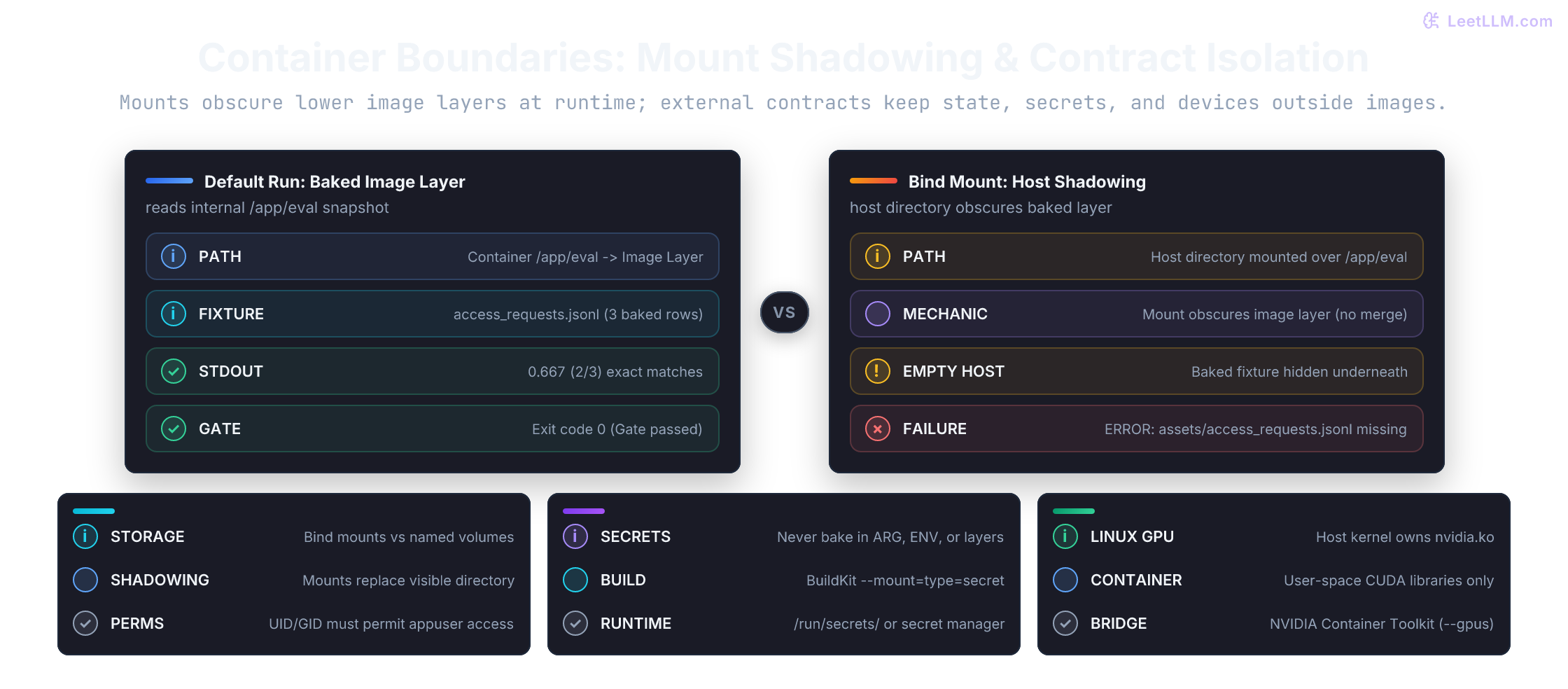
Compare that failure with other small changes:
| Change | Prediction | Why |
|---|---|---|
Rename eval/access_requests.jsonl on the host | mounted run fails with a missing file | the read-only mount replaces the image's /app/eval directory |
Rename the host eval/ directory | --mount rejects the missing source path | explicit bind mounts don't create missing host directories by default |
Remove requirements.txt from the build context | build fails at the COPY requirements.txt step | Docker can copy only files that exist in the context |
Add env_file: .env to Compose before creating .env | Compose reports the missing env file | env_file entries are required unless marked optional |
| Run on a machine without Docker Compose | docker compose version is unknown | Docker Engine and the Compose CLI plugin are separate on some Linux installs |
The distinction saves a rebuild: a missing host path is a mount problem, while a missing file inside an existing mount is an input-data problem.
Check in one Compose file
For one service, docker run is enough. As soon as the project adds a vector database, API, worker, or model cache, one checked-in Compose file gives each engineer the same starting command and mount policy. Add only the scorer that exists today.
Start with a runnable compose.yaml for the scorer:
1services:
2  scorer:
3    build:
4      context: .
5      dockerfile: Dockerfile
6    image: access-rag:local
7    read_only: true
8    volumes:
9      - type: bind
10        source: ./eval
11        target: /app/eval
12        read_only: true
13        bind:
14          create_host_path: false
create_host_path: false preserves the missing-directory failure we chose with docker run --mount. Compose otherwise creates a missing bind source directory by default. read_only: true on the service protects its root filesystem; the second read_only protects the separate data mount.[9]
Validate the file before running it:
1if docker compose version >/dev/null 2>&1; then
2  docker compose config --quiet
3  docker compose run --build --rm scorer
4else
5  echo "Docker Compose plugin missing. Install docker-compose-plugin before using compose."
6fi
Docker Desktop includes Compose. Some Linux Engine installs need the docker-compose-plugin package first.[10] If docker compose version is unknown, the Dockerfile still works through docker run, but the Compose workflow isn't installed yet. The old top-level version: field is obsolete, so omit it. compose.yaml is the preferred filename. docker-compose.yml remains a backward-compatible name. Use the hyphen-free docker compose command; Docker documents the standalone docker-compose install only for compatibility.
docker compose config --quiet validates and resolves configuration without starting a container; it doesn't prove the scorer works or that its mount is readable. docker compose run --build --rm scorer first builds the service image, then creates a one-off container. --build matters after a source edit because an existing tag may still point at an older image. --rm removes the container after the scorer exits, while the image remains available.
When the RAG stack grows, add vector-db, api, and worker services to this same file. Don't add fake services before they exist. A Compose file that starts today beats an impressive YAML file that fails on the first command.
Keep credentials out of image layers
The scorer doesn't need an API key yet, so don't give it one. Least privilege starts by attaching no secret to a process that doesn't use it. When a future build needs private-package access, separate that short build lifetime from the runtime secret a process reads later.
When a build must authenticate to a private package index, don't pass the credential with ARG or ENV. ARG isn't copied into the running container the way ENV is, but it still isn't safe. Docker's docs warn that build-arg values show up in docker history and in max-mode provenance attestations:
This bad pattern puts the token in a build argument. Don't run it with a real credential:
1# BAD: ARG values appear in docker history and provenance attestations
2ARG PRIVATE_INDEX_TOKEN
3RUN python -m pip install --index-url "https://token:${PRIVATE_INDEX_TOKEN}@packages.example.invalid/simple" private-package
BuildKit, Docker's build engine, has a separate secret-mount channel. The mounted file is available only for that RUN instruction and isn't committed to its layer. Commands can still leak it by copying its contents elsewhere or printing them, so the channel doesn't replace careful handling.[11]
If requirements.txt later needs a private index, replace its install instruction in the builder stage with this fragment. required=true fails clearly when the build command forgets to supply the secret:
1RUN \
2 python -m pip install --require-hashes -r /tmp/requirements.txtSupply that temporary file from the build command:
1docker build \
2  --secret id=pip_config,src="$HOME/.config/pip/pip.conf" \
3  -t access-rag:private .
Runtime secrets use a separate channel. Docker's Compose guidance warns against putting passwords or API keys in environment variables, because container configuration and diagnostic tooling can expose them. When the scorer later calls an API, mount a Compose secret as /run/secrets/access_api_key or use the deployment platform's secret manager, then have the process read that file. Keep env_file for non-sensitive settings such as log level or feature mode.[12]
Once the scorer reads that file, extend the existing Compose model with this fragment:
1services:
2  scorer:
3    secrets:
4      - access_api_key
5
6secrets:
7  access_api_key:
8    file: ./secrets/access_api_key.txt
Don't add this fragment before the process consumes the file. Local Compose mounts a host file; it doesn't encrypt that file or remove host-access risks. Keep it out of Git, restrict its host permissions, and verify that appuser can read the mounted secret without granting unrelated users access.
Keep secrets/ and .env* in both .gitignore and .dockerignore. Those exclusions protect two different routes out of your machine. Explicit build-secret and runtime-secret mounts deliver the selected file without copying it into ordinary image layers.
Why shouldn't an API key enter through COPY, ARG, ENV, or an ordinary runtime environment variable?
Answer
COPY and ENV can persist the key in image content or config. ARG isn't an environment variable in the running container, but it still appears in docker history and provenance attestations. Runtime environment values can show up in container configuration and diagnostics. A runtime secret file or platform secret manager limits exposure to the process that needs it, while a BuildKit secret mount handles credentials needed only during the build.
When the GPU enters the story
The CPU-first image is the right base here. It works through Docker Engine or Docker Desktop on common Linux, macOS, and Windows development machines. For the Linux Docker Engine path below, a CUDA workload needs a compatible NVIDIA GPU, an installed host driver, and NVIDIA Container Toolkit configuration that exposes selected devices to the container. CUDA user-space libraries live in the application image; the kernel driver stays on the host.[13]
Windows also has a supported GPU path: Docker Desktop with its WSL2 backend and a compatible NVIDIA Windows driver can expose the GPU to Linux containers. Use Docker's Windows-specific setup and validation instructions for that path; the systemctl and Linux driver commands below configure a Linux Engine host.[14]
When the same scorer later becomes a GPU workload, don't start by swapping Python packages. First ask which boundary can see the device: the host, the container runtime, or the framework inside the image.
After installing the toolkit on a systemd-managed Docker Engine host, configure its runtime and restart the daemon:
1sudo nvidia-ctk runtime configure --runtime=docker
2sudo systemctl restart docker
Rootless Docker uses a user-scoped daemon configuration and restart command, so follow NVIDIA's rootless instructions instead of copying the system-wide commands.
When a later PyTorch or inference chapter needs GPU acceleration, keep the same habits and change only the platform-specific pieces:
| Contract | CPU scorer now | GPU workload later |
|---|---|---|
| Base image | python:3.12-slim-trixie | official PyTorch CUDA image or NVIDIA CUDA runtime image matched to the torch wheel |
| Runtime check | scorer returns 0.667 | python -c "import torch; assert torch.cuda.is_available()" |
| Run command | docker run access-rag:local | docker run --gpus all ...; add shared memory only when the workload needs it |
| Portability claim | same Python runtime on normal machines | compatible NVIDIA platform, driver, and container runtime |
Don't promise that one CUDA image gives Apple Silicon and NVIDIA parity. Docker Desktop on Apple Silicon can run this Linux CPU image, but it doesn't turn the Mac GPU into an NVIDIA CUDA device. Use the later Metal/MPS path for native Mac PyTorch, and test production CUDA images on compatible Linux NVIDIA hosts.
Before running the smoke test, predict what it can prove: device exposure through Docker, not that a particular PyTorch build is compatible. NVIDIA uses a plain ubuntu image so the toolkit can expose nvidia-smi without coupling the check to a CUDA application image:
1sudo docker run --rm --runtime=nvidia --gpus all ubuntu nvidia-smiRead GPU failures in layers:
| Observation | Boundary to inspect next |
|---|---|
nvidia-smi fails on host | install or repair host NVIDIA driver first |
| host command works, container smoke test fails | inspect Container Toolkit installation, Docker runtime configuration, and requested devices |
smoke test works, but torch.cuda.is_available() is false | inspect application image, installed PyTorch build, visible-device settings, and driver/runtime compatibility |
The smoke test proves device exposure, not that a chosen PyTorch image is compatible. Read the table from top to bottom: fix the host first, then the container runtime, then the application image. For a real workload, select an official framework or CUDA image whose architecture and CUDA runtime match the locked Python packages, verify its documented minimum driver requirement, and pin that application image for the release as you pinned the CPU base.
A build-and-run gate
The separate checks can become a small Bash script for local use or continuous integration (CI), the automated checks run after a code change. Run both fixture paths: a passing mounted run can hide a missing or broken baked fixture.
1#!/usr/bin/env bash
2set -euo pipefail
3
4docker build --check .
5docker build -t access-rag:check .
6docker run --rm --read-only access-rag:check
7docker run --rm \
8  --read-only \
9  --mount type=bind,source="$PWD/eval",target=/app/eval,readonly \
10  access-rag:check
11if docker compose version >/dev/null 2>&1; then
12  docker compose config --quiet
13else
14  echo "Docker Compose plugin missing. Install docker-compose-plugin before enabling the compose gate."
15fi
set -euo pipefail stops this script when a mandatory command fails. A missing Compose plugin is deliberately reported and skipped; an installed plugin with invalid configuration fails the script. On an older Docker release without docker build --check, upgrade or temporarily omit only that static check. Neither static check substitutes for running the image.
The scorer's exit status enforces its existing threshold, at least two-thirds correct. It doesn't require exactly 0.667: three matches would pass too. For the unchanged starter fixture, compare stdout with the expected 0.667 (2/3) as well. A threshold check and an exact regression check answer different questions.
Failures you'll see first
| Symptom | Most common cause | Fix that belongs in the repo |
|---|---|---|
ModuleNotFoundError inside the container | dependency missing from requirements.txt | add it to requirements.txt, rebuild, and keep dependency install before COPY scripts/ |
.env appears in the image context | .dockerignore forgot .env* | add .env*, rotate any exposed credential, rebuild, and inspect image history before pushing |
Permission denied on a mounted directory | appuser lacks the required access | check file modes and UID/GID; initialize writable volume ownership rather than assuming Docker grants access |
| each code edit reinstalls dependencies | COPY . /app happens before dependency install | copy requirements.txt first, install dependencies, then copy application code |
could not select device driver with capabilities: [[gpu]] | Docker's configured runtime can't provide the requested GPU | check the platform's GPU setup and keep the CPU scorer path working |
| Cloud Run starts but can't read config | local file or environment setup was assumed to exist in production | declare non-secret configuration and use Secret Manager for credentials |
The useful habit isn't memorizing each Docker flag. Put the diagnosis, the command, and the prevention in the repo so the next clone doesn't have to rediscover them.
What survives a fresh clone
Commit the Dockerfile, .dockerignore, requirements.txt, and compose.yaml alongside the scorer and fixture. Another engineer should be able to build, run both fixture paths, and reproduce the empty-mount failure without borrowing your virtual environment or credentials.
Before publishing a release image, pin the base digest and deployment platform, lock any dependencies, and record the image identity with the successful run output. These controls constrain the inputs; they don't guarantee bit-for-bit identical rebuilds or identical GPU numerical results. For deployment, promoting one tested image by digest is a stronger guarantee than rebuilding the same recipe on every machine.
The container now makes the runtime assumptions visible. Python is the remaining part we've treated as a command to execute rather than code to understand. Opening the scorer next will connect that command to the row parsing, comparisons, and error handling behind its output.