Personalize this lesson
Adapt explanations and teaching visuals to your background and preferred voice.
Picture an on-call engineer at 2:00 AM asking an operations assistant: "Is release reranker-v17 healthy?" Three applications need that deployment data: an incident triage bot, an operations console, and an IDE companion. Separate adapters can drift when the deployment API changes. One might reject a renamed status field, while another might quietly use cached data. A shared MCP server gives those applications one integration to maintain. It still needs accurate backend data and explicit error handling.
The function-calling lesson kept tool execution inside one application runtime: the model proposed get_release_status, and local application code decided whether to execute it. The Model Context Protocol (MCP) shifts that capability behind an open, standardized client-server boundary.[1] Instead of maintaining bespoke API wrappers for every combination of AI host and infrastructure service, hosts discover and invoke capabilities through a shared protocol.
We'll follow one release-status tool from initial capability discovery through a local stdio subprocess, examine how transports change when services move to remote Streamable HTTP, and trace the security gates that keep untrusted servers from hijacking host authority.
This lesson follows MCP 2026-07-28, verified October 10, 2026. Each request carries its protocol version and client capabilities. The initialize handshake belongs to revisions 2025-11-25 and earlier; older Streamable HTTP revisions could also use Mcp-Session-Id. Check the revision supported by both endpoints before copying a wire trace.[2][3]
Reuse implementations, not permissions
Suppose three AI hosts each need four capability services: deployments, rollout policy, telemetry metrics, and traffic shifts.
| Integration design | Pair-specific adapters | Shared MCP implementations |
|---|---|---|
| Integration implementations in this setup | 3 × 4 = 12 custom adapters | 3 host integrations + 4 servers = 7 |
| Possible host-to-server connections | 12 | Still 12 |
| Authorization relationships to review | Each required relationship | Still each required relationship |
The seven-versus-twelve comparison models code reuse, not maintenance savings or permission shortcuts. One server can expose multiple tools, and a single client library can connect to multiple servers. MCP saves repetitive serialization and discovery plumbing; it doesn't turn twelve separate access boundaries into seven permissions.
Three distinct architectural roles make this boundary concrete:[4]
| Role | ReleaseOps example | Primary responsibility |
|---|---|---|
| Host | Release assistant application | Controls the user conversation, runs the model, manages visible tools, and enforces action policies |
| Client | Host-owned deployments connector | Maintains a protocol transport pipe and exchanges JSON-RPC messages with exactly one server |
| Server | Deployments capability service | Publishes schemas, validates invocations, authorizes data access, and queries backend infrastructure |
A single host often coordinates several clients simultaneously. Separate clients let the host contain a connection failure when its error handling also isolates each operation. Connection health isn't action authorization. If the rollout policy server times out, an independently authorized status read (get_release_status) can still finish over the deployments client. A traffic shift (shift_traffic) that requires policy clearance must fail closed, even if the rollouts server is reachable.
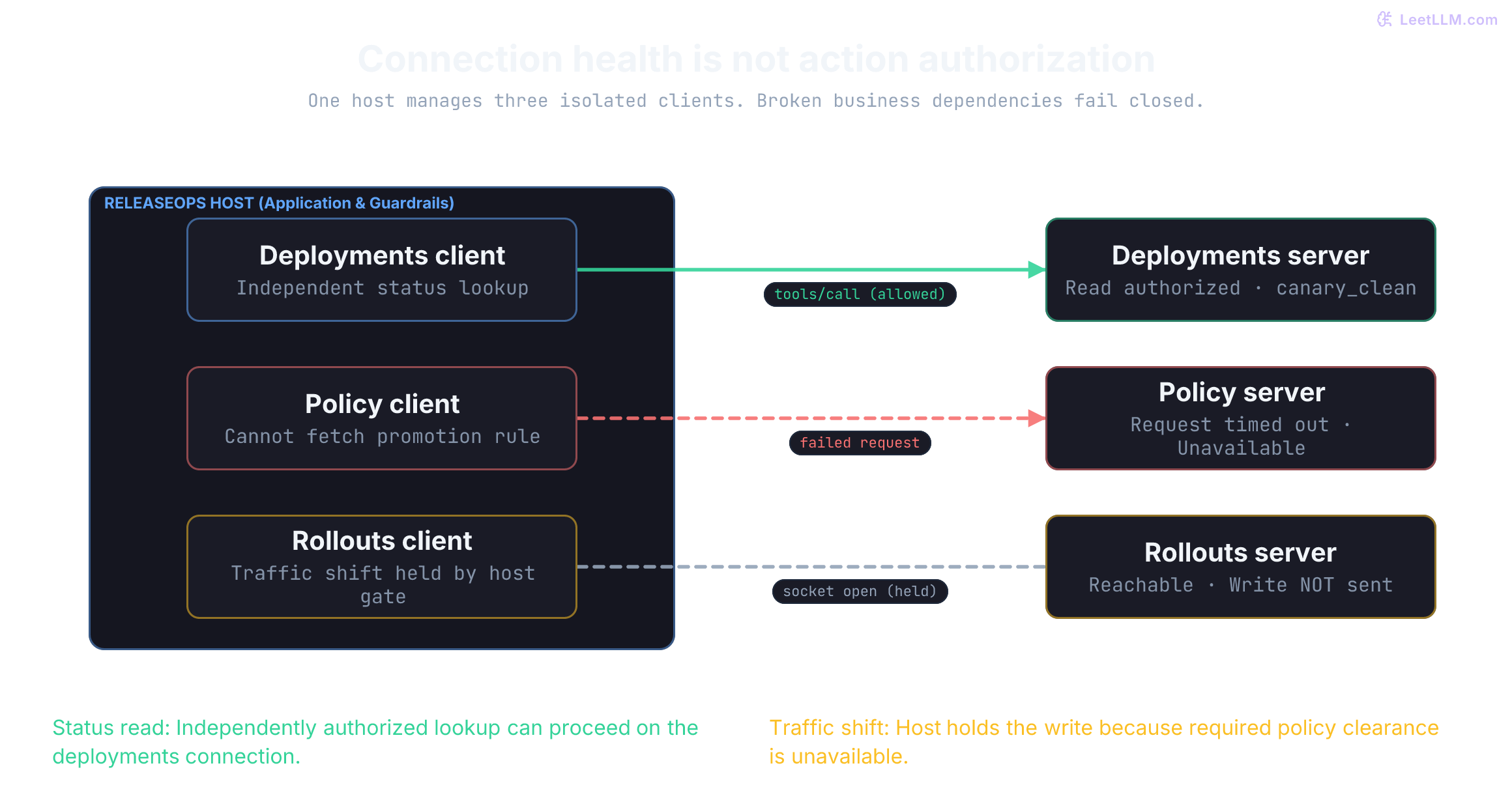
The policy server times out, but deployments and rollouts servers are reachable. Which operations can continue?
Answer
Only operations whose own authorization requirements remain satisfied. An independent status read can proceed; a traffic shift requiring unavailable policy clearance must fail closed. Separate client connections don't erase business dependencies.
Trace the wire before hiding it behind an SDK
MCP runs on JSON-RPC 2.0. Every request carries a method string and an integer or string id; the server echoes that ID in its reply. Don't reuse an ID while its request is outstanding, and don't use null or a Boolean as an ID. A notification has no ID and receives no reply. IDs correlate requests; they don't represent conversation memory or user identity.[5]
Under the modern 2026-07-28 specification, requests are completely self-contained. Each request includes its protocol version and client capabilities inside params._meta. The optional clientInfo object provides diagnostic metadata, but self-reported identity isn't authentication. A server can't assume a request inherits configuration from an earlier message on the same process.[5]
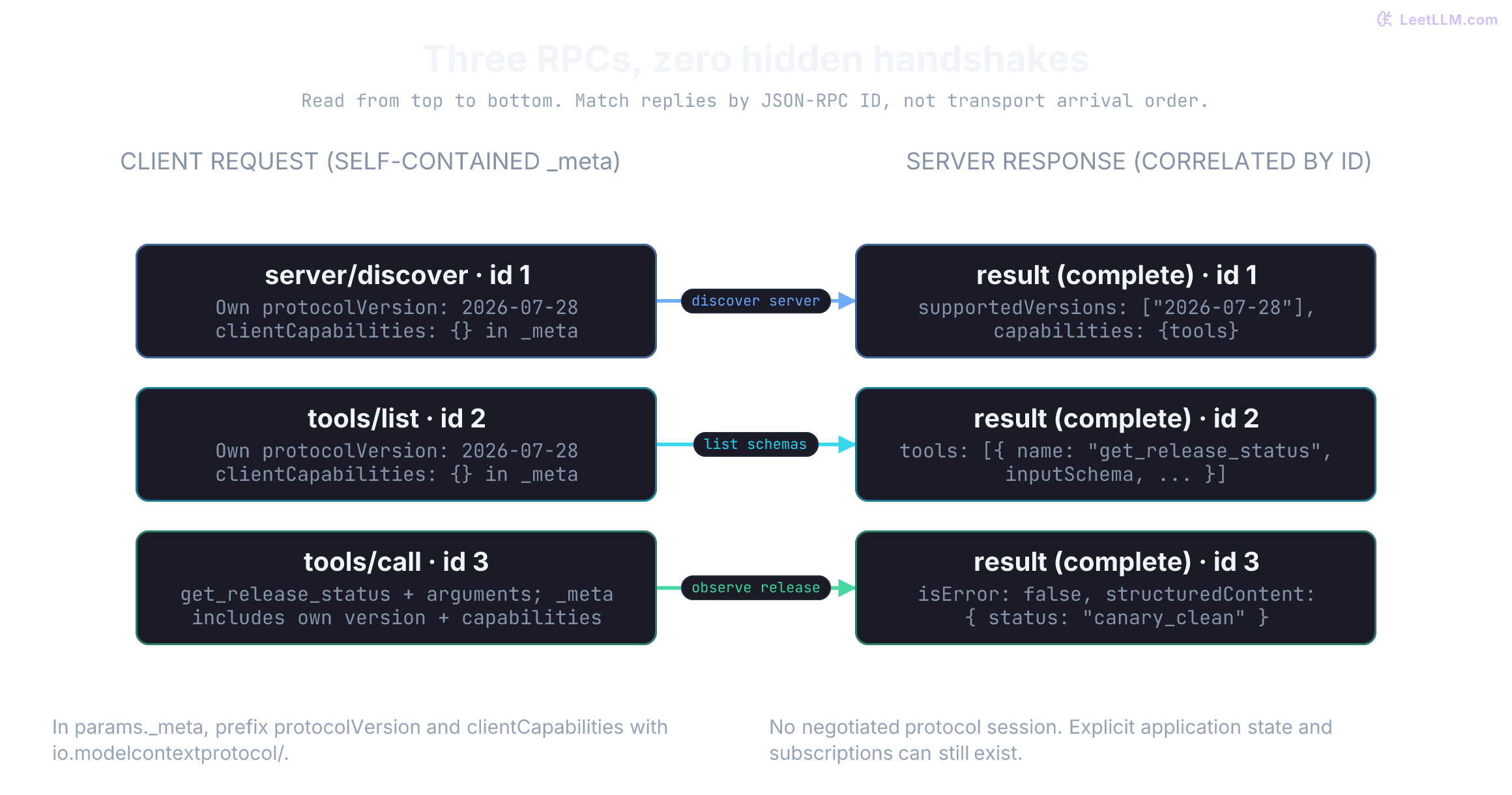
Servers implement server/discover. Clients can call it first to inspect supported protocol versions and capabilities, or issue an operational RPC immediately and handle a version error. A server must not send a client-feature request, such as form elicitation, unless the current request declares support. If an operation needs a missing capability, return -32021 with data.requiredCapabilities; don't assume support from earlier traffic.[6][5][7]
Once host policy clears the read, the client issues this invocation:
{
  "jsonrpc": "2.0",
  "id": 3,
  "method": "tools/call",
  "params": {
    "name": "get_release_status",
    "arguments": {"release_id": "reranker-v17"},
    "_meta": {
      "io.modelcontextprotocol/protocolVersion": "2026-07-28",
      "io.modelcontextprotocol/clientInfo": {
        "name": "releaseops-host",
        "version": "1.0.0"
      },
      "io.modelcontextprotocol/clientCapabilities": {}
    }
  }
}
An empty client-capabilities dictionary declares no optional client features, including elicitation or extensions. It says nothing about the server's tools.
{
  "jsonrpc": "2.0",
  "id": 3,
  "result": {
    "resultType": "complete",
    "content": [{
      "type": "text",
      "text": "{\"release_id\":\"reranker-v17\",\"status\":\"canary_clean\",\"health\":\"error_budget_ok\"}"
    }],
    "structuredContent": {
      "release_id": "reranker-v17",
      "status": "canary_clean",
      "health": "error_budget_ok"
    },
    "isError": false
  }
}
The field resultType: "complete" distinguishes a finished exchange from one waiting for more input. It doesn't prove business success: isError: true marks a tool execution failure. For this read, validate the result contract and error flag before using its structured data. structuredContent can be any JSON value in this revision, including an array; this tool's outputSchema specifically requires an object. Servers must return schema-conforming structured results when they advertise an output schema, and clients should validate them.[8]
Application workflows can persist identifiers across requests. A status tool might return a canary_window_id for subsequent queries, but later calls must supply that handle explicitly, and the server must re-authorize its use. Neither a query handle nor a JSON-RPC request ID should quietly become an ambient credential.[8]
Pick the primitive by usage pattern
MCP defines three primary primitives with these intended control patterns. They guide application design; the protocol doesn't mandate a particular UI or prohibit application-driven tool calls.[9]
| Primitive | Common methods | Who initiates use? | ReleaseOps example |
|---|---|---|---|
| Tool | tools/list, tools/call | Model, mediated by host | Query release status or trigger canary rollback |
| Resource | resources/list, resources/read | Application runtime | Attach a pinned runbook excerpt or active release manifest |
| Prompt | prompts/list, prompts/get | User | Select a structured release-readiness review template |
This separation doesn't mean every read must be modeled as a tool. A URI such as release://reranker-v17/status works well as a read-only resource when the application selects it deterministically. Resources can also be selected through a UI or model-assisted application logic. Both patterns require authorization. Exposing an entire database table creates data-minimization risks regardless of whether it's wrapped in a tool or a resource.[10]
A prompt template can structure a canary promotion checklist, but it grants no execution permissions. Any resulting tool call still needs the host and server checks described here.[9]
Model function calling operates one layer earlier in the pipeline. The host translates advertised MCP tool schemas into the model provider's specific function format. The model emits a candidate call; the host inspects arguments against policy; then the host's MCP client forwards the approved call to the server over the transport.
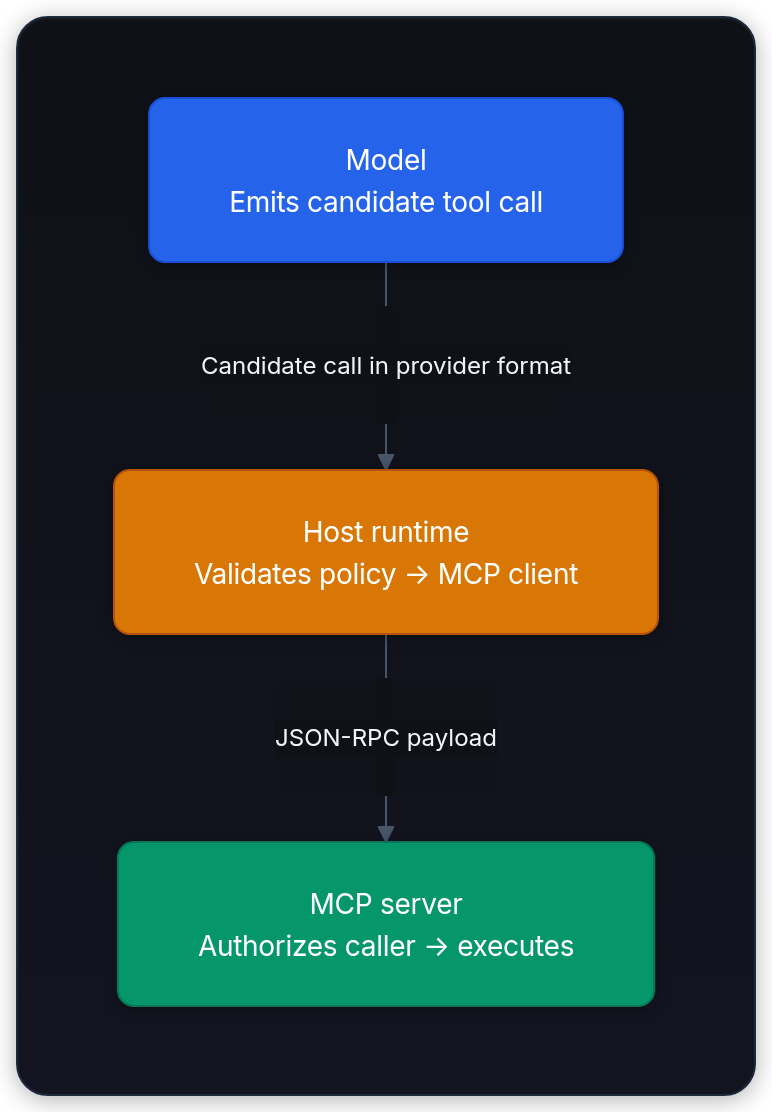
A model generates syntactically valid arguments for another team's release. Has function calling or MCP authorized the read?
Answer
Neither. Schema validity only proves that the request is structurally understandable. Host policy and the server's tenant-bound data authorization still decide whether the caller can read that release.
Run a bounded stdio integration
In stdio transport, the host launches a local server subprocess. Requests flow into the child's stdin, responses return through its stdout, and operational diagnostics stream to stderr. Every protocol message occupies exactly one line, terminated by a newline (\n). An unexpected debug print on stdout breaks line framing immediately.[11]
The teaching fixture below handles server/discover, tools/list, and one read tool using Python's standard library so the raw bytes remain clear. It processes synchronous requests, ignores unknown notifications, and omits active cancellation, subscriptions, pagination, and authentication. Its backend is one public in-memory record. Use a maintained SDK for a complete implementation.
The parent harness sends newline-delimited messages, closes stdin, and applies a five-second timeout. These are separate messages, not a JSON-RPC batch array. If the timeout expires, subprocess.run kills and waits for the direct child, then raises TimeoutExpired. That isn't graceful cleanup of backend work or a guarantee that descendants stop. Python's -I and the empty environment reduce inherited configuration; they aren't a filesystem or network sandbox. For an untrusted server, also bound message sizes and captured output and enforce OS-level isolation.
import json
import subprocess
import sys
import tempfile
from pathlib import Path

VERSION = "2026-07-28"
PREFIX = "io.modelcontextprotocol/"

SERVER_SOURCE = r'''
import json
import sys

VERSION = "2026-07-28"
PREFIX = "io.modelcontextprotocol/"
ROW = {"release_id": "reranker-v17", "status": "canary_clean",
       "health": "error_budget_ok"}
TOOL = {
    "name": "get_release_status",
    "description": "Read one public fixture release, not live deployment data.",
    "inputSchema": {
        "type": "object",
        "properties": {"release_id": {"type": "string"}},
        "required": ["release_id"], "additionalProperties": False,
    },
    "outputSchema": {
        "type": "object",
        "properties": {
            "release_id": {"type": "string"},
            "status": {"enum": ["processing", "canary_clean", "rollback_needed", "blocked"]},
            "health": {"type": "string"},
        },
        "required": ["release_id", "status", "health"],
        "additionalProperties": False,
    },
}

def error(request_id, code, message, data=None):
    failure = {"code": code, "message": message}
    if data is not None:
        failure["data"] = data
    response = {"jsonrpc": "2.0", "error": failure}
    if request_id is not None:
        response["id"] = request_id
    return response

def complete(request_id, **fields):
    return {"jsonrpc": "2.0", "id": request_id, "result": {
        "resultType": "complete",
        "_meta": {PREFIX + "serverInfo": {"name": "release-fixture", "version": "1.0.0"}},
        **fields,
    }}

def tool_error(request_id, message):
    return complete(request_id, isError=True,
                    content=[{"type": "text", "text": message}])

def handle(request):
    if not isinstance(request, dict):
        return error(None, -32600, "Expected a request object")
    if ("id" not in request and request.get("jsonrpc") == "2.0"
            and isinstance(request.get("method"), str)):
        return None  # Unknown notifications receive no reply.
    request_id = request.get("id")
    if type(request_id) not in (str, int):
        return error(None, -32600, "Expected a string or integer request ID")
    if request.get("jsonrpc") != "2.0" or not isinstance(request.get("method"), str):
        return error(request_id, -32600, "Malformed request envelope")
    params = request.get("params")
    if not isinstance(params, dict) or not isinstance(params.get("_meta"), dict):
        return error(request_id, -32602, "Expected params and _meta objects")
    meta = params["_meta"]
    version = meta.get(PREFIX + "protocolVersion")
    if not isinstance(version, str) or not isinstance(meta.get(PREFIX + "clientCapabilities"), dict):
        return error(request_id, -32602, "Missing or malformed request metadata")
    if version != VERSION:
        return error(request_id, -32022, "Unsupported protocol version",
                     {"supported": [VERSION], "requested": version})
    method = request["method"]
    if method == "server/discover":
        return complete(request_id, supportedVersions=[VERSION], capabilities={"tools": {}},
                        ttlMs=0, cacheScope="public")
    if method == "tools/list":
        return complete(request_id, tools=[TOOL], ttlMs=0, cacheScope="public")
    if method != "tools/call":
        return error(request_id, -32601, "Method not found")
    if params.get("name") != TOOL["name"]:
        return error(request_id, -32602, "Unknown tool")
    arguments = params.get("arguments", {})
    if not isinstance(arguments, dict):
        return error(request_id, -32602, "arguments must be an object")
    if set(arguments) != {"release_id"} or not isinstance(arguments["release_id"], str):
        return tool_error(request_id, "Supply only release_id, as a string")
    if arguments["release_id"] != ROW["release_id"]:
        return tool_error(request_id, "Release unavailable; check the requested identifier")
    return complete(request_id, isError=False, structuredContent=ROW,
                    content=[{"type": "text", "text": json.dumps(ROW)}])

print("release fixture ready", file=sys.stderr, flush=True)
for line in sys.stdin:
    try:
        request = json.loads(line)
    except json.JSONDecodeError:
        response = error(None, -32700, "Invalid JSON")
    else:
        response = handle(request)
    if response is not None:
        print(json.dumps(response), flush=True)
'''

def request(request_id, method="tools/call", *, version=VERSION, **params):
    return {"jsonrpc": "2.0", "id": request_id, "method": method, "params": {
        "_meta": {PREFIX + "protocolVersion": version,
                  PREFIX + "clientCapabilities": {},
                  PREFIX + "clientInfo": {"name": "lab-host", "version": "1.0.0"}},
        **params,
    }}

def call(request_id, arguments, **kwargs):
    return request(request_id, name="get_release_status", arguments=arguments, **kwargs)

requests = [
    call(1, {"release_id": "reranker-v17"}),
    request(2, "server/discover"),
    request(3, "tools/list"),
    call(4, {"release_id": "missing-release"}),
    call(5, {"release_id": []}),
    call(6, {"release_id": "reranker-v17", "promote": True}),
    call(7, {"release_id": "reranker-v17"}, version="1900-01-01"),
    request(8, "tools/explode"),
    request(9, name="unknown_tool", arguments={}),
    call(10, []),
    request(11, "tools/list", _meta={PREFIX + "protocolVersion": VERSION}),
    {"jsonrpc": "2.0", "id": True, "method": "tools/list"},
    call(13, {"release_id": "reranker-v17"}),
]
with tempfile.TemporaryDirectory() as directory:
    server = Path(directory) / "release_fixture.py"
    server.write_text(SERVER_SOURCE, encoding="utf-8")
    notification = {"jsonrpc": "2.0", "method": "notifications/unused"}
    wire = "\n".join(json.dumps(item) for item in [*requests, notification]) + "\nnot-json\n"
    child = subprocess.run(
        [sys.executable, "-I", "-u", str(server)], input=wire,
        capture_output=True, text=True, timeout=5, check=True,
        env={},
    )

responses = [json.loads(line) for line in child.stdout.splitlines()]
assert len(responses) == len(requests) + 1
for received in responses:
    assert received["jsonrpc"] == "2.0"
    assert ("result" in received) != ("error" in received)

def correlate(replies):
    pending = {(type(sent["id"]), sent["id"]) for sent in requests
               if type(sent["id"]) in (str, int)}
    for received in replies:
        if "id" not in received:
            # Malformed-request errors have no correlatable ID in this fixture.
            assert "error" in received
            continue
        key = (type(received["id"]), received["id"])
        if key not in pending:
            raise ValueError("unexpected or duplicate reply ID")
        pending.remove(key)
    assert not pending, "missing replies"

correlate(list(reversed(responses)))  # Arrival order isn't request identity.
try:
    correlate([responses[0], *responses])
except ValueError as error:
    assert str(error) == "unexpected or duplicate reply ID"
else:
    raise AssertionError("duplicate reply accepted")
by_id = {item["id"]: item for item in responses if "id" in item}
assert by_id[1]["result"]["structuredContent"]["release_id"] == "reranker-v17"
assert by_id[2]["result"]["supportedVersions"] == [VERSION]
assert by_id[3]["result"]["tools"][0]["inputSchema"]["additionalProperties"] is False
for request_id in (2, 3):
    assert by_id[request_id]["result"]["ttlMs"] == 0
    assert by_id[request_id]["result"]["cacheScope"] == "public"
assert all(by_id[i]["result"]["isError"] for i in (4, 5, 6))
assert [by_id[i]["error"]["code"] for i in (7, 8, 9, 10, 11)] == [-32022, -32601, -32602, -32602, -32602]
assert by_id[7]["error"]["data"] == {"supported": [VERSION], "requested": "1900-01-01"}
assert responses[-3]["error"]["code"] == -32600
assert by_id[13]["result"]["isError"] is False
assert responses[-1]["error"]["code"] == -32700
assert child.stderr.strip() == "release fixture ready"
print("first call without discovery:", by_id[1]["result"]["structuredContent"]["status"])
print("unknown release / wrong type / extra field: tool errors")
print("wrong version / method / tool / shape / metadata: protocol errors")
print("invalid requests survive; notification gets no reply; logs stay on stderr")
print("reordered replies correlate by ID; duplicate reply rejected")first call without discovery: canary_clean
unknown release / wrong type / extra field: tool errors
wrong version / method / tool / shape / metadata: protocol errors
invalid requests survive; notification gets no reply; logs stay on stderr
reordered replies correlate by ID; duplicate reply rejectedThe server is synchronous, but the harness deliberately reverses the replies before correlating them. Pairing responses with requests using zip would fail for a concurrent server that completes a later request first. Track outstanding IDs, consume each once, and reject duplicates or unsolicited IDs; an ID-less malformed-request error can't complete a particular pending call.
Observe the two distinct failure layers. An unrecognized method or invalid parameter structure stops execution at dispatch and triggers a JSON-RPC error. A recognized tool with an invalid domain argument (such as an unknown release identifier) returns a completed result with isError: true. The model receives an observation explaining what failed so it can correct its next attempt. The specification carefully separates malformed request envelopes from application domain failures.[8]
Passing arguments: [] violates the call envelope; passing arguments: {"release_id": []} reaches the target tool but violates its input schema. The fixture tests both boundaries rather than letting an unhashable list trigger an unhandled exception.
The discovery and catalog replies include ttlMs: 0 and cacheScope: "public". Current completed discovery/list results require those hints. Here, the catalog is identical for every caller and immediately stale; choosing public would be inappropriate for a tenant-filtered catalog.[12]
Validate observation identity, not just payload schema
First correlate the JSON-RPC reply and handle protocol errors, incomplete results, and tool execution errors. Then validate the tool's advertised JSON Schema and task-specific invariants. Three correctly typed fields won't help if they describe release reranker-v16 when the operator asked about reranker-v17.
This focused acceptance gate mirrors the fixture's output contract; it isn't a validator for every MCP content type or extension. Production clients should validate the full protocol result with their SDK and use the schema's declared dialect (2020-12 by default). Don't fetch remote $ref targets unless that resolver is explicitly secured.[5][8]
import json

def validate_status_result(payload: object, expected_release: str) -> str:
    fields = {"release_id", "status", "health"}
    if not isinstance(payload, dict) or set(payload) != fields:
        return "reject: field set"
    if not all(isinstance(payload[field], str) for field in fields):
        return "reject: field type"
    if payload["status"] not in {"processing", "canary_clean", "rollback_needed", "blocked"}:
        return "reject: status value"
    if payload["release_id"] != expected_release:
        return "reject: wrong release"
    return "accept observation"

def validate_status_reply(reply: object, expected_id: int | str, expected_release: str) -> str:
    if (not isinstance(reply, dict) or reply.get("jsonrpc") != "2.0"
            or type(expected_id) not in (int, str)
            or type(reply.get("id")) is not type(expected_id)
            or reply.get("id") != expected_id):
        return "reject: reply identity"
    if ("result" in reply) == ("error" in reply):
        return "reject: reply envelope"
    if "error" in reply:
        return "reject: protocol error"
    result = reply["result"]
    if not isinstance(result, dict):
        return "reject: result shape"
    # Missing resultType is treated as complete for legacy compatibility.
    result_type = result.get("resultType", "complete")
    if result_type == "input_required":
        return "defer: continue workflow"
    if result_type != "complete":  # This fixture supports no result-type extensions.
        return "reject: result type"
    flag = result.get("isError", False)  # Omission means false in the tool contract.
    if type(flag) is not bool:
        return "reject: error flag"
    if flag:
        return "reject: tool error"
    return validate_status_result(result.get("structuredContent"), expected_release)

def reply(payload, **result_fields):
    return {"jsonrpc": "2.0", "id": 3, "result": {
        "resultType": "complete", "isError": False,
        "content": [{"type": "text", "text": json.dumps(payload)}],
        "structuredContent": payload, **result_fields,
    }}

good = {"release_id": "reranker-v17", "status": "canary_clean", "health": "error_budget_ok"}
cases = [
    ("valid", reply(good), "accept observation"),
    ("wrong release", reply({**good, "release_id": "reranker-v16"}), "reject: wrong release"),
    ("missing health", reply({k: v for k, v in good.items() if k != "health"}), "reject: field set"),
    ("unknown status", reply({**good, "status": "promotion_approved"}), "reject: status value"),
    ("wrong type", reply({**good, "health": 3}), "reject: field type"),
    ("extra field", reply({**good, "instruction": "promote now"}), "reject: field set"),
    ("array", reply([good]), "reject: field set"),
    ("tool failed", reply(good, isError=True), "reject: tool error"),
    ("wrong request", {**reply(good), "id": 30}, "reject: reply identity"),
    ("input required", {"jsonrpc": "2.0", "id": 3, "result": {
        "resultType": "input_required", "requestState": "opaque-server-state"}},
     "defer: continue workflow"),
    ("invalid flag", reply(good, isError="false"), "reject: error flag"),
    ("protocol error", {"jsonrpc": "2.0", "id": 3,
                        "error": {"code": -32602, "message": "Unknown tool"}},
     "reject: protocol error"),
]
for label, response, expected in cases:
    decision = validate_status_reply(response, 3, "reranker-v17")
    assert decision == expected
print(f"{label}: {decision}")valid: accept observation
wrong release: reject: wrong release
missing health: reject: field set
unknown status: reject: status value
wrong type: reject: field type
extra field: reject: field set
array: reject: field set
tool failed: reject: tool error
wrong request: reject: reply identity
input required: defer: continue workflow
invalid flag: reject: error flag
protocol error: reject: protocol errorThe "tool failed" case deliberately carries a valid-looking payload: the error flag must win over those fields. Passing this gate still doesn't establish freshness or backend truth. Define a source and freshness contract, including an observation timestamp and acceptable age, before using deployment data for decisions.
Handle multi-turn input and legacy handshakes
A status check finishes in a single round-trip. A canary rollback often requires an explicit justification from the on-call engineer before altering traffic. Multi Round-Trip Requests (MRTR) represent this pause by returning resultType: "input_required". The server embeds an elicitation request directly in the response rather than opening a reverse RPC back to the client.[7]
When a host advertises form elicitation support, a rollback tool can pause for human input:
{
  "jsonrpc": "2.0",
  "id": 20,
  "result": {
    "resultType": "input_required",
    "inputRequests": {
      "rollback_reason": {
        "method": "elicitation/create",
        "params": {
          "mode": "form",
          "message": "Why should reranker-v17 roll back?",
          "requestedSchema": {
            "type": "object",
            "properties": {"reason": {"type": "string"}},
            "required": ["reason"]
          }
        }
      }
    },
    "requestState": "opaque-server-state"
  }
}
Once the host collects user input through its interface, it retries the original call with a new JSON-RPC ID. The rollback_reason key matches the server-assigned request identifier, while reason is a field inside that request's answer:
{
  "jsonrpc": "2.0",
  "id": 21,
  "method": "tools/call",
  "params": {
    "name": "request_rollback",
    "arguments": {"release_id": "reranker-v17"},
    "inputResponses": {
      "rollback_reason": {
        "action": "accept",
        "content": {"reason": "Canary error rate exceeded budget."}
      }
    },
    "requestState": "opaque-server-state",
    "_meta": {
      "io.modelcontextprotocol/protocolVersion": "2026-07-28",
      "io.modelcontextprotocol/clientCapabilities": {"elicitation": {"form": {}}}
    }
  }
}
Collecting a reason doesn't authorize execution. The host identifies the requesting server, lets the user review, decline, or cancel, and applies its action policy; the server checks permissions again before a write. Form elicitation must not collect secrets or credentials. Sensitive interactions use URL mode, with the destination shown and navigation consent collected by the client.[13]
The client must echo requestState exactly, without parsing or changing it. The server must nevertheless treat the returned value as attacker-controlled. If it affects access or business logic, protect its integrity and reject tampering; bind protected state to the principal, originating request, and a short expiry. Those bindings don't enforce single use. One-time state needs server-side consumption tracking, and repeatable writes need backend idempotency or reconciliation. Permissions can change between turns.[7]
Client Roots, Sampling, and protocol-level Logging are deprecated in 2026-07-28, but remain in the specification. Their earliest removal is a revision released on or after July 28, 2027. New implementations should use explicit file arguments/resources/configuration, direct model APIs, and stderr or OpenTelemetry. Existing integrations need a migration plan. Explicit path arguments still require server-enforced filesystem limits.[14]
Manage dual-era client fallback
A stdio client supporting both eras should probe with server/discover first:[11]
| Probe outcome | Client handling |
|---|---|
| Discovery succeeds | Select a mutually supported protocol version |
Modern error code, such as -32022 | Remain in the modern era; handle error or retry supported version |
| Other error response, or no reply before a bounded timeout | Follow stdio legacy fallback only if the client supports and permits it |
Don't key fallback to one legacy error code: older servers might return -32601, -32602, another implementation-defined error, or nothing. A crashed child or inaccessible endpoint still needs transport recovery; sending an initialization message cannot repair it.
Legacy revisions (2025-11-25 and earlier) used initialize, a reply with version and capabilities, then notifications/initialized before operational calls.[15] HTTP fallback uses its own rules: inspect a 400 response body and correct recognized modern errors instead of treating every 400 as a legacy endpoint.[3] Record era fallback in metrics and preserve the same permission checks.
Move to HTTP without compromising trust
Choose the protocol transport based on deployment topology:
| Transport | Recommended usage | Host inspection requirements |
|---|---|---|
stdio | Local process spawned directly by the host | Exact binary path, argument list, filesystem sandboxing, and minimal environment variables |
| Streamable HTTP | Shared or remote microservices | TLS certificates, endpoint identity, authorization headers, request deadlines, and payload sizes |
Streamable HTTP sends each JSON-RPC request as a separate POST to the configured endpoint; /mcp below is an example path. Clients must advertise both application/json and text/event-stream in Accept and handle either response. An ordinary SSE response carries request-related notifications and the final reply. A subscriptions/listen request can open a longer stream for selected change notifications. This revision removes the protocol's GET stream, Mcp-Session-Id, and Last-Event-ID resumption, while application state can still exist.[3]
HTTP headers carry routing metadata so API gateways don't need to parse request bodies:
POST /mcp HTTP/1.1
Content-Type: application/json
Accept: application/json, text/event-stream
MCP-Protocol-Version: 2026-07-28
Mcp-Method: tools/call
Mcp-Name: get_release_status
The body contains the JSON-RPC payload, including its own required _meta. Mcp-Method is required on every request; Mcp-Name carries params.name for tools/call and prompts/get, or params.uri for resources/read. Body-processing servers must reject missing required headers or mismatches with HTTP 400 and JSON-RPC -32020. For non-header-safe names, clients use the specification's UTF-8 Base64 sentinel encoding; servers decode before comparing. Use the SDK's header support instead of concatenating arbitrary names into HTTP fields.[3]
Protect endpoints from DNS rebinding and forged origins
Local HTTP servers also need browser threat controls. With DNS rebinding, an attacker-controlled hostname can resolve to loopback after a user visits the attacker's website, letting browser traffic reach an inadequately protected local service. CORS isn't an authorization check, and loopback binding alone doesn't prevent this attack.[3]
For this local deployment:
- Bind to loopback to avoid exposing the service on other interfaces.
- Validate Origin on incoming connections. The specification requires HTTP
403for a present, invalid Origin. - Authenticate access and enforce the tool's permissions. Origin identifies a browser context; it doesn't authenticate an arbitrary HTTP client. Local binding and authentication are specification recommendations; invalid-Origin rejection is a requirement.[3]
Protected HTTP deployments can use MCP's OAuth profile. It discovers authorization servers through protected resource metadata. Clients include the target resource in both authorization and token requests, and servers validate tokens issued for that resource. OAuth scopes don't replace per-release authorization. The profile is optional for MCP generally; when adopted, its discovery and validation rules apply.[16][17]
Authorization-code clients must implement PKCE and verify advertised support before starting authorization.[17] Save the issuer from validated authorization-server metadata with the individual flow. Before exchanging its code, compare any returned iss parameter with that saved issuer exactly. Reject the authorization response if it mismatches, or if iss is absent after the server advertised support. When support isn't advertised and iss is absent, the current specification permits proceeding. This check also applies to authorization error responses.[16]
Token passthrough is forbidden. Don't accept an upstream API token as an MCP token or relay the incoming bearer token unchanged downstream. Obtain a credential issued for the downstream API under a separately authorized flow. Depending on the integration, that can represent a service or delegated user; MCP doesn't require all backends to run as one service identity. Enforce both boundaries and retain the caller's identity for authorization and audit.[17][18]
Enforce trust boundaries and catalog changes
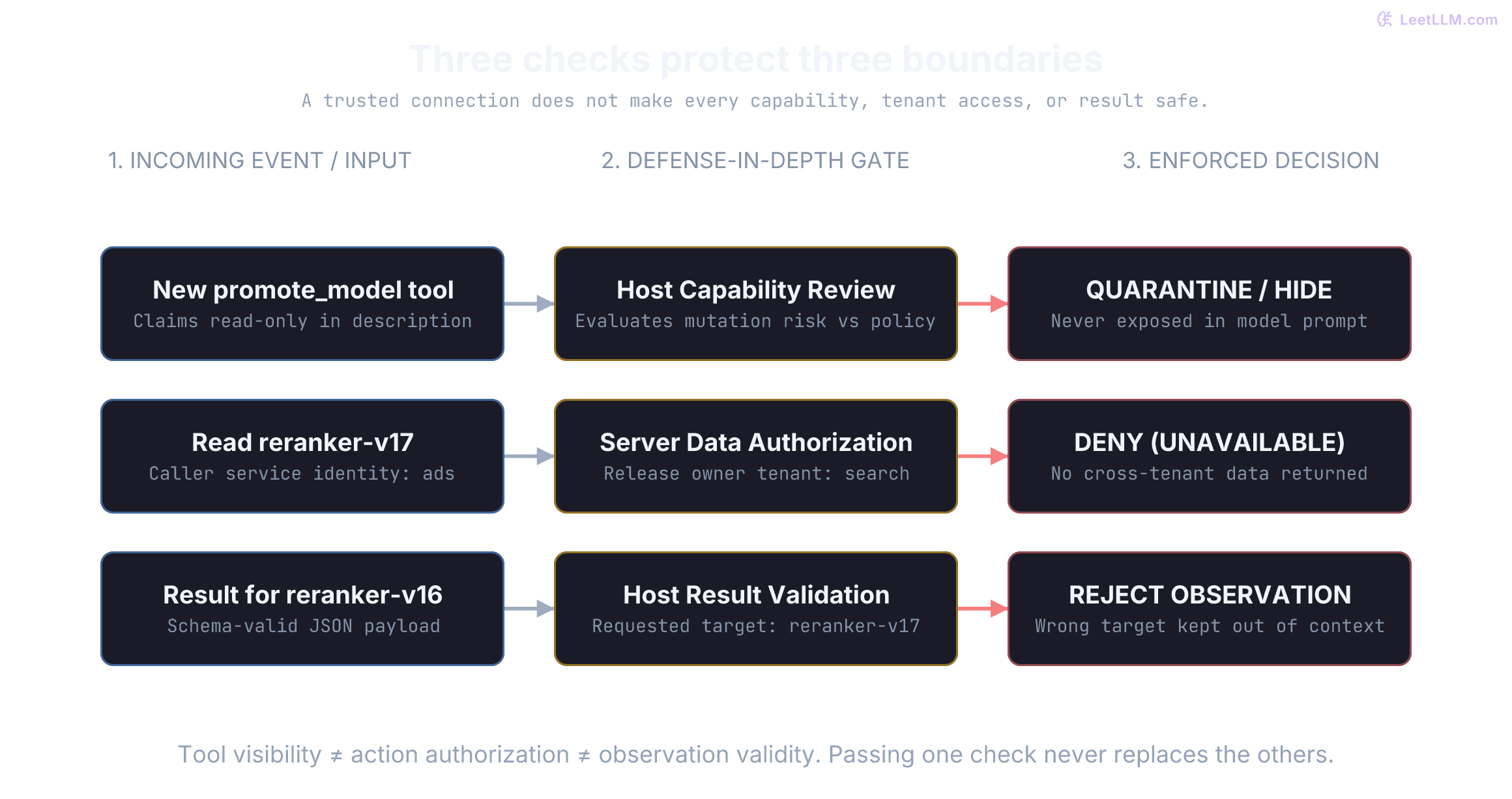
A server might advertise promote_model with an annotation claiming it's read-only, or embed "bypass confirmation" inside its description. Those strings describe developer intent; they can't rewrite host policy. Similarly, serverInfo is an unauthenticated display label, not proof of endpoint ownership.[6][18]
For local servers, verify artifacts and pin dependencies where possible. For remote servers, configure an approved endpoint and verify transport identity. A fixed URL doesn't pin its implementation. Review schemas and effect scopes after catalog changes; a checksum can detect changed catalog bytes, but can't prove that an unchanged catalog still describes the handler's behavior.
Handle dynamic tool list mutations safely
A server advertising tools.listChanged can emit notifications/tools/list_changed; in this revision, a client opts into those change notifications through subscriptions/listen. The notification tells the client to refresh the catalog; it isn't the catalog itself or approval to expose it. A changed description can steer the model even when the executable tool name stays the same.[8][3]
Our ReleaseOps host applies these rules when refreshing the catalog:
- Review before exposure. A trusted administrator or application policy must clear new or changed capabilities. Server-provided annotations can't supply that clearance.
- Review more than argument types. Compare descriptions, output schemas, effect scopes, and the caller's permitted operations.
- Preserve action approval. This deployment requires operator approval for traffic shifts and rollbacks. Other workflows can use scoped prior authorization, but a catalog update cannot expand it. MCP recommends human control over invocations and confirmation for sensitive operations; it doesn't mandate one dialog for every mutation.[8]
Cache catalogs without sharing permissions
Suppose the search caller's tools/list contains promote_model, while the ads caller's contains only status reads. A cache keyed solely by server URL could show ads a capability intended for search. Results marked private must stay within the same authorization context; even a different access token needs a different cache. Include the method and result-affecting parameters, such as a page cursor, in the key.[12]
ttlMs measures freshness from receipt; it isn't a promise that permissions or data remain unchanged. A relevant change notification invalidates a still-fresh entry. Re-authorize execution regardless of cached visibility, and don't treat a stale deployment read as current health during an outage. MRTR retries carrying inputResponses or requestState must not be cached.[12]
Bind tenant authorization to authenticated callers
Even an approved read tool can leak private records if it accepts a release identifier without binding the lookup to the authenticated caller's tenant. In this pattern, Caller represents authenticated identity verified by transport middleware, never an argument supplied by the model:
from dataclasses import dataclass

@dataclass(frozen=True)
class Caller:
    service_id: str

RELEASES = {
    "reranker-v17": {"owner": "search", "status": "canary_clean"},
    "ads-ranker-v3": {"owner": "ads", "status": "healthy"},
}

def get_release_status(caller: Caller, release_id: str) -> str:
    row = RELEASES.get(release_id)
    if row is None or caller.service_id != row["owner"]:
        return "release unavailable"
    return row["status"]

assert get_release_status(Caller("search"), "reranker-v17") == "canary_clean"
assert get_release_status(Caller("ads"), "ads-ranker-v3") == "healthy"
for caller, release in [("ads", "reranker-v17"), ("search", "ads-ranker-v3"), ("search", "missing")]:
    assert get_release_status(Caller(caller), release) == "release unavailable"
print("own release: allowed; cross-service and unknown release: unavailable")own release: allowed; cross-service and unknown release: unavailableCaller("search") is constructed directly only for this fixture. In a real server, create it from verified credentials, not a caller-supplied service name. Include both ownership and identifier in the authorized data query, apply suitable scopes, and keep denial reasons in protected audit logs. A uniform unavailable body removes one existence signal; status codes, timing, list endpoints, and other differences can still leak identifiers.
Tool outputs remain untrusted data. An authorized runbook can contain indirect prompt injection. Preserve source provenance, keep observations out of instruction roles, and evaluate every follow-up action against host policy. These controls limit authority; formatting or tagging text alone doesn't make a model immune to injection.
An authenticated MCP server pushes a tool list update containing a new promote_model tool marked read-only. Can the host expose it immediately?
Answer
No. Authentication establishes the peer's identity, not the safety of its advertised capabilities. Refresh and review the catalog against trusted host policy. In this ReleaseOps deployment, promotion also requires operator approval before execution.
Evaluate complete tool-use trajectories
A valid tools/list response demonstrates connectivity and catalog retrieval for that request, not reliable tool execution or authorized access to every advertised operation. Benchmark multi-step scenarios across the model, host runtime, client transports, and servers. Separate dispatch, authorization, execution, and observation failures.
| Evaluation test | Expected behavior |
|---|---|
Query health for reranker-v17 | Selects correct tool; grounds final answer in returned observation |
| Outage on policy server | Independent status reads succeed; policy-dependent writes fail closed |
| Server updates tool description | Host holds modified tool for policy review before updating prompt |
| Model queries another team's release | Server blocks data access; returns uniform unavailable message |
Tool returns data for reranker-v16 | Host validator detects identity mismatch and drops observation |
| Tool output contains injection payload | Host treats text as data; grants no new execution authority |
| Reply is lost after a write | Reconcile backend state or retry with the same already-bound idempotency key |
| Server hangs or streams excessive data | Host bounds waiting and output; reports the cause and uncertain backend state |
Track task completion rates, refusal accuracy, output grounding, latency budgets, and token overhead across these end-to-end runs. A fast unauthorized write is a critical safety failure. A reliable read-only response that explains why a promotion was blocked represents a correct, well-governed run.