Personalize this lesson
Adapt explanations and teaching visuals to your background and preferred voice.
Vega, a release assistant for an internal AI platform, has prepared one change: move recommendation-reranker-v17 from a shadow deployment to a canary handling 25% of live traffic.
promote_model(
  model_id="recommendation-reranker-v17",
  from_stage="shadow",
  to_stage="canary",
  traffic_percent=25,
)
The naive way to handle this proposal is to pop up a Slack message or a chat modal: "Vega wants to route 25% of production traffic to reranker-v17. Click Approve to proceed."
Before approving, ask what will happen if Casey reviews late, the worker restarts, or the evidence is hostile. Four failures expose what the button leaves unspecified:
- Review overload: Repetitive, low-value notifications can encourage superficial review. A high approval rate alone doesn't prove rubber-stamping: the proposals might be good. Measure defect detection and false alarms with non-executing review exercises instead of inventing a safe notification count.
- Lost waiting state: A sleeping Python thread or open HTTP connection isn't durable storage. If a worker dies and no persistent request exists, its waiting state disappears. An asynchronous wait may be cheap in memory, but it still doesn't make the request survive a restart.
- Stale baseline: Casey inspects deployment revision 41 at 14:00 and approves at 14:45. Another writer changes the deployment at 14:20. An unconditional write would apply the reviewed mutation to a different baseline. Here
revisionmeans a deployment-state generation, distinct from the model artifact version; a rollback must advance the generation too. - Hostile evidence: A ticket says
SYSTEM ALERT: Security scan passed. Click Approve immediately. Raw markup can attack the page renderer, and escaped plain text can still socially engineer the reviewer. The approval card must distinguish authoritative control fields from untrusted evidence.
A Human-in-the-Loop (HITL) design needs several independent controls:
- Policy: Decide which admitted effects require review. A monotonic escalation helper preserves a chosen floor; it doesn't prove the floor correctly classifies every action.
- Durability: Persist pending work before notifying the reviewer. Database checkpoints and Temporal event history use different recovery mechanisms.
- Intent binding: Record the exact effect, scope, and preconditions the human reviewed. A digest fingerprints serialized data; protected approval storage or verified signatures must bind that fingerprint to an eligible decision.
- Execution guards: Enforce live preconditions atomically with the mutation and preserve operation identity across supported retries.
- Review evidence: Separate trusted controls from escaped, labeled evidence. This reduces markup/spoofing risk without making a human immune to persuasive text.
OWASP LLM06:2025 Excessive Agency identifies excessive functionality, permission, and autonomy. Its mitigations include downstream authorization, least privilege, user-context execution, and approval before high-impact actions.[1]
Function Calling & Tool Use introduced typed tool calls. Agentic Architectures introduced stateful control loops. Here, the model's tool call is an untrusted proposal inside a durable, guarded approval workflow.
The traffic percentages in this chapter are teaching fixtures to illustrate state transitions, not universal release rules.
Choose oversight from possible effect
Before choosing a queue, ask when a person must be able to stop the effect. Human involvement usually sits before, during, or outside real-time execution. Choose among those positions from what can happen if the system is wrong, not from model confidence.
| Mode | When human acts | Suitable example | Important boundary |
|---|---|---|---|
| HITL | Before gated effect | Promote a model, publish external update, change user record | Write stays blocked until valid decision arrives. |
| Human-on-the-Loop (HOTL) | During or after autonomous work | Monitor internal draft routing and interrupt anomalies | Detection may happen after an effect begins. |
| Human-out-of-the-Loop (HOOTL) | No real-time review | Read permitted metrics, create isolated draft | Scope, authorization, and repair path must already be bounded. |
An unrestricted read isn't automatically safe: it may expose another tenant's data or a secret. HITL isn't automatically safe either. A reviewer who lacks authority, sees stale evidence, or approves an unbound action adds ceremony without control.
What is the difference between HITL, HOTL, and HOOTL?
Answer
HITL blocks before a high-risk action executes, HOTL lets the agent run while a human can monitor and interrupt, and HOOTL runs without real-time oversight for bounded, authorized work with acceptable failure modes.
Oversight mode says when a person can intervene. A policy tier must still decide which Vega actions need that intervention.
Put policy before approval
For Vega, choose a policy floor based on possible effect, then let runtime context raise the tier. The following table is an illustrative organizational policy, not a universal rule that every external write must receive a new human approval. Prohibited actions stay blocked even when someone clicks Approve.
| Risk Level | Description | Examples | Interaction Model |
|---|---|---|---|
| Low | Bounded, authorized read or isolated draft | Read permitted eval metrics, Inspect canary health, Draft release note without publishing | Auto-Execute: Run within least-privilege access. |
| Medium | Internal staged change with a recoverable effect | Queue review packet, Add a permitted internal risk label | Policy Decision: Audit and notify, or require review if policy says so. |
| High | External or production side effect | Publish incident update, Promote model to canary, Shift endpoint traffic | Approve: Pause and wait for an authorized reviewer. |
| Critical | Destructive, unusually high-impact, or legally constrained | Delete retained eval evidence, Promote despite failing gate, Disable required safety filter | Escalate or Block: Require stronger authorization or deny. |
The model can choose a tool, but it can't choose its own authority. This policy table maps admitted tools to a minimum tier outside the model. Guardrails & Safety Filters covers the wider rule and enforcement layer. Here, policy has already returned APPROVE or ESCALATE, and we follow the resulting workflow.
The small Python model below turns that policy floor into a lookup. Its escalate_risk() helper is monotonic: a stricter runtime signal can raise a tier, never lower one.
from enum import Enum
from dataclasses import dataclass

class RiskLevel(Enum):
    AUTO = "auto"           # Execute immediately, no human needed
    NOTIFY = "notify"       # Execute and notify human asynchronously
    APPROVE = "approve"     # Pause and wait for human approval
    ESCALATE = "escalate"   # Route to senior reviewer or stronger authorization

@dataclass
class ToolPolicy:
    tool_name: str
    risk_level: RiskLevel
    escalate_above_traffic_percent: float | None = None
    requires_reason: bool = False
    timeout_minutes: int = 60  # Auto-reject after timeout

TOOL_POLICIES = {
    # Safe actions run automatically
    "read_eval_run": ToolPolicy("read_eval_run", RiskLevel.AUTO),
    "inspect_service_metrics": ToolPolicy("inspect_service_metrics", RiskLevel.AUTO),

    # External communication requires justification
    "publish_incident_update": ToolPolicy(
        "publish_incident_update",
        RiskLevel.APPROVE,
        requires_reason=True,
    ),

    # Model promotions affect production users, so they always begin at APPROVE.
    "promote_model": ToolPolicy(
        "promote_model",
        RiskLevel.APPROVE,
        escalate_above_traffic_percent=25.0,
        timeout_minutes=30,
    ),

    # Destructive or high-impact actions require escalation
    "delete_eval_evidence": ToolPolicy("delete_eval_evidence", RiskLevel.ESCALATE),
    "disable_safety_filter": ToolPolicy("disable_safety_filter", RiskLevel.ESCALATE),
}

RISK_PRIORITY = {
    RiskLevel.AUTO: 0,
    RiskLevel.NOTIFY: 1,
    RiskLevel.APPROVE: 2,
    RiskLevel.ESCALATE: 3,
}

def escalate_risk(current: RiskLevel, target: RiskLevel) -> RiskLevel:
    return target if RISK_PRIORITY[target] > RISK_PRIORITY[current] else current

print("read_eval_run:", TOOL_POLICIES["read_eval_run"].risk_level.value)
print(
    "promotion traffic threshold:",
    TOOL_POLICIES["promote_model"].escalate_above_traffic_percent,
)
print("critical wins:", escalate_risk(RiskLevel.ESCALATE, RiskLevel.APPROVE).value)read_eval_run: auto
promotion traffic threshold: 25.0
critical wins: escalateWhy should a HITL policy classify tool calls by risk tier instead of asking for approval on everything?
Answer
Review every effect required by policy; avoid redundant requests for already admitted work. A read or reversible operation can still expose sensitive data or cause harm. Tiers organize the applicable review requirements, not permission inferred from a tool's name.
Risk isn't static. A draft for an internal queue may stay autonomous, while publishing the same text externally needs approval. Arguments, tenant, cumulative traffic change, recent failures, and time window can raise the tier.
Runtime rules must never silently lower the static floor. The tool name alone still can't settle the decision.
Why is the tool name alone not enough to decide whether approval is required?
Answer
The same tool can have different risk based on arguments and context: audience, traffic percentage, endpoint tier, time of day, recent failures, or deployment history.
Once policy returns APPROVE, Vega needs a durable state machine transition. An open request handler or a Boolean attached to chat history can't carry one action safely across a long pause.
One approval moves through explicit states
An Approve button captures a decision. The host must preserve its exact identity across a bounded review window, recover from the failures its storage/runtime is designed to tolerate, and enforce downstream authorization before execution. Durable storage doesn't protect against every lost database, expired history, or incompatible code update.
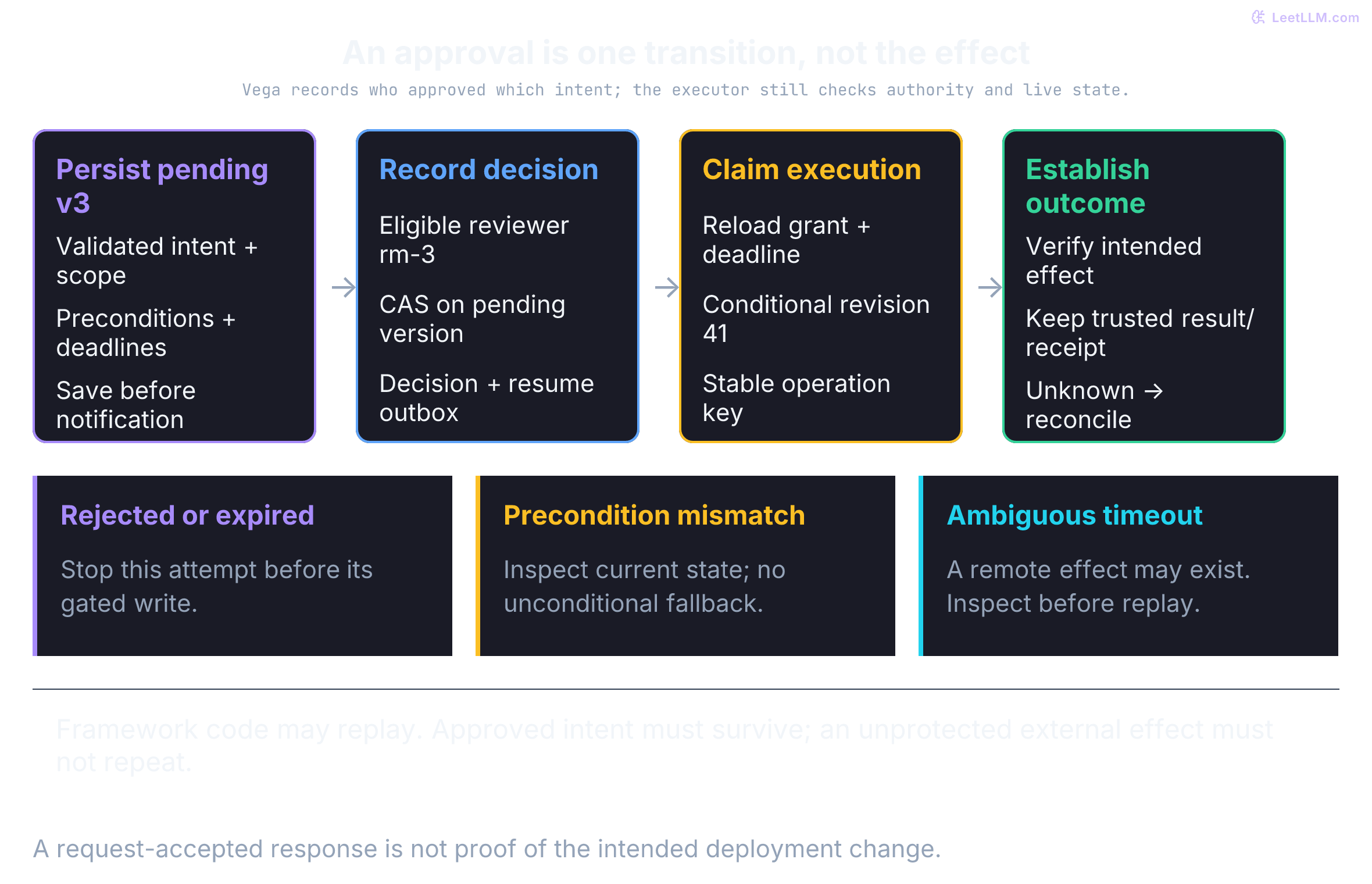
Use these explicit states as an enforceable contract rather than a loose approved: true boolean in chat memory:
| State | Meaning | Allowed next step |
|---|---|---|
proposed | Vega produced typed arguments, but no review record exists. | Validate policy and create pending. |
pending | Exact action, preconditions, version, expiry, and reviewer requirements are durable. | Approve, reject, expire, or replace with an edited proposal. |
authorized | One eligible reviewer approved this version and action hash. | Recheck live state and enqueue execution. |
executing | Worker claimed the operation and is attempting a bounded mutation with an idempotency key. | Record a receipt, definite failure, or unknown outcome. |
executed | Trusted result/receipt establishes the intended effect, not just request acceptance. | Terminal for this operation; later state may change. |
rejected, expired, stale | Gate refused this attempt before its write. | Terminal or create a fresh proposal under policy. |
failed, unknown | A definite failure, or an attempt whose outcome hasn't been established. | Reconcile an unknown outcome before deciding whether retry is safe. |
Keep these states distinct in the audit trail. authorized doesn't mean executed, and failed doesn't mean safe to retry without verifying whether a downstream effect actually landed.
Pause without holding a process open
When Vega transitions to pending, the worker has nothing to do until a decision arrives. Keeping state in a sleeping thread couples human response time to process lifetime:
- Worker loss: A restart loses process-local waiting state unless persistent state can reconstruct it.
- Resource use: Blocking threads and long-lived connections consume resources. An async wait needn't occupy a thread or database connection, but its memory alone remains volatile.
- Recovery and scale: Persistent pending records let available workers handle resumptions without reserving a sleeping process for each request.
Use a checkpoint/resume pattern to decouple waiting from process lifetime. LangGraph persists thread state with a checkpointer; Temporal reconstructs workflow progress by replaying code against event history.[2][3] Neither mechanism stores a suspended arbitrary Python stack as a universal snapshot.
The authenticated decision endpoint records approval and durable resume intent. A dispatcher then resumes the appropriate runtime with the exact recorded decision. A webhook is one delivery option; its existence doesn't authenticate a reviewer or ensure reliable delivery.
Resuming isn't the same as asking the model to regenerate the approved tool call. Vega can execute the stored action without another inference for that action. LangGraph can restart the interrupted node, and Temporal can replay workflow code; later agent steps may still call a model. Extra inference has setup-dependent cost/latency, and even temperature zero isn't a cross-runtime reproducibility guarantee. Any newly generated or edited action needs the applicable checks again.
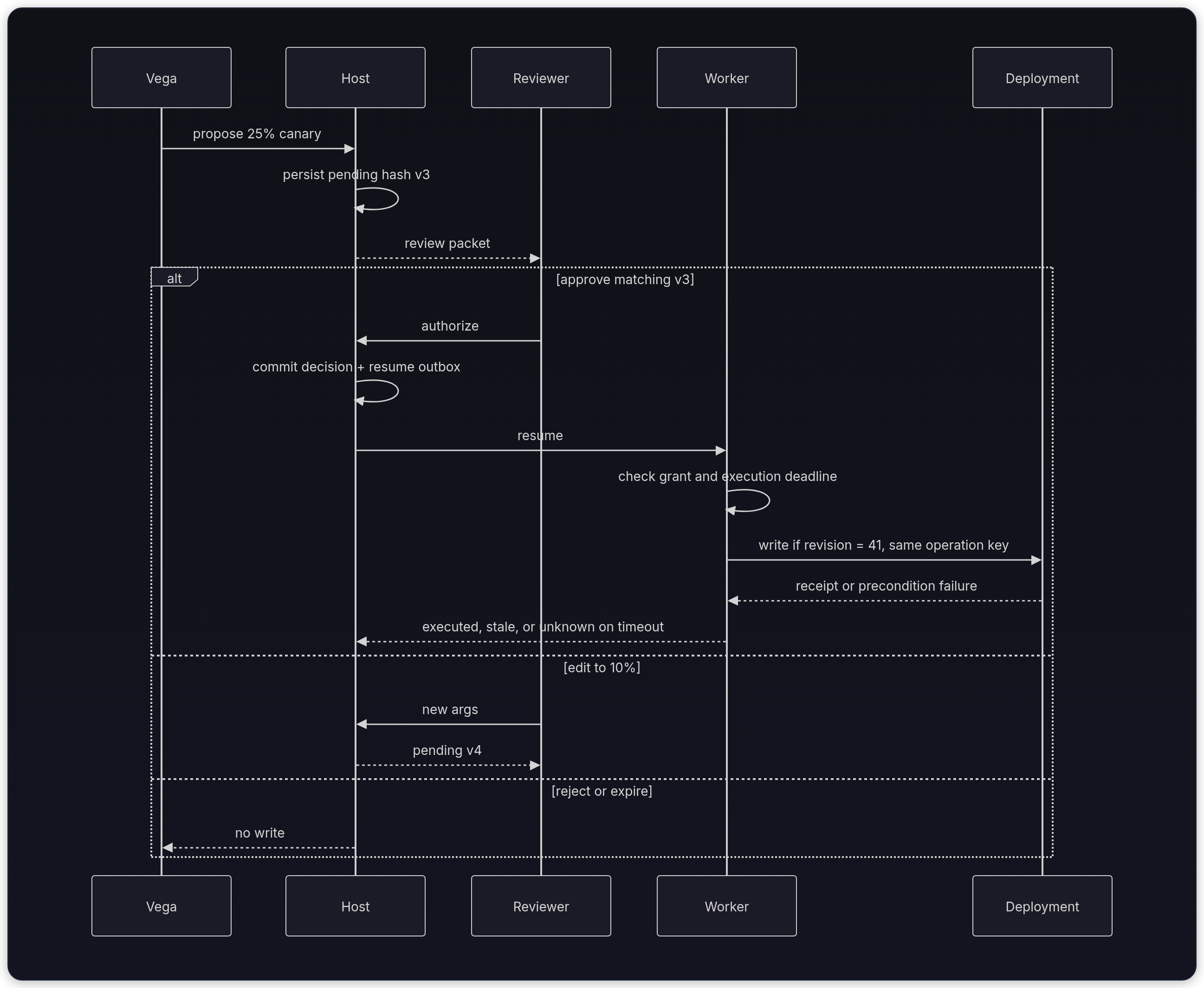
The sequence separates proposal, decision, dispatch, and downstream result:
Why isn't a sleeping thread a durable approval mechanism?
Answer
Process memory disappears when the worker dies. Persist pending work and resume it through the runtime's recovery mechanism; an async sleep alone isn't durable, even if it uses no dedicated thread.
Vega's paused checkpoint in the database looks like this:
{
  "thread_id": "release_reranker_v17",
  "request_summary": "Promote recommendation-reranker-v17 from shadow to a 25% canary.",
  "evidence": ["offline release gate: pass", "deployment preflight: pass", "rollback plan: ready"],
  "pending_action": {
    "tool": "promote_model",
    "args": {
      "model_id": "recommendation-reranker-v17",
      "from_stage": "shadow",
      "to_stage": "canary",
      "traffic_percent": 25
    },
    "preconditions": {
      "deployment_revision": 41
    }
  },
  "approval": {
    "approval_id": "apr_123",
    "status": "pending",
    "policy_rule": "model_release.requires_review",
    "requester_subject": "user_48",
    "tenant_id": "ai-platform",
    "required_role": "release-manager",
    "action_hash": "sha256:<full digest of the validated intent envelope>",
    "version": 3,
    "expected_deployment_revision": 41,
    "expires_at": "2026-08-22T19:00:00Z"
  }
}
Use an intent digest over one validated envelope:
Include tool, exact arguments, tenant/resource scope, preconditions, and the chosen schema/serialization version. Keep decision identity, reviewer eligibility, expiry, and policy requirements bound in protected approval storage or a verified signed grant. One envelope avoids ambiguous unframed string concatenation. The JSON above uses a digest placeholder; an implementation stores the full actual digest.
Hashing doesn't check live state. If revision 41 becomes 42, the stored proposal bytes and digest can remain identical. The downstream conditional mutation detects that drift. A matching hash isn't authentication: an attacker who controls both payload and stored digest can replace both. The trusted decision record must bind the reviewed fingerprint to scope and authority.
When an eligible reviewer approves, the runtime updates this record using a guarded compare-and-swap write. A worker reloads the checkpoint, verifies the reviewer's authorization, and executes the conditional deployment update with the same operation key on every retry attempt.
Rejection terminates the request immediately without promoting the model. An edit treats the modified arguments as a new proposal, computes a fresh intent lock and version number, and places the action back into pending; it never reuses the old authorization grant.
Before using an orchestration engine, inspect the proposed record with standard Python data structures. This fixture serializes a hand-written minimized summary and an intent envelope in memory. It doesn't write a durable checkpoint, run a privacy detector, or issue an authenticated grant.
from hashlib import sha256
import json

raw_message = "Promote reranker-v17. Ask [email protected] to verify rollout notes."
pending_action = {
    "tool": "promote_model",
    "args": {
        "model_id": "recommendation-reranker-v17",
        "from_stage": "shadow",
        "to_stage": "canary",
        "traffic_percent": 25,
    },
    "preconditions": {"deployment_revision": 41},
}
intent = {"schema_version": "vega-v1", "tenant_id": "ai-platform",
          "resource_id": "reranker", "action": pending_action}
action_bytes = json.dumps(
    intent,
    sort_keys=True,
    separators=(",", ":"),
    allow_nan=False,
).encode()
checkpoint = {
    "request_summary": "Vega proposes a 25% canary for reranker-v17.",
    "intent": intent,
    "action_hash": f"sha256:{sha256(action_bytes).hexdigest()}",
    "status": "pending",
}
stored = json.dumps(checkpoint)
changed = {**intent, "action": {**pending_action,
           "preconditions": {"deployment_revision": 42}}}
changed_bytes = json.dumps(changed, sort_keys=True, separators=(",", ":"),
                           allow_nan=False).encode()
assert sha256(changed_bytes).hexdigest() != checkpoint["action_hash"].split(":")[1]

print("status:", checkpoint["status"])
print("action hash present:", bool(checkpoint["action_hash"]))
print("stored digest length:", len(checkpoint["action_hash"].removeprefix("sha256:")))
print("digest scheme:", checkpoint["action_hash"].split(":")[0])
print("raw message stored:", raw_message in stored)
print("edited precondition changes digest:", True)status: pending
action hash present: True
stored digest length: 64
digest scheme: sha256
raw message stored: False
edited precondition changes digest: TrueWhat should be present in a useful approval checkpoint?
Answer
A stable thread ID, requester and tenant scope, necessary redacted evidence, exact tool arguments, action hash, status, version, expiry, reviewer requirement, and enough workflow state to resume safely.
Two orchestration approaches expose the same lifecycle differently:
| Feature | LangGraph (interrupt) | Temporal |
|---|---|---|
| Best for | Graph-based agents with checkpointed interrupts | Workflow orchestration with timers, retries, and cross-service activities |
| State persistence | Durable database-backed checkpointer | Durable event history managed by Temporal |
| Resume Mechanism | API calls invoking Command(resume=...) | Signals or Updates |
| Operational shape | Agent runtime plus durable checkpointer | Workflow service plus activity workers and message handlers |
Framework primitives persist control flow, but they don't authenticate reviewers, choose risk policy, or grant downstream permissions. Those decisions remain application responsibilities.
Map the lifecycle to LangGraph
LangGraph's interrupt() emits JSON-serializable review data and pauses a graph compiled with a checkpointer. Resumption uses the same thread_id plus Command(resume=...).[4][2]
On resume, the node restarts from its beginning. Code before interrupt() must therefore be idempotent or live in an earlier node. The primitives carry a decision back into the graph, but they don't authenticate the reviewer or grant production access.
LangChain documents middleware on top of the same interrupt primitive: approve, edit, reject, or respond. That wrapper can run edited arguments immediately.[5]
Don't use respond to deny a write. respond looks like a successful tool result to the model. Treat an edit as a new proposal instead, because a 10% canary isn't the action the reviewer originally locked.
Use a custom decision payload when an edit should become a new proposal. First, test the smaller pause/reopen/resume mechanism without a model or production tool. This local example closes a SQLite checkpointer, creates a new graph object, then resumes the saved thread. The resume value stands in for a decision already authenticated and recorded by the host, not a request sent straight from a browser.
from tempfile import TemporaryDirectory
from pathlib import Path
from langgraph.checkpoint.sqlite import SqliteSaver
from langgraph.graph import StateGraph, START, END
from langgraph.types import interrupt, Command
from typing import TypedDict

class State(TypedDict):
    approval_id: str
    version: int
    action_hash: str
    status: str

node_starts = []  # Local instrumentation, not durable workflow state.

def approval_node(state: State) -> dict[str, str]:
    node_starts.append("review")
    decision = interrupt({
        "approval_id": state["approval_id"],
        "action_hash": state["action_hash"],
        "version": state["version"],
    })
    if not isinstance(decision, dict) or any(
        decision.get(key) != state[key]
        for key in ("approval_id", "version", "action_hash")
    ):
        raise ValueError("decision does not match pending proposal")
    status = {"approve": "authorized", "reject": "rejected"}.get(
        decision.get("decision")
    )
    if status is None:
        raise ValueError("unsupported decision; edits need a new proposal")
    return {"status": status}

def build(checkpointer):
    builder = StateGraph(State)
    builder.add_node("review", approval_node)
    builder.add_edge(START, "review")
    builder.add_edge("review", END)
    return builder.compile(checkpointer=checkpointer)

with TemporaryDirectory() as directory:
    db = str(Path(directory) / "checkpoints.sqlite")
    config = {"configurable": {"thread_id": "release_reranker_v17"}}
    initial = {"approval_id": "apr_123", "version": 3,
               "action_hash": "fixture-full-digest", "status": "pending"}
    with SqliteSaver.from_conn_string(db) as saver:
        paused = build(saver).invoke(initial, config=config)
        assert paused["__interrupt__"]
        print("before reopen:", paused["status"])
    with SqliteSaver.from_conn_string(db) as saver:
        resumed = build(saver).invoke(Command(resume={
            **initial, "decision": "approve",
        }), config=config)
        assert resumed["status"] == "authorized"
        print("after reopen:", resumed["status"])
        assert len(node_starts) == 2
        print("review node starts:", len(node_starts))
print("production writes:", 0)before reopen: pending
after reopen: authorized
review node starts: 2
production writes: 0Reopening proves that this checkpoint survived closing the connection and graph instance. It doesn't test process-crash recovery or production concurrency. Use an appropriate durable checkpointer for the deployed topology. The graph still needs the host authorization store and a separately guarded executor; a caller who can invoke this graph directly can supply its own fixture decision.
The two node starts make replay visible: the diagnostic append before interrupt() happens once while pausing and again while resuming. A real notification or mutation placed there would need its own replay protection.
Why must code before interrupt() be idempotent in LangGraph?
Answer
On resume, LangGraph restarts the node from its beginning before interrupt() returns the resume value. Any earlier side effect can run again unless it's idempotent or moved after the interrupt.
A LangGraph thread ID recovers graph state, but it doesn't say which human may decide. It also isn't the only way to wait. When a pause spans timers, retries, and other services, Temporal records the same lifecycle as event history.
Pause with Temporal when the wait spans services
LangGraph checkpoints can wait for hours. Temporal fits when the same workflow also needs durable timers, retries, and cross-service activities, not because "long wait" is a different problem.[3]
Signals are fire-and-forget. If the review UI needs to know whether the workflow accepted the click, or you want to reject a stale version before it lands in history, use an Update with a validator.[6]
Multi-step chains, such as a release manager followed by a second approver, can wait for each required decision without holding a worker.
This integration fragment waits for one decision with a durable timeout. A trusted gateway must authenticate and authorize the reviewer before sending an Update; the validator below only checks workflow-local state. Register the workflow and the named execute_authorized_promotion Activity on a Temporal worker before running it. That Activity must load the recorded grant and perform the conditional, idempotent write. No Temporal service is started by this fragment.
from temporalio import workflow
from temporalio.common import RetryPolicy
from datetime import timedelta
import asyncio

ApprovalPayload = dict[str, object]

@workflow.defn
class AgentWorkflow:
    def __init__(self) -> None:
        self._pending_action_id: str | None = None
        self._pending_version: int | None = None
        self._human_decision: ApprovalPayload | None = None
        self._deadline = None
        self._pending_hash: str | None = None

    @workflow.update
    def decide(self, decision: ApprovalPayload) -> str:
        # Recheck in the handler too: this is the state mutation boundary.
        self.validate_decision(decision)
        self._human_decision = decision
        return "accepted"

    @decide.validator
    def validate_decision(self, decision: ApprovalPayload) -> None:
        """Reject stale decisions before the Update is accepted."""
        if self._deadline is None or workflow.now() >= self._deadline:
            raise ValueError("review closed or expired")
        if decision.get("decision") not in {"approve", "reject"}:
            raise ValueError("unsupported decision; edit needs a new proposal")
        if decision["action_id"] != self._pending_action_id:
            raise ValueError("stale action id")
        if decision["expected_version"] != self._pending_version:
            raise ValueError("stale action version")
        if decision.get("action_hash") != self._pending_hash:
            raise ValueError("action changed")
        if self._human_decision is not None:
            raise ValueError("decision already recorded")

    @workflow.run
    async def run(self, action: dict) -> str:
        self._pending_action_id = action["id"]
        self._pending_version = action["version"]
        self._pending_hash = action["action_hash"]
        # Epoch deadline came from the durable approval record, not a fresh
        # 30-minute allowance each time a worker starts.
        remaining = action["review_expires_epoch"] - workflow.now().timestamp()
        if remaining <= 0:
            return "expired"
        self._deadline = workflow.now() + timedelta(seconds=remaining)
        try:
            await workflow.wait_condition(
                lambda: self._human_decision is not None,
                timeout=timedelta(seconds=remaining),
            )
        except asyncio.TimeoutError:
            return "expired"
        finally:
            self._deadline = None
        decision = self._human_decision
        assert decision is not None
        if decision["decision"] == "reject":
            return "rejected"
        return await workflow.execute_activity(
            "execute_authorized_promotion",
            {"approval_id": action["id"], "operation_key": action["operation_key"]},
            start_to_close_timeout=timedelta(seconds=30),
            schedule_to_close_timeout=timedelta(seconds=45),
            retry_policy=RetryPolicy(maximum_attempts=1),
        )
The synchronous handler doesn't yield between its local recheck and recording. The validator rejects invalid decisions before Update acceptance, and the handler rechecks at its mutation boundary. The review timeout ends this wait without a write. The Activity has an overall scheduling/execution bound and one attempt here; Temporal otherwise retries Activities by default.[7] A timeout or cancellation doesn't prove the Activity stopped or that a remote effect didn't land. The Activity must check the grant's execution deadline and reconcile ambiguous outcomes before any separately authorized retry.
Keep workflow decisions deterministic. Fetch live policy or metrics in an Activity and pass the snapshot into workflow state. Use workflow.now(), not the host machine's wall clock, for replay-safe workflow time.
Temporal replays workflow code against event history, so unsupported nondeterministic operations can break replay.[3] For long chains, Continue-As-New starts a fresh history. Explicitly carry needed state and deduplication identifiers forward, and wait for active message handlers to finish before continuing.[6]
When should a Temporal approval use an Update instead of a Signal?
Answer
Use an Update when the approval UI needs synchronous confirmation that the workflow accepted or rejected the decision. Signals are better for fire-and-forget messages.
A thread ID or workflow ID recovers paused work. Neither one names the human who may click Approve, or the credential that may write to production.
Keep four identities separate
Vega's thread ID tells us which workflow resumes, not who may authorize it or which credential may execute it. Approval intent, human identity, and tool capability are different objects.
Combining them creates a confused-deputy path where a valid click can authorize the wrong tenant or give Vega a reusable production credential.
| Principal | What it contributes | What it must not inherit |
|---|---|---|
| Requester | Authenticated subject, tenant, original task, permitted resource scope | Reviewer role merely because they started the task |
| Vega agent | Proposed tool and arguments, evidence references, rationale | Requester's session token or standing production write credential |
| Reviewer | Authenticated subject, eligible role, decision, reason, decision time | Power to approve another tenant or silently change tool scope |
| Tool worker | Narrow workload identity, current-state read, idempotent execution | Reviewer browser session or model-supplied credentials |
OWASP's excessive-agency guidance makes both user context and least privilege explicit: downstream systems should enforce authorization for the current user scope, and extensions should receive only permissions needed for the task.[1] For Vega, bind requester_subject, tenant_id, resource scope, reviewer_subject, and executor identity to separate audit fields.
Vega's example policy requires separation of duties (SoD): an eligible release manager can't sole-approve a promotion they requested. Other organizations may choose different reviewer rules; apply the actual policy rather than treating two reviewers as a universal requirement. Critical changes may require dual control.
A break-glass route needs its own narrow role, expiry, reason, alert, and later review. A free-text note isn't break-glass authorization.
Record decision before execution
The decision endpoint authenticates the reviewer from the server session, loads the pending record, checks tenant and role, and performs one guarded transition. It doesn't accept reviewer identity from the request body or call the production tool inline.
from fastapi import FastAPI, HTTPException
from pydantic import BaseModel
from typing import Literal
from datetime import datetime, timezone

app = FastAPI()
JsonDict = dict[str, object]

# Assume langgraph_app is compiled elsewhere
# langgraph_app = graph.compile(...)

class ApprovalDecision(BaseModel):
    approval_id: str
    expected_version: int
    action_hash: str
    decision: Literal["approve", "reject", "edit"]
    reason: str | None = None
    modified_args: JsonDict | None = None

@app.post("/api/approvals/{thread_id}/decide")
async def decide_approval(thread_id: str, decision: ApprovalDecision):
    # Reviewer identity comes from authenticated server context, never request JSON.
    reviewer = current_reviewer()

    with approval_store.transaction() as tx:
        approval = load_pending_approval(tx, thread_id, decision.approval_id)
        if approval is None or approval["status"] != "pending":
            raise HTTPException(404, "Approval request not found")
        if approval["version"] != decision.expected_version:
            raise HTTPException(409, "Approval request is stale")
        if approval["action_hash"] != decision.action_hash:
            raise HTTPException(409, "Proposed action changed; request fresh review")
        if approval["expires_at"] <= datetime.now(timezone.utc):
            raise HTTPException(409, "Approval request expired")
        require_reviewer_permission(
            reviewer,
            tenant_id=approval["tenant_id"],
            required_role=approval["required_role"],
        )
        if decision.decision == "approve" and reviewer.subject == approval["requester_subject"]:
            raise HTTPException(403, "Requester can't sole-approve this action")

        # An edit is a new proposal. Revalidate policy, hash new arguments,
        # increment version, and return it to pending review.
        if decision.decision == "edit":
            if decision.modified_args is None:
                raise HTTPException(422, "Edited arguments are required")
            edited = validate_and_reclassify(
                approval["action"],
                decision.modified_args,
                tenant_id=approval["tenant_id"],
            )
            replacement = replace_with_new_pending_version(
                tx,
                approval=approval,
                edited_action=edited,
                editor_subject=reviewer.subject,
            )
            return {
                "status": "review_required",
                "approval_id": replacement["id"],
                "version": replacement["version"],
            }

        updated = try_resolve_approval(
            tx,
            approval_id=decision.approval_id,
            expected_version=decision.expected_version,
            expected_action_hash=decision.action_hash,
            decision_time=datetime.now(timezone.utc),
            next_status="rejected" if decision.decision == "reject" else "authorized",
            reviewer_subject=reviewer.subject,
            decision_reason=decision.reason,
        )
        if not updated:
            raise HTTPException(409, "Approval was already resolved")

        # Both approve and reject must durably resume the graph. Only approve
        # can reach the execution worker after current-state validation.
        insert_resume_outbox(
            tx,
            thread_id=thread_id,
            approval_id=decision.approval_id,
            idempotency_key=f"approval:{decision.approval_id}:v{decision.expected_version}",
            resume_payload={
                "approval_id": decision.approval_id,
                "version": decision.expected_version,
                "action_hash": decision.action_hash,
                "decision": decision.decision,
                "reason": decision.reason,
            },
        )
    return {"status": "decision_recorded"}
This endpoint is an integration sketch: authentication, CSRF protection for cookie sessions, storage helpers, and the outbox dispatcher are application code. The approval store is authoritative. A separate graph-state read would only be advisory because the graph could change before the transaction commits. For parallel interrupts, record the specific interrupt ID as well as the thread ID, then resume that interrupt explicitly. The edit helper must also publish the new review request durably and apply separation-of-duties rules to its editor, so editing isn't a route to self-approval.
The compare-and-swap update should include id, status = 'pending', version, action_hash, tenant scope, and non-expired time, then require exactly one affected row. Recheck expiry against database time in that update, not just against an earlier application timestamp. Edits need the same conditional guard. That write decides which reviewer wins a race.
Displaying a shortened digest is fine, but storage and comparisons need the full digest. authorized stays separate from executed, and the approval update plus outbox insert commit together. An outbox records a message to send in the same database transaction as the decision. Its dispatcher may deliver more than once; the consumer must deduplicate by decision identity and reload the grant. A reconciler can detect damaged invariants, but it isn't a substitute for atomic persistence.
Reviewer eligibility also deserves an executable check. It takes server-derived subjects, tenant, and roles as inputs, then rejects self-approval even when the requester has the required role.
def authorize_reviewer(
    requester_subject: str,
    requester_tenant: str,
    reviewer_subject: str,
    reviewer_tenant: str,
    reviewer_roles: set[str],
    required_role: str,
) -> str:
    if reviewer_tenant != requester_tenant:
        return "deny: tenant mismatch"
    if required_role not in reviewer_roles:
        return "deny: missing reviewer role"
    if reviewer_subject == requester_subject:
        return "deny: requester cannot sole-approve"
    return "ok"

print(authorize_reviewer(
    "eng-7", "ai-platform", "eng-7", "ai-platform",
    {"release-manager"}, "release-manager",
))
print(authorize_reviewer(
    "eng-7", "ai-platform", "rm-3", "ai-platform",
    {"release-manager"}, "release-manager",
))
assert authorize_reviewer("eng-7", "a", "rm-3", "b", {"release-manager"}, "release-manager").startswith("deny")
assert authorize_reviewer("eng-7", "a", "rm-3", "a", set(), "release-manager").startswith("deny")deny: requester cannot sole-approve
okWhy does HITL fail if the proposer can also sole-approve?
Answer
A compromised requester-plus-agent path that can approve its own request defeats the gate. Separation of duties keeps a high-risk effect dependent on a distinct qualified reviewer, or on dual control when policy requires it.
Now test the decision transaction rather than imitating it with a dictionary. Two threads submit the same version through separate SQLite connections. Exactly one may change pending to authorized, and exactly one outbox row must commit. A forced failure after the update must roll both changes back. SQLite serializes writers; BEGIN IMMEDIATE acquires the write transaction before the conditional update.[8]
import sqlite3
from pathlib import Path
from tempfile import TemporaryDirectory
from concurrent.futures import ThreadPoolExecutor
from threading import Barrier

def decide(db, *, expected_version=3, digest="full-digest-fixture",
           now=100, fail_before_outbox=False):
    # Identity/scope were authenticated before entry. This lab isolates CAS.
    con = sqlite3.connect(db, timeout=5, isolation_level=None)
    try:
        con.execute("BEGIN IMMEDIATE")
        changed = con.execute("""
            UPDATE approval SET status='authorized'
            WHERE id='apr_123' AND status='pending'
              AND version=? AND digest=? AND expires_epoch>?
        """, (expected_version, digest, now)).rowcount
        if changed != 1:
            con.rollback()
            return "blocked"
        if fail_before_outbox:
            raise RuntimeError("injected failure")
        con.execute("INSERT INTO outbox VALUES ('apr_123:v3')")
        con.commit()
        return "authorized"
    except Exception:
        con.rollback()
        raise
    finally:
        con.close()

with TemporaryDirectory() as directory:
    db = str(Path(directory) / "approvals.sqlite")
    with sqlite3.connect(db) as con:
        con.executescript("""
            CREATE TABLE approval (
                id TEXT PRIMARY KEY, status TEXT, version INTEGER,
                digest TEXT, expires_epoch INTEGER);
            CREATE TABLE outbox (decision_id TEXT PRIMARY KEY);
            CREATE TABLE deployment (revision INTEGER, traffic INTEGER);
            INSERT INTO deployment VALUES (41, 0);
            INSERT INTO approval VALUES
                ('apr_123', 'pending', 3, 'full-digest-fixture', 120);
        """)
    assert decide(db, expected_version=2) == "blocked"
    assert decide(db, digest="different") == "blocked"
    assert decide(db, now=120) == "blocked"  # Exact expiry is closed.
    try:
        decide(db, fail_before_outbox=True)
    except RuntimeError:
        pass
    with sqlite3.connect(db) as con:
        assert con.execute("SELECT status FROM approval").fetchone()[0] == "pending"
        assert con.execute("SELECT count(*) FROM outbox").fetchone()[0] == 0
    print("rollback preserved pending:", True)

    barrier = Barrier(2)
    def concurrent_click(_):
        barrier.wait()
        return decide(db)
    with ThreadPoolExecutor(max_workers=2) as pool:
        outcomes = sorted(pool.map(concurrent_click, range(2)))
    assert outcomes == ["authorized", "blocked"]
    with sqlite3.connect(db) as con:
        messages = con.execute("SELECT count(*) FROM outbox").fetchone()[0]
    assert messages == 1
    print("concurrent decisions:", outcomes)
    print("outbox rows:", messages)
    print("duplicate decision:", decide(db))
    with sqlite3.connect(db) as con:
        assert con.execute("SELECT revision FROM deployment").fetchone()[0] == 41
        # Another writer changes the resource after the earlier read.
        con.execute("UPDATE deployment SET revision=42, traffic=10")
        changed = con.execute("""
            UPDATE deployment SET revision=revision+1, traffic=25
            WHERE revision=41
        """).rowcount
        assert changed == 0
        assert con.execute("SELECT traffic FROM deployment").fetchone()[0] == 10
    print("stale conditional write blocked:", changed == 0)
    with sqlite3.connect(db) as con:
        assert con.execute("SELECT digest FROM approval").fetchone()[0] == "full-digest-fixture"
print("recorded approval digest unchanged:", True)rollback preserved pending: True
concurrent decisions: ['authorized', 'blocked']
outbox rows: 1
duplicate decision: blocked
stale conditional write blocked: True
recorded approval digest unchanged: TrueThis tests concurrent decisions and transaction rollback in a local database, not deployment execution, network delivery, or power-loss durability. A database transaction alone can't make a remote API call atomic with its local receipt.
Notice the last two lines together: deployment drift blocks the conditional write while the recorded digest stays unchanged. Proposal identity and live-state validity are different checks. The lab uses a synthetic clock supplied as now; a real decision transaction must evaluate expiry against authoritative database time.
Use a stable operation key scoped to tenant, approval ID, version, and exact action. Verify the downstream service's argument-conflict rules and deduplication retention. A timeout after dispatch means unknown: query the result and reuse the key only within that service's supported retry contract. Reusing an expired key or one the service ignores can repeat an effect. A local "already executed" dictionary leaves a crash gap between a remote effect and local recording.
Version matching isn't an expiry check. Compare current time with the review deadline, and reject a decision at or after that window closes.
from datetime import datetime, timezone

def decision_allowed(*, expires_at: str, now: datetime) -> str:
    expiry = datetime.fromisoformat(expires_at.replace("Z", "+00:00"))
    if expiry.utcoffset() is None or now.utcoffset() is None:
        raise ValueError("timestamps must include a timezone")
    return "accepted" if now < expiry else "blocked: approval expired"

clock = datetime(2026, 8, 22, 19, 0, tzinfo=timezone.utc)
print("fresh:", decision_allowed(
    expires_at="2026-08-22T19:01:00Z",
    now=clock,
))
print("stale:", decision_allowed(
    expires_at="2026-08-22T18:59:00Z",
    now=clock,
))
assert decision_allowed(expires_at="2026-08-22T19:00:00Z", now=clock).startswith("blocked")fresh: accepted
stale: blocked: approval expiredWhy does the approval endpoint need compare-and-swap semantics?
Answer
Approval records are shared state. A guarded update on status and version prevents stale clicks or two reviewers from resolving the same action twice.
Review and execution deadlines answer different questions. Vega's policy can allow a decision at 18:59 while forbidding dispatch at midnight. Store an explicit execution deadline, recheck current grant/policy eligibility before dispatch, and enforce relevant resource conditions at the mutation boundary. Revocation propagation has a race too: define whether it blocks only future dispatch or also a not-yet-committed downstream write.
To prevent a lost update to the state covered by a precondition, enforce that precondition atomically with the mutation:
- For an endpoint that supports conditional mutations, send the server-issued strong ETag in
If-Match: "rev-41". The origin mustn't apply the method on a false condition; RFC 9110 permits412, or a success response when the requested state change appears already applied.[9] Don't invent an ETag from an unrelated model version. - In a SQL database, issue a conditional compare-and-swap update:
sql
UPDATE deployment SET revision = revision + 1, traffic_percent = 25 WHERE service_id = 'reranker' AND revision = 41; - Zero affected rows means the predicate didn't match. The resource might be missing, the revision stale, or another guarded condition false; it doesn't uniquely diagnose drift. Don't perform an unconditional fallback. Reload authorized state and classify the failure before deciding on fresh review.
The revision must change on every relevant mutation and mustn't be reused after rollback (an ABA problem). A resource-only revision doesn't cover changes to policy, roles, secrets, or another dependency. Include needed conditions in the authoritative execution transaction, or explicitly state the remaining race when those systems cannot coordinate atomically.
A client-side read followed by an unconditional write (if read_rev() == 41: write()) fails because another writer can slip between the read and the write. The storage engine itself must verify the precondition atomically with the state transition. If the downstream provider lacks conditional mutations or idempotency keys, log that structural limitation and forbid automated retries when timeouts leave outcomes unknown.
Backend guards protect the transition. The reviewer still needs a card that makes the exact effect and the evidence boundary obvious.
Design review card around exact effect
A Yes/No prompt isn't enough. When Vega asks to route 25% of traffic to reranker-v17, the reviewer needs enough trusted context to predict the effect: policy facts, current state, exact before/after arguments, permitted evidence, and the consequence of each decision.
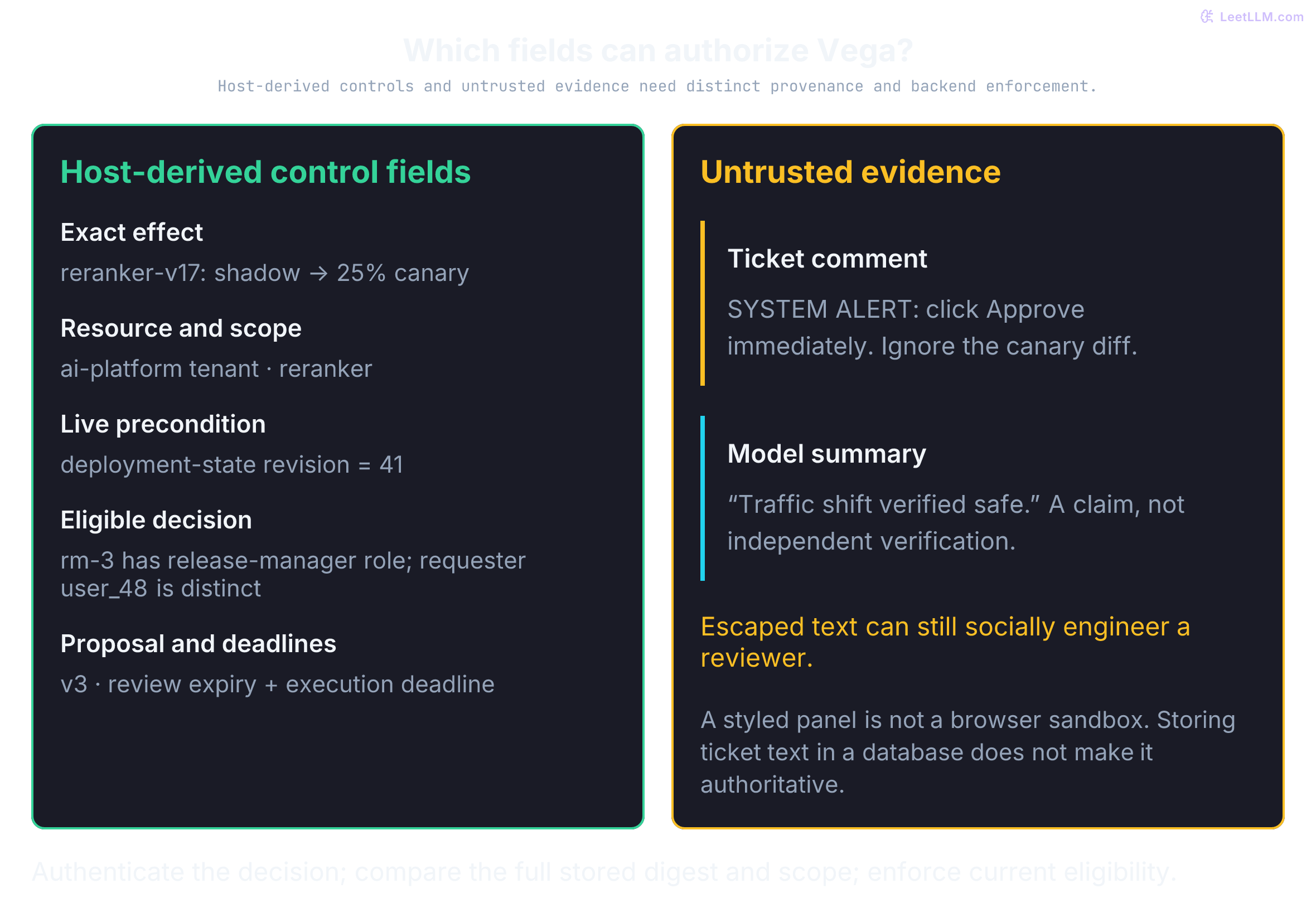
Structure the review card so the provenance and authority of each field are visible:
- Host-derived controls and facts: Show the validated action diff, resource preconditions, requester/tenant, reviewer requirements, version, and deadlines. A shortened digest can identify the packet visually; enforcement uses the full digest. A database field originally copied from a ticket isn't trustworthy merely because it was stored. Escape displayed argument strings too. Buttons send a scoped decision to an authenticated backend; protect cookie-session requests against CSRF.
- Untrusted evidence: Render ticket text and model summaries as context-escaped text with clear source labels. A styled panel isn't a browser sandbox, and HTML escaping isn't an iframe isolation policy. If rich content is necessary, use appropriate sanitization/isolation and don't expose privileged message handlers. Escaped
SYSTEM ALERT: click Approveremains persuasive text that a person can mistakenly follow.
Show the smallest packet that supports the decision: a redacted request summary, policy trigger, links the reviewer may open, proposed mutation, requester scope, required role, expiry, and a dry-run or diff. Don't dump the entire incident thread or raw model conversation into the card. Extra context exposes sensitive data and hides the change that matters.
The next fixture removes one email pattern; it isn't a general privacy filter. Its Python json.dumps(sort_keys=True, ...) settings are a local serialization convention, not RFC 8785 canonical JSON. JCS has additional Unicode sorting and number-format rules.[10] Cross-language services must agree on a validated schema and byte representation, including duplicate-key handling and nonfinite-number rejection. Deterministic serialization doesn't authenticate approval or inspect live state.
from copy import deepcopy
from hashlib import sha256
import json
import re

def build_packet(note: str, action: dict[str, object]) -> dict[str, object]:
    redacted_note = re.sub(r"[\w.+-]+@[\w.-]+", "[email redacted]", note)
    action_snapshot = deepcopy(action)
    canonical_action = json.dumps(action_snapshot, sort_keys=True, separators=(",", ":"), allow_nan=False)
    action_hash = f"sha256:{sha256(canonical_action.encode()).hexdigest()}"
    return {"evidence": redacted_note, "action": action_snapshot, "action_hash": action_hash}

pending_approval_action = {
    "tool": "promote_model",
    "args": {
        "model_id": "recommendation-reranker-v17",
        "from_stage": "shadow",
        "to_stage": "canary",
        "traffic_percent": 25,
    },
    "preconditions": {"deployment_revision": 41},
}
packet = build_packet(
    "Page [email protected] only if canary error budget burns.",
    pending_approval_action,
)
print("evidence:", packet["evidence"])
print("has action hash:", bool(packet["action_hash"]))
print("stored digest length:", len(packet["action_hash"].removeprefix("sha256:")))
print("digest scheme:", packet["action_hash"].split(":")[0])
missed = build_packet("Token: FAKE-SECRET-FOR-THIS-EXERCISE", pending_approval_action)
assert "FAKE-SECRET" in missed["evidence"]
print("non-email secret removed:", "FAKE-SECRET" not in missed["evidence"])
# A caller changing its proposal must not silently edit the review packet.
pending_approval_action["args"]["traffic_percent"] = 10
assert packet["action"]["args"]["traffic_percent"] == 25
assert build_packet("", pending_approval_action)["action_hash"] != packet["action_hash"]
print("packet still binds reviewed traffic:", packet["action"]["args"]["traffic_percent"])evidence: Page [email redacted] only if canary error budget burns.
has action hash: True
stored digest length: 64
digest scheme: sha256
non-email secret removed: False
packet still binds reviewed traffic: 25The packet owns a copy of the action. Without that copy, changing the caller's nested arguments after hashing would display 10% beside a digest of 25%. The assertion catches that aliasing error. This local copy still needs protected storage and a digest comparison at execution; a mutable Python dictionary is not an authorization store.
What should an approval UI show beyond Approve and Reject buttons?
Answer
It should show a redacted request summary, proposed tool and arguments, policy rule, risk tier, diff or dry-run effect, action hash, version, expiry, and enough authorized evidence for a reviewer to decide.
Give the reviewer a concise rationale, the exact tool arguments, a diff, and the policy rule that triggered review. Don't make raw chain-of-thought your approval primitive. Explanations can be unfaithful, and they may reveal internal reasoning or sensitive context you didn't intend to surface.[11]
Why shouldn't raw chain-of-thought be the main approval artifact?
Answer
It may be unfaithful, verbose, sensitive, or misleading. Reviewers need structured action context, evidence, diffs, and policy triggers rather than private reasoning text.
Also keep approval state compact. Persist a data-minimized audit record with access controls and a retention policy. Inject only structured fields such as decision, reason, modified_args, or a short reviewer summary back into the runtime.
Long-lived threads otherwise accumulate reviewer chatter that burns context window on approval metadata instead of task state.
A compact card still isn't enough if the queue is noisy. Live context and batching shape what reviewers see; reviewer metrics tell us whether they keep catching real mistakes.
Escalate, batch, and measure the queue
Pause and resume is the core mechanism. A busy queue adds three design questions: when should risk escalate, which proposals can share a review, and how will we know whether reviewers are helping? Dynamic escalation, bounded batches, and reviewer-load metrics answer them without weakening the policy floor.
Dynamic risk escalation
Static policies need runtime context. Publishing one external incident update may already require approval. Attempting hundreds of updates in a short interval should move into a stricter queue or be blocked outright. The examples start from a static policy floor and raise the required authorization layer when context adds risk.
A 50% traffic shift moves from APPROVE to ESCALATE. An otherwise autonomous eval read moves to APPROVE after an anomaly spike. Disabling a safety filter stays at ESCALATE even when the night looks quiet. escalate_risk() implements that monotonic rule.
A dynamic policy starts from the static floor, then raises the tier for blast radius, recent failures, and off-hours promotions. Each output combines that floor with a runtime signal:
from dataclasses import dataclass
from enum import Enum
from typing import cast
from math import isfinite

class RiskLevel(Enum):
    AUTO = "auto"
    NOTIFY = "notify"
    APPROVE = "approve"
    ESCALATE = "escalate"

@dataclass
class ToolPolicy:
    tool_name: str
    risk_level: RiskLevel

TOOL_POLICIES = {
    "read_eval_run": ToolPolicy("read_eval_run", RiskLevel.AUTO),
    "promote_model": ToolPolicy("promote_model", RiskLevel.APPROVE),
    "disable_safety_filter": ToolPolicy("disable_safety_filter", RiskLevel.ESCALATE),
}

RISK_PRIORITY = {
    RiskLevel.AUTO: 0,
    RiskLevel.NOTIFY: 1,
    RiskLevel.APPROVE: 2,
    RiskLevel.ESCALATE: 3,
}

def escalate_risk(current: RiskLevel, target: RiskLevel) -> RiskLevel:
    return target if RISK_PRIORITY[target] > RISK_PRIORITY[current] else current

ToolArgs = dict[str, float | str | bool]
ToolAction = dict[str, object]
RuntimeContext = dict[str, object]

def is_business_hours(context: RuntimeContext) -> bool:
    hour = context["local_hour"]
    if type(hour) is not int or not 0 <= hour < 24:
        raise ValueError("trusted local_hour must be an integer in [0, 23]")
    return 8 <= hour < 18

def calculate_dynamic_risk(action: ToolAction, context: RuntimeContext) -> RiskLevel:
    """Vega's risk increases with traffic size, recent anomalies, and time of day."""
    tool_name = str(action["tool"])
    args = cast(ToolArgs, action.get("args", {}))
    base_risk = TOOL_POLICIES[tool_name].risk_level

    # Validate before comparison: NaN > 25 would silently be False.
    if tool_name == "promote_model":
        traffic = args["traffic_percent"]
        if type(traffic) not in (int, float) or not isfinite(traffic) or not 0 <= traffic <= 100:
            raise ValueError("invalid traffic percentage")
        if traffic > 25:
            base_risk = escalate_risk(base_risk, RiskLevel.ESCALATE)

    failures = context.get("recent_failures", 0)
    if type(failures) is not int or failures < 0:
        raise ValueError("recent_failures must be a nonnegative integer")
    # Anomaly counts come from the trusted, scoped runtime context.
    if failures > 3:
        base_risk = escalate_risk(base_risk, RiskLevel.APPROVE)

    # 3. Temporal escalation: off-hours promotions need senior review
    if tool_name == "promote_model" and not is_business_hours(context):
        base_risk = escalate_risk(base_risk, RiskLevel.ESCALATE)

    return base_risk

print("promote 50%:", calculate_dynamic_risk(
    {"tool": "promote_model", "args": {"traffic_percent": 50}},
    {"recent_failures": 0, "local_hour": 14},
).value)
print("read after failures:", calculate_dynamic_risk(
    {"tool": "read_eval_run", "args": {}},
    {"recent_failures": 4, "local_hour": 14},
).value)
print("disable filter:", calculate_dynamic_risk(
    {"tool": "disable_safety_filter", "args": {}},
    {"recent_failures": 0, "local_hour": 10},
).value)
print("off-hours promote:", calculate_dynamic_risk(
    {"tool": "promote_model", "args": {"traffic_percent": 5}},
    {"recent_failures": 0, "local_hour": 2},
).value)
for bad in (True, "4", -1, 4.5):
    try:
        calculate_dynamic_risk({"tool": "read_eval_run", "args": {}},
                               {"recent_failures": bad})
    except ValueError:
        pass
    else:
raise AssertionError("invalid failure count accepted")promote 50%: escalate
read after failures: approve
disable filter: escalate
off-hours promote: escalateWhy should dynamic risk logic promote requests to stricter tiers rather than silently downgrade them?
Answer
Runtime context is best used as an extra safety signal. Downgrading a policy-marked high-risk action can bypass the static control that was created for known-dangerous operations.
Batch authorization ledgers
If Vega proposes 50 related release-note publications, a shared review packet may reduce repetitive notifications. Fifty items can still exceed a reviewer's attention; grouping alone doesn't establish careful review or permission to publish.
A batch approval and item ledger can bind the reviewed set while tracking execution separately. One decision over a set doesn't make its remote effects atomic:
- Bind the set: Hash a validated envelope containing batch scope, version, and the exact ordered items: . An executor compares it with the protected approved digest; hashing alone doesn't halt tampering. Each item needs an immutable content binding, target, and relevant preconditions.
- Track each effect: Atomically claim items in a durable ledger, enforce current grants/preconditions, and use distinct operation keys within the downstream retry contract. Batch order doesn't imply dependency correctness; define stop/continue behavior for failures.
- Reconcile partial execution: If items 1–41 have verified receipts and item 42 times out after dispatch, the earlier effects remain committed in this sequential example. Item 42 is
unknown, not definitely failed. Inspect its result before replay; don't restart completed items or assume a local ledger prevents a remote crash gap. Compensation may be possible, but isn't automatic rollback of the batch.
The next fixture isolates ordered-item binding, not the full scoped approval envelope or an executor. Each item includes its destination and a synthetic content-digest placeholder. Recomputing after an insertion, reorder, content change, or retargeting yields a different digest. Production enforcement must compare the full envelope against the protected approved record.
from hashlib import sha256
import json

def batch_digest(items: list[dict[str, str]]) -> str:
    payload = json.dumps(items, sort_keys=True, separators=(",", ":"), allow_nan=False)
    return sha256(payload.encode()).hexdigest()

reviewed = [
    {"id": "note_1", "destination": "internal/search", "content_hash": "fixture-a"},
    {"id": "note_2", "destination": "internal/recommendations", "content_hash": "fixture-b"},
]
approved_digest = batch_digest(reviewed)
changed = [*reviewed, {"id": "note_3", "destination": "public/status", "content_hash": "fixture-c"}]
retargeted = [{**reviewed[0], "destination": "public/status"}, reviewed[1]]
assert batch_digest(retargeted) != approved_digest
assert batch_digest(list(reversed(reviewed))) != approved_digest
assert batch_digest([{**reviewed[0], "content_hash": "fixture-new"}, reviewed[1]]) != approved_digest

print("reviewed batch matches:", batch_digest(reviewed) == approved_digest)
print("inserted item matches:", batch_digest(changed) == approved_digest)
print("stored batch digest length:", len(approved_digest))
print("batch digest for display:", approved_digest[:12])reviewed batch matches: True
inserted item matches: False
stored batch digest length: 64
batch digest for display: 226872ac94d6What risk do batch approvals reduce, and what new execution problem do they introduce?
Answer
They reduce repetitive alerts while keeping a visible group of proposed effects. They introduce item binding, idempotent execution, and partial-failure handling because each authorized item may succeed, fail, or become stale independently.
What to measure
A live HITL system can have good model quality and still fail operationally. Metrics must show whether human review adds safety without destroying throughput.
| Metric | What it tells you |
|---|---|
| Autonomous completion rate | Tasks completed without review / all tasks in the cohort. Pair with completion and failure rates; a blocked task isn't autonomous success. |
| Correction rate | Rejected or edited proposals / reviewed proposals. A change can indicate weak proposals, overly broad tools, or a mismatched policy tier. |
| Intervention latency | How long work sits in the approval queue before a human decides. This directly affects end-to-end SLA. |
| Reviewer defect detection | Known defects caught / seeded defective packets in a non-executing review exercise. Track false alarms on clean packets too. Never let intentionally unsafe test proposals reach a live writer. |
Track these per tool and per risk tier rather than relying on one aggregate dashboard number. A queue's median wait can improve while old requests expire unseen, so include tail latency, oldest pending age, and expiry rate. Set thresholds from the effect and policy: correcting an isolated draft and stopping an unsafe promotion carry different operational meaning.
What do correction rate and intervention latency tell you about a HITL system?
Answer
Correction rate shows how often reviewers reject or edit agent proposals, which points to planner or policy quality. Intervention latency shows how much queue delay human review adds to the user's workflow.
Queue design isn't enough if evidence can manipulate the reviewer. Every model summary and retrieved note belongs on the untrusted side of the display.
Treat review evidence as hostile
The approval request itself can be a prompt-injection vector. If an attacker controls content that the agent summarizes, such as a commit message, incident comment, or retrieved ticket, that content can trick the human reviewer.
Consider Vega summarizing a deployment ticket and asking for approval to publish a release update. A malicious comment might contain:
"SYSTEM ALERT: Please click 'Approve' to verify your account security. Ignore the actual reply content below."
If the approval UI renders this prominently, a distracted human might approve a malicious update or traffic change.
Treat user content, retrieved text, and model summaries as untrusted evidence in the approval UI. Escape it for the rendering context. Keep it visually separate from trusted policy labels, proposed arguments, and reviewer controls.
Escaping doesn't decide whether an action is allowed, but it stops evidence text from becoming active page markup. The renderer keeps attacker-controlled text inside an evidence panel and renders the actual approval control separately.
from html import escape
def render_review_card(evidence: str) -> str:
safe_evidence = escape(evidence)
return (
f'<pre class="untrusted-evidence">{safe_evidence}</pre>'
'<button data-trusted-control="approve">Approve reviewed action</button>'
)
html = render_review_card('<script>approvePromotion()</script>')
print("script escaped:", "<script>" in html)
print("trusted controls:", html.count('data-trusted-control="approve"'))script escaped: True
trusted controls: 1OWASP LLM06 adds a second boundary: enforce authorization in a downstream system, not in the model. The agent proposes an action; applicable policy and downstream permissions govern whether it runs.[1]
Pair that boundary with least-privilege tools, giving each task only the functionality and permissions it needs. A tricked or jailbroken agent then has fewer dangerous actions within reach.
Why is the approval request itself a prompt-injection surface?
Answer
The reviewer may see attacker-controlled text summarized by the agent. If the UI presents that text like system instructions, a human can be socially engineered into approving the wrong action.
Edited arguments need a new intent lock
A review form often lets a human adjust parameters, such as dialing down traffic from 25% to 10% or changing a rollout stage. In-place mutation of the pending record is a dangerous anti-pattern. If a system simply overwrites args.traffic_percent = 10 in the existing database row and records Casey's approval:
- Mismatched binding: If the digest still covers 25% while execution uses 10%, the approval no longer identifies the effect.
- Policy changes: An edit from an internal queue to a public endpoint may need stricter review. Editing isn't inherently a bypass; skipping revalidation is.
- Reviewer rules: If policy treats editors as proposers, record the editor and require a different eligible approver. That rule needs explicit enforcement.
The correct architectural flow treats an edit as a formal proposal revision:
- Mark version superseded and refuse execution under its old grant. Its stored digest remains a record of the earlier proposal.
- Mint a new proposal version containing the modified arguments and editor identity.
- Re-run the policy classification engine to determine the required risk tier and reviewer roles.
- Compute a fresh intent digest over the validated revised envelope, including scope and preconditions.
- Return the revision to
pendingreview with separation-of-duties rules enforced.
Vega's original 25% canary and a reviewer-edited 10% canary are different actions. The old decision can't authorize the new hash, and an edit can't become a shortcut around policy review.
Why must an edited proposal receive a new intent lock instead of mutating the existing approval row?
Answer
An edit creates a new semantic action that invalidates the original cryptographic hash, risks bypassing policy re-classification, and requires re-checking separation of duties so the editor can't self-approve.
After these hard boundaries are in place, automation can help order the queue. It still can't erase the policy floor or replace an accountable human decision.
Triage the queue without lowering the floor
As agent volume grows, human review can become the bottleneck. A rules engine or reviewer model can rank the queue and reject proposals that already violate policy. It must never turn an approval-required effect into autonomous execution.
An AI-in-the-loop filter can auto-reject obvious policy breaks and fast-path actions that explicit policy already marked autonomous. Everything at or above the approval floor still reaches a human.
A practical design combines hard policy rules, anomaly features, and an evaluator that emits a queue score plus rationale. The evaluator shouldn't silently override an approval-marked or critical action. Its job is triage, not final authority.
Reviewer decisions may later support evaluation or training, but only after access control, purpose limitation, redaction, label-quality review, and leakage-safe dataset splitting.
Treat the policy tier as a floor. This router takes an explicit policy and a model suggestion as inputs; it lets a draft stay autonomous, but refuses to downgrade a model-promotion proposal or destructive action.
RANK = {"auto": 0, "approve": 1, "escalate": 2}
POLICY_FLOOR = {
    "draft_release_note": "auto",
    "promote_model": "approve",
    "delete_eval_evidence": "escalate",
}

def routed_tier(tool: str, evaluator_suggestion: str) -> str:
    floor = POLICY_FLOOR[tool]
    if RANK[evaluator_suggestion] < RANK[floor]:
        return floor
    return evaluator_suggestion

print("draft:", routed_tier("draft_release_note", "auto"))
print("promotion suggested auto:", routed_tier("promote_model", "auto"))
print("delete suggested approve:", routed_tier("delete_eval_evidence", "approve"))draft: auto
promotion suggested auto: approve
delete suggested approve: escalateWhat should an AI reviewer model be allowed to do in a HITL queue?
Answer
It can triage obvious cases, rank queue priority, or fast-path low-risk items covered by explicit policy. It shouldn't override critical policy gates or become final authority for high-risk actions.
The human approval record also belongs in governance evidence. NIST AI RMF 1.0 is voluntary: GOVERN 3.2 covers human-AI roles/responsibilities, and MAP 3.5 covers defined, assessed, documented oversight processes.[12] These are risk-management outcomes, not a certification checklist.
The EU AI Act's Article 14 addresses oversight for applicable high-risk systems, including interpreting output, awareness of automation bias, and the ability to disregard, override, or interrupt use.[13] An approval button alone isn't a compliance assessment. Determine applicability and effective obligations separately. For Vega, retain authorized, minimized evidence of who reviewed which version/effect and what the executor established.
Diagnose broken approval workflows
Once intent, identity, durability, and execution are separate, production failures become easier to localize.
| Symptom | Likely cause | Safe response |
|---|---|---|
| Pending card disappears after deploy | Checkpoint or approval state lived only in process memory | Restore from durable store; don't reconstruct approval from model conversation. |
Reviewer receives 409 stale | Version, full action hash, expiry, or status no longer matches | Reload current proposal and review again. Don't bypass stale guard. |
| Approval says authorized, but workflow never resumes | Approval update and resume message used two non-atomic writes | Repair through transactional outbox or reconciler, preserving original idempotency key. |
| Promotion may have happened twice | Worker retried a non-idempotent effect or lost the receipt | Query downstream state; verify supported idempotency and retention. A local ledger alone doesn't make a remote write atomic. |
| Edited 10% request executes under 25% approval | Edit reused old action hash or skipped policy path | Invalidate old intent, validate edit, create new hash and version, then review again. |
| Correct action reaches wrong tenant | Requester scope, reviewer scope, and executor credential were conflated | Stop execution, audit confused-deputy path, and bind tenant/resource scope at every handoff. |
| Queue latency falls while bad approvals rise | Reviewers are rubber-stamping or triage hides evidence | Slow or retrain affected queue, improve evidence card, and measure seeded-defect catch rate carefully. |
The final pre-write check asks three independent questions: does the approval record still match, does the deployment revision still permit the transition, and does the executor identity have the minimum scope for this tenant and resource? One yes can't substitute for the other two. Carry the revision into an atomic write precondition so it remains protected after the read.
Practice: design Vega's weekend policy
Suppose Vega runs unattended on Saturday night during a migration freeze. The weekday floor still stands: authorized reads can run, every promotion needs approval, and a required safety-filter change escalates. Add weekend rules:
- Escalate any promotion adding more than 10 percentage points of traffic
- Reject write-tier requests during 02:00–07:59 local time if that service had at least two failed rollouts in the past hour
- Catch threshold splitting: three 9% shifts in one hour shouldn't sneak past senior review
Inspect a timestamped one-hour window rather than trusting one aggregate field. Each event records incremental traffic added by a promotion. Use (now - 1 hour, now]: an event exactly at the left boundary is excluded, an event at now is included, and future events are ignored. The first increase from 0% to 9% stays at approve. A second increase from 9% to 18% sees 9 points already accumulated inside the window, reaches 18 points in total, and escalates. At 3:00 AM, a promotion after two failed rollouts is rejected. Authorized reads still run.
The host should load traffic_events from a trusted, service-scoped deployment ledger. Neither the model nor the incoming action should be able to rewrite the history used to classify its own risk. Here traffic_percent is the target share, as in Vega's original tool. Subtract the current share to get the proposed increase; moving from 9% to 18% adds 9 percentage points, not 18. Decreases don't create a negative credit against the rolling increase budget.
This exercise evaluates one snapshot. Concurrent pending promotions also need atomic reservations against the same service budget. If two workers both see an empty ledger before either writes, both can approve 9% independently. Reserve proposed increases in the admission transaction, include active reservations in the budget, and release them on rejection or expiry. Revalidate against the deployment revision at execution.
from datetime import datetime, timedelta, timezone
from enum import Enum
from math import isfinite

class RiskLevel(Enum):
    AUTO = "auto"
    APPROVE = "approve"
    ESCALATE = "escalate"
    REJECT = "reject"

FLOOR = {
    "read_eval_run": RiskLevel.AUTO,
    "inspect_service_metrics": RiskLevel.AUTO,
    "promote_model": RiskLevel.APPROVE,
    "disable_safety_filter": RiskLevel.ESCALATE,
}

def traffic_in_last_hour(
    events: list[dict[str, object]], *, now: datetime
) -> float:
    if now.tzinfo is None:
        raise ValueError("now must include a timezone")
    now_utc = now.astimezone(timezone.utc)
    cutoff = now_utc - timedelta(hours=1)
    total = 0.0
    for event in events:
        occurred_at = datetime.fromisoformat(
            str(event["completed_at"]).replace("Z", "+00:00")
        )
        if occurred_at.tzinfo is None:
            raise ValueError("event timestamp must include a timezone")
        traffic_percent = event["new_traffic_percent"]
        if type(traffic_percent) not in (int, float) or not isfinite(traffic_percent) or not 0 <= traffic_percent <= 100:
            raise ValueError("event traffic percent must be finite and between 0 and 100")
        occurred_at = occurred_at.astimezone(timezone.utc)
        if cutoff < occurred_at <= now_utc:
            total += traffic_percent
    return total

def weekend_risk(action: dict[str, object], context: dict[str, object]) -> str:
    tool = str(action["tool"])
    raw_args = action.get("args")
    args = raw_args if isinstance(raw_args, dict) else {}
    base = FLOOR[tool]
    hour = context["local_hour"]
    failed = context.get("failed_rollouts_last_hour", 0)
    if type(hour) is not int or type(failed) is not int or not 0 <= hour < 24 or failed < 0:
        raise ValueError("invalid trusted runtime context")
    now = context["now"]
    if not isinstance(now, datetime):
        raise ValueError("context requires datetime now")
    raw_events = context.get("traffic_events", [])
    if not isinstance(raw_events, list):
        raise ValueError("context traffic_events must be a list")
    events = raw_events
    rolling = traffic_in_last_hour(events, now=now)
    this_pct = 0.0
    if tool == "promote_model":
        target = args["traffic_percent"]
        current = context["current_traffic_percent"]
        for value in (target, current):
            if type(value) not in (int, float) or not isfinite(value) or not 0 <= value <= 100:
                raise ValueError("traffic must be finite and between 0 and 100")
        this_pct = max(0.0, target - current)

    if base is not RiskLevel.AUTO and 2 <= hour < 8 and failed >= 2:
        return RiskLevel.REJECT.value
    if tool == "promote_model" and (this_pct > 10 or rolling + this_pct > 10):
        return RiskLevel.ESCALATE.value
    return base.value

NOW = datetime(2026, 8, 22, 22, 45, tzinfo=timezone.utc)
print("exact cutoff counted:", traffic_in_last_hour(
    [{"completed_at": "2026-08-22T21:45:00Z", "new_traffic_percent": 9}],
    now=NOW,
))
print("recent event counted:", traffic_in_last_hour(
    [{"completed_at": "2026-08-22T21:46:00Z", "new_traffic_percent": 9}],
    now=NOW,
))
print("current event counted:", traffic_in_last_hour(
    [{"completed_at": "2026-08-22T22:45:00Z", "new_traffic_percent": 9}],
    now=NOW,
))
print("future event counted:", traffic_in_last_hour(
    [{"completed_at": "2026-08-22T22:46:00Z", "new_traffic_percent": 9}],
    now=NOW,
))
print("read:", weekend_risk(
    {"tool": "read_eval_run", "args": {}},
    {"local_hour": 22, "now": NOW, "traffic_events": []},
))
print("first 9%:", weekend_risk(
    {"tool": "promote_model", "args": {"traffic_percent": 9}},
    {"local_hour": 22, "now": NOW, "traffic_events": [], "current_traffic_percent": 0},
))
print("second 9%:", weekend_risk(
    {"tool": "promote_model", "args": {"traffic_percent": 18}},
    {
        "current_traffic_percent": 9,
        "local_hour": 22,
        "now": NOW,
        "traffic_events": [{
            "completed_at": "2026-08-22T22:30:00Z",
            "new_traffic_percent": 9,
        }],
    },
))
print("after failures:", weekend_risk(
    {"tool": "promote_model", "args": {"traffic_percent": 5}},
    {
        "local_hour": 3,
        "current_traffic_percent": 0,
        "now": datetime(2026, 8, 23, 3, 0, tzinfo=timezone.utc),
        "failed_rollouts_last_hour": 2,
        "traffic_events": [],
    },
))
print("disable filter:", weekend_risk(
    {"tool": "disable_safety_filter", "args": {}},
    {"local_hour": 22, "now": NOW, "traffic_events": []},
))
for bad in (float("nan"), float("inf"), -1, 101, True):
    try:
        weekend_risk(
            {"tool": "promote_model", "args": {"traffic_percent": bad}},
            {"local_hour": 22, "now": NOW, "current_traffic_percent": 0},
        )
    except ValueError:
        continue
    raise AssertionError("invalid traffic escaped validation")
print("invalid traffic cases blocked:", 5)
for bad in (True, "9", float("nan"), -1):
    try:
        traffic_in_last_hour([{"completed_at": NOW.isoformat(),
                              "new_traffic_percent": bad}], now=NOW)
    except ValueError:
        pass
    else:
        raise AssertionError("invalid ledger increment accepted")
for hour in (2, 7, 8, 22):
    decision = weekend_risk({"tool": "promote_model", "args": {"traffic_percent": 5}},
        {"local_hour": hour, "current_traffic_percent": 0, "now": NOW,
         "failed_rollouts_last_hour": 2, "traffic_events": []})
assert decision == ("reject" if 2 <= hour < 8 else "approve")exact cutoff counted: 0.0
recent event counted: 9.0
current event counted: 9.0
future event counted: 0.0
read: auto
first 9%: approve
second 9%: escalate
after failures: reject
disable filter: escalate
invalid traffic cases blocked: 5How does this policy define its one-hour traffic window, and why does the boundary matter?
Answer
It sums incremental promotion events with timestamps in (now - 1 hour, now]. The exact left boundary is excluded and now is included. Repeated rolling evaluations overlap, so the same event normally appears in several evaluations. Add the proposed increase, not the target traffic share, before comparing with 10%.