Personalize this lesson
Adapt explanations and teaching visuals to your background and preferred voice.
Keep the previous lesson's job J-204 and 09:00 UTC scoring cutoff, but change one condition: in this authored transport-failure fixture, the 08:30 heartbeat arrives at 11:00 rather than 08:31. The scheduler is still predicting whether the job will miss its May 2 deadline. One input is elapsed time since the last visible worker heartbeat.
Tomorrow's lakehouse query finds the 08:30 heartbeat and reports an age of 0.5 hours. The live service at 09:00 had only the 01:00 heartbeat, so it reported 8.0 hours. Which row belongs in the training example for that decision?
Use the eight-hour row. The difference proves an information mismatch; neither age alone diagnoses a hung worker or proves the model will miss an SLA. Packet delivery, worker behavior, and model quality need separate evidence. Training on the half-hour row gives the model information serving lacked, which can make offline evaluation misleading.
Batch processing works over bounded input, such as a day's archived logs. Streaming processing incrementally handles arriving records, often from an unbounded feed. These describe execution modes, not guaranteed latencies. A historical replay can reconstruct past feature rows only if the necessary inputs, availability records, transformation versions, and state transitions were retained. The target is what serving could read at the decision cutoff.
Dual-clock time semantics: event time versus ingestion time
Record two clocks on each lab input and a cutoff on each scoring request:
| Field | Example | Meaning |
|---|---|---|
event_time | May 1, 08:30 UTC | When the source worker generated the event payload |
ingested_at | May 1, 11:00 UTC | When the message broker or storage engine registered the record |
prediction_time | May 1, 09:00 UTC | When the inference service requested features for job J-204 |
The heartbeat's event time is 30 minutes before prediction time, but its arrival is two hours later. A live request at 09:00 couldn't read an event that hadn't reached the broker. For the heartbeat lab, assume each accepted record becomes readable immediately at ingested_at. Under that assumption, eligibility requires:
Here is the source's reported event timestamp, is pipeline arrival, and is the prediction timestamp. The first check excludes future-dated events under that source clock; the second excludes later arrivals. Clock validation is still necessary. Passing both checks doesn't prove that a windowed aggregate was published or that a record survived the routing policy.
Publication adds another clock: an event ingested at 08:58 might become readable in the feature cache at 09:02. For a 09:00 decision, require feature availability time at or before the cutoff, or replay the recorded published states. The lab includes equality at the boundary. Real systems with coarse timestamps also need sequence numbers or snapshot versions to resolve operations sharing the same timestamp.
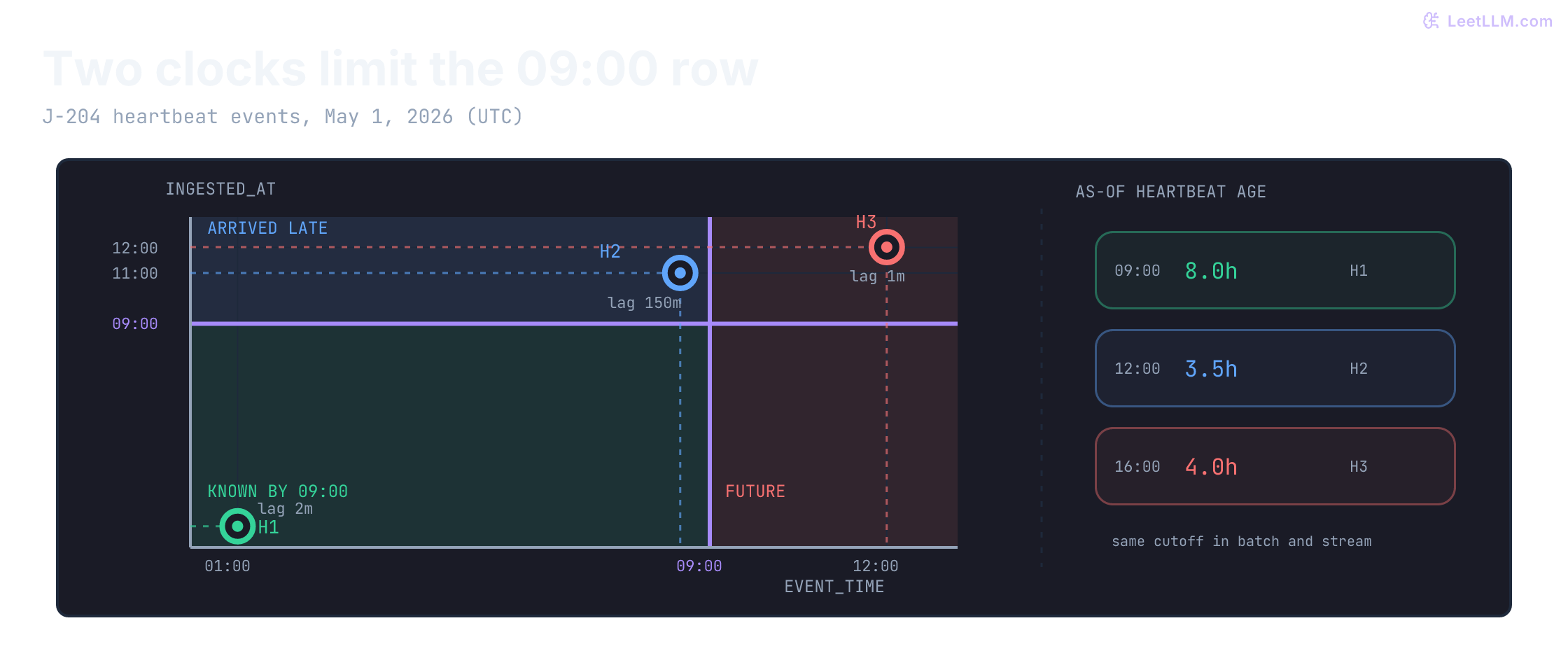
09:00, only H1 lies inside both time boundaries, so heartbeat age is 8.0h. H2 occurred before the decision but arrived afterward. The right-hand rows show how later cutoffs admit later arrivals and change the selected heartbeat.A heartbeat occurred at 08:30 but wasn't ingested until 11:00. Can a prediction made at 09:00 use it?
Answer
No. A faithful replay requires both event_time <= prediction_time and ingested_at <= prediction_time. The heartbeat had happened, but the live system didn't know about it yet.
Rebuilding what live serving knew at decision time
The first cell defines one on-time heartbeat, one late arrival, and one future heartbeat for job J-204. The numbered cells share state, so run them in order. All example times are UTC. The helper attaches that timezone to our offset-free fixtures; real timestamps with explicit offsets are converted to UTC.[1]
from datetime import datetime, timedelta, timezone

def dt(value):
    parsed = datetime.fromisoformat(value)
    if parsed.tzinfo is None:
        return parsed.replace(tzinfo=timezone.utc)  # Fixture convention only.
    return parsed.astimezone(timezone.utc)

events = [
    {
        "id": "H1",
        "job": "J-204",
        "event_time": dt("2026-05-01T01:00:00"),
        "ingested_at": dt("2026-05-01T01:02:00"),
        "source_version": 1,
    },
    {
        "id": "H2",
        "job": "J-204",
        "event_time": dt("2026-05-01T08:30:00"),
        "ingested_at": dt("2026-05-01T11:00:00"),
        "source_version": 1,
    },
    {
        "id": "H3",
        "job": "J-204",
        "event_time": dt("2026-05-01T12:00:00"),
        "ingested_at": dt("2026-05-01T12:01:00"),
        "source_version": 1,
    },
]
prediction_time = dt("2026-05-01T09:00:00")

for event in events:
    lag_minutes = int((event["ingested_at"] - event["event_time"]).total_seconds() / 60)
    print(
        f'{event["id"]} occurred={event["event_time"]:%H:%M} '
        f'arrived={event["ingested_at"]:%H:%M} lag={lag_minutes}m'
)H1 occurred=01:00 arrived=01:02 lag=2m
H2 occurred=08:30 arrived=11:00 lag=150m
H3 occurred=12:00 arrived=12:01 lag=1mFiltering by event time alone keeps H1 and H2. This first replay deliberately makes the mistake so we can compare its answer with serving.
def event_time_only(events, job_id, at):
    return [
        event
        for event in events
        if event["job"] == job_id and event["event_time"] <= at
    ]

def heartbeat_age_hours(visible, at):
    if not visible:
        return "missing"
    latest = max(visible, key=lambda event: event["event_time"])
    return (at - latest["event_time"]).total_seconds() / 3600

naive_replay = event_time_only(events, "J-204", prediction_time)
print("event-time-only ids:", [event["id"] for event in naive_replay])
print(f"event-time-only age: {heartbeat_age_hours(naive_replay, prediction_time):.1f}h")
print("leaked late heartbeat:", any(event["id"] == "H2" for event in naive_replay))event-time-only ids: ['H1', 'H2']
event-time-only age: 0.5h
leaked late heartbeat: TrueAdd the availability boundary. H2 disappears and the age returns to eight hours.
def known_by(events, job_id, at):
    return [
        event
        for event in events
        if (
            event["job"] == job_id
            and event["event_time"] <= at
            and event["ingested_at"] <= at
        )
    ]

faithful_replay = known_by(events, "J-204", prediction_time)
print("decision-time ids:", [event["id"] for event in faithful_replay])
print(f"decision-time age: {heartbeat_age_hours(faithful_replay, prediction_time):.1f}h")
print("late heartbeat excluded:", all(event["id"] != "H2" for event in faithful_replay))decision-time ids: ['H1']
decision-time age: 8.0h
late heartbeat excluded: TrueA historical training snapshot needs the latest visible heartbeat for each scoring request. H2 becomes usable after it arrives at 11:00; H3 becomes usable after 12:01. Age is computed at the cutoff from that latest timestamp, not cached from the last stream write.
def state_order(event):
    return (event["event_time"], event.get("source_version", 0))

def revision_value(event):
    return event.get("phase")

def as_of_hours(events, job_id, at):
    visible = known_by(events, job_id, at)
    if not visible:
        return "missing"
    latest_order = max(state_order(event) for event in visible)
    latest = [event for event in visible if state_order(event) == latest_order]
    if len({revision_value(event) for event in latest}) > 1:
        return "quarantined"
    hours = (at - latest[0]["event_time"]).total_seconds() / 3600
    return hours

for requested_at in [
    dt("2026-05-01T09:00:00"),
    dt("2026-05-01T12:00:00"),
    dt("2026-05-01T16:00:00"),
]:
    age = as_of_hours(events, "J-204", requested_at)
    rendered = f"{age:.1f}h" if isinstance(age, float) else age
print(f"{requested_at:%H:%M} -> {rendered}")09:00 -> 8.0h
12:00 -> 3.5h
16:00 -> 4.0hThe (event_time, source_version) tuple compares event time first and revision second. A higher version resolves corrections to the same timestamp. phase is the optional payload compared in this lab; conflicting phases claiming the same ordering key are quarantined. A production contract must compare all relevant payload fields or a canonical payload fingerprint.
An audit may instead ask for the corrected event-time history by 09:00, including later-arriving reports. Keep that artifact separate: it may include H2, while the decision-time training row contains only H1. Even an audit remains dependent on source-clock and payload accuracy.
Per-entity temporal cutoffs: point-in-time joins versus table time travel
Two-clock filtering still isn't enough if every training row uses the latest feature state from one global table snapshot. Table time travel reads a retained table version or snapshot associated with a commit timestamp. That clock differs from source event time and serving availability. A point-in-time join selects eligible state separately for each prediction row's timestamp. A snapshot containing historical records can support that join; taking a snapshot alone doesn't perform it.[2][3]
In machine learning training, each observation row carries its own , even if its outcome label arrives hours or days later. Job J-201 might be scored at 09:00 while J-202 is scored at 09:30. The join searches backward from each row's prediction time for its latest eligible feature state.
If you select only each job's latest state from the 09:30 snapshot for both jobs:
J-202(predicted at09:30) gets the correct state.J-201(predicted at09:00) picks up the09:15backlog update. That's leakage.
The next snippet implements both selections in ordinary Python. To isolate the per-row cutoff, these backlog updates occur and become available at the same time. There are no delayed publications or duplicate timestamps in this fixture. Each training row keeps its own cutoff; the leaky path reuses 09:30 for every job.
from datetime import datetime

def ts(value):
    return datetime.fromisoformat(value)

labels = [
    {"job": "J-201", "prediction_time": ts("2026-05-01T09:00:00")},
    {"job": "J-202", "prediction_time": ts("2026-05-01T09:30:00")},
]
feature_updates = [
    {"job": "J-201", "time": ts("2026-05-01T08:50:00"), "queue_backlog": 5},
    {"job": "J-201", "time": ts("2026-05-01T09:15:00"), "queue_backlog": 12},
    {"job": "J-202", "time": ts("2026-05-01T09:20:00"), "queue_backlog": 8},
]

def asof_join(labels, updates):
    rows = []
    for label in labels:
        visible = [
            update
            for update in updates
            if update["job"] == label["job"] and update["time"] <= label["prediction_time"]
        ]
        latest = max(visible, key=lambda update: update["time"]) if visible else None
        rows.append({
            "job": label["job"],
            "prediction_time": label["prediction_time"],
            "queue_backlog": None if latest is None else latest["queue_backlog"],
        })
    return rows

def snapshot_join(labels, updates, snapshot_time):
    latest_by_job = {}
    for update in updates:
        if update["time"] <= snapshot_time:
            previous = latest_by_job.get(update["job"])
            if previous is None or update["time"] > previous["time"]:
                latest_by_job[update["job"]] = update
    return [
        {
            "job": label["job"],
            "prediction_time": label["prediction_time"],
            "queue_backlog": latest_by_job[label["job"]]["queue_backlog"],
        }
        for label in labels
    ]

pit_join = asof_join(labels, feature_updates)
leakage_join = snapshot_join(labels, feature_updates, ts("2026-05-01T09:30:00"))

print("ASOF (PIT) JOIN:")
for row in pit_join:
    print(f'{row["job"]} {row["prediction_time"]:%H:%M} backlog={row["queue_backlog"]}')
print("SNAPSHOT JOIN (LEAKAGE):")
for row in leakage_join:
    print(f'{row["job"]} {row["prediction_time"]:%H:%M} backlog={row["queue_backlog"]}')

assert next(row["queue_backlog"] for row in pit_join if row["job"] == "J-201") == 5
assert next(row["queue_backlog"] for row in leakage_join if row["job"] == "J-201") == 12ASOF (PIT) JOIN:
J-201 09:00 backlog=5
J-202 09:30 backlog=8
SNAPSHOT JOIN (LEAKAGE):
J-201 09:00 backlog=12
J-202 09:30 backlog=8For this single-clock fixture, pandas provides merge_asof. Sort both DataFrames globally by the join clock, then search backward within each job. direction="backward" includes exact timestamp matches by default. It returns J-201 = 5, not the leaky snapshot 12.[4]
from datetime import datetime

import pandas as pd

def ts(value):
    return datetime.fromisoformat(value)

labels = pd.DataFrame(
    [
        {"job": "J-201", "prediction_time": ts("2026-05-01T09:00:00")},
        {"job": "J-202", "prediction_time": ts("2026-05-01T09:30:00")},
    ]
).sort_values("prediction_time")
updates = pd.DataFrame(
    [
        {"job": "J-201", "prediction_time": ts("2026-05-01T08:50:00"), "queue_backlog": 5},
        {"job": "J-201", "prediction_time": ts("2026-05-01T09:15:00"), "queue_backlog": 12},
        {"job": "J-202", "prediction_time": ts("2026-05-01T09:20:00"), "queue_backlog": 8},
    ]
).sort_values("prediction_time")

pit = pd.merge_asof(
    labels,
    updates,
    by="job",
    on="prediction_time",
    direction="backward",
)

for row in pit.itertuples(index=False):
    print(f"{row.job} {row.prediction_time:%H:%M} backlog={row.queue_backlog}")
assert int(pit.loc[pit["job"].eq("J-201"), "queue_backlog"].iloc[0]) == 5J-201 09:00 backlog=5
J-202 09:30 backlog=8How old may a matched value be? A backward join can otherwise return a six-month-old backlog. Declare a maximum age when that suits the feature contract. In pandas, tolerance=pd.Timedelta("24h") limits the distance between join timestamps. It doesn't add an ingestion or publication constraint to merge_asof.[4]
Some stores express that lookback as a time-to-live (TTL) window. Join lookback and physical retention are separate settings. A long heartbeat silence may itself be informative; replacing every old heartbeat with null would change this lab's feature definition.
Feast applies a configured lookback relative to each entity row's timestamp. Its default point-in-time join constrains event time but can include later-created corrections. As checked on October 10, 2026, filter_by_created_timestamp=True adds a creation-time constraint on supported offline stores, with non-null creation timestamps required. That clock must reflect availability to reproduce serving; arbitrary warehouse insertion time isn't enough.[5]
Dual-store architecture: offline lakehouses and low-latency online stores
When historical scans and request-time lookups have different requirements, a useful design is to maintain separate stores. It isn't mandatory for every ML application; batch prediction may need no online store.
| System attribute | Offline feature store | Online feature store |
|---|---|---|
| Example technology | Iceberg or Delta tables over columnar files such as Parquet | Redis, DynamoDB, or another entity-keyed store |
| Access pattern | Historical scans and joins | Point lookups by entity key (job_id) |
| Performance contract | Measure scan cost and dataset-generation time | Measure retrieval latency, tail latency, and availability under load |
| Temporal depth | Whatever input revisions, snapshots, and metadata the retention policy preserves | Often latest materialized state; Feast's online store has this model |
| Core workload | Per-row temporal training-dataset joins | Retrieve the scoring row and its freshness metadata |
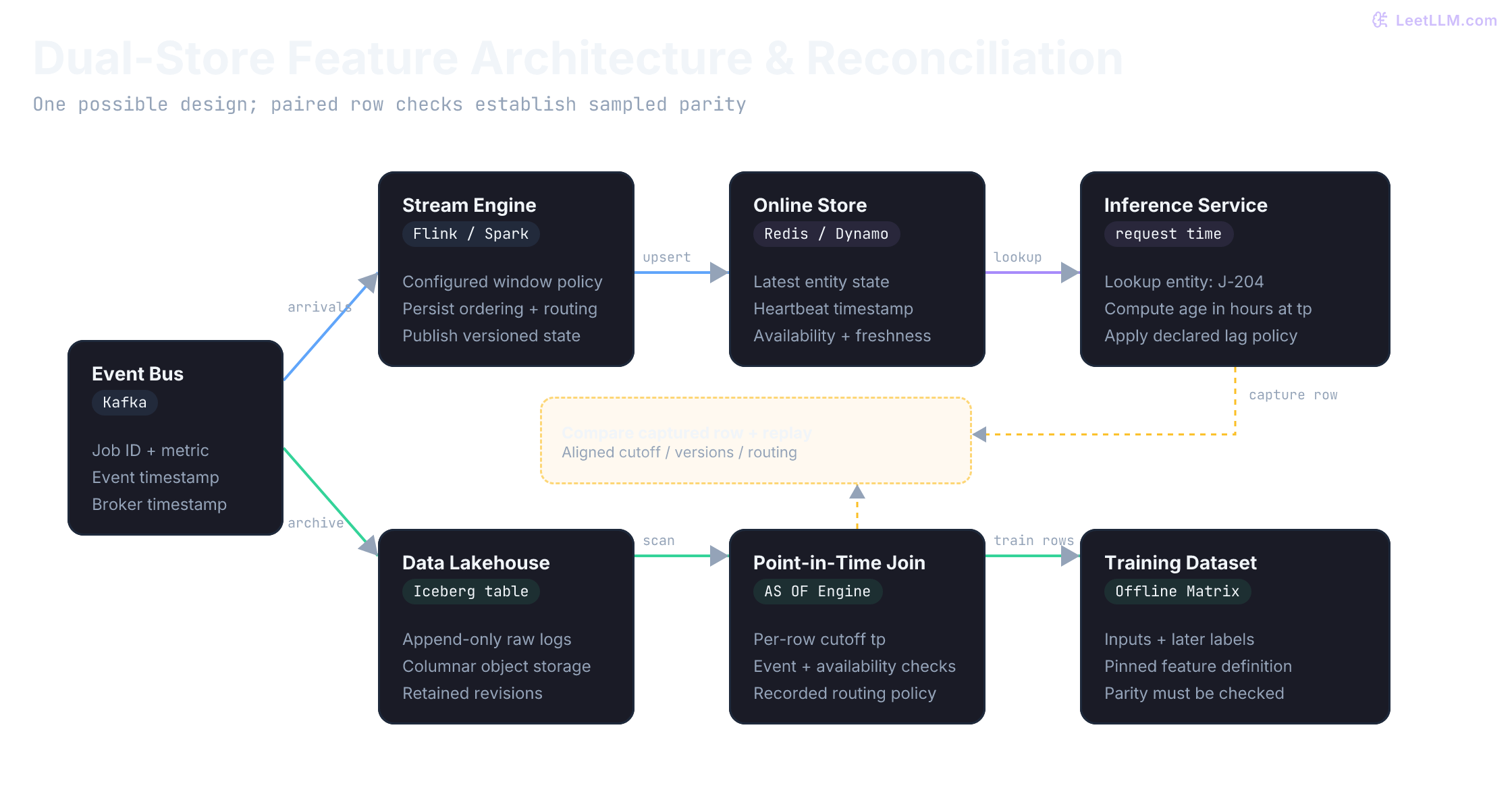
A unified event bus (such as Apache Kafka) fans out incoming events to both storage destinations:
- Streaming path: A stream engine such as Apache Flink processes arrivals, computes the configured aggregates, and publishes current entity state to an online store.
- Batch path: A sink archives raw inputs and their arrival metadata. An append-only log is a deliberate data contract, not a guarantee supplied by every lakehouse table. Batch jobs join the retained history at each prediction cutoff.
Feast's online store is built for low-latency lookups: for each entity key it keeps only the latest feature values, not full history.[6] Google Cloud's MLOps guidance describes a feature store as a shared repository for definitions, storage, and access across high-throughput batch and low-latency serving workloads.[7]
For this request-time age definition, store the heartbeat timestamp. If the stream updater writes an age of 0.03 at 01:02 and no later heartbeat arrives, a 09:00 read must compute 8.0. Periodically materialized ages are another possible contract, but their update interval and staleness must be explicit.
A late, older event mustn't overwrite newer online state. Same-time corrections need a deterministic rule too. Use the same source-owned (event_time, source_version) order in batch replay and online updates: version 2 replaces version 1, including when a stale version-1 retry arrives later. In a real source contract, require a stable sequence or revision field rather than trusting arrival order.
Here, revisions preserve the event timestamp; correcting it or deleting an event requires a richer revision model. The updater compares the ordering key and phase, not the full payload or a durable ID ledger. Validate source clocks and payloads before calling it: a future-dated event could otherwise displace usable state. Distributed writers need an atomic compare-and-update plus recorded publication metadata.
online_state = {}

def apply_latest_state(state, event):
    previous = state.get(event["job"])
    if previous is not None:
        if state_order(event) < state_order(previous):
            return "ignored stale event"
        if state_order(event) == state_order(previous):
            if previous.get("quarantined"):
                return "quarantine persists"
            if revision_value(event) == revision_value(previous):
                return "ignored duplicate revision"
            state[event["job"]] = {
                "job": event["job"],
                "event_time": event["event_time"],
                "source_version": event.get("source_version", 0),
                "ingested_at": max(event["ingested_at"], previous["ingested_at"]),
                "phase": "quarantined",
                "quarantined": True,
            }
            return "quarantined conflicting revision"
    state[event["job"]] = event.copy()
    return "stored"

def online_age_hours(state, job_id, requested_at):
    current = state.get(job_id)
    if current is None:
        return "missing"
    if current["event_time"] > requested_at or current["ingested_at"] > requested_at:
        raise ValueError("current online state cannot answer this historical request")
    if current.get("quarantined"):
        return "quarantined"
    return (requested_at - current["event_time"]).total_seconds() / 3600

arrivals = [
    {
        "id": "H4",
        "job": "J-204",
        "event_time": dt("2026-05-01T10:30:00"),
        "ingested_at": dt("2026-05-01T10:31:00"),
        "source_version": 1,
        "phase": "worker_scaled",
    },
    {
        "id": "H4-correction",
        "job": "J-204",
        "event_time": dt("2026-05-01T10:30:00"),
        "ingested_at": dt("2026-05-01T10:34:00"),
        "source_version": 2,
        "phase": "worker_scaled_corrected",
    },
    {
        "id": "H4-v1-retry",
        "job": "J-204",
        "event_time": dt("2026-05-01T10:30:00"),
        "ingested_at": dt("2026-05-01T10:36:00"),
        "source_version": 1,
        "phase": "worker_scaled",
    },
    {
        "id": "H1-retry",
        "job": "J-204",
        "event_time": dt("2026-05-01T01:00:00"),
        "ingested_at": dt("2026-05-01T11:05:00"),
        "source_version": 1,
    },
]

cutoff = dt("2026-05-01T10:40:00")
for event in arrivals:
    if event["ingested_at"] <= cutoff:
        print(f'{event["id"]}: {apply_latest_state(online_state, event)}')
age_at_1040 = online_age_hours(online_state, "J-204", cutoff)
print(f"age at 10:40: {age_at_1040:.2f}h")
print("stored version:", online_state["J-204"]["source_version"])

# The older heartbeat retry arrives after the captured 10:40 read.
print(f'{arrivals[-1]["id"]}: {apply_latest_state(online_state, arrivals[-1])}')H4: stored
H4-correction: stored
H4-v1-retry: ignored stale event
age at 10:40: 0.17h
stored version: 2
H1-retry: ignored stale eventAn online store holding only the latest state can't reconstruct arbitrary past requests. Capture feature rows at serving time and use historical replay for older cutoffs. The guard above rejects a request older than the current value's availability instead of returning a negative age or leaking that value backward.
A version-2 correction and a later retry of version 1 share the same event time. Which value should remain online?
Answer
Version 2. Ordering by (event_time, source_version) prevents a late retry from moving current state backward. If both ordering fields match but values conflict, quarantine the state instead of choosing by arrival order.
Stream windowing, watermarks, and out-of-order event routing
Window assigners group events for calculations such as heartbeat counts or rolling error rates. Three common types are:[8]
- Tumbling windows: Fixed-length, non-overlapping time buckets (such as
[08:00, 09:00)and[09:00, 10:00)). Each event belongs to exactly one window. Useful for hourly heartbeat counts. - Sliding windows: Fixed-length buckets that advance by a configured slide. They overlap when the slide is shorter than the window, such as a 60-minute window sliding every 5 minutes.
- Session windows: Dynamically sized windows bounded by periods of inactivity (such as grouping worker heartbeats until an idle gap exceeds 30 minutes).
Choose the clock before choosing when to emit. A processing-time window follows the engine's clock. An event-time window uses source timestamps and a watermark to estimate input progress. A watermark is neither the wall clock nor a promise that no older record will arrive.[9][8]
One simplified bounded out-of-orderness strategy uses the maximum timestamp seen on an input minus a configured delay:
Here is a configured bound, not a measured universal jitter constant. Exact engine semantics matter: Flink's bounded-out-of-orderness generator emits periodically and subtracts an additional millisecond from this expression.[10]
For multiple inputs, Flink advances using the minimum watermark across active inputs. A quiet partition can hold progress back. Configured idleness detection can exclude it, but resumed records may then be late. A fast partition alone doesn't prove that all partitions have caught up.[11]
Allowed lateness is relative to a window's end. With Flink's default event-time trigger, crossing the end fires the window. A positive lateness allowance retains state longer; a late arrival may cause another result depending on the trigger. Default allowed lateness is zero. A late side output requires explicit configuration, and downstream consumers must handle updated results without double-counting.[8]
The next cell instead implements an application routing rule: timestamps at least as large as the watermark take the on-time path; timestamps up to 45 minutes behind it are accepted; older ones are marked for replay. It doesn't create windows, evict state, or write a dead-letter queue. Exactly 45 minutes is accepted. Ahead of the watermark doesn't necessarily mean ahead of wall-clock time.
def late_event_action(event_time, watermark, max_behind):
    if max_behind < timedelta(0):
        raise ValueError("lateness budget must be nonnegative")
    if event_time >= watermark:
        return "on-time path"
    lateness = watermark - event_time
    if lateness <= max_behind:
        return "accept late update"
    return "quarantine for replay"

watermark = dt("2026-05-01T12:00:00")
max_behind = timedelta(minutes=45)

for event_time in [
    dt("2026-05-01T12:05:00"),
    dt("2026-05-01T12:00:00"),
    dt("2026-05-01T11:30:00"),
    dt("2026-05-01T11:15:00"),
    dt("2026-05-01T10:00:00"),
]:
print(f"{event_time:%H:%M} -> {late_event_action(event_time, watermark, max_behind)}")12:05 -> on-time path
12:00 -> on-time path
11:30 -> accept late update
11:15 -> accept late update
10:00 -> quarantine for replayTry predicting a different case. A record at 11:05 belongs to the hourly window [11:00, 12:00). The watermark is 12:20 and the window has 30 minutes of allowed lateness. Should the earlier 45-minute routing rule decide whether that window still exists?
window_start = dt("2026-05-01T11:00:00")
window_end = dt("2026-05-01T12:00:00")
later_watermark = dt("2026-05-01T12:20:00")
late_record = dt("2026-05-01T11:05:00")
window_allowance = timedelta(minutes=30)

# Interior example, away from engine-specific millisecond boundary details.
window_may_update = (
    window_start <= late_record < window_end
    and later_watermark < window_end + window_allowance
)
print("record-lag rule:", late_event_action(late_record, later_watermark, max_behind))
print("window still within lateness allowance:", window_may_update)record-lag rule: quarantine for replay
window still within lateness allowance: TrueThe record is 75 minutes behind the watermark, but the watermark is only 20 minutes past its window's end. These policies answer different questions. The Boolean checks window eligibility; it doesn't run Beam or Flink or simulate their triggers.
Suppose a count window first publishes 2, then a late event causes it to publish 3. The second result describes the revised whole window, not three additional events.[8] In this sink fixture, each output carries an application-defined revision and the entity plus window boundaries as its key. Predict what blindly adding both counts would produce:
window_key = ("J-204", "11:00", "12:00")
results = [
    {"revision": 1, "count": 2},
    {"revision": 2, "count": 3},
    {"revision": 1, "count": 2},  # Retry of the earlier output.
]
materialized = {}
for result in results:
    previous = materialized.get(window_key)
    if previous is None or result["revision"] > previous["revision"]:
        materialized[window_key] = result.copy()
    elif result["revision"] == previous["revision"] and result["count"] != previous["count"]:
        raise ValueError("conflicting count for the same window revision")
print("adding the first two totals:", sum(r["count"] for r in results[:2]))
print("materialized window count:", materialized[window_key]["count"])adding the first two totals: 5
materialized window count: 3The sink replaces 2 with 3 and ignores the stale retry. A delta-output contract would instead publish the increment +1; its retries need their own deduplication. Don't mix those units. This example assumes fixed window boundaries and source-assigned revision order. Flink doesn't automatically attach this key or revision to every emitted result. Session windows can merge, requiring retraction or replacement of earlier window identities. Durable sink writes and published-state history remain necessary for crash safety and decision-time replay.
Record routing and publication decisions. If streaming rejects a record but batch silently includes it, the paths can disagree even when both timestamp filters pass. A correction may improve a later feature state without rewriting what an earlier prediction actually read.
Idempotency, deduplication ledgers, and atomic state mutations
Latest-value state isn't enough for aggregates. A duplicated queue delta can silently inflate origin_backlog unless the updater is idempotent. Retrying the same event should preserve its original outcome. Here, one queue's unique deltas arrive in source order, though retries may be interleaved. If deltas can arrive out of order, buffer or reconcile them before treating a negative intermediate count as invalid.
Predict the final backlog before running the next cell: count Q1 once, apply Q2, and decide what should happen to Q3.
backlog_state = {"seen": {}, "origin_backlog": 0}

def apply_queue_update(state, event):
    if event["id"] in state["seen"]:
        old_delta, outcome = state["seen"][event["id"]]
        if old_delta != event["delta"]:
            raise ValueError("event ID reused with a different delta")
        return "duplicate skipped" if outcome == "applied" else outcome
    next_backlog = state["origin_backlog"] + event["delta"]
    if next_backlog < 0:
        state["seen"][event["id"]] = (event["delta"], "blocked negative backlog")
        return "blocked negative backlog"
    state["seen"][event["id"]] = (event["delta"], "applied")
    state["origin_backlog"] = next_backlog
    return "applied"

queue_updates = [
    {"id": "Q1", "delta": 3},
    {"id": "Q1", "delta": 3},
    {"id": "Q2", "delta": -1},
    {"id": "Q3", "delta": -5},
]

for update in queue_updates:
    result = apply_queue_update(backlog_state, update)
print(f'{update["id"]}: {result}; backlog={backlog_state["origin_backlog"]}')Q1: applied; backlog=3
Q1: duplicate skipped; backlog=3
Q2: applied; backlog=2
Q3: blocked negative backlog; backlog=2This in-memory dictionary demonstrates sequential retries, not crash safety. A live updater needs a durable atomic write: record the event ID, payload, and outcome together with any aggregate change. Otherwise a worker can crash between those steps and a retry can lose or repeat an update. Persist rejected outcomes too: a later retry of Q3 mustn't silently become accepted after unrelated additions. Repair rejected data through an explicit correction or replay.
Bound the deduplication ledger according to the source's redelivery and replay contract. Expiring an ID while it can still be retried allows a second application. Concurrent consumers also need an atomic state comparison and update; Python dictionaries don't provide that distributed transaction.
Broker guarantees have a scope. Kafka transactions can coordinate output topics and consumed offsets, but writing to an external store requires cooperation with that destination. An idempotent Kafka producer alone doesn't make Redis updates exactly once. Persist or coordinate source progress with durable sink state, and test the crash points.[12]
Freshness SLAs, degraded mode fallbacks, and silent feature staleness
An upstream pipeline can stall while an online key remains readable. Successful retrieval says nothing about whether the inputs are current. Measure freshness separately from read latency and predictive performance.
Here feature_as_of means the source progress represented by published state. It isn't simply the latest heartbeat timestamp: a healthy pipeline may know that no heartbeat arrived. Nor is it automatically interchangeable with last_updated_at: rewriting a stale row can refresh write time without advancing source coverage. Define coverage for the relevant partitions and features.
For this authored exercise, use these thresholds:
- Normal scoring: lag at most 15 minutes.
- Degraded fallback: lag above 15 and at most 45 minutes; record the mode and use an independently validated fallback.
- Abstention: lag above 45 minutes; withhold the narrow SLA estimate.
These are illustrative policy choices, not industry-wide safety limits. The function returns a mode; it doesn't execute a fallback model or calibrate an uncertainty discount. A fallback that depends on the same stalled inputs won't solve the problem.
def serving_mode(feature_as_of, requested_at):
    if feature_as_of is None:
        return "abstain: unknown feature freshness"
    lag = requested_at - feature_as_of
    if lag < timedelta(0):
        raise ValueError("feature update is from the future")
    if lag <= timedelta(minutes=15):
        return "normal scoring"
    if lag <= timedelta(minutes=45):
        return "fallback and log degraded mode"
    return "abstain from narrow SLA estimate"

requested_at = dt("2026-05-01T12:00:00")
for feature_as_of in [
    dt("2026-05-01T11:52:00"),
    dt("2026-05-01T11:30:00"),
    dt("2026-05-01T10:30:00"),
]:
print(f"{feature_as_of:%H:%M} -> {serving_mode(feature_as_of, requested_at)}")11:52 -> normal scoring
11:30 -> fallback and log degraded mode
10:30 -> abstain from narrow SLA estimateCompare exact durations before formatting them for display. Rounding 15 minutes 30 seconds down to 15 minutes would wrongly keep normal scoring; truncating a 30-second future timestamp toward zero would hide a clock error. Record freshness lag with each prediction trace so operators can distinguish model error from stale state.
Automated reconciliation pipelines and training-serving skew detection
Different stores are acceptable. Different meanings aren't. If batch computes a seven-day mean backlog while online returns a one-hour queue count under the same name, offline metrics can't predict live behavior. That gap is training-serving skew.
Two useful categories of causes are:
- Implementation skew: Batch transformations written in SQL or PySpark diverge from streaming logic written in Java Flink or Python microservices. Subtle variations in null imputation, window boundaries, or floating-point rounding accumulate into mismatched feature vectors.
- Temporal data skew: The offline batch backfill has access to late-arriving events that were unavailable when the online inference engine scored the request.
Three practices make those differences inspectable:
- Versioned definitions: Share transformation contracts, units, null rules, and window boundaries. Framework support varies; a shared definition doesn't automatically compile to every batch and stream engine or guarantee equivalent execution.
- Prediction feature logging: Capture the actual serving vector with prediction ID, cutoff, feature version, publication and freshness metadata. Logging a row is distinct from running a shadow model.
- Paired reconciliation: Replay those requests under the recorded routing policy and compare by prediction ID. Schedule it according to detection needs and cost. Marginal distribution tests such as PSI or a two-sample KS test can supplement comparisons, but cannot establish row parity.
Before promotion, compare sampled replays with captured serving rows at the same cutoff. Start with exact equality for categorical and integer fields; declare floating-point tolerances when necessary. Compare schema, types, and values. An absent field differs from null, and Python considers False == 0, so value equality alone isn't a type check. Passing sampled parity is one release criterion, not proof of model quality or future correctness.
The next cell constructs both paths locally. It exercises three positive fixture cases: a correction with a stale retry, equal-key quarantine, and a 16:00 row. It isn't a capture from production infrastructure.
def mismatches(left, right):
    keys = sorted(left.keys() | right.keys())
    return {
        key: (left.get(key, "<absent>"), right.get(key, "<absent>"))
        for key in keys
        if key not in left or key not in right or left[key] != right[key]
    }

correction_offline_row = {
    "hours_since_last_heartbeat": as_of_hours(arrivals, "J-204", dt("2026-05-01T10:40:00")),
}
correction_online_row = {
    "hours_since_last_heartbeat": online_age_hours(
        online_state, "J-204", dt("2026-05-01T10:40:00")
    ),
}
correction_differences = mismatches(correction_offline_row, correction_online_row)
print("same-time retry mismatches:", correction_differences)

conflicting_revisions = [
    {
        "id": "H5-a",
        "job": "J-205",
        "event_time": dt("2026-05-01T10:30:00"),
        "ingested_at": dt("2026-05-01T10:31:00"),
        "source_version": 7,
        "phase": "worker_scaled",
    },
    {
        "id": "H5-b",
        "job": "J-205",
        "event_time": dt("2026-05-01T10:30:00"),
        "ingested_at": dt("2026-05-01T10:32:00"),
        "source_version": 7,
        "phase": "worker_scale_failed",
    },
]
conflict_online_state = {}
for event in conflicting_revisions:
    apply_latest_state(conflict_online_state, event)
conflict_offline = as_of_hours(conflicting_revisions, "J-205", dt("2026-05-01T10:40:00"))
conflict_online = online_age_hours(
    conflict_online_state, "J-205", dt("2026-05-01T10:40:00")
)
assert conflict_offline == conflict_online == "quarantined"
print("equal-order conflict parity:", conflict_offline, "==", conflict_online)

all_heartbeats = events + arrivals
online_state_at_1600 = {}
for event in sorted(all_heartbeats, key=lambda row: row["ingested_at"]):
    if event["ingested_at"] <= dt("2026-05-01T16:00:00"):
        apply_latest_state(online_state_at_1600, event)

def replay_backlog(log):
    # Shared transition logic, fresh state, and the recorded source order.
    replayed = {"seen": {}, "origin_backlog": 0}
    for event in log:
        apply_queue_update(replayed, event)
    return replayed["origin_backlog"]

offline_row = {
    "hours_since_last_heartbeat": as_of_hours(all_heartbeats, "J-204", dt("2026-05-01T16:00:00")),
    "origin_backlog": replay_backlog(queue_updates),
}
online_row = {
    "hours_since_last_heartbeat": online_age_hours(
        online_state_at_1600, "J-204", dt("2026-05-01T16:00:00")
    ),
    "origin_backlog": backlog_state["origin_backlog"],
}

print("offline row:", offline_row)
print("online row:", online_row)
print("mismatches:", mismatches(offline_row, online_row))
assert offline_row["origin_backlog"] == 2
assert mismatches({"origin_backlog": None}, {})same-time retry mismatches: {}
equal-order conflict parity: quarantined == quarantined
offline row: {'hours_since_last_heartbeat': 4.0, 'origin_backlog': 2}
online row: {'hours_since_last_heartbeat': 4.0, 'origin_backlog': 2}
mismatches: {}The backlog replay starts from zero rather than copying the online result. Sharing a transition function reduces implementation drift, but agreement alone won't catch a bug shared by both paths; we also assert the hand-calculated backlog of 2.
Now swap two jobs' values. Before running the cell, decide whether a distribution-only comparison can detect the error.
swap_offline = {"J-201": 5, "J-202": 18}
swap_online = {"J-201": 18, "J-202": 5}
same_distribution = sorted(swap_offline.values()) == sorted(swap_online.values())
swap_differences = mismatches(swap_offline, swap_online)
print("same value distribution:", same_distribution)
print("paired mismatches:", swap_differences)
print("wrong rows:", len(swap_differences))same value distribution: True
paired mismatches: {'J-201': (5, 18), 'J-202': (18, 5)}
wrong rows: 2Both marginal samples are [5, 18], so their empirical KS distance is zero and identical PSI bins also show no change. Both jobs still have the wrong value. Pairing is the information those distribution summaries discard.
A stale row should produce another visible failure:
stale_online_row = {
    "hours_since_last_heartbeat": 0.03,
    "origin_backlog": backlog_state["origin_backlog"],
}
differences = mismatches(offline_row, stale_online_row)
print("mismatches:", differences)
print("parity gate passed:", not differences)mismatches: {'hours_since_last_heartbeat': (4.0, 0.03)}
parity gate passed: FalseThe lab ends with an illustrative receipt for three matching cases and two deliberately failing cases. It prints metadata, not a retained snapshot or cryptographic artifact manifest. A production receipt should reference immutable definitions, actual snapshots, retained logs, and captured rows.
receipt = {
    "feature_definition": "job_sla_features_v1",
    "replay_boundary": "event_time <= prediction_time and ingested_at <= prediction_time",
    "offline_online_ordering": "(event_time, source_version); equal-key conflicts quarantine",
    "age_rule": "store last heartbeat timestamp; compute hours at request time",
    "aggregate_updates": "require atomic ID/outcome ledger; demo is in-memory",
    "fixture_id": "job-sla-lab-2026-05-01",
    "parity_fixture_cases": 5,
    "availability_assumption": "accepted heartbeat published at ingested_at",
    "freshness_policy": "sla-freshness-v1",
}

assert as_of_hours(events, "J-204", dt("2026-05-01T09:00:00")) == 8.0
assert as_of_hours(events, "J-204", dt("2026-05-01T12:00:00")) == 3.5
assert not correction_differences
assert conflict_offline == conflict_online == "quarantined"
assert not mismatches(offline_row, online_row)
assert swap_differences and differences

for key, value in receipt.items():
print(f"{key}={value}")feature_definition=job_sla_features_v1
replay_boundary=event_time <= prediction_time and ingested_at <= prediction_time
offline_online_ordering=(event_time, source_version); equal-key conflicts quarantine
age_rule=store last heartbeat timestamp; compute hours at request time
aggregate_updates=require atomic ID/outcome ledger; demo is in-memory
fixture_id=job-sla-lab-2026-05-01
parity_fixture_cases=5
availability_assumption=accepted heartbeat published at ingested_at
freshness_policy=sla-freshness-v1Offline replay says heartbeat age 4.0, while the captured online row says 0.03 for the same job and cutoff. Should the model release proceed?
Answer
No. The mismatch shows that replay and serving disagree on definition, ordering, or freshness. Fix that parity failure before using offline model quality as evidence for live behavior.
Diagnostic guide: symptoms, root causes, and production remediation
| Observed symptom | Check before assigning a cause | Response if confirmed |
|---|---|---|
| Offline quality exceeds observed live quality | Inspect paired feature rows for later-arrival leakage; also check population and label differences | Fix availability cutoffs and rerun honest evaluation |
| Heartbeat age stays near zero despite no new visible heartbeat | Compare stored timestamp, cached age, request clock, and units | Compute this age from the timestamp at request time |
| Entity status rolls backward after retry | Inspect source revisions and concurrent write history | Enforce the declared ordering atomically; quarantine equal-key conflicts |
| Backlog doubles during network blips | Trace event IDs, duplicate deliveries, and sink acknowledgments | Persist atomic transitions and coordinate source progress |
| Predictions change during ingestion delays | Compare source coverage, mode selection, and actual model outcomes | Apply the validated lag policy and inspect fallback inputs |
| Stream window counts differ from batch | Align membership, deduplication, triggers, routing, and publication cutoffs | Adjust the relevant policy with its latency and state-cost tradeoffs; preserve the original decision-time record |
Boundary test scenarios
Change one condition at a time, then check the returned value and the state left behind:
- Call
serving_modewith progress exactly 15 minutes old, then 15 minutes and one second old. Repeat at 45 minutes and with a timestamp one second in the future. - Give the two conflicting H5 revisions the same
id. Send them in both orders. Neither ordering should silently choose one payload. - After Q3 is rejected, apply a new Q4 with delta
+10, then retry Q3. Also try reusing Q1's ID with a different delta. - Move H2's ingestion to 08:59 but suppose publication finishes at 09:02. What changes in the eligibility rule for the 09:00 request?
Expected results: exactly 15 minutes scores normally, 15:01 falls back, exactly 45 minutes still falls back, and 45:01 abstains. Future timestamps raise an error. Both H5 orders quarantine the conflicting revision. Backlog becomes 12 after Q4 and stays 12 when rejected Q3 is retried; changing Q1's payload raises an error. In the delayed-publication case, H2 remains unavailable at 09:00: add feature_available_at <= prediction_time, or replay logged published states using that clock. Raw ingestion alone is insufficient.