Personalize this lesson
Adapt explanations and teaching visuals to your background and preferred voice.
A large language model (LLM) answered correctly in your local notebook. In the deployed application, the exact same request stalls, times out, or throws an HTTP 429. Did the remote server finish? Did it charge your credit balance? Should your client retry right away, or will repeating the call knock down an already struggling provider? What should the user see while you don't know?
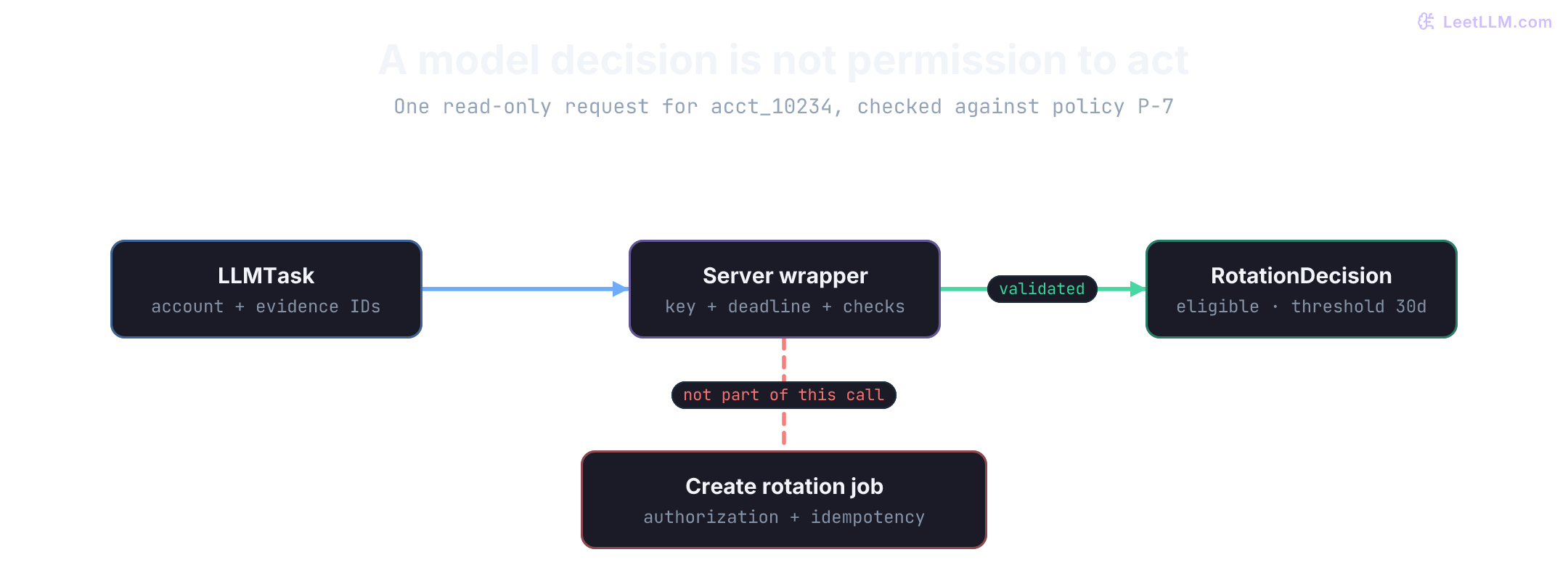
In Prompt Engineering Fundamentals, citing a policy line didn't make an unsupported 90-minute deadline true. We'll carry that discipline into an operational security task: deciding whether a stale service-account key on account acct_10234 meets rotation policy P-7. The trusted key age in the database is 45 days; the policy threshold is 30 days. The model can propose an eligibility candidate, but the server checks it against trusted facts and never creates a rotation job as an untracked side effect.
We'll build that boundary layer by layer, then exercise an actual provider SDK through a mocked HTTP transport. All runnable examples execute locally without live credentials or billable model calls. For a simple threshold rule, ordinary backend code could check the integers directly; the model candidate gives us a compact, checkable environment to master the defensive contracts needed whenever a larger workflow summarizes, extracts, or reasons over unstructured text.
Keep credentials on the server
A hosted model call needs an API key or an IAM role token. That key authorizes billable requests against your organization's quota. Client-side browser bundles, mobile apps, git repositories, and build artifacts are dangerous places for it. Keep provider keys strictly on the server.
Local code can read a credential from an environment variable. A deployed service should inject it from the platform's secret manager (such as AWS Secrets Manager, Google Secret Manager, or HashiCorp Vault) directly into the server process. If you prefix a variable with frontend exposure tags like NEXT_PUBLIC_ or VITE_, build tools bake the secret into the static JavaScript shipped to every browser tab. Anyone opening browser DevTools can steal that key within seconds.
The lab injects a placeholder into a local test dictionary rather than mutating the process environment. Production code passes os.environ, so a missing deployment secret fails fast on startup instead of silently falling back to a dummy value.
The following check rejects an absent or blank configuration value. It can't prove a key has the right model permissions; only the remote provider can verify authorization. Notice that neither output line prints the key itself.
1import os
2
3def require_server_key(environ) -> str:
4    api_key = environ.get("LLM_API_KEY", "")
5    if not isinstance(api_key, str) or not api_key.strip():
6        raise RuntimeError("LLM_API_KEY is not set")
7    return api_key
8
9try:
10    require_server_key({})
11except RuntimeError:
12    print({"missing_rejected": True})
13
14api_key = require_server_key({"LLM_API_KEY": "dev_key_not_a_real_secret"})
15print({"loaded": True, "server_only": True})1{'missing_rejected': True}
2{'loaded': True, 'server_only': True}Both verification branches stay visible, while the secret value never appears in stdout or log sinks. A production service calls require_server_key(os.environ) during startup, keeps separate credentials for staging and production, and rotates compromised credentials immediately upon any suspected leak.
A task contract for the model
A server-side secret protects the credential from theft, but it doesn't protect the application from erratic responses. Your internal application routes need a typed task contract, not a disorganized collection of vendor SDK parameters.
When a browser client asks whether account acct_10234 needs key rotation, the frontend identifies the account and transmits the user's intent. After authenticating the caller and checking tenant access, the backend loads the trusted key age and rotation policy from its database. Client-supplied status flags or timestamps must never become authoritative merely because they arrived in a JSON payload.
The boundary separates several core responsibilities:
| Contract field | LLM app equivalent | Why it matters |
|---|---|---|
| Task name | Request schema | The backend knows exactly what operation was requested. |
| Account ID | Tenant or user ID | Logs and distributed traces can isolate issues by customer. |
| Privacy rule | Redaction policy | Sensitive customer fields stay out of log collectors. |
| Deadlines | Tiered timeouts | Slow generation won't hang server worker threads indefinitely. |
| Action idempotency | Idempotency key | Retrying a network hiccup won't create duplicate rotation jobs. |
| Policy check | Validation gate | Hallucinated or contradictory outputs get blocked before reaching users. |
The model handles raw text and token probabilities; your application enforces contracts and invariants. That separation is the foundation of dependable AI engineering.
Name the application's request
A vendor request format changes often: Anthropic uses messages with specific system parameters, OpenAI uses messages or responses formats, and local inference engines use OpenAI-compatible HTTP schemas. If your route handlers call vendor SDKs directly, vendor-specific parameters bleed into your business logic.
This internal contract encapsulates intent, evidence IDs, deadline tiers, a trace ID, and a prompt version. It doesn't mention any specific vendor SDK, and it doesn't grant permission to execute a rotation job. Python's dataclass annotations document the internal contract clearly.
1from dataclasses import dataclass
2from typing import Literal
3
4@dataclass(frozen=True)
5class LLMTask:
6    task: Literal["decide_rotation", "summarize_scan", "draft_reply"]
7    account_id: str
8    policy_line_ids: tuple[str, ...]
9    customer_question: str
10    trace_id: str
11    prompt_version: str
12    connect_timeout_seconds: float = 2.0
13    read_timeout_seconds: float = 8.0
14    overall_deadline_seconds: float = 20.0
15    max_retries: int = 2
16
17task = LLMTask(
18    task="decide_rotation",
19    account_id="acct_10234",
20    policy_line_ids=("P-7",),
21    customer_question="Can I rotate the stale service-account key?",
22    trace_id="trace_7e3b",
23    prompt_version="rotation_decision@2",
24)
25
26print(task.task, task.account_id, task.policy_line_ids)1decide_rotation acct_10234 ('P-7',)LLMTask describes application intent rather than a specific vendor's wire schema. It works equally well with OpenAI, Anthropic, a local vLLM instance, or an API gateway.
Notice that LLMTask separates the read-only eligibility inquiry from the write action. Deciding eligibility is a safe read; creating a rotation job is an authorized mutation.
overall_deadline_seconds specifies the total latency budget for the end-to-end task. If the wrapper retries after a transient network drop, each subsequent attempt receives only the time that remains. Three 20-second attempts must not silently consume a full minute of user waiting time. A retry count without a shared deadline budget isn't a resilient architecture.
What belongs in the wrapper
The wrapper encapsulates operational policies that must remain consistent across all application routes:
| Concern | Wrapper responsibility |
|---|---|
| Model selection | Choose the primary model or regional endpoint for the given task. |
| Prompt version | Attach the exact template version used for deterministic debugging. |
| Timeout budgets | Enforce connect, first-token, and overall deadlines across retries. |
| Retry classification | Retry only safe, transient failures and respect backoff caps. |
| Response validation | Parse JSON, check schema types, and enforce business rules. |
| Telemetry | Log latency, token usage, status codes, and error reasons. |
| Privacy scrubbing | Hash or redact customer inputs before logging to telemetry sinks. |
If individual route handlers call vendor SDKs directly, these policies drift. One handler retries five times on HTTP 500 while another fails immediately; one route logs raw customer emails while another logs nothing. A centralized wrapper makes operational behavior testable and uniform.
A provider adapter translates that domain contract into provider wire format. Here, required_response_fields makes our validation requirements explicit before mapping them to a concrete SDK:
1import json
2
3policy_lines = {"P-7": "Stale service-account keys at least 30 days old require rotation."}
4task = {
5    "account_id": "acct_10234",
6    "credential_age_days": 45,
7    "key_stale": True,
8    "policy_line_ids": ["P-7"],
9}
10
11context = "\n".join(
12    f"{line_id}: {policy_lines[line_id]}" for line_id in task["policy_line_ids"]
13)
14payload = {
15    "messages": [
16        {"role": "system", "content": "Decide rotation eligibility only from supplied policy lines. Return JSON."},
17        {"role": "user", "content": f"{context}\nAccount: {json.dumps(task, sort_keys=True)}"},
18    ],
19    "required_response_fields": ["decision", "rotation_window_days", "source_line_ids"],
20}
21
22assert "P-7" in payload["messages"][1]["content"]
23assert "acct_10234" in payload["messages"][1]["content"]
24print(json.dumps(payload, indent=2))1{
2 "messages": [
3 {
4 "role": "system",
5 "content": "Decide rotation eligibility only from supplied policy lines. Return JSON."
6 },
7 {
8 "role": "user",
9 "content": "P-7: Stale service-account keys at least 30 days old require rotation.\nAccount: {\"account_id\": \"acct_10234\", \"credential_age_days\": 45, \"key_stale\": true, \"policy_line_ids\": [\"P-7\"]}"
10 }
11 ],
12 "required_response_fields": [
13 "decision",
14 "rotation_window_days",
15 "source_line_ids"
16 ]
17}The adapter injects actual policy text and trusted facts, not bare IDs that the model can't resolve. Here, rotation_window_days denotes the minimum key age required for rotation under policy P-7 (30 days), matching the contract we'll verify.
What the wrapper does
Follow one request through the wrapper. In modern provider APIs, tool calling requests that an application run an external tool, while Structured Outputs constrains generation grammar via token-level masking.[1][2] Both mechanisms still produce an untrusted candidate; validating that candidate against source facts remains the server's responsibility.
Every model invocation serves two distinct audiences:
- The product caller requires a validated typed object or a structured failure it can present to the user.
- The operations team requires a telemetry record capturing latency, token usage, and status, even when the model fails or returns garbage.
Validate a candidate before returning it
Start with a fixed candidate so validation mechanics stay transparent. We verify the root dictionary, required keys, strict types, cited source IDs, and whether the proposed decision matches trusted database facts. Notice that Python's bool is a subclass of int (isinstance(True, int) evaluates to True), so we verify type(data["rotation_window_days"]) is int to reject booleans pretending to be integers.
1import json
2import time
3from dataclasses import dataclass
4from typing import Any
5
6@dataclass(frozen=True)
7class RotationDecision:
8    decision: str
9    rotation_window_days: int
10    source_line_ids: tuple[str, ...]
11
12def fake_provider_call(prompt: str) -> str:
13    return json.dumps({
14        "decision": "eligible",
15        "rotation_window_days": 30,
16        "source_line_ids": ["P-7"],
17    })
18
19def parse_decision(
20    raw: str,
21    policy_windows: dict[str, int],
22    credential_facts: dict[str, object],
23) -> RotationDecision:
24    data: Any = json.loads(raw)
25    if not isinstance(data, dict) or set(data) != {"decision", "rotation_window_days", "source_line_ids"}:
26        raise ValueError("response must be an object with exactly the required fields")
27    if not isinstance(data["decision"], str) or data["decision"] not in {"eligible", "not_eligible"}:
28        raise ValueError("decision is outside allowed enum")
29    if type(data["rotation_window_days"]) is not int:
30        raise ValueError("rotation_window_days must be an integer")
31    if not isinstance(data["source_line_ids"], list) or not all(isinstance(x, str) for x in data["source_line_ids"]):
32        raise ValueError("source_line_ids must be a list of strings")
33    cited = tuple(data["source_line_ids"])
34    if cited != ("P-7",) or data["rotation_window_days"] != policy_windows["P-7"]:
35        raise ValueError("decision is unsupported by supplied policy")
36    expected_decision = (
37        "eligible"
38        if credential_facts["key_stale"]
39        and credential_facts["credential_age_days"] >= policy_windows["P-7"]
40        else "not_eligible"
41    )
42    if data["decision"] != expected_decision:
43        raise ValueError("decision conflicts with trusted credential facts")
44    return RotationDecision(
45        decision=data["decision"],
46        rotation_window_days=data["rotation_window_days"],
47        source_line_ids=cited,
48    )
49
50def decide_rotation(account_id: str, trace_id: str, now_fn=time.perf_counter) -> RotationDecision:
51    start = now_fn()
52    trusted_credentials = {
53        "acct_10234": {"credential_age_days": 45, "key_stale": True},
54    }
55    credential_facts = trusted_credentials[account_id]
56    raw = fake_provider_call(f"Decide stale-key rotation eligibility for {account_id} using P-7.")
57    decision = parse_decision(raw, {"P-7": 30}, credential_facts)
58    latency_ms = (now_fn() - start) * 1000
59    print({"trace_id": trace_id, "status": "ok", "latency_ms": round(latency_ms, 2)})
60    return decision
61
62fake_times = iter([100.0, 100.00005])
63decision = decide_rotation(
64    "acct_10234",
65    "trace_7e3b",
66    now_fn=lambda: next(fake_times),
67)
68print(decision)1{'trace_id': 'trace_7e3b', 'status': 'ok', 'latency_ms': 0.05}
2RotationDecision(decision='eligible', rotation_window_days=30, source_line_ids=('P-7',))The caller receives a validated RotationDecision rather than raw model text. If an unknown account ID is provided, the database lookup fails before dispatching a billable request to the provider.
Timeouts, rate limits, and resilience
Hosted LLMs take seconds to generate completions. If a provider stalls under traffic, one lingering call can monopolize a web worker and freeze the UI. Defending against that requires tiered timeouts and intelligent rate-limit classification.
Tiered timeouts: connect, TTFT, read, and total budget
Production networking requires setting multiple timeout tiers rather than a single coarse timer:
- Connect timeout (1s to 3s): Time spent resolving DNS and completing the TCP/TLS handshake. If this fails, the provider gateway is unreachable or your network routing has dropped. Fail fast here.
- Time-to-First-Token (TTFT) timeout (5s to 10s): Time spent waiting for the provider's scheduler to allocate GPU capacity and run the prompt prefill phase. If TTFT exceeds 10 seconds, the provider's queue is backlogged.
- Read / socket timeout (2s to 4s): The maximum allowable pause between consecutive streamed tokens or response bytes. This catches silent socket drops where the connection hangs without sending an explicit TCP RST.
- Overall task deadline (e.g. 20s): The total end-to-end latency budget across all attempts. If your overall deadline is 20 seconds and attempt 1 consumed 14 seconds before failing, attempt 2 gets at most 6 seconds.
Enforce deadlines around an asynchronous provider call using asyncio.wait_for:
1import asyncio
2
3async def slow_provider() -> str:
4    await asyncio.sleep(0.02)
5    return "late decision"
6
7async def call_with_deadline(timeout_seconds: float) -> dict[str, str]:
8    try:
9        text = await asyncio.wait_for(slow_provider(), timeout=timeout_seconds)
10        return {"status": "ok", "text": text}
11    except TimeoutError:
12        return {"status": "timeout", "next_step": "show_retry_option"}
13
14print(asyncio.run(call_with_deadline(0.001)))1{'status': 'timeout', 'next_step': 'show_retry_option'}asyncio.wait_for requests task cancellation and awaits coroutine termination. It can't interrupt blocking synchronous code or confirm that the remote provider ceased token generation. Always configure underlying transport timeouts in your HTTP client alongside high-level asyncio deadlines.[3]
Rate limit dynamics: RPM, TPM, and 429 response handling
API providers enforce rate limits along two distinct dimensions using token bucket or sliding window limiters:
- Requests Per Minute (RPM): Limits the number of discrete HTTP requests initiated in a 60-second window.
- Tokens Per Minute (TPM): Limits the cumulative count of input and output tokens processed in that same window.
In production, TPM limits are hit much faster than RPM limits. A prompt containing 16,000 tokens of retrieved documents drains 16,000 tokens from your TPM bucket on a single request. If your tier has an 80,000 TPM limit, just five concurrent requests exhaust your quota for the entire minute, even though your RPM utilization is only 5 out of 500 allowed requests.
When a provider rejects a call, inspect the HTTP status and body headers before deciding whether to retry:
- Temporary rate limits (HTTP 429): The token bucket is momentarily dry. Headers indicate when capacity replenishes. This is safe to retry with backoff.
- Permanent billing and quota exhaustion (HTTP 429): The provider returns errors such as
credit_balance_exhausted,insufficient_quota,organization_spend_limit_exceeded, ormonthly_spend_limit_exceeded.[4] These indicate an unpaid invoice, empty credit balance, or hard spend cap. Retrying these calls burns server CPU, inflates latency, and guarantees another 429. Fail immediately and alert operators. - Response headers to inspect:
Retry-After: The minimum duration (in seconds or an HTTP-date timestamp) the client must sleep before re-attempting.x-ratelimit-remaining-requestsandx-ratelimit-reset-requests: Remaining request allowance and replenishment window.x-ratelimit-remaining-tokensandx-ratelimit-reset-tokens: Remaining token balance and reset timing.[5]
A provider returns HTTP 429 with error code credit_balance_exhausted. Should the wrapper retry with backoff?
Answer
No. Credit exhaustion is a permanent account failure, not a transient rate limit. Retrying will burn latency and fail every time until an operator adds funds.
The classifier below categorizes HTTP responses into distinct operational actions:
1BILLING_OR_QUOTA = {
2    "insufficient_quota",
3    "credit_balance_exhausted",
4    "organization_spend_limit_exceeded",
5    "project_spend_limit_exceeded",
6    "organization_usage_limit_exceeded",
7}
8
9def retry_decision(status_code: int, error_code: str = "") -> str:
10    if error_code in {
11        "content_filter",
12        "refusal",
13        "incomplete_output",
14        "validation_reject",
15    }:
16        return "fail_and_inspect"
17    if status_code == 429:
18        if error_code in BILLING_OR_QUOTA:
19            return "fail_and_fix_quota"
20        if error_code == "rate_limit":
21            return "retry_with_backoff"
22        return "fail_and_inspect"
23    if status_code in {408, 500, 502, 503, 504}:
24        return "retry_with_backoff"
25    if status_code in {400, 401, 403}:
26        return "fail_and_fix_request"
27    return "fail_and_inspect"
28
29cases = [
30    (429, "rate_limit"),
31    (429, "credit_balance_exhausted"),
32    (429, ""),
33    (503, ""),
34    (401, ""),
35    (400, ""),
36    (200, "refusal"),
37    (200, "incomplete_output"),
38    (200, "validation_reject"),
39]
40for status, error_code in cases:
41 print(status, error_code or "-", retry_decision(status, error_code))1429 rate_limit retry_with_backoff
2429 credit_balance_exhausted fail_and_fix_quota
3429 - fail_and_inspect
4503 - retry_with_backoff
5401 - fail_and_fix_request
6400 - fail_and_fix_request
7200 refusal fail_and_inspect
8200 incomplete_output fail_and_inspect
9200 validation_reject fail_and_inspectExponential backoff with full and decorrelated jitter
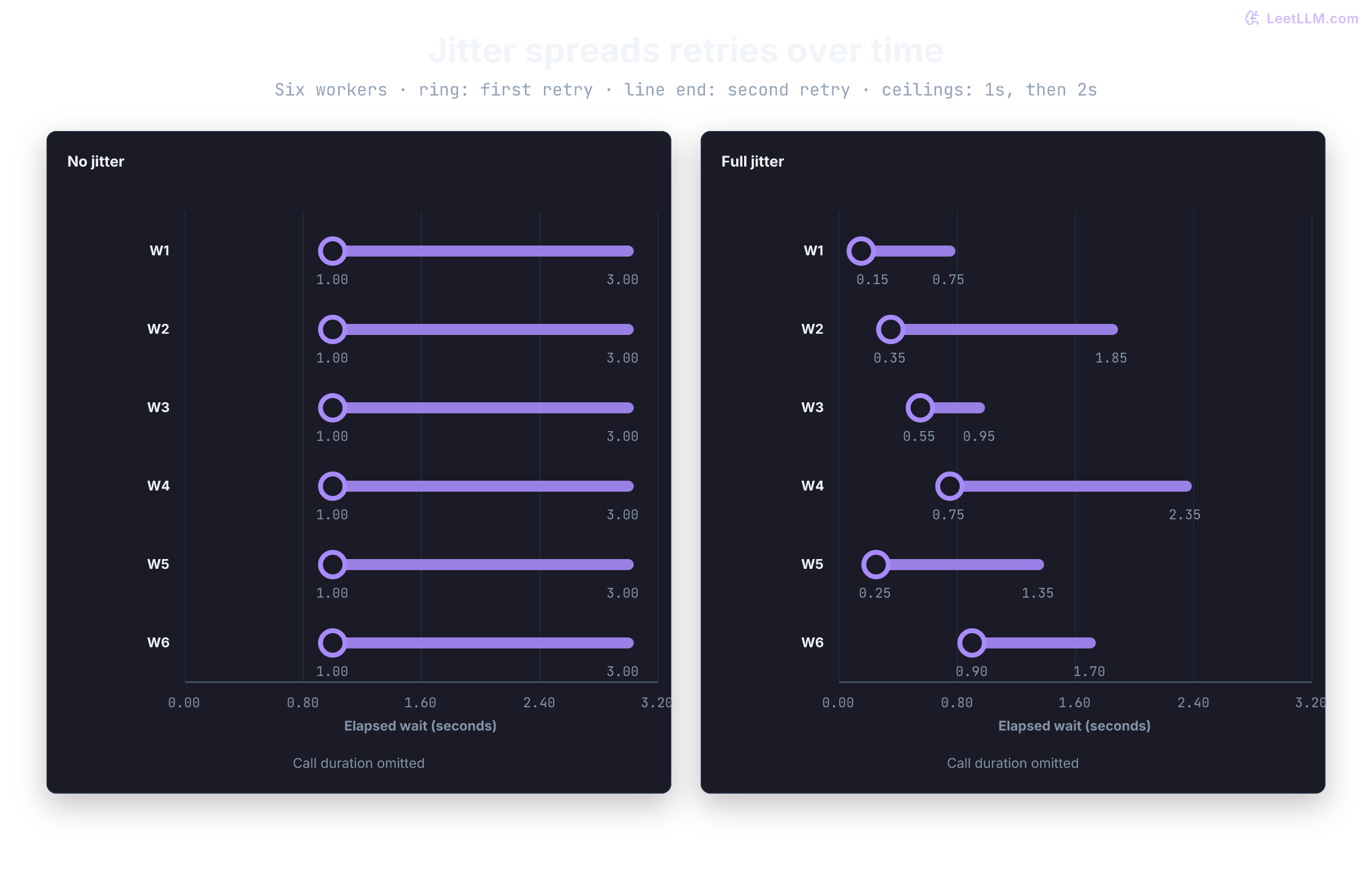
When an API blips, immediate retries transform a momentary hiccup into a thundering herd that knocks the provider down completely. If 500 client workers encounter an error at the exact same moment and use standard exponential backoff (e.g. sleep 1s, then 2s, then 4s), all 500 workers wake up simultaneously at and slam the provider again in a synchronized shockwave.
Jitter math: full jitter vs decorrelated jitter
AWS distributed systems research identified two primary randomization strategies to break synchronized retry waves:[6][7]
- Full Jitter: Sample uniformly between zero and the current exponential delay ceiling: Full jitter guarantees that no two workers wake at the exact same moment, spreading load across the entire interval.
- Decorrelated Jitter: Instead of calculating powers of two from the attempt index, sample uniformly between the base delay and three times the prior sleep interval: Decorrelated jitter produces high entropy between successive retries, preventing clusters from reforming even over extended retry sequences.
Compare both algorithms side by side:
1import time
2import random
3
4class RetryableModelError(Exception):
5    pass
6
7def flaky_call(attempt: int) -> str:
8    if attempt < 2:
9        raise RetryableModelError("temporary rate limit")
10    return "ok"
11
12def full_jitter_delay(attempt: int, base: float = 1.0, cap: float = 8.0, rand_fn=random.random) -> float:
13    ceiling = min(cap, base * (2 ** (attempt - 1)))
14    return rand_fn() * ceiling
15
16def decorrelated_jitter_delay(prev_sleep: float, base: float = 1.0, cap: float = 8.0, rand_fn=random.random) -> float:
17    return min(cap, base + rand_fn() * max(0.0, (prev_sleep * 3.0) - base))
18
19def call_with_retry(max_retries: int = 2, sleep_fn=time.sleep, rand_fn=lambda: 0.5) -> str:
20    attempts = 0
21    prev_sleep = 1.0
22    while True:
23        try:
24            return flaky_call(attempts)
25        except RetryableModelError as exc:
26            if attempts >= max_retries:
27                print({"status": "failed", "reason": str(exc)})
28                raise
29            attempts += 1
30            full_delay = full_jitter_delay(attempts, rand_fn=rand_fn)
31            decorr_delay = decorrelated_jitter_delay(prev_sleep, rand_fn=rand_fn)
32            prev_sleep = decorr_delay
33            print({
34                "status": "retrying",
35                "attempt": attempts,
36                "full_jitter_s": full_delay,
37                "decorr_jitter_s": round(decorr_delay, 2),
38            })
39            sleep_fn(full_delay)
40
41result = call_with_retry(sleep_fn=lambda _seconds: None, rand_fn=lambda: 0.5)
42print(result)1{'status': 'retrying', 'attempt': 1, 'full_jitter_s': 0.5, 'decorr_jitter_s': 2.0}
2{'status': 'retrying', 'attempt': 2, 'full_jitter_s': 1.0, 'decorr_jitter_s': 3.5}
3okRespecting Retry-After and deadline caps
If the provider includes a Retry-After header, that value represents an absolute floor. You must never shorten the requested sleep duration to squeeze in an extra attempt. Instead, calculate your jitter on top of that floor, and verify that the combined sleep fits within your remaining task deadline budget:
1import math
2import random
3
4def retry_wait_s(
5    attempt: int,
6    remaining_s: float,
7    retry_after_s: float | None = None,
8    rand_fn=random.random,
9) -> float:
10    if type(attempt) is not int or attempt < 1:
11        raise ValueError("attempt must be a positive retry number")
12    floor = 0.0 if retry_after_s is None else retry_after_s
13    if not math.isfinite(floor) or floor < 0:
14        raise ValueError("Retry-After must be finite and nonnegative")
15    if not math.isfinite(remaining_s) or remaining_s <= 0:
16        raise TimeoutError("task deadline exhausted")
17    ceiling = 2 ** min(attempt - 1, 3)
18    wait = floor + rand_fn() * ceiling
19    if wait >= remaining_s:
20        raise TimeoutError("retry would miss the task deadline")
21    return wait
22
23print(retry_wait_s(attempt=1, remaining_s=20.0, rand_fn=lambda: 0.5))
24print(retry_wait_s(attempt=1, remaining_s=20.0, retry_after_s=2.0, rand_fn=lambda: 0.5))
25try:
26    retry_wait_s(attempt=1, remaining_s=1.2, retry_after_s=2.0)
27except TimeoutError as exc:
28 print({"status": "timeout", "reason": str(exc)})10.5
22.5
3{'status': 'timeout', 'reason': 'retry would miss the task deadline'}When only 1.2 seconds remain in the task budget, sleeping 2.0 seconds is impossible. The wrapper halts immediately and emits a deadline timeout rather than embarking on an attempt that can't return in time.
Circuit breakers, fallback providers, and multi-region routing
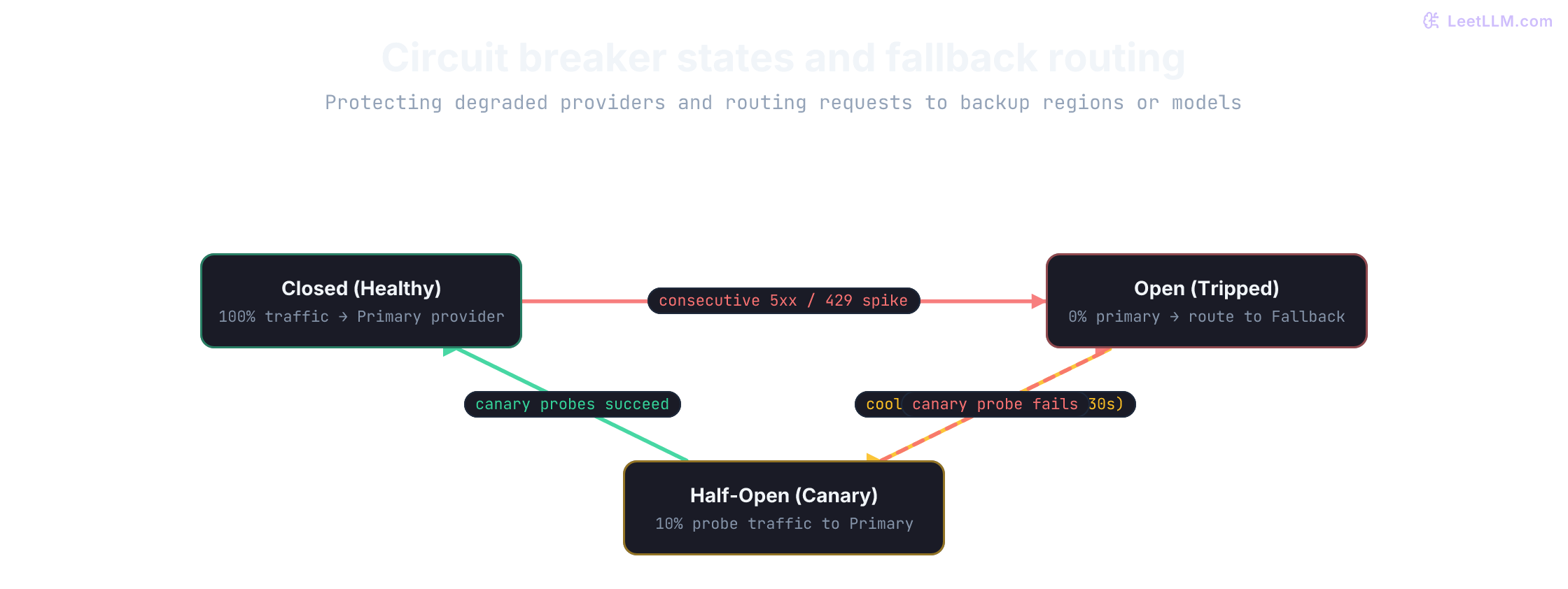
When a provider region enters hard failure (such as an extended 5xx outage or sustained 100% rate-limiting), retrying every incoming request worsens downstream latency and exhausts your server's thread pool. A circuit breaker prevents an unhealthy upstream dependency from destabilizing your entire architecture.
The three-state circuit breaker
A circuit breaker transitions across three well-defined states:
- Closed (Healthy): Normal operations. All requests route to the primary provider. Consecutive successes reset the failure counter to zero.
- Open (Tripped): When the failure count or error rate breaches a configured threshold (such as 5 consecutive 5xx errors), the breaker trips to Open. Incoming calls don't touch the primary provider; they fail fast or route immediately to a secondary fallback provider. This protects the primary provider from load so it can recover.
- Half-Open (Canary Probing): After a cooldown window (e.g. 30 seconds), the circuit permits a small canary fraction (such as 10% of traffic) to test the primary provider. If the canary requests succeed, the breaker resets to Closed. If any canary call fails, the breaker snaps back to Open for another cooldown period.
Fallback providers and multi-region routing
When the breaker opens, a model router can divert requests along two dimensions:
- Multi-region routing: Divert from
openai/us-easttoopenai/us-westorazure-openai/eastus2. Regional outages frequently spare secondary availability zones. - Cross-provider fallback: Divert from an unavailable primary model (such as Claude 3.5 Sonnet) to a secondary model (such as GPT-4o).
When configuring cross-provider fallbacks, enforce strict contract normalization: both providers must produce outputs that parse cleanly into the same RotationDecision schema. Never return raw fallback text that bypasses semantic verification.
Implement a circuit breaker with automatic routing to a fallback provider:
1import time
2from typing import Literal
3
4class CircuitBreaker:
5    def __init__(self, failure_threshold: int = 2, cooldown_seconds: float = 10.0):
6        self.failure_threshold = failure_threshold
7        self.cooldown_seconds = cooldown_seconds
8        self.state: Literal["closed", "open", "half_open"] = "closed"
9        self.failure_count = 0
10        self.last_failure_time = 0.0
11
12    def record_success(self) -> None:
13        self.failure_count = 0
14        self.state = "closed"
15
16    def record_failure(self, now: float) -> None:
17        self.failure_count += 1
18        self.last_failure_time = now
19        if self.failure_count >= self.failure_threshold:
20            self.state = "open"
21
22    def allow_request(self, now: float) -> bool:
23        if self.state == "closed":
24            return True
25        if self.state == "open":
26            if now - self.last_failure_time >= self.cooldown_seconds:
27                self.state = "half_open"
28                return True
29            return False
30        return True
31
32def route_request(breaker: CircuitBreaker, now: float) -> str:
33    if breaker.allow_request(now):
34        target = "primary_provider" if breaker.state != "half_open" else "primary_canary"
35    else:
36        target = "fallback_provider"
37    return f"{breaker.state} -> {target}"
38
39cb = CircuitBreaker(failure_threshold=2, cooldown_seconds=10.0)
40print(route_request(cb, now=100.0))
41cb.record_failure(now=101.0)
42print(route_request(cb, now=102.0))
43cb.record_failure(now=103.0)
44print(route_request(cb, now=104.0))
45print(route_request(cb, now=114.0))
46cb.record_success()
47print(route_request(cb, now=115.0))1closed -> primary_provider
2closed -> primary_provider
3open -> fallback_provider
4half_open -> primary_canary
5closed -> primary_providerIdempotency and side-effect isolation
A timeout describes local uncertainty: your client gave up waiting for a response, but the remote provider or downstream worker might still have processed the request.
Checking rotation eligibility is a read operation: retrying it carries no risk of corrupting database records. In contrast, creating a rotation job or triggering an AWS IAM key deactivation is an action with real side effects. Retrying an unconfirmed action without an idempotency key can spawn duplicate rotation tickets, confuse operations teams, or trigger multiple credential revokes in production.
Always enforce durable idempotency keys on mutating operations. The following in-memory demonstration records arguments alongside each idempotency key:
1created_rotation_jobs: dict[str, tuple[str, str]] = {}
2
3def create_rotation_job_once(account_id: str, idempotency_key: str) -> tuple[str, bool]:
4    if idempotency_key in created_rotation_jobs:
5        saved_account, job_id = created_rotation_jobs[idempotency_key]
6        if saved_account != account_id:
7            raise ValueError("idempotency key reused with different arguments")
8        return job_id, False
9    job_id = f"job_{len(created_rotation_jobs) + 1:03d}"
10    created_rotation_jobs[idempotency_key] = (account_id, job_id)
11    return job_id, True
12
13key = "request_7e3b"
14first = create_rotation_job_once("acct_10234", key)
15retry_after_timeout = create_rotation_job_once("acct_10234", key)
16
17assert first[0] == retry_after_timeout[0]
18assert len(created_rotation_jobs) == 1
19print({"first": first, "retry_after_timeout": retry_after_timeout})1{'first': ('job_001', True), 'retry_after_timeout': ('job_001', False)}This dictionary demonstrates the sequential concept. In production, use durable database storage with an atomic unique constraint on (tenant_id, idempotency_key) to prevent concurrent workers from both executing the mutation. Scope the key to the specific user intent; using an account ID alone would block all future legitimate key rotations for that account.
From text to typed objects
Free-form natural language is fine for human reading, but programmatic software requires typed structures.
For key rotation, downstream systems need exact fields: decision, rotation_window_days, and source_line_ids. In OpenAI's API, Structured Outputs with a strict JSON schema uses constrained decoding: during generation, an underlying finite state machine (FSM) masks tokens that would violate the schema grammar. JSON mode (json_object) guarantees only syntactically valid JSON, allowing missing keys, type mismatches, and hallucinated enums.[2]
Neither mode proves that the output is semantically truthful or compliant with policy. Check schema adherence first, then verify business invariants before creating a RotationDecision:
| Mode | What it guarantees | What it doesn't |
|---|---|---|
Structured Outputs (strict json_schema) | Supported schema adherence | Grounded truth, policy compliance, refusals, token limits |
JSON mode (json_object) | Valid JSON syntax | Required keys, enum constraints, policy rules |
| Field | Schema check | Business check |
|---|---|---|
decision | Must match allowed enum. | Must match trusted credential age and stale status in both directions. |
rotation_window_days | Must be an integer. | Must equal the age threshold in policy P-7. |
source_line_ids | Must be an array of strings. | Every ID must exist in supplied evidence. |
Schema checks vs semantic checks
Run the parser from minimal-wrapper.py against five distinct candidates in the same session. All five contain valid JSON. Two have the wrong schema shape; two have plausible fields but contradict trusted database facts or policy definitions. Only one passes:
1import json
2
3policy_windows = {"P-7": 30}
4trusted_facts = {"credential_age_days": 45, "key_stale": True}
5candidates = [
6    '{"decision":"eligible","rotation_window_days":30,"source_line_ids":["P-7"]}',
7    '{"decision":"not_eligible","rotation_window_days":30,"source_line_ids":["P-7"]}',
8    '{"decision":"eligible","rotation_window_days":90,"source_line_ids":["P-7"]}',
9    '[]',
10    '{"decision":"eligible","rotation_window_days":true,"source_line_ids":["P-7"]}',
11]
12
13def validate(raw: str) -> str:
14    try:
15        parse_decision(raw, policy_windows, trusted_facts)
16    except ValueError as exc:
17        return f"REJECT {exc}"
18    return "ACCEPT grounded decision"
19
20for candidate in candidates:
21 print(validate(candidate))1ACCEPT grounded decision
2REJECT decision conflicts with trusted credential facts
3REJECT decision is unsupported by supplied policy
4REJECT response must be an object with exactly the required fields
5REJECT rotation_window_days must be an integerThe second candidate has the right shape and cites P-7, but claims not_eligible when trusted records show a 45-day-old stale key (which meets the 30-day threshold). The third candidate claims a 90-day threshold that P-7 never specified. Syntax validation checks shape; semantic validation checks truth.
Exercise a real SDK without spending tokens
OpenAI's Responses API accepts a strict schema in text.format; its SDK exposes generated text through response.output_text.[8] The adapter below maps our contract to those fields, verifying completion status and checking for refusals before calling parse_decision.
We use httpx.MockTransport to intercept every outgoing HTTP request locally. The API key and model ID are placeholders. Four test fixtures exercise success, an unsupported policy threshold, a model refusal, and an incomplete response truncated by token limits:[9]
1import httpx
2from openai import OpenAI
3
4DECISION_SCHEMA = {
5    "type": "object",
6    "properties": {
7        "decision": {"type": "string", "enum": ["eligible", "not_eligible"]},
8        "rotation_window_days": {"type": "integer"},
9        "source_line_ids": {"type": "array", "items": {"type": "string"}},
10    },
11    "required": ["decision", "rotation_window_days", "source_line_ids"],
12    "additionalProperties": False,
13}
14
15def request_decision(client, model, account_id, facts):
16    response = client.responses.create(
17        model=model,
18        instructions="Use only the supplied policy and facts. Decide eligibility; do not execute any action.",
19        input=json.dumps({
20            "policy": {"P-7": "Stale service-account keys at least 30 days old require rotation."},
21            "account_id": account_id,
22            "trusted_facts": facts,
23        }),
24        text={"format": {
25            "type": "json_schema", "name": "rotation_decision",
26            "strict": True, "schema": DECISION_SCHEMA,
27        }},
28        max_output_tokens=512,
29        store=False,
30    )
31    if response.status != "completed":
32        raise ValueError("incomplete_output")
33    if any(
34        part.type == "refusal"
35        for item in response.output if item.type == "message"
36        for part in item.content
37    ):
38        raise ValueError("refusal")
39    if not response.output_text:
40        raise ValueError("empty_output")
41    return parse_decision(response.output_text, {"P-7": 30}, facts)
42
43def fixture(*, window=30, refusal=False, incomplete=False):
44    part = (
45        {"type": "refusal", "refusal": "Mock refusal"}
46        if refusal else
47        {"type": "output_text", "annotations": [], "text": json.dumps({
48            "decision": "eligible", "rotation_window_days": window,
49            "source_line_ids": ["P-7"],
50        })}
51    )
52    return {
53        "id": "resp_mock", "object": "response", "created_at": 0,
54        "model": "model-under-test", "status": "incomplete" if incomplete else "completed",
55        "error": None,
56        "incomplete_details": {"reason": "max_output_tokens"} if incomplete else None,
57        "output": [{
58            "id": "msg_mock", "type": "message", "role": "assistant",
59            "status": "incomplete" if incomplete else "completed", "content": [part],
60        }],
61    }
62
63replies = iter([fixture(), fixture(window=90), fixture(refusal=True), fixture(incomplete=True)])
64
65def mock_http(request):
66    payload = json.loads(request.content)
67    assert request.url.path == "/v1/responses"
68    assert payload["text"]["format"]["strict"] is True
69    assert json.loads(payload["input"])["trusted_facts"]["credential_age_days"] == 45
70    return httpx.Response(200, json=next(replies), headers={"x-request-id": "req_mock"})
71
72with OpenAI(
73    api_key="mock-key-not-a-secret",
74    max_retries=0,
75    timeout=5.0,
76    http_client=httpx.Client(transport=httpx.MockTransport(mock_http)),
77) as client:
78    for label in ["valid", "wrong_threshold", "refused", "truncated"]:
79        try:
80            result = request_decision(client, "model-under-test", "acct_10234", {
81                "credential_age_days": 45, "key_stale": True,
82            })
83            print(label, result.decision)
84        except ValueError as exc:
85 print(label, "REJECT", str(exc))1valid eligible
2wrong_threshold REJECT decision is unsupported by supplied policy
3refused REJECT refusal
4truncated REJECT incomplete_outputOnly the first candidate reaches application code as a validated RotationDecision. The other three fail cleanly rather than returning fabricated defaults.
In production, remove the mock transport, load credentials from secret storage, and configure long-lived HTTP client connection pools. Notice store=False: this disables provider retention for prompt evaluation, helping satisfy data privacy requirements.[10]
Server-Sent Events streaming vs buffered responses
When invoking an LLM, you can buffer the entire response on the server or stream tokens incrementally over HTTP using Server-Sent Events (SSE).[11][12]
In an SSE connection, the client issues an HTTP POST request with Accept: text/event-stream. The provider keeps the TCP connection open and emits event chunks formatted with data: prefixes, ending with a sentinel data: [DONE]\n\n:
1HTTP/1.1 200 OK
2Content-Type: text/event-stream
3Cache-Control: no-cache
4Connection: keep-alive
5
6data: {"choices": [{"delta": {"content": "Account"}}]}
7
8data: {"choices": [{"delta": {"content": " acct_10234"}}]}
9
10data: {"choices": [{"delta": {"content": " is eligible."}}]}
11
12data: [DONE]
TTFT vs inter-token latency
Streaming splits response time into two distinct metrics:
- Time-to-First-Token (TTFT): The duration from request dispatch to the arrival of the very first token chunk. TTFT reflects network transit, provider scheduling queues, and prompt prefill time.
- Inter-Token Latency (ITL): The interval between consecutive tokens during the autoregressive decode phase, inversely related to tokens per second (TPS).
In human-facing chat interfaces, streaming creates the illusion of speed: a user starts reading within 300 ms (TTFT), even if the full answer takes 6 seconds to generate. For automated programmatic pipelines, streaming adds complexity without value: you can't parse incomplete JSON without speculative partial parsers, and partial tokens must never cross an action boundary.
The streaming client state machine
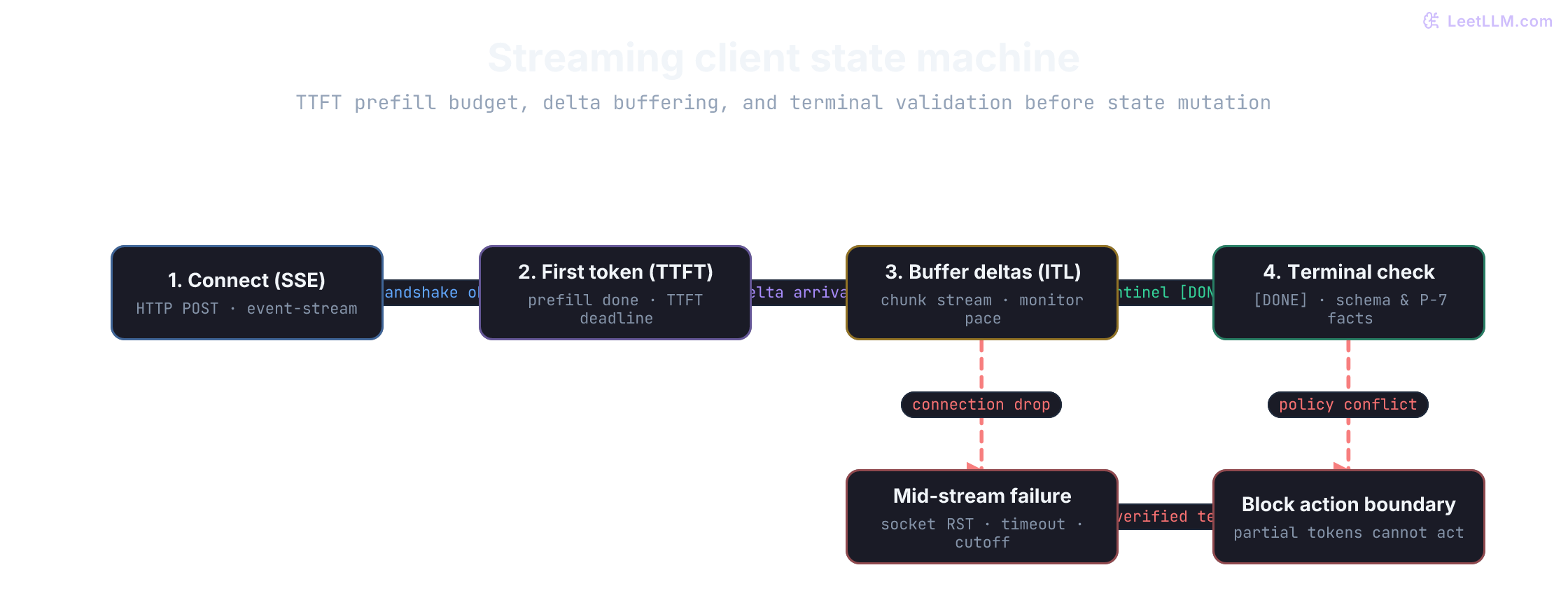
A robust streaming client transitions through distinct states:
- Connect: Initiate the HTTP connection with
Accept: text/event-stream. - First token milestone: Measure TTFT. If no byte arrives before the TTFT budget, abort the socket.
- Buffer deltas: Append incremental text deltas to an in-memory buffer while monitoring read timeouts between chunks.
- Handle socket drop: If the TCP connection terminates prematurely, mark the buffer unverified and fail closed.
- Terminal validation: When
data: [DONE]arrives, run schema and semantic checks on the complete text before committing the state.
Test delta buffering and failure handling during a mid-stream connection drop:
1from collections.abc import Iterator
2
3def fake_stream(fail: bool = False) -> Iterator[str]:
4    chunks = ["Account ", "acct_10234 ", "is eligible ", "under P-7."]
5    for index, chunk in enumerate(chunks):
6        if fail and index == 2:
7            raise ConnectionError("mock stream dropped")
8        yield chunk
9
10def render_draft(chunks: Iterator[str]) -> None:
11    buffer = ""
12    try:
13        for chunk in chunks:
14            buffer += chunk
15            print({"event": "delta", "preview": buffer})
16    except ConnectionError:
17        print({"event": "failed", "display_only": True, "partial_text": buffer})
18        return
19    print({"event": "completed", "display_only": True, "text": buffer})
20
21render_draft(fake_stream())
22render_draft(fake_stream(fail=True))1{'event': 'delta', 'preview': 'Account '}
2{'event': 'delta', 'preview': 'Account acct_10234 '}
3{'event': 'delta', 'preview': 'Account acct_10234 is eligible '}
4{'event': 'delta', 'preview': 'Account acct_10234 is eligible under P-7.'}
5{'event': 'completed', 'display_only': True, 'text': 'Account acct_10234 is eligible under P-7.'}
6{'event': 'delta', 'preview': 'Account '}
7{'event': 'delta', 'preview': 'Account acct_10234 '}
8{'event': 'failed', 'display_only': True, 'partial_text': 'Account acct_10234 '}When the connection drops mid-stream, the client flags the accumulated buffer as failed and display-only. Partial sentences must never authorize a backend action.
Production telemetry and cost attribution
After every request, operators need to know what model version executed, how many tokens were billed, how long generation took, and why the call stopped.
Under the OpenTelemetry GenAI Semantic Conventions, model calls are instrumented using standardized attribute namespaces:[13]
gen_ai.system: Provider identifier (e.g.openai,anthropic).gen_ai.request.model: The specific model ID requested (e.g.gpt-4o,claude-3-5-sonnet-20241022).gen_ai.usage.input_tokens: Count of prompt tokens billed.gen_ai.usage.output_tokens: Count of completion tokens billed.gen_ai.response.finish_reasons: Terminal reason (e.g.stop,length,content_filter).
Tracing spans should follow a strict hierarchy:
1[Root Span: POST /api/v1/rotation-decision]
2  ├── [Child Span: db.fetch_credential_facts]
3  ├── [Child Span: gen_ai.client.call (model: gpt-4o, input: 250, output: 80)]
4  └── [Child Span: validation.check_p7_policy]
Token accounting and cost attribution
Hosted model providers bill separately for prompt tokens and output tokens. If the model supports prompt caching, cached prompt tokens receive substantial discounts (typically 50% to 75% cheaper than fresh input tokens).
At illustrative baseline rates of $2.00 per million input tokens and $6.00 per million output tokens:
| Step | Tokens | Rate (per million) | Cost |
|---|---|---|---|
| Input (policy lines, account facts, schema instructions) | 250 | $2.00 | $0.00050 |
| Output (JSON decision fields) | 80 | $6.00 | $0.00048 |
| Total per request | 330 | $0.00098 |
While less than a tenth of a cent per call sounds negligible, a cluster processing 200,000 automated policy evaluations daily spends nearly $6,000 monthly. Telemetry must track token consumption by tenant and task to support cost attribution.
Redacting customer text
Prompts can contain customer names, proprietary code, or personal data. OWASP's Top 10 for LLM Applications highlights sensitive information disclosure and prompt injection as top vulnerabilities.[14] Copying raw prompts into log collectors turns your monitoring platform into a high-risk data store.[15]
Use keyed HMAC fingerprints for diagnostic correlation. The fingerprint lets you identify whether identical prompts caused identical failures without storing customer text:
1import hmac
2from hashlib import sha256
3
4trace_id = "trace_7e3b"
5customer_question = "Can I rotate the stale service-account key for account acct_10234?"
6fingerprint_key = b"dev-only-fingerprint-key"
7usage = {"input_tokens": 250, "output_tokens": 80}
8rates_per_million = {"input": 2.0, "output": 6.0}
9model = "provider-model-id"
10latency_ms = 840
11retry_count = 0
12cached_input_tokens = 0
13cost_usd = (
14    usage["input_tokens"] * rates_per_million["input"]
15    + usage["output_tokens"] * rates_per_million["output"]
16) / 1_000_000
17log_record = {
18    "trace_id": trace_id,
19    "task": "decide_rotation",
20    "model": model,
21    "prompt_version": "rotation_decision@2",
22    "latency_ms": latency_ms,
23    "retry_count": retry_count,
24    "input_fingerprint": hmac.new(fingerprint_key, customer_question.encode(), sha256).hexdigest()[:12],
25    "cached_input_tokens": cached_input_tokens,
26    **usage,
27    "estimated_cost_usd": round(cost_usd, 6),
28    "status": "ok",
29}
30
31assert customer_question not in str(log_record)
32print(log_record)1{'trace_id': 'trace_7e3b', 'task': 'decide_rotation', 'model': 'provider-model-id', 'prompt_version': 'rotation_decision@2', 'latency_ms': 840, 'retry_count': 0, 'input_fingerprint': '85ef707a963b', 'cached_input_tokens': 0, 'input_tokens': 250, 'output_tokens': 80, 'estimated_cost_usd': 0.00098, 'status': 'ok'}Choosing the execution shape
The server boundary supports different execution patterns depending on user expectations and latency constraints:
| Execution shape | When to use | Key consideration |
|---|---|---|
| Synchronous request | User needs an immediate structured decision. | Enforce strict connect and overall deadline budgets. |
| Streaming request | Human reads long explanations or generated drafts. | Display deltas provisionally; never authorize actions from partial tokens. |
| Background job queue | Work is slow, offline, or takes longer than 30 seconds. | Use durable job state machines with status polling and worker checkpoints. |
| OpenAI Batch API | Non-urgent batch workloads that can wait up to 24 hours. | 50% cost discount. Match records by custom_id, not line ordering.[16] |
| Prompt caching | Long, static system prompts and policy rules repeat across calls. | Place stable context at the prefix; verify cache hit rates in telemetry.[17] |
Interactive draft generation benefits from streaming responsiveness, eligibility verification requires atomic schema validation, and nightly compliance scans belong in an offline batch queue. Choose your execution shape to match the consumer's constraints.
Carry the boundary into an app
Production systems require an authenticated backend environment. Before exposing /rotation-decision to the web, authenticate the user session, verify tenant permissions, and apply rate limiting at your API gateway. Hiding a provider key on the server doesn't protect you if an unprotected public endpoint lets anyone burn your budget through your proxy.
We've validated the core boundary components: secret isolation, typed contracts, tiered deadlines, rate-limit classification, full and decorrelated jitter backoff, circuit breakers, and redacted telemetry. The next lesson integrates these components into an end-to-end fullstack application.