Personalize this lesson
Adapt explanations and teaching visuals to your background and preferred voice.
A chat window stays blank, then the reply arrives in uneven chunks. A GPU dashboard reports a healthy compute rate. Which observation should guide the investigation? Both can be true: processing a prompt and extending a response run the same model with different shapes, reuse patterns, and scheduling pressures.
Trace that call from the instant the user hits Send. Network transit, queueing, and tokenization kick off the pipeline. Then prefill processes the uncached prompt, possibly in chunks, and builds reusable attention state. After the first output token, ordinary decode consumes one newly generated token per request per step. The key-value (KV) cache retains earlier attention keys and values. Full-attention cache grows as tokens are consumed; hybrid models can also maintain recurrent state.
Three operational counters tell the story: time to first token (TTFT) measures the initial wait, tokens per second (TPS) measures a defined output rate, and KV cache occupancy tracks memory capacity. More uncached prompt work can increase TTFT, but prefix reuse and scheduling change the relationship. A longer full-attention history can slow decode because each new query reads more cached K/V.
Working hypothesis: Long-prompt prefill often has enough weight reuse to approach a compute limit. Low-batch decode often approaches a memory-bandwidth limit. Short prompts, long histories, batching, sharding, and kernel overhead can change the bottleneck. KV cache paging, continuous batching, and disaggregation target different parts of this serving problem.
Why doesn't a chat response appear all at once after you submit a prompt?
Answer
The model processes the uncached prompt and samples the first output token. In ordinary autoregressive decode, each later token depends on the preceding output, so each request advances sequentially. Prompt processing can be chunked or reuse a cached prefix, and speculative decoding can verify multiple proposed tokens together.
The two phases of LLM inference
Under standard autoregressive generation without speculation, distinguish prompt processing from response extension. For an uncached full-attention prompt, prefill computes K/V for its tokens. Decode consumes the latest output token, appends its K/V, attends to the retained prefix, and samples the next output.[1] A serving iteration can batch requests in both phases; these labels do not require separate kernel launches or separate workers.
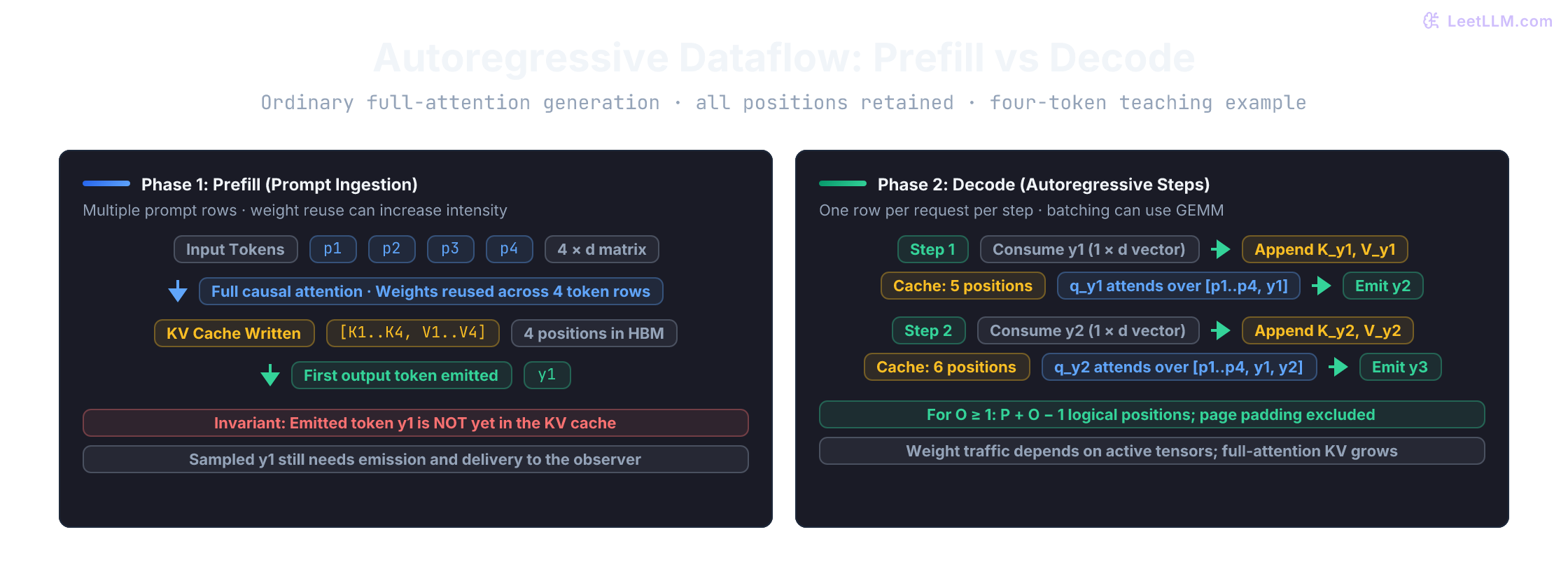
The operational handoff between phases is sequential even though prompt processing is parallel:
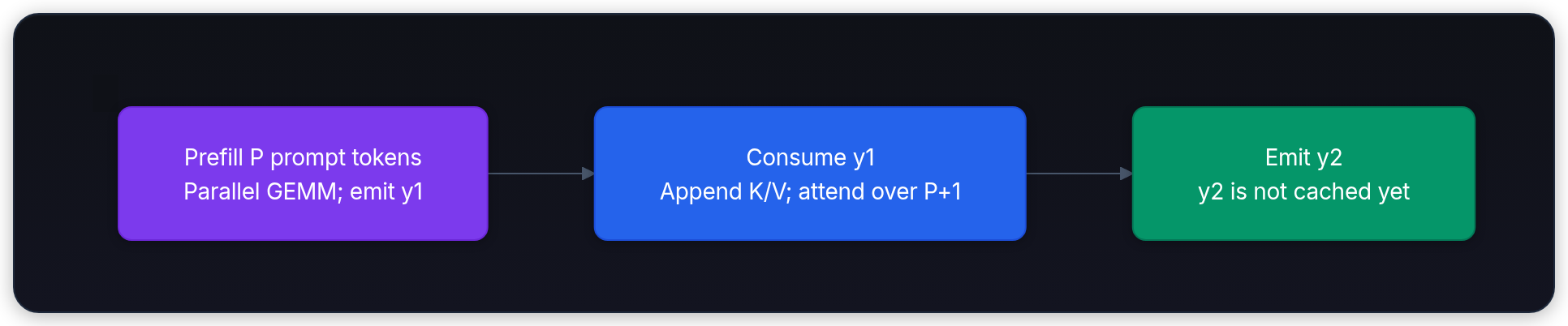
What is the cleanest mental split between prefill and decode?
Answer
Prefill processes uncached prompt positions, with many token rows available for matrix-matrix work. Decode advances each request sequentially, usually one token per step, but can batch many requests into matrix-matrix work too. TTFT includes the path to the first observed token; later gaps describe streaming cadence.
Phase 1: Prefill (processing the prompt via GEMM)
Consider an uncached prefill or one prefill chunk containing token rows. Its activations form a matrix . Linear projections against use General Matrix-Matrix Multiplication (GEMM). Token rows can be processed together within a layer; transformer layers still depend on preceding layers.
A projection's weight tiles can be reused across token rows. More rows make it easier to amortize weight traffic and approach a compute bound, but the actual intensity also includes activations, attention, and repeated tile loads. A long prompt does not establish full Tensor Core utilization. In a simple unchunked full-attention trace:
Input prompt (N tokens): "Explain why decode slows as context grows"
→ Tokenize prompt into N integer IDs
→ Ingest all N token embeddings simultaneously (matrix of shape N × d_model)
→ Execute parallel GEMM across all transformer layers (causal mask applied)
→ Write N Key and Value vector pairs into HBM (initial KV cache)
→ Produce logits for position N and sample output token y1
The wall-clock interval from request arrival to the moment token 1 emerges is TTFT. Users feel that blank pause directly. A snappy chat experience needs low TTFT, but different products place different pressures on that initial clock:
| Use Case | Primary Pressure | What to Measure |
|---|---|---|
| Real-time voice | Turn-taking delay | End-to-end TTFT including audio framing and transport |
| Code completion | Interruption to typing flow | Tail (p95/p99) TTFT on the product's actual context distribution |
| Conversational chat | Visible waiting screen | TTFT plus streaming inter-token cadence |
| Offline batch pipelines | Total job duration | Aggregate throughput (tokens/sec) over TTFT |
Phase 2: Decode (generating tokens via GEMV)
Once token 1 is sampled, we don't reprocess the prompt. The model switches to generating tokens one by one, autoregressively: feed the newest token through the network, reuse the cached Keys and Values for the prefix, append the newest token's K/V slice, and sample the next token.
Notice the fundamental linear algebra change: the input activation is no longer an matrix. It's a single token vector of shape . Multiplying this single row vector by layer weight matrices is a General Matrix-Vector Multiplication (GEMV).
At batch size 1, projection weights cannot be amortized across multiple token rows. Large dense layers can therefore require substantial weight traffic for little arithmetic. This does not mean every model parameter is read from HBM on every step: embedding lookups, routed experts, on-chip caching, and kernel implementations change the active bytes. Full attention also reads the retained K/V prefix. The generation loop proceeds step by step:
After prefill: cache contains P prompt positions; sample output token y1
Decode step 1: feed y1 (1 × d vector) → compute/append K_y1, V_y1 → attend over P+1 → sample y2
Decode step 2: feed y2 (1 × d vector) → compute/append K_y2, V_y2 → attend over P+2 → sample y3
After emitting y3: cache contains exactly P+2 positions (y3 is not cached yet)
Low-batch decode often reaches a memory-bandwidth bound before its arithmetic throughput reaches peak. With a longer full-attention history, K/V traffic can become a larger term. Measure the bottleneck rather than interpreting low FLOPs relative to peak as a percentage of idle GPU cycles.
Read the following timeline as instrumentation, not as a static benchmark. Request arrival is 0 ms; four output tokens are captured at 320, 355, 392, and 428 ms. The first timestamp closes TTFT. Only the intervals after it describe decode cadence.
from math import isfinite

def token_metrics(arrival_ms: float, times_ms: list[float]) -> dict:
    if not isfinite(arrival_ms) or any(not isfinite(t) for t in times_ms):
        raise ValueError("timestamps must be finite")
    if any(b < a for a, b in zip([arrival_ms] + times_ms, times_ms)):
        raise ValueError("timestamps must be nondecreasing after arrival")
    if not times_ms:
        return {"ttft": None, "itls": [], "tpot": None, "tps": None}
    gaps = [b - a for a, b in zip(times_ms, times_ms[1:])]
    tpot = sum(gaps) / len(gaps) if gaps else None
    # Equal timestamps can reflect clock resolution or coalesced delivery.
    tps = 1000 / tpot if tpot is not None and tpot > 0 else None
    return {"ttft": times_ms[0] - arrival_ms, "itls": gaps,
            "tpot": tpot, "tps": tps}

m = token_metrics(0, [320, 355, 392, 428])
ttft_ms, itls_ms, tps = m["ttft"], m["itls"], m["tps"]
assert token_metrics(0, [])['ttft'] is None
assert token_metrics(0, [320])['tpot'] is None
assert token_metrics(0, [320, 320])['tps'] is None

print("TTFT:", ttft_ms, "ms")
print("decode ITLs:", itls_ms, "ms")
print(f"decode TPS: {tps:.1f}")TTFT: 320 ms
decode ITLs: [35, 37, 36] ms
decode TPS: 27.8Why prefill and decode hit different roofs
To understand why GPU utilization dashboards deceive engineers during LLM generation, we need the lens of operational intensity (or arithmetic intensity): the ratio of floating-point operations (FLOPs) performed to bytes fetched from high-bandwidth memory (HBM).
For an ideal BF16 linear projection, each weight serves rows: FLOPs per weight against 2 bytes of weight payload gives FLOPs/byte. Actual HBM intensity includes activation and attention traffic and any repeated loads. This idealization explains the direction of weight reuse, not a measured phase-wide intensity.
At , the same weight-only approximation gives about 1 FLOP/byte. If we deliberately model 27 billion parameters as dense multiply weights streamed once per step, BF16 traffic is 54 GB and multiply work is 54 GFLOPs. Actual model traffic can differ; this is an explanatory approximation:
The roofline model[2] maps this arithmetic reality directly against hardware limits. At operational intensity , attainable performance is bounded by the minimum of two physical ceilings:
The sloped roof represents memory-bandwidth saturation (), and the horizontal flat roof represents peak Tensor Core compute (). The two lines intersect at the hardware ridge point:
NVIDIA lists H100 SXM BF16 Tensor Core performance as 1,979 TFLOPS with sparsity, and HBM bandwidth as 3.35 TB/s.[3] Its structured-sparse mode doubles the corresponding dense throughput.[4] For dense BF16 work, use approximately TFLOPS, derived from those rounded specifications:
In this simple dense-BF16/HBM roofline:
- At FLOP/byte: The bandwidth roof is 3.35 TFLOPS, about 0.34% of the dense compute peak. That is a ratio of arithmetic rates, not evidence that the GPU idles for 99.66% of its cycles.
- At measured FLOPs/byte: The compute roof is lower than the bandwidth roof. The kernel can still fall below it because of occupancy, launch overhead, communication, or other limits. Having 2,048 prompt tokens does not by itself establish .
| Phase | Tokens per Step | Weight Reuse | Operational Intensity () | Hardware Bottleneck |
|---|---|---|---|---|
| Prefill | prompt/chunk rows | Across token rows | Ideal weight-only | Often compute at long prompts; measure |
| Decode () | 1 token row | No reuse across rows | Ideal weight-only | Often bandwidth; overhead can dominate |
| Decode () | 64 token rows | Across batch rows | Ideal weight-only | KV traffic and kernels change the result |
Before trusting a specification, check its precision, sparsity footnote, and units. This CPU calculation catches the factor-of-two error:
sparse_bf16_tflops = 1979
dense_bf16_tflops = sparse_bf16_tflops / 2
bandwidth_tb_s = 3.35
assert dense_bf16_tflops == 989.5
print(f"dense ridge: {dense_bf16_tflops / bandwidth_tb_s:.1f} FLOPs/byte")
print(f"sparse ridge: {sparse_bf16_tflops / bandwidth_tb_s:.1f} FLOPs/byte")
print(f"I=1 arithmetic rate / dense peak: {100 * bandwidth_tb_s / dense_bf16_tflops:.2f}%")dense ridge: 295.4 FLOPs/byte
sparse ridge: 590.7 FLOPs/byte
I=1 arithmetic rate / dense peak: 0.34%How batching shifts decode along the roofline
Notice how batching transforms decode economics. When the serving engine batches concurrent decode requests together, the input activation changes from a vector to a matrix.
Projection weight tiles can now serve independent query rows. A weight-only estimate becomes:
Including K/V and activation traffic changes the intensity; include their associated FLOPs too when measuring a whole phase. Larger batches can increase aggregate throughput by amortizing weights, but a throughput gain is not guaranteed. Each request needs state, and larger batches can lengthen steps or queueing. Sweep batch size and concurrency while measuring both throughput and per-request latency.
Putting a measured point on the roofline
Use one kernel or one clearly defined phase at a time. Record elapsed time, FLOPs, and actual HBM traffic. NVIDIA Nsight Compute exposes hardware counters such as dram__bytes.sum; query supported metrics for your GPU/tool version with ncu --query-metrics.[5] Profiling can replay or perturb execution, so distinguish profiled kernel duration from unprofiled service latency. Then compute:
Plot against the roofline curves for your specific GPU architecture and precision:
- Near the sloped ceiling: Reducing traffic is a candidate. Quantization can help if saved bytes outweigh conversion overhead and quality remains acceptable. Caching avoids repeated computation but can add retained-state reads.
- Near the flat ceiling: Investigate math efficiency, precision, and parallelism. FlashAttention[6] specifically reduces attention HBM traffic; its value depends on which kernels consume the time.
- Far below both ceilings: Investigate launch overhead, small grids, synchronization, communication, or other ceilings. The roofline alone cannot identify the cause.
Why is prefill usually compute-bound while single-stream decode is usually memory-bandwidth-bound?
Answer
Long-prompt projection work can reuse weights across many token rows. Single-stream projection work has one row, giving little reuse across tokens. This makes long prefill more likely to approach a compute roof and low-batch decode more likely to approach a bandwidth roof. Actual intensity includes all phase traffic; short prompts, long K/V histories, and kernel overhead can change the diagnosis.
Four numbers for one request
When diagnosing serving latency, define the interval before averaging. TTFT ends at the first observed token; decode cadence uses the subsequent gaps. End-to-end output rate includes the initial wait and answers another useful question.
![Unified request timeline: 320 ms TTFT through token 1, followed by three decode intervals of 35 ms, 37 ms, and 36 ms ending at 428 ms. Metric cards break down TTFT (320 ms), decode ITL [35, 37, 36] ms, TPOT (36 ms), and per-request decode TPS (27.8 tok/s).](/cdn/content-image/fundamentals/inference-mechanics-ttft-tps-kv-cache/illustrations/_generated/latency_breakdown_dark.png?v=b52a51797aa5)
TTFT (time to first token)
TTFT is the elapsed time from request arrival to the emission of the first output token. It's the critical metric for human-perceived responsiveness:
Define client TTFT and server TTFT separately. A UI clock from Send to first rendered token can include serialization, transport, proxy buffering, and rendering. A server clock begins at its instrumented arrival point; whether tokenization and front-end queues are included depends on that point. Checked October 10, 2026: vLLM's metrics documentation starts front-end arrival_time when tokenization begins.[7] Do not compare clocks with different start or end boundaries as if they measured the same interval.
In real-world applications, user-visible TTFT can also include streaming buffering and hidden reasoning chains (such as "thinking" tokens before visible answer text). Ensure your instrumentation tracks whether "first token" means the first generated token, the first reasoning token, or the first visible token rendered in the UI.
TPS (tokens per second)
Define the interval and population whenever reporting TPS. Two common rates are:
- Per-request decode rate: The pacing at which tokens stream to a single user after token 1 has arrived. For tokens observed at times , calculate: With times expressed in seconds, the denominator spans intervals, not . Our three gaps span 0.108 seconds, giving tokens/s. The end-to-end output rate is tokens/s. Label that rate with its full-request interval rather than calling it decode speed.
- Aggregate cluster throughput: Total output tokens produced across all active requests divided by total elapsed wall-clock time: This measures throughput. Assess efficiency or cost by also reporting GPU resources, precision, quality, workload, and spend. Continuous batching[8] can improve throughput by admitting and retiring requests between iterations instead of waiting for an entire batch to finish.
ITL (inter-token latency)
ITL is the elapsed time between consecutive output tokens during decode:
An ITL distribution exposes stuttering that a mean can hide. A stream alternating between short gaps and long pauses feels different from an evenly paced one. There is no universal comfortable rate in model tokens: tokenizer, language, task, and rendering all matter.
Check what an event contains. If a server or network emits several tokens together, event-to-event latency is not an observed gap between each individual token. Speculative generation and buffered delivery can both produce such chunks. Current vLLM metrics explicitly distinguish iteration events from per-token averages.[7]
Under concurrency, scheduling, preemption, communication, and prefill interference can increase tail gaps. Report event or token granularity, measurement side, and percentile population with p95/p99 rather than treating every emitted chunk as one token.
TPOT (time per output token)
TPOT is the average duration required to generate each output token after token 1:
In our example, TPOT is ms/token, so decode TPS is . They are inverses for the same request, with consistent units. Requests with zero or one output token have no measured post-first-token interval; state how your metrics handle them. In particular, the inverse of mean request TPOT is not mean request TPS.
Checked October 10, 2026: vLLM records a zero in its Prometheus request-TPOT histogram for responses with at most one token, while vllm bench serve excludes those responses from TPOT statistics.[7] A traffic shift toward one-token replies can therefore lower the histogram mean without improving decode. Compare the same eligible request population, output lengths, and event granularity before attributing a mean change to a faster kernel.
Predict these results before running the example. One stream has 10 ms gaps; another has 100 ms gaps. Then consider a delivery event containing four tokens:
tpots_ms = [10, 100]
mean_tpot_ms = sum(tpots_ms) / len(tpots_ms)
mean_tps = sum(1000 / gap for gap in tpots_ms) / len(tpots_ms)
assert mean_tps == 55
assert 1000 / mean_tpot_ms != mean_tps
print(f"mean request TPS: {mean_tps:.1f}")
print(f"inverse of mean request TPOT: {1000 / mean_tpot_ms:.1f} tokens/s")

event_gap_ms, new_tokens = 40, 4
print("event gap:", event_gap_ms, "ms")
print(f"interval-average time per new token: {event_gap_ms / new_tokens:.1f} ms")mean request TPS: 55.0
inverse of mean request TPOT: 18.2 tokens/s
event gap: 40 ms
interval-average time per new token: 10.0 msThe four-token event supplies an average over its preceding interval, not four individual generation timestamps. A token-weighted aggregate, a request-weighted mean, and a histogram of iteration gaps describe different populations.
The four metrics form a coherent diagnostic picture:
| Metric | What It Measures | Target Phase | Primary Drivers | Key Aggregation |
|---|---|---|---|---|
| TTFT | Elapsed time until token 1 appears | Prefill path | Prompt length, server queueing, network | Median & p99 latency |
| TPS | Generation rate after token 1 | Decode | HBM bandwidth, batch size, model size | Per-request & cluster rate |
| ITL | Gap between consecutive tokens | Decode | Scheduler contention, prefill interference | Distribution & tail jitter |
| TPOT | Average time per output token | Decode | Batch size, memory bus traffic, context length | Request & benchmark mean |
If users complain that nothing appears for a long time, which metric do you inspect first? What if streaming looks choppy after it starts?
Answer
Inspect TTFT first when the initial pause is too long, because that points to prefill, queueing, tokenization, or scheduling before the first token. Inspect ITL, TPOT, and TPS when streaming is choppy after generation begins, because those describe decode pacing and system contention.
This tiny router shows how an alert can choose an investigation path. Its thresholds are illustrative policy inputs, not benchmark results:
def investigate(ttft_p95_ms: int, itl_p95_ms: int) -> str:
    if min(ttft_p95_ms, itl_p95_ms) < 0:
        raise ValueError("latencies must be nonnegative")
    paths = []
    if ttft_p95_ms > 900:
        paths.append("inspect queueing and prefill")
    if itl_p95_ms > 120:
        paths.append("inspect decode scheduling and memory pressure")
    return "; ".join(paths) or "within example thresholds"

print("long initial pause:", investigate(ttft_p95_ms=1100, itl_p95_ms=60))
print("choppy stream:", investigate(ttft_p95_ms=350, itl_p95_ms=160))long initial pause: inspect queueing and prefill
choppy stream: inspect decode scheduling and memory pressureBack-of-the-envelope: a bandwidth upper bound
Before running a serving benchmark, estimate one optimistic limit. For a single low-batch decode stream, most model weights must be read for each token, so memory bandwidth is a useful first bound:
For this calculation, assume dense Qwen3.6-27B language weights in BF16, one H100 SXM, weights resident on that GPU, one low-batch stream, and ideal peak HBM bandwidth. The model card implies about 54 GB of language weights, before KV cache, runtime buffers, extra tensors, and allocator headroom.[9]
NVIDIA lists 3.35 TB/s peak HBM bandwidth for H100 SXM.[3] Treat that specification as an optimistic roof, not a sustained application measurement.
Treat 62 tok/s as an idealized full-weight-streaming estimate, not a measured single-stream result. It assumes all 54 GB move through HBM once per step. Actual active tensors, embedding access, cache reuse, and auxiliary heads can change that traffic, so parameter count alone isn't a rigorous model-specific throughput ceiling. Two refinements keep this estimate useful:
- Sustained bandwidth must come from a benchmark on selected hardware and kernel mix. Replace 3,350 GB/s with that measured value; skip any universal peak-to-sustained percentage.
- KV-prefix traffic grows with sequence length : each full-attention decode step also reads prior K/V for that request and any batch mates. As rises, weight streaming is no longer the only HBM term, so the effective ceiling falls below this pure weight-read bound.
The bound omits activation memory, kernel overhead, scheduling, and interconnect traffic when the model is sharded. Benchmark selected engine, parallelism layout, model precision, prompt/output distribution, and concurrency to get real TPS. Batched inference can improve aggregate throughput by sharing weight reads, but it changes arithmetic intensity and per-request ITL at the same time.
def ideal_weight_stream_tps(model_bytes: int, bandwidth_bytes_per_s: int) -> float:
    if model_bytes <= 0 or bandwidth_bytes_per_s <= 0:
        raise ValueError("weight bytes and bandwidth must be positive")
    return bandwidth_bytes_per_s / model_bytes

model_gb = 54
h100_capacity_gb = 80
print("weights alone fit in 80 GB:", model_gb <= h100_capacity_gb)
bound = ideal_weight_stream_tps(54 * 10**9, 3350 * 10**9)
print(f"single-GPU ideal weight-read bound: {bound:.1f} tokens/s")weights alone fit in 80 GB: True
single-GPU ideal weight-read bound: 62.0 tokens/sResearch note: For low-batch decode, quantization can move the weight-streaming bound by reducing bytes read per token. PagedAttention[10] improves KV-cache packing and sharing, while continuous batching[8] improves utilization across requests. These techniques address related serving constraints, but they aren't interchangeable.
Why does the rough bandwidth estimate divide HBM bandwidth by model size?
Answer
If we assume the entire dense weight footprint streams once per step, bandwidth divided by weight bytes gives an idealized rate. Actual active tensor access can differ, so the calculation is not an unconditional model-specific ceiling. K/V traffic and runtime overhead are omitted.
The KV cache: the dynamic capacity bottleneck
The 62 tok/s calculation answered how fast bytes can move through memory. Capacity asks a different question: after static model weights and runtime buffers are loaded, how much HBM remains for active request state?
In long-context or high-concurrency serving, the KV cache can dominate the remaining memory. Recurrent state, activations, workspaces, graph buffers, and retained prefix blocks also need a budget.
Cached keys and values
Full-attention layers compute Key and Value projections for token positions. Discarding their history forces later steps to regenerate prefix state. Repeating projection work over successively longer prefixes gives quadratic total projection work in sequence length. Repeating naive full-prefix attention can be even more expensive.
What the cache saves: Retaining K/V avoids repeating old projections. It does not make full-attention generation constant-cost: a new query still attends to a prefix whose length grows. Over a growing sequence, those cached attention steps still perform quadratic total attention work.
The generation trace indexes consumed tokens, not newly emitted predictions:
Prompt prefill: Compute [K1..KP], [V1..VP] → Store in cache (P positions)
Decode step 1:  Consume y1 → Compute/append K_y1, V_y1 → Attend over P+1 positions → Emit y2
Decode step 2:  Consume y2 → Compute/append K_y2, V_y2 → Attend over P+2 positions → Emit y3
...
After emitting y3: cache holds exactly P+2 positions (y3 is not cached yet)
Why dynamic allocation exhausts VRAM: fragmentation
Output length varies even when the server enforces a maximum. Generation can stop at a configured EOS token, stop sequence, length limit, or cancellation; the literal EOS token is model-specific.
Two allocation strategies illustrate wasted capacity:
- Internal fragmentation: Reserving 4,096 positions for a sequence that uses 120 total cached positions leaves about 97% of that reservation unused. Count prompt and consumed output, not output alone.
- External fragmentation: Repeatedly growing and freeing allocations can leave free regions that an allocator cannot use for a requested block. Allocation can fail despite substantial total free bytes, depending on allocator and driver behavior. Total free memory alone does not guarantee a suitable allocation.
PagedAttention maps logical sequences to fixed-size physical K/V blocks, inspired by virtual memory.[10] A block pool avoids needing one large contiguous cache allocation per sequence and confines unused tail positions to the last block. It does not eliminate every GPU allocator's fragmentation. Nor is tail waste always below a fixed percentage: with a 16-token block, a one-token sequence reserves fifteen unused positions.
page_tokens = 16
for cached_tokens in (1, 120):
    pages = (cached_tokens + page_tokens - 1) // page_tokens
    reserved_tokens = pages * page_tokens
    unused = reserved_tokens - cached_tokens
    assert 0 <= unused < page_tokens
    print(f"{cached_tokens} cached: {reserved_tokens} reserved, "
f"{100 * unused / reserved_tokens:.2f}% unused")1 cached: 16 reserved, 93.75% unused
120 cached: 128 reserved, 6.25% unusedWhat does the KV cache save, and what does it cost?
Answer
It avoids recomputing previously processed K/V. The raw full-attention payload grows with cached positions, KV heads, vector dimensions, layers, and value precision. Full-attention queries still read growing history; paging and other model state add allocation costs outside the raw formula.
A raw KV payload formula
For equal-length sequences, uniform full-attention layers, equal key/value head dimensions, and uncompressed values, the raw tensor payload is:
Let's break down each term from first principles:
- : For every token position, we must store both a Key vector and a Value vector.
- : The number of transformer layers that maintain an attention cache. In hybrid models (like Qwen3.6-27B), DeltaNet or recurrent layers don't store standard K/V caches.
- : KV heads per layer. MHA has as many K/V heads as query heads; GQA shares K/V across groups.[11] The raw-payload reduction relative to matching MHA is the query-head/KV-head ratio, not a universal 4× or 8×.
- : The configured key/value vector dimension. It is often , but not always. Read the actual architecture: Qwen3.6-27B lists attention head dimension 256, hidden size 5,120, and 24 query heads, so dividing 5,120 by 24 would be wrong.[9]
- : Cached positions. Unequal lengths require their sum. Under ordinary full-history decode with outputs, this is ; reserving is a conservative planning convention.
- : Precision in bytes per value ( for FP16/BF16, for FP8/INT8, for FP4).
- : The batch size (number of concurrent sequences).
For different attention-layer layouts, sum each layer's own times its retained positions. Sliding-window layers can retain fewer positions; latent-attention caches and recurrent layers require their own state formulas. Page padding, quantization scales, and allocator overhead are not raw tensor payload.
Concrete example: Qwen3.6-27B-style GQA sizing
Let's plug in real architectural numbers for a Qwen3.6-27B-style model:
| Parameter | Architectural Value | Rationale |
|---|---|---|
| Attention layers () | 16 | 64 total layers; 48 Gated DeltaNet layers use fixed-size recurrent state |
| KV heads () | 4 | Grouped-Query Attention (GQA) sharing 24 query heads across 4 KV heads |
| Head dimension () | 256 | Dimension per attention head |
| Cached length () | 4,096 positions | Chosen example length; native context is 262,144 tokens |
| Precision () | 2 bytes | 16-bit float (FP16 or BF16) |
Storing 4 KV heads instead of a hypothetical matching MHA layout with 24 KV heads reduces this payload by . That MHA layout would need GB ( GiB) per 4K sequence. Sixfold cache-payload savings do not guarantee sixfold admitted concurrency: recurrent state, buffers, other reservations, and latency constraints remain.
def kv_cache_bytes(
    layers: int, kv_heads: int, head_dim: int, tokens: int, bytes_per_value: int
) -> int:
    dimensions = (layers, kv_heads, head_dim, bytes_per_value)
    if any(type(x) is not int or x <= 0 for x in dimensions):
        raise ValueError("cache dimensions must be positive integers")
    if type(tokens) is not int or tokens < 0:
        raise ValueError("tokens must be a nonnegative integer")
    return 2 * layers * kv_heads * head_dim * tokens * bytes_per_value

gqa_bytes = kv_cache_bytes(16, 4, 256, 4096, 2)
mha_bytes = kv_cache_bytes(16, 24, 256, 4096, 2)

print(f"GQA cache: {gqa_bytes / 1e9:.2f} GB")
print(f"MHA cache: {mha_bytes / 1e9:.2f} GB")
print("MHA / GQA:", mha_bytes // gqa_bytes)GQA cache: 0.27 GB
MHA cache: 1.61 GB
MHA / GQA: 6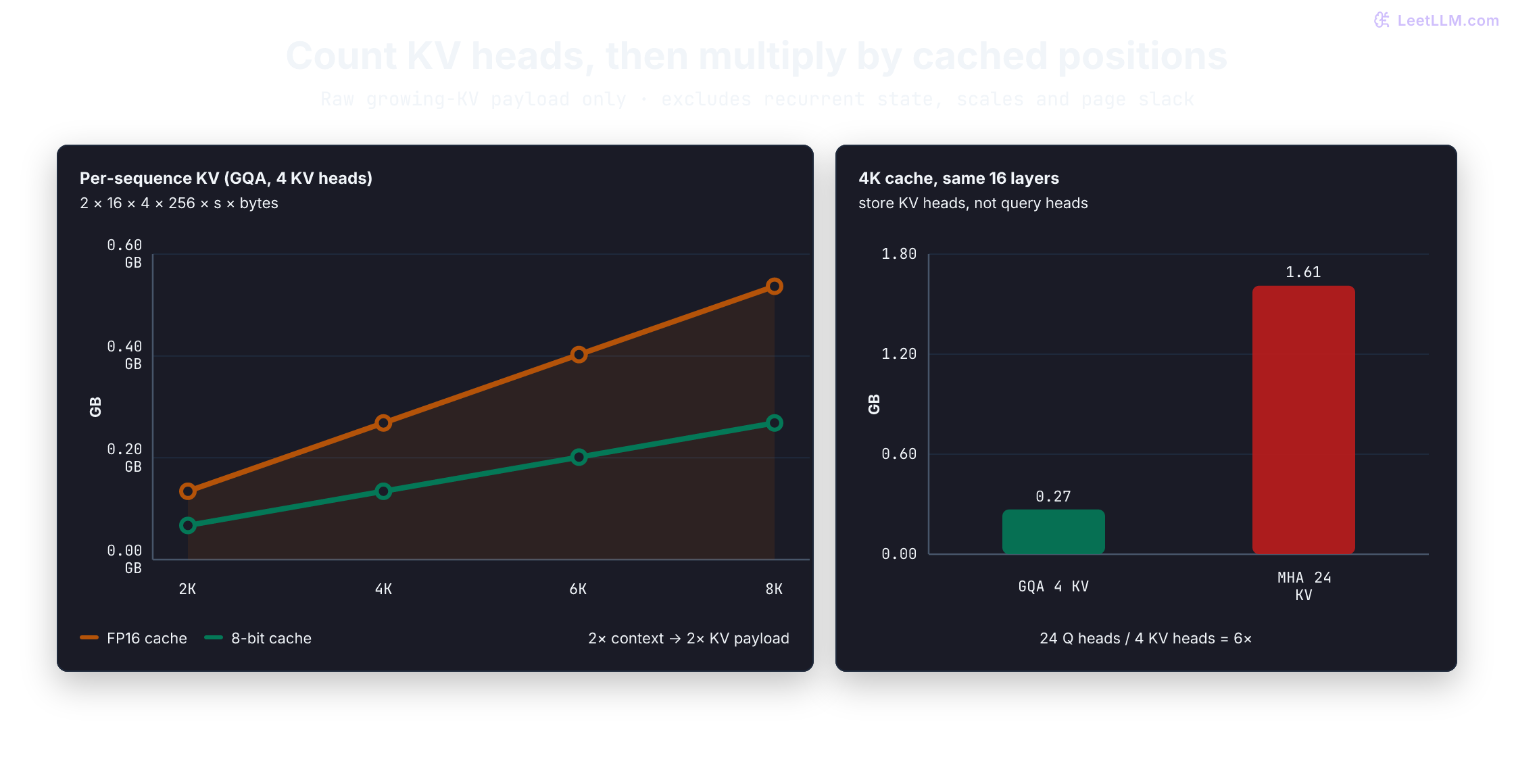
Production note: A weight-fit check is not an admission policy. Qwen3.6-27B's BF16 language weights are about 54 GB, so they fit on one H100-80GB on paper, but remaining HBM must also cover KV cache, DeltaNet state, runtime buffers, prefix cache, optional vision-encoder weights, and allocator overhead. Its 262,144-token native window is usable only when policy reserves enough memory for active prompt-plus-output tokens.[9]
Try it yourself: A colleague says a 7B model (32 layers, 8 KV heads, 128 head dimension, FP16) can serve 200 concurrent users on one 80 GB GPU. The weights take about 14 GB. Use the formula, then leave a runtime reserve, to test that claim.
def kv_gb_per_sequence(tokens: int) -> float:
    values = 2 * 32 * 8 * 128 * tokens
    return values * 2 / 1e9

users = 200
raw_total_gb = 14 + users * kv_gb_per_sequence(tokens=2048)
print(f"raw weights plus KV: {raw_total_gb:.2f} GB")
for reserve_gb in (8, 16):
    admitted = raw_total_gb + reserve_gb <= 80
print(f"with {reserve_gb} GB runtime reserve: {admitted}")raw weights plus KV: 67.69 GB
with 8 GB runtime reserve: True
with 16 GB runtime reserve: FalseHere 2,048 is each user's total reserved prompt-plus-output length, not merely the initial prompt. Raw weights plus KV leave a narrow margin. Whether 200 active sequences fit depends on measured activations, workspace, allocator behavior, and fragmentation for the serving engine. The True result under one arbitrary reserve is not a concurrency promise or evidence that latency meets an SLO.
Why must the KV-cache formula use num_key_value_heads instead of num_attention_heads for GQA models?
Answer
GQA shares one K/V head across multiple query heads. The cache stores keys and values, not every query head, so using the full query-head count overestimates cache memory by the query-to-KV grouping factor.
Dynamic token budgeting
Context length is an architecture limit, not a concurrency budget. The deployable budget is leftover GPU memory after weights and runtime buffers, divided across active requests. One extra reserved token for request A leaves less room for request B.
When a request arrives, the engine estimates its prompt-plus-output KV demand. If that demand plus live cache exceeds remaining capacity, the scheduler must queue, reject, or preempt it. Capacity and latency belong on the same dashboard because overcommit is not a recovery plan.
The function below divides a hypothetical 18 GB pool dedicated to growing K/V equally among 50 users. It computes available whole 16-token pages per user, then caps usable positions at the configured context limit (which need not be page-aligned). The pool must already exclude weights, runtime buffers, recurrent state at the intended concurrency, and other reservations. Neither 18 GB nor a 16-token page size is a measured engine setting:
def max_context_for_budget(
    kv_pool_bytes: int, bytes_per_token: int, num_concurrent: int,
    page_tokens: int = 16, context_limit: int = 262_144,
) -> int:
    positive = (bytes_per_token, num_concurrent, page_tokens, context_limit)
    if any(type(x) is not int or x <= 0 for x in positive):
        raise ValueError("dimensions, concurrency, page size and limit must be positive")
    if type(kv_pool_bytes) is not int or kv_pool_bytes < 0:
        raise ValueError("KV pool must be nonnegative integer bytes")
    pages_per_user = kv_pool_bytes // (bytes_per_token * page_tokens * num_concurrent)
    return min(pages_per_user * page_tokens, context_limit)

max_tokens = max_context_for_budget(
    kv_pool_bytes=18 * 10**9,
    bytes_per_token=2 * 16 * 4 * 256 * 2,
    num_concurrent=50,
)
print(f"max context per user: {max_tokens:,} tokens")max context per user: 5,488 tokensThis calculation gives a planning limit, not a safe production limit. If 100 users need 5,000 reserved tokens each and the budget falls short, options include additional memory, lower precision, fewer active tokens, or application caps. Validate any choice with activations, communication buffers, allocator slack, DeltaNet state, and serving-runtime measurements.
Common mistake: Plugging query heads into a KV formula. Qwen3.6-27B lists 24 query heads but 4 KV heads for its Gated Attention path.[9] Using 24 overestimates this cache by 6×. Read
num_key_value_headsand the model's layer layout; using all 64 layers would also count 48 DeltaNet layers outside this growing-KV formula.
An online admission check can reserve capacity from each request's prompt-plus-output token budget instead of assuming every request consumes the maximum architectural context:
BYTES_PER_TOKEN = 2 * 16 * 4 * 256 * 2

def reservation_bytes(tokens: int, page_tokens: int = 16) -> int:
    if type(tokens) is not int or tokens <= 0:
        raise ValueError("reservation must be positive integer tokens")
    if type(page_tokens) is not int or page_tokens <= 0:
        raise ValueError("page size must be a positive integer")
    pages = (tokens + page_tokens - 1) // page_tokens
    return pages * page_tokens * BYTES_PER_TOKEN

def admit(existing_tokens: list[int], new_tokens: int, kv_budget_bytes: int) -> bool:
    if type(kv_budget_bytes) is not int or kv_budget_bytes < 0:
        raise ValueError("budget must be nonnegative integer bytes")
    reservations = existing_tokens + [new_tokens]
    needed = sum(reservation_bytes(tokens) for tokens in reservations)
    return max(reservations) <= 262_144 and needed <= kv_budget_bytes

active = [4096] * 40
print("admit 16K request:", admit(active, 16_384, kv_budget_bytes=12 * 10**9))
print("admit 64K request:", admit(active, 65_536, kv_budget_bytes=12 * 10**9))
assert reservation_bytes(17) == reservation_bytes(32)  # two pages
assert admit([], 16, reservation_bytes(16))
assert not admit([], 17, reservation_bytes(16))admit 16K request: True
admit 64K request: FalseThis reservation check rounds each sequence separately and assumes no shared prefix pages. It's a pure planning function, not a concurrent allocator: a server must check and reserve atomically, enforce output limits, and release reservations on completion or cancellation. Budget any retained prefix-cache blocks separately. Otherwise two requests can both pass against the same free bytes.
Why is maximum context length a production policy, not a model-card number alone?
Answer
Every extra active token consumes KV-cache memory. Allowing every user to use the model's full architectural context can collapse concurrency, so production systems cap prompt length, output length, and active tokens based on GPU memory budgets and latency goals.
Stop a new prefill from stalling live streams
Memory capacity and request scheduling solve two completely different failure modes. A request can easily fit within available HBM and still wreck your service level objectives (SLOs) if its compute-heavy prompt monopolizes a GPU running active decode streams.
This is the classic Head-of-Line (HoL) blocking dilemma of colocated serving.
Chunked prefill: mitigating head-of-line blocking
Consider an authored scheduling scenario, not a GPU measurement. One worker serves 32 streams with 35 ms gaps. A new 8,192-token prompt occupies that worker exclusively for 200 ms before its next decode turn. In this assumed schedule, a gap spanning that work grows to 235 ms. Neither the 200 ms duration nor 100% Tensor Core utilization follows from prompt length alone.
Chunked prefill gives the scheduler smaller units to place alongside decode work. A conceptual alternating schedule looks like this:
Without chunked prefill (monolithic prefill blocks the worker):
  [Prefill 8,192 tokens ===========================] [Decode...Decode...Decode...]
  ↑ In the assumed exclusive-worker schedule, no decode turn occurs during prefill

With chunked prefill (chunk_size = 2,048 tokens):
  [Prefill chunk 1][Decode step][Prefill chunk 2][Decode step][Prefill chunk 3]...
  ↑ Smaller scheduling units create opportunities for decode turns; measure tail ITL
What chunking changes
Smaller prefill units can reduce the time an existing stream waits behind a prompt. They do not guarantee an ITL deadline: step duration, offered load, K/V history, and preemption still matter. Small chunks can add scheduling or kernel overhead and increase the new request's TTFT; larger chunks can improve prefill efficiency while widening decode gaps.
Current vLLM V1 prioritizes pending decodes, then fits prefill chunks into the remaining batched-token budget in the same batch.[12] Sarathi likewise studies decode-maximal batches containing a prefill chunk and decode requests.[13] The alternating trace below isolates the scheduling idea; it does not reproduce either engine's mixed-batch implementation.
def chunked_schedule(prompt_tokens: int, chunk_tokens: int) -> list[str]:
    if type(prompt_tokens) is not int or prompt_tokens < 0:
        raise ValueError("prompt length must be a nonnegative integer")
    if type(chunk_tokens) is not int or chunk_tokens <= 0:
        raise ValueError("chunk size must be a positive integer")
    actions: list[str] = []
    remaining = prompt_tokens
    while remaining:
        processed = min(chunk_tokens, remaining)
        actions.append(f"prefill {processed}")
        remaining -= processed
        actions.append("decode active streams")
    return actions

for action in chunked_schedule(prompt_tokens=6144, chunk_tokens=2048):
print(action)prefill 2048
decode active streams
prefill 2048
decode active streams
prefill 2048
decode active streamsThis trace gives logical turns without kernel timings. A 2,048-row prefill chunk and 32 one-row decode requests have different work and reuse, but token counts alone cannot compare their durations. Decode context lengths and model architecture also matter. Profile the chosen workload rather than treating a token cap as a millisecond guarantee.
Why does chunked prefill improve tail latency for existing decode streams?
Answer
If a monolithic prefill delays decode on a shared worker, smaller prompt chunks give the scheduler opportunities to run decode sooner. Mixed batches can also combine chunks and decode rows. This can improve tail ITL, but measured latency depends on chunk cost, history lengths, engine policy, and offered load.
Prefill-decode disaggregation (Splitwise & DistServe)
Chunking can soften interference while both phases still share resources. Disaggregation is another candidate when prompt traffic and streaming demand have different resource or latency needs.
A colocated worker generally uses one model-sharding configuration for both phases. That configuration may not be optimal for both:
- Prefill: Larger token-row counts can amortize cross-GPU communication, so sharding may reduce prompt-processing time.
- Decode: Communication can dominate small steps, but sharding can also spread weight and K/V reads across more memory bandwidth, or make the model fit at all. Larger batches change this balance.
There is no universal rule that prefill needs TP=8 and decode needs TP=1. Sweep parallelism on the actual model, interconnect, context distribution, and batch sizes. More GPUs can improve decode too; account for their cost.
Prefill-decode disaggregation assigns the phases to separate workers, enabling independent resource allocation. Splitwise,[14] DistServe,[15] and Mooncake[16] explore this design:
- Prefill pool: Processes prompts using a measured configuration and produces state for response extension.
- Decode pool: Extends responses with its own capacity, batching, and sharding choices.
- State handoff: Transfers compatible state and request metadata over the available interconnect. A hybrid model may need recurrent state as well as K/V. The receiving worker must finish the handoff and schedule generation; takeover is not instantaneous.
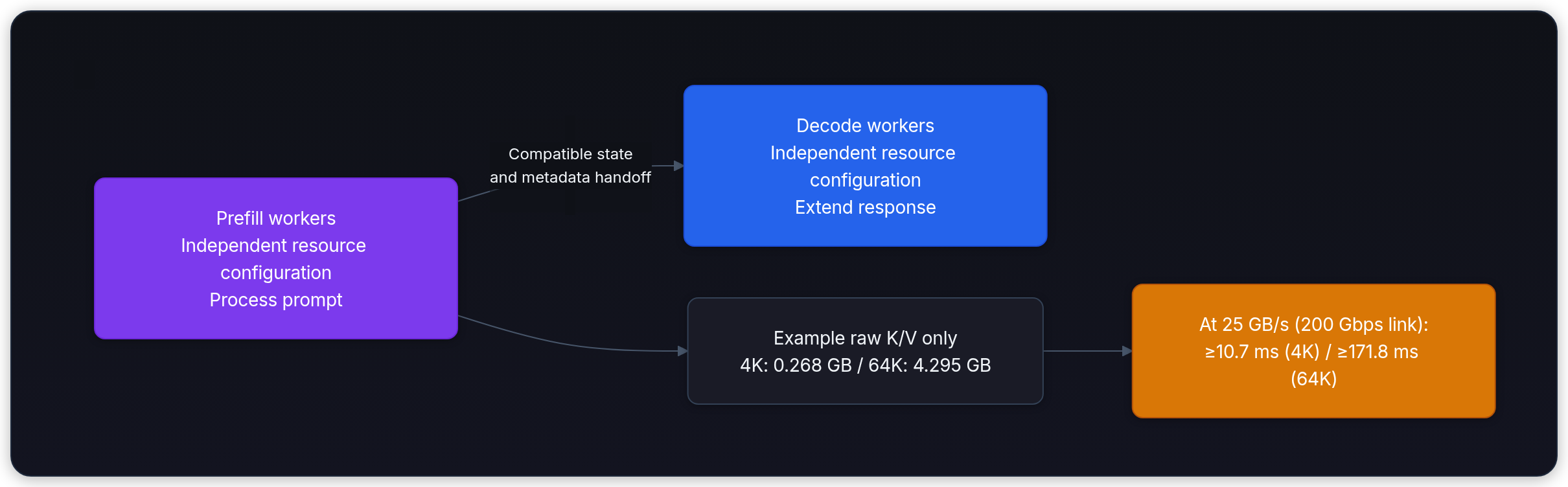
The disaggregation trade-off
Separate GPU pools remove direct competition between those workers' prefill and decode compute. They can still encounter queueing, memory pressure, handoff delays, and shared-network contention. Separation also permits independent scaling, but scheduling and communication determine whether both latency SLOs improve.
An ideal lower bound for serialized payload transfer is:
Consider an otherwise idle 200 Gbps network link (which provides an ideal throughput of ):
- For a 4,096-token prompt, our example's raw K/V payload is GB, requiring at least ms at 25 GB/s. This omits Qwen's recurrent state and handoff overhead. The transfer affects the new request; the earlier 200 ms stall affected existing streams. Subtracting those durations does not establish a net latency improvement.
- For a 65,536-token prompt, the same raw K/V calculation gives GB and at least ms over 200 Gbps (about 86 ms over 400 Gbps). These are payload/bandwidth estimates, not measured handoff delays, and still omit other state and overhead.
Prompt bursts and tight streaming SLOs motivate testing separation. Whether it improves goodput depends on phase demand, state-transfer cost, worker capacity, and the interconnect. Compare against a tuned colocated scheduler under the same offered workload and resource budget.
First calculate a lower bound on moving the growing-KV payload. This example assumes an otherwise idle 200 Gbit/s link: divide by eight to get 25 GB/s. It excludes protocol overhead, contention, layout conversion, and any additional recurrent state. Larger prompts increase both transfer bytes and the memory needed at the destination.
bytes_per_token = 2 * 16 * 4 * 256 * 2
link_bytes_per_s = 200 * 10**9 / 8
for prompt_tokens in (4096, 65_536):
    payload_bytes = prompt_tokens * bytes_per_token
    lower_bound_ms = 1000 * payload_bytes / link_bytes_per_s
    print(f"{prompt_tokens:,} tokens: {payload_bytes / 1e9:.3f} GB, "
f"at least {lower_bound_ms:.1f} ms transfer")4,096 tokens: 0.268 GB, at least 10.7 ms transfer
65,536 tokens: 4.295 GB, at least 171.8 ms transferWhen is prefill-decode disaggregation worth its extra KV-transfer cost?
Answer
It's a candidate when prefill bursts hurt streaming latency or prompt and decode demand scale differently. Compare both layouts under the same offered workload: new-request TTFT, active-stream ITL, SLO-compliant goodput, quality, and total hardware cost. A transfer-time estimate alone can't establish that separation is better.
KV cache quantization
If cache capacity, rather than latency interference, is the failing resource, reduce bytes per cached value. An 8-bit format such as FP8 uses about half the raw payload of FP16/BF16. Research systems also explore 3-bit and 2-bit caches, but quality and kernel support are model-, hardware-, and engine-specific.[17][18] vLLM documents FP8 KV-cache configuration and calibration.[19] See our model quantization deep-dive for weight and activation trade-offs:
An 8-bit K/V payload uses 1 byte per value instead of 2, so raw cache bytes are halved for the same sequence length and concurrency. Scaling metadata, padding, and runtime buffers mean allocated memory savings can be smaller.
Weight quantization shrinks static model memory. KV quantization targets dynamic per-request state. With a fixed leftover KV budget and no other per-request costs, halving bytes doubles continuous capacity, with integer rounding at admission. Static weights reduce that leftover budget but don't by themselves reduce this ratio. Unquantized recurrent state, metadata, page slack, other per-request memory, and latency constraints can reduce the realized concurrency gain.
The following planning example reuses Qwen3.6-27B-style GQA dimensions. Each active user reserves 5,120 prompt-plus-output tokens of FP16 KV state. The budget is the 18 GB left after 54 GB of language weights and an 8 GB runtime reserve on one 80 GB GPU, not the whole card:
def users_from_kv_budget(kv_budget_bytes: int, bytes_per_user: int) -> int:
    if kv_budget_bytes < 0 or bytes_per_user <= 0:
        raise ValueError("budget must be nonnegative and per-user bytes positive")
    return kv_budget_bytes // bytes_per_user

tokens_per_user = 5120
fp16_bytes_per_user = 2 * 16 * 4 * 256 * tokens_per_user * 2
fp8_bytes_per_user = fp16_bytes_per_user // 2
kv_budget_bytes = (80 - 54 - 8) * 10**9

print(f"KV budget after weights and reserve: {kv_budget_bytes / 1e9:.0f} GB")
print("FP16 users from remaining KV budget:", users_from_kv_budget(kv_budget_bytes, fp16_bytes_per_user))
print("FP8 users from remaining KV budget:", users_from_kv_budget(kv_budget_bytes, fp8_bytes_per_user))KV budget after weights and reserve: 18 GB
FP16 users from remaining KV budget: 53
FP8 users from remaining KV budget: 107The 53-versus-107 result is cache-payload arithmetic, not a supported Qwen deployment claim. Before enabling FP8, verify the exact engine, attention backend, layer types, scale calibration, and GPU support. Compare task quality and long-context behavior against the original precision, then benchmark latency. A smaller stored cache doesn't guarantee faster kernels.[19]
Now test a short-context case where hybrid state dominates. Qwen3.6-27B has 48 DeltaNet layers with 48 value heads and 128-dimensional keys and values.[9] The Transformers v5.17.0 fallback keeps one FP32 recurrent matrix of shape [batch, value_heads, key_dim, value_dim] per DeltaNet layer.[20] For one sequence, those matrices alone occupy MiB. Their size doesn't depend on the number of consumed tokens. Convolution state and other allocations add more bytes.
Predict the capacity gain if only growing K/V is halved at 128 cached positions. The following 8 GiB state pool is an authored budget after weights and global reserves; it includes the recurrent matrices but deliberately excludes other per-request overhead:
mib = 2**20
recurrent_bytes = 48 * 48 * 128 * 128 * 4
kv_bytes = 2 * 16 * 4 * 256 * 128 * 2
state_pool = 8 * 2**30
full_state = recurrent_bytes + kv_bytes
half_kv_state = recurrent_bytes + kv_bytes // 2
before, after = state_pool // full_state, state_pool // half_kv_state

assert recurrent_bytes == 144 * mib
assert kv_bytes == 8 * mib
assert before * full_state <= state_pool < (before + 1) * full_state
assert after * half_kv_state <= state_pool < (after + 1) * half_kv_state
print(f"Per sequence: recurrent={recurrent_bytes // mib} MiB, growing KV={kv_bytes // mib} MiB")
print(f"Only KV halved: total state {full_state // mib} -> {half_kv_state // mib} MiB")
print(f"Authored pool capacity: {before} -> {after} sequences ({after / before:.2f}x)")Per sequence: recurrent=144 MiB, growing KV=8 MiB
Only KV halved: total state 152 -> 148 MiB
Authored pool capacity: 53 -> 55 sequences (1.04x)The result is 53 to 55 sequences, rather than a doubling. Recurrent state is fixed per active sequence, so it must scale with concurrency in the admission budget. This arithmetic isn't an FP8 backend test or a complete Qwen memory measurement: state dtype, sharding, stored checkpoints, convolution buffers, and allocator choices depend on the engine. Use the chosen implementation's actual allocations to replace these counts.
Why can KV-cache quantization improve concurrency even if model weights are already quantized?
Answer
Weight quantization shrinks the static model footprint. KV-cache quantization shrinks per-token, per-request state, which is the dynamic memory cost that grows with context length and concurrent users.
Build a serving budget
For a real serving budget, record hardware and engine, model and precision, prompt/output distribution, arrival process, concurrency, correctness result, and measured HBM/compute counters. Then report weight memory, KV bytes per token, TTFT and ITL p50/p99, raw throughput, and goodput under the product SLO. The first release constraint should be visible as compute, bandwidth, capacity, or an unmodeled overhead.
Run a load sweep with a fixed prompt/output mix and explicit arrival rate, including bursts and overload. Report completed, failed, cancelled, and rejected requests alongside latency and output-token throughput. Define goodput as qualifying requests per second under the chosen correctness and latency requirements, divided by the full measurement duration. Report the fraction of offered requests that qualify too; don't omit failures from that fraction. Compare client and server clocks, check cache occupancy and queue growth, then vary one scheduling or memory policy at a time.
The code here verifies CPU arithmetic and scheduling logic. It doesn't run Qwen, measure GPU bandwidth, establish an FP8 quality result, or prove a safe production concurrency. Those are measurements the serving experiment must supply.