Personalize this lesson
Adapt explanations and teaching visuals to your background and preferred voice.
A computer-use agent proposes mouse and keyboard actions from observations of a graphical interface. The model chooses a next step; a host application decides whether to execute it. Consider a fictional deploy run, RUN-78432, that failed after the test stage. Its legacy CI portal shows the failing step and a redacted traceback in a canvas widget, without a supported API for that evidence. An agent could inspect the permitted session and prepare a note for a reviewer.
That sounds safe until the same session can also click a deploy control or edit an incident. How can an agent inspect a visual page without turning a useful read into an unauthorized write?
Code generation and sandboxing kept generated commands behind a host that admits the job, runs it in a sandbox, and scores the result with a trusted validator. Computer-use and graphical user interface (GUI) agents keep that boundary, but change the proposal. Instead of a patch, the model asks to click, type, scroll, or take another screenshot.
You don't need image-encoder internals to follow the design. The agent grounds proposals from pixels, page text, and accessibility metadata. The host still owns credentials, policy, and every write.
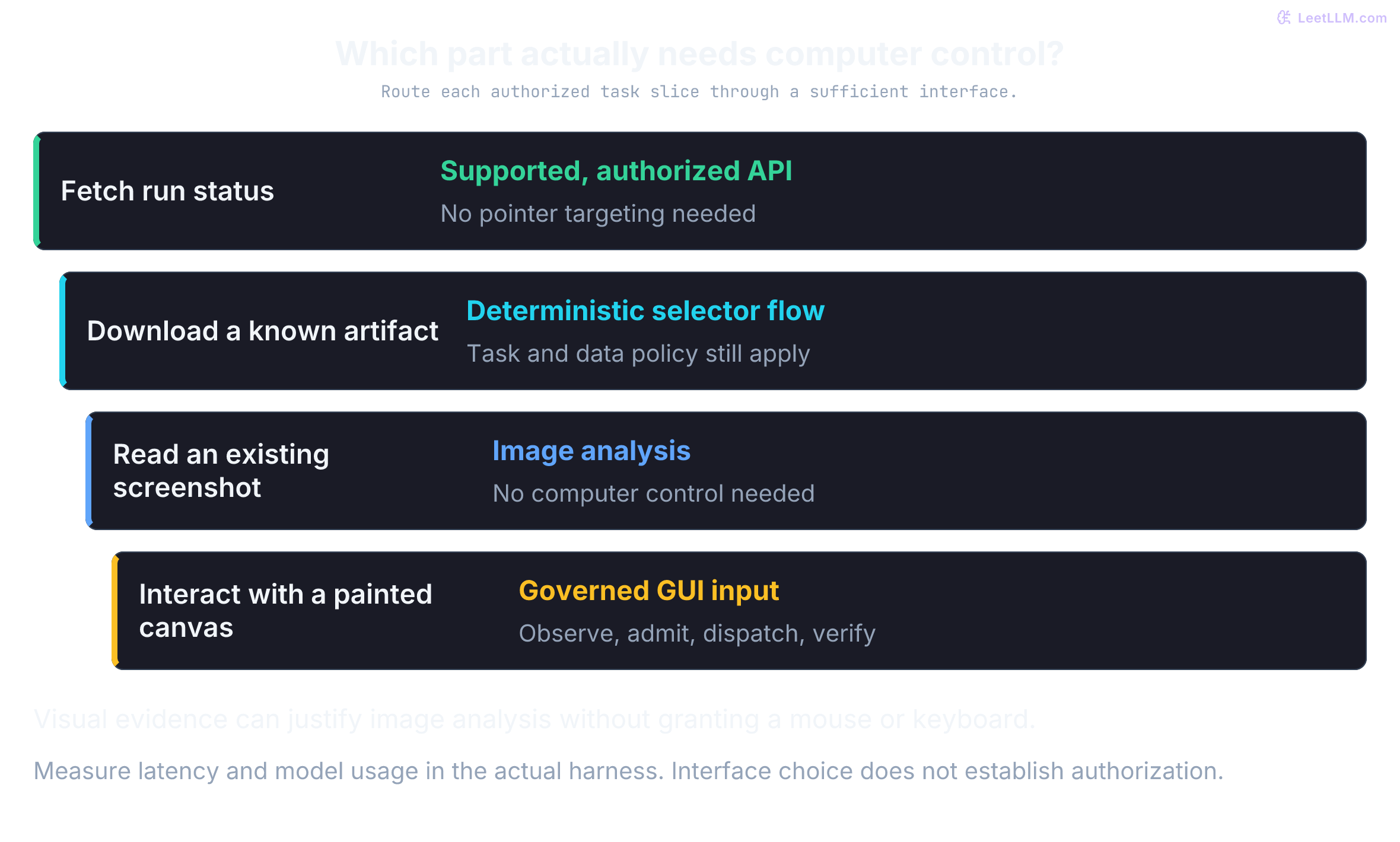
If a stable API or selector-based automation already finishes the workflow, use that first. Computer use earns a seat only when the approved task depends on visual evidence or a legacy interface that deterministic automation can't address reliably. Even then, the model proposes steps. A host process controls credentials, action allowlists, and record mutation.
Computer-use tools let models receive screenshots, and sometimes browser state or accessibility metadata, then propose input events such as moving a virtual mouse, clicking, typing a run ID, scrolling, or requesting another screenshot.[1] The host decides whether and where each event executes.
That reach covers permitted legacy tools and visual portal steps with no suitable API. It also creates a new failure surface: a mis-grounded click, an overbroad session, or a leaked credential can change external state. A browser session that uses its broader access to perform an action the initiating user can't authorize becomes a confused deputy. Computer use is delegated access, not a screenshot convenience wrapper.
From curated tools to full computer control
The incident exposes the difference between two action surfaces. Ordinary function calling gives a model a curated set of typed operations that the developer can separately authorize. Typed doesn't automatically mean safe, but it keeps the set of possible requests narrow.
Computer use starts from a screenshot and may add an accessibility tree or optical character recognition (OCR) output. The model then proposes primitive input events. A computer-use agent can, in principle, open any application visible on the virtual desktop, click any pixel, and type into any field.
That broader reach helps with workflows that have no API. It also moves the main safety question from "which function names did we expose?" to "which visible state may this session reach, and who can authorize a side effect?" Every deployment therefore needs a permission boundary with several independent layers of control.
What changes when you move from function calling to computer use?
Answer
Function calling restricts the model to typed operations the developer exposed. Computer use lets the model propose low-level GUI actions against anything visible in the sandbox, so the execution environment and policy engine become the real safety boundary.
The observe-act loop
Computer-use agents follow a sense-plan-act cycle. The host captures an observation, and the model proposes an action or a short ordered batch. The host checks each action before dispatch and returns observations and execution results.
That contract is an agent-computer interface (ACI): a bounded action vocabulary, an observation format, and host guardrails that accept or reject the next step. The loop ends when the host verifies completion, a limit expires, or a safety boundary intervenes. Every extra observation and model decision adds latency and model usage, so trajectories need bounds.
Now apply the cycle to RUN-78432. The host brokers a restricted session, the model proposes one GUI step at a time, and the task ends at a local draft. Policy, approval, audit evidence, and teardown stay outside the model.
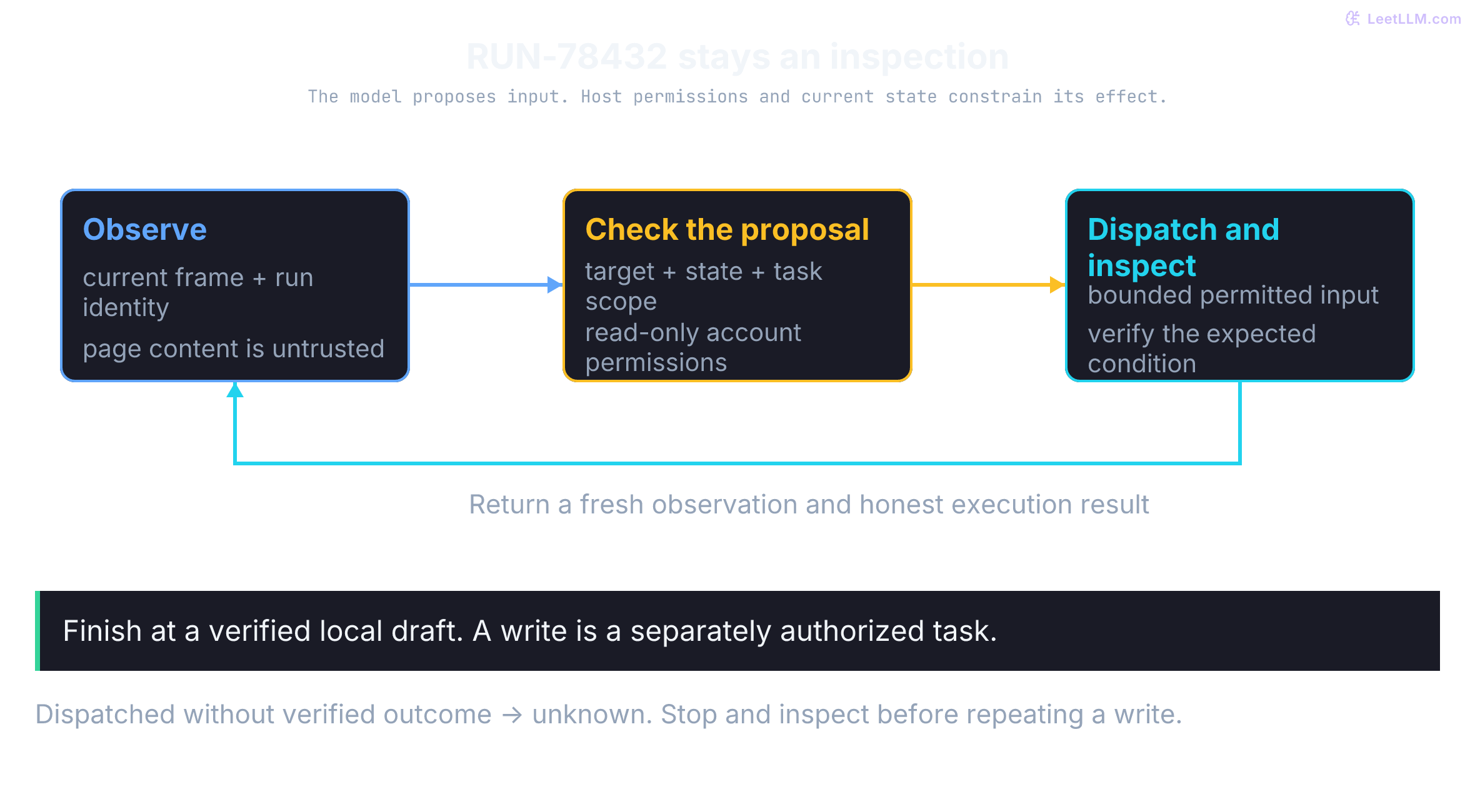
The CI dashboard runs inside a restricted browser session because the task depends on visual evidence rather than an available API. A policy engine sits between the model's proposal and execution.
A potentially permitted write needs separate authorization and a reviewer who can see the relevant observation and intended change. Out-of-scope actions are rejected, not automatically escalated into permission. Audit records capture policy evidence without copying secrets or more log data than retention policy permits.
Who owns execution in a computer-use loop: the model or the host?
Answer
The host owns execution. The model proposes an action, but the host captures observations, validates policy, executes inside the sandbox, records the step, and verifies the final state.
A host can make that split concrete before integrating a model. The policy below represents host-defined semantic operations, not labels we trust a model to attach to arbitrary clicks. A raw click needs a known target and current state before the host can classify its effect. If that mapping isn't reliable, restrict the account to read-only permissions or stop. Its pause result is only a routing decision, not permission to resume; task scope must permit a write before reviewer approval can authorize it.
1from dataclasses import dataclass
2
3@dataclass(frozen=True)
4class Action:
5    domain: str
6    kind: str
7    target: str
8
9ALLOWED_DOMAINS = {"ci.example", "incidents.example"}
10READ_ACTIONS = {"view_log", "open_run", "scroll", "capture_reference"}
11WRITE_ACTIONS = {"update_incident", "rerun_deploy", "submit_form"}
12
13def route(action: Action) -> str:
14    if action.domain not in ALLOWED_DOMAINS:
15        return "blocked: domain outside task scope"
16    expected = "RUN-78432" if action.domain == "ci.example" else "INC-2048"
17    if action.target != expected:
18        return "blocked: record outside task scope"
19    if action.kind in READ_ACTIONS:
20        return "execute read-only step"
21    if action.kind in WRITE_ACTIONS:
22        return "pause: reviewer approval required"
23    return "blocked: unknown action kind"
24
25for proposal in [
26    Action("ci.example", "view_log", "RUN-78432"),
27    Action("incidents.example", "update_incident", "INC-2048"),
28    Action("ci.example", "erase_run", "RUN-78432"),
29    Action("mail.example", "open", "inbox"),
30]:
31 print(route(proposal))1execute read-only step
2pause: reviewer approval required
3blocked: unknown action kind
4blocked: domain outside task scopeA concrete five-step trace for RUN-78432
Trace the CI failure inspection from the first browser state to the verified handoff. Each step keeps the model's proposal separate from the host's decision.
Step 1. The host opens a fresh restricted browser profile and establishes an authorized CI session through a credential broker. The model doesn't receive the password or propose typing it.
Once authenticated, the host captures the permitted dashboard view and relevant grounding metadata. The model starts with a bounded observation, not ambient access.
Step 2. After the login succeeds, the host captures the next screenshot showing the run search form. The model outputs type("RUN-78432") for the run field and a left_click on the search button.
Step 3. Results load with failing test output visible. The model proposes clicking the Failed tests control by role and name, not by a remembered coordinate.
The host resolves a single match, expands the failed step, and scrolls until the traceback is in view. If two tabs shared that name, the host would re-observe or escalate instead of guessing.
Step 4. The model reads visible evidence and proposes preparing a draft incident note with the failing command, traceback line, and artifact link. The host policy permits extracting that evidence.
It doesn't allow the model to rerun deploys or edit incident severity from the page alone. The same page can be useful evidence without becoming authority for a write.
Step 5. The read-only task ends with a local draft. If the user separately authorizes an incident update, the host can present that exact change to a reviewer. Approval must bind the actor, session, incident, content, expected record version, and expiry. A changed target or stale record requires a fresh decision, not replaying an old approval.
After an authorized write, the host verifies the intended record and checks available audit evidence for unintended effects. A screenshot of one correct note doesn't prove that every other record stayed unchanged. Completion needs an explicitly bounded verifier, not a model message.
This is a proposed trace, not a recorded browser execution. Navigation and evidence collection stay read-only; an incident write is a separately authorized extension, and a deploy rerun remains outside this task.
The audit record stores action proposals, policy outcomes, relevant observation identifiers, approval, and final verification. It excludes secrets and unnecessary raw log content.
Why should the model not receive the real CI dashboard password in the RUN-78432 trace?
Answer
Credential handling is ambient authority. The host should establish an authorized session through a broker or driver so the password isn't included in screenshots, prompts, action text, or audit events.
Authentication belongs in a host-owned setup step, not in text the model should type. Return only an allowlisted session outcome to the model. This fixture tests that output boundary; it doesn't log into a portal or demonstrate a real credential broker.
1def public_session_result(broker_result: dict[str, str]) -> dict[str, str]:
2    if broker_result.get("status") != "authenticated":
3        raise PermissionError("host authentication failed")
4    return {"session": "authenticated"}
5
6model_context = {"task": "inspect CI failure evidence", "run_id": "RUN-78432"}
7broker_fixture = {"status": "authenticated", "credential": "FAKE-SECRET"}
8session = public_session_result(broker_fixture)
9assert "FAKE-SECRET" not in str((model_context, session))
10try:
11    public_session_result({"status": "failed"})
12except PermissionError:
13    pass
14else:
15    raise AssertionError("failed authentication accepted")
16
17print("model fields:", sorted(model_context))
18print("session:", session["session"])
19print("credential field exposed:", "credential" in session)1model fields: ['run_id', 'task']
2session: authenticated
3credential field exposed: FalseGrounding pixels to intent
Grounding connects a proposal to a target in the observed state. An API agent also needs grounding: it must choose the right record, arguments, and current resource. A typed schema constrains request shape, not those choices. A direct lookup such as GET /api/v1/runs/RUN-78432 avoids pointer positioning; it can still use a wrong run ID, stale data, or insufficient authority.
A computer-use agent faces the action-perception gap. Its observation might be a screenshot or accessibility tree, while its input vocabulary includes pointer movement, clicks, typing, and scrolling. The host translates those proposals through a browser protocol or desktop input channel. Connecting "expand the failed test traceback for RUN-78432" to the right target is difficult when elements shift, animate, and reflow.
Start with the tempting shortcut: click the coordinate that worked yesterday. Pure coordinate clicking is brittle. An A/B test can move the Failed tests tab twenty pixels down. A different viewport can collapse the sidebar, and a narrower window can trigger a responsive layout. Yesterday's (x, y) is now empty space, even though the page still looks plausible to a human.
The coordinate transformation pipeline
Start with the selected provider's coordinate contract. Some tools use screenshot pixels; others use normalized integers. The host must preserve the observation's dimensions, origin, scaling, and tab/display identity before translating a valid point into input coordinates.
For example, Gemini's current action tables specify integer coordinates from 0 through 999 on a 1000-unit scale.[2] For an unresized full-screen observation with native width and height , convert a valid normalized point as follows:
A result of 1000 violates this tool contract; reject it rather than silently snapping it to another target. With positive dimensions and valid 0–999 inputs, the formula stays inside the image. Normalization doesn't make perception resolution-invariant: text readability and target visibility still change. Other tool versions may define different endpoints.
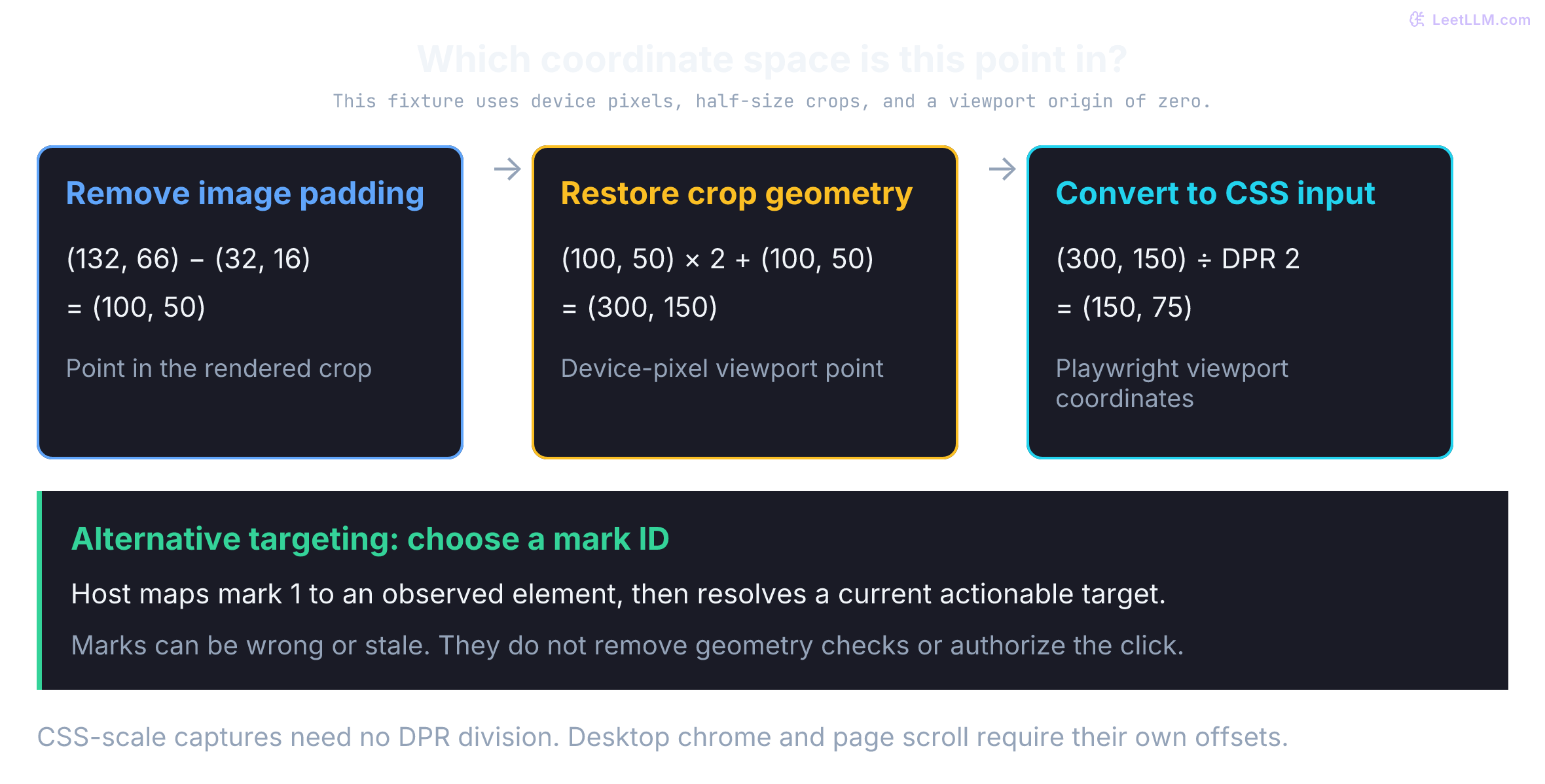
When screenshots are resized, cropped, or letterboxed, coordinate scaling requires an explicit multi-step pipeline:
- Letterbox padding removal: If an image was padded with black or neutral bars to fit the vision encoder's aspect ratio, subtract the padding offsets: , .
- Crop scale inversion: Invert the downsampling ratio to return to physical crop dimensions: .
- Crop origin restoration: Add the crop's top-left origin to place the coordinate in the native framebuffer: .
- Input-space conversion: Playwright's mouse API accepts main-frame viewport CSS pixels.[3] Divide by device pixel ratio (DPR) only when your screenshot uses device pixels. A screenshot captured with
scale: "css"already has one image pixel per CSS pixel.[4] A full-desktop capture also needs the browser viewport's offset removed; a full-page capture needs the current scroll offset. DPR alone doesn't account for browser chrome, page zoom, or a different origin.
Set-of-Marks: discrete visual grounding
Set-of-Mark (SoM) prompting labels image regions so the model can refer to them discretely. The original work used segmentation regions and marks such as numbers, masks, and boxes for visual-grounding tasks; it wasn't a universal GUI executor.[5] A GUI adaptation can label candidate controls from DOM boxes, accessibility nodes, or visual detections.
Instead of guessing continuous floats, the model emits a discrete token: click(mark_1). The host maps that ID back to the element's centroid or bounding box.
The model chooses an ID instead of estimating the click point. The host still needs a correct mark map, current geometry, coordinate conversion, and actionability checks. SoM changes the targeting problem; it doesn't eliminate spatial errors.
- Preprocessing work: Detection, tree extraction, and badge rendering add work; measure their latency in the actual harness rather than assuming a fixed range.
- Visual occlusion: A badge drawn over a tiny icon or short number can obscure the very text the model needs to read.
- Dynamic staleness: Scrolling, animation, or rerendering can change a marked target's identity or geometry. Bind mappings to the tab and observation, re-resolve the intended element before dispatch, and reject maps whose relevant state has changed. Unrelated DOM changes don't necessarily invalidate a stable element reference.
Representation trade-offs: DOM, accessibility tree, and pixels
Production GUI agents balance three observation modalities, each with distinct trade-offs:
- DOM representation: Exposes structure, attributes, and text, with size depending on serialization and subtree filtering. Hidden text and scripts can add irrelevant or hostile content. DOM text alone doesn't describe painted canvas/WebGL content or native windows, although a page can provide accessible fallback content. More tokens lengthen context; they don't by themselves establish quadratic runtime for every model.
- Accessibility tree: Supplies semantic roles, names, and states when the application exposes them. Focused trees can omit much markup, but there is no universal token-reduction percentage. Poor labeling or missing semantic annotations can leave controls ambiguous or absent. A visually plain
<div>may still have a useful role and name. - Screenshots: Capture visible canvas, browser, and desktop content without requiring DOM semantics. Reading small text, recognizing controls, and distinguishing spoofed chrome remain difficult. Cost and preparation/inference latency depend on resolution, model, preprocessing, caching, and provider accounting; no fixed vision-encoder timing applies across systems.
A hybrid observation pipeline can combine these signals: use a focused accessibility tree for semantic targeting, a screenshot for spatial context, and a higher-resolution crop or mark overlay when the target remains unclear. Downsampling can hide small text, so choose representations based on the information the task needs rather than following a fixed escalation order.
Why is a screenshot-only coordinate click brittle?
Answer
Coordinates move when layouts, fonts, screen sizes, A/B tests, or animations change. Accessibility trees, OCR, DOM snapshots, and element detection give the model more stable grounding signals.
Grounding metadata helps only when it selects one target in the intended frame and record. Two identical names may become unique after scoping to the correct run panel. Uniqueness still isn't enough: Playwright checks visibility, stability, event reception, and enabled state before a normal locator click.[6] Those checks improve interaction reliability, not authorization. This fixture resolves boxes and coordinates; it doesn't implement browser hit-testing.
1from dataclasses import dataclass
2from math import isfinite
3
4@dataclass(frozen=True)
5class GroundedElement:
6    mark_id: int
7    role: str
8    name: str
9    box: tuple[int, int, int, int]  # x, y, w, h
10
11def normalized_to_native(point: tuple[int, int], native_res: tuple[int, int]) -> tuple[int, int]:
12    nx, ny = point
13    nw, nh = native_res
14    if any(type(v) is not int for v in (*point, *native_res)):
15        raise ValueError("coordinates and dimensions must be integers")
16    if min(nw, nh) <= 0 or not (0 <= nx <= 999 and 0 <= ny <= 999):
17        raise ValueError("positive dimensions and normalized coordinates in [0, 999] required")
18    return nx * nw // 1000, ny * nh // 1000
19
20def scale_point(
21    point: tuple[int, int],
22    source_res: tuple[int, int],
23    target_res: tuple[int, int],
24) -> tuple[int, int]:
25    sx, sy = point
26    sw, sh = source_res
27    tw, th = target_res
28    if any(type(v) is not int for v in (*point, *source_res, *target_res)):
29        raise ValueError("coordinates and dimensions must be integers")
30    if min(sw, sh, tw, th) <= 0 or not (0 <= sx < sw and 0 <= sy < sh):
31        raise ValueError("invalid dimensions or source point")
32    # Floor mapping avoids rounding the final source pixel outside the target.
33    return sx * tw // sw, sy * th // sh
34
35def cropped_to_css(point, crop, rendered_size, padding, dpr):
36    x, y = point
37    ox, oy, cw, ch = crop
38    rw, rh = rendered_size
39    px, py = padding
40    values = (*point, *crop, *rendered_size, *padding, dpr)
41    if not all(type(v) in (int, float) and isfinite(v) for v in values):
42        raise ValueError("nonfinite transform")
43    if min(cw, ch, rw, rh, dpr) <= 0 or min(ox, oy, px, py) < 0:
44        raise ValueError("invalid transform geometry")
45    if not (px <= x < px + rw and py <= y < py + rh):
46        raise ValueError("point lies outside rendered crop")
47    return ((ox + (x - px) * cw / rw) / dpr,
48            (oy + (y - py) * ch / rh) / dpr)
49
50def resolve_by_mark(elements: list[GroundedElement], mark_id: int) -> tuple[int, int]:
51    if type(mark_id) is not int or mark_id <= 0:
52        raise ValueError("mark ID must be a positive integer")
53    matches = [e for e in elements if e.mark_id == mark_id]
54    if len(matches) != 1:
55        raise ValueError(f"expected 1 match for mark {mark_id}, found {len(matches)}")
56    x, y, w, h = matches[0].box
57    if any(type(v) is not int for v in (x, y, w, h)) or min(x, y) < 0 or min(w, h) <= 0:
58        raise ValueError("invalid target box")
59    return x + w // 2, y + h // 2
60
61def resolve_by_role_name(elements: list[GroundedElement], role: str, name: str) -> str:
62    matches = [e for e in elements if e.role == role and e.name == name]
63    if len(matches) != 1:
64        return f"blocked: expected one target, found {len(matches)}"
65    return f"click mark {matches[0].mark_id}"
66
67page = [
68    GroundedElement(1, "tab", "Failed tests", (380, 160, 120, 40)),
69    GroundedElement(2, "tab", "Failed tests", (800, 160, 120, 40)),
70]
71
72print("scaled coordinate:", scale_point((190, 80), (512, 384), (1024, 768)))
73print("normalized (999, 999):", normalized_to_native((999, 999), (1024, 768)))
74print("mark 1 center:", resolve_by_mark(page, mark_id=1))
75print("unique role match:", resolve_by_role_name(page[:1], "tab", "Failed tests"))
76print("ambiguous role match:", resolve_by_role_name(page, "tab", "Failed tests"))
77transform = ((100, 50, 640, 400), (320, 200), (32, 16), 2)
78assert cropped_to_css((132, 66), *transform) == (150.0, 75.0)
79assert scale_point((511, 383), (512, 384), (1024, 768)) == (1022, 766)
80assert normalized_to_native((999, 999), (1024, 768)) == (1022, 767)
81assert normalized_to_native((500, 500), (1024, 768)) == (512, 384)
82for bad_point, bad_res in [((1000, 0), (1024, 768)), ((True, 0), (1024, 768)),
83                           ((0, 0), (0, 768)), ((0, 0), (-1, 768)),
84                           ((0.5, 0), (1024, 768))]:
85    try:
86        normalized_to_native(bad_point, bad_res)
87    except ValueError:
88        pass
89    else:
90        raise AssertionError("invalid normalized geometry accepted")
91for bad_point in [(31, 66), (352, 66), (float("nan"), 66)]:
92    try:
93        cropped_to_css(bad_point, *transform)
94    except ValueError:
95        pass
96    else:
97        raise AssertionError("invalid point accepted")
98print("cropped model point to CSS:", cropped_to_css((132, 66), *transform))1scaled coordinate: (380, 160)
2normalized (999, 999): (1022, 767)
3mark 1 center: (440, 180)
4unique role match: click mark 1
5ambiguous role match: blocked: expected one target, found 2
6cropped model point to CSS: (150.0, 75.0)How providers expose computer use
Provider contracts change independently. These details were checked September 22, 2026; pin a supported model, tool schema, platform, and adapter. Anthropic's standard client toolset is computer_toolset_20260801, available without a beta header on the Claude API and Google Cloud. One tools entry declares it:
1{
2  "type": "computer_toolset_20260801",
3  "configs": {
4    "zoom": { "enabled": false }
5  }
6}
The entry has no name or legacy display-dimension fields. configs can disable members your environment doesn't implement; all 17 are enabled by default, including zoom.[7]
Calls name a member such as left_click, type, or screenshot and carry "toolset_name": "computer"; member input has no action field. Dispatch on both toolset and member name. Return a matched result for every call, including errors for skipped members after a batch failure. Coordinates remain in full-screenshot pixel space after zoom, so don't apply a crop offset merely because the last image was zoomed.[7]
Older model/platform integrations may still require computer_20251124 and a beta header. Check compatibility rather than mixing versions. Anthropic's screenshot classifiers add injection detection, not application permission.[7]
OpenAI's current Responses guide recommends computer use through generated code in your own execution service, with a structured computer tool as an alternative. On that structured path, a computer_call contains an ordered actions[]; return the updated screenshot in a computer_call_output matching its call_id. The call's status: "completed" means generation finished, not that a click executed. Continuing an API response doesn't restore a lost browser session.[8]
Generated code can perform more than the declared mouse primitive. Isolate that executor and its reachable capabilities; a router that recognizes click labels can't by itself authorize arbitrary Python or JavaScript. OpenAI treats screen instructions as untrusted and notes that typing sensitive data into a form is already transmission, even before Submit.[8]
Gemini's current examples use the Interactions API, a computer_use tool with an environment, and UI function calls. Gemini 3.x documents browser, desktop, and mobile environments, alongside a legacy Gemini 2.5 browser-oriented contract. Current coordinate tables use integers 0–999. Don't combine action names, endpoints, or result shapes from different generations.[2]
Gemini can return safety_decision: require_confirmation; obtain actual confirmation before execution and include the corresponding safety_acknowledgement in the function result. The current 3.x screenshot injection detector is opt-in, default false. Overrides don't guarantee that confirmation requests disappear. Neither detection nor acknowledgement replaces application authorization.[2]
Across these client-executed patterns, the developer owns the execution environment. Provider safety signals can add mandatory confirmation steps; honor those protocol requirements as well as your own policy. They don't execute clicks, mint credentials, or mark INC-2048 updated.
Batching changes transport, not authority. Execute actions in order, rechecking state-dependent preconditions at each step. Stop at an unknown action, failure, or authorization boundary and report remaining actions as unexecuted according to the provider protocol. A paused batch needs fresh state before resuming. The routing fixture below considers a separately authorized write workflow; it doesn't extend the read-only pilot. Its action names are host-classified operations, so a production adapter must map raw clicks to that policy rather than trust a proposed label.
1def authorize_batch(actions: list[str]) -> list[str]:
2    decisions: list[str] = []
3    for action in actions:
4        if action in {"rerun_deploy", "update_incident"}:
5            decisions.append(f"pause before {action}")
6            break
7        if action not in {"capture_traceback", "scroll"}:
8            decisions.append(f"blocked unknown action: {action}")
9            break
10        decisions.append(f"execute {action}")
11    return decisions
12
13print("\n".join(authorize_batch(["capture_traceback", "rerun_deploy", "scroll"])))
14assert authorize_batch(["erase_run", "scroll"]) == ["blocked unknown action: erase_run"]1execute capture_traceback
2pause before rerun_deployWhat is common across Anthropic, OpenAI, and Google computer-use APIs?
Answer
The model proposes UI actions, but your application executes them, captures the next observation, and decides whether to block, confirm, continue, or stop. Provider-required confirmation must be honored; its absence doesn't authorize an action.
Browser agents versus full desktop agents
Many production workloads stay inside the browser, so start with lighter options. Use Playwright or Selenium directly when an approved target exposes stable selectors and deterministic automation satisfies the workflow.
Browser-agent harnesses and evaluation environments can add observation/action adapters for model-driven experiments. Prefer the narrowest control surface that meets the task rather than moving to pixel-level control by default.
Anthropic now exposes a separate browser_toolset_20260801: the host runs calls against its own browser, with page reads, element references, and screenshots. References are scoped to a tab and can become stale after navigation or material DOM changes. The host owns their mapping; an API can't certify that a reference still resolves correctly.[9] This is a model-directed browser adapter, distinct from a full-desktop toolset or a fixed Playwright script.
Consider full computer-use primitives only when an authorized task requires visual interpretation, browser UI interaction, or a native desktop application and no narrower supported integration is suitable. Don't use computer use to evade a site's access controls or anti-bot policy.
Full desktop control may be appropriate when a task spans a browser and a native application with no suitable narrower integration. An input event can create an irreversible external effect, so "revocable" access means stopping future actions and withdrawing credentials where supported; it doesn't undo every past click.
When should you prefer Playwright or Selenium over full computer use?
Answer
Use deterministic browser automation when an approved target has stable selectors and the workflow doesn't need visual reasoning. It has a narrower, more repeatable action surface than model-proposed pixel interaction.
Systems runtime: Playwright, CDP, virtual displays, and containers
Choose runtime infrastructure for the intended observation and input channel. A browser-only agent doesn't automatically need an X11 desktop; a native-app agent may need a virtual display and window management.
Headless versus headful under virtual displays
Current Chrome has unified headless and headful implementations; the old headless shell is a separate binary.[10] A headless browser can render screenshots for a visual agent. Browser mode, automation flags, fonts, GPU availability, viewport, and site behavior still need validation in your harness. navigator.webdriver signals automation in some configurations, not a proof that a browser is headless. Headful mode isn't an anti-bot exemption.
For a Linux X11 desktop, X Virtual Framebuffer (Xvfb) provides a display without a physical monitor. The launch sketch below assumes a dedicated isolated runtime, an existing host-created Xauthority file, an existing VNC password file, and supervision for process startup and teardown. It doesn't create those secrets or a complete authenticated viewing service. No browser is launched here.
1export XAUTHORITY=/run/gui/Xauthority
2Xvfb :99 -screen 0 1280x800x24 -nolisten tcp -auth "$XAUTHORITY" &
3export DISPLAY=:99
4
5# Observer channel: view-only at the VNC server, loopback-bound listeners
6x11vnc -display :99 -auth "$XAUTHORITY" -localhost -viewonly \
7  -rfbauth /run/gui/vnc.pass -rfbport 5900 &
8websockify --web /usr/share/novnc 127.0.0.1:6080 localhost:5900 &
Avoid Xserver's -ac, which disables access control.[11] VNC viewing is interactive by default: x11vnc's server-side -viewonly rejects viewer input.[12] Loopback binding doesn't authenticate a remote viewing gateway. Any exposed gateway needs its own authentication, encrypted transport, and access policy; websockify offers explicit authentication and TLS configuration.[13]
The useful properties are controlled display geometry and an observable shared screen. Matching fonts, browser version, scaling, and graphics configuration improves repeatability; Xvfb doesn't guarantee identical rendering to a physical workstation or deterministic UI timing. Screenshot capture is a snapshot, not an atomic lock on the next input event.
Actuation mechanics: CDP versus OS-level input injection
Executing a mouse click or keystroke requires choosing the appropriate input injection channel:
- Browser protocol input: Chromium's CDP offers mouse and keyboard dispatch. Playwright also supports Firefox and WebKit through other browser-specific channels; CDP isn't its universal transport. Browser mouse coordinates are viewport CSS pixels.[3] Browser input doesn't control arbitrary native windows. A file upload often has a narrower
setInputFiles/file-chooser integration instead of an OS click.[4] - Desktop input: X11 tools, compositor-specific mechanisms, or permitted OS APIs can control native applications. Their coordinate and permission rules differ. Verify the actual display/window identity and keyboard focus before dispatch; activating a window once doesn't prevent later focus races. Give the agent an isolated desktop instead of the user's active workspace.
Sandboxing and safety boundaries
The prompt isn't the boundary. The environment in which approved actions run is.
For a privileged engineering workflow, begin each task in a fresh restricted browser profile or disposable runtime appropriate to the threat model. Expose only the applications and domains needed for the task.
Don't expose personal email, password managers, general-purpose terminals, or package installation to a dashboard-inspection session. A read-only inspection shouldn't inherit the user's whole desktop.
Ephemeral container isolation and session hygiene
For the inspection pilot, define isolation across compute, storage, and networking:
- Execution boundary: Use a dedicated low-privilege container, application-kernel sandbox, or VM appropriate to the threat model. gVisor is an application kernel, not a microVM; Firecracker is a KVM-backed microVM. A macOS process sandbox isn't an ephemeral Linux container or a VM. These mechanisms don't all offer identical protections.
- Filesystem and lifecycle: Exclude unrelated home directories, host cookie databases, password-manager sockets, and control-plane sockets. Restrict persistent writes and provide bounded disposable storage for browser profiles, downloads, caches, and shared memory. A read-only root may be useful, but GUI applications still need carefully scoped writable paths. Verify cleanup rather than assuming "ephemeral" removed every prior session.
- Clipboard and export channels: Disable unneeded host/viewer clipboard sync, file transfer, downloads, and uploads. An isolated clipboard doesn't prevent the browser from posting copied text to a reachable service. Apply data and network policy to all export paths.
- Network policy: Enforce permitted destinations outside worker control and prevent direct/proxy/DNS bypass. Address bars don't cover background requests, frames, redirects, or sockets. Resolve and check schemes, hosts, ports, IPv4/IPv6 addresses, and redirects under a defined policy. Domain filtering alone can't distinguish a read from a destructive endpoint or prevent transmission to an allowed host.[9]
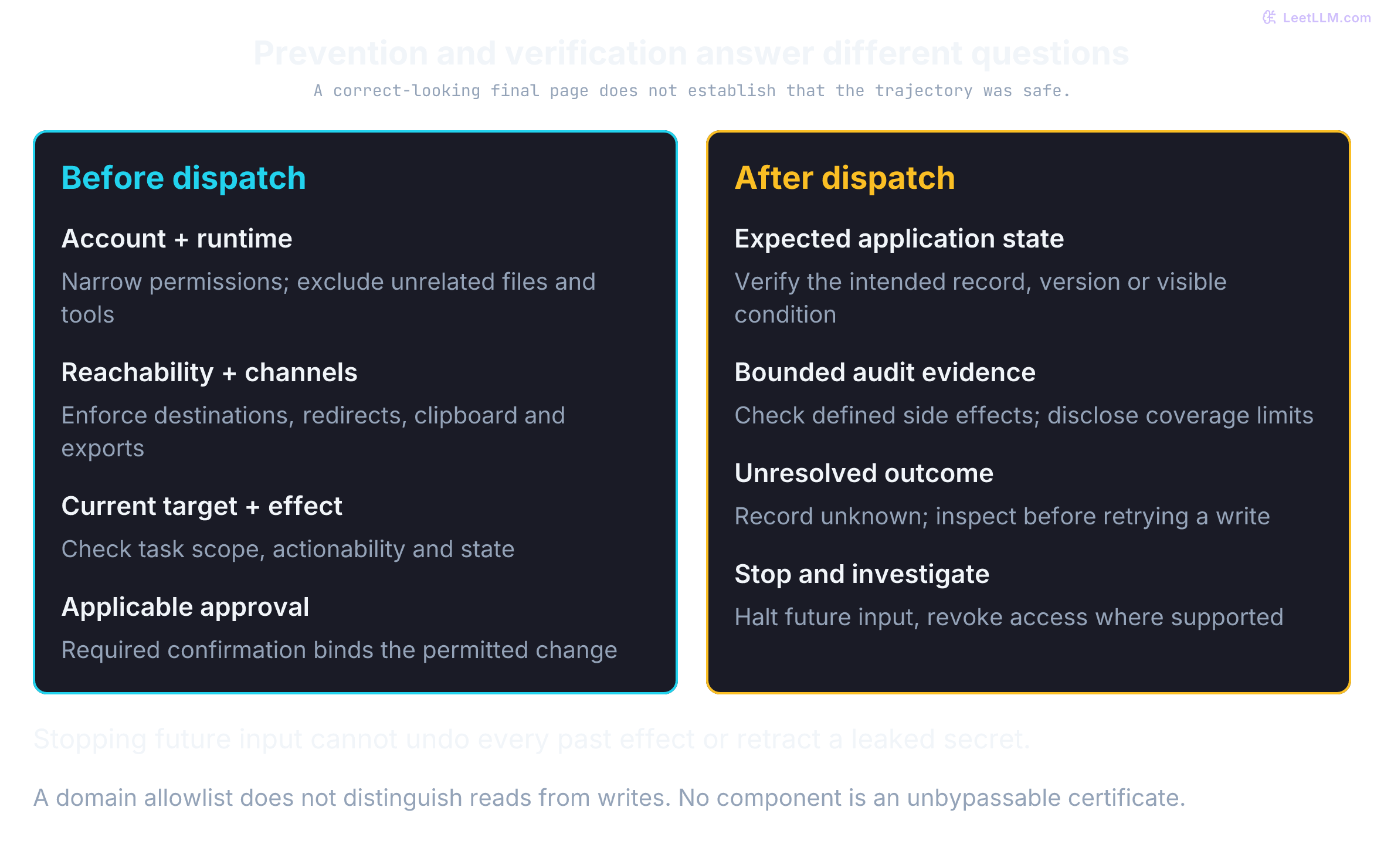
A fresh browser profile clears inherited state; it isn't an OS sandbox or a read-only account. A permitted domain may still expose destructive endpoints. Prefer server-enforced read-only credentials for the inspection pilot, disable unrelated tools and clipboard/download channels, and block ambiguous actions rather than guessing their effects.
High-risk actions, including deploy reruns, production mutations, or incident-record writes, require explicit human approval. Show the reviewer the relevant redacted observation and intended change.
For audits and debugging, retain action proposals, policy outcomes, approval decisions, and verifier evidence according to a retention policy. Don't assume storing every raw screenshot or keystroke is appropriate.
The session manifest should be inspectable before the browser starts. The example below admits a read-only CI lookup and rejects a session that requests an unrelated domain or write capability.
1from dataclasses import dataclass
2
3@dataclass(frozen=True)
4class SessionManifest:
5    domains: tuple[str, ...]
6    allowed_effects: tuple[str, ...]
7    browser_profile: str
8
9TASK_DOMAINS = {"ci.example", "incidents.example"}
10READ_ONLY_EFFECTS = {"browse_url", "read_visible_text", "capture_reference"}
11
12def admit(manifest: SessionManifest) -> str:
13    if not manifest.domains or not manifest.allowed_effects:
14        return "blocked: empty task scope"
15    if manifest.browser_profile != "fresh":
16        return "blocked: reused browser profile"
17    if not set(manifest.domains) <= TASK_DOMAINS:
18        return "blocked: unrelated domain"
19    if not set(manifest.allowed_effects) <= READ_ONLY_EFFECTS:
20        return "blocked: write capability requested"
21    return "admitted: read-only session"
22
23safe = SessionManifest(("ci.example",), ("browse_url", "capture_reference"), "fresh")
24reused_profile = SessionManifest(("ci.example",), ("browse_url",), "reused")
25unrelated_domain = SessionManifest(("ci.example", "mail.example"), ("browse_url",), "fresh")
26write_capability = SessionManifest(("ci.example",), ("rerun_deploy",), "fresh")
27print(admit(safe))
28print(admit(reused_profile))
29print(admit(unrelated_domain))
30print(admit(write_capability))
31assert admit(SessionManifest((), (), "fresh")) == "blocked: empty task scope"1admitted: read-only session
2blocked: reused browser profile
3blocked: unrelated domain
4blocked: write capability requestedAudit data needs the same boundary. Logging arbitrary page text and then scrubbing two patterns won't reliably remove credentials, tokens, or private data. Prefer an allowlisted event schema without free-text page content. This fixture drops a fake secret field rather than claiming a general-purpose redactor. Session and observation IDs must also be host-created references, not arbitrary page text; allowing a field name doesn't make its value non-sensitive.
1def audit_event(host_event: dict[str, str]) -> dict[str, str]:
2    fields = ("session_id", "observation_id", "action", "decision")
3    if host_event.get("action") not in {"capture_reference", "scroll"}:
4        raise ValueError("unknown audit action")
5    if host_event.get("decision") not in {"allowed_read_only", "blocked"}:
6        raise ValueError("unknown audit decision")
7    return {field: host_event[field] for field in fields}
8
9event = audit_event({
10    "session_id": "session-1", "observation_id": "frame-3",
11    "action": "capture_reference", "decision": "allowed_read_only",
12    "page_text": "password=FAKE-SECRET [email protected]",
13})
14assert "FAKE-SECRET" not in str(event) and "page_text" not in event
15print("stored fields:", sorted(event))
16print("free-text page content logged:", "page_text" in event)1stored fields: ['action', 'decision', 'observation_id', 'session_id']
2free-text page content logged: FalseCommon pitfalls include reusing a browser profile across unrelated tasks, letting the model alone decide when the task is finished, and running write-enabled sessions without rate limits or a kill switch.
GUI-agent isolation adds browser-profile state, visible credential surfaces, timing-dependent interfaces, and clicks that can mutate external application state. Filesystem and process limits aren't enough. The host also needs domain policy, credential brokering, action gating, final-state verification, and cleanup of session state.
Why is GUI-agent sandboxing harder than code sandboxing?
Answer
The environment must behave like a real desktop while still blocking real desktop risks: password managers, browser profiles, email clients, terminals, production dashboards, persistent cookies, and irreversible clicks.
Evaluate computer-use agents
Final-task accuracy alone isn't enough. A run can reach the right page after too many retries, leak a secret on the way, or require a reviewer for every step. Evaluate functional success alongside operational safety.
Task success rate asks whether the final observable state matches the goal. WebArena and OSWorld supply programmatic validators for this. Step efficiency measures actions and model calls; long trajectories burn tokens and raise the probability of eventual failure.
Measure attempted forbidden actions, prevented actions, and executed policy violations separately. A blocked attack isn't an executed violation, and a required approval isn't automatically a failure. Define denominators: attempts per proposed action, violations per executed action or episode, and reviews per episode. Grounding accuracy can measure whether a point hits the annotated target, but a correctly grounded harmful click is still unsafe.
Useful evaluation suites include:
- WebArena for 812 long-horizon browser tasks on self-hostable sites: an e-commerce store, GitLab, a Reddit-style forum, and a content-management admin, plus supporting Wikipedia and map services.[14]
- WebArena-Verified for an audited 812-task release and 258-task Hard subset. Its deterministic evaluators operate on responses and captured network traces, including offline replay. This isn't a claim that every result is checked by directly reading a live database.[15]
- OSWorld 1.0 for the original 369 Ubuntu tasks (plus a smaller Windows analytic subset). Platform support isn't equal evaluated coverage.[16] OSWorld 2.0 introduces 108 longer workflows with weighted checkpoints and partial credit, including limited model-based judgments. Its current
osworld-v2.1release, announced September 16, 2026, pins task, asset, website, and provider-image references.[17][18] A 2.0 partial-credit score isn't interchangeable with 1.0 binary success. - Mind2Web for 2,350 collected tasks from 137 websites spanning 31 domains. Its original offline evaluation uses recorded demonstrations and page snapshots; that isn't evidence of live closed-loop task completion on today's sites.[19]
- GAIA for general assistant questions that mix reasoning, browsing, and file/tool use. Its answer-oriented evaluation isn't a full GUI-mutation or policy-violation benchmark.[20]
- AgentDojo as a complementary tool-use security environment for prompt-injection and harmful-action testing, not as a substitute for GUI grounding evals.[21]
Public benchmark numbers change as systems and harnesses change. Treat WebArena, OSWorld, and related suites as regression harnesses and failure-mode maps, not as a full production-readiness certificate.
A score under a documented harness doesn't determine whether your CI dashboard, incident workflow, and reviewer queue satisfy policy. Your own acceptance checks still decide whether the RUN-78432 pilot is safe to expand.
Which metrics matter besides final task success?
Answer
Step count, model-call count, latency, safety violations, human-review rate, grounding accuracy, blocked-action rate, and cost per successful task.
Failure modes specific to GUI agents
Computer-use agents fail in ways typed API agents rarely see. The screen can look plausible while the target, timing, or authority has changed.
UI drift is the obvious example: an A/B test, font change, or responsive layout moves a control, and the model clicks empty space. Visual ambiguity is quieter. Two buttons can look identical at the screenshot resolution the model received, so compression hides the label and the model picks the wrong one.
Timing bugs click before a menu finishes expanding or a spinner disappears. Captchas and anti-bot systems are built to stop this class of agent; send those to a human rather than automate a bypass.
Credential leakage happens when the model is asked to log in and types a real password into a visible field that later lands in the audit log. Scope creep looks like the model deciding "while I am here I should also clean up the user's profile" and editing fields that were never in the task.
Indirect prompt injection across visual and DOM channels
Indirect prompt injection is the central security failure mode for web and GUI agents. A computer-use agent reads screen content as input, and a page can contain attacker-written text or images that instruct it to hijack the session.
AgentDojo studies prompt-injection attacks against tool-using agents.[21] Provider guidance also places responsibility on the host: Anthropic recommends isolated environments and confirmation for consequential actions, OpenAI documents confirmation and isolation practices, and Gemini can return a per-step safety_decision requiring confirmation.[7][8][2]
Attacks arrive through multiple perceptual channels:
- Hidden DOM text: Raw-source adapters may include zero-size, transparent, or off-screen instruction strings that aren't present in a rendered screenshot. A pixels-only capture doesn't expose those particular hidden bytes; that doesn't make the agent immune to visible image attacks, alternate observations, or later rendering changes. OCR on the same bitmap doesn't recover text that wasn't painted.
- Visual prompt injection: Rendered instructions in CI log tracebacks or forged banner images on
<canvas>widgets can ask the agent to trigger a deploy. Low contrast may hide text from a casual viewer; text painted in exactly the background color supplies no contrasting glyph pixels to a screenshot reader. - Spoofed system chrome: A malicious web page renders a pixel-perfect CSS replica of an OS confirmation dialog or browser extension prompt ("Session expired. Enter credentials to re-authenticate"). A vision-guided model can mistake the painted HTML pixels for genuine OS chrome and type sensitive tokens into the attacker's input field.
- Accessibility-tree poison: A visible button reads "Close log," but its
aria-labelcarries an instruction payload consumed by the structural adapter. OCR of the screenshot and an accessibility read can therefore supply different strings.
Host policy owns approval. Never treat a painted button, on-screen dialog, or OCR string as an authorization event.
A policy can carry the observation taint of untrusted screen content into the next proposed action. This is the same first-class property named for non-GUI tool results in ReAct architectures.
All page content remains untrusted whether or not an injection detector flags it. A detector miss mustn't turn a write into a read. Bounded reads may continue, while a deploy rerun stays outside the inspection task even if a page asks for it. An authorized incident-write extension requires independent approval and fresh-state checks.
Pre- and post-action visual state assertions
When an agent proposes a click, don't assume the intended effect occurred. Network latency, disabled buttons, JavaScript errors, or a missed target can leave the UI unchanged. Without a verifier and a retry bound, the loop can repeat an ineffective input or incorrectly report success.
Separate dispatch evidence from outcome evidence:
- Before dispatch: Resolve the target in the right frame/window and check current actionability. A normal Playwright locator click performs visibility, stability, enabled-state, and event-reception checks; a raw
page.mouse.click(x, y)isn't a locator and doesn't supply those target checks.[6][3] For canvas/desktop targets, the host needs its own checks and narrow application permissions. - After dispatch: Wait within a bounded deadline for the task-specific condition, such as the intended run's expanded panel or a record/version change. Playwright discourages
networkidleas a readiness assertion.[4] A visual diff can show change without proving the right change; an unchanged screenshot can hide a delayed server mutation. If the verifier can't establish the outcome, record unknown, re-observe, and inspect authoritative state before retrying a write. Reserve not dispatched for actions the host knows it didn't send.
Predict the result: the screenshot is unchanged immediately after Submit, but the server has queued the request. How many notes appear if the host clicks again? This local object models delayed processing, not a real portal or an idempotent service.
1class DelayedPortal:
2    def __init__(self):
3        self.pending = 0
4        self.notes = 0
5
6    def click_submit(self):
7        self.pending += 1
8
9    def advance_server(self):
10        self.notes += self.pending
11        self.pending = 0
12
13def outcome(dispatched, expected_state_verified):
14    if not dispatched:
15        return "not dispatched"
16    return "verified" if expected_state_verified else "unknown"
17
18repeated = DelayedPortal()
19repeated.click_submit()
20assert repeated.notes == 0  # The visible record hasn't changed yet.
21assert outcome(True, repeated.notes == 1) == "unknown"
22repeated.click_submit()  # Incorrectly infer that the first click didn't execute.
23repeated.advance_server()
24assert repeated.notes == 2
25
26inspected = DelayedPortal()
27inspected.click_submit()
28assert outcome(True, inspected.notes == 1) == "unknown"
29inspected.advance_server()  # Inspect the delayed result without another write.
30assert inspected.notes == 1
31assert outcome(False, False) == "not dispatched"
32assert outcome(True, inspected.notes == 1) == "verified"
33print("After dispatch without verified state: unknown")
34print("Blind repeat creates notes:", repeated.notes)
35print("Inspecting the delayed result creates notes:", inspected.notes)1After dispatch without verified state: unknown
2Blind repeat creates notes: 2
3Inspecting the delayed result creates notes: 11from dataclasses import dataclass
2
3@dataclass(frozen=True)
4class Observation:
5 contains_untrusted_instruction: bool
6
7@dataclass(frozen=True)
8class Proposal:
9 action: str
10
11def authorize(observation: Observation, proposal: Proposal) -> str:
12 # Host policy, not a model-supplied risk flag, defines the allowed effects.
13 if proposal.action not in {"read_failed_step", "capture_reference"}:
14 return "blocked: action outside read-only scope"
15 return "allowed: bounded read with untrusted content"
16
17banner = Observation(contains_untrusted_instruction=True)
18print(authorize(banner, Proposal("read_failed_step")))
19print(authorize(banner, Proposal("rerun_deploy")))
20assert authorize(Observation(False), Proposal("rerun_deploy")).startswith("blocked")
21assert authorize(banner, Proposal("unknown")).startswith("blocked")1allowed: bounded read with untrusted content
2blocked: action outside read-only scopeTreat each computer-use run as a security-sensitive operation. Retain enough redacted evidence to explain policy outcomes and support incident response. Keep an operator stop control available for active sessions.
Why is UI drift especially dangerous for GUI agents?
Answer
The agent can still see a plausible page but click the wrong place after layout, font, responsive, animation, or A/B-test changes. The failure may look like normal interaction until a wrong state changes.
Why is better prompting insufficient as the only indirect-injection defense?
Answer
The screen is untrusted input. A model can still propose an action based on page content, so host policy must prevent that content from authorizing a write or production mutation and keep approval on irreversible steps.
Production patterns that work
A useful production pattern is hybrid, not pure computer use. Keep the typed path for work that already has one.
Use ordinary tool calling, Model Context Protocol (MCP) servers, direct APIs, or deterministic browser automation whenever they satisfy the authorized workflow. Invoke computer use only for the narrow portion that requires visual reasoning or legacy GUI access.
Bound sessions by step count and wall-clock time. Require approval for actions whose blast radius includes secrets, incident state, or production infrastructure. Speed and generality matter only when they remain inside explicit boundaries and human accountability, the same discipline used for AI coding agents.
What is the hybrid production rule for computer use?
Answer
Use APIs, deterministic browser automation, MCP, or direct tools for most workflow steps. Invoke computer use only for the narrow visual or legacy-GUI slice that can't be solved safely another way.
Encode that escalation rule in routing rather than leaving it to a model's preference. In this fixture, api_available means a supported, authorized API that completes the task; mere endpoint existence isn't enough. The router chooses a control surface, not permission or guaranteed success.
1from dataclasses import dataclass
2
3@dataclass(frozen=True)
4class Workflow:
5    name: str
6    api_available: bool
7    stable_selector_flow: bool
8    visual_interaction_required: bool
9
10def control_surface(workflow: Workflow) -> str:
11    if workflow.api_available:
12        return "direct API"
13    if workflow.stable_selector_flow and not workflow.visual_interaction_required:
14        return "deterministic browser automation"
15    if workflow.visual_interaction_required:
16        return "computer use with host policy"
17    return "stop: no supported control surface"
18
19workflows = [
20    Workflow("fetch run status", True, False, False),
21    Workflow("download known artifact", False, True, False),
22    Workflow("open painted canvas traceback", False, False, True),
23]
24for workflow in workflows:
25    print(workflow.name, "->", control_surface(workflow))
26assert control_surface(Workflow("unsupported", False, False, False)).startswith("stop")1fetch run status -> direct API
2download known artifact -> deterministic browser automation
3open painted canvas traceback -> computer use with host policyA structured lookup is often one API call. A computer-use trajectory can take many screenshots, model calls, waits, retries, and a human pause. Measure that cost on your own dashboard and model. Don't import someone else's per-task estimate.
When a browser driver supplies observations, keep viewport, device scale, fonts, and extensions deterministic. A generic networkidle event isn't proof that a dynamic page is ready. Wait for task-specific visible state and re-observe after each action, or the Failed tests tab can move between proposal and click.
Why is screenshot stability a production requirement?
Answer
The model acts on what it sees. If fonts, resolution, extensions, loading states, or animations differ from the expected environment, grounding becomes unreliable and clicks can land on the wrong target.
A minimal host executor sketch
Start with a stateful local portal before connecting a browser or model. The proposals are fixture inputs, and the portal is a Python object with three views. Opening the run changes its view; expanding the failure exposes evidence. A capture succeeds only from that state. The host also rejects stale observation versions, wrong origins, unknown controls, and deploy actions.
Predict the stale-state test: after opening the run, a proposal based on the original dashboard frame must fail even if its target name sounds correct. No mouse events, network requests, real authentication, model inference, or external writes occur in this experiment.
1from dataclasses import dataclass
2
3@dataclass(frozen=True)
4class Proposal:
5    version: int
6    target: str
7
8class Portal:
9    def __init__(self):
10        self.origin = "https://ci.example"
11        self.version = 0
12        self.view = "dashboard"
13        self.incidents = {"INC-2048": "open", "INC-9911": "open"}
14        self.deploys = 0
15        self.closed = False
16
17    def controls(self):
18        return {
19            "dashboard": {"RUN-78432"},
20            "run": {"failed-tests", "rerun-deploy"},
21            "failure": {"capture-reference", "rerun-deploy"},
22        }[self.view]
23
24    def evidence(self):
25        if self.view != "failure":
26            raise ValueError("traceback isn't visible")
27        return {"run_id": "RUN-78432", "step": "test-parser",
28                "traceback": "AssertionError: expected 3, got 2",
29                "artifact": "ci://RUN-78432/test-parser/log"}
30
31def execute(portal, proposal):
32    if portal.closed or portal.origin != "https://ci.example":
33        raise PermissionError("session unavailable or wrong origin")
34    if proposal.version != portal.version:
35        raise ValueError("stale observation; re-observe")
36    if proposal.target not in portal.controls():
37        raise ValueError("target absent from current view")
38    if proposal.target == "rerun-deploy":
39        raise PermissionError("deploy outside task scope")
40    if proposal.target == "capture-reference":
41        return portal.evidence()
42    portal.view = {"RUN-78432": "run", "failed-tests": "failure"}[proposal.target]
43    portal.version += 1
44    return None
45
46portal = Portal()
47before = portal.incidents.copy()
48try:
49    execute(portal, Proposal(0, "RUN-78432"))
50    for invalid in [Proposal(0, "failed-tests"), Proposal(1, "invented-control"),
51                    Proposal(1, "rerun-deploy")]:
52        try:
53            execute(portal, invalid)
54        except (ValueError, PermissionError) as error:
55            print("blocked:", error)
56        else:
57            raise AssertionError("invalid action executed")
58    execute(portal, Proposal(portal.version, "failed-tests"))
59    evidence = execute(portal, Proposal(portal.version, "capture-reference"))
60    assert evidence == portal.evidence() and evidence["run_id"] == "RUN-78432"
61    assert portal.incidents == before and portal.deploys == 0
62    portal.origin = "https://ci.example.attacker.invalid"
63    try:
64        execute(portal, Proposal(portal.version, "capture-reference"))
65    except PermissionError:
66        pass
67    else:
68        raise AssertionError("lookalike origin accepted")
69    print("verified fixture evidence:", evidence["artifact"])
70finally:
71    portal.closed = True
72print("fixture session closed:", portal.closed)1blocked: stale observation; re-observe
2blocked: target absent from current view
3blocked: deploy outside task scope
4verified fixture evidence: ci://RUN-78432/test-parser/log
5fixture session closed: TrueThe checks exercise state transitions and host policy, not visual grounding. In a real driver, binding a proposal to an observation still leaves a race between the final check and the click. Re-resolve actionable targets immediately before dispatch, stop when focus or layout changes, and use application permissions to limit what a raced click can do. Bound retries and time; after an uncertain write result, inspect state before retrying because a second click may duplicate the effect.
Why should the host verifier decide task completion instead of trusting the model's "done" message?
Answer
The model can stop early, hallucinate success, or miss a side effect. The host must check observable acceptance criteria in the application state before teardown.
Classify CI dashboard actions by blast radius
In this CI/incident example, the following illustrative policy assigns tiers to host-classified operations. Risk depends on the record, data, account permissions, and effect; a raw click or the model's label doesn't establish its tier. Task authorization is checked before routing, and approval is required where the applicable policy or provider protocol requires it.
| Risk Tier | Example Actions in CI Dashboard | Example Actions in Incident UI | Human Gate? | Typical Policy Response |
|---|---|---|---|---|
| Low | View an admitted run, scroll, read permitted metadata | Read an admitted incident | No additional gate in this example | Check current scope and preconditions, then execute |
| Medium | Expand log panel, copy artifact reference | Stage a draft note without submitting it | Policy-dependent | Permit only if retention and data policy allow it |
| High | Export sensitive logs; rerun an authorized production job | Submit an authorized note or severity change | Yes in this example | Block prohibited effects; pause permitted effects for required approval |
The tiers don't admit actions outside task scope. Opening a deploy panel isn't inherently the same effect as rerunning a job; typing note text can itself cause an autosave or transmission. Classify the actual application behavior rather than waiting for a button named Submit. A required reviewer sees the intended change and relevant state before the effect occurs.
This tiny policy router makes that escalation rule concrete:
1from dataclasses import dataclass
2
3@dataclass(frozen=True)
4class ActionProposal:
5    target: str
6    kind: str
7
8LOW_RISK_ACTIONS = {"scroll", "view_run", "read_incident"}
9MEDIUM_RISK_ACTIONS = {"expand_log", "copy_reference", "prepare_note"}
10HIGH_RISK_ACTIONS = {"download_logs", "rerun_deploy", "submit_incident", "update_severity"}
11
12def classify(proposal: ActionProposal) -> tuple[str, bool, str]:
13    if proposal.kind in HIGH_RISK_ACTIONS:
14        return "high", True, "pause"
15    if proposal.kind in MEDIUM_RISK_ACTIONS:
16        return "medium", False, "policy_check"
17    if proposal.kind in LOW_RISK_ACTIONS:
18        return "low", False, "execute"
19    return "blocked", False, "unknown_action"
20
21samples = [
22    ActionProposal(target="run_page", kind="scroll"),
23    ActionProposal(target="log_panel", kind="copy_reference"),
24    ActionProposal(target="deploy_controls", kind="rerun_deploy"),
25    ActionProposal(target="run_page", kind="erase_run"),
26]
27
28for sample in samples:
29    tier, needs_human, decision = classify(sample)
30 print(f"{sample.target}: tier={tier}, human_gate={needs_human}, decision={decision}")1run_page: tier=low, human_gate=False, decision=execute
2log_panel: tier=medium, human_gate=False, decision=policy_check
3deploy_controls: tier=high, human_gate=True, decision=pause
4run_page: tier=blocked, human_gate=False, decision=unknown_actionIn this separately authorized local extension, the fixture grant binds one session, target, record version, status, and expiry. Its in-memory set rejects sequential replay within this process. Assume the host obtained the grant from an authenticated reviewer; the dataclass doesn't prove that provenance. Real enforcement also needs actor/operation scope, revocation checks, and durable atomic reservation plus compare-and-set execution. Concurrent requests or a process restart can defeat this fixture's replay tracking.
1from copy import deepcopy
2from dataclasses import dataclass
3
4@dataclass(frozen=True)
5class Approval:
6    id: str
7    session: str
8    target: str
9    version: int
10    new_status: str
11    expires_at: int
12
13before = {"INC-2048": {"status": "traceback_collected", "version": 4},
14          "INC-9911": {"status": "open", "version": 7}}
15approval = Approval("review-1", "session-1", "INC-2048", 4, "review_approved", 120)
16used = set()
17
18def apply_approved(state, grant, session, target, status, now):
19    if grant.id in used or now >= grant.expires_at:
20        raise PermissionError("approval expired or consumed")
21    if (session, target, status) != (grant.session, grant.target, grant.new_status):
22        raise PermissionError("approval scope mismatch")
23    if state[target]["version"] != grant.version:
24        raise PermissionError("record changed; request new approval")
25    state[target] = {"status": status, "version": grant.version + 1}
26    used.add(grant.id)
27
28for session, target, status, now in [
29    ("session-2", "INC-2048", "review_approved", 100),
30    ("session-1", "INC-9911", "review_approved", 100),
31    ("session-1", "INC-2048", "closed", 100),
32    ("session-1", "INC-2048", "review_approved", 120),
33]:
34    state = deepcopy(before)
35    try:
36        apply_approved(state, approval, session, target, status, now)
37    except PermissionError:
38        assert state == before
39    else:
40        raise AssertionError("invalid approval accepted")
41
42stale = deepcopy(before)
43stale["INC-2048"]["version"] = 5
44try:
45    apply_approved(stale, approval, "session-1", "INC-2048", "review_approved", 100)
46except PermissionError:
47    pass
48else:
49    raise AssertionError("stale record accepted")
50
51state = deepcopy(before)
52apply_approved(state, approval, "session-1", "INC-2048", "review_approved", 100)
53assert state["INC-9911"] == before["INC-9911"]
54assert state["INC-2048"] == {"status": "review_approved", "version": 5}
55try:
56    apply_approved(state, approval, "session-1", "INC-2048", "review_approved", 101)
57except PermissionError:
58    pass
59else:
60    raise AssertionError("approval replay accepted")
61print("scoped fixture update verified; stale, expired, mismatched, replayed approvals rejected")1scoped fixture update verified; stale, expired, mismatched, replayed approvals rejectedWhy should high-risk GUI actions pause even when the model is confident?
Answer
Confidence isn't authority. Actions that update incident state, expose secrets, or touch production systems need independent authorization because errors can create irreversible external effects.
Start the first pilot read-only. Measure grounding, latency, cost, and blocked-action rate before allowing any incident write.
For a permitted write, define acceptance criteria, page-injection testing, required reviewer evidence, and recovery or compensation before rollout. Some effects have no reliable rollback; classify and restrict them accordingly. A verified session can later help evaluation or improvement when retention, privacy, and authorization allow it.
Store the goal, permitted observations, actions, policy decisions, approvals, and final-verifier result. A completed run isn't automatically a representative training demonstration.
Why should the first pilot be read-only?
Answer
Read-only scope lets the team measure grounding, latency, cost, and safety violations without letting early failures mutate incidents, deploys, or production records.
Practice: design a safe CI failure inspector
Design the read-only pilot first: inspect the legacy CI dashboard, locate the failed test step, and prepare a local traceback/artifact draft. Then design a separately authorized extension for posting that note to the intended incident. Routing an investigation or notifying a team is an additional effect that needs its own task scope and checks.
The dashboard has no API and lacks reliable selector-based automation. Use the constraints from RUN-78432 to draft a policy and reviewer packet another engineer could use on day one.
Complete these tasks:
- Write admission and per-action policy rules. Cover navigation, credentials, targets, data transmission, and ambiguous effects; moving or hovering can also trigger application behavior.
- Decide which actions require human approval and what evidence (screenshot, proposed diff, run ID, incident ID) the reviewer must see before approving.
- Specify the draft verifier, then the authorized-write verifier. Check the intended record/version and failing-step reference, and define which audit/state evidence can reveal unrelated mutations. State what that evidence cannot establish.
- List three failure modes you realistically expect in the first week of production and the concrete guardrails that would catch each one.
- Produce a one-page reviewer checklist that a human can use consistently before approving a write.
Compare your design with this minimum answer: the inspection session has CI read-only credentials and no deploy capability; the local draft names RUN-78432 and INC-2048 without posting. A separately authorized write presents the exact note diff and current incident version. A stale version invalidates approval. Verification checks the note and available audit events, while an unexpected mutation stops the session and triggers investigation. A post-hoc failure report doesn't undo the mutation.
What is the key acceptance criterion in the CI failure inspector practice?
Answer
Verify the local draft in the read-only pilot. For an authorized write, check the intended note, record/version, and failing-step reference, plus the defined audit/state evidence for unintended effects. Don't claim absence of every side effect from one screenshot.
Computer-use agents propose actions on visible interfaces that can expose privileged state. Treat that ability as delegated access. That means least privilege, redacted evidence, restricted sessions, host verification, and approval for irreversible effects.