Personalize this lesson
Adapt explanations and teaching visuals to your background and preferred voice.
Your laptop runs an evaluation script, compares three saved model predictions against ground truth, and prints 0.667: two answers matched. A teammate clones your repo, runs the exact same script, and crashes immediately with a FileNotFoundError. The Python code arrived over Git, but the dataset it reads stayed behind on your hard drive.
We'll build a minimal project called access-rag that anyone can clone, configure, and execute reliably. Its evaluation (an eval) evaluates saved predictions against expected answers without invoking live APIs or needing secret tokens. Git carries the source code and fixtures, shell scripts define repeatable entrypoints, and a fresh clone proves that nothing was left behind on your laptop.
Meet the terminal, shell, and repository
The terminal provides your command window; the shell running inside it (typically Bash or Zsh) parses commands and launches processes. Linux is common on remote AI servers and multi-GPU clusters, so the command-line habits you build here transfer directly to those environments.
Use Bash or Zsh on macOS, Linux, or Windows Subsystem for Linux (WSL), with Git and Python 3.12 or newer installed. You don't need a physical GPU to complete this project; the GPU commands we'll inspect later illustrate routine remote-cluster diagnostics.
Before writing code, make your working path visible. A filesystem path locates a file or directory (. represents your current directory and .. points to its parent). We run pwd (print working directory) to check the current folder, mkdir to create our project directory, and cd to move into it. Run these commands line by line in your workspace:
1pwd
2mkdir access-rag
3cd access-rag || exit 1
4pwd
5git --version
6python3 --version
7git init -b main
Notice cd access-rag || exit 1. If the directory change fails, the shell halts with exit status 1 rather than quietly executing subsequent commands in the wrong folder. In shell conventions, exit status 0 signals success, while any nonzero code flags a failure. Whenever a pipeline crashes, always read the first failing line rather than the final traceback.
Git tracks changes by recording deliberate, immutable snapshots of files called commits. A directory managed by Git is a repository (or repo). Running git init -b main creates Git's internal bookkeeping directory at .git/ and designates main as your initial branch. A branch represents an independent line of development; we'll stay right on main. Leave everything inside .git/ to Git.
Before creating your first commit, assign an author name and email. These settings stay local to access-rag. (Add --global only if you want to use this identity across every repository on your machine):
1git config user.name "Your Name"
2git config user.email "[email protected]"
3git status
git status confirms you're on main with no commits yet. Your project folder contains three distinct tiers: the working tree (the editable files on disk), the staging area or index (the selected changes staged for the next snapshot), and committed history. Running git add copies a file's exact current content into the staging area, and git commit permanently seals those staged contents into history.[1] If you edit a file after staging it, run git add again to stage the updated state.
That lifecycle explains the missing-file bug. A file can sit comfortably on your laptop's filesystem without ever entering the staging area or commit history. Before adding our eval code, establish a hard boundary: which files must travel through Git, and which files must never leave your local disk?
Ignore the files that shouldn't travel
Before adding the scorer, separate project inputs from local residue. Create .gitignore with patterns for secrets, caches, generated indexes, and model artifacts:
1# Python
2__pycache__/
3*.py[cod]
4*$py.class
5.venv/
6venv/
7.uv-cache/
8
9# Environment & secrets (do not commit these)
10.env*
11!.env.example
12*.pem
13*.key
14secrets/
15
16# Generated model and vector artifacts that do not travel with the repo
17checkpoints/
18models/local/
19*.pt
20*.pth
21chroma/
22faiss_index/
23*.db
24*.sqlite3
25
26# OS and editor noise
27.DS_Store
28.idea/
29.vscode/
30*.swp
31
32# Evaluation caches that should be regenerated
33eval_cache/
34runs/
35wandb/
36mlruns/
37
38# Do not ignore *.gguf, *.safetensors, or *.bin here.
39# .gitattributes routes those extensions through Git LFS when configured.
.gitignore keeps matching untracked files out of ordinary git add operations; it doesn't remove files already committed or rewrite Git history. It also isn't an access control: git add -f can stage an ignored file. If git ls-files '.env*' returns any file containing credentials, halt immediately: remove it from tracking with git rm --cached before sharing your branch. When an active credential leaks into commit history, rotate that key on your provider immediately. A subsequent commit that deletes the file still leaves the key readable in earlier Git revisions.[2]
Use Git LFS only when a large artifact truly belongs in this repo. GitHub warns above 50 MiB and blocks ordinary Git files above 100 MiB; LFS keeps a small pointer in Git while storing the bytes separately.[3] Generated checkpoints and local model directories stay ignored.
Production datasets and frequently changing weights usually belong in object storage or a data registry, with a versioned manifest in Git. LFS quotas and file caps depend on the host and plan, so treat LFS as a pointer mechanism, not a dataset store.
An ignored path won't be picked up by LFS tracking. Keep selected LFS patterns out of .gitignore, then check whether the separate git-lfs tool is installed before adding weights:
1cat > .gitattributes << 'EOF'
2# This file is populated by `git lfs track` when LFS is available.
3EOF
4
5if command -v git-lfs >/dev/null 2>&1; then
6  git lfs install --local
7  git lfs track "*.gguf" "*.safetensors" "models/*.bin"
8  git lfs track
9else
10  echo "Git LFS isn't installed. Safe for now: don't commit model weights yet."
11fi
12
13git add .gitattributes
Commit this skeleton before adding the fixture. Inspect the staged changes with git diff --cached, then record them. git commit saves locally; it doesn't upload anything to GitHub.
1git add .gitignore .gitattributes
2git diff --cached
3git commit -m "chore: initial AI project skeleton with safe .gitignore and LFS"
On a normal LFS checkout, Git materializes the object. Without LFS, or with GIT_LFS_SKIP_SMUDGE=1, a clone may contain pointer text instead. git lfs pull downloads and checks out missing objects after LFS is installed.[4] Commit .gitattributes when tracking patterns change, and document which workflows need those bytes.
Commit the three-row fixture
Our repository has directory structure, but no evaluation data yet. A fixture is a small, deterministic test dataset used for repeatable verification. We'll add three access-request examples, each pairing a user prompt with an expected classification label and a saved model prediction. The shell idiom cat > path << 'EOF' writes every line up to EOF into the target file, replacing any existing content:
1mkdir -p eval
2cat > eval/access_requests.jsonl << 'EOF'
3{"prompt": "Access request 101 status?", "expected": "approved", "prediction": "approved"}
4{"prompt": "Access request 102 status?", "expected": "blocked", "prediction": "escalated"}
5{"prompt": "Access request 103 status?", "expected": "restored", "prediction": "restored"}
6EOF
Row 102 is the intentional miss (blocked vs escalated). Two of three labels match, so accuracy is , printed to three decimal places as 0.667. Three fixed examples are enough to test the workflow, not enough to establish model quality. The downloadable fixture contains the same rows; the browser's runnable example reads that copy.
A scorer that fails out loud
Give the check a small program that reads JSONL, one JSON object per line, and computes exact-match accuracy. You don't need to understand every Python statement yet. Follow its three jobs: validate the rows, count matching labels, and report whether at least two thirds match. Python for AI Engineering later explains the functions, exceptions, and tests behind this work.
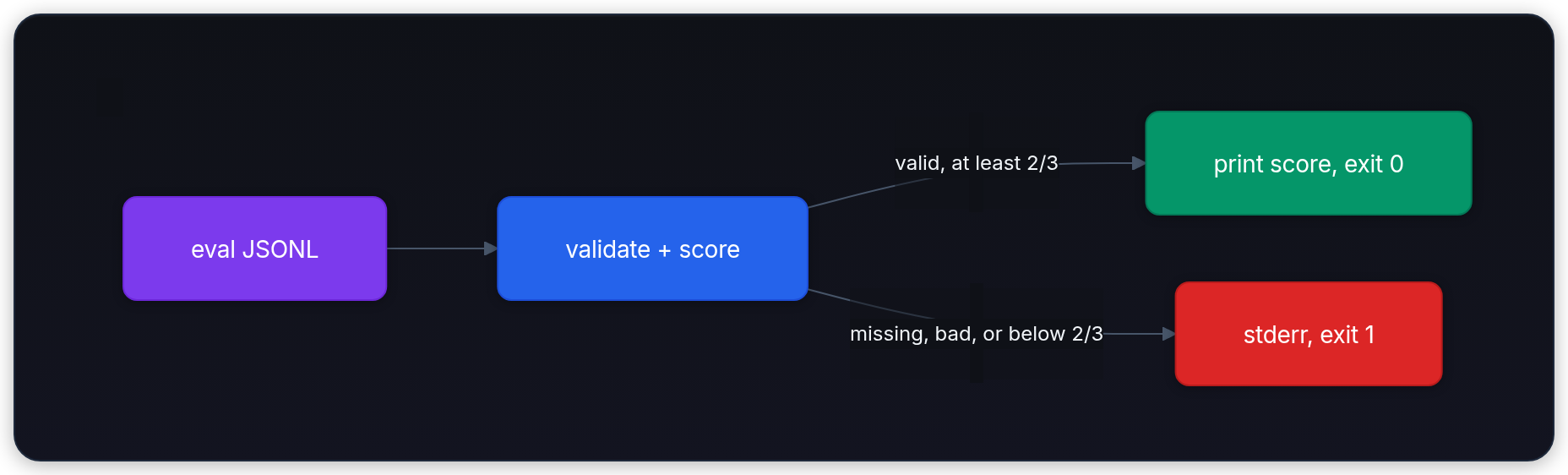
A gate is a check that blocks a later action when it fails. Valid rows at or above the threshold print a score and return status 0; missing, malformed, empty, or below-threshold input returns nonzero. Run mkdir -p scripts, then save the utility below as scripts/score_access_requests.py. The shell wrapper will invoke it on every clone.
1import json
2import sys
3from pathlib import Path
4
5REQUIRED = ("prompt", "expected", "prediction")
6EVAL_FILE = Path("eval/access_requests.jsonl")
7ASSET_FILE = Path("assets/access_requests.jsonl")
8
9path = EVAL_FILE if EVAL_FILE.exists() else ASSET_FILE
10if not path.exists():
11    print(f"ERROR: {path} missing; commit the eval fixture", file=sys.stderr)
12    raise SystemExit(1)
13
14rows = []
15for line_number, line in enumerate(path.read_text(encoding="utf-8").splitlines(), start=1):
16    if not line.strip():
17        continue
18    try:
19        row = json.loads(line)
20    except json.JSONDecodeError as error:
21        print(f"ERROR: line {line_number}: {error.msg}", file=sys.stderr)
22        raise SystemExit(1)
23    if not isinstance(row, dict):
24        print(f"ERROR: line {line_number} must be a JSON object", file=sys.stderr)
25        raise SystemExit(1)
26    missing = [field for field in REQUIRED if field not in row]
27    if missing:
28        print(f"ERROR: line {line_number} missing {missing}", file=sys.stderr)
29        raise SystemExit(1)
30    if any(not isinstance(row[field], str) or not row[field].strip() for field in REQUIRED):
31        print(f"ERROR: line {line_number} requires nonempty text fields", file=sys.stderr)
32        raise SystemExit(1)
33    rows.append(row)
34
35if not rows:
36    print("ERROR: eval file is empty", file=sys.stderr)
37    raise SystemExit(1)
38
39def normalize(label: str) -> str:
40    return label.strip().lower()
41
42correct = sum(normalize(row["expected"]) == normalize(row["prediction"]) for row in rows)
43total = len(rows)
44score = correct / total
45print(f"Eval rows: {total}")
46print(f"Exact-match accuracy on tiny fixture: {score:.3f} ({correct}/{total})")
47# Count gate: fail below 2/3 correct (same rule Docker and Python reuse).
48if correct * 3 < total * 2:
49    print("Gate failed: score regressed below 2/3", file=sys.stderr)
50    raise SystemExit(1)
51print("Gate passed. You may commit.")1Eval rows: 3
2Exact-match accuracy on tiny fixture: 0.667 (2/3)
3Gate passed. You may commit.Labels are normalized with strip().lower(), which removes surrounding whitespace and ignores letter case. The gate compares integer counts (correct * 3 < total * 2) instead of asking whether a rounded float equals 0.667. A score of 1.000 also passes; 0.667 is this fixture's expected output, not the only permitted score.
Read the printed count for what happened, then read the exit status for whether the command may continue. Errors use standard error (stderr), a separate output stream from ordinary results. Shell scripts can capture or redirect those streams independently.
Why does the gate compare integer counts instead of testing whether a floating-point score equals 0.667?
Answer
2 / 3 isn't exactly 0.667. Binary floating-point arithmetic can introduce subtle rounding errors, whereas cross-multiplying integer counts (correct * 3 >= total * 2) tests the exact two-thirds boundary without float precision traps.
The pre-commit gate that protects the score
The scorer works, but remembering to trigger it manually every time doesn't scale. We'll create an executable shell wrapper that both our local pre-commit hook and the clean-clone test can invoke.
1mkdir -p scripts
2cat > scripts/run_eval.sh << 'EOF'
3#!/usr/bin/env bash
4set -euo pipefail
5
6EVAL_FILE="eval/access_requests.jsonl"
7if [[ ! -f "$EVAL_FILE" ]]; then
8  echo "ERROR: $EVAL_FILE missing. Did you forget to commit the fixture or pull the latest repo?" >&2
9  exit 1
10fi
11
12PYTHON_BIN="${PYTHON_BIN:-python3}"
13if ! command -v "$PYTHON_BIN" >/dev/null 2>&1; then
14  echo "ERROR: Python 3 is required by the provided scorer. Install it or set PYTHON_BIN." >&2
15  exit 1
16fi
17
18if [[ -f scripts/score_access_requests.py ]]; then
19  "$PYTHON_BIN" scripts/score_access_requests.py
20else
21  echo "ERROR: scripts/score_access_requests.py missing. Add the Python scorer from this chapter." >&2
22  exit 1
23fi
24EOF
25chmod +x scripts/run_eval.sh
The command a teammate needs to run must be a tracked script in the repo, never a personal shell alias. Aliases and installed .git/hooks/ binaries stay pinned to one person's laptop; repro.sh travels everywhere with the repository.
1cat > repro.sh << 'EOF'
2#!/usr/bin/env bash
3set -euo pipefail
4
5./scripts/run_eval.sh
6EOF
7chmod +x repro.sh
Now connect that command to Git via a pre-commit hook. A hook is an executable script that Git automatically triggers before specific lifecycle actions like committing or pushing. Git stores active hooks inside .git/hooks/, meaning they never travel in a clone; we keep the canonical hook source in scripts/ and provide a guarded installer that sets up the local hook on every new checkout.[5] The installer verifies existing hooks so it won't silently overwrite other tooling.
1cat > scripts/pre-commit-ai-eval.sh << 'EOF'
2#!/usr/bin/env bash
3set -euo pipefail
4
5echo "Running AI eval gate before commit..."
6./scripts/run_eval.sh
7echo "Eval gate passed."
8EOF
9
10cat > scripts/install_hooks.sh << 'EOF'
11#!/usr/bin/env bash
12set -euo pipefail
13
14repo_root="$(git rev-parse --show-toplevel 2>/dev/null)" || {
15  echo "ERROR: run this command inside a Git working tree" >&2
16  exit 1
17}
18cd "$repo_root"
19
20if configured_hooks_path="$(git config --get core.hooksPath)"; then
21  echo "ERROR: core.hooksPath is already set to $configured_hooks_path; add the eval gate there deliberately" >&2
22  exit 1
23fi
24
25hooks_dir="$(git rev-parse --git-path hooks)"
26if [[ "$hooks_dir" != /* ]]; then
27  hooks_dir="$repo_root/$hooks_dir"
28fi
29hook_path="$hooks_dir/pre-commit"
30
31mkdir -p "$hooks_dir"
32if [[ -e "$hook_path" ]] && ! cmp -s scripts/pre-commit-ai-eval.sh "$hook_path"; then
33  echo "ERROR: $hook_path already exists; merge the eval command into it instead of overwriting it" >&2
34  exit 1
35fi
36
37cp scripts/pre-commit-ai-eval.sh "$hook_path"
38chmod +x "$hook_path"
39echo "Installed $hook_path"
40EOF
41
42chmod +x scripts/pre-commit-ai-eval.sh scripts/install_hooks.sh
43./scripts/install_hooks.sh
Test it.
1./repro.sh
2git add scripts/pre-commit-ai-eval.sh scripts/score_access_requests.py scripts/run_eval.sh scripts/install_hooks.sh repro.sh eval/access_requests.jsonl
3git commit -m "feat: add three-row eval and pre-commit gate that protects 0.667"1Eval rows: 3
2Exact-match accuracy on tiny fixture: 0.667 (2/3)
3Gate passed. You may commit.
4Running AI eval gate before commit...
5Eval rows: 3
6Exact-match accuracy on tiny fixture: 0.667 (2/3)
7Gate passed. You may commit.
8Eval gate passed.If the scorer reports a regression or the fixture disappears, the commit stops. This hook reads working-tree files, not the staged snapshot. A passing unstaged edit could therefore hide a failing version in the commit. Review git diff for unstaged edits and git diff --cached for the version you're about to commit, then test the committed version in a clone.
--no-verify can bypass a local hook, so it provides fast feedback rather than a security boundary. Run ./repro.sh in continuous integration (CI), an automated check of a committed version, too. That shared check catches a bypassed or missing local hook without borrowing working-tree edits.
Trace a regression through Git history
The gate tells you when behavior changes, but it doesn't name which file or commit broke it. When yesterday's passing 0.667 suddenly regresses to exit status 1, capture the terminal output and exit code before modifying any code:
1./repro.sh
2repro_status=$?
3printf 'repro exit status: %s\n' "$repro_status"
4git status --short
5git log --oneline --decorate -5
6git show --stat --oneline HEAD
git log names the snapshots that led here. git show reveals what the latest snapshot changed, while git status --short separates committed history from edits still sitting in the worktree. A green rerun with a dirty worktree is weaker evidence than a green commit with a clean status.
When the bad behavior could have entered anywhere in a long history, test the middle instead of reading every diff. git bisect checks one candidate commit at a time and narrows the range. Start from a clean worktree or set aside uncommitted edits, because bisect checks out candidate snapshots:
1git bisect start
2git bisect bad HEAD
3# Replace the value with a commit known to pass ./repro.sh.
4GOOD_COMMIT="replace-with-known-good-commit"
5git bisect good "$GOOD_COMMIT"
At each candidate, run the gate and read its output before classifying the commit:
1./repro.sh
2printf 'repro exit status: %s\n' "$?"
Enter git bisect good if the check passes, git bisect bad if it reproduces the regression, or git bisect skip if an unrelated setup problem prevents testing. Repeat the test and classification at each new candidate until Git reports the first bad commit. Only then inspect it and return to your original branch:
1git show refs/bisect/bad
2git bisect reset
The shell's zero-versus-nonzero status maps directly to git bisect good and git bisect bad. If a candidate commit can't execute because of a broken environment, use git bisect skip rather than falsely condemning that revision. Once Git identifies the first bad snapshot, running git show <commit> gives you the exact diff that introduced the bug.[1]
Personal shortcuts vs repo commands
The hook now runs on your development machine, but shortcuts defined in ~/.zshrc or ~/.bashrc stay strictly local. Shell functions can accelerate daily development on your personal machine; they can never serve as a repository's official setup contract.
For NVIDIA setups, nvidia-smi --query-gpu with --format=csv provides a scriptable interface for custom shell helpers.[6] The functions below assume GNU utilities on a Linux GPU system. Command options often differ on macOS, which doesn't ship NVIDIA drivers; run these helpers on remote GPU instances, and rely on ./repro.sh as the portable repo entrypoint.
1# GPU snapshot (works on NVIDIA, falls back gracefully)
2gpu() {
3  if command -v nvidia-smi >/dev/null 2>&1; then
4    nvidia-smi --query-gpu=index,name,memory.used,memory.total,utilization.gpu --format=csv,noheader
5  else
6    echo "No NVIDIA GPU or nvidia-smi not in PATH"
7  fi
8}
9
10# Dataset size at a glance
11ds() {
12  local target="${1:-.}"
13  du -sh -- "$target"
14  find "$target" -type f -name '*.jsonl' -exec wc -l {} \; 2>/dev/null |
15    awk '{ rows += $1 } END { print "JSONL newline count:", rows + 0 }'
16}
17
18# One-command reproduction of the current eval
19repro() {
20  if [[ -x ./repro.sh ]]; then
21    ./repro.sh
22  else
23    echo "No executable ./repro.sh in the current directory" >&2
24    return 1
25  fi
26}
After saving the functions, run source ~/.zshrc or source ~/.bashrc once to reload the configuration. gpu, ds, and repro then become shortcuts. Keep ./repro.sh in setup docs and CI. If a clone needs the alias, the command still isn't reproducible.
Inspect data, then reclaim a GPU
Remote debugging on cloud nodes starts with a fundamental question: is the input dataset malformed, or is the training process hung? First inspect large datasets without flooding your SSH session. Running cat train.jsonl dumps millions of lines into your terminal buffer; start with a single line and targeted row counts instead:
1head -n 1 eval/access_requests.jsonl    # peek at the schema of one row
2wc -l eval/access_requests.jsonl        # count rows without loading the file
3grep -c '"expected"' eval/access_requests.jsonl  # how many rows have the field
The pipe operator | routes stdout from one process into stdin of the next. Running grep '"restored"' eval/access_requests.jsonl | wc -l streams lines through the filter and counts matches on the fly. Remember that wc -l counts newline characters (\n), not JSON objects: a final line lacking a trailing newline won't be counted, and blank lines will be counted. Similarly, grep performs plain string matching rather than schema validation. These utilities offer rapid checks, not replacements for full data validation.
Without pipefail, Bash normally uses the final command's status for a pipeline. That means wc could report success (status 0) even if grep couldn't open the file. With pipefail, a failure in an earlier stage makes the pipeline return nonzero too. Bash still waits for the pipeline to finish; this option doesn't immediately cancel the other stages.[7]
set -euo pipefail is useful, but it doesn't replace explicit error handling. -u catches unset variables; -e exits on many unhandled nonzero statuses. Commands tested by if, while, !, or parts of && / || lists have exceptions. Testing a function this way can also disable -e inside the function. Check important failures deliberately, and remember that grep returns 1 for a valid search with no matches.[8]
For example, ask whether a label appears instead of treating every nonzero status as a crash. A nonexistent file is a different outcome from an existing file with no matching label:
1if grep -q '"restored"' eval/access_requests.jsonl; then
2  echo "At least one restored label appears"
3else
4  search_status=$?
5  if [[ "$search_status" -eq 1 ]]; then
6    echo "No restored label appears"
7  else
8    echo "ERROR: search failed with status $search_status" >&2
9  fi
10fi
If the output is surprising, verify location before blaming Python. A relative path such as eval/access_requests.jsonl starts from the current directory; an absolute path starts at /. Quote variables that contain paths so spaces don't split one path into several arguments. Then check the exact capability a command needs:
1pwd
2ls -l scripts/run_eval.sh eval/access_requests.jsonl
3test -r eval/access_requests.jsonl && echo "eval fixture is readable"
4test -x scripts/run_eval.sh && echo "eval script is executable"
chmod +x scripts/run_eval.sh adds the executable bit. It doesn't make a script trustworthy, grant access to its input, or fix a filesystem mounted with execution disabled. Avoid chmod 777: it grants write access far beyond what this repo needs and hides the ownership problem.
Now diagnose a GPU that remains pinned after a training script hangs or an SSH session terminates abruptly. A detached PyTorch process can stay resident in VRAM while nvidia-smi reports active compute processes.[6] A process ID (PID) identifies a running program; it isn't an immediate license to run kill -9. Check who owns it and what command launched it, request a graceful shutdown, and only force-kill if the process refuses to stop and you're authorized to terminate it.
1nvidia-smi  # read the PID in the bottom "Processes" table
2PID=12345   # replace this only after you identify your own process
3
4ps -o user=,pid=,ppid=,stat=,etime=,cmd= -p "$PID"
5kill -TERM "$PID"
6for _ in {1..10}; do  # give graceful shutdown up to ten seconds
7  kill -0 "$PID" 2>/dev/null || break
8  sleep 1
9done
10
11if kill -0 "$PID" 2>/dev/null; then
12  ps -o user=,pid=,ppid=,stat=,etime=,cmd= -p "$PID"
13  echo "Still alive. Recheck owner and command before: kill -KILL $PID"
14fi
Only signal a process you own or are authorized to operate. kill -0 checks whether a PID exists and whether you may signal it; it doesn't prove that the PID still belongs to the same program. Re-inspect owner and command before SIGKILL. If VRAM remains allocated but nvidia-smi shows no owning compute PID, there's no process ID to kill. Check container or PID-namespace visibility and other driver clients, then move to container-runtime or driver diagnosis.
Start with SIGTERM. Signal 15 gives the process a chance to close files and release CUDA memory. SIGKILL (signal 9) can't be caught or handled and can leave lock files or corrupt checkpoints, so reserve it for a process that refuses to exit.[9]
You find a live training PID holding GPU memory. Which signal should you send first, and when should you escalate?
Answer
After checking ownership and permission to stop the job, send SIGTERM first. A program with a shutdown handler can then flush files. Wait for a bounded grace period and recheck the process identity before considering SIGKILL; a live PID alone isn't enough.
Keep a long job alive across SSH
./repro.sh finishes in a blink. A training job can run for hours through SSH, and closing the laptop shouldn't kill it. The choice depends on what evidence you'll need when you reconnect.
nohup python train.py > train.log 2>&1 </dev/null &runs a noninteractive process that ignores hangup and writes a log. It won't give you a session to type into later.tmux new -s traininggives you a detachable session. Detach withCtrl-b d, reconnect, then runtmux attach -t training; the job keeps its terminal while you're away.[10]nice -n 10 python train.pylowers CPU scheduling priority relative to the default. It doesn't cap RAM or GPU, and it doesn't keep a process alive after logout.[11]- When disk fills up, find heavy paths with
du -ah /workspace | sort -rh | head -20. When you need the training PID,pgrep -af 'python.*train.py'finds candidates without matching the search command itself.
Use tmux when you may need to inspect or steer the run later. Use nohup for a noninteractive job whose progress you can inspect through its log. Neither protects against a machine reboot, an out-of-memory kill, or a cluster scheduler stopping the job. They also don't make its inputs or environment reproducible.
Git carried the scripts and fixture. Python still needs a declared, rebuildable environment on the next machine.
Rebuild Python on every clone
The next common onboarding failure is ModuleNotFoundError: the tracked Python code arrived, but python points to a different machine's site-packages. Python's built-in venv module creates isolated virtual environments, but compiled virtual environments aren't portable across paths or machines. Every fresh clone must construct its own .venv locally.[12] Our scorer relies solely on the standard library; the activation script below checks for CUDA availability if torch happens to be installed.
1cat > .python-version << 'EOF'
23.12
3EOF
4
5cat > requirements.txt << 'EOF'
6# Empty because this chapter's scorer uses only Python's standard library.
7# When packages arrive, use a committed lockfile or fully hashed requirements.
8EOF
9
10cat > .env.example << 'EOF'
11# Copy to .env and fill locally. Never commit the real value.
12ACCESS_API_KEY=
13EOF
14
15cat > activate.sh << 'EOF'
16#!/usr/bin/env bash
17
18_activate_fail() {
19  echo "ERROR: $1" >&2
20}
21
22_activate_main() {
23  # Allow an explicit interpreter; version managers can read .python-version.
24  PYTHON_BIN="${PYTHON_BIN:-python3}"
25  if ! command -v "$PYTHON_BIN" >/dev/null 2>&1; then
26    _activate_fail "install python3 or set PYTHON_BIN=/path/to/python"
27    return 1
28  fi
29
30  if ! "$PYTHON_BIN" - << 'PY'
31import sys
32raise SystemExit(0 if sys.version_info >= (3, 12) else 1)
33PY
34  then
35    _activate_fail "Python 3.12 or newer is required; set PYTHON_BIN to a supported interpreter"
36    return 1
37  fi
38
39  # 1. Create or reuse a local virtualenv
40  if [[ ! -d .venv ]]; then
41    "$PYTHON_BIN" -m venv .venv || {
42      _activate_fail "could not create .venv"
43      return 1
44    }
45  fi
46  source .venv/bin/activate || {
47    _activate_fail "could not activate .venv"
48    return 1
49  }
50
51  if ! python -c 'import sys; raise SystemExit(0 if sys.version_info >= (3, 12) else 1)'; then
52    _activate_fail "existing .venv uses an older Python; recreate it with Python 3.12 or newer"
53    return 1
54  fi
55  # Make run_eval.sh use this environment, even after an interpreter override.
56  export PYTHON_BIN="$VIRTUAL_ENV/bin/python"
57
58  # 2. Install only a fully pinned, fully hashed requirements set.
59  if grep -Ev '^[[:space:]]*(#|$)' requirements.txt >/dev/null 2>&1; then
60    python -m pip install --require-hashes -r requirements.txt || {
61      _activate_fail "requirements must pin and hash every package"
62      return 1
63    }
64  else
65    _requirements_status=$?
66    if [[ $_requirements_status -gt 1 ]]; then
67      _activate_fail "could not read requirements.txt"
68      return 1
69    fi
70  fi
71  unset _requirements_status
72
73  # 3. Print the local environment without requiring GPU packages yet
74  if ! python - << 'PY'
75import os, sys
76print("Python executable:", sys.executable)
77print("Python:", sys.version.split()[0])
78visible_devices = os.environ.get("CUDA_VISIBLE_DEVICES")
79print(
80    "CUDA_VISIBLE_DEVICES:",
81    visible_devices if visible_devices is not None else "<unset; no mask applied>",
82)
83try:
84    import torch
85except ModuleNotFoundError:
86    print("PyTorch: not installed yet (OK for this chapter)")
87else:
88    print("PyTorch:", torch.__version__)
89    print("CUDA available:", torch.cuda.is_available())
90    if torch.cuda.is_available():
91        print("GPU:", torch.cuda.get_device_name(0))
92PY
93  then
94    _activate_fail "environment probe failed"
95    return 1
96  fi
97
98  echo "Environment ready. Run './repro.sh' to execute the eval gate."
99}
100
101if _activate_main; then
102  _activate_status=0
103else
104  _activate_status=$?
105fi
106unset -f _activate_main _activate_fail
107if [[ $_activate_status -ne 0 ]]; then
108  return "$_activate_status" 2>/dev/null || exit "$_activate_status"
109fi
110unset _activate_status
111EOF
112chmod +x activate.sh
The outer status check matters because this file is sourced. A helper can return nonzero while later commands keep running and make setup look successful. _activate_main checks its important steps explicitly; the surrounding if captures its result before cleanup, and the file-level return passes that status back to the caller. Run source activate.sh && ./repro.sh to continue only after successful setup. If your calling shell has -e enabled, handle a setup failure in a conditional too rather than assuming a nonzero source will leave that shell open.
The scorer's dependency set is empty today. Once packages arrive, plain version ranges won't reproduce an install. Choose one complete contract: commit pyproject.toml plus uv.lock and run uv sync --locked, or commit a requirements file that pins every direct and transitive package and includes accepted artifact hashes for pip --require-hashes.[13][14] A lockfile constrains Python packages; it doesn't pin the OS, driver, or system libraries. Docker handles that boundary next.
.python-version suggests Python 3.12 to version managers; it doesn't install Python or enforce that version by itself. This lab checks for 3.12 or newer because it uses only the standard library. A project that depends on one exact Python release should pin and verify that release too.
.env.example demonstrates how to record a variable name without its secret value. This scorer doesn't need ACCESS_API_KEY; leave it empty. activate.sh deliberately doesn't source .env: sourcing treats every line as shell code. When an application does need a key, export trusted values through your shell or a dedicated environment loader and fail clearly when the required variable is absent.
Expected output:
source activate.shshould print an executable insideaccess-rag/.venv, a Python version of 3.12 or newer, the currentCUDA_VISIBLE_DEVICESstate, andEnvironment ready. If setup printsERROR, fix that first and don't run the eval from a half-created environment.
Create README.md with the same setup order another machine should follow:
1cat > README.md << 'EOF'
2## Quick start
3
4git clone [email protected]:your-org/access-rag.git
5cd access-rag
6./scripts/install_hooks.sh
7if command -v git-lfs >/dev/null 2>&1; then
8  git lfs install --local
9  git lfs pull
10fi
11source activate.sh && ./repro.sh
12EOF
Track the setup contract before testing a clone. If the hook is configured, committing these files runs the same eval gate first.
1git add .python-version requirements.txt .env.example activate.sh README.md
2git commit -m "chore: add reproducible environment contract"
3git status --short
With ordinary status settings, no output from git status --short means the tracked files and staging area match the new commit and no unignored, untracked files were reported. Ignored files can still exist. Now test the stronger claim: did the required project files actually enter the commit?
When the clone still fails
| Symptom | Most common cause | Fix that belongs in the repo |
|---|---|---|
CUDA not found on the GPU box | Host driver or container runtime is missing, the image lacks a compatible CUDA stack, or CUDA_VISIBLE_DEVICES is explicitly empty/invalid and hides the GPU | Compare nvidia-smi, the printed CUDA_VISIBLE_DEVICES, and torch.cuda.is_available(); remove an accidental mask or choose a valid device index, then document the required image and runtime. An unset variable normally exposes all available devices. An empty string hides every GPU.[15] |
ModuleNotFoundError for a package that worked on the laptop | Dependency contract is incomplete or environment wasn't synced from it | Rebuild from an empty env, lock every direct and transitive dependency, commit the lock, and install with uv sync --locked or a fully hashed requirements file |
| Eval exits because the three-row JSONL is missing | fixture existed only as an untracked local file | Move the fixture to eval/, commit it, and prove it appears in a clone |
| Pre-commit hook doesn't run on a fresh clone | installed copy under Git's private hook path is clone-local | Keep scripts/pre-commit-ai-eval.sh and scripts/install_hooks.sh tracked, then run the installer after cloning |
| Installer refuses to replace an existing hook | another tool or developer already owns pre-commit | Merge ./scripts/run_eval.sh into existing hook deliberately; don't silently overwrite another control |
| Pull introduces a model pointer that won't load | Git LFS is missing, smudge was skipped, or object wasn't uploaded | Run git lfs install and git lfs pull, inspect pointer status, and make CI verify required LFS objects before a release |
Keep each diagnosis and its prevention in the repo. The next clone should name its missing contract instead of requiring machine-specific guesswork.
Prove it with a throwaway clone
The code, fixture, and setup scripts are committed. Now verify whether a completely isolated copy can run without borrowing any untracked files from your laptop. A valid clone must receive the fixture and scripts, build a fresh .venv, and install its local pre-commit hook. It requires no secret tokens for this eval. Both copies must output 0.667 when running ./repro.sh.
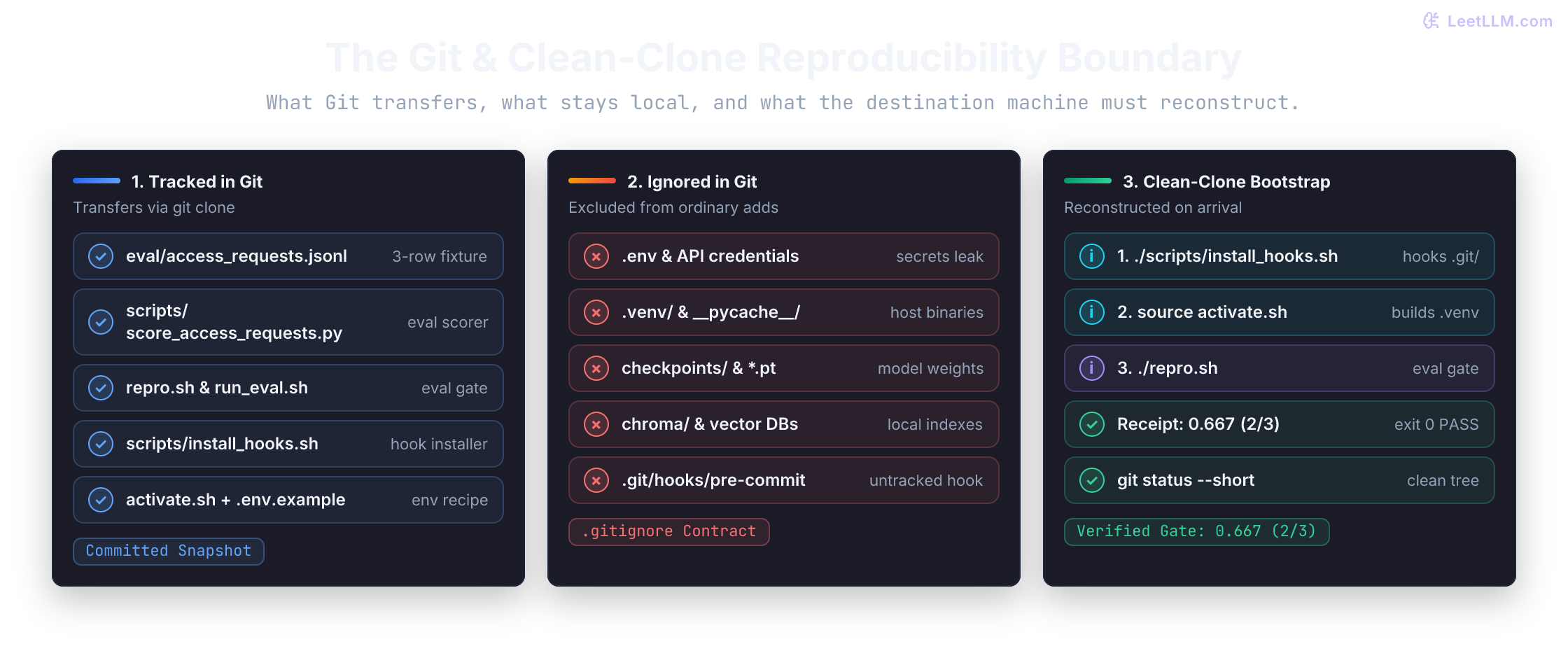
mktemp -d generates a clean, unique temporary directory. The clone receives committed files without borrowing the original worktree's untracked inputs or installed .git/hooks/. Calling the tracked ./repro.sh avoids relying on a personal alias. Adding --no-local uses regular Git transport instead of the local hardlink optimization; a local-path clone still doesn't need a network server.[16] Wrapping the commands in a subshell (...) keeps activation changes out of your active terminal.
1repo_root="$(pwd)"
2clone_root="$(mktemp -d)"
3
4(
5  set -e
6  git clone --no-local "$repo_root" "$clone_root/access-rag"
7  cd "$clone_root/access-rag" || exit 1
8  ./scripts/install_hooks.sh
9  source activate.sh || exit 1
10  ./repro.sh
11  git status --short
12)
13clone_status=$?
14
15printf 'Clone check exit status: %s\n' "$clone_status"
16echo "Temporary clone kept for inspection: $clone_root/access-rag"
Check all four results: activation prints its Python executable and version, the eval prints three rows and 0.667 (2/3), git status --short prints nothing, and the clone check exits 0. The ignored .venv may exist without making the tree dirty. A setup or eval failure stops the subshell instead of being hidden by a later successful git status.
This is a file-isolation test on the same machine, not a new machine. It still shares your installed tools, environment variables, network access, and operating system. If it needs an untracked project file, add the nonsecret input or its setup instructions to Git, commit, and rerun. Testing on another machine or in CI exposes the next layer of assumptions.
Before sharing a commit, inspect git status, run ./repro.sh, and repeat the temporary clone. Record any missing file, variable, package, permission, or machine capability in the tracked contract first.
Why is a clean temporary clone stronger evidence than rerunning repro in your working directory?
Answer
The clone doesn't contain your untracked files or installed hook copies, and the test invokes tracked scripts rather than a personal alias. A passing run shows that those files and setup commands traveled through Git. The same-machine test still inherits host tools and environment variables; it doesn't prove OS or driver parity.