Personalize this lesson
Adapt explanations and teaching visuals to your background and preferred voice.
The Docker image from the previous lesson printed a passing evaluation report. Two predictions matched their expected labels; one didn't:
1Eval rows: 3
2Exact-match accuracy on tiny fixture: 0.667 (2/3)
3Gate passed. You may commit.
Git stored eval/access_requests.jsonl and scripts/score_access_requests.py. Docker supplied the operating system files and Python runtime, but neither one explains how a line of text becomes 2/3.
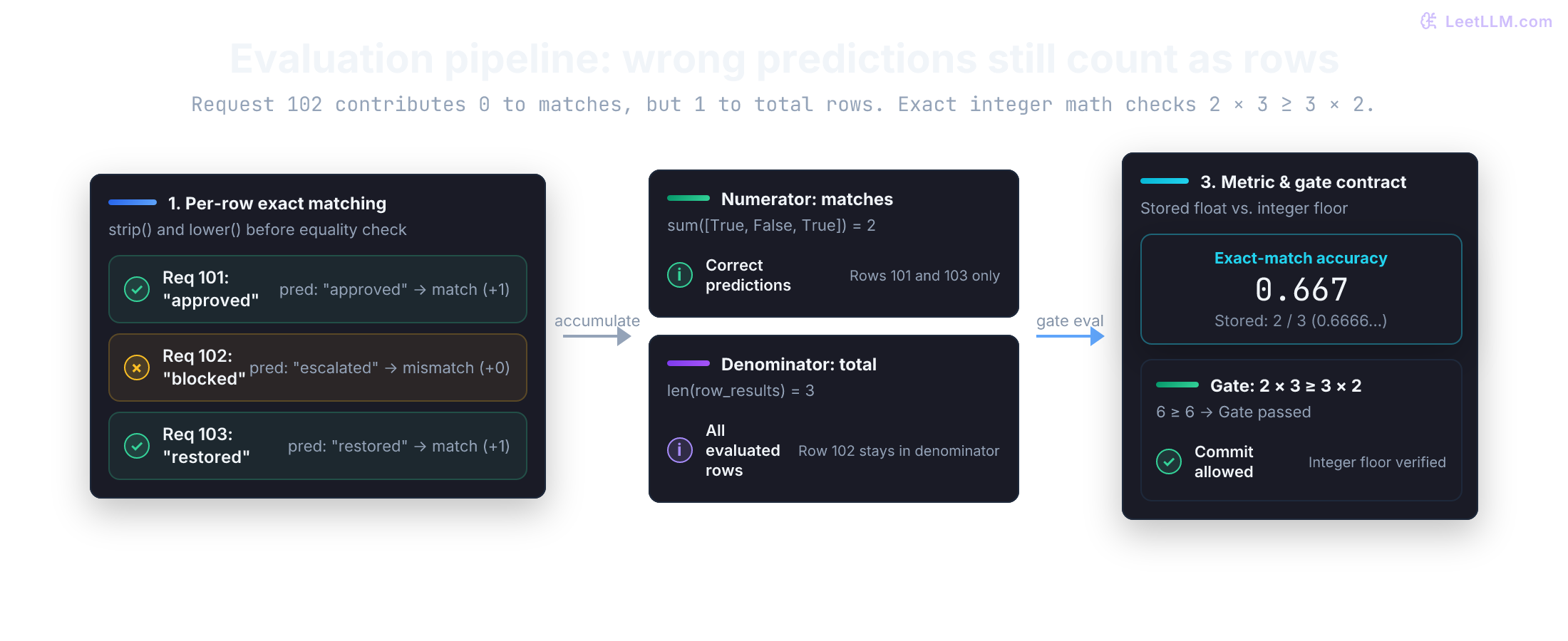
That path is ordinary Python: a file becomes rows, rows become counts, and counts become a printed score. Rebuild it with each boundary visible.[1]
Pin a local Python 3.12 project
The image already pins one runtime path. Before changing the scorer, give your checkout a matching interpreter and a separate place for its tools. Otherwise a passing test can depend on whichever Python and packages happen to be first on your PATH.
A virtual environment provides a project-local package directory separate from the operating system's Python. Local work here uses uv's project workflow for that isolation.
Keep the lab on Python 3.12 because that's what the Docker image already pins, not because 3.12 is the newest CPython release.
Confirm uv --version works. If it doesn't, use the official uv installation guide for your operating system. Run these commands from your earlier lab repository, not from an unrelated project. Skip uv init if pyproject.toml already exists:
1uv python install 3.12
2uv init --bare --python 3.12
3uv python pin 3.12
4uv sync
5uv run python --version
Read the files after running these commands. uv init --bare writes only pyproject.toml; its requires-python field declares compatible Python versions. A 3.12 pin selects that minor release family, not one exact patch release.
uv python pin 3.12 writes .python-version. The first uv sync or uv run creates .venv and uv.lock.[2]
Each path answers a different reproducibility question. Keep the portable inputs in Git and recreate machine-local output:
| Path | What it records | Commit it? |
|---|---|---|
pyproject.toml | supported Python range and direct dependencies | yes |
.python-version | default Python version for this checkout | yes |
uv.lock | resolved dependency versions | yes |
.venv/ | installed packages for this machine | no |
uv run uses the project environment without shell activation. If you activate it on macOS or Linux, run source .venv/bin/activate; on Windows PowerShell, run .venv\Scripts\Activate.ps1. Activation changes which python your shell finds.
uv sync creates the environment and resolves its dependencies. Activation is a shell convenience, not dependency management.
Python also ships venv. In a project that doesn't use uv, python3.12 -m venv .venv creates the same kind of isolation. Pick one environment workflow per project so package state stays understandable. Keep Docker's requirements.txt; don't replace the image install path used by the earlier scorer.
Why shouldn't .venv/ be committed even though uv.lock should be?
Answer
The lockfile is portable input that records resolved dependencies. .venv/ contains machine-specific installed files and can be recreated from the project files with uv sync.
One row is ordinary Python data
Start with request 102, the row the scorer should mark wrong. Before writing a loop, predict what one row must contain and what the comparison should return:
1{"prompt": "Access request 102 status?", "expected": "blocked", "prediction": "escalated"}After parsing, this JSON object becomes a Python dictionary. A dictionary maps keys such as "expected" to values such as "blocked", so row["expected"] retrieves one named field. Assigning the mapping to row gives later operations a stable name.
The next cell reads both labels, normalizes outer whitespace and case, then stores the comparison as a Boolean. Its output lets you check the type and the decision before any batch logic appears.
1row = {
2    "prompt": "Access request 102 status?",
3    "expected": "blocked",
4    "prediction": "escalated",
5}
6
7expected = row["expected"].strip().lower()
8prediction = row["prediction"].strip().lower()
9is_correct = prediction == expected
10
11print("prompt:", row["prompt"])
12print("expected type:", type(expected).__name__)
13print("is correct:", is_correct)1prompt: Access request 102 status?
2expected type: str
3is correct: FalsePython evaluates the right side of = first, then binds that value to the name on the left. A single = assigns; == compares.
strip() removes whitespace from both ends, and lower() returns a lowercase string. Neither method edits the original string. Strings are immutable: operations return results instead of changing their contents in place.
Here, exact match means equality after these two normalization steps. It's appropriate for the fixture's short status labels. It won't recognize two differently worded explanations as equivalent, and it doesn't remove spaces inside a label.
Built-in values used in the scorer
You don't need every Python type before writing useful code. These eight cover the values moving through this evaluator:
| Type | Example | Use in this scorer |
|---|---|---|
str | "blocked" | prompts, labels, and file paths |
int | 2 | correct-row and total-row counts |
float | 2 / 3 | the accuracy score |
bool | False | one row's exact-match decision |
NoneType | None | an explicit absence of a value |
list | [True, False, True] | ordered results for all rows |
tuple | (2, 3, 2 / 3) | a fixed group of returned values |
dict | {"expected": "blocked"} | named fields for one row |
Python is dynamically typed: a name can be rebound to a value of another type. That flexibility doesn't make types interchangeable. "2" is text, 2 is an integer, and 2.0 is a floating-point number. Convert with int(), float(), or str() only when the data contract says the conversion is valid. A malformed label shouldn't become a value that happens to score.
A list turns one row into a batch
The protected evaluation fixture contains three dictionaries in order. Before running the batch, predict the receipt: two labels match, one differs, and the denominator stays at three.
| Request | Expected | Prediction | Exact match |
|---|---|---|---|
| 101 | approved | approved | 1 |
| 102 | blocked | escalated | 0 |
| 103 | restored | restored | 1 |
A list keeps those rows together, and a for loop visits each row once. Indentation marks the statements that belong to the loop. The code records each Boolean before it computes an aggregate, so a surprising score still has a per-row trail.
1examples = [
2    {"prompt": "Access request 101 status?", "expected": "approved", "prediction": "approved"},
3    {"prompt": "Access request 102 status?", "expected": "blocked", "prediction": "escalated"},
4    {"prompt": "Access request 103 status?", "expected": "restored", "prediction": "restored"},
5]
6
7row_results = []
8
9for position, row in enumerate(examples, start=1):
10    is_correct = row["prediction"].strip().lower() == row["expected"].strip().lower()
11    row_results.append(is_correct)
12    print(position, row["prediction"], is_correct)
13
14matches = sum(row_results)
15total = len(row_results)
16score = matches / total
17
18print("matches:", matches)
19print("score:", f"{score:.3f}")11 approved True
22 escalated False
33 restored True
4matches: 2
5score: 0.667enumerate(..., start=1) supplies a readable position with each row, while append() keeps one Boolean for that row.
Then len() counts all results and sum() treats True as 1 and False as 0, producing the correct-row count. An f-string such as f"{score:.3f}" formats the fraction for display after the calculation is done.
Check the arithmetic by hand before trusting the output:
If the code prints anything else for these exact three rows, inspect the per-row Booleans first. A mismatch there points to normalization; matching Booleans with a wrong total points to aggregation.
After adding a fourth row whose prediction matches its expected label, what should the score become?
Answer
There are now three correct rows out of four, so the score becomes 3 / 4 = 0.75.
Functions give the comparison a name
The loop works, but comparison, aggregation, and printing are tangled together. Pull the comparison out first. A function packages one operation behind a name: inputs arrive as parameters, and return sends a value back to the caller.
Ask what should stay true if another caller needs the same rule. Both labels should be stripped and lowercased, and the function should return only the Boolean decision. This function owns that normalization rule:
1def exact_match(expected: str, prediction: str) -> bool:
2    normalized_expected = expected.strip().lower()
3    normalized_prediction = prediction.strip().lower()
4    return normalized_prediction == normalized_expected
5
6print(exact_match("blocked", "escalated"))
7print(exact_match("approved", " APPROVED "))1False
2Trueexpected: str and -> bool are type hints. They document intended inputs and output for readers, editors, and static type checkers. Python doesn't enforce those hints when the function runs.[1] Calling exact_match("approved", 7) still enters the function, then raises AttributeError because an integer has no strip() method.
That failure points to a boundary: editor-visible annotations aren't a parser. Runtime data needs runtime checks as soon as values come from a file instead of a literal in the editor.
JSONL moves the same rows to disk
Hardcoded lists are useful for learning, but an evaluator must read the rows it was given. Store the same three requests in a file using JSONL (JSON Lines), where each line contains one complete JSON value.
Save the stable fixture at eval/access_requests.jsonl:
1{"prompt": "Access request 101 status?", "expected": "approved", "prediction": "approved"}
2{"prompt": "Access request 102 status?", "expected": "blocked", "prediction": "escalated"}
3{"prompt": "Access request 103 status?", "expected": "restored", "prediction": "restored"}
JSON and Python use similar punctuation, but they aren't the same language. When json.loads parses a line, Python's standard-library json module maps JSON values into Python values:
| JSON | Python after json.loads |
|---|---|
| object | dict |
| array | list |
| string | str |
number with no decimal point or exponent, such as 7 | int |
number with a decimal point or exponent, such as 7.0 or 7e0 | float |
true / false | True / False |
null | None |
Path from the standard-library pathlib module represents a filesystem path. Opening it with encoding="utf-8" makes text decoding explicit.
Iterating over the handle yields one line at a time instead of reading one giant string.[1] Our loader will still collect the parsed dictionaries in a list, so its memory use grows with the dataset. Streaming the scoring itself is a separate change.
Create the same fixture in the next helper cell so every marked example can run in isolation. If you followed the Git and Docker lessons, that file already exists, and running this cell recreates its three lines.
1from pathlib import Path
2
3fixture = Path("eval/access_requests.jsonl")
4fixture.parent.mkdir(exist_ok=True)
5fixture.write_text(
6    "\n".join(
7        [
8            '{"prompt": "Access request 101 status?", "expected": "approved", "prediction": "approved"}',
9            '{"prompt": "Access request 102 status?", "expected": "blocked", "prediction": "escalated"}',
10            '{"prompt": "Access request 103 status?", "expected": "restored", "prediction": "restored"}',
11        ]
12    )
13    + "\n",
14    encoding="utf-8",
15)
16print("fixture rows:", len(fixture.read_text(encoding="utf-8").splitlines()))1fixture rows: 3Read the file, then print the same receipt
Now connect the file to the receipt. Follow one row through JSON decoding, field checks, comparison, aggregation, and the 2/3 eval gate. If any boundary changes the contract, the receipt should stop matching the Git and Docker chapters.
The Git scorer rejected non-string fields before normalizing labels with .strip().lower(). Replacing that type check with str(label) would turn JSON number 7 into string "7", counting a producer bug as a wrong prediction against "approved". Refusing that row keeps invalid data out of the mismatch count.
The parser needs two kinds of checks. isinstance(value, str) checks a value's type; not value.strip() rejects a string containing no visible text. raise stops normal execution with an exception, and try/except handles a named exception. Around json.loads, that handler adds our file's line number; from error preserves the original decoding error as its cause.
![Runtime validation contract: Line 4 is valid JSON, so json.loads produces Python integer 7. The static type hint dict[str, str] is ignored at runtime. The explicit isinstance(value, str) check catches the type violation and raises TypeError before the row can reach the scorer or pollute the metric denominator.](/cdn/content-image/foundations/python-for-ai-engineering/illustrations/_generated/runtime_validation_contract_dark.png?v=2d03760d3b7f)
Save these definitions in scripts/score_access_requests.py, replacing the earlier scorer. Square brackets in a hint describe contents: dict[str, str] has string keys and values, and list[dict[str, str]] is a list of those dictionaries.
1import json
2import sys
3from pathlib import Path
4
5REQUIRED_FIELDS = ("prompt", "expected", "prediction")
6DEFAULT_INPUT = Path("eval/access_requests.jsonl")
7
8def parse_example(line: str, line_number: int) -> dict[str, str]:
9    try:
10        row = json.loads(line)
11    except json.JSONDecodeError as error:
12        raise ValueError(f"line {line_number}: invalid JSON") from error
13
14    if not isinstance(row, dict):
15        raise TypeError(f"line {line_number}: expected a JSON object")
16
17    example: dict[str, str] = {}
18    for key in REQUIRED_FIELDS:
19        if key not in row:
20            raise KeyError(f"line {line_number}: missing {key}")
21
22        value = row[key]
23        if not isinstance(value, str):
24            raise TypeError(f"line {line_number}: {key} must be a string")
25        if not value.strip():
26            raise ValueError(f"line {line_number}: {key} must not be empty")
27
28        example[key] = value
29
30    return example
31
32def load_examples(path: Path) -> list[dict[str, str]]:
33    examples = []
34
35    with path.open("r", encoding="utf-8") as handle:
36        for line_number, line in enumerate(handle, start=1):
37            if line.strip():
38                examples.append(parse_example(line, line_number))
39
40    if not examples:
41        raise ValueError("input file has no examples")
42
43    return examples
44
45def exact_match(expected: str, prediction: str) -> bool:
46    return expected.strip().lower() == prediction.strip().lower()
47
48def score_examples(examples: list[dict[str, str]]) -> tuple[int, int, float]:
49    if not examples:
50        raise ValueError("examples must not be empty")
51
52    matches = 0
53    for example in examples:
54        if exact_match(example["expected"], example["prediction"]):
55            matches += 1
56
57    total = len(examples)
58    return matches, total, matches / total
59
60def passes_gate(matches: int, total: int) -> bool:
61    return matches * 3 >= total * 2
62
63def main(path: Path) -> None:
64    examples = load_examples(path)
65    matches, total, score = score_examples(examples)
66    print(f"Eval rows: {total}")
67    print(f"Exact-match accuracy on tiny fixture: {score:.3f} ({matches}/{total})")
68    if not passes_gate(matches, total):
69        print("Gate failed: score regressed below 2/3", file=sys.stderr)
70        raise SystemExit(1)
71    print("Gate passed. You may commit.")
Read the loader from the outside in. if runs its indented block only when the condition is True, and matches += 1 means matches = matches + 1.
The three values after return form a tuple; matches, total, score = ... unpacks it into three names. A with block closes the file even if parsing raises an exception.
The loader deliberately ignores blank lines, but never skips a malformed nonblank row. It also ignores extra object fields after copying the three required strings. These are choices in this evaluator, not rules imposed by JSON. if not examples rejects an empty list before division could use a zero denominator.
passes_gate keeps the rule in integer counts, the same form Git already used: fail when matches * 3 < total * 2. For a positive total, multiplying matches / total >= 2 / 3 by 3 * total gives that exact count comparison. The caller supplies valid counts from a nonempty list; this helper doesn't validate arbitrary counts.
The saved module also needs a small command-line wrapper. sys.argv[0] is the script name, and sys.argv[1] is the optional path. Add it at the bottom so direct execution and imports have different behavior:
1if __name__ == "__main__":
2    if len(sys.argv) > 2:
3        raise SystemExit("usage: uv run scripts/score_access_requests.py [examples.jsonl]")
4
5    input_path = Path(sys.argv[1]) if len(sys.argv) == 2 else DEFAULT_INPUT
6    main(input_path)
The if __name__ == "__main__" guard calls main when you run the file directly. Importing the functions in a test doesn't score a file as a side effect.
Run the default path once against the stable fixture. Before you do, predict the same three lines from the earlier receipt:
1main(DEFAULT_INPUT)1Eval rows: 3
2Exact-match accuracy on tiny fixture: 0.667 (2/3)
3Gate passed. You may commit.From the shell, both commands should print the same three-line receipt. The first uses DEFAULT_INPUT; the second proves that an explicit path follows the same route:
1uv run scripts/score_access_requests.py
2uv run scripts/score_access_requests.py eval/access_requests.jsonl
Trace request 102 through the boundaries
When the score surprises you, follow one value instead of staring at the final number. Request 102 is valid input, yet its labels differ. Its trace should end in one zero, not an input error.
| Boundary | Value for request 102 | New guarantee |
|---|---|---|
| file iteration | one line of text | line number is known |
json.loads | a dictionary | JSON syntax was valid |
| field loop | three non-empty strings | row contract was valid |
exact_match | False | normalized labels differed |
score_examples | one zero among [1, 0, 1] | aggregate is 2 / 3 |
passes_gate | True | 2 * 3 >= 3 * 2 |
That order gives each failure a location. A malformed line should fail while parsing, not disappear from the denominator or turn into a wrong prediction.
Errors should name the broken boundary
Suppose request 102 suddenly disappears from a run. Before changing the metric, ask whether Python ever accepted that row.
A syntax error means Python couldn't parse the program. An exception means valid Python hit a problem while running. The final line of a traceback gives the exception type and message; lines above it show the call path.[1]
Start at the final exception line, then work upward to the call that failed:
| Symptom | Cause | First check |
|---|---|---|
FileNotFoundError | input path doesn't exist | print the path and run ls eval/ |
ValueError: line 2: invalid JSON | quotes, commas, or braces are malformed | inspect line 2 as raw text |
KeyError: 'line 2: missing prediction' | required field is absent | compare keys with REQUIRED_FIELDS |
TypeError: line 2: prediction must be a string | JSON contains a number, list, Boolean, or null | inspect the value and fix the producer |
ValueError: input file has no examples | file is empty or only whitespace | verify the fixture and path |
Catch an exception only when your code can add context, recover, or turn it into a deliberate command-line exit. Continuing after every exception would let broken rows produce a misleading metric.
The next cell deliberately sends a number where prediction must be text. Predict the boundary first: JSON decoding should succeed, field validation should reject the value, and scoring should never run.
1bad_line = '{"prompt": "Access request 104 status?", "expected": "approved", "prediction": 7}'
2
3try:
4    parse_example(bad_line, line_number=4)
5except TypeError as error:
6    print(type(error).__name__)
7 print(error)1TypeError
2line 4: prediction must be a stringThe exception is expected here, so catching it makes the output visible. In the real loading path, let it stop the run. That preserves the distinction between an invalid input row and a valid row the model got wrong.
Keep the fraction separate from its display
The receipt displays 0.667, while the scorer stores 2 / 3. Those values look interchangeable until a gate compares them.
Python's float type uses binary floating-point arithmetic. Many fractions, including 2 / 3, have no exact finite representation. Formatting to three decimal places produces a readable report; it doesn't change the stored value.[1]
1import math
2
3matches = 2
4total = 3
5score = matches / total
6
7print("stored:", score)
8print("displayed:", f"{score:.3f}")
9print("equal to 0.667:", score == 0.667)
10print("close to 2/3:", math.isclose(score, 2 / 3))
11print("count floor:", matches * 3 >= total * 2)1stored: 0.6666666666666666
2displayed: 0.667
3equal to 0.667: False
4close to 2/3: True
5count floor: TrueKeep matches and total for exact checks on this discrete metric. Use math.isclose when two independently computed floating-point results should be approximately equal. Never compare the stored score with its rounded display string.
The count floor stays exact in integer form: 2 * 3 >= 3 * 2 doesn't care that 2 / 3 isn't the literal 0.667.
Cover the contracts with pytest
The manual run proved one path once. A test suite lets you rerun the boundary decisions after every edit. Add pytest as a development dependency; uv updates pyproject.toml and uv.lock.[3]
1uv add --dev pytestAdd this section to pyproject.toml, preserving the existing project fields, so pytest can import scripts.score_access_requests from the project root:
1[tool.pytest.ini_options]
2pythonpath = ["."]
Create a tests/ directory and save these checks as tests/test_score_access_requests.py. pytest discovers functions whose names begin with test_. An assert fails if its condition is false; pytest.raises instead expects the enclosed operation to raise the named exception and can check its message. A missing or different exception fails the test.[3]
1from pathlib import Path
2
3import pytest
4
5from scripts.score_access_requests import (
6    exact_match,
7    load_examples,
8    parse_example,
9    passes_gate,
10    score_examples,
11)
12
13def test_exact_match_normalizes_case_and_whitespace():
14    assert exact_match("approved", " APPROVED ")
15
16def test_parse_example_rejects_non_string_prediction():
17    line = '{"prompt": "Q", "expected": "approved", "prediction": 7}'
18    with pytest.raises(TypeError, match="line 4: prediction must be a string"):
19        parse_example(line, line_number=4)
20
21def test_load_examples_rejects_empty_file(tmp_path: Path):
22    empty_file = tmp_path / "empty.jsonl"
23    empty_file.write_text("", encoding="utf-8")
24    with pytest.raises(ValueError, match="input file has no examples"):
25        load_examples(empty_file)
26
27def test_score_keeps_exact_counts():
28    examples = [
29        {"prompt": "101", "expected": "approved", "prediction": "approved"},
30        {"prompt": "102", "expected": "blocked", "prediction": "escalated"},
31        {"prompt": "103", "expected": "restored", "prediction": "restored"},
32    ]
33    matches, total, score = score_examples(examples)
34    assert (matches, total) == (2, 3)
35    assert score == matches / total
36
37def test_gate_uses_counts_not_the_display():
38    assert passes_gate(2, 3)
39    assert not passes_gate(1, 3)
40    assert passes_gate(2, 2)
tmp_path is a pytest fixture: a test that requests this parameter gets its own temporary directory as a pathlib.Path.[3]
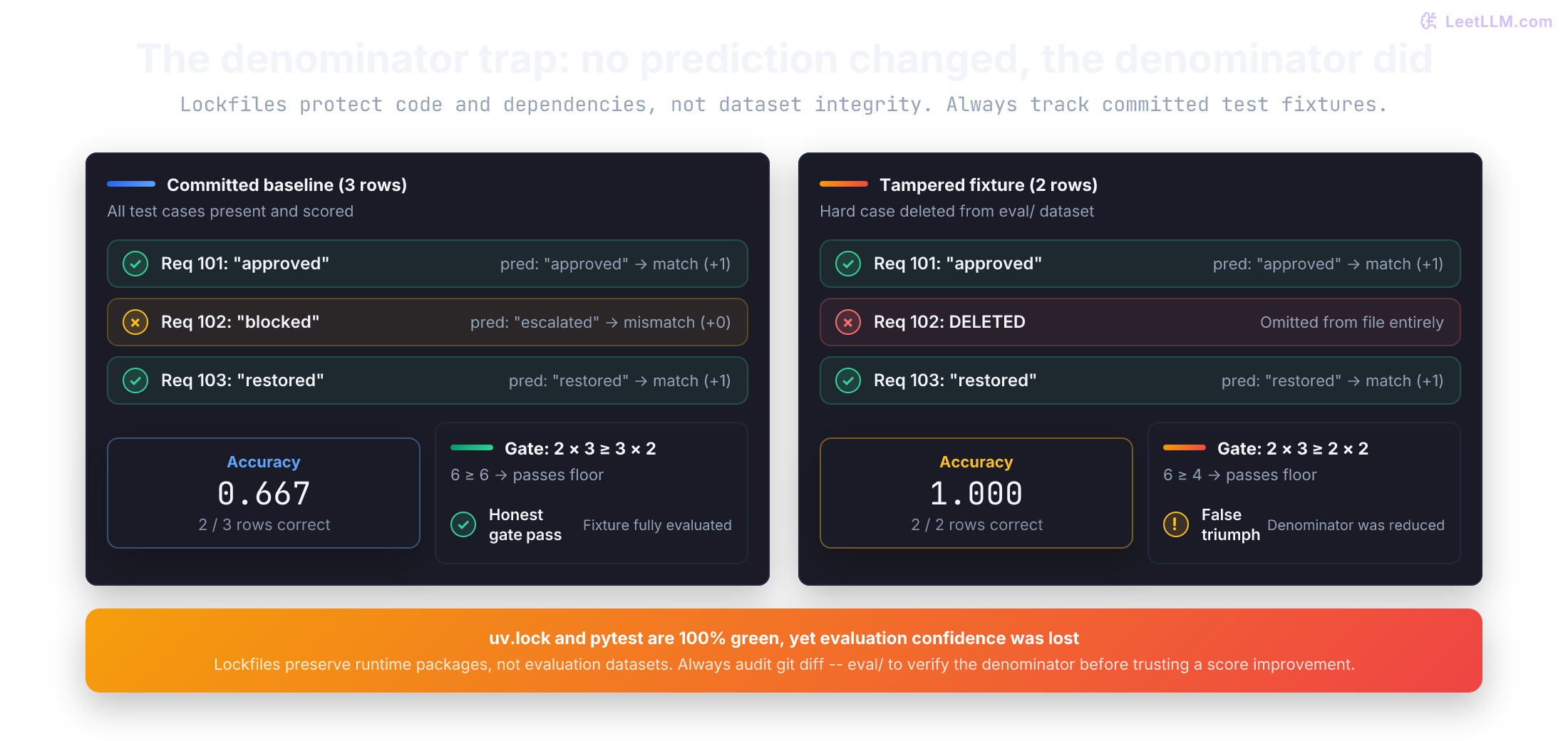
The last test is the trap. Two correct rows out of two produce 2 / 2, and the 2/3 floor still passes because 2 * 3 >= 2 * 2. Deleting the hard row improved the metric without failing the gate.
Run only this file while learning:
1uv run python -m pytest tests/test_score_access_requests.py -qExpected summary:
1.....
25 passed
Each test protects a different contract. Normalization covers a valid edge case, while the parser and empty-file tests exercise deliberate failures. Exact counts stay attached to the displayed float. The gate test exposes a limit of an accuracy floor: it doesn't freeze the fixture itself.
A lockfile doesn't lock the metric
The environment can be identical while the metric changes. Remove request 102 and neither Python nor pytest needs to change for the score to jump.
| Piece | Evidence |
|---|---|
| interpreter | .python-version chooses Python 3.12 |
| dependencies | pyproject.toml plus uv.lock describe pytest and its resolution |
| input | committed eval/access_requests.jsonl contains the stable three rows |
| command | uv run scripts/score_access_requests.py prints the same receipt |
On a clean checkout, verify the lockfile and then run the scorer against the committed rows:[2]
1uv sync --locked
2uv run python -m pytest tests/test_score_access_requests.py -q
3uv run scripts/score_access_requests.py
--locked asks uv to fail instead of updating an out-of-date lockfile. A successful clean sync confirms that declared project state can create the environment.
It says nothing about whether the JSONL denominator changed. Git records the reviewed fixture, but doesn't prevent a later edit. Use git diff -- eval/access_requests.jsonl to inspect local changes, and compare against the same committed fixture when evaluating two versions of a scorer. Data, random state, hardware, and external model behavior still need their own controls.
This scorer has no randomness, which is ideal for a first lab. Later simulations and training code should create and seed their random-number generators explicitly, record the seed, and still avoid promising bit-for-bit equality across every device and library implementation.
Practice by changing one contract at a time
Use the same fixture for each exercise. Predict the failure or receipt first, make one edit, run the scorer and tests, then restore the file before the next change. Each edit should answer one question about a boundary.
- Add request 104 with
expected: "approved"andprediction: "approved". - Put spaces around request 101's prediction.
- Change request 103's prediction to the JSON number
7. - Delete request 102's
predictionkey. - Remove a closing brace from request 101.
- Delete request 102 entirely and leave 101 and 103 in place.
Compare your observation with this feedback. Notice which changes stop before scoring and which ones alter the denominator:
| Change | Expected behavior | Reason |
|---|---|---|
| fourth correct row | 3 / 4 = 0.750 and Gate passed | 3 * 3 >= 4 * 2, so the floor still clears |
| surrounding spaces | receipt stays 0.667 (2/3) | strip() removes outer whitespace |
prediction 7 | TypeError names line and field | runtime validation rejects a non-string |
| missing prediction | KeyError names line and field | required-key check fails before scoring |
| broken brace | ValueError reports invalid JSON | json.loads can't decode the line |
| delete request 102 | 1.000 (2/2) and Gate passed | the hard row left the denominator |
Adding a correct row raises the measured fraction to 3 / 4; it doesn't demonstrate that the model improved because the evaluation set changed. Deleting request 102 also clears the floor, but removes evidence of a mistake. Compare model versions on the same rows before attributing a score change to the model.
To see the gate fail, add a fourth row whose labels differ: 2 / 4 is below 2 / 3, so the receipt should print Gate failed.
Why is silently skipping a malformed row worse than stopping the run?
Answer
Skipping changes the denominator and can make the metric look better without disclosing missing data. Stopping keeps input failure separate from model quality.
Same habit, next on arrays
One small program now exposes every boundary. JSON text becomes a checked dictionary; a loop visits rows; a function decides exact match; exact counts become a displayed score; and a count floor decides whether the receipt may say the gate passed. Failures point to syntax, file access, JSON decoding, field validation, or metric logic instead of collapsing into one bad number.
The next lesson replaces row dictionaries with numerical arrays. Field names such as expected were the contract here. Axis names and sizes become the contract there, so indexing, broadcasting, and reductions need the same explicit checks before you trust their output.