Personalize this lesson
Adapt explanations and teaching visuals to your background and preferred voice.
A fictional deployment assistant reads one policy record: approval-4412 permits rolling back payment-tests. An engineer asks whether that same record permits deploying payment-service. Imagine a candidate confidently quoting the record and a keyword-matching evaluator accepting it. Mentioning an approval ID hasn't established permission for the requested action.
Searching against that evaluator can select unsupported answers. DSPy helps separate four concerns that a large prompt string might mix: task fields, execution flow, instructions, and demonstrations. You can also structure these concerns by hand; changing models doesn't automatically break every hand-written prompt.
DSPy expresses LM applications as programs.[1] Its prompt optimizers search instructions and demonstrations against an explicit metric while preserving the program's declared execution structure. Model outputs and optimizer search can remain stochastic. The experiment-tracking lesson showed how to record comparisons; here you'll inspect what compilation changes and which claims require a real evaluation.
We'll work with DSPy 3.4.0 (dspy[optuna]==3.4.0), the latest published release checked October 10, 2026.[2] The executable examples use real interfaces and DSPy's DummyLM test double without provider calls. They inspect wiring, demonstration filtering, and serialization; they don't run an instruction search or establish quality improvements. All labels and evaluation counts are teaching fixtures.
Give the program a narrow job
Our routing module, DeployAnswerer, proposes two fields: a route (SERVE or ABSTAIN) and a supporting record ID. ABSTAIN requires an empty ID. It generates neither free-form prose nor infrastructure commands. A real host must validate the proposal against admitted policy records and authorization before rendering an approved answer. That serving control isn't implemented by the predictor below.
A signature declares input and output fields alongside a concise docstring describing the task.[3] A module manages the execution flow across predictors. For a single inference step, dspy.Predict wraps the signature directly:
from typing import Literal
import dspy

class RouteAnswer(dspy.Signature):
    """Select a record that supports the requested action, or abstain."""
    evidence: str = dspy.InputField(desc="Admitted, versioned policy records")
    question: str = dspy.InputField()
    route: Literal["SERVE", "ABSTAIN"] = dspy.OutputField()
    record_id: str = dspy.OutputField(desc="Supporting record ID; empty for ABSTAIN")

class DeployAnswerer(dspy.Module):
    def __init__(self):
        super().__init__()
        self.decide = dspy.Predict(RouteAnswer)

    def forward(self, question: str, evidence: str):
        return self.decide(question=question, evidence=evidence)

evidence = "Record approval-4412 permits rollback of payment-tests."
trainset = [
    dspy.Example(
        question="Can we roll back payment-tests?", evidence=evidence,
        route="SERVE", record_id="approval-4412",
    ).with_inputs("question", "evidence"),
    dspy.Example(
        question="Can we deploy payment-service?", evidence=evidence,
        route="ABSTAIN", record_id="",
    ).with_inputs("question", "evidence"),
]
student = DeployAnswerer()
print("Inputs:", sorted(trainset[0].inputs().keys()))
print("Expected decisions:", [(row.route, row.record_id) for row in trainset])
print("Initial demonstrations:", len(student.decide.demos))Inputs: ['evidence', 'question']
Expected decisions: [('SERVE', 'approval-4412'), ('ABSTAIN', '')]
Initial demonstrations: 0Field descriptions guide prompt rendering; they don't enforce record support or authorization. In this version, dspy.ChainOfThought prepends an output named reasoning, even though its customization argument is called rationale_field.[4] Generated reasoning isn't proof of soundness. Extra output generally adds generation work, but latency depends on the actual serving system. Direct prediction avoids that extra field here.
Optimize the behavior you actually need
Prompt search uses the evaluation metric as its objective. Rewarding persuasive but unsupported answers can favor the wrong candidates; an optimizer doesn't independently know which errors your metric missed.
Our metric uses supplied route/record labels. A prediction scores 1.0 only when both match. A wrong record scores 0.0. This fixture has one acceptable record per served case; a task with several valid records needs a support-aware metric or an approved set, rather than penalizing every different ID:
def decision_metric(example, prediction, trace=None) -> float:
    expected_route = getattr(example, "route", None)
    expected_record = getattr(example, "record_id", None)
    if type(expected_route) is not str or type(expected_record) is not str:
        raise ValueError("labels must be strings")
    if expected_route not in {"SERVE", "ABSTAIN"}:
        raise ValueError("unknown labeled route")
    if (expected_route == "ABSTAIN" and expected_record != "") or (expected_route == "SERVE" and not expected_record.strip()):
        raise ValueError("label violates the route/record contract")
    route = getattr(prediction, "route", None)
    record_id = getattr(prediction, "record_id", None)
    return float(
        type(route) is str and type(record_id) is str
        and route == expected_route and record_id == expected_record
    )

checks = [
    ("supported rollback", trainset[0], dspy.Prediction(route="SERVE", record_id="approval-4412")),
    ("wrong record", trainset[0], dspy.Prediction(route="SERVE", record_id="approval-9999")),
    ("unsupported deploy", trainset[1], dspy.Prediction(route="SERVE", record_id="approval-4412")),
    ("justified abstention", trainset[1], dspy.Prediction(route="ABSTAIN", record_id="")),
    ("abstention with a record", trainset[1], dspy.Prediction(route="ABSTAIN", record_id="approval-4412")),
]
scores = [decision_metric(example, prediction) for _, example, prediction in checks]
for (name, _, _), score in zip(checks, scores):
    print(f"{name}: {score:.1f}")
assert scores == [1.0, 0.0, 0.0, 1.0, 0.0]supported rollback: 1.0
wrong record: 0.0
unsupported deploy: 0.0
justified abstention: 1.0
abstention with a record: 0.0This metric accepts example, prediction, and optional trace. Bootstrapping supplies the recorded predictor trace; ordinary evaluation can omit it. Test wrong and malformed predictions before spending on search. Matching these supplied labels doesn't independently validate their semantics or the evidence.
Why doesn't finding approval-4412 in both evidence and answer prove that the answer is supported?
Answer
The identifier says which record is mentioned, not whether the record permits the requested action on the requested service. It supports rollback of payment-tests, not deployment of payment-service. The metric must check the decision's meaning through trusted labels or an evaluated support checker.
Keep examples for learning separate from examples for judging
Prompt tuning uses feedback from data. A practical separation is:
- Training split: Supplies raw labeled examples and acts as the seed pool for teacher bootstrapping.
- Validation split (development set): Guides optimizer search, trial comparisons, and candidate selection.
- Held-out test split: Stays completely untouched until all prompt instructions and demonstration sets are frozen.
Different request IDs can paraphrase the same policy. Splitting those rows across training and test may inflate an estimate of transfer to unseen policies. It doesn't prove memorization; the appropriate grouping depends on what deployment generalization you want to measure.
For unseen-policy transfer, group rows into case families by policy entity or incident. This metadata check keeps declared families within one split; it cannot discover semantic duplicates you assigned different family IDs:
def assert_disjoint_families(splits: dict[str, list[tuple[str, str]]]) -> None:
    if type(splits) is not dict or set(splits) != {"train", "validation", "test"}:
        raise ValueError("need train, validation, and test splits")
    owner = {}
    seen_requests = set()
    for split, rows in splits.items():
        if type(rows) is not list or not rows:
            raise ValueError("each split must contain rows")
        if any(type(row) is not tuple or len(row) != 2 for row in rows):
            raise ValueError("each row must be a request/family pair")
        for request_id, family in rows:
            if any(type(value) is not str or not value.strip() for value in (request_id, family)):
                raise ValueError("request and family IDs must be nonempty strings")
            if request_id in seen_requests:
                raise ValueError("request IDs must be unique across splits")
            seen_requests.add(request_id)
            if family in owner and owner[family] != split:
                raise ValueError(f"case family {family} appears in {owner[family]} and {split}")
            owner[family] = split

splits = {
    "train": [("req-001", "approval-4412"), ("req-002", "approval-4412")],
    "validation": [("req-101", "approval-5501")],
    "test": [("req-201", "approval-6601")],
}
assert_disjoint_families(splits)
print("Clean case-family split: passed")
leaked = {**splits, "test": [("req-999", "approval-4412")]}
try:
    assert_disjoint_families(leaked)
except ValueError as error:
    print("Rejected:", error)
else:
raise AssertionError("Case-family leakage was missed")Clean case-family split: passed
Rejected: case family approval-4412 appears in train and testNever look at test errors to manually patch your prompts, re-tune your metric, or restart search. Once test results influence your prompt choices, that test split becomes development data. True generalization estimates require a fresh, unpolluted holdout.
How a demonstration gets into the prompt
The simplest few-shot optimizer is dspy.LabeledFewShot. It copies labeled training examples directly into predictor demonstration slots without running model calls or scoring candidate quality.
Calling .compile() returns a new, independent module instance while leaving the original student untouched:
labeled = dspy.LabeledFewShot(k=2).compile(student, trainset=trainset, sample=False)
print("Original demonstration count:", len(student.decide.demos))
print("Compiled demonstration count:", len(labeled.decide.demos))
print("Returned a separate program:", labeled is not student)
assert len(student.decide.demos) == 0
assert len(labeled.decide.demos) == 2Original demonstration count: 0
Compiled demonstration count: 2
Returned a separate program: Truedspy.BootstrapFewShot runs a teacher program over training inputs and scores its final prediction, with the predictor trace available to the metric. The teacher can be a copy of the student using the configured LM; a separate stronger model is optional. Accepted recorded predictor steps become bootstrapped demonstrations. Depending on its limits, the compiled result may also include labeled examples.[5]
With the binary metric and nonzero threshold 1.0 used below, filtering follows this path:
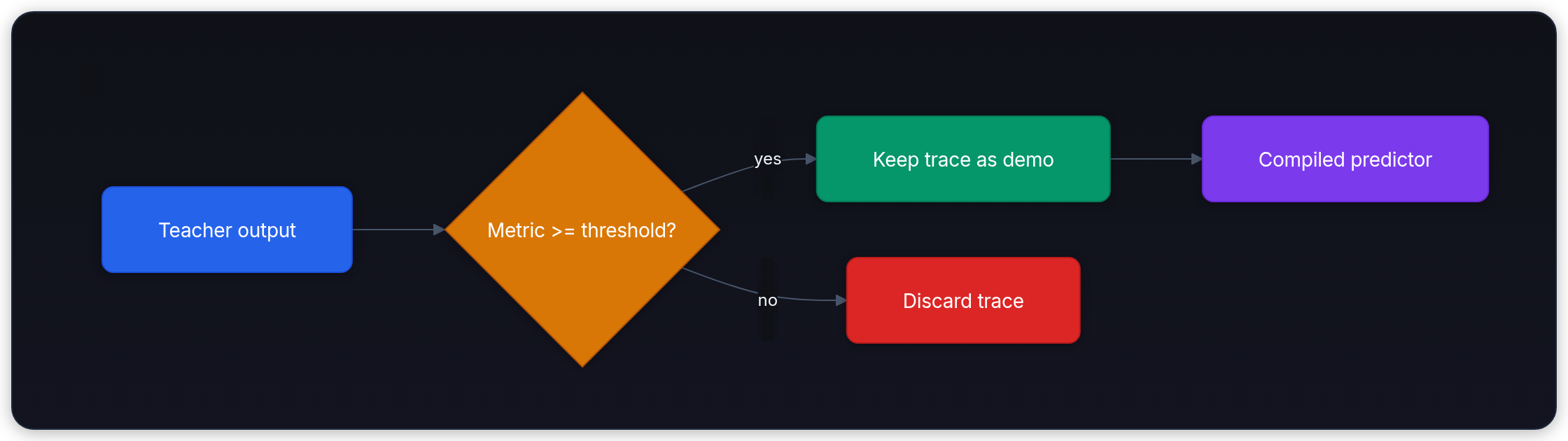
In a multi-stage program, labels may cover only the final answer. A passing final result can admit intermediate recorded steps as demonstrations. It doesn't prove each step is factually correct or causally necessary. Trace coverage and demonstration limits also matter.[6]
Watch the truthiness trap. In DSPy 3.4.0, an unset or zero metric_threshold uses the returned score's truthiness. A partial score of 0.5 can admit a bad demonstration; negative numbers and NaN are truthy too. No metric means successful teacher executions are accepted without a quality check. Use a valid metric and a nonzero threshold appropriate to its scale; 1.0 is the acceptance value for our binary scorer.[5]
import contextlib
import io
from dspy.utils.dummies import DummyLM

teacher_lm = DummyLM([
    {"route": "SERVE", "record_id": "approval-4412"},
    {"route": "SERVE", "record_id": "approval-4412"},
])
bootstrap = dspy.BootstrapFewShot(
    metric=decision_metric, metric_threshold=1.0,
    max_bootstrapped_demos=2, max_labeled_demos=0, max_rounds=1,
)
# Suppress optimizer logging during compile; inspect results directly below.
with contextlib.redirect_stdout(io.StringIO()), contextlib.redirect_stderr(io.StringIO()):
    with dspy.context(lm=teacher_lm):
        bootstrapped = bootstrap.compile(student, trainset=trainset)

demos = bootstrapped.decide.demos
print("Accepted demonstration count:", len(demos))
print("Accepted question:", demos[0].question)
print("Original demonstration count:", len(student.decide.demos))
assert len(demos) == 1
assert demos[0].question == trainset[0].question

def partial_score_demo_count(threshold):
    compiler = dspy.BootstrapFewShot(
        metric=lambda example, prediction, trace=None: 0.5,
        metric_threshold=threshold,
        max_bootstrapped_demos=2, max_labeled_demos=0, max_rounds=1,
    )
    lm = DummyLM([
        {"route": "SERVE", "record_id": "approval-4412"},
        {"route": "SERVE", "record_id": "approval-4412"},
    ])
    with contextlib.redirect_stdout(io.StringIO()), contextlib.redirect_stderr(io.StringIO()):
        with dspy.context(lm=lm):
            result = compiler.compile(student, trainset=trainset)
    return len(result.decide.demos)

for threshold in (None, 0.0, 1.0):
print(f"Partial-score demos at threshold {threshold}: {partial_score_demo_count(threshold)}")Accepted demonstration count: 1
Accepted question: Can we roll back payment-tests?
Original demonstration count: 0
Partial-score demos at threshold None: 2
Partial-score demos at threshold 0.0: 2
Partial-score demos at threshold 1.0: 0The first teacher prediction matched the rollback label and was accepted. The second teacher prediction served approval-4412 for the deployment request, failed the metric, and was discarded.
A metric awards 0.5 when the route is correct but the evidence is wrong. Why can that be dangerous during bootstrapping?
Answer
Without an explicit threshold, a truthy partial score can count as success and turn an unsafe teacher output into a demonstration. Define what acceptance means. A strict threshold helps only if the metric itself detects the important error.
Search instructions as well as demonstrations
A single bootstrap pass produces one set of demonstrations. DSPy provides a family of optimizers tailored to different stages of complexity, compute budgets, and prompt search spaces:[7]
BootstrapFewShot: Collects accepted predictor demonstrations up to its limits.max_roundscontrols attempts per case; it can stop before visiting every case once enough demonstrations are collected.BootstrapFewShotWithRandomSearch(BootstrapRS): Generates candidate demonstration subsets and evaluates multiple combinations across validation data, selecting the highest-scoring set.COPRO: Searches predictor instructions and output prefixes using candidate evaluations and histories of attempted instructions/scores. Itscompile(..., trainset=...)uses that argument as the development evaluation set; it doesn't automatically inspect detailed failure traces or reserve a final test.[8]MIPROv2(Multiprompt Instruction PRoposal Optimizer Version 2): Jointly searches instructions and few-shot demonstration sets across multi-stage pipelines.[9] It proposes diverse instruction candidates grounded in data and uses Bayesian optimization (Tree-structured Parzen Estimator via Optuna) to efficiently explore the combinatorial prompt space.
These prompt optimizers leave the underlying model weights untouched. Let denote a prompt candidate (its instructions and demonstration sets). The optimizer seeks to maximize the empirical validation score:
Here represents the DSPy program running candidate prompt on validation input .
In DSPy 3.4.0, auto="light" chooses heuristic budgets. For manual control, use auto=None, constructor num_candidates, and compile-time num_trials. Proposal and task LMs can be supplied explicitly or inherited from dspy.configure(lm=...)/an active context. They can be the same LM.[10]
offline_lm = DummyLM([])
with dspy.context(lm=offline_lm):
    inherited = dspy.MIPROv2(metric=decision_metric, auto=None, num_candidates=4)
print("Default LM supplies both roles:", inherited.prompt_model is offline_lm and inherited.task_model is offline_lm)
manual = dspy.MIPROv2(
    metric=decision_metric, auto=None, num_candidates=4,
    prompt_model=offline_lm, task_model=offline_lm,
)
try:
    manual.compile(student, trainset=trainset)
except ValueError as error:
    assert "num_trials" in str(error)
    print("Missing manual trial budget: rejected")
else:
    raise AssertionError("Missing num_trials was accepted")

# A full search requires configured LMs, a trial budget, and a dedicated validation set:
# compiled = manual.compile(student, trainset=trainset, valset=valset,
# num_trials=12, minibatch=False)Default LM supplies both roles: True
Missing manual trial budget: rejectedFor instruction-only MIPROv2 candidates, set both demonstration limits to zero and start with a student that has no existing demonstrations. Those settings don't erase demonstrations already attached to its predictors. MIPROv2 can still bootstrap examples internally to inform instruction proposals, even when its candidates contain no demos. Supply a reviewed valset when split membership matters. In this pinned version, omitting it takes the final roughly 80% of the supplied training list (capped at 1,000) as validation, with at least one example. That positional split doesn't enforce family isolation or reserve a final test.[10]
GEPA reflects on recorded executions and feedback to propose revised predictor instructions.[11] In the pinned DSPy interface its metric must accept five arguments: gold, pred, trace, pred_name, and pred_trace. It can return a scalar, which produces generic score feedback, or dspy.Prediction(score=..., feedback=...) for a useful task-specific critique. Our three-argument scorer needs an adapter. Version 3.4.0 also supports an optional program_trace argument for scoring a Flex submodule; it does not remove the five-argument contract. Reflection proposes instructions; it doesn't certify or directly repair the model's internal reasoning.[12]
A validation winner can lose on test
Repeatedly selecting candidate prompts on a small validation set creates a risk of adapting to its noise or narrow phrasing. A winning validation score alone doesn't show how the candidate will perform on new cases.
Consider invented counts: baseline passes 14/20 validation cases (70%) and compiled_a passes 19/20 (95%). Selecting by validation chooses compiled_a. On a separate illustrative test, baseline passes 16/20 (80%) and compiled_a passes 13/20 (65%). The code selects before reading those test scores; it runs no model evaluation:
validation = {"baseline": (14, 20), "compiled_a": (19, 20)}
test = {"baseline": (16, 20), "compiled_a": (13, 20)}

def rate(result: tuple[int, int]) -> float:
    if type(result) is not tuple or len(result) != 2 or any(type(value) is not int for value in result):
        raise ValueError("need two integer counts, excluding booleans")
    correct, total = result
    if total <= 0 or not 0 <= correct <= total:
        raise ValueError("invalid evaluation counts")
    return correct / total

selected = max(validation, key=lambda name: rate(validation[name]))
print("Validation winner:", selected)
print(f"Candidate test score: {rate(test[selected]):.2f}")
print(f"Baseline test score: {rate(test['baseline']):.2f}")
print("Observed improvement:", rate(test[selected]) > rate(test["baseline"]))
assert selected == "compiled_a"
assert rate(test[selected]) < rate(test["baseline"])Validation winner: compiled_a
Candidate test score: 0.65
Baseline test score: 0.80
Observed improvement: False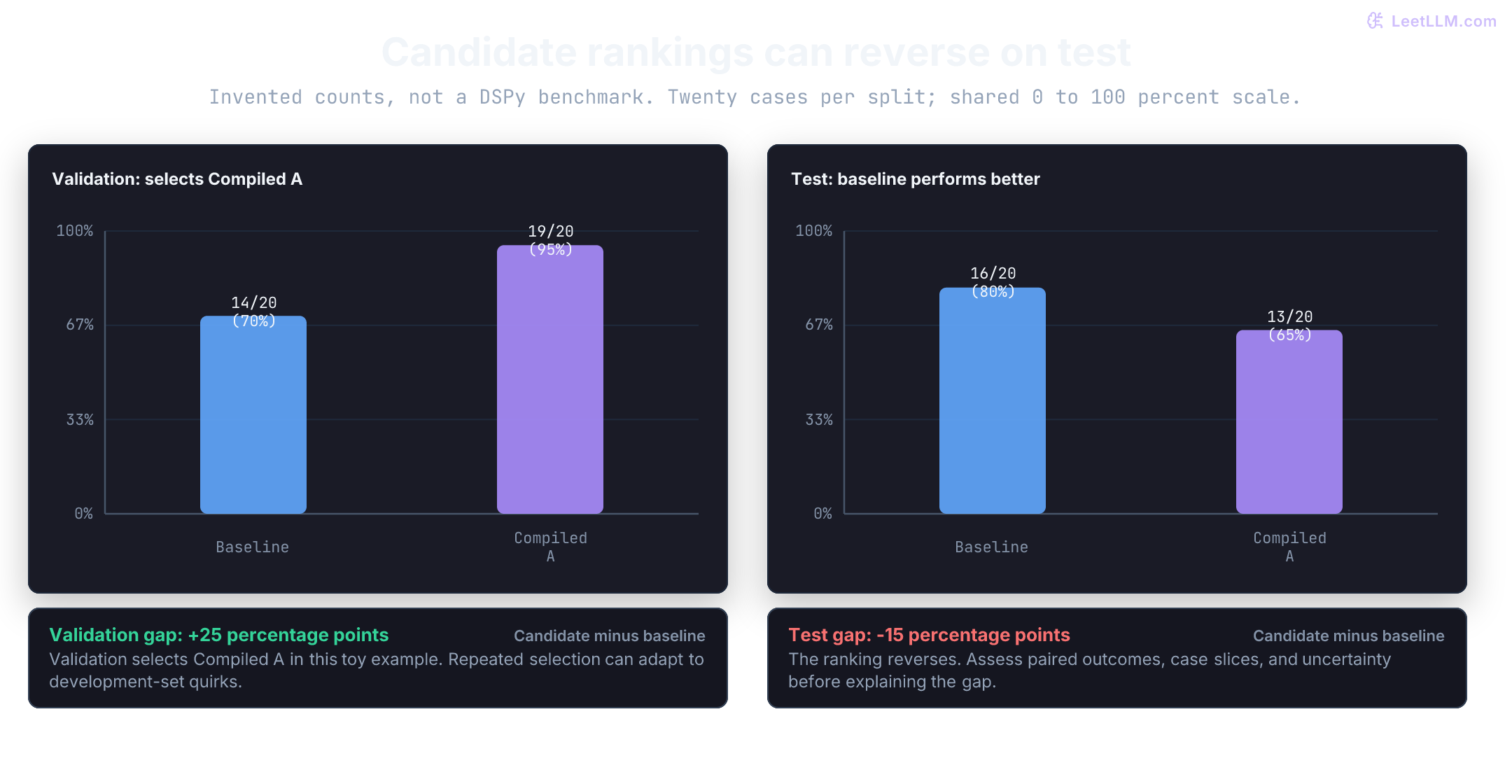
Repeated candidate selection can overfit noisy or narrow development data. The search method doesn't remove that risk. A test reversal can also reflect sampling variation, distribution differences, or scoring problems. Aggregate counts alone don't identify the mechanism or establish a population difference. Preserve paired per-case outcomes, relevant slices, and sampling uncertainty in a real comparison.
Group related cases according to the intended transfer test, review the scorer, and keep final evaluation separate from selection. Define critical safety constraints separately from the average score. A small overall gain cannot establish that a permission error is acceptable.
After seeing the candidate fail on test, you fix its prompt and repeatedly rerun the same test. Is the next score still an untouched estimate?
Answer
No. Test feedback is now guiding development, even if those rows never appear in .compile(). Keep the useful regression cases, but reserve fresh cases for the final comparison after the prompt and evaluation choices are frozen.
Budget the search, not just the final request
Forty full candidate evaluations over 50 cases account for 2,000 logical program executions. In pinned MIPROv2, num_trials=40, minibatch=False also evaluates the default program before those trials: another 50, or 2,050 total before bootstrapping and instruction proposals.[10] Minibatching and periodic full evaluations change that accounting.
Program executions aren't billable requests. A program may call several predictors and a model-backed judge; caches may avoid calls, while retries may add them. Count actual calls, usage, and estimated spend across teacher, proposer, task, and judge roles.
Version 3.4.0 changes the LM execution layer. Its default engine="auto" prefers native lm15 for supported requests; eligible compatibility fallback chooses LiteLLM before inference. Authentication errors, timeouts, and provider failures do not trigger a backend switch. Record the engine choice alongside the model and artifact when comparing runs.[2]
The native and canonical custom-engine path implements n answers as separate sequential requests. Here one logical prompt requests two answers. This deterministic engine counts the actual calls; it contacts no provider and incurs no token bill:[13]
import dspy
from dspy.lm15 import Message, Response, Usage

class CountingEngine:
    def __init__(self):
        self.calls = 0

    def complete(self, request):
        self.calls += 1
        return Response(
            id=None, model=request.model,
            message=Message.assistant(f"answer {self.calls}"),
            finish_reason="stop", usage=Usage(),
        )

engine = CountingEngine()
lm = dspy.LM("custom/counting", engine=engine, cache=False)
answers = lm("One logical prompt", n=2)
print("Returned answers:", len(answers))
print("Engine requests:", engine.calls)
assert answers == ["answer 1", "answer 2"]
assert engine.calls == 2Returned answers: 2
Engine requests: 2A real provider may bill the input twice on this path. LiteLLM can use its backend's native n behavior; that still needs provider-specific accounting. The fixture deliberately disables DSPy's response cache, so its two calls are an execution receipt rather than a cost estimate.
Enforce hard spending and latency caps outside DSPy. Track proposal-model token usage separately from task-model usage.
Suppose extra demonstrations add 2,500 logical input tokens to each request. At 100 requests/s, that is 250,000 extra logical input tokens/s. It doesn't specify billable uncached tokens, dollars, or added first-token latency: caching, rate cards, batching, and serving conditions matter. Measure task quality, actual usage, latency, and versioned cost estimates together.
Record seeds, resolved model revisions when available, generation settings, cache policy, dependencies, and dataset/scorer versions. A mutable model name isn't an immutable weight pin. Temperature zero doesn't guarantee identical outputs, and a cache can replay results from a previous backend behind the same name. Keep repeated trials and their provenance.
Save the prompt state and control the runtime model
Exporting compiled prompt state is straightforward: call program.save("compiled.json"). To restore, instantiate the matching Python module class and call program.load("compiled.json"). The JSON file stores the optimized instructions, extracted few-shot demonstrations, signature metadata, and model settings.[14]
Beware of the attached LM precedence trap. Predictors retain their attached language model from compilation. If a saved artifact includes an attached model, configuring a new global default with dspy.settings.configure(lm=...) or with dspy.context(lm=...) won't override it! You must call program.set_lm(runtime_lm) directly on the loaded program to explicitly bind the production model:
from pathlib import Path
from tempfile import TemporaryDirectory

saved_lm = dspy.LM(
    "openai/fixture-model-a", api_key="unused-placeholder", temperature=0,
    extra_headers={"Authorization": "fixture-only-header"},
)
runtime_lm = dspy.LM("openai/fixture-model-b", temperature=0)
labeled.set_lm(saved_lm)

with TemporaryDirectory() as directory:
    artifact = Path(directory) / "compiled.json"
    labeled.save(artifact)
    restored = DeployAnswerer()
    restored.load(artifact)
    with dspy.context(lm=runtime_lm):
        print("Attached model after load:", restored.get_lm().model)
    print("Restored demonstrations:", len(restored.decide.demos))
    print("Placeholder API key serialized:", "unused-placeholder" in artifact.read_text())
    print("Nested header string serialized:", "fixture-only-header" in artifact.read_text())
    assert restored.get_lm().model == "openai/fixture-model-a"
    assert "unused-placeholder" not in artifact.read_text()
    restored.set_lm(runtime_lm)
    print("Attached model after override:", restored.get_lm().model)
assert restored.get_lm() is runtime_lmAttached model after load: openai/fixture-model-a
Restored demonstrations: 2
Placeholder API key serialized: False
Nested header string serialized: True
Attached model after override: openai/fixture-model-bThis pinned serializer omits the top-level api_key entry. It doesn't recursively sanitize arbitrary configuration: the dummy Authorization header above survives. Demonstrations, instructions, other config fields, and custom LM state can contain sensitive data too. Review the complete artifact before sharing it; these placeholder strings aren't real credentials.[14]
Whole-program persistence with save_program=True uses cloudpickle. Loading an untrusted pickle can execute code, so verify provenance before loading it. State-only JSON avoids pickle deserialization, but still requires a compatible, reviewed Python program, dependency versions, and approved model/configuration. It doesn't contain the whole application or certify its safety.
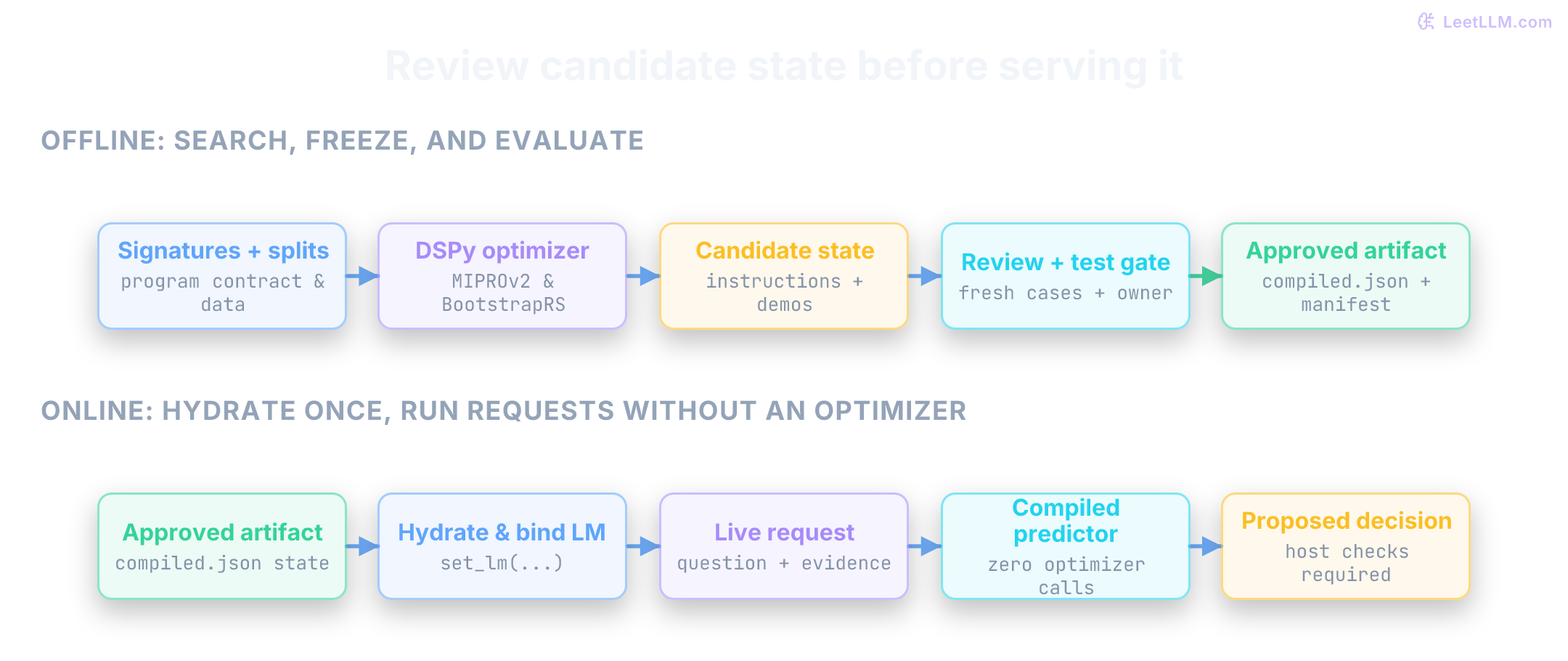
Attach a retained release manifest identifying code and artifact digests, DSPy/dependency versions, effective model/configuration, data/scorer versions, evaluation evidence, and a checked rollback target. A digest identifies bytes; it doesn't enforce retention or authenticate approval. Re-evaluate changed model/artifact combinations before release, governing repeated benchmark use so final test feedback doesn't quietly become tuning data.