Personalize this lesson
Adapt explanations and teaching visuals to your background and preferred voice.
Two log snippets contain three words each: "cache miss trace" and "timeout from worker." Suppose we represent each word with four numbers. We have 24 numbers in total, but the total alone won't tell us which numbers belong to which word.
The previous Python for AI Engineering lesson scored JSONL rows one at a time: parse a line, check its fields, compare a predicted status with the expected one. Here, the same kind of data arrives as one numeric array holding many rows, and one operation runs across them together.
Two log snippets, one array
An array arranges values along numbered axes, such as rows and columns. NumPy calls its array object an ndarray. In machine-learning code, you'll also see the word tensor for an array with zero, one, or several axes.
| Batch item | Tokens (log words) |
|---|---|
| 0 | ["cache", "miss", "trace"] |
| 1 | ["timeout", "from", "worker"] |
A token is a piece of text a model processes; here we choose one word per token. A feature vector is the list of numbers representing one token. The numbers below are deliberately artificial, not learned word meanings: counting from 0 makes it easy to trace every value when we rearrange the array.
Give each token four features and fill them in order so every coordinate has a real value. Before reading the shape, count the snippets, token rows, and feature columns:
1x =
2[
3  [[ 0,  1,  2,  3],
4   [ 4,  5,  6,  7],
5   [ 8,  9, 10, 11]],
6
7  [[12, 13, 14, 15],
8   [16, 17, 18, 19],
9   [20, 21, 22, 23]]
10]
There are two snippets, three token rows per snippet, and four values per row. So the shape is (B, T, D) = (2, 3, 4):
| Axis | Meaning | Size |
|---|---|---|
B | batch, how many snippets | 2 |
T | token positions per snippet | 3 |
D | numbers per token | 4 |
If you can say that sentence, you can usually debug the next operation. The first axis picks a snippet, the second picks a word, and the third holds that word's four numbers. x[0, 1] selects the row labeled miss and returns its four-feature vector.
![Two stacked snippet trays of shape (2, 3, 4). Snippet 0 is a 3 by 4 grid of values 0 through 11 with the miss row 4, 5, 6, 7 highlighted. Snippet 1 holds 12 through 23. Indexing x[0, 1] removes both batch and token axes, locating element offset 4 in flat memory and returning the four-feature vector [4, 5, 6, 7] of shape (4,).](/cdn/content-image/foundations/numpy-and-tensor-shapes/illustrations/_generated/chapter_flow_dark.png?v=61b50195d05d)
Rank, shape, and dtype
Finding one value takes three indices, and the shape says how many choices exist at each position. The number of axes is the array's rank, exposed as x.ndim, so this array has rank 3. Axis numbers start at zero: batch is axis 0, tokens are axis 1, and features are axis 2. Negative axis numbers count backward, making -1 another name for the feature axis.
| Term | Shape | What it holds |
|---|---|---|
| scalar | () | one number, no axes |
| vector | (4,) | 4 numbers along one axis, with no row or column orientation |
| matrix | (3, 4) | 3 rows, each with 4 numbers |
| 3-D tensor | (2, 3, 4) | three axes, generalizing the same idea |
The comma in (4,) is Python's notation for a one-item tuple. An array's shape is always a tuple, even when it contains just one axis length.
Shape is only half of the contract. Every NumPy array also has one data type, or dtype, that says how each element is stored and interpreted. The examples use float32, a 32-bit floating-point type common in model inputs. np.arange without a dtype uses NumPy's default integer. Writing dtype=np.float32 makes later arithmetic match the type you'll see in model code. Shape tells you where values live; dtype tells you what kind of values they are.
At a model boundary, check shape and dtype separately. An array with shape (2, 3, 4) and dtype int64 passes the shape check but fails a contract that requires float32.
Indexing: which axes stay and which disappear
Each coordinate now points at an actual token vector.
Before using the table, predict x[:, 1].shape: the batch axis stays, the token axis is selected, and the four features stay, so (2, 4) is the answer.
| Expression | Plain-English meaning | Result shape |
|---|---|---|
x[0] | snippet 0, all tokens, all features | (3, 4) |
x[0, 1] | token 1 in snippet 0 | (4,) |
x[:, 1] | token 1 from each snippet | (2, 4) |
x[:, :, 0] | feature 0 from each token in each snippet | (2, 3) |
Read an index from left to right. A single integer such as 0 or 1 chooses one item and removes that axis. A colon keeps the whole axis. A slice such as 0:1 also keeps the axis, but selects only its first item: x[0:1] has shape (1, 3, 4), unlike x[0] with shape (3, 4). Use the slice when later code still expects a batch axis.
Inspect the batch
Run the script to check both values and shapes. np.arange(24) creates the integers from 0 through 23; reshape(B, T, D) groups them into the nested layout above. With uv from the Python lesson, save a cell as a .py file and run uv run --with numpy filename.py.
1import numpy as np
2
3B, T, D = 2, 3, 4
4x = np.arange(B * T * D, dtype=np.float32).reshape(B, T, D)
5
6print("x shape", x.shape)
7print("x dtype", x.dtype)
8print("x[0] shape", x[0].shape)
9print("x[0,1]", x[0, 1])
10print("x[:,1]")
11print(x[:, 1])1x shape (2, 3, 4)
2x dtype float32
3x[0] shape (3, 4)
4x[0,1] [4. 5. 6. 7.]
5x[:,1]
6[[ 4. 5. 6. 7.]
7 [16. 17. 18. 19.]]Selecting miss gave us four features. Adding the same four offsets to every token should preserve those feature positions, without writing a loop over snippets and tokens.
Broadcasting: reuse one feature bias
A bias is an additive offset. Here use four offsets, one per feature, and add them to every token vector. Should that addition keep all three axes or lose one?
1bias = [100, 200, 300, 400]This bias has shape (4,), so it matches the last axis of x.
For the miss token, the four additions are:
1x[0, 1]     = [  4,   5,   6,   7]
2bias        = [100, 200, 300, 400]
3result      = [104, 205, 306, 407]
NumPy applies that addition to each token in each snippet without a Python loop. You can picture the bias vector repeating across the batch and token axes, but that repetition is conceptual: broadcasting usually avoids copying the smaller operand in memory.[1]
The batch and token axes stay. The feature bias repeats across both of them, so the output keeps shape (2, 3, 4).
The matching rule:
- Line shapes up from the right.
- Two axes are compatible if they're equal or one of them is
1. - Missing leading axes in the smaller array count as size
1(NumPy prepends them mentally). - If neither rule holds, NumPy raises an error.
For x.shape == (2, 3, 4):
| Smaller shape | What NumPy does | Meaning |
|---|---|---|
(4,) | aligns with the feature axis and expands across batch and token positions | one bias per feature |
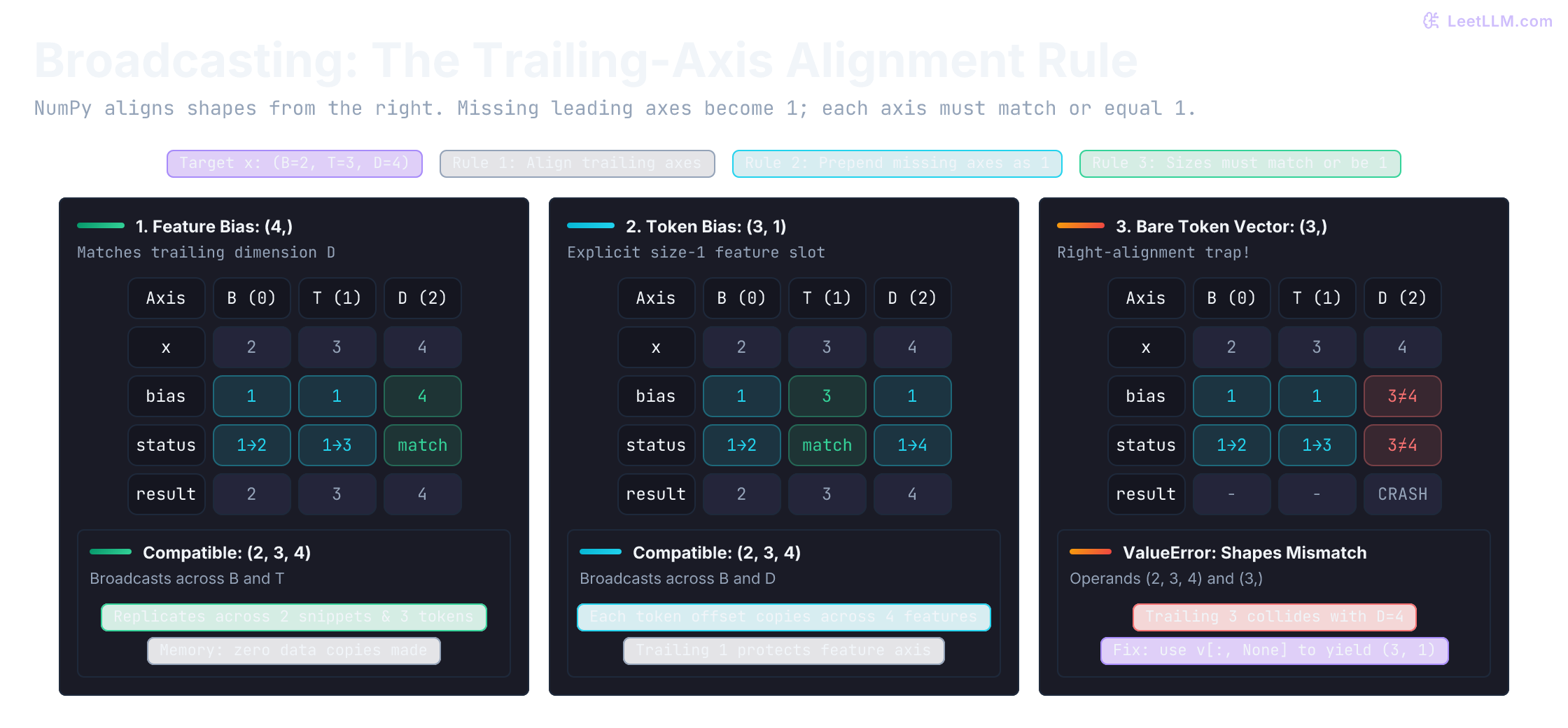
(3, 1) | aligns with the token axis and expands across batch and features | one scalar per token position |
(3,) | raises an error | no feature axis matches that 3 |
Each column below represents a fixed axis position. Cyan cells are size-1 axes, including the missing leading axes. The failure puts 3 on D, not on T.
Add the feature bias
Predict the selected row after the addition: [104, 205, 306, 407]. Then run the cell and check that its shape is still (2, 3, 4).
1import numpy as np
2
3B, T, D = 2, 3, 4
4x = np.arange(B * T * D, dtype=np.float32).reshape(B, T, D)
5bias = np.array([100, 200, 300, 400], dtype=np.float32)
6shifted = x + bias
7
8print("shifted shape", shifted.shape)
9print("shifted[0,1]", shifted[0, 1])1shifted shape (2, 3, 4)
2shifted[0,1] [104. 205. 306. 407.]If you accidentally try np.array([10, 20, 30]), NumPy raises:
1ValueError: operands could not be broadcast together with shapes (2,3,4) (3,)That message is useful. It shows the feature axis wasn't where you thought it was.
You can test that failure deliberately instead of waiting for it to surprise you:
1import numpy as np
2
3x = np.arange(2 * 3 * 4, dtype=np.float32).reshape(2, 3, 4)
4token_bias = np.array([10, 20, 30], dtype=np.float32)
5
6try:
7    x + token_bias
8except ValueError as exc:
9    print(str(exc))
10else:
11 raise RuntimeError("Expected NumPy to reject shape (3,) against (2, 3, 4)")1operands could not be broadcast together with shapes (2,3,4) (3,)When broadcasting succeeds with the wrong meaning
A 1-D array (3,) isn't the same as a column-shaped array (3, 1). Inside an index, None inserts an axis of size 1 without changing the values. Here's how to make either orientation explicit:
1import numpy as np
2
3v = np.array([1, 2, 3])
4print("v shape", v.shape)
5print("v[:, None] shape", v[:, None].shape)
6print("v[None, :] shape", v[None, :].shape)1v shape (3,)
2v[:, None] shape (3, 1)
3v[None, :] shape (1, 3)A plain (3,) has no row or column orientation. Broadcasting aligns its only axis with the trailing axis, which may not be the axis you intended.
Now temporarily take just the first three features of snippet 0. Its shape is (3, 3), so token count and feature count happen to match. NumPy will accept a (3,) token bias, but apply it to features instead. Compare the first row under both operations:
1import numpy as np
2
3x = np.arange(24, dtype=np.float32).reshape(2, 3, 4)
4square = x[0, :, :3]
5token_bias = np.array([10, 20, 30], dtype=np.float32)
6wrong = square + token_bias
7right = square + token_bias[:, None]
8
9print("both shapes", wrong.shape, right.shape)
10print("wrong first token", wrong[0])
11print("right first token", right[0])
12assert np.array_equal(right[0], [10, 11, 12])
13assert not np.array_equal(wrong, right)1both shapes (3, 3) (3, 3)
2wrong first token [10. 21. 32.]
3right first token [10. 11. 12.]The intended offset for token 0 is 10, applied to all three features. A successful operation and a correct output shape don't prove that the axes mean what you intended. Check a known row's values too.
Reductions: collapsing the right axis
A reduction answers the question, "which axis am I summarizing away?"
Suppose you want one vector per snippet, not one vector per token. Then average across the token axis. Predict the result before writing the call: keeping batch and feature axes should leave shape (2, 4).
1x.mean(axis=1)Keep using the same x whose values run from 0 through 23:
For snippet 0, average each feature column across its three token rows:
1token 0 = [ 0,  1,  2,  3]
2token 1 = [ 4,  5,  6,  7]
3token 2 = [ 8,  9, 10, 11]
4mean    = [ 4,  5,  6,  7]
So x.mean(axis=1) keeps the batch and feature axes, giving shape (B, D) = (2, 4). The token axis disappears; one vector remains for each snippet.
Now compare that with:
1x.mean(axis=-1)That reduces the feature axis instead. It keeps batch and token axes, so the shape becomes (B, T) = (2, 3).
Compare two reductions
The next cell makes the contrast visible. Predict (2, 4) for token pooling and (2, 3) for feature means, then check the first row values.
1import numpy as np
2
3B, T, D = 2, 3, 4
4x = np.arange(B * T * D, dtype=np.float32).reshape(B, T, D)
5pooled_tokens = x.mean(axis=1)
6feature_means = x.mean(axis=-1)
7
8print("pooled_tokens shape", pooled_tokens.shape)
9print("pooled_tokens dtype", pooled_tokens.dtype)
10print("pooled_tokens[0]", pooled_tokens[0])
11print("feature_means shape", feature_means.shape)
12print("feature_means[0]", feature_means[0])1pooled_tokens shape (2, 4)
2pooled_tokens dtype float32
3pooled_tokens[0] [4. 5. 6. 7.]
4feature_means shape (2, 3)
5feature_means[0] [1.5 5.5 9.5]Before writing a reduction, say its contract out loud: "I want one vector per snippet, so I'm reducing the token axis." That sentence tells you which axis disappears and which two must remain.
The float32 input produces a float32 mean. By default, integer inputs use float64 accumulation and output; floating-point inputs return their input dtype. float16 is a special case: NumPy accumulates in float32 for extra precision before returning float16.[2]
A large float32 reduction can lose precision. Pass dtype=np.float64 when you need a higher-precision accumulator and can accept a float64 result. Check both .shape and .dtype when a reduction feeds later model code.
Subtract a mean without losing its position
By default, a reduction removes the axis entirely. That can break later broadcasting because the shape has changed. Predict which result can subtract back into (2, 3, 4): (2, 4) or (2, 1, 4)?
1import numpy as np
2
3B, T, D = 2, 3, 4
4x = np.arange(B * T * D, dtype=np.float32).reshape(B, T, D)
5
6# Without keepdims: shape becomes (2, 4), which no longer broadcasts with (2, 3, 4)
7mean_flat = x.mean(axis=1)
8print("mean_flat shape", mean_flat.shape)
9
10# With keepdims: shape stays (2, 1, 4), which still broadcasts with (2, 3, 4)
11mean_kept = x.mean(axis=1, keepdims=True)
12print("mean_kept shape", mean_kept.shape)
13centered = x - mean_kept
14print("centered snippet 0")
15print(centered[0])
16assert np.allclose(centered.mean(axis=1), 0)1mean_flat shape (2, 4)
2mean_kept shape (2, 1, 4)
3centered snippet 0
4[[-4. -4. -4. -4.]
5 [ 0. 0. 0. 0.]
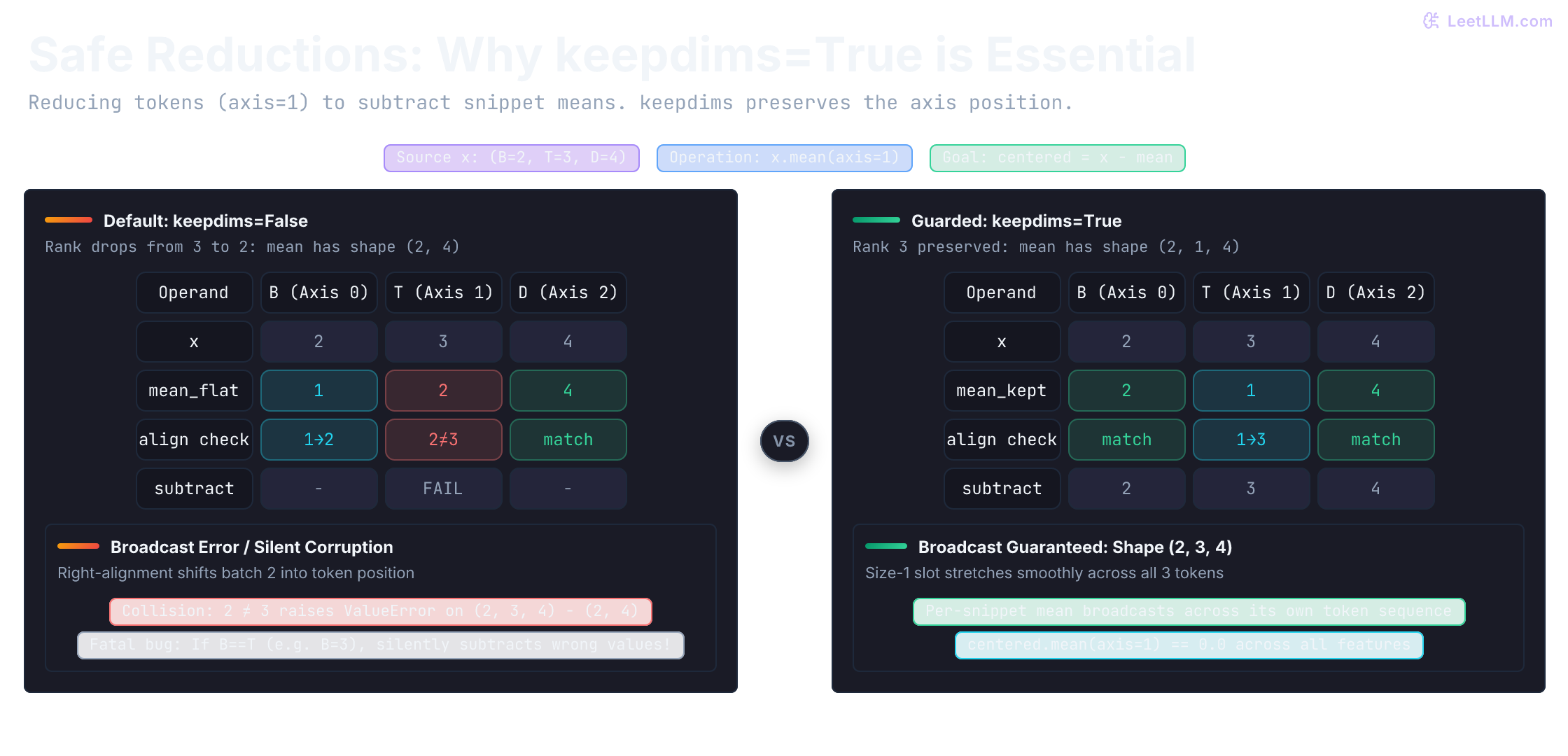
6 [ 4. 4. 4. 4.]]keepdims=True keeps the collapsed axis as a placeholder of size 1. That preserves the original axis positions so operations against the original tensor can still broadcast correctly. Use it when a reduction result must be added, subtracted, or divided back into its source-shaped tensor.
The first feature now contains [-4, 0, 4] across tokens, whose mean is zero. np.allclose checks that property with a tolerance for floating-point rounding. If batch size happened to equal token count, the version without keepdims could run and subtract the wrong snippet's mean, just like the square-array bias bug.
Side by side, the missing token slot is the whole bug. Without keepdims, (2, 4) right-aligns so the leftover 2 lands on T. With keepdims, a cyan size-1 slot stays where T was, and the mean can subtract back into x.
Reshape vs. transpose: regrouping or reordering
At this point, x has named axes. The next operation asks for shape (2, 4, 3). Before running it, decide whether that means regrouping the data stream or moving the existing axes.
Use the same batch so you can see how identical values acquire different positions:
1import numpy as np
2
3x = np.arange(24, dtype=np.float32).reshape(2, 3, 4)
4reshaped = x.reshape(2, 4, 3)
5transposed = np.transpose(x, (0, 2, 1))
6
7print("x[0]")
8print(x[0])
9print("reshaped[0]")
10print(reshaped[0])
11print("transposed[0]")
12print(transposed[0])1x[0]
2[[ 0. 1. 2. 3.]
3 [ 4. 5. 6. 7.]
4 [ 8. 9. 10. 11.]]
5reshaped[0]
6[[ 0. 1. 2.]
7 [ 3. 4. 5.]
8 [ 6. 7. 8.]
9 [ 9. 10. 11.]]
10transposed[0]
11[[ 0. 4. 8.]
12 [ 1. 5. 9.]
13 [ 2. 6. 10.]
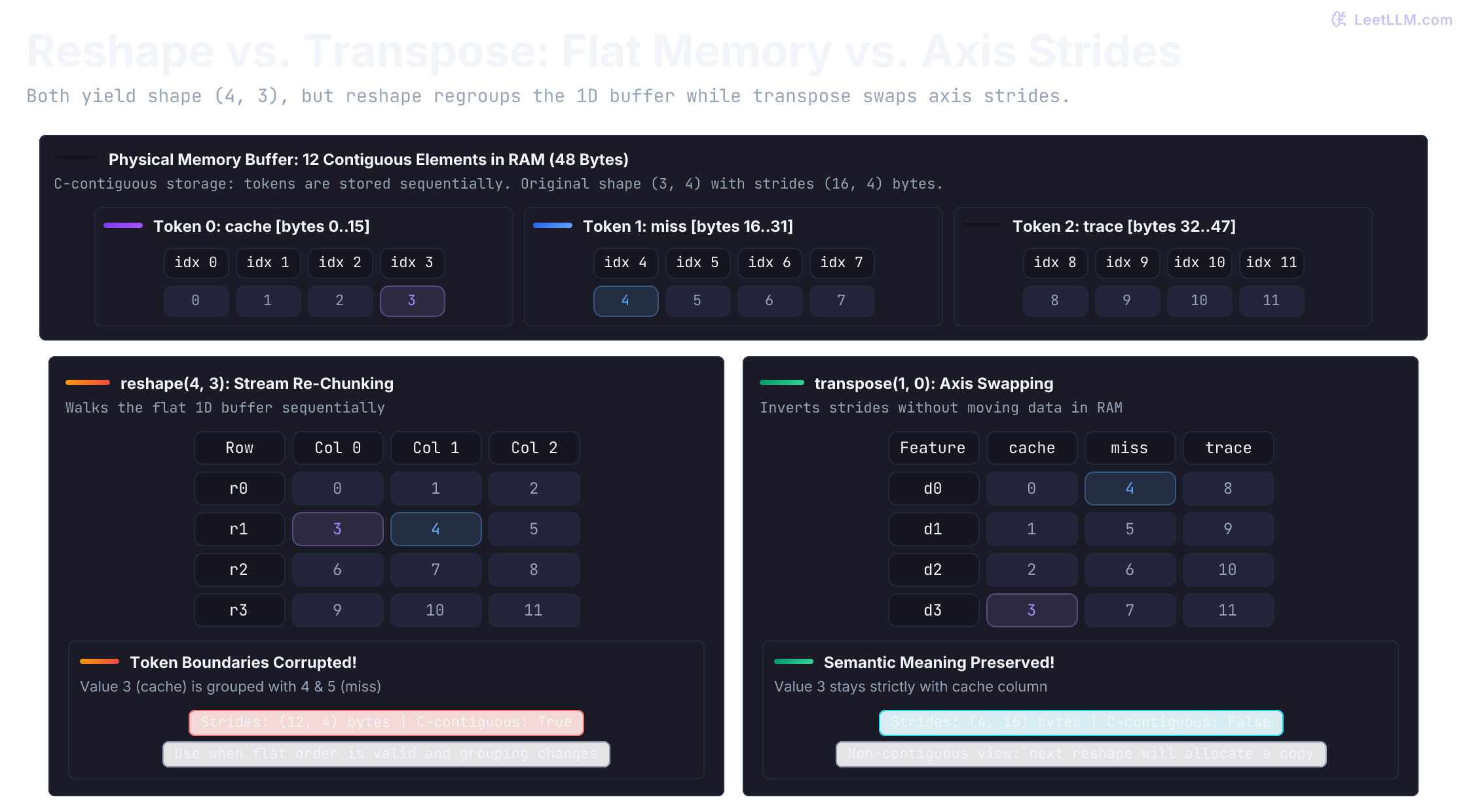
14 [ 3. 7. 11.]]Both results have shape (2, 4, 3), but they answer different questions. Predict where the highlighted 3 should land if it remains cache's last feature. reshape parks it next to 4 (the first feature of miss), while transpose keeps it with cache in a feature-by-token grid.
| Operation | What it does | When to use it |
|---|---|---|
reshape | reads values in the requested index order (C-order by default) and groups them into a new shape | when the flat order is correct and you want new grouping |
transpose | permutes the axes | when the same values are attached to the wrong axis order |
If your real goal is to turn (B, T, D) into (B, D, T), that's an axis-order problem, so transpose is the right tool.
Reshaping must preserve element count: 2 * 3 * 4 and 2 * 4 * 3 both equal 24. One dimension can be -1 to let NumPy infer its size. For example, x.reshape(-1, 4) gives (6, 4), combining batch and token positions while keeping each four-feature row intact.[3]
A 1-D vector has a quieter trap. Predict both printed shapes before running the cell: transposing (3,) still gives (3,).
1import numpy as np
2
3v = np.array([1, 2, 3])
4print(v.shape)
5print(v.T.shape)1(3,)
2(3,)A 1-D vector has one axis, so transposing it does nothing. If you need a row or column vector, make that axis explicit with v[None, :] or v[:, None].
Views and copies: who shares memory
An ndarray stores a buffer of values and metadata describing how to reach them. Its strides say how many bytes to move when an index increases by one along an axis. A view reuses a buffer with its own metadata; a copy owns separate values.
Basic slicing, such as x[:, 1, :], returns a view. Selecting with an integer array or boolean mask is advanced indexing, which returns a copy.[4]
np.transpose returns a view whenever possible; for the ndarray below, it shares the buffer and changes the strides. reshape returns a view when the new layout can be expressed with strides, but it may copy a non-contiguous array.[4]
Predict the mutation before running the cell: editing the basic slice should change x, while editing the advanced-index result should leave x alone.
1import numpy as np
2
3x = np.arange(24, dtype=np.float32).reshape(2, 3, 4)
4
5token = x[:, 1, :]   # basic slice -> view shares memory with x
6token[0, 0] = 99
7print("after editing a slice, x[0, 1, 0] =", x[0, 1, 0])
8
9picked = x[[0, 1]]   # advanced indexing -> independent copy
10picked[0, 0, 0] = -1
11print("after editing an advanced-index copy, x[0, 0, 0] =", x[0, 0, 0])1after editing a slice, x[0, 1, 0] = 99.0
2after editing an advanced-index copy, x[0, 0, 0] = 0.0If you need to mutate a slice without touching the source, take an explicit copy first with x[:, 1, :].copy(). When unsure, np.shares_memory(a, b) answers the question directly.
A transpose can make the next reshape copy
An array is C-contiguous when its values occupy one uninterrupted memory region in last-axis-first order: move across a row, then to the next row. A transpose changes how indices traverse that buffer. Its result is often no longer C-contiguous, so a later reshape may need to copy values into a new buffer. The code checks sharing before and after that reshape:
1import numpy as np
2
3x = np.arange(24, dtype=np.float32).reshape(2, 3, 4)
4t = x.transpose(0, 2, 1)
5print("transpose shares memory?", np.shares_memory(t, x))
6print("transpose contiguous?", t.flags["C_CONTIGUOUS"])
7reshaped = t.reshape(2, 12)
8print("reshape shares memory with transpose?", np.shares_memory(reshaped, t))
9print("reshaped shape", reshaped.shape)1transpose shares memory? True
2transpose contiguous? False
3reshape shares memory with transpose? False
4reshaped shape (2, 12)Prefer reshape only when flat order is already correct. If downstream code requires a C-contiguous buffer, make that requirement explicit with np.ascontiguousarray(t) before reshaping. ravel() also returns a contiguous one-dimensional array, copying when needed, but flattening first discards the axis structure you were reasoning about.
Axis names are positions, not portable labels. Image libraries may expect either (batch, channels, height, width) or (batch, height, width, channels), so write the intended axis order explicitly.
Matrix multiplication: compare every pair of tokens
So far, addition has paired features by position and mean has combined token rows. Another useful operation compares one token vector with another. Their dot product multiplies corresponding features and adds the products. For cache = [0, 1, 2, 3] and miss = [4, 5, 6, 7], that gives .
To compare every token with every other token in a snippet, we need nine such scores. Matrix multiplication, written @ in Python, computes those row-against-column dot products together. Unlike elementwise *, it combines a shared axis: (3, 4) @ (4, 3) gives (3, 3).[5]
This pairwise comparison is also part of attention, the operation that lets tokens draw information from other positions. A Transformer model builds a query vector for the token doing the comparison and a key vector for the token being compared.[6] We can practice its array operations without learning the whole model yet.
Starting from our (B, T, D) array, multiply each token vector by learned matrices of shape (D, D) to produce queries and keys. For this exercise, use identity matrices: diagonal entries are 1 and the others are 0, so multiplying by them leaves the vectors unchanged.
1q.shape == (B, T, D)
2k.shape == (B, T, D)
Every query token should compare with T key tokens, so the score tensor should be (B, T, T). For arrays with more than two axes, @ treats the final two axes as matrices and broadcasts the earlier axes as a stack. Here that keeps the two snippets separate.[5]
The last two axes of k must swap first. Each (T, D) query matrix then multiplies a (D, T) key matrix:
1unscaled_scores = q @ swapaxes(k, -1, -2)
2unscaled_scores.shape == (B, T, T)
k has to change axis order before that multiply. q keeps (B, T, D) and goes straight in.
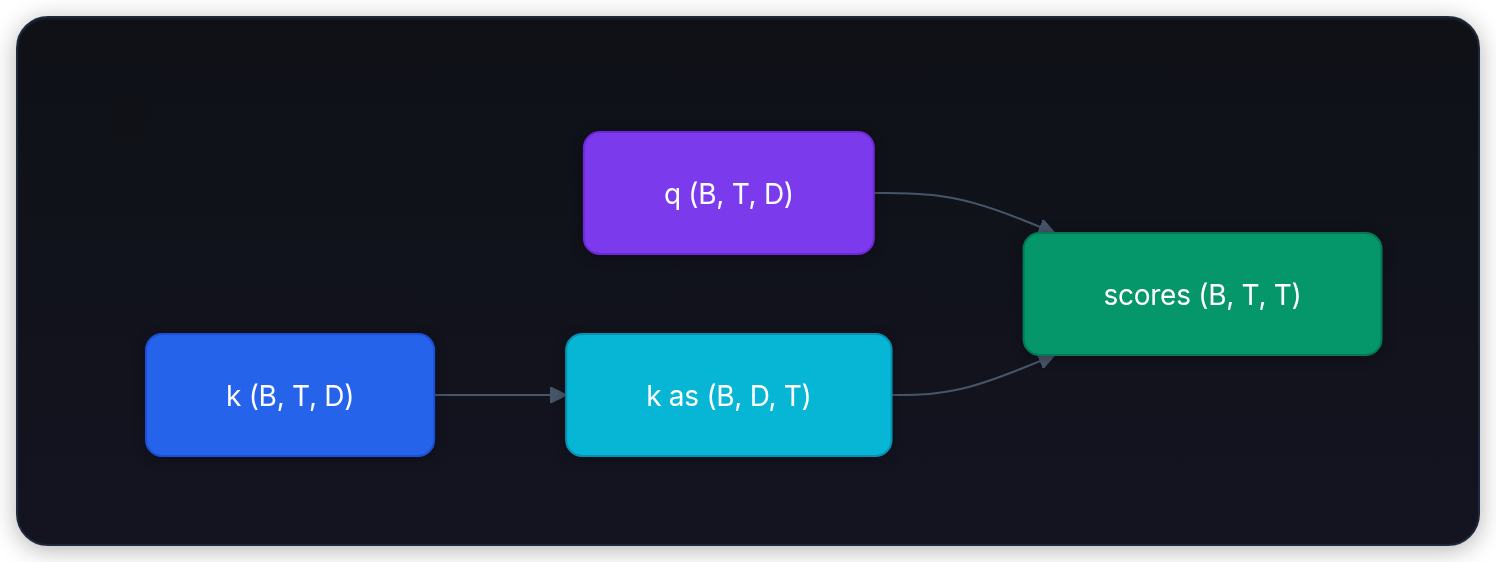
The inner size that has to agree is D. After the swap, that shared D disappears into the scores, leaving two T axes: which token asked and which token was compared.
Check the attention scores
Use identity projection matrices so q and k keep the same values as x. That lets you verify the first score by hand: .
1import numpy as np
2
3B, T, D = 2, 3, 4
4x = np.arange(B * T * D, dtype=np.float32).reshape(B, T, D)
5wq = np.eye(D, dtype=np.float32)
6wk = np.eye(D, dtype=np.float32)
7
8q = x @ wq
9k = x @ wk
10
11try:
12    q @ k
13except ValueError:
14    print("q @ k fails: inner axes are D=4 and T=3")
15else:
16    raise RuntimeError("Expected q @ k to fail for shapes (2, 3, 4) and (2, 3, 4)")
17
18unscaled_scores = q @ np.swapaxes(k, -1, -2)
19
20print("q", q.shape)
21print("k", k.shape)
22print("unscaled_scores", unscaled_scores.shape)
23print("first query against first key", unscaled_scores[0, 0, 0])
24print("cache against miss", unscaled_scores[0, 0, 1])
25assert unscaled_scores[0, 0, 1] == 381q @ k fails: inner axes are D=4 and T=3
2q (2, 3, 4)
3k (2, 3, 4)
4unscaled_scores (2, 3, 3)
5first query against first key 14.0
6cache against miss 38.0These are raw comparison scores, not probabilities or the final attention output. Later lessons turn them into weights and use those weights to combine token information. For now, the checkable contract is enough: scores[b, i, j] compares token i with token j in snippet b, using all four features.
Split each token's features, then move the new axis
Transformers often perform several attention comparisons in parallel, called heads.[6] For a shape-only preview, split each token's four features into two groups: cache becomes [0, 1] and [2, 3]. With H equally sized heads, D must be divisible by H; each group has width D // H.
Splitting the last axis exposes (B, T, H, D // H). That still keeps all groups for a token together.
To finish at (B, H, T, D // H), first reshape to expose the head axis, then transpose to move it next to the batch axis. Reshaping straight to the target shape produces a legal array whose numbers are attached to the wrong head and token positions.
1import numpy as np
2
3B, T, D, H = 2, 3, 4, 2
4assert D % H == 0
5head_dim = D // H
6x = np.arange(B * T * D, dtype=np.float32).reshape(B, T, D)
7
8# Right: expose the head axis, then move it next to the batch axis.
9heads = x.reshape(B, T, H, head_dim).transpose(0, 2, 1, 3)
10
11# Wrong: same target shape, but the values land in the wrong heads.
12jumbled = x.reshape(B, H, T, head_dim)
13
14print("heads shape", heads.shape)
15print("same positions?", np.array_equal(heads, jumbled))
16print("head 0, token miss", heads[0, 0, 1])
17print("direct reshape, same index", jumbled[0, 0, 1])
18assert np.array_equal(heads[0, 0, 1], x[0, 1, :head_dim])1heads shape (2, 2, 3, 2)
2same positions? False
3head 0, token miss [4. 5.]
4direct reshape, same index [2. 3.]Both arrays have shape (2, 2, 3, 2), so a shape check alone would pass. But head 0 for miss must contain [4, 5], not the last two features of cache. The value assertion catches what the shape assertion can't.
Transfer: the same rule on images
The trailing-axis rule isn't special to text. A computer-vision pipeline might prepare 32 satellite tiles for a land-cover model. Each red-green-blue (RGB) tile is 224 pixels high by 224 pixels wide:
1images = (32, 224, 224, 3)Color lives on the last axis. Suppose pixel values are scaled between 0 and 1, and you want to subtract one training-set mean per color channel from every pixel. The example uses made-up channel means [0.52, 0.48, 0.44] and all-white tiles so the result is easy to inspect.
1import numpy as np
2
3images = np.ones((32, 224, 224, 3), dtype=np.float32)  # placeholder normalized tiles
4mean_color = np.array([0.52, 0.48, 0.44], dtype=np.float32)  # illustrative means
5
6normalized = images - mean_color
7print("normalized shape", normalized.shape)
8print("one centered pixel", normalized[0, 0, 0].round(2))1normalized shape (32, 224, 224, 3)
2one centered pixel [0.48 0.52 0.56]NumPy lines the shapes up from the right. The trailing 3 matches, so the mean color broadcasts across all 224 rows, 224 columns, and 32 photos. No Python loop is needed.
Common shape bugs: symptoms and fixes
Shape bugs become easier to fix when you name the symptom, the cause, and the correction.
| Symptom | Likely cause | Fix |
|---|---|---|
ValueError: operands could not be broadcast together with shapes (2,3,4) (3,) | you tried to match a token-sized vector with the feature axis | decide whether the smaller array should be (D,), (T, 1), or something else |
output has shape (2, 3) after mean, but you expected (2, 4) | you reduced the feature axis instead of the token axis | say the axis name before calling mean, then verify the kept axes |
code works with x[0] but breaks on real batches | you dropped the batch axis during indexing | keep tiny batch examples in scripts and assertions |
v.T still has shape (4,) | a 1-D vector has a single axis | make the row or column explicit with v[None, :] or v[:, None] |
reshape gave a legal array, but token meaning changed | axis order was wrong, but you regrouped values instead of permuting axes | use transpose when the axis names must move |
q @ k raises a matrix-multiply mismatch | the last axis of q doesn't line up with the second-to-last axis of k | swap the last two axes of k before the multiply |
subtracting a mean gives (32, 224, 224, 3) but colors look wrong | (224, 224, 3) subtracts a different mean at each pixel location | require (3,) when the contract is one mean per channel, shared across all locations |
| editing a slice silently changes the original array | basic slices are views that share memory, not copies | call .copy() when you need an independent array |
| split heads have the right shape but attention output is garbage | you reshaped straight to (B, H, T, D // H) instead of reshaping then transposing | reshape to (B, T, H, D // H) first, then transpose(0, 2, 1, 3) |
When a shape bug appears, write the intended axis meaning before changing code. Then check whether the operation preserved it.
Build a shape guard script
Now turn the running example into a small boundary check. Start with x = np.arange(24).reshape(2, 3, 4), add a feature bias and keep (2, 3, 4), pool tokens and keep (2, 4), then build attention scores and keep (2, 3, 3). End by replacing the bias with shape (3,) and reading the rejection.
Wrap each operation in a function so its input and output contract stays visible:
add_feature_bias(x, bias)pool_tokens(x)unscaled_attention_scores(x, wq, wk)
Try implementing these three functions before reading the solution. Reject a bad input shape explicitly and assert the output invariant each function promises. Python can remove assert statements when run with optimization enabled, so use ordinary exceptions for checks at a real data boundary. These functions check shapes only; add dtype checks separately if the caller requires a particular numeric type.
Run this reference version and compare its output with your predictions:
1import numpy as np
2
3def add_feature_bias(x: np.ndarray, bias: np.ndarray) -> np.ndarray:
4    if x.ndim != 3:
5        raise ValueError(f"expected (B, T, D), got {x.shape}")
6    expected_bias_shape = (x.shape[-1],)
7    if bias.shape != expected_bias_shape:
8        raise ValueError(f"expected bias shape {expected_bias_shape}, got {bias.shape}")
9    out = x + bias
10    assert out.shape == x.shape
11    return out
12
13def pool_tokens(x: np.ndarray) -> np.ndarray:
14    if x.ndim != 3:
15        raise ValueError(f"expected (B, T, D), got {x.shape}")
16    out = x.mean(axis=1)
17    assert out.shape == (x.shape[0], x.shape[2])
18    return out
19
20def unscaled_attention_scores(x: np.ndarray, wq: np.ndarray, wk: np.ndarray) -> np.ndarray:
21    if x.ndim != 3:
22        raise ValueError(f"expected (B, T, D), got {x.shape}")
23    batch, tokens, width = x.shape
24    expected_weight_shape = (width, width)
25    if wq.shape != expected_weight_shape or wk.shape != expected_weight_shape:
26        raise ValueError(
27            f"expected weight shapes {expected_weight_shape}, got {wq.shape} and {wk.shape}"
28        )
29    q = x @ wq
30    k = x @ wk
31    unscaled_scores = q @ np.swapaxes(k, -1, -2)
32    assert unscaled_scores.shape == (batch, tokens, tokens)
33    return unscaled_scores
34
35x = np.arange(24, dtype=np.float32).reshape(2, 3, 4)
36bias = np.array([100, 200, 300, 400], dtype=np.float32)
37wq = np.eye(4, dtype=np.float32)
38wk = np.eye(4, dtype=np.float32)
39
40shifted = add_feature_bias(x, bias)
41pooled = pool_tokens(shifted)
42unscaled_scores = unscaled_attention_scores(x, wq, wk)
43
44print("shifted", shifted.shape)
45print("pooled", pooled.shape)
46print("unscaled_scores", unscaled_scores.shape)
47
48try:
49    add_feature_bias(x, np.array([10, 20, 30], dtype=np.float32))
50except ValueError as exc:
51    print("caught:", exc)
52else:
53 raise RuntimeError("Expected the shape guard to reject a token-sized bias")1shifted (2, 3, 4)
2pooled (2, 4)
3unscaled_scores (2, 3, 3)
4caught: expected bias shape (4,), got (3,)When extending these checks, use both unequal axis sizes and equal ones. Unequal sizes exposed the earlier broadcasting error, but equal sizes can hide a misplaced axis. Pair shape checks with a known-value assertion, as the head-splitting example did for the miss token.
Your loader now returns one snippet as shape (3, 4). The shape guard rejects it. How can you add a batch axis without changing which values belong to each token?
Answer
For single.shape == (3, 4), use single[None, :, :] to get (1, 3, 4). The new leading axis says there's one snippet. If you're selecting from the original batch instead, x[0:1] preserves that leading axis directly, whereas x[0] removes it.
(B, T, D) records how many snippets, how many positions in each snippet, and how many numbers describe each position. Preserve those meanings, not just the element count. A useful check pairs the expected shape with one value you can trace back to its original token.