Personalize this lesson
Adapt explanations and teaching visuals to your background and preferred voice.
A code agent writes a JUnit XML parser, executes it against a test-report fixture, and hits KeyError: 'status'. The candidate assumed each <testcase> has a status attribute. In the report below, failures and errors appear as child elements. The traceback gives the next attempt a specific hypothesis to test. It doesn't establish that the next patch will be correct.
The danger hides in that simple word: executes. Candidate code and its dependencies may be mistaken or malicious. With the host user's authority, they can read environment variables, probe internal networks, query a cloud metadata endpoint such as 169.254.169.254, or exhaust resources. Passing tests establishes neither authorization nor system security.
For an agent that executes untrusted candidates, design two mechanisms together:
- An evidence-driven repair loop: Extracts bounded execution feedback (exit codes, exact assertion failures, truncated tracebacks) so the model refines its logic iteratively.
- An execution boundary: Restricts capabilities and resources, contains the job's processes, and keeps grading authority outside candidate control. Choose its implementation for the workload and threat model; multiple nested runtime technologies aren't mandatory.
The plan-and-execute pattern can provide the outer loop. Prompt-injection defenses help handle hostile instructions, but can't make a runtime safe. This chapter separates repair evidence, execution containment, and trustworthy grading. Tests check specified behavior; they rarely prove complete program correctness.
Make the next attempt depend on evidence
Define the parser's contract first: return classname::name for failed or errored cases, preserving first-seen order and deduplicating by the (classname, name) pair. Status elements must be direct children in the root's namespace. A <skipped> child takes precedence in this exercise, and a failing case with a missing or blank identifier is invalid. These are chosen conventions for the fixture, not a universal specification of every JUnit XML producer.
Here's an executable regression suite demonstrating the repair loop. It runs both the flawed initial assumption and the working repair against an identical fixture. Arbitrary model-generated code must never run in your host Python process; it belongs in the isolated sandbox explored next.
from xml.etree import ElementTree as ET

REPORT = """<testsuites><testsuite>
  <testcase classname="billing" name="ok"/>
  <testcase classname="billing" name="declined"><failure/></testcase>
  <testcase classname="billing" name="offline"><error/></testcase>
  <testcase classname="billing" name="later"><skipped/></testcase>
  <testcase classname="billing" name="both"><failure/><error/></testcase>
  <testcase classname="billing" name="declined"><failure/></testcase>
  <testcase classname="billing" name="nested"><details><failure/></details></testcase>
</testsuite></testsuites>"""

def broken(xml):
    return [case.attrib["name"] for case in ET.fromstring(xml).iter("testcase")
            if case.attrib["status"] == "failed"]

def failed_tests(xml):
    root = ET.fromstring(xml)
    namespace = root.tag[:root.tag.index("}") + 1] if root.tag.startswith("{") else ""
    result = []
    seen = set()
    for case in root.iter(f"{namespace}testcase"):
        children = {child.tag for child in case}
        if f"{namespace}skipped" in children:
            continue
        if not children.intersection({f"{namespace}failure", f"{namespace}error"}):
            continue
        identity = (case.get("classname"), case.get("name"))
        if any(value is None or not value.strip() for value in identity):
            raise ValueError("A failing case needs classname and name")
        if identity not in seen:
            seen.add(identity)
            result.append(f"{identity[0]}::{identity[1]}")
    return result

try:
    broken(REPORT)
except KeyError as error:
    assert error.args == ("status",)
    print("First candidate: KeyError('status')")
else:
    raise AssertionError("The broken candidate unexpectedly passed")

assert failed_tests(REPORT) == [
    "billing::declined", "billing::offline", "billing::both"
]
assert failed_tests("<testsuite/>") == []
NAMESPACED = '''<testsuite xmlns="urn:example:junit" xmlns:other="urn:other">
  <testcase classname="api" name="bad"><failure/></testcase>
  <testcase classname="api" name="foreign"><other:failure/></testcase>
  <testcase classname="api" name="skip"><skipped/><error/></testcase>
</testsuite>'''
assert failed_tests(NAMESPACED) == ["api::bad"]
for invalid in ('<testcase name="x"><failure/></testcase>',
                '<testcase classname="api" name=" "><error/></testcase>'):
    try:
        failed_tests(invalid)
    except ValueError:
        pass
    else:
        raise AssertionError("Missing or blank identifier was accepted")
try:
    failed_tests("<testsuite>")
except ET.ParseError:
    pass
else:
    raise AssertionError("Malformed XML was accepted")
print("Repair: status, duplicates, namespaces, identifiers and malformed XML checked")First candidate: KeyError('status')
Repair: status, duplicates, namespaces, identifiers and malformed XML checkedThe original lookup also invites an ElementTree pitfall: if case.find("failure"): treats a childless element as false in current Python, and truth-value testing has been deprecated since Python 3.12. Use is not None for existence, or compare direct child tags as above. Namespace expansion turns failure into {uri}failure; matching the namespace prevents a foreign extension element from becoming a failure verdict. The assertions now check both repeated test cases and a case containing two status elements.[1]
When feeding execution feedback back into the agent context, supply structured, bounded evidence:
- The entry point or shell command invoked.
- The numeric process exit status code.
- The exact failing assertion or exception name (
KeyError: 'status'). - Byte-bounded stdout and stderr, plus selected beginning/end lines when useful. One line can contain megabytes, and the root cause may precede the tail.
Treat feedback as untrusted data: a traceback can contain attacker-controlled strings, secrets, or forged instructions. Limit bytes while collecting output, escape terminal control sequences before display, and cap retries. Repeated identical failures justify diagnosis or triage, not broader privileges. For untrusted XML, bound input/decompressed size, parsing time, and memory, and check the actual Expat version. Current Python documents protections that depend on Expat's version; a byte cap alone doesn't eliminate parser vulnerabilities.[2]
Keep the worker away from the authority to grade it
Separate these responsibilities, even when trusted components share a service:
- The Trusted Supervisor: Manages the repair loop, provisions sandboxes, enforces execution timeouts, strips secrets, and applies patches.
- The Untrusted Worker: Contains the untrusted candidate code, third-party libraries, build scripts, and untrusted execution tools.
- The Trusted Validator: Owns grading rules and reports observed behavior. For pure input/output tasks, it can compare worker results to expected outputs outside the worker. Repository tests may need to execute alongside candidate code; that makes runner integrity and independent result checks important.
A read-only test mount doesn't by itself establish trustworthy or confidential grading:
- Read-only files remain readable: Untrusted candidate code can open
tests/test_oracle.py, inspect private test assertions, discover edge cases, and hardcode answers without solving the actual problem. - In-process test tampering: When the test runner shares an interpreter with candidate code, the candidate can monkey-patch
unittest.TestCase.assertTrue = lambda *a, **k: None, overwritesys.modules, or hijack exception handlers. The test suite exits with status code 0, falsely claiming complete validation.
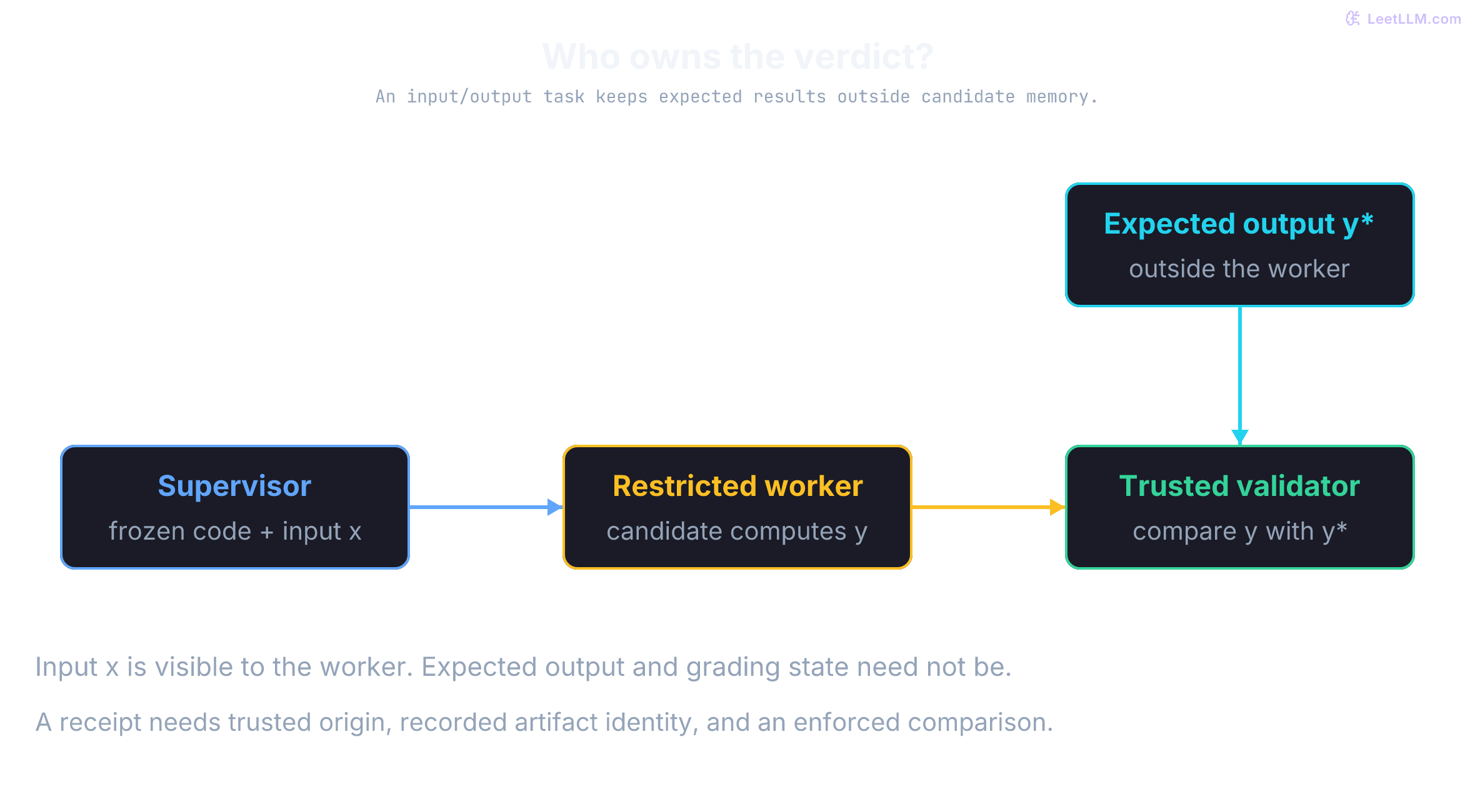
To detect a time-of-check to time-of-use (TOCTOU) mismatch, bind the result to the actual tested artifact. Record the base commit, candidate file bytes or resulting tree, dependencies/image digest, grading version, and job ID. A patch-diff hash alone omits its base and other executable files. Hash the frozen artifact before execution, protect it from mutation, and compare it again when accepting the result or applying the patch.
A receipt must come from an authenticated trusted validator. A protected database record may suffice; a transferable receipt can use a verified signature with the signing key outside the worker. SHA-256 alone neither authenticates a verdict nor prevents edits, and nothing "immediately" invalidates a changed artifact unless an enforcement step checks it. Even a valid receipt proves only that the recorded checks passed for that artifact and environment.
Try the distinction without executing any candidate. This small manifest is an illustrative classroom record; a production artifact needs every relevant input. Assume the verdict record is held by the trusted supervisor.
from copy import deepcopy
from hashlib import sha256
import json

def fingerprint(manifest):
    encoded = json.dumps(manifest, sort_keys=True, separators=(",", ":")).encode()
    return sha256(encoded).hexdigest()

tested = {
    "base": "fixture-base-v1",
    "files": {"parser.py": "return failure_names(report)"},
    "environment": "fixture-image-v1",
    "grading": "fixture-tests-v1",
}
trusted_receipt = {"artifact": fingerprint(tested), "verdict": "pass"}
assert fingerprint(tested) == trusted_receipt["artifact"]
for field, replacement in (("base", "fixture-base-v2"),
                           ("files", {"parser.py": "return []"}),
                           ("grading", "fixture-tests-v2")):
    changed = deepcopy(tested)
    changed[field] = replacement
    assert fingerprint(changed) != trusted_receipt["artifact"]
print("Same manifest matches; changed base, file or grading version doesn't")
print("Hash comparison detects change; receipt authenticity is a separate requirement")Same manifest matches; changed base, file or grading version doesn't
Hash comparison detects change; receipt authenticity is a separate requirementA test file is mounted read-only (:ro) inside the candidate's container. Why can't that alone protect the grading verdict?
Answer
Read-only mounts prevent disk writes, but candidate code can still inspect private test cases. If the candidate and test runner share an interpreter, candidate code can monkey-patch assertion functions in memory to force a passing exit code.
Four execution boundaries to compare
Compare capabilities, kernel exposure, compatibility, and lifecycle controls. These alternatives aren't an ascending security ranking. Startup measurements need an endpoint: image pull, runtime creation, guest boot, module compilation, and ready-to-run execution are different events.
| Runtime | Execution boundary | Compatibility and remaining exposure |
|---|---|---|
| Linux container (Docker/runc) | Namespaces, cgroups, configured seccomp/capabilities | General Linux processes; shares the host kernel. Permitted mounts, devices, and daemon access can defeat intended restrictions. |
| Application kernel (gVisor/runsc) | Sentry implements application syscalls; restricted host interactions | Many Linux workloads; syscall compatibility and I/O overhead depend on the application and configuration. Gofer mediates filesystem access, with options such as DirectFS changing the path. |
| MicroVM (Firecracker) | Guest kernel and minimal VMM over Linux KVM | Runs a guest OS; needs KVM support, guest/image management, and external resource/network policy. VMM, host kernel, devices, and hardware remain part of the boundary. |
| WebAssembly runtime | Checked linear-memory access and typed control flow; explicitly linked imports | Code must target Wasm, or run through an interpreter compiled to Wasm. WASI/host imports grant capabilities; fuel metering is a runtime option, not a mandatory core-Wasm feature. |
A reachable kernel vulnerability can defeat standard container isolation; not every kernel bug is reachable or produces an escape. Access to an unrestricted rootful Docker daemon usually gives effective host-root authority because the caller can create privileged containers or mount host files. A rootless daemon has a different authority scope. Keep daemon/control-plane access outside the worker either way.[3]
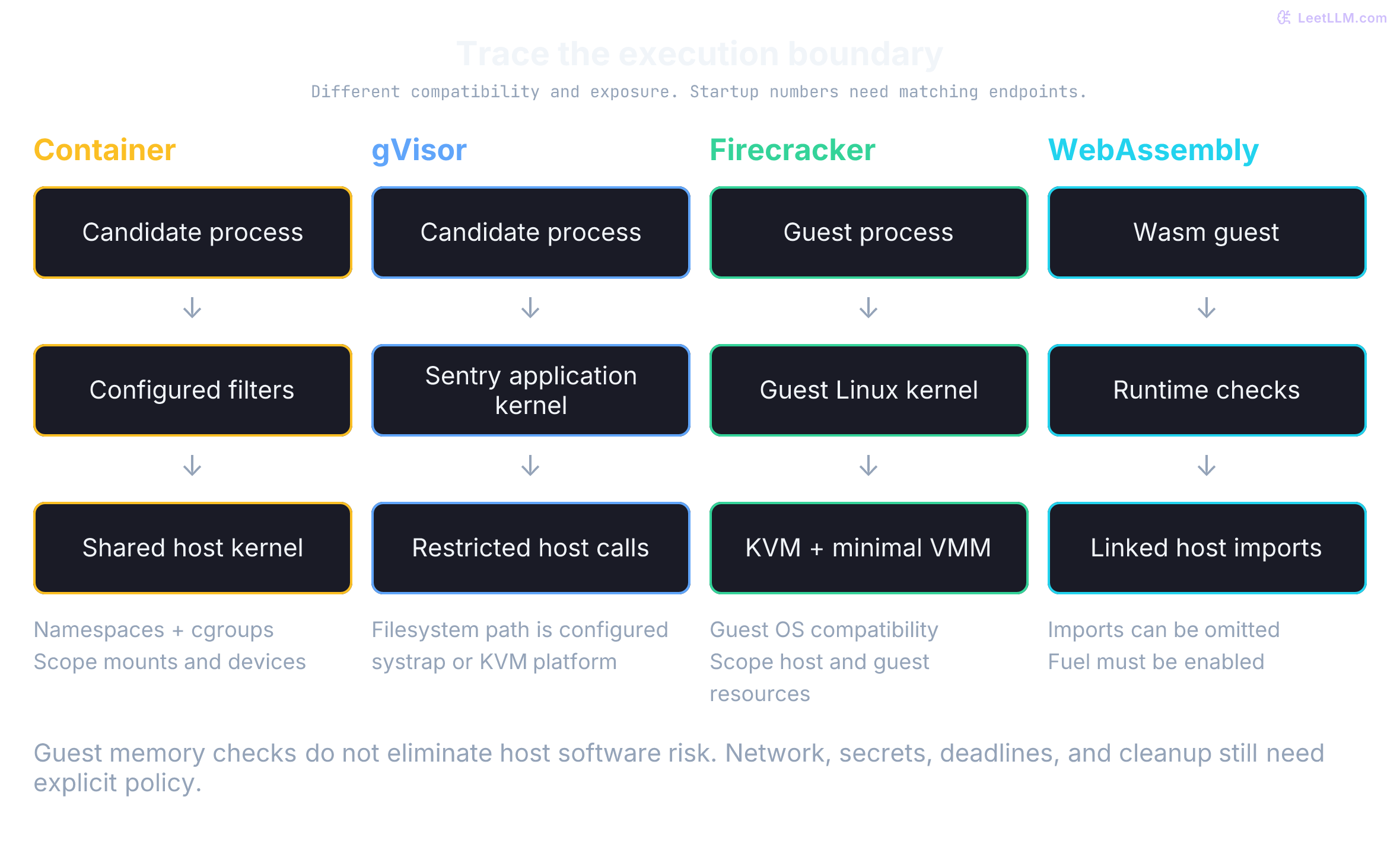
gVisor's Sentry implements much of the Linux application interface in Go and limits its own host interactions. It still relies on the host OS and other trusted components. Gofer isn't an "off-host" filesystem service by definition. Current gVisor uses systrap by default, supports a KVM platform, and documents ptrace as no longer supported. None of these options provides a universal 10–30% I/O overhead.[4][5]
Firecracker uses Linux KVM and a deliberately small device model.[6] Its published specification targets at most 125 ms from InstanceStart to guest /sbin/init, under a tuned minimal setup on specified metal instances. That isn't a guarantee that an agent sandbox, dependencies, network policy, and test runner are ready in 125 ms.[7]
Managed sandbox APIs move provisioning and lifecycle work into a service; inspect the exact product's defaults and limits. As checked October 10, 2026, Modal's sandbox networking documentation permits outbound public-IP connections by default and offers block_network=True, CIDR allowlists, and a domain allowlist in Beta. A domain allowlist filters TLS names rather than request bodies; its documented domain-fronting limitation matters when two domains share an endpoint. "Sandbox" doesn't automatically mean offline.[8]
Multi-layer containment and resource controls
Combine controls for different failure modes. Their protection overlaps and depends on configuration; each layer doesn't independently stop every attack.
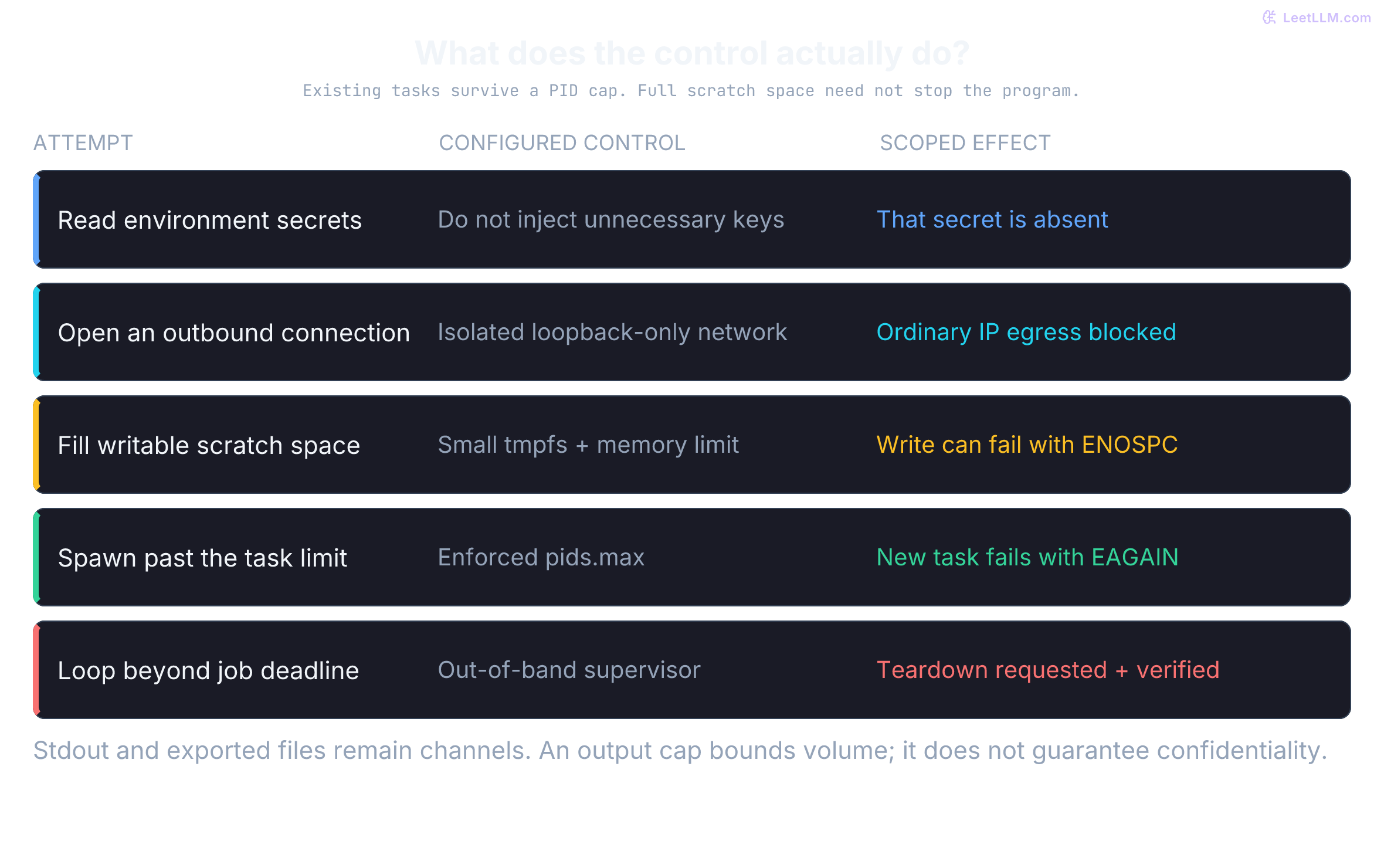
This Linux Docker example illustrates restrictions, not a complete deployment. Supply a reviewed worker image containing /app/main.py; choose an immutable image digest in a real launch configuration. The host must provide the reviewed, workload-compatible seccomp profile at the shown path. The flags don't create it or supply a wall-clock timeout.[9]
docker run --rm \
  --read-only \
  --tmpfs /tmp:rw,noexec,nosuid,nodev,size=64m,mode=1777 \
  --net=none \
  --user 10001:10001 \
  --cap-drop=ALL \
  --security-opt=no-new-privileges \
  --security-opt seccomp=/etc/docker/seccomp-strict.json \
  --pids-limit 64 \
  --memory 512m \
  --memory-swap 512m \
  --cpus 0.5 \
  --workdir /app \
  --entrypoint python \
  candidate-worker:reviewed-example /app/main.py
These parameters enforce concrete boundaries:
--read-onlymakes the container root filesystem read-only. Writable mounts,/tmp, and memory still exist; the flag doesn't prevent malicious code from running.--tmpfs ...size=64mbounds this scratch mount to 64 MiB. Its usage also counts toward the container memory limit.noexecblocks direct execution from the mount, butpython /tmp/script.pycan still read and interpret a script. It isn't a code-execution prohibition.[10]--net=nonecreates an isolated network namespace with loopback only. It blocks ordinary outbound IP connections without removing the namespace or every communication channel.[11]--user 10001:10001selects a non-root UID/GID. This reduces privileges; it doesn't eliminate exploitable kernel or application bugs.--cap-drop=ALLremoves configured Linux capabilities.no-new-privilegespreventsexecvefrom granting new privileges through mechanisms such as setuid files; it doesn't stop every privilege-escalation vulnerability.--pids-limit 64limits tasks, including threads. Whenfork/clonewould exceed the enforced limit, it fails withEAGAIN; already running tasks remain alive.[12]- Equal
--memoryand--memory-swaplimits disable container swap where enforcement is supported. Memory pressure can cause reclaim, allocation failure, or an OOM kill; an allocation past a threshold isn't guaranteed to kill the whole job immediately.[13][12]
Also bound /dev/shm, file descriptors, exported artifacts, and collected logs as appropriate. A read-only root doesn't cap host-side container logs. Enforce aggregate concurrency and host headroom so many individually bounded jobs don't exhaust the machine.
Offline execution can still leak secrets
Disabling networking (--net=none) stops an attacker from sending HTTP requests to a command-and-control server, but it doesn't prevent secret leaks. If you inject database passwords or API tokens into worker environment variables, untrusted code can read os.environ and print those credentials into stdout, stderr, or generated files.
Because the supervisor collects standard output to capture debug evidence, printed secrets flow right back into logs, model context windows, and human review consoles. Regex-based output scrubbers won't catch base64-encoded, hex-encoded, or rot13-obfuscated secrets. The only dependable rule is: never supply credentials to a worker that doesn't strictly need them.
When candidate code requires external dependencies, use a two-phase build pipeline:
- Dependency preparation: Fetch approved, pinned artifacts with hashes from a trusted lockfile through limited egress. Treat package build/install scripts as untrusted execution too; don't give the builder production secrets or broad internal access. A matching hash establishes artifact identity, not that a package is benign.
- Offline execution: Install from the approved cache/image and run the candidate without outbound networking. Mount only needed artifacts. Native builds may require executable scratch space, so adapt
noexecto the task rather than quietly removing other controls when a build fails.
If a task needs egress, enforce a default-deny policy outside worker control and allow specific destinations/protocols. Account for IPv4/IPv6, DNS, redirects, resolved addresses, cloud metadata variants, and exposed proxies or Unix sockets. A denylist of three private IPv4 ranges and one metadata address isn't complete. Internal access can be legitimate when explicitly scoped; blanket private-IP denial isn't appropriate for every task.
CPU bandwidth, deadlines, and complete teardown
A CPU quota doesn't function as a timeout. With the default 100-millisecond quota period, --cpus 0.5 permits roughly 50 milliseconds of aggregate CPU time per period.[13] An infinite loop (while True: pass) can run indefinitely, throttled to the configured CPU bandwidth.
Combine CPU accounting with a separate wall-clock deadline:
- CPU accounting: A cgroup quota limits CPU bandwidth.
RLIMIT_CPUcan signal a process at a cumulative CPU-time limit, but isn't automatically an aggregate budget for all descendants. Neither is a wall-clock deadline. - Wall-Clock Supervisor Watchdog: An out-of-band supervisor timer that issues a hard
SIGKILLwhen elapsed wall time exceeds the job budget (such as 30 seconds).
Killing one process can leave descendants running. Orphans are adopted by a suitable subreaper or namespace init, not necessarily host PID 1. A child can create a new session/process group with setsid, so killpg doesn't guarantee that all descendants are killed. Subreaper status supports adoption and waiting; it doesn't itself contain or terminate them.[14][15]
When the init process of a PID namespace terminates, Linux sends SIGKILL to processes in that namespace. Have the trusted runtime enforce teardown from outside the worker; a runtime-owned init may still be alive after the candidate process exits.[16] On supporting cgroup v2 hosts, a supervisor can use cgroup.kill to kill an entire job cgroup tree, provided the worker can't migrate out or control that hierarchy. This isn't equivalent to running kill -9 -1, and sending a signal isn't proof that cleanup completed.[12]
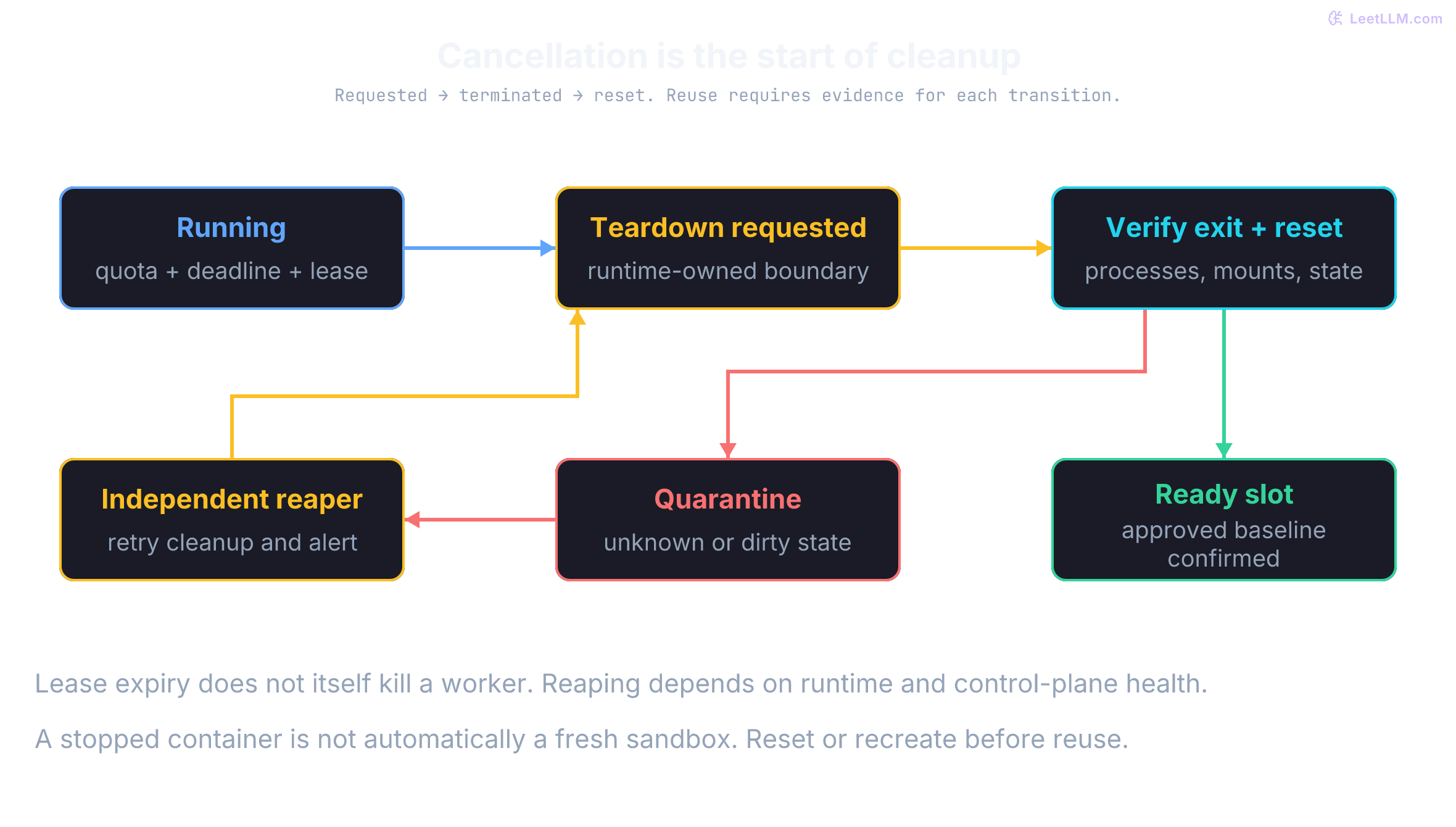
A supervisor can crash before cleanup. Track a finite job lease and maximum lifetime in a control plane the worker can't modify, and use an independent reaper. Preserve the worker ID, lease generation, and deadline in durable state; a vanished TTL key alone may no longer tell the reaper which worker to destroy. Reaping still depends on scheduling, backend access, and runtime health. Retry and alert on unconfirmed termination, and quarantine the slot instead of claiming that lease expiry immediately reclaimed memory. Warm reuse needs a verified reset or fresh instance, not merely a stopped container.
A delayed cleanup retry also needs the original worker's identity. Suppose generation 7 has been destroyed and verified clean, and slot A now hosts generation 8. Resolving the old cleanup request through the slot's current mapping would destroy the new job. Predict which worker these two targets select:
old_cleanup = {"slot": "A", "generation": 7, "worker_id": "worker-7"}
current = {"slot": "A", "generation": 8, "worker_id": "worker-8"}
live_workers = {"worker-8"}  # Old worker's teardown already completed.

wrong_target = current["worker_id"]
correct_target = old_cleanup["worker_id"]
print("Slot lookup would hit replacement:", wrong_target in live_workers)
live_workers.discard(correct_target)  # Retry addresses the immutable old ID.
print("Original-ID retry preserves replacement:", "worker-8" in live_workers)
assert old_cleanup["generation"] != current["generation"]
assert live_workers == {"worker-8"}Slot lookup would hit replacement: True
Original-ID retry preserves replacement: TrueThis fixture selects targets; it doesn't implement a runtime API. A real reaper must address an immutable, non-reused runtime ID and qualify slot-state updates by generation. If destruction only accepts a reusable name, the backend must enforce the generation with the action. A separate check followed by a name-based destroy still has a race.
Bound guest execution with WebAssembly
WebAssembly is useful for tasks with a narrow interface. Core Wasm has checked linear-memory access and typed control flow, with I/O supplied through linked interfaces. A module may declare multiple memories; the embedding below allows at most one. WASI and custom host imports can expose files, clocks, network access, and other capabilities. The engine and embedding remain trusted software that needs updates.[17]
With Wasmtime fuel metering enabled, generated code consumes a configured budget as guest operations execute. Exhaustion traps with OUT_OF_FUEL. For a deterministic execution path and fixed runtime settings, fuel provides repeatable guest interruption. Fuel isn't milliseconds, isn't necessarily one unit per source statement, and doesn't bound module parsing/compilation, host-import execution, or all engine allocations. Epoch-based interruption is another Wasmtime option with different overhead and timing behavior.[18]
This import-free embedding uses wasmtime==49.0.0, released September 21, 2026, and accepts a guest function run(i32) -> i32.[19][20] Its 65,536-byte limit covers guest linear memory, not total host RSS. The 4,096-byte WAT input cap reduces compilation input size; production execution also needs host process memory/CPU/deadline controls. Fuel is set before instantiation because a module's start function can execute then.
import wasmtime as wasm

config = wasm.Config()
config.consume_fuel = True
engine = wasm.Engine(config)

def run_guest(wat, argument, *, fuel=1_000, memory_bytes=65_536):
    for name, value, maximum in (
        ("fuel", fuel, 100_000),
        ("memory_bytes", memory_bytes, 65_536),
    ):
        if type(value) is not int or not 1 <= value <= maximum:
            raise ValueError(f"Invalid {name}")
    if type(argument) is not int or not -(2**31) <= argument < 2**31:
        raise ValueError("Argument must be a signed i32")
    if not isinstance(wat, str) or len(wat.encode("utf-8")) > 4_096:
        raise ValueError("Expected at most 4096 UTF-8 bytes of WAT")

    module = wasm.Module(engine, wat)
    if module.imports:
        raise ValueError("Host imports are not allowed")
    with wasm.Store(engine) as store:
        store.set_limits(memory_size=memory_bytes, memories=1,
                         instances=1, tables=0)
        store.set_fuel(fuel)  # Fuel set before instantiation; start functions consume fuel too.
        instance = wasm.Instance(store, module, [])
        run = instance.exports(store).get("run")
        if not isinstance(run, wasm.Func):
            raise ValueError("Missing exported function run")
        signature = run.type(store)
        if ([str(t) for t in signature.params] != ["i32"]
                or [str(t) for t in signature.results] != ["i32"]):
            raise ValueError("Expected run(i32) -> i32")
        return run(store, argument)

ADD_ONE = '''(module
  (func (export "run") (param i32) (result i32)
    local.get 0 i32.const 1 i32.add))'''
assert run_guest(ADD_ONE, 41) == 42
assert run_guest(ADD_ONE, -1) == 0
assert run_guest(ADD_ONE, 2**31 - 1) == -(2**31)
print("run(41) = 42; negative input and signed i32 wrap checked")run(41) = 42; negative input and signed i32 wrap checkedThe test verifies integer addition wrapping at signed 32-bit boundaries. Integer overflow semantics represent a task verification requirement rather than a sandbox flaw.
Testing failure boundaries instead of happy paths
Failure probes give evidence about specific boundaries. This suite checks loops, guest memory, imports, and the function interface. Passing it doesn't prove that an engine has no exploitable implementation bugs or that the host survives every resource attack.
def expect_exception(error_type, operation):
    try:
        operation()
    except error_type as error:
        return error
    raise AssertionError(f"Expected {error_type.__name__}")

def guest(instructions, memory=""):
    return f'''(module {memory}
      (func (export "run") (param i32) (result i32) {instructions}))'''

loop = guest("(loop br 0) i32.const 0")
error = expect_exception(wasm.Trap, lambda: run_guest(loop, 0))
assert error.trap_code == wasm.TrapCode.OUT_OF_FUEL

# Failure to grow memory returns -1; it doesn't trap.
grow = guest("i32.const 1 memory.grow", "(memory 1)")
assert run_guest(grow, 0) == -1
oversized = guest("local.get 0", "(memory 2)")
expect_exception(wasm.WasmtimeError, lambda: run_guest(oversized, 0))

outside = guest("i32.const 65536 i32.load", "(memory 1)")
error = expect_exception(wasm.Trap, lambda: run_guest(outside, 0))
assert error.trap_code == wasm.TrapCode.MEMORY_OUT_OF_BOUNDS

imported = '''(module (import "host" "read_secret" (func))
  (func (export "run") (param i32) (result i32) local.get 0))'''
expect_exception(ValueError, lambda: run_guest(imported, 0))
wrong_type = '(module (func (export "run") (result i32) i32.const 0))'
expect_exception(ValueError, lambda: run_guest(wrong_type, 0))

start_loop = '''(module
  (func $start (loop br 0)) (start $start)
  (func (export "run") (param i32) (result i32) local.get 0))'''
error = expect_exception(wasm.Trap, lambda: run_guest(start_loop, 0))
assert error.trap_code == wasm.TrapCode.OUT_OF_FUEL

for bad in (0, -1, True, 100_001):
    expect_exception(ValueError, lambda: run_guest(ADD_ONE, 0, fuel=bad))
for bad in (0, -1, True, 65_537):
    expect_exception(ValueError, lambda: run_guest(ADD_ONE, 0, memory_bytes=bad))
for bad in (True, 2**31, -(2**31) - 1):
    expect_exception(ValueError, lambda: run_guest(ADD_ONE, bad))
expect_exception(ValueError, lambda: run_guest(" " * 4_097, 0))
expect_exception(ValueError, lambda: run_guest("(module)", 0))
print("Fuel, memory, start, import and interface boundaries checked; bad inputs rejected")Fuel, memory, start, import and interface boundaries checked; bad inputs rejectedThese tests establish the following behavior for the exercised modules:
- The infinite guest loop traps cleanly with
OUT_OF_FUEL. - Calling
memory.growbeyond the store quota returns -1 rather than crashing the host process. - Reading offset 65,536 (outside the single 64 KiB page) traps with
MEMORY_OUT_OF_BOUNDS. - Start function loops also consume fuel and halt before invocation.
- Modules declaring any host import are rejected before instantiation.
No host imports or WASI are linked, so these guests have no provided filesystem, socket, or environment interface. If a task needs file I/O, expose a scoped capability with bounded results and validated resource resolution. A virtual-path label alone doesn't prevent traversal or access through symlinks in its host implementation.
Repeatable fuel interruption also doesn't make all Wasm execution deterministic. Floating-point NaN representations, relaxed SIMD, memory-growth failure, and nondeterministic imports need separate treatment when reproducibility is required.[21]
Measuring correctness and containment separately
Evaluating coding agents requires measuring functional correctness and runtime containment on separate axes. High correctness on benchmarks doesn't guarantee your execution environment is secure.[22][23]
HumanEval reports an unbiased estimator of success within samples, averaged over tasks. Under the independent, identically distributed sampling assumptions behind that estimator, collect candidates with test-passing solutions. For a fixed observed pool, the probability of at least one passing result in indices selected without replacement is:
Consider an example with generated candidates where pass unit tests. Evaluating pass@2 checks the probability that at least one of two chosen samples succeeds. Total ways to select two candidates equals . The number of selections containing zero passing candidates equals . Therefore:
Selecting pool indices with replacement gives for this fixed pool. That arithmetic is correct for a different experiment. Plugging the estimated success rate into is generally biased as an estimator of fresh-sample success; the combinatorial expression avoids that bias under its assumptions. Independently generated candidates can still contain identical code. Without replacement refers to sample indices, not a promise of unique patches.[22]
from itertools import combinations
from math import comb, isclose

def pass_at_k(n, c, k):
    if any(type(x) is not int for x in (n, c, k)):
        raise ValueError("Counts must be integers")
    if not (n >= 1 and 0 <= c <= n and 1 <= k <= n):
        raise ValueError("Expected n >= 1, 0 <= c <= n and 1 <= k <= n")
    misses = comb(n - c, k) if n - c >= k else 0
    return 1 - misses / comb(n, k)

pairs = list(combinations([True, True, False, False, False], 2))
assert sum(any(pair) for pair in pairs) == 7
assert isclose(pass_at_k(5, 2, 2), 0.7)
assert pass_at_k(5, 0, 2) == 0
assert pass_at_k(5, 5, 2) == 1
assert pass_at_k(5, 2, 5) == 1
assert isclose(pass_at_k(5, 2, 1), 0.4)
print("pass@2 = 7/10 = 70%; zero/all successes and k=1/n checked")pass@2 = 7/10 = 70%; zero/all successes and k=1/n checkedWithin a repair trajectory, attempt depends on feedback from attempt , so its successive patches aren't IID samples for the estimator above. You can instead sample independent whole trajectories under a fixed configuration and grade each final artifact. SWE-bench supplies repository issue-resolution tasks and a patch-evaluation harness; it doesn't itself require a multi-turn agent or impose one universal token, attempt, or dollar budget.[23][24] Pin task versions, environments, tools, budgets, and grading policies. Separate test failures from infrastructure failures and incomplete evaluations.
Separately, run bounded containment probes in a disposable staging environment with the intended runtime configuration. Use synthetic secrets and supervisor-enforced limits; don't launch uncontrolled resource attacks on a shared host:
- Canary Probe: Write an artificial credential file on the host; verify the sandbox worker can't read it.
- Egress Probe: Attempt a bounded connection to a test destination that policy denies, and inspect the enforcement result. Where relevant, test metadata/private/IPv6 destinations without retrieving actual credentials. Connection failure alone can reflect an unavailable server rather than a working deny rule.
- Storage Probe: Write slightly beyond the configured small scratch quota, then verify the write error and remaining host headroom.
ENOSPCneedn't terminate the worker; the deadline still owns teardown. Check host log and artifact limits too. - Orphan Probe: Under an independent hard lifetime limit, launch a bounded background workload and terminate the job supervisor. Measure cleanup delay after lease expiry, verify descendant termination, and check that an unconfirmed slot remains quarantined.
- Cross-Job Leak Probe: Check prior files, mounts, environment, processes, sessions, and inherited descriptors against the next job's baseline. A clean filesystem alone doesn't establish a clean runtime.
Bounded patches from verifiable execution
Building effective coding agents requires pairing iterative reasoning with defensive execution architecture. The JUnit XML parser candidate improved because execution exposed an exact KeyError: 'status' traceback, enabling targeted hypothesis testing.
Keeping that loop safe demands strict separation of concerns:
- The Agent LLM reasons about code logic and proposes semantic repairs.
- The Execution Sandbox isolates untrusted code behind kernel, network, and resource barriers.
- The Trusted Validator grades specified behavior outside candidate authority wherever the task permits, and treats candidate-controlled test output as evidence to check.
- The Artifact Record binds an authenticated result to the tested code, base, environment, and grading version, with comparison enforced before acceptance.
Repair feedback can improve a candidate while also leaking information or carrying hostile text. Containment limits execution authority while leaving implementation and lifecycle risks to manage. An authenticated, matching test result is useful evidence for review; it isn't a deployment grant or a complete proof of correctness.