Personalize this lesson
Adapt explanations and teaching visuals to your background and preferred voice.
Your retriever finds the right paragraph. Then the process restarts, and its document dictionary is empty. The Data Structures for AI lesson made lookup efficient inside one process; now the documents need a home that outlives it.
Structured Query Language (SQL) lets you read and change data in a relational database. The database stores durable state in tables. Named columns describe fields, and each stored fact is a row. Constraints turn assumptions into rules the database can enforce, even when another process writes the data.
Use a small, fictional support-policy corpus for Acme Cloud. Its current API-key policy says "rotate within seven days." An older version says ninety days. Both paragraphs can match a search, but only one should support a current answer. This policy is sample data, not security advice.
SQLite and Python's standard-library sqlite3 interface keep the lab local and runnable. Run the Python cells in order in one session; they share the connection and tables. The later PostgreSQL sections are extensions, not additional software you need for the SQLite lab.
| Question | Database feature that answers it |
|---|---|
| Does this document still exist after a restart? | A table row saved in a database |
| Can two chunks claim the same identity? | A primary key or uniqueness constraint |
| Which document version produced this quoted chunk? | A foreign key plus a JOIN |
| Is this agent allowed to retrieve it? | A permission row plus a filter |
| What if chunk insertion fails halfway through? | A transaction that rolls back |
From Python objects to rows
In memory, you might keep documents in a dictionary keyed by document_id. A database makes those identities and their relationships explicit. A workspace separates one customer's data from another's; a chunk is a paragraph we might retrieve; a principal is the user or service whose access we're checking:
| Table | One row means | Important link |
|---|---|---|
workspaces | one tenant workspace | id identifies tenant |
documents | one published version of a source document | workspace_id refers to owner |
chunks | one retrievable paragraph | document_id refers to source |
chunk_permissions | one allowed principal for one chunk | chunk_id refers to content |
Now the links are data rather than a convention in application code. In-memory Python dictionaries let you nest chunks inside documents, but they leave integrity to developer discipline. Separate writes to a persistent store can leave a document without its chunks if an ingestion worker fails halfway through. A relational schema turns relationship assumptions into database-enforced rules: a primary key uniquely identifies each row, while a foreign key ensures references point to existing records. Our references specify NOT NULL, so a chunk can't omit its source document or point into the void. A transaction will later keep the related writes together.
For properties that vary across parsers (like token counts, header hierarchies, or custom chunk metadata), modern AI architectures combine normalized relational columns with hybrid JSON or JSONB attributes. The relational skeleton owns identity, tenancy, and authorization; the hybrid layer carries flexible document metadata without breaking foreign-key guarantees.[1]
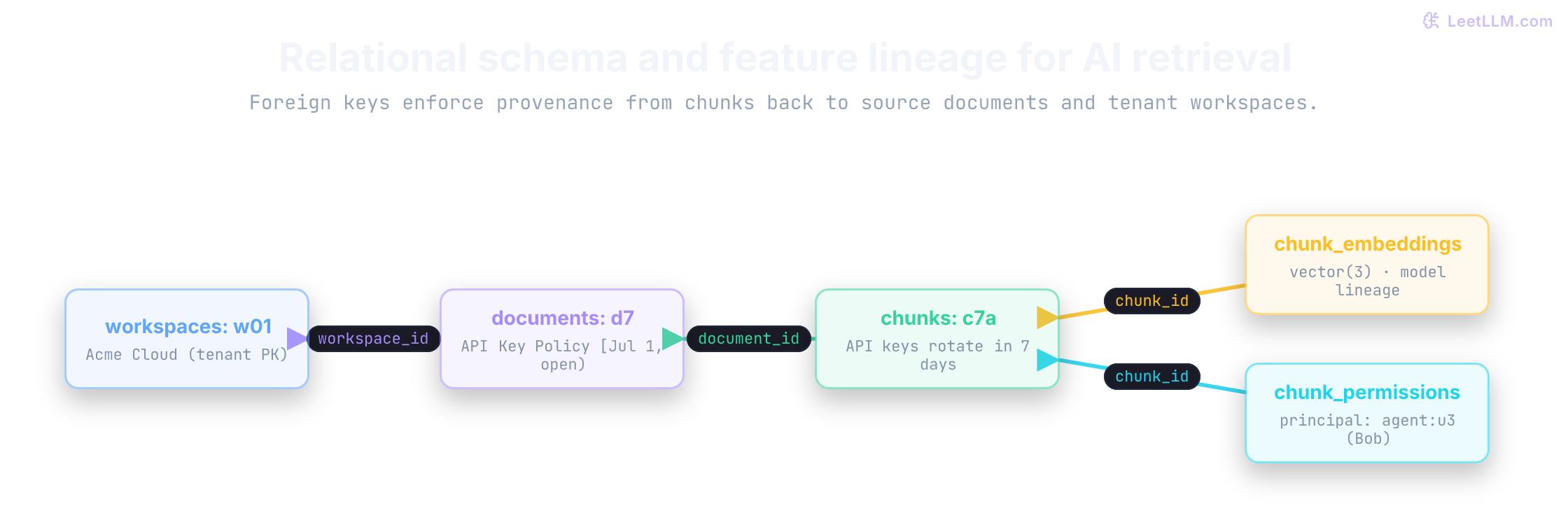
Create the smallest useful schema
The first example creates four tables and inserts a tiny corpus. CREATE TABLE declares columns and constraints; INSERT INTO adds rows. TEXT holds strings, NOT NULL requires a value, and UNIQUE rejects a repeated combination of values. A CHECK rejects a row when its condition is false.
The database file lives in a fresh temporary directory so rerunning the lesson won't overwrite earlier work. A file-backed connection can be closed and reopened without losing committed rows. sqlite3.connect(":memory:") would be convenient for scratch work, but it would lose the database when that connection closes.[2]
Its validity interval is half-open: active at valid_from, inactive at valid_to. A NULL valid_to means the version has no known end yet. This local SQLite lab stores canonical UTC timestamps as text; the PostgreSQL version later uses TIMESTAMPTZ.
PRAGMA foreign_keys = ON enables SQLite's foreign-key rules on this connection. Don't depend on the build's default setting.[3] SQLite also preserves a historical exception: an ordinary TEXT PRIMARY KEY can accept NULL unless it explicitly says NOT NULL. PostgreSQL primary keys reject NULL automatically, but this lab declares both constraints.[4]
We commit the seed data so later examples can open and roll back new transactions on purpose.
1import sqlite3
2from pathlib import Path
3from tempfile import TemporaryDirectory
4
5lab_directory = TemporaryDirectory(prefix="leetllm-sql-")
6db_path = Path(lab_directory.name) / "support.sqlite"
7conn = sqlite3.connect(db_path)
8conn.execute("PRAGMA foreign_keys = ON")
9
10conn.executescript(
11    """
12    CREATE TABLE workspaces (
13        id TEXT PRIMARY KEY NOT NULL,
14        name TEXT NOT NULL
15    );
16
17    CREATE TABLE documents (
18        id TEXT PRIMARY KEY NOT NULL,
19        workspace_id TEXT NOT NULL REFERENCES workspaces(id),
20        source_key TEXT NOT NULL,
21        title TEXT NOT NULL,
22        valid_from TEXT NOT NULL,
23        valid_to TEXT,
24        CHECK (valid_to IS NULL OR valid_to > valid_from),
25        UNIQUE (workspace_id, source_key, valid_from)
26    );
27
28    CREATE TABLE chunks (
29        id TEXT PRIMARY KEY NOT NULL,
30        document_id TEXT NOT NULL REFERENCES documents(id),
31        chunk_text TEXT NOT NULL,
32        UNIQUE (document_id, chunk_text)
33    );
34
35    CREATE TABLE chunk_permissions (
36        chunk_id TEXT NOT NULL REFERENCES chunks(id),
37        principal TEXT NOT NULL,
38        PRIMARY KEY (chunk_id, principal)
39    );
40    """
41)
42
43conn.executemany(
44    "INSERT INTO workspaces (id, name) VALUES (?, ?)",
45    [("w01", "Acme Cloud"), ("w02", "Other Workspace")],
46)
47conn.executemany(
48    """
49    INSERT INTO documents
50        (id, workspace_id, source_key, title, valid_from, valid_to)
51    VALUES (?, ?, ?, ?, ?, ?)
52    """,
53    [
54        (
55            "d7-old",
56            "w01",
57            "api-key-policy",
58            "API Key Policy",
59            "2026-01-01T00:00:00Z",
60            "2026-07-01T00:00:00Z",
61        ),
62        (
63            "d7",
64            "w01",
65            "api-key-policy",
66            "API Key Policy",
67            "2026-07-01T00:00:00Z",
68            None,
69        ),
70        (
71            "d9",
72            "w01",
73            "account-help",
74            "Account Help",
75            "2026-01-01T00:00:00Z",
76            None,
77        ),
78        (
79            "d99",
80            "w02",
81            "private-token-policy",
82            "Private Token Policy",
83            "2026-01-01T00:00:00Z",
84            None,
85        ),
86    ],
87)
88conn.executemany(
89    "INSERT INTO chunks (id, document_id, chunk_text) VALUES (?, ?, ?)",
90    [
91        ("c7-old", "d7-old", "API keys rotate within ninety days."),
92        ("c7a", "d7", "API keys rotate within seven days."),
93        ("c7b", "d7", "Email security with your workspace ID for key rotation."),
94        ("c9a", "d9", "Reset passwords from account settings."),
95        ("c99", "d99", "Private key exception for another workspace."),
96    ],
97)
98conn.executemany(
99    "INSERT INTO chunk_permissions (chunk_id, principal) VALUES (?, ?)",
100    [
101        ("c7-old", "agent:u3"),
102        ("c7a", "agent:u1"),
103        ("c7a", "agent:u3"),
104        ("c7b", "agent:u1"),
105        ("c7b", "agent:u3"),
106        ("c9a", "agent:u1"),
107        ("c99", "agent:u3"),
108    ],
109)
110conn.commit()
111
112print(
113    "rows",
114    [
115        conn.execute("SELECT COUNT(*) FROM workspaces").fetchone()[0],
116        conn.execute("SELECT COUNT(*) FROM documents").fetchone()[0],
117        conn.execute("SELECT COUNT(*) FROM chunks").fetchone()[0],
118        conn.execute("SELECT COUNT(*) FROM chunk_permissions").fetchone()[0],
119    ],
120)1rows [2, 4, 5, 7]Those counts describe two workspaces, four document versions, five chunks, and seven permission rows. executemany repeats one parameterized insert for each Python tuple. commit() makes those inserts a completed unit rather than leaving them pending on this connection.
d7-old and d7 share source_key = "api-key-policy", but their validity intervals don't overlap. Ownership and version time live on the document; visibility lives on the chunk. Two paragraphs in one document can have different visibility, and every retrieved paragraph still points at the exact source version.
Select rows with parameters
SELECT chooses columns. WHERE keeps some rows and drops the rest. ORDER BY makes the output order something you can test. This query keeps Acme versions that have no recorded end time.
Keep the query shape and its values separate. Put a placeholder in the statement and pass the value beside it. That split prevents untrusted data from changing the statement's structure through SQL injection.[2]
1workspace_id = "w01"
2
3rows = conn.execute(
4    """
5    SELECT id, title
6    FROM documents
7    WHERE workspace_id = ?
8      AND valid_to IS NULL
9    ORDER BY id
10    """,
11    (workspace_id,),
12).fetchall()
13
14print(rows)1[('d7', 'API Key Policy'), ('d9', 'Account Help')]The SQL statement has a ? where a value belongs, and the tuple (workspace_id,) holds that value. execute runs the query; fetchall collects its result rows as Python tuples. These rows have no end time, which isn't yet the same as proving they're active now: a future version could also have valid_to IS NULL.
Placeholder spelling depends on the driver. Python's SQLite interface uses ?; PostgreSQL prepared statements use $1 and $2, as shown in the PostgreSQL PREPARE reference. Use the parameter API your driver gives you. Keep values out of SQL text.
NULL means missing or unknown, not an ordinary value. Comparisons with it yield an unknown truth value, so valid_to = NULL doesn't select open-ended rows. Write valid_to IS NULL. PostgreSQL follows the same three-valued rule in its comparison documentation.
| Check | Expression | What to notice |
|---|---|---|
| Bind the workspace value | workspace_id = ? | SQL structure stays separate from the value tuple. |
| Select an open-ended version | valid_to IS NULL | NULL needs IS NULL, not ordinary equality. |
Binding keeps a value from becoming SQL syntax. A chat message is still untrusted input, even when another model wrote it. It must not rewrite the statement shape.
Join a chunk to its source
Matching text isn't enough for an answer generator. The UI also needs the title, version, or document ID that makes the evidence citable. A join combines rows according to a condition. Ours matches a chunk's document reference to the corresponding document identity.
Here, chunks.document_id refers to documents.id. Follow that link and one result set can return both the paragraph and its source title:
1term = "%key%"
2
3citations = conn.execute(
4    """
5    SELECT c.id, d.title, d.valid_from, d.valid_to, c.chunk_text
6    FROM chunks AS c
7    JOIN documents AS d ON d.id = c.document_id
8    WHERE d.workspace_id = ?
9      AND LOWER(c.chunk_text) LIKE ?
10    ORDER BY d.valid_from, c.id
11    """,
12    ("w01", term),
13).fetchall()
14
15for chunk_id, title, valid_from, valid_to, text in citations:
16 print(f"{chunk_id} [{title}] {valid_from} -> {valid_to or 'open'} | {text}")1c7-old [API Key Policy] 2026-01-01T00:00:00Z -> 2026-07-01T00:00:00Z | API keys rotate within ninety days.
2c7a [API Key Policy] 2026-07-01T00:00:00Z -> open | API keys rotate within seven days.
3c7b [API Key Policy] 2026-07-01T00:00:00Z -> open | Email security with your workspace ID for key rotation.For c7a, document_id is d7, so the join attaches the title and dates from d7. It doesn't attach d7-old merely because that row has the same title. AS c and AS d are short table aliases, and c.id identifies which table supplies the column. The pattern %key% was bound as a value, not pasted into SQL text.
In LIKE, % matches any sequence of characters and _ matches one character. Binding doesn't make either wildcard literal. This exploratory query intentionally uses %key% to find key anywhere in the text. Before exposing search to a caller, we'll escape user-supplied wildcards and reject blank input.
It also showed a new problem. Both the retired ninety-day rule and the current seven-day rule match key, so a correct join alone doesn't decide which fact was valid for this request.
What security boundary does a bound SQL parameter protect, and what does it not fix inside LIKE?
Answer
It keeps user data from becoming SQL syntax. It doesn't make % or _ literal characters, so escape those wildcards when literal matching is the product requirement.
Query the version that was valid at a specific time
Now ask a time-bound question: which policy was true at a particular instant? The lab uses a fixed timestamp so every rerun has the same answer. A version is valid when valid_from <= as_of and either its end is unknown or as_of < valid_to:
1AS_OF = "2026-08-12T12:00:00Z"
2
3current_citations = conn.execute(
4    """
5    SELECT c.id, d.title, c.chunk_text
6    FROM chunks AS c
7    JOIN documents AS d ON d.id = c.document_id
8    WHERE d.workspace_id = ?
9      AND d.valid_from <= ?
10      AND (d.valid_to IS NULL OR ? < d.valid_to)
11      AND LOWER(c.chunk_text) LIKE ?
12    ORDER BY c.id
13    """,
14    ("w01", AS_OF, AS_OF, "%key%"),
15).fetchall()
16
17for chunk_id, title, text in current_citations:
18 print(f"{chunk_id} [{title}] {text}")1c7a [API Key Policy] API keys rotate within seven days.
2c7b [API Key Policy] Email security with your workspace ID for key rotation.The half-open interval [valid_from, valid_to) gives a clean boundary: at exactly 2026-07-01T00:00:00Z, d7-old is inactive and d7 is active.
SQLite's text comparison works here because every timestamp uses the same fixed-width UTC format. Mixing offsets or formats would break that ordering.
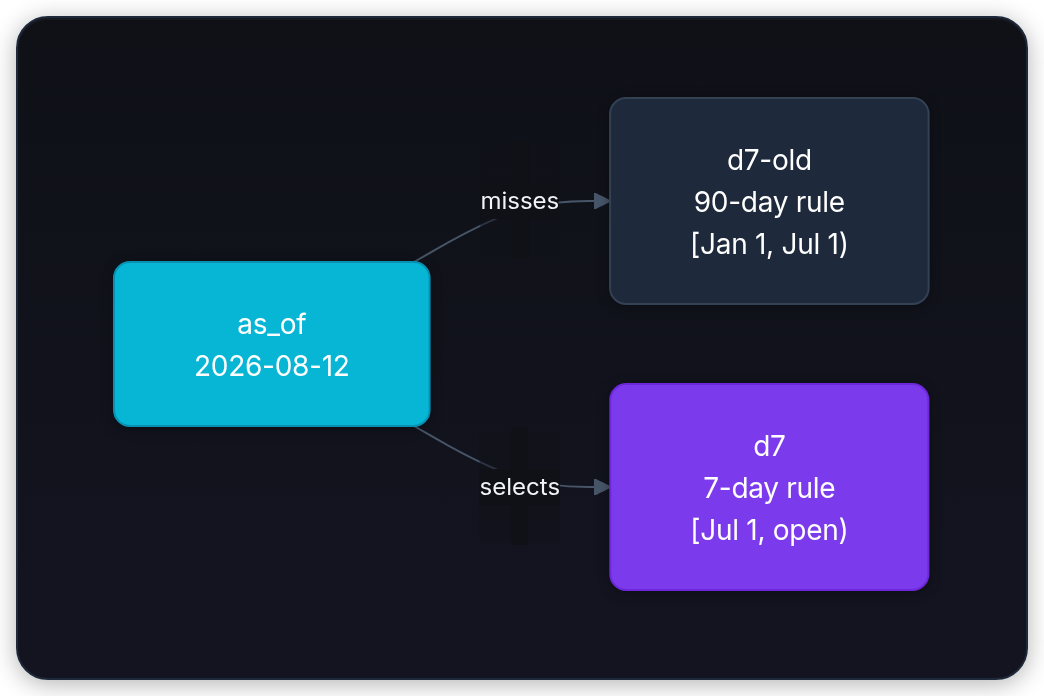
The schema prevents duplicate start times for a source, but it doesn't reject overlapping intervals. For example, a second row beginning June 15 and ending July 15 could overlap both versions without violating any current constraint. An ingestion transaction must check the existing intervals under appropriate concurrency control, or PostgreSQL can enforce a suitable exclusion constraint.[1]
PostgreSQL should store these instants as TIMESTAMPTZ; it normalizes zoned input internally and converts it for display in the active session time zone.[5]
LIKE is enough for this tiny vocabulary demonstration. It isn't semantic retrieval: it will miss paraphrases such as "rotate credentials" when no row contains "key." The PostgreSQL extension later adds vector similarity without discarding time, tenant, or permission checks.
Group rows to inspect the corpus
Retrieval returns individual chunks. Operators often need a summary instead: how many current chunks does each Acme source contribute? GROUP BY collects input rows that share the named keys, and COUNT(*) reduces each group to one number.
At AS_OF, predict two chunks for d7 and one for d9; retired d7-old should contribute none. The query makes that prediction testable:
1summary = conn.execute(
2    """
3    SELECT d.id, d.title, COUNT(*) AS chunk_count
4    FROM documents AS d
5    JOIN chunks AS c ON c.document_id = d.id
6    WHERE d.workspace_id = ?
7      AND d.valid_from <= ?
8      AND (d.valid_to IS NULL OR ? < d.valid_to)
9    GROUP BY d.id, d.title
10    ORDER BY d.id
11    """,
12    ("w01", AS_OF, AS_OF),
13).fetchall()
14
15for document_id, title, chunk_count in summary:
16 print(document_id, title, chunk_count)1d7 API Key Policy 2
2d9 Account Help 1WHERE filters rows before grouping, so retired d7-old never contributes to these counts. To filter completed groups, such as keeping sources with at least two chunks, add HAVING COUNT(*) >= 2 after GROUP BY.[6]
An ordinary JOIN also drops documents with no matching chunks. For an ingestion audit that must show zero-chunk documents, use LEFT JOIN chunks AS c ON c.document_id = d.id and COUNT(c.id). A left join preserves the document with null chunk fields; counting c.id gives zero, whereas COUNT(*) would count that placeholder row as one.
Constraints catch broken relationships
Code can be buggy. An ingestion job can create a chunk for a document ID that never arrived. Without a constraint, that orphan may show up in retrieval with no trustworthy source.
Predict the next failure: inserting a chunk for missing-document should stop before it becomes data. The foreign key on chunks turns that silent corruption into a visible failure.
Under Python's default sqlite3 transaction handling, a data-changing statement opens a transaction implicitly. A failed statement reverts its own change, and rollback() closes the failed unit before the lab continues:
1try:
2    conn.execute(
3        "INSERT INTO chunks (id, document_id, chunk_text) VALUES (?, ?, ?)",
4        ("broken", "missing-document", "This row has no source."),
5    )
6except sqlite3.IntegrityError:
7    print("blocked orphan chunk")
8    conn.rollback()
9
10try:
11    conn.execute(
12        "INSERT INTO chunks (id, document_id, chunk_text) VALUES (?, ?, ?)",
13        (None, "d7", "A chunk can't have a missing identity."),
14    )
15except sqlite3.IntegrityError:
16    print("blocked null primary key")
17    conn.rollback()
18
19missing = conn.execute(
20    "SELECT COUNT(*) FROM chunks WHERE id = ?",
21    ("broken",),
22).fetchone()[0]
23print("orphan rows stored", missing)1blocked orphan chunk
2blocked null primary key
3orphan rows stored 0Primary keys catch duplicate identities. The explicit NOT NULL catches SQLite's otherwise-accepted missing text identity. Foreign keys catch broken references.
These rules belong in the schema because every writer must obey them, including the current Python script. Remove NOT NULL from chunks.id and the second check stops printing blocked null primary key: SQLite accepts the missing identity even though the column says PRIMARY KEY.
Make permissions queryable data
Integrity tells us which rows connect. It doesn't tell us who may read one. An access-control list says which principals may view a resource. Instead of hiding that list in application logic, this schema stores one permitted (chunk_id, principal) pair per row. The retrieval rule is simple:
Return a chunk only when its document belongs to the active workspace and a permission row exists for the active principal.
Alice (agent:u1) may read key and account help. Bob (agent:u3) may read key paragraphs for Acme, but not Acme account-help content. The query below turns that distinction into rows we can inspect:
In an application, the authenticated session supplies principal, and the server verifies the requested workspace against that session. They aren't claims a chat message or model may choose. The function accepts them as arguments here only so the lab can exercise several identities explicitly.
1def permitted_matches(
2    workspace_id: str,
3    principal: str,
4    word: str,
5    as_of: str,
6) -> list[str]:
7    return [
8        row[0]
9        for row in conn.execute(
10            """
11            SELECT c.id
12            FROM chunks AS c
13            JOIN documents AS d ON d.id = c.document_id
14            JOIN chunk_permissions AS p ON p.chunk_id = c.id
15            WHERE d.workspace_id = ?
16              AND d.valid_from <= ?
17              AND (d.valid_to IS NULL OR ? < d.valid_to)
18              AND p.principal = ?
19              AND LOWER(c.chunk_text) LIKE ?
20            ORDER BY c.id
21            """,
22            (workspace_id, as_of, as_of, principal, f"%{word.lower()}%"),
23        ).fetchall()
24    ]
25
26print("Bob key", permitted_matches("w01", "agent:u3", "key", AS_OF))
27print("Bob password", permitted_matches("w01", "agent:u3", "password", AS_OF))
28print("Alice password", permitted_matches("w01", "agent:u1", "password", AS_OF))1Bob key ['c7a', 'c7b']
2Bob password []
3Alice password ['c9a']A missing workspace predicate leaks a row
Bob also has permission to read one row in w02. That's useful for showing the failure rather than assuming the rule is correct.
Suppose the active support screen is displaying Acme (w01), but a programmer filters only by user and query word. Bob's key search can now pull a private rule from w02 even though the UI is scoped to Acme:
1unsafe = conn.execute(
2    """
3    SELECT c.id
4    FROM chunks AS c
5    JOIN chunk_permissions AS p ON p.chunk_id = c.id
6    JOIN documents AS d ON d.id = c.document_id
7    WHERE d.valid_from <= ?
8      AND (d.valid_to IS NULL OR ? < d.valid_to)
9      AND p.principal = ?
10      AND LOWER(c.chunk_text) LIKE ?
11    ORDER BY c.id
12    """,
13    (AS_OF, AS_OF, "agent:u3", "%key%"),
14).fetchall()
15
16safe = permitted_matches("w01", "agent:u3", "key", AS_OF)
17
18print("unsafe", [row[0] for row in unsafe])
19print("safe", safe)1unsafe ['c7a', 'c7b', 'c99']
2safe ['c7a', 'c7b']The scoped query checks both dimensions: current workspace and current principal. Bob can read c99 in a different request, but that doesn't make it valid context for an Acme answer. This is a cross-workspace disclosure in the active request, not evidence that Bob lacks all access to c99.
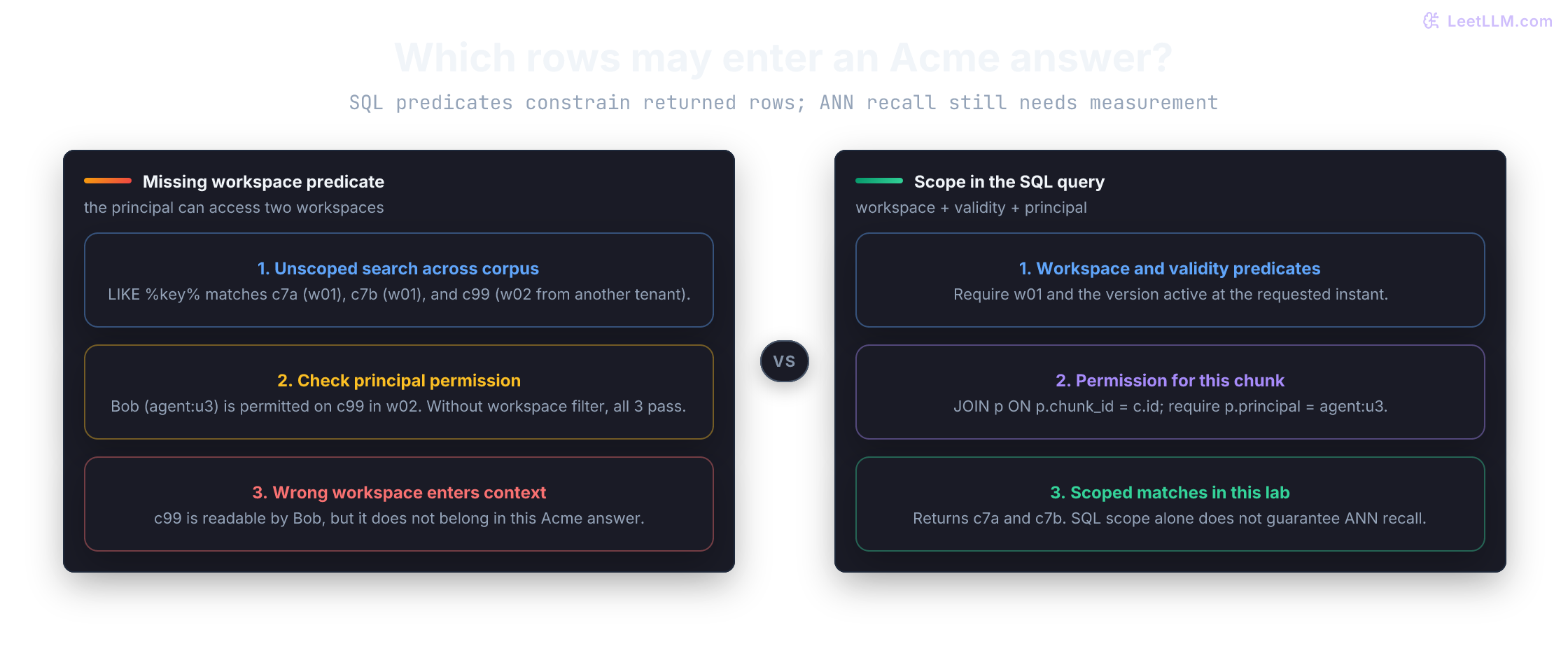
For a production PostgreSQL application, row-level security (RLS) can make a database policy enforce an additional boundary. RLS isn't automatic: once it's enabled for a table, normal access must satisfy a policy, and an enabled table with no policy uses default deny.[7]
Superusers and roles with BYPASSRLS always bypass those policies. Table owners normally bypass them too unless the table uses FORCE ROW LEVEL SECURITY. Run application queries with a role that's subject to the policy, then test that role directly.
Why is filtering only by principal insufficient when the active support screen is scoped to workspace w01?
Answer
The same principal may have access in another workspace. Every retrieval path must enforce both active workspace and principal, or relevant rows from a different tenant can enter the prompt.
Use a transaction for all-or-nothing ingestion
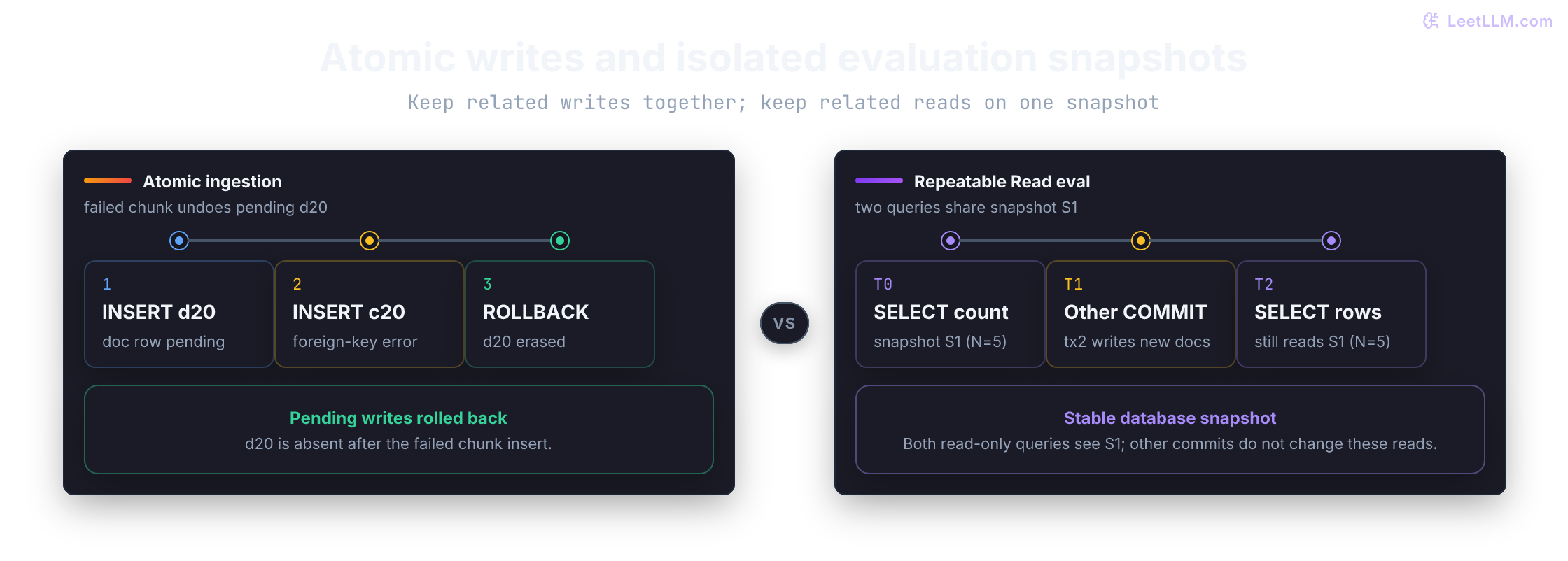
A database transaction groups changes into one unit. A commit makes that unit permanent; a rollback discards it. That matters when a new document and its chunks must appear together. A visible document with missing chunks is confusing; visible chunks with no source are worse.
Use with conn: here so Python commits an open transaction on success or rolls it back when an exception escapes the block. Catch the exception outside the block: swallowing it inside could let earlier writes commit. The context manager doesn't open a transaction by itself.[2]
With Python's default sqlite3 handling, the first INSERT inside the block opens one. The second INSERT intentionally points at a missing source, so its foreign-key error rolls back the document insertion too:
1try:
2    with conn:
3        conn.execute(
4            """
5            INSERT INTO documents
6                (id, workspace_id, source_key, title, valid_from, valid_to)
7            VALUES (?, ?, ?, ?, ?, ?)
8            """,
9            (
10                "d20",
11                "w01",
12                "incident-policy",
13                "Incident Policy",
14                "2026-08-01T00:00:00Z",
15                None,
16            ),
17        )
18        conn.execute(
19            "INSERT INTO chunks (id, document_id, chunk_text) VALUES (?, ?, ?)",
20            ("c20", "not-d20", "Incidents are reviewed in two days."),
21        )
22except sqlite3.IntegrityError:
23    print("transaction rolled back")
24
25visible = conn.execute(
26    "SELECT COUNT(*) FROM documents WHERE id = ?",
27    ("d20",),
28).fetchone()[0]
29print("partial document visible", bool(visible))1transaction rolled back
2partial document visible FalseThe transaction protects database rows, not a remote embedding service. You have two reasonable designs: compute embeddings before the database transaction and commit document plus chunks together, or write a pending ingestion record and publish a new complete version only after all chunks are ready. Don't expose half an index to retrieval without making that state deliberate.
An ingestion transaction inserts a document, then fails while inserting one chunk. What state should remain after rollback?
Answer
Neither the document nor any of its chunks should remain. The transaction preserves the all-or-nothing invariant and prevents a visible partial ingestion.
Atomicity doesn't choose what concurrent readers see
Rollback demonstrates atomicity: one transaction's writes appear together or not at all. Isolation answers a different question: what can one transaction observe while another transaction commits changes?
PostgreSQL defaults to Read Committed isolation. Each ordinary SELECT sees a snapshot taken when that statement begins, so two SELECT statements in one transaction can observe different committed states.
That behavior is fine for many request paths. It can undermine an evaluation export that first counts current chunks and later reads them, because a concurrent ingestion may commit between those statements.[8]
When several reads must describe one stable corpus snapshot, use a read-only Repeatable Read transaction. This is PostgreSQL syntax, not part of the SQLite lab:
1BEGIN TRANSACTION ISOLATION LEVEL REPEATABLE READ READ ONLY;
2
3SELECT d.id, COUNT(*)
4FROM documents AS d
5JOIN chunks AS c ON c.document_id = d.id
6WHERE d.workspace_id = 'w01'
7  AND d.valid_from <= TIMESTAMPTZ '2026-08-12 12:00:00+00'
8  AND (
9      d.valid_to IS NULL
10      OR TIMESTAMPTZ '2026-08-12 12:00:00+00' < d.valid_to
11  )
12GROUP BY d.id;
13
14-- Later reads in this transaction keep the same snapshot.
15SELECT c.id, c.chunk_text
16FROM chunks AS c
17JOIN documents AS d ON d.id = c.document_id
18WHERE d.workspace_id = 'w01'
19  AND d.valid_from <= TIMESTAMPTZ '2026-08-12 12:00:00+00'
20  AND (
21      d.valid_to IS NULL
22      OR TIMESTAMPTZ '2026-08-12 12:00:00+00' < d.valid_to
23  );
24
25COMMIT;
Repeatable Read fixes the snapshot after the first non-control statement, so the count and detail rows agree even if another transaction commits later.
Serializable isolation is stricter when concurrent transactions enforce a cross-row business rule, but PostgreSQL may abort one transaction with a serialization failure. Applications using that level must retry the whole transaction rather than the final statement alone.
Keep retries from duplicating completed work
A transaction makes one attempt all-or-nothing. It doesn't tell a worker whether the request already succeeded before a timeout. If the worker commits new rows, crashes before sending its response, and retries the same request, a second write attempt can duplicate work.
For retried writes, store a stable idempotency key in the same transaction as the rows created for that request. A uniqueness constraint lets the database accept the first attempt and recognize later repeats even after the original process disappears:
The same key must also mean the same input. Store a fingerprint of all input fields alongside it. Here, json.dumps gives a fixed field list a consistent representation, and SHA-256 turns those bytes into a compact comparison value. A changed title or paragraph must raise an error, not be mistaken for a successful retry.
1import hashlib
2import json
3
4conn.execute(
5    """
6    CREATE TABLE ingestion_requests (
7        request_id TEXT PRIMARY KEY NOT NULL,
8        document_id TEXT NOT NULL,
9        payload_hash TEXT NOT NULL
10    )
11    """
12)
13conn.commit()
14
15def ingest_document_once(
16    request_id: str,
17    document_id: str,
18    source_key: str,
19    title: str,
20    valid_from: str,
21    chunk_id: str,
22    chunk_text: str,
23) -> str:
24    payload = json.dumps(
25        ["w01", document_id, source_key, title, valid_from, chunk_id, chunk_text],
26        ensure_ascii=False,
27        separators=(",", ":"),
28    )
29    payload_hash = hashlib.sha256(payload.encode("utf-8")).hexdigest()
30    with conn:
31        created = conn.execute(
32            """
33            INSERT INTO ingestion_requests (request_id, document_id, payload_hash)
34            VALUES (?, ?, ?)
35            ON CONFLICT(request_id) DO NOTHING
36            """,
37            (request_id, document_id, payload_hash),
38        ).rowcount
39        if created == 0:
40            existing_hash = conn.execute(
41                "SELECT payload_hash FROM ingestion_requests WHERE request_id = ?",
42                (request_id,),
43            ).fetchone()[0]
44            if existing_hash != payload_hash:
45                raise ValueError("idempotency key reused with changed input")
46            return "skipped retry"
47
48        conn.execute(
49            """
50            INSERT INTO documents
51                (id, workspace_id, source_key, title, valid_from, valid_to)
52            VALUES (?, ?, ?, ?, ?, NULL)
53            """,
54            (document_id, "w01", source_key, title, valid_from),
55        )
56        conn.execute(
57            "INSERT INTO chunks (id, document_id, chunk_text) VALUES (?, ?, ?)",
58            (chunk_id, document_id, chunk_text),
59        )
60    return "inserted"
61
62print(
63    "first",
64    ingest_document_once(
65        "req-30",
66        "d30",
67        "key-rotation-faq",
68        "Key Rotation FAQ",
69        "2026-08-10T00:00:00Z",
70        "c30",
71        "Temporary keys expire after 30 days.",
72    ),
73)
74print(
75    "retry",
76    ingest_document_once(
77        "req-30",
78        "d30",
79        "key-rotation-faq",
80        "Key Rotation FAQ",
81        "2026-08-10T00:00:00Z",
82        "c30",
83        "Temporary keys expire after 30 days.",
84    ),
85)
86stored = conn.execute(
87    "SELECT COUNT(*) FROM documents WHERE id = ?",
88    ("d30",),
89).fetchone()[0]
90print("d30 rows", stored)
91
92try:
93    ingest_document_once(
94        "req-30", "d30", "key-rotation-faq", "Key Rotation FAQ",
95        "2026-08-10T00:00:00Z", "c30", "Changed policy text.",
96    )
97except ValueError as exc:
98    print("changed retry", exc)
99else:
100 raise AssertionError("changed input must not reuse an idempotency key")1first inserted
2retry skipped retry
3d30 rows 1
4changed retry idempotency key reused with changed inputThe first call stores the request marker, document, and chunk together. An identical retry skips the write. Reusing req-30 with different text raises an error and leaves the original policy untouched. The fingerprint is an equality check, not authentication; the server still owns workspace and user identity.
This function leaves the new chunk ungranted, so retrieval won't expose it yet. A complete ingestion operation would also write the intended permission rows before publishing the document. Keeping that default closed is safer than treating a missing permission as public access.
This pattern works when the protected side effect lives in the same database transaction. A local marker can't atomically cover a deployment API or another remote service. For an external side effect, pass the same key to a downstream API that enforces it, or use a workflow such as an outbox with an idempotent consumer.
Index the predicates you run often
Without an index, a database may need to inspect many rows to answer a filter. An index is an additional data structure that lets the engine reach selected rows more directly, at the cost of storage and write work.
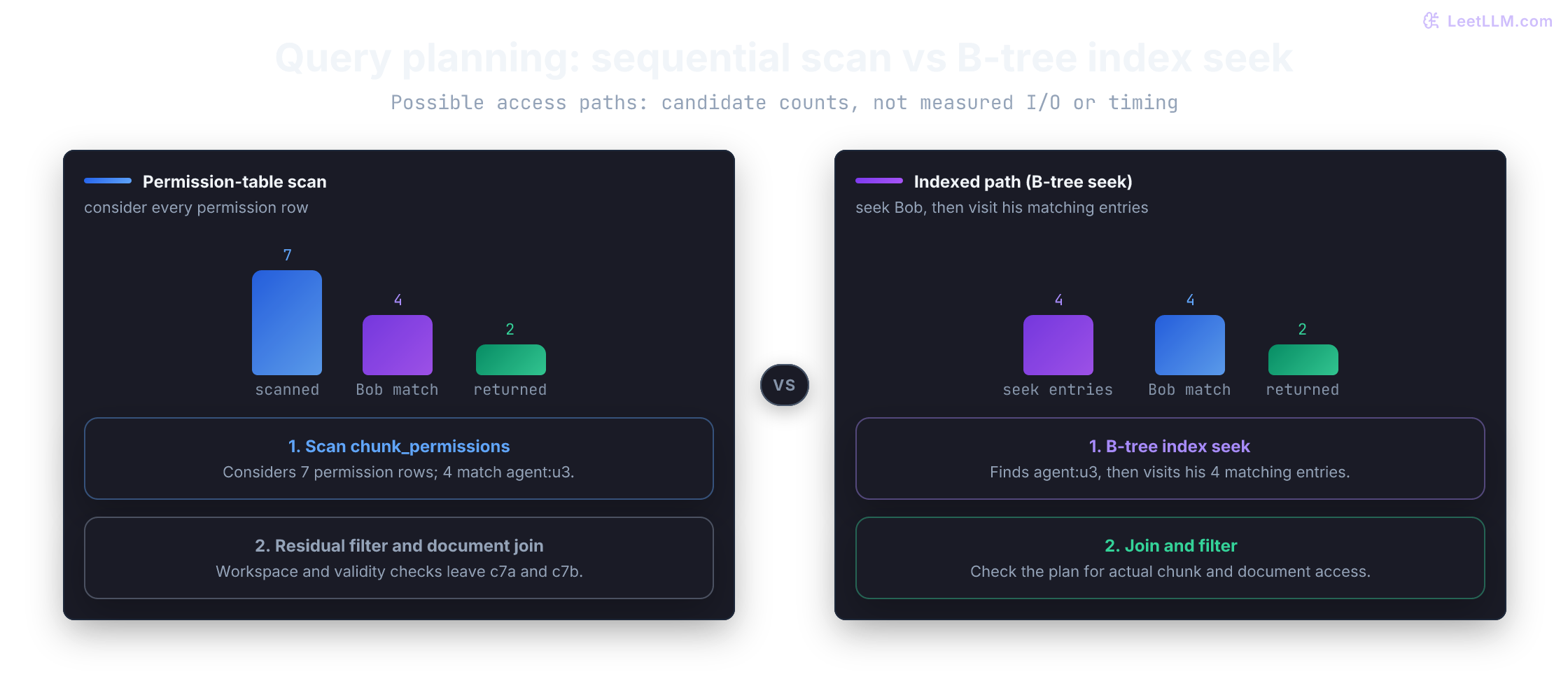
Our authorized query repeatedly filters permissions by principal and follows document ownership. Add indexes for those paths, then ask SQLite for its query plan. A plan describes an access strategy, not measured runtime work.[9]
1conn.executescript(
2    """
3    CREATE INDEX permission_principal_idx
4        ON chunk_permissions (principal, chunk_id);
5    CREATE INDEX document_workspace_idx
6        ON documents (workspace_id, valid_from, valid_to, id);
7    """
8)
9
10authorized_sql = """
11SELECT c.id, d.title, c.chunk_text
12FROM chunks AS c
13JOIN documents AS d ON d.id = c.document_id
14JOIN chunk_permissions AS p ON p.chunk_id = c.id
15WHERE d.workspace_id = ?
16  AND d.valid_from <= ?
17  AND (d.valid_to IS NULL OR ? < d.valid_to)
18  AND p.principal = ?
19  AND LOWER(c.chunk_text) LIKE ? ESCAPE '!'
20ORDER BY c.id
21"""
22
23plan = conn.execute(
24    "EXPLAIN QUERY PLAN " + authorized_sql,
25    ("w01", AS_OF, AS_OF, "agent:u3", "%key%"),
26).fetchall()
27details = " | ".join(row[3] for row in plan)
28
29print("uses permission index", "permission_principal_idx" in details)
30print("plan operators", len(plan))1uses permission index True
2plan operators 4The exact plan text can vary as engines and statistics change. The habit doesn't: inspect the plan for the production query, with realistic tenant and permission selectivity, rather than assuming an index fixed latency.
In this corpus, a sequential path inspects all seven chunk_permissions rows. An index on (principal, chunk_id) can seek the four rows for agent:u3 (c7-old, c7a, c7b, c99). Workspace and validity predicates then drop the retired version and the other-workspace chunk, leaving c7a and c7b.
Those are candidate-set sizes, not a benchmark or a count of storage operations. An index still has to traverse its own structure, and the planner can choose a different join order. Whatever path it picks, the authorization rule must stay unchanged.
Query-plan check: PostgreSQL uses
EXPLAINfor estimated plans andEXPLAIN ANALYZEfor actual row counts and timing. The latter executes the statement, including writes. Use a read query here. A surrounding rollback can undo ordinary database writes, but it can't undo every possible effect, such as a function calling an external service. Plans from tiny tables also don't predict plans for large ones.[10]
Indexes on principal, workspace, and validity time give the planner candidate access paths for authorization and version filters. They don't make LOWER(c.chunk_text) LIKE ? a fast B-tree lookup on chunk_text. Substring LIKE at scale needs full-text search, a trigram index, or a vector path. This demo corpus is small enough that a scan is fine.
Build a small authorized retriever
The schema, filters, and indexes now fit one function a caller can test. It returns permitted matching paragraphs beside their document titles. The query above uses ESCAPE '!': !% matches a literal %, !_ matches a literal _, and !! matches a literal !. Escape those characters in the user's text before adding our own surrounding % wildcards.
1def search_support(
2    workspace_id: str,
3    principal: str,
4    query: str,
5    as_of: str,
6) -> list[tuple[str, str, str]]:
7    text = query.strip().lower()
8    if not text:
9        return []
10    literal = text.replace("!", "!!").replace("%", "!%").replace("_", "!_")
11    pattern = f"%{literal}%"
12    return conn.execute(
13        authorized_sql,
14        (workspace_id, as_of, as_of, principal, pattern),
15    ).fetchall()
16
17for chunk_id, title, text in search_support("w01", "agent:u3", "key", AS_OF):
18 print(f"{chunk_id} | {title} | {text}")1c7a | API Key Policy | API keys rotate within seven days.
2c7b | API Key Policy | Email security with your workspace ID for key rotation.This is lexical search: it looks for a literal text fragment. A query of % now searches for an actual percent sign rather than matching every row. Blank queries return no rows. The SQL parameter still protects statement structure; escaping protects the product's substring-search behavior. Neither one supplies authorization.
Passing as_of keeps a retired policy out of current answers and still lets a historical audit reproduce an older one. A retrieval-augmented generation (RAG) system usually also retrieves semantically related text before a large language model (LLM) drafts an answer. That path should reuse the same source, time, and permission model.
Test forbidden rows too
Test forbidden results as well as matches. Make the forbidden fixture match the query first: a cross-workspace test using token would be weak here because c99 contains key, not token. It would return nothing even if the workspace predicate were missing.
1bob_key = [row[0] for row in search_support("w01", "agent:u3", "key", AS_OF)]
2bob_password = search_support("w01", "agent:u3", "password", AS_OF)
3other_workspace_key = [
4    row[0] for row in search_support("w02", "agent:u3", "key", AS_OF)
5]
6unknown_user = search_support("w01", "agent:unknown", "key", AS_OF)
7retired_key = [
8    row[0]
9    for row in search_support("w01", "agent:u3", "key", "2026-06-01T00:00:00Z")
10]
11
12assert bob_key == ["c7a", "c7b"]
13assert bob_password == []
14assert other_workspace_key == ["c99"]
15assert "c99" not in bob_key
16assert unknown_user == []
17assert retired_key == ["c7-old"]
18assert search_support("w01", "agent:u3", "%", AS_OF) == []
19assert search_support("w01", "agent:u3", "   ", AS_OF) == []
20assert [
21    row[0]
22    for row in search_support("w01", "agent:u3", "key", "2026-07-01T00:00:00Z")
23] == ["c7a", "c7b"]
24
25print("retrieval boundary tests passed")1retrieval boundary tests passedThe tests guard the central retrieval boundary: context must be relevant, authorized, and valid at the requested time before it reaches an LLM prompt.
The historical assertion also proves that keeping old versions isn't the same as leaking them into current answers.
Close the connection and read the file again
So far, every query has used the same open connection. Test the promise that motivated the database: after committing and closing it, can another connection recover the same authorized rows?
The global conn name is rebound below, so search_support now queries the reopened file. No schema creation or seeding runs a second time:
1conn.commit()
2conn.close()
3
4conn = sqlite3.connect(db_path)
5conn.execute("PRAGMA foreign_keys = ON")
6reopened = [row[0] for row in search_support("w01", "agent:u3", "key", AS_OF)]
7assert reopened == ["c7a", "c7b"]
8print("reopened", reopened)
9
10conn.close()
11lab_directory.cleanup() # Remove only this lab's temporary files.1reopened ['c7a', 'c7b']The file, not the connection object, preserved the rows. Cleanup removes this lab's file only after the check. An application would use a stable path on persistent storage and keep it across runs. Don't rerun the seed script against that existing database; open it and query it. A file inside an ephemeral container filesystem still disappears when that container is removed, so the Docker storage distinction applies here too.[2]
Extend the model with PostgreSQL and pgvector
SQLite gave us a fully runnable lab without a separate database server. A PostgreSQL server becomes useful when application processes on several machines need a shared database and its concurrency controls. The table relationships stay useful, but adapt column types, driver placeholders, and transaction behavior rather than assuming the files are interchangeable.
When keyword matching isn't enough, the pgvector extension adds a vector column and distance operators. A vector is a list of numbers representing an embedding. Nearby embeddings can capture semantic similarity even when the exact words differ.
This PostgreSQL sketch assumes you've installed pgvector on the server and created the equivalent base tables, using TIMESTAMPTZ for the validity columns. $1 through $5 are server-side query parameters, not literals to paste into an ordinary SQL console. A Python driver may use different placeholder syntax.
Three vector dimensions keep the declaration readable. Choose the dimension required by your embedding model in a real system, and embed the query with the same model and preprocessing as the stored vectors. Matching dimensions alone doesn't make two models' vector spaces compatible. Embeddings live in their own table so each derived feature keeps its source chunk, model identifier, and creation time.
1CREATE EXTENSION vector;
2
3CREATE TABLE chunk_embeddings (
4    id TEXT PRIMARY KEY,
5    chunk_id TEXT NOT NULL REFERENCES chunks(id),
6    embedding_model TEXT NOT NULL,
7    created_at TIMESTAMPTZ NOT NULL DEFAULT now(),
8    embedding vector(3) NOT NULL,
9    UNIQUE (chunk_id, embedding_model)
10);
11
12-- Optional once exact scans no longer meet the latency target:
13CREATE INDEX chunks_embedding_hnsw
14    ON chunk_embeddings USING hnsw (embedding vector_cosine_ops);
15
16SELECT e.id AS embedding_id,
17       e.embedding_model,
18       c.id AS chunk_id,
19       d.title,
20       c.chunk_text,
21       1 - (e.embedding <=> $1) AS cosine_similarity
22FROM chunk_embeddings AS e
23JOIN chunks AS c ON c.id = e.chunk_id
24JOIN documents AS d ON d.id = c.document_id
25WHERE d.workspace_id = $2
26  AND d.valid_from <= $3
27  AND (d.valid_to IS NULL OR $3 < d.valid_to)
28  AND e.embedding_model = $4
29  AND EXISTS (
30      SELECT 1
31      FROM chunk_permissions AS p
32      WHERE p.chunk_id = c.id
33        AND p.principal = $5
34  )
35ORDER BY e.embedding <=> $1
36LIMIT 3;
In pgvector, <=> means cosine distance, so 1 - distance is cosine similarity. The query works without an approximate index: pgvector performs exact nearest-neighbor search by default. HNSW (Hierarchical Navigable Small World) builds a graph of nearby vectors to search a promising subset instead of exhaustively comparing every vector.
Add an HNSW index when exact scans no longer meet the latency target, then measure the recall tradeoff introduced by approximate search.[11]
Filtered search has one caveat. With an approximate vector index, filtering conditions can be applied after the index scans candidates. If workspace or permission filters reject many candidates, a query may return fewer rows than requested even when allowed matches exist.
Iterative index scans continue searching when filters remove too many candidates. Available since pgvector 0.8.0 and off by default, they can be enabled for this HNSW example with SET hnsw.iterative_scan = strict_order. Scanning still stops at configured limits, so this isn't a guarantee of exact recall or a full result set. Re-measure with realistic workspace, model, and permission filters.[11][12]
Vector check: Four checks carry into vector retrieval:
- Authorization predicates belong in every retrieval query.
- Version and embedding-model predicates make current answers reproducible.
- Approximate vector retrieval still needs plan inspection and recall testing under restrictive filters.
- A database policy such as PostgreSQL RLS can reinforce authorization, but it doesn't replace designing and testing retrieval behavior.
Keep feature and evaluation lineage in the schema
An embedding is a derived feature. If an evaluation improves after changing the embedding model, you need to know which feature row produced each ranked result. Store that identity instead of keeping only a floating-point score.
The next PostgreSQL tables record one evaluation run and the ranked embedding rows it observed:
1CREATE TABLE retrieval_eval_runs (
2    id TEXT PRIMARY KEY,
3    dataset_version TEXT NOT NULL,
4    query_embedding_model TEXT NOT NULL,
5    created_at TIMESTAMPTZ NOT NULL DEFAULT now()
6);
7
8CREATE TABLE retrieval_eval_results (
9    eval_run_id TEXT NOT NULL REFERENCES retrieval_eval_runs(id),
10    query_id TEXT NOT NULL,
11    rank INTEGER NOT NULL CHECK (rank > 0),
12    embedding_id TEXT NOT NULL REFERENCES chunk_embeddings(id),
13    score DOUBLE PRECISION NOT NULL,
14    PRIMARY KEY (eval_run_id, query_id, rank),
15    UNIQUE (eval_run_id, query_id, embedding_id)
16);
embedding_id leads back to the chunk and embedding model. eval_run_id records dataset and query-model versions. Preserve those rows as immutable versions: overwriting the vector or source text in place would change what an old result points to. Use a versioned model identifier and a new chunk identity when the source text changes.
For a reproducible evaluation, also record the retrieval query/configuration, requested policy time, and corpus snapshot. Those fields aren't in this minimal schema yet. A stored foreign key identifies evidence; it doesn't freeze every input that produced the ranking.
A timestamp alone can't answer that question because two runs may use different models at the same time.
This schema stores ranked evidence alongside scores. Computing recall or hit rate also requires relevance labels for each evaluation query; rank and similarity alone don't say whether a result was correct. Keep those labels in the versioned dataset named by the run.
Database skills used in retrieval
You started with four tables, not a production vector stack:
| Skill | Why it matters in an AI system |
|---|---|
| Model versioned documents, chunks, and permissions as rows | Context has ownership, time, and provenance |
| Use primary and foreign keys | Broken citation links fail early |
| Bind parameters rather than formatting SQL | Inputs can't change query structure |
| Join source and permission tables | Retrieval returns only attributable, allowed text |
Group rows and handle NULL explicitly | Summaries don't silently mix current and retired state |
| Wrap multi-row ingestion in a transaction | Partially written context stays hidden |
| Choose isolation for multi-query reads | One evaluation packet describes one corpus snapshot |
| Store a unique idempotency key with retried writes | Completed work doesn't run twice after a timeout |
| Inspect indexes and plans | Performance is measured, not assumed |
| Version derived embeddings and eval results | Model changes remain traceable to exact evidence |
| Add vectors after boundaries are correct | Semantic rank preserves access and time rules |