Personalize this lesson
Adapt explanations and teaching visuals to your background and preferred voice.
An assistant reads retrieved context before responding. In a small replay table, latency climbs from 118 to 198 milliseconds as context grows from 100 to 500 tokens. A straight line suggests about 220 milliseconds for 600 tokens. How do we find that line, when does an analytical matrix inversion beat iterative steps, and what could a training score of 0.9965 be hiding?
The linear-algebra lesson introduced least-squares projections, and Training & Backpropagation demonstrated iterative parameter updates. Here we'll connect both worlds: formulate the hypothesis function and Mean Squared Error loss, solve the weights with the closed-form Normal Equation, examine its computational complexity against gradient descent, inspect the geometry of ill-conditioned loss bowls, compare Ridge and Lasso regularization, and evaluate the core Gauss-Markov assumptions that tell us when ordinary least squares can be trusted.
Predicting latency from retrieved evidence
For each request replay, the input feature is retrieved text length measured in hundreds of tokens. The target is end-to-end latency in milliseconds. Keeping units visible keeps physical intuition intact: x = 1 means 100 tokens, while y = 118 means 118 ms. These five rows represent synthetic teaching measurements:
Evidence length x (hundreds of tokens) | Observed latency y (ms) |
|---|---|
| 1 | 118 |
| 2 | 141 |
| 3 | 162 |
| 4 | 181 |
| 5 | 198 |
Observed latency climbs by roughly 20 ms for each additional 100 tokens. Before setting up a formal solver, we can express our hypothesis with two parameters:
- The intercept,
b, is the line's prediction atx = 0(baseline latency overhead). - The slope,
w(orm), is the change in predicted latency for each additional 100 tokens.
For a single observation with feature vector , the linear regression hypothesis function is:
With one feature, this simplifies to . A sensible first candidate line is:
Read this as an operational baseline: start around 100 ms of fixed overhead, then add 20 ms for each 100 tokens of retrieved context. For x = 6 (600 tokens), the candidate line predicts ms.
This is single-feature linear regression. We choose b and w to minimize squared prediction errors across our training dataset, a criterion called ordinary least squares (OLS). The model captures an empirical association; it doesn't prove that retrieved text alone causes this latency response.
An intercept can approximate fixed overhead, but we haven't measured x = 0. Calling the fitted 100 ms a measured server boot cost would extrapolate beyond our evidence. Likewise, predicting latency at x = 6 extends past the observed range, making it an extrapolation.
Before running the inspection script, predict five requests, an evidence range of 1 to 5, and a latency range of 118 to 198 ms.
1import numpy as np
2
3x = np.array([1.0, 2.0, 3.0, 4.0, 5.0])
4y = np.array([118.0, 141.0, 162.0, 181.0, 198.0])
5
6print("requests", len(x))
7print("evidence_range", (int(x.min()), int(x.max())), "hundreds_of_tokens")
8print("latency_range", (int(y.min()), int(y.max())), "ms")1requests 5
2evidence_range (1, 5) hundreds_of_tokens
3latency_range (118, 198) msResiduals show what the line missed
At x = 1, the candidate line predicts 120 ms while the replay measured 118. At x = 3, it predicts 160 ms while the replay measured 162. A model's predictions become informative when you name and inspect that signed gap. The residual is:
On the raw latency scale, small 1-2 ms errors almost disappear against a 100-200 ms span. Isolating residuals on their own dedicated scale reveals both their sign and their structural pattern.
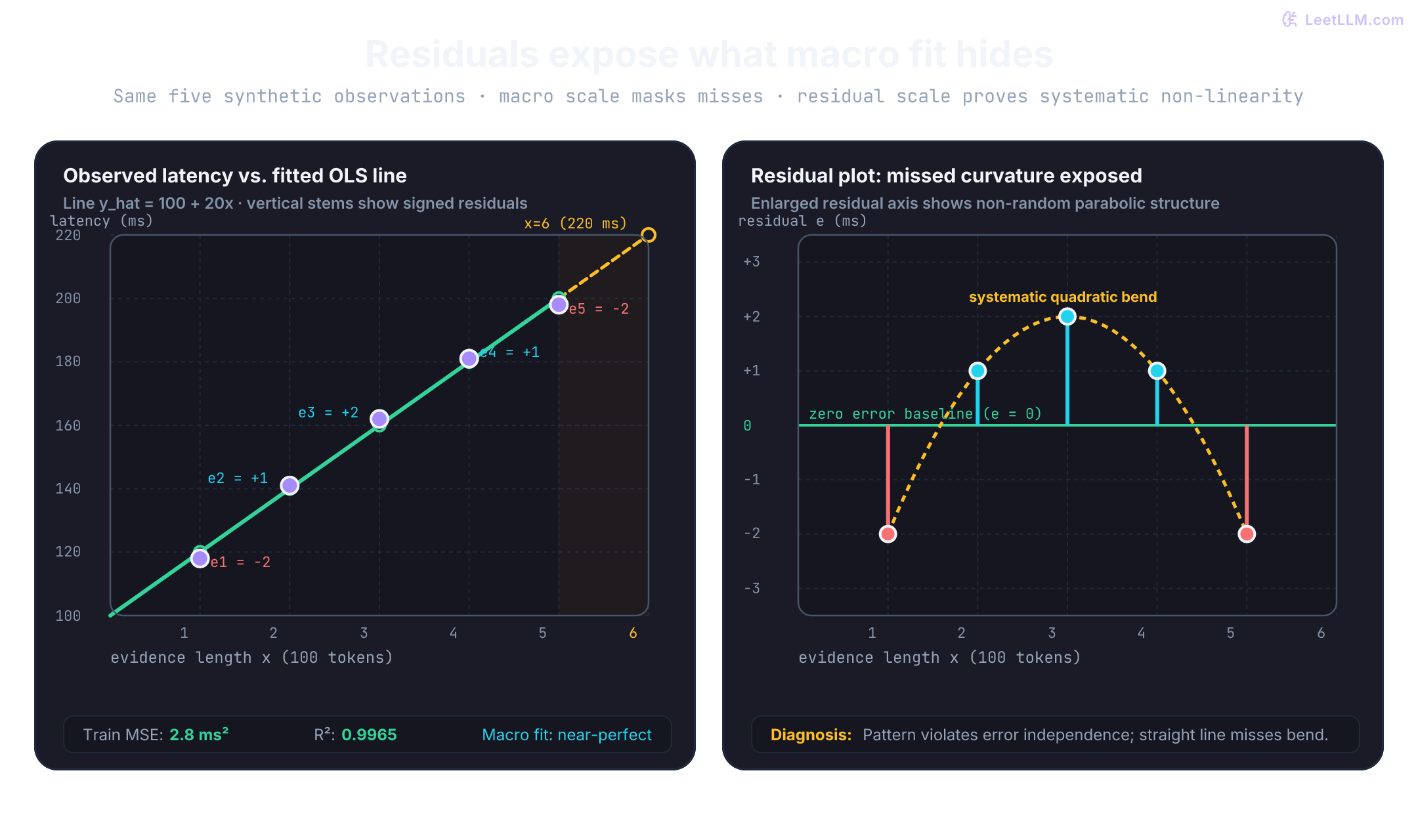
Using the candidate line , write out each prediction before combining errors into an aggregate metric:
x | Actual y | Predicted y-hat | Residual y - y-hat | Residual squared |
|---|---|---|---|---|
| 1 | 118 | 120 | -2 | 4 |
| 2 | 141 | 140 | 1 | 1 |
| 3 | 162 | 160 | 2 | 4 |
| 4 | 181 | 180 | 1 | 1 |
| 5 | 198 | 200 | -2 | 4 |
Signs carry direct diagnostic information:
- Negative residual: the model predicted too high (the request ran faster than predicted).
- Positive residual: the model predicted too low (the request ran slower than predicted).
- Residual near zero: the observation sat directly on the fitted line.
Residual signs show how predictions miss, but the sequence of signs exposes model structure. The residuals run : negative at both endpoints and positive in the center. That low-high-low arc indicates that the true latency curve bends, even though every individual miss is small.
To summarize performance in a single number, square every residual and compute the mean:
That quantity is mean squared error. Squaring stops positive and negative misses from canceling each other out, while penalizing large blunders much more heavily than small discrepancies.
MSE is measured in squared units: milliseconds squared. Taking its square root gives the root mean squared error: milliseconds. That returns the error scale back to the original units of observed latency.
Before interpreting a model's error, compare it with the simplest plausible fallback: predicting the target mean ms for every request. That mean baseline produces an MSE of 802.8, whereas the candidate line produces 2.8. This comparison verifies that the evidence feature supplies real predictive signal beyond target averaging.
The coefficient of determination, R-squared, measures the proportion of target variance explained by the model:[1]
An of 0 indicates performance matching the constant mean baseline. An of 1 indicates zero residual error. Negative values indicate predictions worse than the target mean.
Dividing the numerator and denominator by reproduces the ratio 1 - MSE_line / MSE_baseline. Here, describes training fit quality across these five points. It doesn't make the underlying residual curve vanish, nor does it guarantee accuracy on future requests outside this sample.
Why square residuals before averaging them instead of taking their raw sum?
Answer
Taking raw sums lets positive and negative residuals cancel out, making large over-predictions and under-predictions look like zero error. Squaring ensures all errors contribute positively, penalizing large blunders disproportionately.
Before running the evaluation cell, predict residuals [-2, 1, 2, 1, -2], MSE 2.8, baseline MSE 802.8, and .
1import numpy as np
2
3x = np.array([1.0, 2.0, 3.0, 4.0, 5.0])
4y = np.array([118.0, 141.0, 162.0, 181.0, 198.0])
5pred = 100 + 20 * x
6residual = y - pred
7mse = np.mean(residual ** 2)
8baseline_mse = np.mean((y - y.mean()) ** 2)
9r2 = 1 - mse / baseline_mse
10
11print("predictions", pred.astype(int))
12print("residuals", residual.astype(int))
13print("mse", round(float(mse), 1))
14print("baseline_mse", round(float(baseline_mse), 1))
15print("r2", round(float(r2), 4))1predictions [120 140 160 180 200]
2residuals [-2 1 2 1 -2]
3mse 2.8
4baseline_mse 802.8
5r2 0.9965Why the math becomes matrix multiplication
For a single feature, writing is straightforward. When adding cache hit ratios, prompt complexity, and system load, code needs a vectorized representation that scales cleanly.
We construct a design matrix : each row represents one observation, and each column supplies one model term. An all-ones leading column supplies the intercept term, while subsequent columns hold feature values:
Packing the parameters into a single vector , the prediction rule across all requests becomes a matrix-vector product:
For this replay table, the optimal weights are . Vectorization doesn't alter the math; it lets linear algebra libraries execute dot products simultaneously across rows and features.
Check the third request (), where the design row is :
The leading 1 multiplies the intercept 100, while 3 multiplies the slope 20. Matrix multiplication repeats that calculation across every row simultaneously.
Geometrically, the vector of predictions is a linear combination of 's columns. At the ordinary least squares minimum, is the orthogonal projection of target vector onto the column space . The resulting residual vector is orthogonal to every column of :[2]
Arbitrary candidate weights don't satisfy this orthogonality condition. We'll verify it in code after solving for the weights.
What happens if you remove the all-ones column from the design matrix?
Answer
The model loses its intercept parameter b and can only predict w * x, forcing the regression line through the origin (0, 0). If the true process has a non-zero baseline, this constraint severely degrades fit quality.
Before running the comparison script, predict the result of dropping the intercept: the line will be forced through zero and its MSE will climb past 802.8.
1import numpy as np
2
3x = np.array([1.0, 2.0, 3.0, 4.0, 5.0])
4y = np.array([118.0, 141.0, 162.0, 181.0, 198.0])
5
6with_intercept = np.c_[np.ones_like(x), x]
7without_intercept = x[:, None]
8
9w_full, *_ = np.linalg.lstsq(with_intercept, y, rcond=None)
10w_forced, *_ = np.linalg.lstsq(without_intercept, y, rcond=None)
11mse_full = np.mean((with_intercept @ w_full - y) ** 2)
12mse_forced = np.mean((without_intercept @ w_forced - y) ** 2)
13baseline_mse = np.mean((y - y.mean()) ** 2)
14
15print("with_intercept", w_full.round(2), "mse", round(float(mse_full), 2))
16print("forced_through_zero", w_forced.round(2), "mse", round(float(mse_forced), 2))
17print("mean_baseline_mse", round(float(baseline_mse), 2))
18print("forced_worse_than_mean", mse_forced > baseline_mse)1with_intercept [100. 20.] mse 2.8
2forced_through_zero [47.27] mse 1820.98
3mean_baseline_mse 802.8
4forced_worse_than_mean TrueForcing the line through zero yields an MSE of 1820.98, more than double the mean baseline's error of 802.8. Allowing a fitted offset is essential for these data, even when the offset doesn't isolate an isolated physical source of delay.
The Normal Equation: closed-form ordinary least squares
How do we solve for without guessing combinations of and ? We express the total Mean Squared Error loss in matrix notation and apply matrix calculus:
Expanding the inner product gives:
Taking the gradient with respect to the parameter vector :
Some textbooks define the loss with a leading factor to cancel the 2 in the derivative. Both formulations share identical stationary points. Setting the gradient to zero produces the Normal Equation:
When has full column rank, the Gram matrix is symmetric positive definite and invertible. Solving yields the closed-form ordinary least squares estimator:[3]
For our latency replay, the normal system is:
Row-reducing gives , so . Back-substitution yields . Because the loss is a convex quadratic, this stationary point is the global minimum.
Evaluating the computational complexity reveals important scaling limits:
- Forming requires multiplying a matrix by an matrix, costing arithmetic operations.
- Inverting or solving the linear system via Cholesky decomposition () costs operations.
- Storing requires memory.
Total time complexity for the Normal Equation is . When feature count is small (for example, ) and data fits in memory, the closed-form solve provides the exact optimal weights in one analytical step without tuning learning rates or step counts. When reaches hundreds of thousands (such as wide bag-of-words or embedding tables), inversion and memory become intractable.
Forming explicitly also squares the condition number of the system: . For production code, np.linalg.lstsq solves directly using singular value decomposition (SVD) or QR factorization, avoiding explicit Gram matrix construction while handling rank deficiency cleanly.[2][4]
Before running the closed-form script, predict weights [100, 20], MSE 2.8, and an orthogonality check of True.
1import numpy as np
2
3x = np.array([1.0, 2.0, 3.0, 4.0, 5.0])
4y = np.array([118.0, 141.0, 162.0, 181.0, 198.0])
5
6X = np.c_[np.ones_like(x), x]
7
8w_closed = np.linalg.solve(X.T @ X, X.T @ y)
9pred_closed = X @ w_closed
10residuals = y - pred_closed
11
12baseline = np.full_like(y, y.mean())
13line_mse = np.mean((pred_closed - y) ** 2)
14baseline_mse = np.mean((baseline - y) ** 2)
15r2 = 1 - line_mse / baseline_mse
16
17print("closed_form_weights", w_closed.round(2))
18print("residuals", residuals.round(2))
19print("line_mse", line_mse.round(2))
20print("baseline_mse", baseline_mse.round(2))
21print("r2", round(r2, 4))
22print("residual_orthogonal", bool(np.allclose(X.T @ residuals, 0)))1closed_form_weights [100. 20.]
2residuals [-2. 1. 2. 1. -2.]
3line_mse 2.8
4baseline_mse 802.8
5r2 0.9965
6residual_orthogonal TrueThe check X.T @ residuals confirms geometric projection: the residuals are orthogonal to the column span of . No linear adjustment of the weights can reduce squared error further.
Next, inspect the conditioning and numerical stability of with np.linalg.lstsq. Expect rank 2, condition number cond_X near 8.37, and cond_XTX near 69.99.
1import numpy as np
2
3x = np.array([1.0, 2.0, 3.0, 4.0, 5.0])
4y = np.array([118.0, 141.0, 162.0, 181.0, 198.0])
5X = np.c_[np.ones_like(x), x]
6
7w, residual_sum, rank, singular_values = np.linalg.lstsq(X, y, rcond=None)
8pred = X @ w
9
10print("weights", w.round(2))
11print("rank", rank, "columns", X.shape[1])
12print("mse", round(float(np.mean((pred - y) ** 2)), 2))
13print("singular_values", singular_values.round(2))
14print("cond_X", round(float(np.linalg.cond(X)), 2))
15print("cond_XTX", round(float(np.linalg.cond(X.T @ X)), 2))1weights [100. 20.]
2rank 2 columns 2
3mse 2.8
4singular_values [7.69 0.92]
5cond_X 8.37
6cond_XTX 69.99The 2-norm condition number of is . Squaring that condition number when forming produces . On five well-behaved rows that solves cleanly, but on ill-conditioned data that squaring can wipe out numerical precision.
What happens when feature columns contain redundant information? Create an artificially flawed feature matrix by appending double_tokens = 2 * tokens. The third column provides zero new information. Predict a singular matrix error from np.linalg.solve, rank 2 for 3 columns from lstsq, and an unchanged MSE of 2.8.
1import numpy as np
2
3x = np.array([1.0, 2.0, 3.0, 4.0, 5.0])
4y = np.array([118.0, 141.0, 162.0, 181.0, 198.0])
5X_bad = np.c_[np.ones_like(x), x, 2 * x]
6
7try:
8    np.linalg.solve(X_bad.T @ X_bad, X_bad.T @ y)
9except np.linalg.LinAlgError:
10    print("normal_equation", "singular")
11else:
12    print("normal_equation", "returned weights; rank still needs checking")
13
14w, _, rank, _ = np.linalg.lstsq(X_bad, y, rcond=None)
15print("lstsq_rank", rank, "columns", X_bad.shape[1])
16print("lstsq_weights", w.round(2))
17print("weight_norm", round(float(np.linalg.norm(w)), 2))
18print("alt_norm_100_20_0", round(float(np.linalg.norm([100.0, 20.0, 0.0])), 2))
19print("mse", round(float(np.mean((X_bad @ w - y) ** 2)), 2))1normal_equation singular
2lstsq_rank 2 columns 3
3lstsq_weights [100. 4. 8.]
4weight_norm 100.4
5alt_norm_100_20_0 101.98
6mse 2.8The prediction remains identical because . However, the division of weight between the collinear columns isn't unique. Among the infinite set of solutions that achieve minimal MSE, np.linalg.lstsq returns the solution with the smallest Euclidean norm .[4] Here that produces with norm 100.4, compared to 101.98 for . SVD picks a stable minimum-norm vector, but it can't separate the physical contributions of duplicate features.
Gradient descent finds the same line by walking downhill
When datasets contain millions of observations or thousands of features, constructing and inverting is impractical. Iterative optimization sidesteps matrix inversion by taking successive steps downhill along the negative gradient.
We walk the gradient descent update loop: initialize weights, evaluate predictions, compute derivatives, and adjust weights by a step size called the learning rate ():
For Mean Squared Error, the parameter gradients derive from the chain rule:
Breaking this into separate scalar derivatives for the intercept and feature weights clarifies the arithmetic:
Starting with initial weights , every prediction is 0. Because zero sits below every observed latency value, each prediction error is negative:
| Calculation step | Intercept coordinate | Slope coordinate |
|---|---|---|
| Predictions | [0, 0, 0, 0, 0] | [0, 0, 0, 0, 0] |
| Errors | [-118, -141, -162, -181, -198] | [-118, -141, -162, -181, -198] |
| Feature weighting | ||
| Multiply by |
The slope gradient magnitude is over three times larger than the intercept gradient because higher evidence values pull more aggressively on the slope derivative.
With learning rate , the first parameter update is:
The slope immediately overshoots its target of 20, landing at 52. Yet total MSE drops from 26402.8 to 2194.8. Optimization progress reflects joint loss reduction across the parameter space, not whether every individual coordinate moves monotonically toward its final value.
Each iteration of full-batch gradient descent requires computing ( operations) and ( operations). For iterations, total runtime is while requiring only additional storage for the gradient vector. No matrix is ever constructed or inverted.
Before running the single-step verification, predict gradient [-320, -1040], next weights [16, 52], and an MSE drop from 26402.8 to 2194.8.
1import numpy as np
2
3x = np.array([1.0, 2.0, 3.0, 4.0, 5.0])
4y = np.array([118.0, 141.0, 162.0, 181.0, 198.0])
5X = np.c_[np.ones_like(x), x]
6w = np.zeros(2)
7
8error = X @ w - y
9grad = (2 / len(X)) * X.T @ error
10w_next = w - 0.05 * grad
11
12print("gradient", grad)
13print("next_weights", w_next)
14print("old_mse", round(float(np.mean(error ** 2)), 1))
15print("new_mse", round(float(np.mean((X @ w_next - y) ** 2)), 1))1gradient [ -320. -1040.]
2next_weights [16. 52.]
3old_mse 26402.8
4new_mse 2194.8Now run 1000 steps of gradient descent and verify convergence toward the OLS solution .
1import numpy as np
2
3x = np.array([1.0, 2.0, 3.0, 4.0, 5.0])
4y = np.array([118.0, 141.0, 162.0, 181.0, 198.0])
5X = np.c_[np.ones_like(x), x]
6
7w = np.zeros(2)
8lr = 0.05
9
10for step in range(1000):
11    pred = X @ w
12    error = pred - y
13    grad = (2 / len(X)) * (X.T @ error)
14    w -= lr * grad
15
16    if step in {0, 99, 999}:
17        loss = np.mean((X @ w - y) ** 2)
18        print(f"after_step={step + 1} loss={loss:.2f} w={w.round(2)}")
19
20w_direct, *_ = np.linalg.lstsq(X, y, rcond=None)
21print("matches_direct", bool(np.allclose(w, w_direct, atol=1e-4, rtol=0)))1after_step=1 loss=2194.80 w=[16. 52.]
2after_step=100 loss=49.09 w=[84.05 24.42]
3after_step=1000 loss=2.80 w=[100. 20.]
4matches_direct TrueAfter 1000 iterations, the iterative weights match the closed-form solution to within , confirming that both solvers converge to the identical least-squares minimum.
Convex loss bowl geometry and step size selection
Why did the first gradient step jump past the optimal slope of 20 to 52, and why did later iterations take dozens of steps to crawl from to ? The answer lies in the quadratic geometry of the loss surface.
The second-derivative matrix (Hessian) of the Mean Squared Error loss is constant:
Because is symmetric and positive definite when has full rank, all eigenvalues of are strictly positive: . This confirms that the MSE loss surface is a strictly convex paraboloid bowl with a single global minimum. Local minima and saddle points don't exist.
![MSE contours in intercept-slope space alongside a mechanism comparison. Left panel shows the convex quadratic bowl with condition number 70: gradient descent starts at [0, 0], overshoots to [16, 52] on step 1, then follows the curved valley to the minimum at [100, 20]. Right panel compares the Normal Equation one-step jump with iterative Gradient Descent across compute complexity, memory, and scaling regimes.](/cdn/content-image/foundations/linear-regression-from-scratch/illustrations/_generated/gradient_descent_update_loop_dark.png?v=067d6922bb9b)
The eigenvalues of , and , govern the surface curvature along its principal axes:
- The condition number of the Hessian is .
- For our replay data, the Hessian matrix is , yielding and .
- The condition number is .
A condition number of 70 means the loss bowl is 70 times steeper along its sharpest axis than along its flattest floor. The level contours are elongated ellipses rather than circles. Gradients point almost perpendicular to the long valley floor, forcing gradient descent to oscillate across the steep walls while creeping slowly along the base.
This geometry determines the mathematical bound for learning rate stability. For gradient descent on a quadratic surface to converge without diverging, the step size must satisfy:
For our replay, . Our chosen learning rate of satisfies this stability bound (), ensuring eventual convergence. If we increase to , the update step exceeds the valley diameter, causing updates to bounce outward with exponentially growing loss.
The optimal theoretical fixed step size for pure quadratic descent is , which yields an asymptotic convergence rate of . When features are standardized (zero mean, unit variance), the columns of become nearly orthogonal, reducing and transforming narrow ravines into circular bowls where gradient descent reaches the minimum rapidly.
Test what happens when the stability bound is violated by setting . Predict an exploding loss sequence where each step overshoots further away from the minimum.
1import numpy as np
2
3x = np.array([1.0, 2.0, 3.0, 4.0, 5.0])
4y = np.array([118.0, 141.0, 162.0, 181.0, 198.0])
5X = np.c_[np.ones_like(x), x]
6w = np.zeros(2)
7losses = []
8
9for _ in range(5):
10    error = X @ w - y
11    losses.append(float(np.mean(error ** 2)))
12    grad = (2 / len(X)) * X.T @ error
13    w -= 0.2 * grad
14
15print("losses", [round(loss, 1) for loss in losses])
16print("loss_increased", losses[-1] > losses[0])1losses [26402.8, 349474.8, 4852473.8, 67584328.5, 941482657.6]
2loss_increased TrueWithin five iterations, loss explodes from to . Numerical divergence is an optimization step-size failure, not evidence that linear regression is unsuited for the problem.
Stabilizing ill-conditioned fits with Ridge and Lasso
When feature columns are strongly correlated, sample sizes are limited, or feature counts exceed observation counts (), ordinary least squares suffers from severe variance. Small shifts in training observations produce wild swings in estimated coefficients. Regularization counters this by introducing a parameter penalty into the optimization objective.[3]
Ridge Regression (L2 regularization) adds the sum of squared feature weights to the loss:
Setting the gradient to zero yields an analytical closed-form solution:
Adding shifts every eigenvalue of upward by . Even when is strictly rank-deficient or singular, is guaranteed to be strictly positive definite and invertible. Ridge regression smoothly shrinks coefficients toward zero, stabilizing correlated parameters and reducing prediction variance at the expense of introducing slight bias.
Lasso Regression (L1 regularization) penalizes the sum of absolute feature weights:
Because the absolute value function has a non-differentiable corner at zero, Lasso can't be solved with standard matrix inversion. Instead, it's solved via subgradient optimization or coordinate descent using the soft-thresholding operator:
The geometry of the L1 penalty explains its distinctive behavior. In parameter space, the L1 constraint boundary forms a diamond (cross-polytope) with sharp vertices positioned along the coordinate axes. The elliptical contours of the MSE loss bowl typically contact these sharp corners first. When an elliptical contour touches a corner, the corresponding parameter is driven exactly to zero. Lasso induces sparsity, performing automated feature selection by eliminating uninformative inputs.
| Property | Ordinary least squares | Ridge (L2 penalty) | Lasso (L1 penalty) |
|---|---|---|---|
| Objective penalty | None | ||
| Closed-form solution | None (coordinate descent) | ||
| Invertibility guarantee | Fails if singular | Guaranteed invertible | Solved iteratively |
| Coefficient behavior | Unconstrained | Smooth shrinkage | Sparse (exact zeros) |
| Primary use case | Full-rank, low data | Multicollinear features | Feature selection, high |
Gauss-Markov foundations and residual diagnostic checks
Why has ordinary least squares remained the default baseline for continuous regression for two centuries? The theoretical foundation rests on the Gauss-Markov Theorem.[3]
The theorem states that under five core assumptions, the OLS estimator is BLUE: the Best Linear Unbiased Estimator. Among all linear unbiased estimators, OLS achieves the minimum sampling variance.
The five Gauss-Markov assumptions establish that guarantee:
- Linearity in parameters: The true data-generating process takes the form . Features can undergo non-linear transformations (such as or ), but parameters must enter linearly.
- Strict exogeneity (Zero conditional mean): . The noise carries zero expected value regardless of feature values. This assumption rules out omitted variable bias and measurement errors in .
- No perfect multicollinearity (Full rank): . No feature is an exact linear combination of other features, ensuring is invertible.
- Spherical error variance:
- Homoscedasticity: for all . Noise variance remains constant across all feature levels. If latency variance spreads out for longer prompts, errors are heteroscedastic.
- No autocorrelation: for . Individual observations must be independent. If replays come from sequential cache warming, residuals correlate across rows.
- Residual normality: .
A common misconception is that OLS requires features or errors to follow a normal distribution. Normality is not required for the Gauss-Markov BLUE guarantee, nor is it needed for OLS consistency. By the Central Limit Theorem, parameter estimates become asymptotically normal in large samples regardless of error distributions. Normality is required only for exact small-sample hypothesis testing (-tests, -tests) and finite-sample prediction intervals.
Our five-row latency replay highlights where linear assumptions begin to strain:
- The residuals form an inverted parabola. This non-random structure violates the zero conditional mean assumption across local feature slices (, while ).
- The macro fit looks stellar (), but the residual diagnostic confirms that a straight line misses systematic curvature.
Evaluation starts on unseen requests
Training metrics measure descriptive fit on data the solver has already inspected. They don't certify how well a model generalizes to fresh traffic. A production latency service requires an explicit train, validation, and test split containing requests from evidence lengths, prompt topics, and traffic volumes the model never saw during fitting.
To demonstrate data separation mechanics, refit using only the first four evidence lengths () and score the held-out fifth request (). Because we have already inspected all five points, this retrospective split provides an illustrative partition rather than untouched test evidence. In real projects, hold out test partitions before exploratory analysis.
Predict weights [98, 21], a prediction of 203 ms for x = 5, and an error of -5 ms.
1import numpy as np
2
3x_train = np.array([1.0, 2.0, 3.0, 4.0])
4y_train = np.array([118.0, 141.0, 162.0, 181.0])
5x_test = np.array([5.0])
6y_test = np.array([198.0])
7
8X_train = np.c_[np.ones_like(x_train), x_train]
9X_test = np.c_[np.ones_like(x_test), x_test]
10w, *_ = np.linalg.lstsq(X_train, y_train, rcond=None)
11prediction = X_test @ w
12baseline = np.full_like(y_test, y_train.mean())
13
14print("train_weights", w.round(2))
15print("test_prediction_ms", prediction.round(2))
16print("test_error_ms", (y_test - prediction).round(2))
17print("line_squared_error", round(float(np.mean((prediction - y_test) ** 2)), 2))
18print("baseline_squared_error", round(float(np.mean((baseline - y_test) ** 2)), 2))1train_weights [98. 21.]
2test_prediction_ms [203.]
3test_error_ms [-5.]
4line_squared_error 25.0
5baseline_squared_error 2256.25The baseline predicts the training mean ( ms) without inspecting the test observation. One scored point can't establish typical future variance or compute a meaningful test , but it demonstrates data array separation: the training split determines parameters, while held-out data evaluates predictive accuracy.
Match a trusted implementation
Writing linear regression from scratch illuminates mathematical mechanics. Once from-scratch implementations work, verify numerical output against a maintained production library. scikit-learn's LinearRegression solves ordinary least squares, learning an intercept by default when fed a 2D feature matrix of shape (5, 1) and a target vector of shape (5,).[5]
Predict exact numerical agreement before running the verification: intercept 100.0, slope 20.0, MSE 2.8, and .
1import numpy as np
2from sklearn.linear_model import LinearRegression
3from sklearn.metrics import mean_squared_error, r2_score
4
5x = np.array([1.0, 2.0, 3.0, 4.0, 5.0]).reshape(-1, 1)
6y = np.array([118.0, 141.0, 162.0, 181.0, 198.0])
7
8model = LinearRegression().fit(x, y)
9pred = model.predict(x)
10
11print("intercept", round(float(model.intercept_), 2))
12print("slope", np.round(model.coef_, 2))
13print("mse", round(float(mean_squared_error(y, pred)), 2))
14print("r2", round(float(r2_score(y, pred)), 4))1intercept 100.0
2slope [20.]
3mse 2.8
4r2 0.9965Matching intercept, slope, MSE, and confirms that our custom NumPy implementation executes the exact mathematical operations of standard OLS libraries.
Operating contracts and extrapolation boundaries
A fitted line predicts 220 ms for x = 6, but a single scalar point estimate provides zero indication of variability. A prediction interval specifies the expected range for an individual future request, incorporating both model parameter uncertainty and observation noise variance . A confidence interval captures uncertainty around the estimated mean response. Neither transforms five training replays into a formal service-level agreement.
Deploying regression models requires explicit operating boundaries:
- Record feature units, allowable training ranges (), condition numbers, and held-out error distributions alongside saved weights.
- If an incoming request arrives with
x = 50after training on1through5, route it to an explicit fallback path rather than blindly trusting linear extrapolation. Beyond the training domain, physical dynamics often transition into different regimes (such as memory swapping or context truncation).
Common failure patterns
Low training error doesn't mean an operating model is sound. Inspect these characteristic failure patterns and diagnostic remedies:
| Symptom | Root cause | Diagnostic fix |
|---|---|---|
| Residuals display a systematic curve (e.g. low-high-low) | True relationship is non-linear | Add polynomial or log features, or transition to spline/tree models |
| Loss bounces violently or explodes during gradient descent | Learning rate , or features have mismatched scales | Lower learning rate below stability bound; standardize features to zero mean and unit variance |
| Normal Equation raises singular matrix error, or weights swing wildly | Multicollinear features cause rank deficiency in | Inspect condition number and rank; eliminate duplicate features or apply Ridge regularization () |
| Training is near 1.0, but test set errors are massive | Overfitting or target leakage into feature pipelines | Enforce strict train-test splits before feature engineering; verify cross-validation performance |
| A single high-value observation drags the fitted line toward itself | Squared loss penalizes large outliers quadratically | Inspect outlier validity; consider Huber loss or median-based robust regression |
Try it yourself
Run these focused experiments using the NumPy code above. Turn each question into a measurable output by printing updated weights, losses, and residual signatures:
| Experiment | Target observation |
|---|---|
Predict latency for x = 6 before running code | . This is an extrapolation past training support, not a measured latency guarantee. |
Modify the final target from 198 to 240 and refit | Weights shift to , and the prediction jumps to ms. One extreme observation alters slope across the entire input domain. |
Set lr = 0.2 in the gradient loop | Loss explodes rapidly because , confirming step-size instability. |
Drop the intercept column and fit using x alone | Forcing the line through zero inflates MSE from to , performing worse than the simple target mean baseline. |
Add collinear column 2 * x and call np.linalg.solve | The system raises a singular matrix error, while lstsq returns the minimum-norm solution vector . |
Standardize x to zero mean and unit variance | The Hessian condition number drops to , allowing gradient descent to converge without transverse oscillation. |