On this page
You pull a model, ask one question, and get an answer. Then you give it a repository file and the response slows to a crawl. Nothing is obviously broken: the weights fit, but context memory and runtime buffers changed the plan. A local model that answers isn't automatically a model that fits your workload.
This walkthrough chooses an artifact, checks runtime placement at an explicit context length, and saves a timing receipt. The installation and inference commands are documentation examples, not measurements from a local GPU. The Python timing example uses synthetic data.
Ollama runs a local model server and exposes an HTTP API. It binds to 127.0.0.1:11434 by default, and that endpoint doesn't require authentication.[1][2]
That endpoint is local, but local isn't a complete access-control plan. Keep the bind address local unless you have deliberately added network controls, authentication, and TLS.
Gemma 4 is Google DeepMind's Apache 2.0 open-weights family. It has five sizes: E2B, E4B, 12B, 26B A4B, and 31B.[3]
E2B and E4B use per-layer embeddings, so their total stored parameter counts exceed their effective parameter counts. The model card gives E2B and E4B 128K context limits, and 12B, 26B A4B, and 31B 256K limits.[3]
Those are model ceilings. They aren't promises that your Ollama process can allocate the full window while keeping the model on fast memory. Start with that distinction in mind, because it explains most surprising local runs.
Google introduced the unified 12B model on June 3, 2026 for machines with 16 GB of VRAM or unified memory.[4]
Its Q4_K_M Ollama artifact is 7.6 GB. That makes it a candidate for this hardware class, not a fit guarantee. If runtime memory is too tight, compare gemma4:e4b-it-qat.[5]
Ollama's published local tags currently advertise text and image input. Google's model card lists native audio for E2B, E4B, and 12B, so treat local audio as unsupported until the exact Ollama tag advertises it.[3][5]
In the tag names below, qat means quantization-aware training (QAT). The model sees simulated low-precision behavior during training before its final weights are packed. That can change fit, but it isn't a substitute for measuring task quality.
Choose an exact Ollama tag
An Ollama tag names the variant and packaged artifact. It can also select quantization or a runtime path. Before you compare quality, choose the exact artifact you intend to measure.
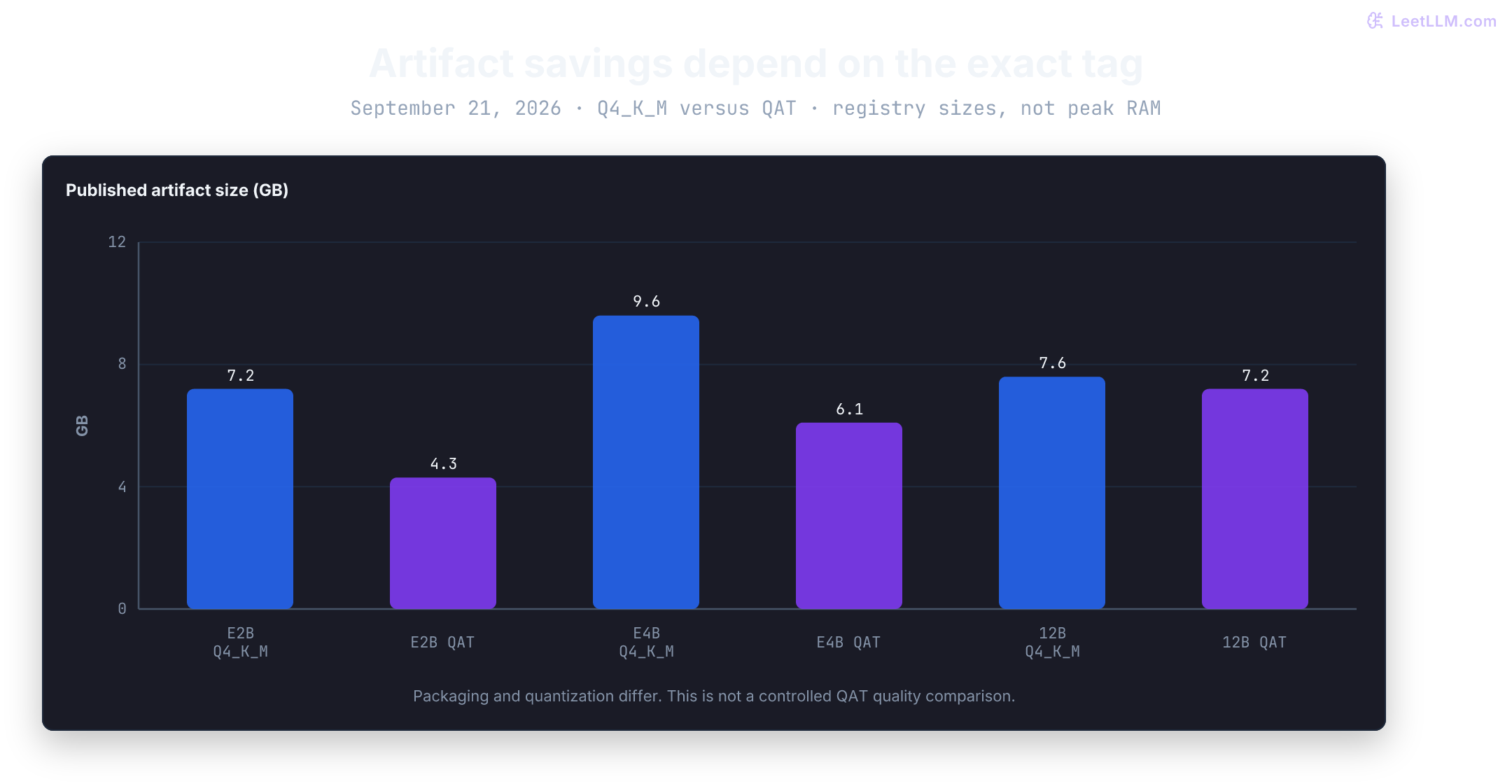
These published sizes were checked September 21, 2026. GB is the registry's rounded artifact size, not a measured RAM or VRAM requirement.[5]
| Tag | Published artifact | Model limit | Start here when |
|---|---|---|---|
gemma4:e2b-it-qat | 4.3 GB | 128K | Tightest local memory budget |
gemma4:e4b-it-qat | 6.1 GB | 128K | E2B misses quality and 12B won't leave enough headroom |
gemma4:12b-it-q4_K_M | 7.6 GB | 256K | 12B trial with room for cache and runtime |
gemma4:12b-it-qat | 7.2 GB | 256K | Compare QAT quality and runtime with the 12B baseline |
gemma4:26b-a4b-it-qat | 16 GB | 256K | Workstation trial with much more free memory |
gemma4:31b-it-qat | 19 GB | 256K | Dense 31B comparison with clear memory margin |
gemma4:cloud and gemma4:31b-cloud call cloud models. A localhost API URL can still route to those models, so the URL alone doesn't prove local inference.[5][2] For a local-only setup, disable cloud features in Ollama's configuration or set OLLAMA_NO_CLOUD=1 in the server environment and restart it. Model downloads still require network access.[1]
The 26B A4B model is a Mixture-of-Experts model with 25.2B total parameters and 3.8B active parameters per token. Ollama rounds that active path to 4B.[3][6]
The active count describes compute per token, while the total artifact still determines the weight-memory problem. This isn't a dense 4B model in disguise.
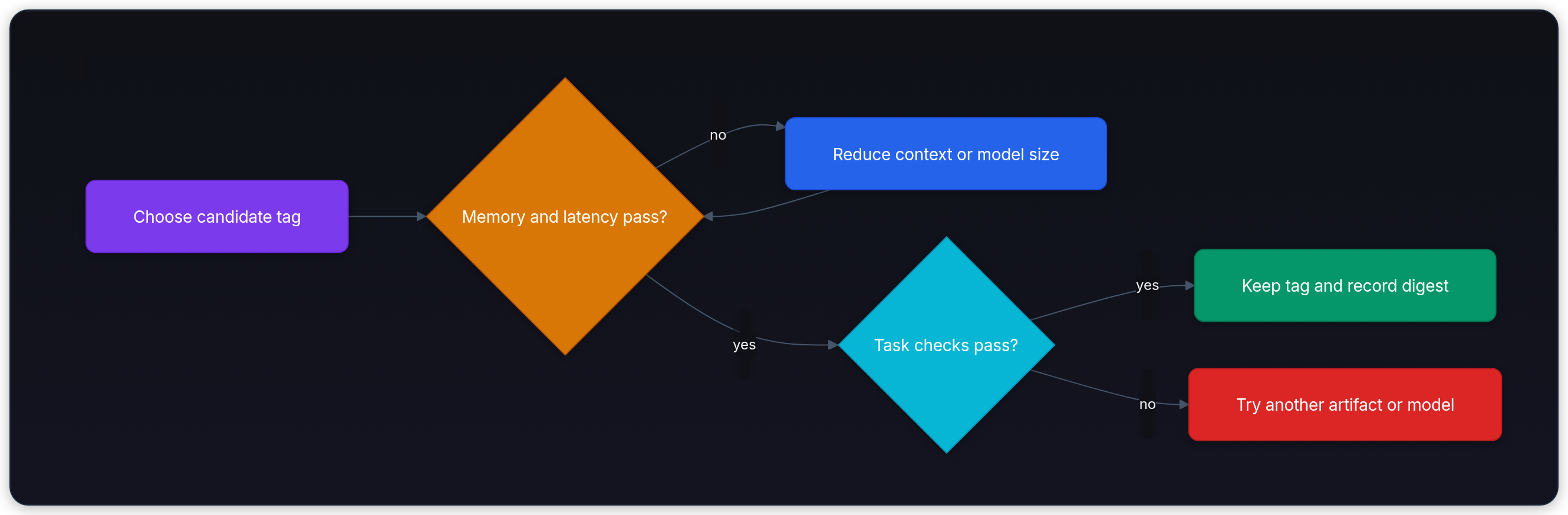
💡 Fit rule: Keep the smallest exact tag that passes your task evaluation at the context length you actually use.
Avoid short aliases in benchmark scripts. latest currently maps to E4B (9.6 GB), while 26b now maps to the 19 GB 26b-a4b-it-mtp-q4_K_M artifact. Neither name describes the full runtime choice.[5] Even a descriptive tag can be updated: record the full digest returned by /api/tags, and retain the artifact if you need an exact rollback.[7]
Budget runtime memory
Published artifact size isn't the full runtime requirement. The process also needs memory for metadata, runtime buffers, prompt processing, the key-value (KV) cache, and a safety margin.
The KV cache stores attention state from earlier tokens, so longer context and concurrent requests raise memory use. Inference: TTFT, TPS & KV Cache is the place to size that cache instead of guessing from download size.
Keep units and memory pools consistent. A 7.6 GB file is approximately 7.08 GiB because a GiB is 2³⁰ bytes. That conversion still doesn't tell you its resident allocation. Discrete GPU VRAM is separate from host RAM; unified memory is shared with the OS and other applications.
For an illustrative 16 GiB unified-memory budget, reserve 4 GiB for the OS and applications. Suppose measured resident weights use 7 GiB and runtime buffers use 1 GiB. That leaves 4 GiB for cache and any additional margin. If each independent request needs 4 GiB of cache, one fills the budget and two require 20 GiB. These are accounting assumptions, not Gemma 4 measurements; a full budget with no safety margin is already fragile.
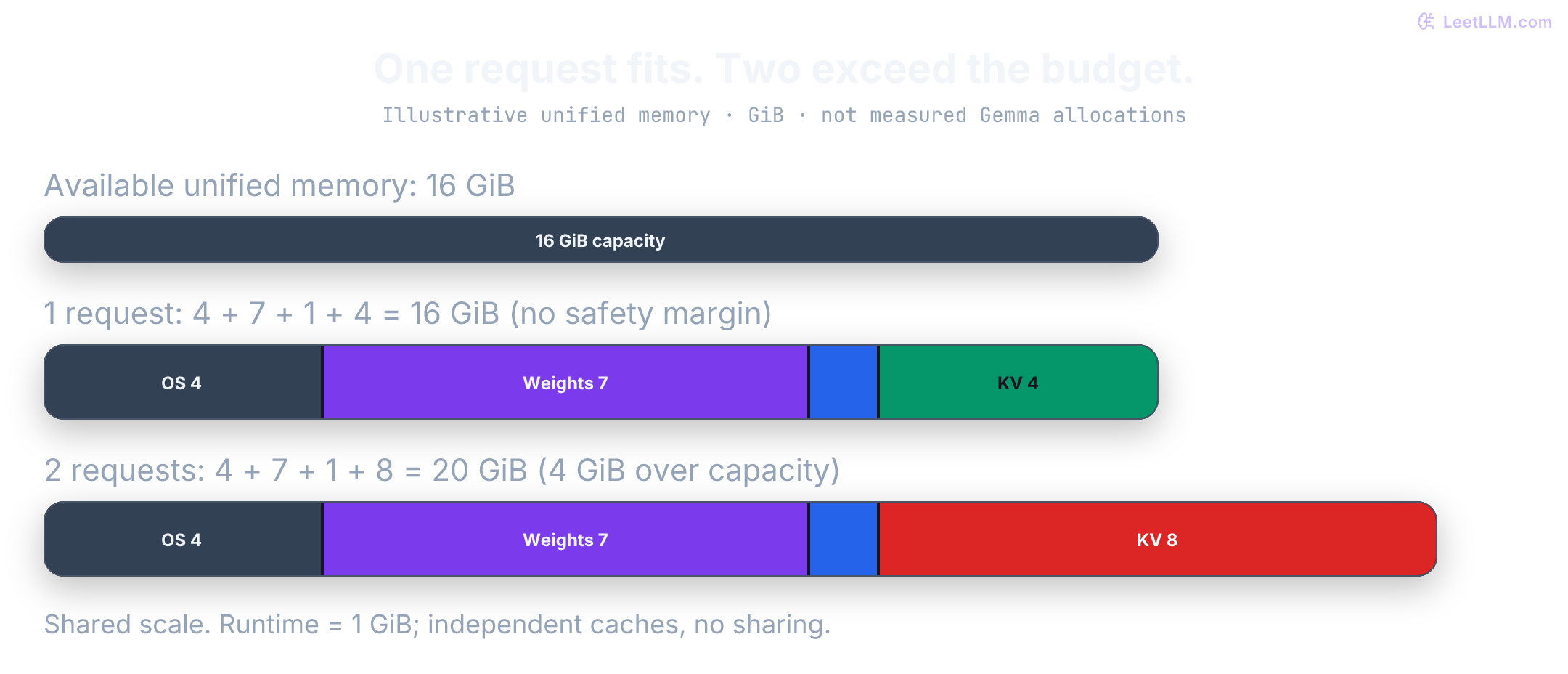
The final fit check happens after a real request. On a discrete GPU, partial CPU offload can hurt latency.
On Apple Silicon, CPU and GPU share unified memory, so read ollama ps placement labels next to measured throughput. Benchmark the exact machine, tag, context, and workload. Local LLM Deployment walks through the full weights-plus-cache-plus-reserve budget, including when to roll back a tag.
What QAT and MTP change
Once the model fits, a second question appears: can it generate fast enough? QAT and multi-token prediction (MTP) solve different problems.
QAT simulates low-precision behavior during training so the model can adapt before weights are compressed. Google's official QAT release covers Q4_0 checkpoints and mobile-specific formats.[8]
Ollama's default aliases and QAT tags use different quantization formats, so the published size gap mixes QAT with packaging. The gap is large for E2B (7.2 GB to 4.3 GB) and E4B (9.6 GB to 6.1 GB), but small for 12B (7.6 GB to 7.2 GB). Treat each tag as its own artifact instead of assuming one percentage.[5] Model Quantization: GPTQ, AWQ & GGUF explains how QAT differs from post-training quantization and why GGUF is a container rather than a bit width.
MTP is a speculative-decoding path. A small drafter proposes tokens and the target verifies them in a batch. Accepted drafts can raise generated-token throughput when saved target passes outweigh drafting and verification overhead. MTP doesn't shrink target weights or remove prompt-processing and KV-cache cost.[9]

Ollama's documented MTP path is runtime-specific. Ollama 0.31 added automatic MTP for Gemma 4 on Apple Silicon MLX. The published recipe is to update Ollama and re-pull gemma4:12b-mlx; no MTP flag is required.[10]
The separate gemma4:31b-coding-mtp-bf16 artifact is 64 GB. The current 26B MTP Q4_K_M artifact is 19 GB. A tag containing mtp identifies packaging, not a measured speedup on your machine.[5] Check the supported runtime and compare generation rates with prompt, context, thinking mode, and sampling held constant. Speculative Decoding explains acceptance and correction in more detail.
Install from the official package
Install Ollama from the official download page on macOS or Windows. On Linux, the official guide offers an install script and manual packages.[11][12]
The commands below download the script for inspection before execution. sh -n checks shell syntax, not trustworthiness. Running the final installation command changes the machine; use your organization's approved package process where required.
curl --fail --location --proto '=https' --tlsv1.2 \
  https://ollama.com/install.sh --output ollama-install.sh
sh -n ollama-install.sh
less ollama-install.sh
sh ollama-install.sh
ollama --version
Pull one descriptive local tag. Check free disk first, because the pull stores several gigabytes. The walkthrough uses the Q4_K_M 12B artifact throughout; substitute a smaller tag consistently if necessary.
ollama pull gemma4:12b-it-q4_K_MCheck the server and save the artifact identity before generation. This Bash snippet requires jq. A failed curl means the server or HTTP request failed; a successful request followed by a failed selection means the expected tag was not found.[7]
set -euo pipefail

curl --fail --silent --show-error http://127.0.0.1:11434/api/tags \
  --output ollama-tags.json
jq -e '.models[] | select(.name == "gemma4:12b-it-q4_K_M")
       | {name, digest, size, details}' ollama-tags.json
On a Linux manual install, start ollama serve in another terminal if no service is running. Desktop apps normally manage the server. Keep the bind address at 127.0.0.1 unless the deployment has a deliberate authentication, firewall, and TLS plan.[1][2]
Call the native API
The native /api/generate endpoint returns the response and runtime timing fields in one receipt. It also accepts num_ctx, so it's a useful first benchmark surface.[13][14]
Set context explicitly. Ollama's context guide describes hardware-dependent defaults, while the FAQ gives 4096 as the baseline; neither is evidence of your running allocation. The example requests 8192 tokens, far below the model's advertised ceiling.[15][1]
Disable streaming so one JSON object contains text and timings. Disable thinking for this short baseline so the output cap isn't consumed by a separate thinking response. Temperature zero reduces sampling variation but doesn't guarantee identical runs across runtimes or hardware.[13]
set -euo pipefail

curl --fail --silent --show-error \
  http://127.0.0.1:11434/api/generate \
  -H 'Content-Type: application/json' \
  -d '{
    "model": "gemma4:12b-it-q4_K_M",
    "prompt": "List three checks for a failing unit test.",
    "stream": false,
    "think": false,
    "keep_alive": "5m",
    "options": {
      "num_ctx": 8192,
      "num_predict": 128,
      "temperature": 0
    }
  }' > gemma4-12b-run.json

jq -e '.done == true and (.response | length > 0)' gemma4-12b-run.json
jq '{model, done, done_reason, prompt_eval_count, prompt_eval_cached_count, eval_count, total_duration,
     load_duration, prompt_eval_duration, eval_duration}' gemma4-12b-run.json
ollama ps
ollama ps shows allocated CONTEXT and PROCESSOR placement. Check both after generation. A CPU/GPU split is not a full-GPU fit; on unified memory also inspect system memory pressure.[1][15]
Ollama reports durations in nanoseconds. done: true means generation ended, not that the answer was correct or complete. Inspect done_reason: a length limit can stop an answer halfway through.[14][13]
Generated-token rate is eval_count / (eval_duration / 1e9). Prompt timing needs another step: Ollama reports the total input count as prompt_eval_count, cached input as prompt_eval_cached_count, and time spent evaluating uncached tokens as prompt_eval_duration. Subtract the cached count before calculating uncached prompt tokens per second.[13]
Suppose a receipt has 1,000 input tokens, 800 cached tokens, and 0.2 seconds of prompt evaluation. The measured uncached rate is tokens/second. Dividing the full input count by that duration would report 5,000 tokens/second and mistake cache reuse for faster computation. With no uncached input, report the uncached rate as unavailable rather than dividing by zero. Keep prompt rate and decode rate separate: a model can ingest a long file slowly and still generate quickly afterward.
The evaluator below checks positive generated counts and timings, a valid cached-token count, and a nonempty response that stopped with done_reason: "stop". It checks an illustrative SLO of at least 20 generated tokens/second and at most 5 seconds of server time. A normal stop doesn't prove that an answer fulfilled the request: a confident but wrong answer can stop normally too. These thresholds and stop checks are separate from task quality.
The synthetic fixture has 128 generated tokens in 3.2 seconds: 40 tokens/second. Its server total is 3.42 seconds. Token counts are invented for arithmetic and aren't a tokenization of the placeholder response. Save this code as evaluate_ollama_run.py; with no arguments it evaluates that fixture. Use --receipt to evaluate your saved JSON file.
import json
import sys
from pathlib import Path

def parse_ollama_metrics(payload: dict) -> dict[str, float | str | bool | None]:
    if not isinstance(payload, dict) or payload.get("done") is not True:
        raise ValueError("Expected a completed non-streaming response")
    for field in ("eval_count", "eval_duration", "prompt_eval_count", "total_duration"):
        if type(payload.get(field)) is not int or payload[field] <= 0:
            raise ValueError(f"Expected a positive integer: {field}")
    cached = payload.get("prompt_eval_cached_count", 0)
    if type(cached) is not int or not 0 <= cached <= payload["prompt_eval_count"]:
        raise ValueError("Cached count must be an integer between zero and prompt count")
    uncached = payload["prompt_eval_count"] - cached
    prompt_duration = payload.get("prompt_eval_duration")
    if type(prompt_duration) is not int or prompt_duration < 0:
        raise ValueError("Expected a nonnegative integer: prompt_eval_duration")
    if uncached > 0 and prompt_duration == 0:
        raise ValueError("Uncached prompt tokens require positive evaluation time")
    response = payload.get("response")
    normal_stop_with_text = (
        isinstance(response, str) and bool(response.strip())
        and payload.get("done_reason") == "stop"
    )
    decode_tps = payload["eval_count"] / (payload["eval_duration"] / 1e9)
    prompt_tps = uncached / (prompt_duration / 1e9) if uncached else None
    total_seconds = payload["total_duration"] / 1e9

    return {
        "model": payload.get("model", ""),
        "uncached_prompt_tokens_per_second": round(prompt_tps, 2) if prompt_tps is not None else None,
        "generated_tokens_per_second": round(decode_tps, 2),
        "server_total_seconds": round(total_seconds, 3),
        "normal_stop_with_text": normal_stop_with_text,
        "timing_passed": decode_tps >= 20.0 and total_seconds <= 5.0,
        "timing_and_stop_passed": normal_stop_with_text and decode_tps >= 20.0 and total_seconds <= 5.0,
    }

sample_response = {
    "model": "gemma4:12b-it-q4_K_M",
    "done": True,
    "done_reason": "stop",
    "prompt_eval_count": 16,
    "prompt_eval_cached_count": 0,
    "prompt_eval_duration": 180_000_000,
    "eval_count": 128,
    "eval_duration": 3_200_000_000,
    "total_duration": 3_420_000_000,
    "response": "1. Verify test inputs and fixtures.\n2. Check assertion diffs.\n3. Isolate environment state.",
}

# Cache reuse must not inflate the uncached processing rate.
partly_cached = {**sample_response, "prompt_eval_count": 1000,
                 "prompt_eval_cached_count": 800, "prompt_eval_duration": 200_000_000}
assert parse_ollama_metrics(partly_cached)["uncached_prompt_tokens_per_second"] == 1000.0
fully_cached = {**sample_response, "prompt_eval_cached_count": 16, "prompt_eval_duration": 0}
assert parse_ollama_metrics(fully_cached)["uncached_prompt_tokens_per_second"] is None
truncated = {**sample_response, "done_reason": "length"}
assert parse_ollama_metrics(truncated)["timing_and_stop_passed"] is False

if __name__ == "__main__":
    payload = sample_response
    if "--receipt" in sys.argv:
        receipt_path = sys.argv[sys.argv.index("--receipt") + 1]
        payload = json.loads(Path(receipt_path).read_text())
print(json.dumps(parse_ollama_metrics(payload), indent=2)){
"model": "gemma4:12b-it-q4_K_M",
"uncached_prompt_tokens_per_second": 88.89,
"generated_tokens_per_second": 40.0,
"server_total_seconds": 3.42,
"normal_stop_with_text": true,
"timing_passed": true,
"timing_and_stop_passed": true
}Run python evaluate_ollama_run.py --receipt gemma4-12b-run.json for the saved request. Server total isn't client wall time or time to first token (TTFT). A non-streaming response can't measure user-visible TTFT; use a streaming client and timestamps for that.
Older receipts may omit prompt_eval_cached_count; the example treats the missing field as zero. That lets it read old fixtures, but doesn't establish their cache state. Label those measurements as unknown cache state unless the runtime and experiment establish that the full prompt was evaluated.
Two responses have the same token counts and timings. Both stop normally, but one answers a different question. Which fields in the evaluator reveal that quality failure?
Answer
None. The evaluator measures timing and the stop condition. Add a separate task check, such as matching the requested assertions or validating extracted fields against the supplied file. A normal stop and a fast decode rate can both accompany an incorrect answer.
Separate cold model loading from warm requests. Preload with the same context allocation and keep-alive setting, then execute the benchmark before the model unloads:[1][13]
curl --fail --silent --show-error \
  http://127.0.0.1:11434/api/generate \
  -H 'Content-Type: application/json' \
  -d '{"model": "gemma4:12b-it-q4_K_M", "stream": false,
       "keep_alive": "5m", "options": {"num_ctx": 8192}}' > /dev/null
🎯 Measurement rule: Record cold and warm trials separately. Repeating identical prompts can reuse prompt work, so label cache state and use representative distinct prompts when measuring prefill. Hold tag, context, thinking, sampling, output cap, concurrency, and machine load constant.
Use the OpenAI-compatible API carefully
Ollama supports /v1/chat/completions and the non-stateful flavor of /v1/responses. Point the client at http://127.0.0.1:11434/v1/ and use a placeholder key such as ollama; the local server ignores that key.[16]
Check supported fields before moving a hosted integration, because this API isn't a full drop-in replacement.
OpenAI-compatible requests don't set Ollama context size per request. To pin context, create a derived model:
FROM gemma4:12b-it-q4_K_M
PARAMETER num_ctx 8192
Then create it and call the derived name:
set -euo pipefail

ollama create gemma4-12b-8k -f Modelfile
curl --fail --silent --show-error \
  http://127.0.0.1:11434/v1/chat/completions \
  -H 'Authorization: Bearer ollama' \
  -H 'Content-Type: application/json' \
  -d '{
    "model": "gemma4-12b-8k",
    "messages": [{"role": "user", "content": "Reply with local-ready"}],
    "stream": false
  }' | jq -e '.choices[0].message.content | select(type == "string" and length > 0)'
Ollama's OpenAI compatibility docs say /v1/responses arrived in Ollama 0.13.3.[16]
It doesn't support previous_response_id or conversation state. Keep conversation state in the application when the integration depends on Responses API semantics.
Keep the template and modalities inside the runtime
Gemma 4 uses standard system, user, and assistant roles. Google recommends sampling with temperature 1.0, top-p 0.95, and top-k 64 for general model behavior.[3][6]
Temperature zero in the benchmark is a test control, not Google's quality recommendation. Thinking mode changes the workload too: if enabled, preserve and inspect the separate thinking field, allow enough generation budget, and report the mode with results.[13]
Ollama applies the model chat template when you use chat endpoints, so pass roles and content instead of assembling control tokens by hand.[6]
For native API images, use its documented base64 images field and let Ollama assemble the multimodal input.[13] The listed local tags advertise text and image only. Google's model-level audio support doesn't establish support in a particular Ollama artifact.[5]
Diagnose from the symptom
| Symptom | Inspect | Next test |
|---|---|---|
curl gets connection refused | Ollama service | Start the app or ollama serve, then retry /api/tags |
| Pull stops | Free disk and exact error | Free space, then retry the exact tag |
| Model loads but the machine swaps | Context and total process memory | Lower num_ctx or use a smaller QAT tag |
| Discrete GPU shows a CPU split | ollama ps PROCESSOR | Lower context or model size, then rerun latency |
| First response is much slower | load_duration | Warm the model, then compare warm trials |
| Request ends without a full answer | done_reason, response, and thinking fields | Disable thinking for the baseline or raise the output cap |
| Generated tokens are slow | eval_duration and eval_count | Compare the exact tag and runtime with context fixed |
| QAT fits but answers regress | Task-specific acceptance set | Keep the larger artifact or choose a different model |
| Audio request fails | Ollama tag capabilities | Use a supported runtime, or treat the workflow as unsupported |
Don't change tag, prompt, context, sampling, and runtime together. One changed variable lets the run receipt answer one question.
Start with service and tag checks, then placement, then context, then timing, then task quality.
Build a reproducible local comparison
Use three prompt classes: short structured extraction, a realistic repository explanation, and fixed-length generation. The first isolates instruction following, the second introduces realistic context pressure, and the third exposes sustained decode speed.
Warm each tag once, run several measured trials, and store the raw JSON. Record:
machine: <CPU, GPU, and memory>
ollama_version: <ollama --version>
tag: gemma4:12b-it-q4_K_M
tag_digest: </api/tags digest>
context: 8192
processor: <ollama ps PROCESSOR>
prompt_pack: <path or commit>
sampling: temperature=0
thinking: false
output_cap: 128
concurrency: 1
warm_state: <cold model, warm model, repeated prompt>
client_wall_seconds: <measured separately>
raw_response: gemma4-12b-run.json
Latency isn't quality. Write task checks before you compare, such as valid JSON schema, correct failing assertions, or a cited answer from a supplied file. A faster tag loses if it misses the required behavior. Keep the smallest tag that meets both quality and latency budgets under real context.