On this page
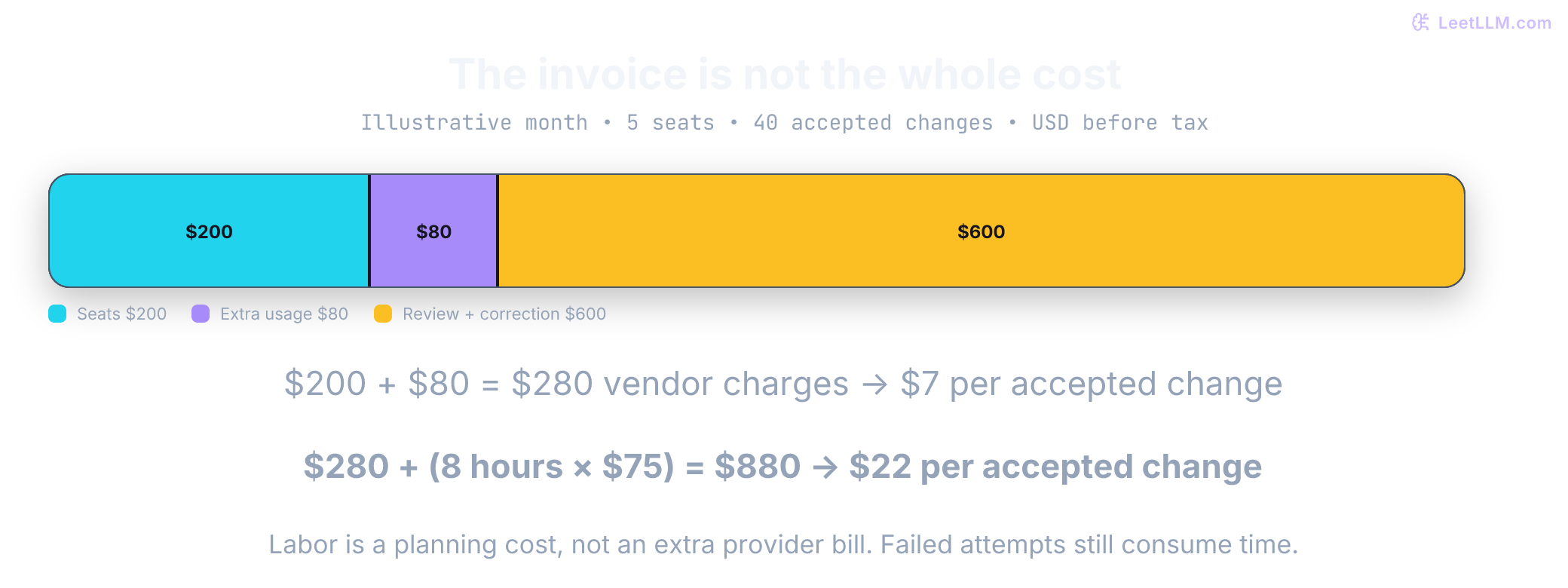
Your team approves five coding-assistant seats at $40 each. The planned bill is $200. A month later, usage charges add $80, and reviewers have spent eight hours correcting and checking the output. The subscription was only one part of the purchase.
Those numbers are illustrative, not a vendor benchmark. They expose the buying question: what will it cost to deliver work your team accepts, under a plan your team is allowed to use? A low seat price, a large credit balance, and a capable model answer different parts of that question.
Public prices and limits below were checked on October 3, 2026. Start with an existing approved entitlement or a free tier that exposes the features you need, then buy the smallest paid tier that passes a bounded trial. AI Coding Assistants in 2026 covers product capabilities and review workflows. Once the product fits, compare the bill, the limits, and the commitment required to renew.
Compare the same billing period
All dollar amounts below are vendor-listed USD before applicable taxes. Exclude promotions, negotiated discounts, currency conversion, and app-store differences. Monthly prices mean a month-to-month subscription unless stated otherwise. An annual monthly equivalent is a comparison number, not permission to cancel after one month. Check payment timing, renewal, refund terms, and seat-reduction rules at checkout.
Individual subscriptions
| Plan | Month-to-month price | Annual option shown here | Capacity detail to inspect |
|---|---|---|---|
| Cursor Pro / Pro+ / Ultra | $20 / $60 / $200 | Not normalized in this table | Two monthly pools; optional on-demand use[1] |
| Claude Pro | $20 | $200 upfront, equivalent to $16.67/month | Shared Claude usage; short-window and weekly limits<a href="https://claude.com/pricing" target="_blank" rel="noopener noreferrer" title="Plans & Pricing |
| Claude Max | From $100 | Not normalized here | 5x or 20x Pro usage options, not unlimited work<a href="https://claude.com/pricing" target="_blank" rel="noopener noreferrer" title="Plans & Pricing |
| ChatGPT Go / Plus / Pro with Codex | $8 / $20 / $100, $200, or $500 | Not normalized here | Codex and ChatGPT Work share usage; weekly limits may apply; Pro currently has no five-hour limit[4] |
| Copilot Pro / Pro+ / Max | $10 / $39 / $100 | Not normalized here | Monthly base credits plus a separate flex allotment[5] |
| Devin Pro / Max | $20 / $200 | Not normalized here | Daily and weekly allowance; optional extra usage[6] |
“Not normalized” marks an annual offer omitted from the comparison, not proof that none exists. Free options are useful for checking installation, permissions, and the review loop, but a limited trial can't establish sustained paid-tier capacity. If your employer already grants a seat, test it before adding a personal subscription for the same job.
Team subscriptions
| Plan | Month-to-month base | Annual monthly equivalent | Seat or purchase boundary |
|---|---|---|---|
| Cursor Teams Standard / Premium | $40 / $120 per user | Not quoted here | Premium advertises 5x Standard Agent limits[1] |
| Claude Team Standard / Premium | $25 / $125 per seat | $20 / $100 per seat | Team plan is for 2 to 150 people; seat types can be mixed<a href="https://claude.com/pricing" target="_blank" rel="noopener noreferrer" title="Plans & Pricing |
| ChatGPT Business with Codex | $25 per user | $20 per user | At least two users[4] |
| Copilot Business / Enterprise | $19 / $39 per granted seat | Not quoted here | Verify current signup eligibility; Enterprise targets GitHub Enterprise Cloud[5] |
| Devin Teams | $80 workspace + $40 per full developer seat | Not quoted here | Each full user receives a quota and Devin Desktop access[6] |
| Gemini Code Assist Standard / Enterprise | $22.80 / $54 per user | $19 / $45 per user | Annual rates require an annual commitment[7] |
At five full developer seats, Devin Teams has a $280 monthly base, not $200: $80 + 5 × $40. At two users, ChatGPT Business is $50 month-to-month or $480 for a year at the annual rate: 2 × 12 × $20. These are base-license calculations, not total-cost or quality comparisons.[6][4]
Purchase check: GitHub's current plans page links Business and Enterprise subscription paths. Enterprise requires GitHub Enterprise Cloud. Confirm organization eligibility and the actual checkout terms before promising a rollout date.[5]
A business tier may be justified by policy rather than more model usage. Write down required single sign-on, seat administration, model restrictions, retention, training policy, and audit access before testing. Don't assume a cheaper personal subscription inherits the employer's controls. Human-in-the-Loop Agent Architecture explains why the human approval boundary remains necessary even after procurement approves the tool.
Annual savings depend on how long you stay
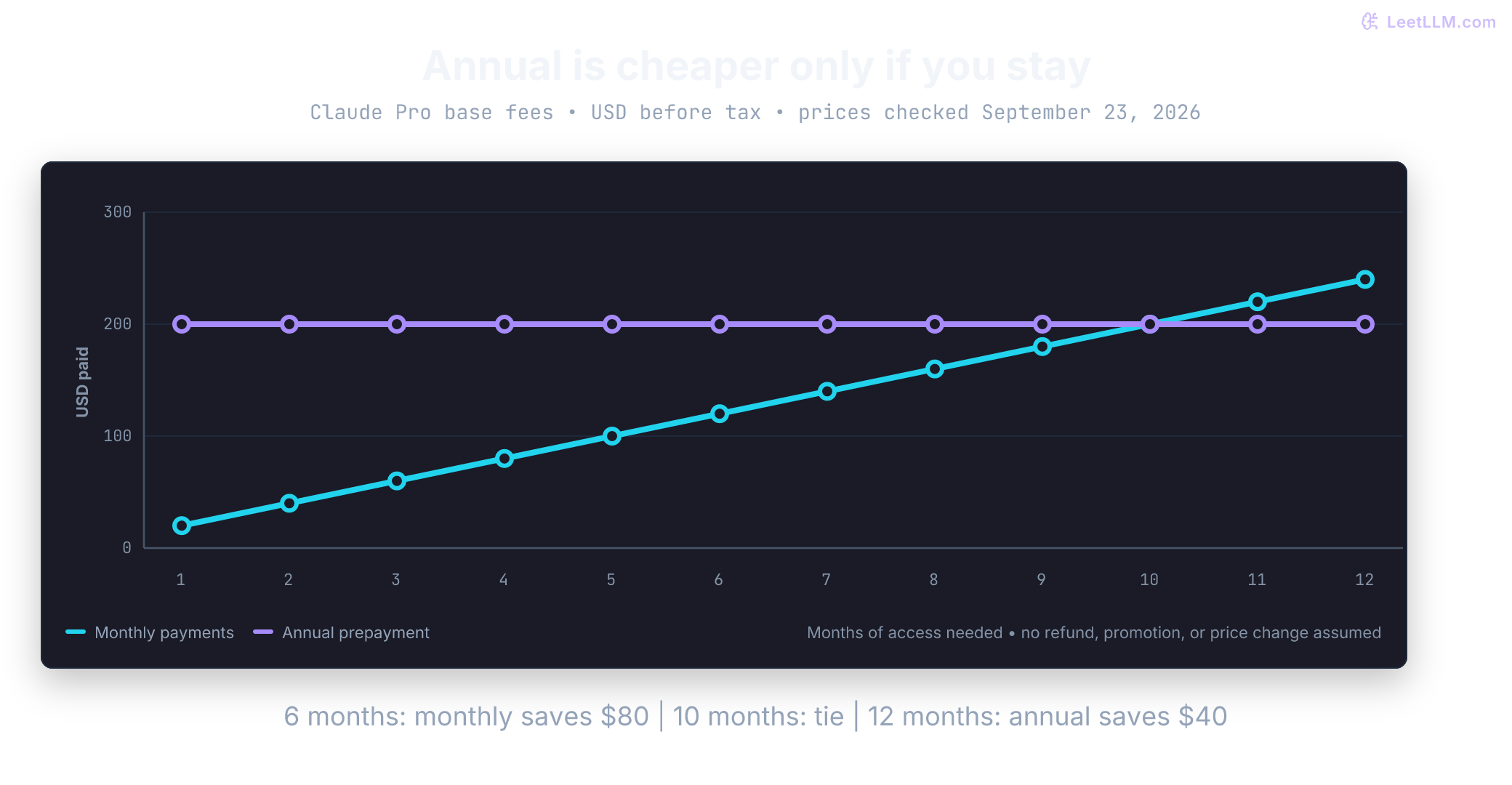
Claude Pro provides a useful arithmetic example: $20 monthly versus $200 prepaid for a year. Anthropic displays the annual equivalent rounded to $17/month; $200/12 is $16.67 to the nearest cent.[2]
If you need six months and can stop monthly renewals after month six, monthly billing costs $120. The prepaid annual purchase still costs $200. Ten monthly payments equal the annual price; the eleventh makes annual cheaper. Twelve monthly payments cost $240, so the maximum first-year saving in this simplified comparison is $40, or 16.7% of $240. Assume unchanged prices, no refund, no promotion, and identical usage entitlements.
Run a short month-to-month pilot before making a year-long commitment when the workflow is unproven. A discount doesn't compensate for an unsuitable plan, unused seats, or a model access change that breaks the intended workflow.
Read the allowance and the overflow path separately
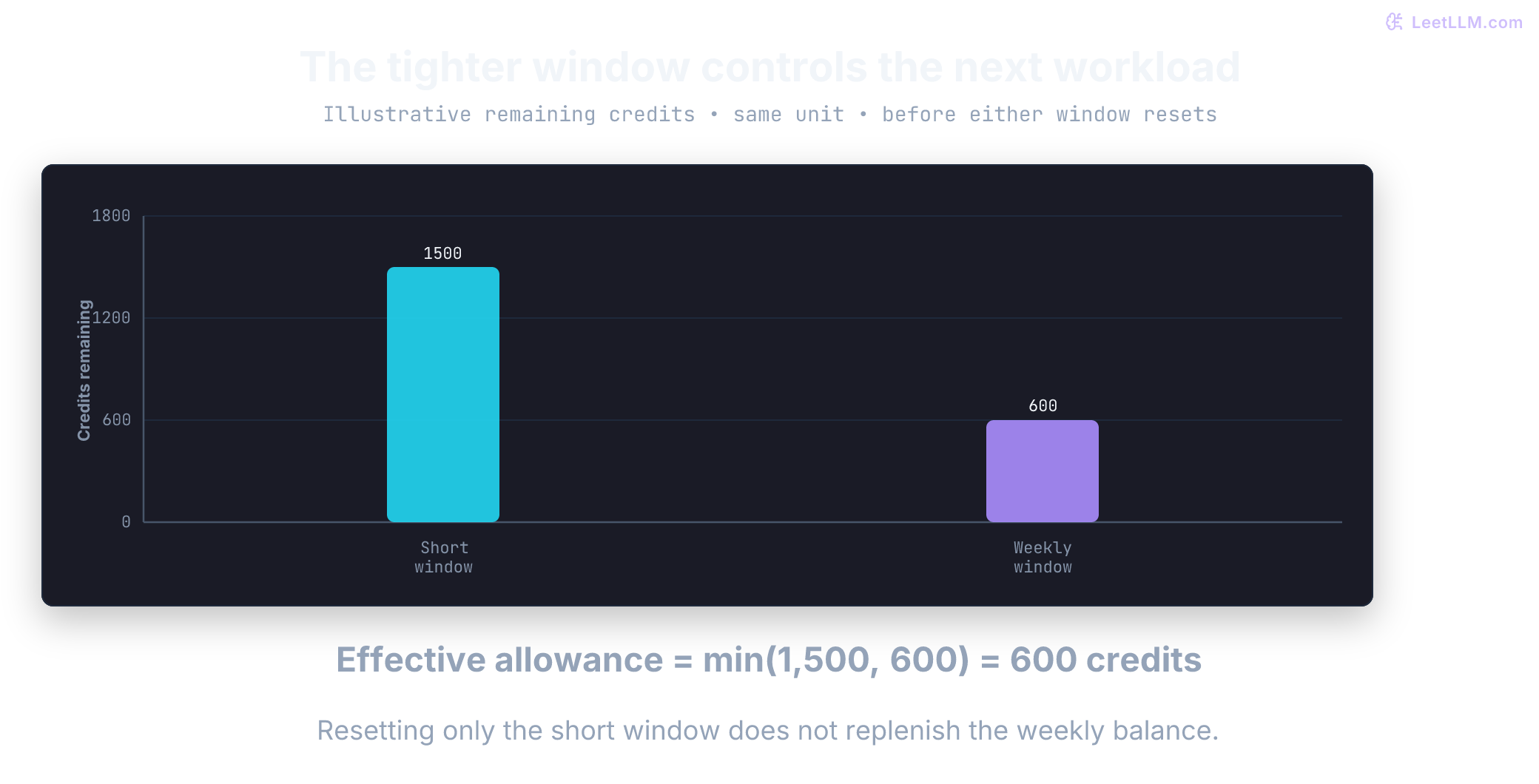
A subscription buys access plus a usage quota. That allowance might be measured in model-weighted credits, requests, or an opaque usage bar. A single agent task can make many model calls, so a request allowance isn't a task allowance. A plan can also enforce several windows at once: enough capacity in the five-hour window doesn't imply enough capacity for the week.
For example, imagine a credit-based plan showing 1,500 short-window credits left and 600 weekly credits left. A further 800-credit workload doesn't fit within included usage even though the short-window meter looks healthy. Before either window resets, and ignoring other limits, the effective remaining allowance is min(1,500, 600) = 600 credits. A 500-credit workload leaves 1,000 and 100 respectively. This is illustrative accounting, not a claim that an agent can predict its full cost or that vendors reserve whole tasks atomically.
Check what happens at the boundary: waiting, stopping, purchasing credits, or automatic overflow billing. Set spending controls before a long run, verify which account and authentication mode are active, and treat a dashboard's estimated usage as distinct from the invoice. Paid API access can still have rate limits.
Cursor: two pools, not one dollar allowance
Pro, Pro+, and Ultra have separate Cursor Models and Other Models pools, resetting monthly. The current documentation marks both as included without publishing the old fixed $20/$70/$400 pool values. Don't budget from those historical numbers. Inspect the account dashboard and the chosen model's rate.[1]
For Teams and Enterprise, third-party requests add a Cursor Token Rate of $0.25 per million tokens on top of model API pricing, including bring-your-own-key (BYOK) usage. Eligible regional data residency adds a separate 10% model-price uplift. Optional on-demand usage is billed after consumption.[1][8] An API provider's price alone therefore isn't a complete team estimate.
Claude Code: authentication changes the bill
Claude subscriptions share included capacity across supported Claude surfaces; model, context, and parallel activity affect how quickly it runs out. /usage reports plan usage. Optional usage credits cover work beyond the allowance, while API-key usage uses separate token-based metered billing.[3] Check that the tool is using the intended subscription rather than assuming any successful login draws from it.
Don't treat every Claude Enterprise offer as a larger prepaid Team plan. The current pricing page advertises a $20/seat Enterprise base plus usage at API rates. A procurement comparison needs the consumption terms as well as the seat price.[2]
Codex: shared limits and a different API entitlement
Codex is included through ChatGPT plans, not a separate “Codex Plus” subscription. Local and cloud work share an allowance, and ChatGPT Work draws from the same usage budget. Weekly limits may apply. The published five-hour estimates apply to Plus and Standard Business; Pro currently has no five-hour limit. Credits can extend eligible subscription usage.[4]
API-key authentication supports the CLI, SDK, and IDE extension with separate token billing, but it doesn't include cloud integrations such as GitHub code review or Slack. Buying API capacity isn't a like-for-like replacement for every subscription feature.[4]
Copilot: read base and flex credits
The current individual allowance table lists 1,500 total monthly AI credits for Pro (1,000 base + 500 flex), 7,000 for Pro+ (3,900 + 3,100), and 20,000 for Max (10,000 + 10,000). Business and Enterprise list 1,900 and 3,900 per user. These are vendor billing units, not counts of reviewed changes.[5]
Use the billing rules for the actual account and renewal period. Don't carry an old premium-request assumption into a current credit-based budget, and don't assume that an individual flex allowance also applies to organizational seats.
Devin and Gemini Code Assist: different buying boundaries
Devin paid plans refresh an allowance daily and weekly; extra usage is purchased at API pricing. The public page doesn't give a task-completion guarantee for that allowance. Each full developer seat includes its own quota and Devin Desktop access, so count the people who need those entitlements.[6]
Gemini Code Assist Standard and Enterprise remain business products with IDE and CLI access. The consumer Code Assist IDE/CLI path was replaced by Antigravity on June 18, 2026; a Google AI consumer subscription isn't interchangeable with these business licenses.[7][9] Gemini 3.1 Pro requires the Preview release channel, while Gemini 3.5 Flash is generally available to Standard and Enterprise users.[10]
Model-only plans need a separate comparison
A model plan can supply a compatible coding tool with capacity without supplying the same editor, review surface, or organization controls. Compare that complete combination, including any separate tool fee. Verify the exact model ID, endpoint, key type, allowed use, and overflow behavior.
| Model plan | Published monthly price | Meter | Important boundary |
|---|---|---|---|
| MiniMax Token Plan Plus / Max / Ultra | $22 / $55 / $132 | Shared usage bar, five-hour rolling and weekly windows | Subscription Key differs from a standard API key; prepaid Credits can cover eligible overflow[11][12] |
| Z.AI GLM Coding Plan Lite | Starts at $18 | 2,000 credits per five hours and 10,000 per week | Credits vary with model, token type, tools, and peak period[13] |
| QwenCloud Token Plan Personal Lite / Essential / Standard / Pro | Regular list prices $8 / $16 / $25 / $80; promotions excluded | 11,500 / 25,500 / 45,000 / 180,000 monthly Credits | Dedicated plan key and compatible endpoint; interactive programming or agent tools, not scripts or application backends[14][15] |
| Fireworks Fire Pass | No price published in setup docs | No per-token charge for included routes while active | Experimental and closed to new subscriptions; existing users and promotional recipients retain access[16] |
MiniMax lists purchased Credits at 1,000 per $1, valid for 365 days from purchase. Unused included subscription quota is different from that purchased balance. Z.AI currently supports GLM-5.3 and GLM-5.3-Flash, with older model names remapped; a familiar name in a configuration file may no longer identify the model you tested.[11][12][13]
Don't compare these plans by headline “millions of tokens.” Cached input, uncached input, output, and tool calls can consume different amounts. The Z.AI row uses published base allowances, not temporary off-peak campaign capacity.[13]
QwenCloud's old Coding Plan documentation now redirects to Token Plan. Its current allowance is monthly Credits, not the older weekly/monthly request counts. Included quota doesn't roll over; when it runs out, service pauses unless a Credit Pack supplies capacity. There's no automatic fallback to pay-as-you-go. The page also advertises limited-time prices, which are excluded from the regular-price comparison above. Verify the dedicated key, compatible endpoint, current model list, and checkout before migrating a configuration.[14][15]
Calculate the budget from accepted work
Return to the five-seat example. Suppose monthly usage beyond included capacity costs $80, and review plus correction takes eight hours at an assumed loaded labor rate of $75/hour. If 40 changes are accepted, the direct vendor bill is $280, or $7 per accepted change. Including $600 of review labor makes the planning cost $880, or $22 per accepted change.
These are invented inputs for budgeting, not a pilot result or a provider ranking. Include time spent on failed attempts in the labor total; divide by accepted changes, not all generated patches. Keep task classes separate so a pile of tiny edits doesn't hide expensive migration failures. Compare against the team's existing workflow before claiming savings.
The local helper below takes seat fees, already-calculated extra usage, review hours, an hourly rate, and the accepted change count. It returns the vendor bill, the bill plus labor, and the cost per accepted change. Predict those three values from the cost stack before running it.
from decimal import Decimal

def monthly_budget(seats, seat_price, workspace_fee, usage_cost,
                   review_hours, hourly_rate, accepted):
    if type(seats) is not int or seats < 0:
        raise ValueError("Seats must be a nonnegative integer")
    if type(accepted) is not int or accepted < 0:
        raise ValueError("Accepted changes must be a nonnegative integer")
    amounts = [Decimal(str(x)) for x in
               (seat_price, workspace_fee, usage_cost, review_hours, hourly_rate)]
    if any(not x.is_finite() or x < 0 for x in amounts):
        raise ValueError("Costs, hours, and rates must be finite and nonnegative")
    price, workspace, usage, hours, rate = amounts
    vendor = seats * price + workspace + usage
    total = vendor + hours * rate
    per_change = total / accepted if accepted else None
    return vendor, total, per_change

vendor, total, per_change = monthly_budget(5, 40, 0, 80, 8, 75, 40)
print(f"Vendor bill: ${vendor:.2f}")
print(f"Including review: ${total:.2f}")
print(f"Per accepted change: ${per_change:.2f}")Vendor bill: $280.00
Including review: $880.00
Per accepted change: $22.00The helper assumes monthly fees, no taxes, and already-calculated dollar usage, not raw vendor credits. It doesn't model proration, refunds, prepaid-credit cash timing, infrastructure, or seat minimums; check those separately. With zero accepted changes it returns None for unit cost, because no finite cost per accepted change has been established. Annual fees can be allocated across months for planning, but that allocation doesn't change the payment date or contractual commitment.
Run a trial that tells you what to buy next
Choose a few real tasks: a bug with a reproducible test, a multi-file feature, a refactor, a dependency update, and a security-sensitive review. Define acceptance criteria before running them. Use the same starting commit and comparable permissions, and record the tool version, plan, model, authentication mode, allowance state, and extra spend. Repeat uncertain results rather than treating one successful patch as proof.
Track assignment-to-accepted-diff time, human correction time, interrupted sessions, tests actually run, unsafe edits, and the invoice. Keep accepted task counts and review time as measurements, not an invented quality score. If two plans expose different models, report a product-plan comparison rather than claiming the tool alone caused the difference.
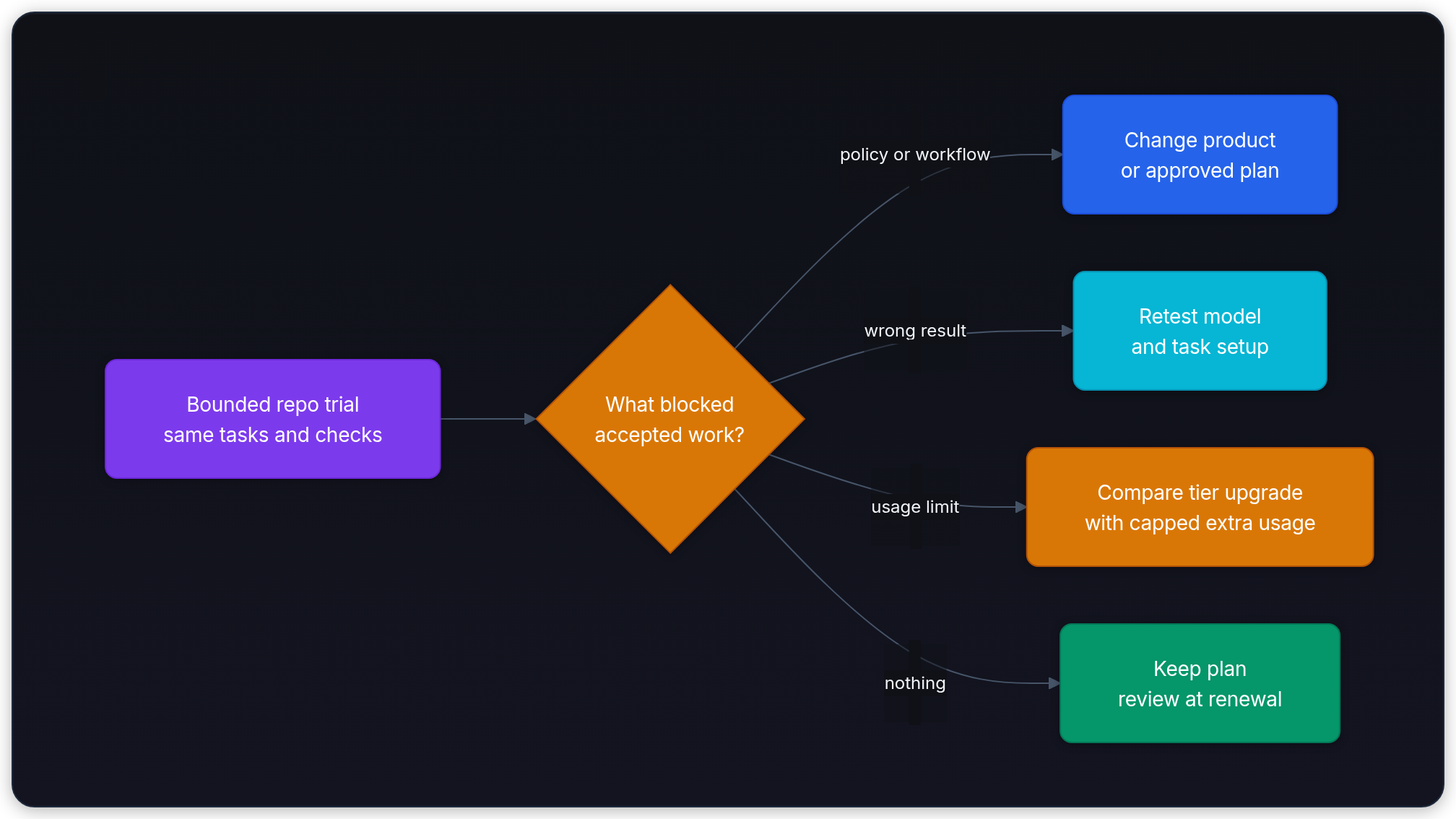
Upgrade rule: A repeatable capacity limit can justify more allowance. A wrong answer needs a quality investigation. A missing approval or data control needs a policy-compatible product. Raising the tier doesn't necessarily solve the other two.
For an occasional burst, compare the permitted extra-usage cost with the incremental tier fee, while checking whether that tier changes models or features. For sustained use, repeat the comparison over representative weeks, including the busiest period. Stop an unsuccessful pilot, remove unused seats, and cancel unwanted renewals under the provider's terms.
Choose one primary tool that fits the team's review process. Add a second subscription only when it solves a measured gap and its extra cost survives this accounting. AI Coding Workflow with Agents covers how to turn that access into bounded tasks, executed checks, and reviewable diffs.