On this page
An authorization patch can pass its tests and still grant access after an admin permission expires. That failure is easy to miss when a timestamp uses the wrong unit.
The backend still has to verify a JSON Web Token (JWT), load the user's role in the requested workspace, and reject expired permissions. If an assistant helps, decide first how much of that loop it may own and what evidence must come back before merge. This comparison uses an illustrative authorization task, not a measured head-to-head product benchmark.
Pick an operating mode before you pick a vendor:
- Autocomplete or next edit: You drive the change. The tool predicts the next local edit.
- Live agent: You stay in an interactive loop. The tool searches, edits, and runs permitted commands while you can steer.
- Delegated agent: You hand off a bounded task and review the result later. Execution might be local or remote; delegation alone says nothing about its security isolation.
One product can offer all three. Code Completion System explains why inline completion and task agents need different latency, context, and evaluation designs.

As of September 23, 2026, Cursor, Codex, GitHub Copilot, and Claude Code each cover more than one surface. Their labels won't tell you where you can steer, what runs remotely, or which evidence returns with the patch. Model menus, usage meters, and plan names move faster than the habits that keep a security-sensitive change reviewable.[1][2][3][4][5][6][7]
Run one task through the agent loop
A weak prompt says, "add admin settings auth." A useful brief gives the agent a bounded change and a way to prove it:
- Reuse the JWT middleware pattern in
app/middleware/ - Read
db/schema.tsbefore adding queries - Require active admin membership in the workspace named by the route
- Reject missing or expired admin permission, including the exact expiry boundary
- Leave token verification, password hashing, dependencies, and other routes unchanged
- Add tests for a valid token, an expired token, missing membership, wrong-workspace membership, and expired permission
The brief names scope, constraints, security rules, and expected evidence. It also gives the agent a reason to reuse the auth system you already have instead of inventing a second one.
Assemble the smallest useful context
Before it edits, ask which files can answer this task. The agent shouldn't dump the whole repository into context. Search for the smallest working set:
db/schema.tsfor membership state and timestamp representationapp/routes/admin-settings.tsfor the workspace identifier and response contractapp/middleware/for existing token verification and auth conventionspackage.jsonfor test commands and installed librariestests/for fixtures and runner styleAGENTS.md,CLAUDE.md, or other project rules
Claude Code reads CLAUDE.md across terminal, IDE, desktop, and web surfaces.[6] Cursor documents project, team, user, and AGENTS.md rules for its Agent. Those rules don't govern Cursor Tab, and User Rules don't apply to Inline Edit.[8] Instruction files keep constraints visible, but relevant source and tests still beat a stale rule. Switching from an agent to autocomplete can also change which instructions apply.

Patch, test, and consume the failure
Once that working set exists, the agent can propose a small plan: reuse the JWT helper, query workspace membership, check admin_expires_at, wire the route, and add failure-mode tests.
Suppose the first run fails:
FAIL tests/admin-settings-auth.test.ts
  Admin Settings Auth
    ✓ accepts valid JWT and valid workspace permission
    ✗ rejects request when admin permission is expired
      Expected 403, received 200
For this example, the database stores expiry in milliseconds. A broken check compares it with current time in seconds: expiresAtMs > nowMs / 1000. An already-expired timestamp near 1.8 trillion still exceeds a current timestamp near 1.8 billion, so the request is allowed. The correct comparison uses milliseconds on both sides and rejects equality.
Before running the predicate below, predict the result when expiry equals the fixed clock. Permission is active only before expiry, so equality must deny access. The four inputs cover just before, exactly at, just after, and a missing expiry.
const nowMs = 1_800_000_000_000; // fixed clock; no timing-dependent test
const active = (expiresAtMs) =>
  Number.isFinite(expiresAtMs) && expiresAtMs > nowMs;

for (const [expiresAtMs, expected] of [
  [nowMs - 1, false], [nowMs, false], [nowMs + 1, true], [null, false],
]) {
  if (active(expiresAtMs) !== expected) throw new Error("expiry boundary failed");
}
console.log("4 expiry checks passed");
Running this standalone example with Node.js prints:
4 expiry checks passedThis checks one pure predicate, not the route or JWT verifier. The agent must also rerun the request-level test and existing auth checks. A green run establishes those tested behaviors, not complete security coverage. Save exact commands, exit codes, and skipped checks rather than accepting a summary that says only "tests passed."
Keep policy with the human reviewer
Now inspect the green diff against the brief. It can still remove signature verification, weaken an assertion, or query admin membership without filtering by the requested workspace. A user who administers workspace A must not gain access to workspace B. Check that query and its negative test yourself. Reject unrelated dependency or password-hashing changes; this task doesn't authorize them.
⚠️ Review boundary: Passing tests don't prove policy compliance. You still own security posture, dependency choices, permission grants, architecture, and release judgment.
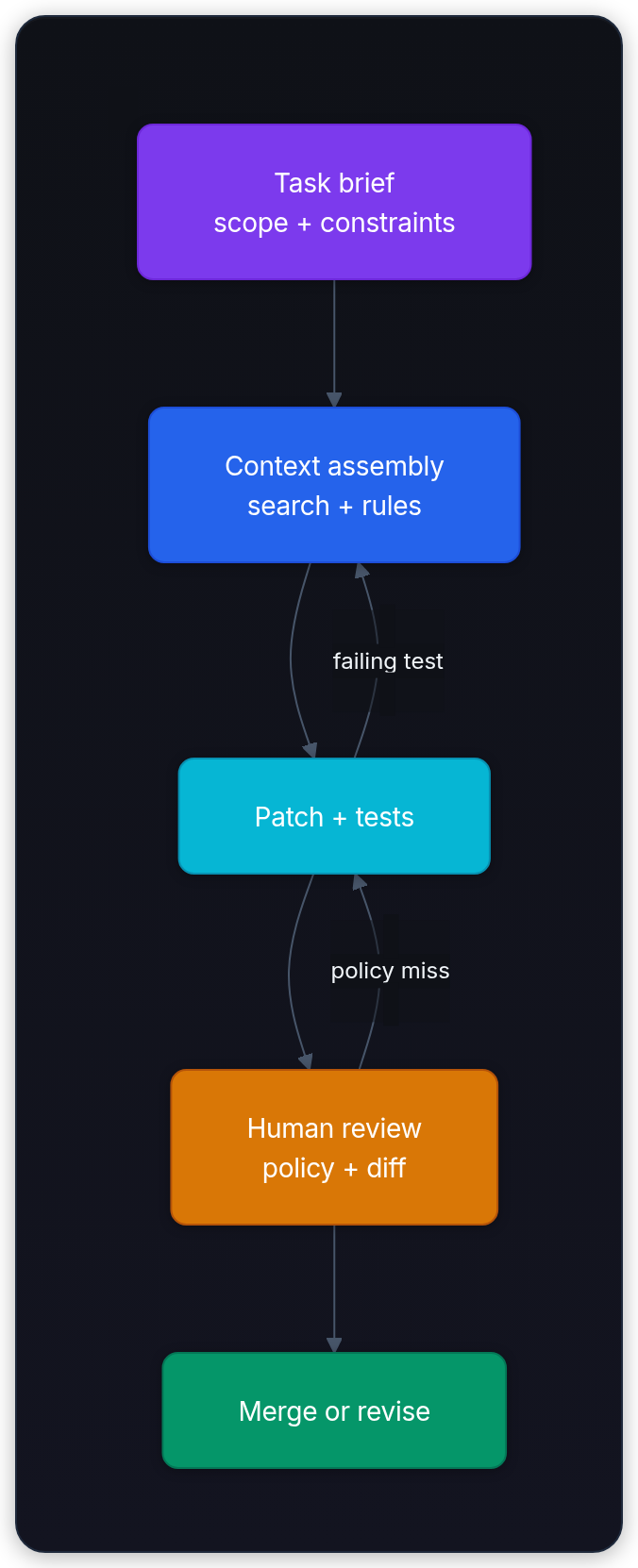
The loop closes on evidence: a task contract, a selected working set, a patch, test output, and a reviewable diff. That evidence packet is what we can compare across products.
Compare surfaces, not logos
Current products cross local and remote boundaries. Compare the handoff inside the mode you actually plan to use.
| Product | Live or local work | Delegated work | Review surface | Useful first pilot |
|---|---|---|---|---|
| Cursor | Editor agent, inline edits, rules, and CLI | Cloud agents | Editor diff, checkpoint, or pull request | Feature change that needs frequent file-level steering[1][8] |
| Codex | Desktop, CLI, and IDE extension | Cloud tasks; desktop scheduled tasks can use local worktrees | Local diff, worktree, branch, or pull request | Two bounded tasks that can run independently[2][3] |
| GitHub Copilot | IDE completion, agent mode, and CLI | GitHub cloud agent in an Actions-powered environment | Local diff or GitHub branch and pull request | Issue-to-PR task with CI and review already in GitHub[9][5] |
| Claude Code | Terminal, IDE, and desktop | Web sessions and cloud routines | Diff, command trace, branch, or pull request | Debugging task that crosses code, shell, logs, and tools[6] |
Surface details change the result. GitHub's cloud agent works on one repository, one branch, and one pull request per task, uses Actions minutes plus GitHub AI Credits, and has a 59-minute hard limit. It's available on paid Copilot plans, not Copilot Free.[5][4] An open-ended migration needs smaller handoffs or another surface. Codex worktrees create separate working directories on the computer or remote development environment holding the project.[2] A worktree is not a security sandbox: it separates edits, not operating-system permissions, network access, or secrets.
💡 Key insight: The interesting product difference isn't "editor vs terminal." It's when you can still steer, and what evidence you get when you can't.
Treat those as routing rules, not a leaderboard. Steer when feedback is cheap, delegate when work can be bounded, use a pull request when team visibility matters, and choose terminal access when inspection and tool composition matter. Pilot the boundary with the same task before you make a broader choice.
Read price as a meter, not a task quota
Vendor units aren't interchangeable. A "5x usage" multiplier, GitHub AI Credits, included model usage, and API tokens measure different things. Context size, model choice, tool calls, local versus cloud execution, and retries can change consumption for the same task.
| Product | Individual monthly list prices | Team list prices and cadence | Meter to watch |
|---|---|---|---|
| Cursor | Hobby free; Pro $20; Pro+ $60; Ultra $200 | Teams Standard $40/user/month; Premium $120/user/month, monthly pricing | Separate Cursor Models and Other Models pools; on-demand usage after included limits[10] |
| Codex | ChatGPT Free; Go $8; Plus $20; Pro $100 or $200 | Business $20/user/month billed annually or $25 monthly; two-user minimum | ChatGPT Work and Codex share usage; local and cloud tasks share a five-hour window, with additional limits. Optional credits or separate API-key billing[3] |
| GitHub Copilot | Free; Pro $10; Pro+ $39; Max $100 | Business $19/seat/month; Enterprise $39/seat/month | GitHub AI Credits; additional usage at $0.01/credit, plus Actions minutes for the cloud agent[4][11][5] |
| Claude Code | Pro $20; Max from $100 | Team Standard $20/user/month annually or $25 monthly; Premium $100 annually or $125 monthly | Shared Claude usage limits, including five-hour and weekly limits; optional extra usage or separate API billing<a href="https://claude.com/pricing" target="_blank" rel="noopener noreferrer" title="Plans & Pricing |
These are USD list prices checked on September 23, 2026, before tax, negotiated contracts, or temporary promotions. The individual column uses monthly billing; annual discounts are not mixed into it. For example, Claude Pro is also sold for $200 upfront per year, displayed as about $17/month. Availability and checkout prices can depend on region and organization type.[7]
GitHub's plans page links Business and Enterprise subscription paths; Enterprise requires GitHub Enterprise Cloud. Verify organization eligibility and checkout before budgeting a rollout.[4] Cursor's team pricing also adds a Cursor Token Rate to third-party model usage, so a model's API price alone is not the full team usage rate.[10] Codex API-key access is a separate billing path and doesn't unlock every cloud feature.[3]
Don't convert a plan multiplier into a promised task count. Run the same repository tasks for one billing cycle, record usage after each task, and compare cost per accepted change. Record the exact model and mode too. Vendors offer multiple models or routing profiles, and a cheaper or faster choice can change both quality and consumption.
Privacy and permissions belong in the purchase decision
Price tells you about budget. Security posture depends on the plan and the settings, not the product name alone.
| Product | Current policy checkpoint |
|---|---|
| Cursor | Enable Privacy Mode if code and prompts must not be used for training. Team plans add admin privacy controls.[1] |
| Codex | ChatGPT Business, Enterprise, and Edu data aren't used for training by default. The API also excludes training by default unless you opt in; check the individual account's data controls separately.[3][13] |
| GitHub Copilot | Business and Enterprise data isn't used for training. Starting April 24, 2026, Free, Pro, Pro+, and Max interactions may be used unless the user opts out.[14] |
| Claude Code | Team and Enterprise work data isn't used for model training by default. Consumer plans use opt-out controls.<a href="https://claude.com/pricing" target="_blank" rel="noopener noreferrer" title="Plans & Pricing |
"Not used for training" doesn't mean zero retention, offline execution, or no third-party processing. Check retention, subprocessors, regional requirements, and whether the selected surface follows the policy you purchased. Separately inspect repository read scope, command execution, network access, secrets, branch protection, and the ability to push or open a pull request. Code Generation & Sandboxing covers isolation, allowlists, and execution boundaries.
🎯 Rollout tip: Use a disposable checkout for edits and a separately configured sandbox for untrusted execution. Don't mount production credentials. Grant only the commands, network destinations, and write actions the task needs.
Pilot with repository evidence
Once the boundary is clear, run a pilot. Give each candidate a fresh checkout of the same starting commit, the same brief, allowed tools, checks, and time budget. Preinstall equivalent dependencies so setup differences don't dominate. Repeat tasks, vary candidate order, and give equal human guidance; log every intervention.
Choose the question before the model. A product-default comparison tests each product as sold, including its model routing. A matched-model comparison holds model and reasoning settings fixed where supported, so differences more closely reflect tools and context assembly. They answer different questions. Record product version, plan, model identifier or Auto routing, mode, and date. Don't label an Auto-routed run as a test of one named model.
| Task | Evidence to save | Failure worth noticing |
|---|---|---|
| Small bug fix | Final diff and targeted test output | Unrelated churn |
| Multi-file refactor | Plan, changed API surface, and full affected checks | Missed dependency or duplicated abstraction |
| Failing test repair | Original error and retry trail | Guessing without reading the failure |
| Security-sensitive change | Permission log, negative tests, and reviewer notes | Constraint silently weakened |
| Documentation update | Source links and rendered output | Fluent but stale claim |
Score the accepted outcome, diff size, review time, tests actually run, risky-command approvals, policy preservation, task duration, and measured cost. Evaluating AI Agents shows how to grade outcome, process, safety, cost, and repeatability as one episode.
Count failures in the cost calculation
Define an accepted change before the run: required checks pass, no scope violation remains, and a reviewer accepts the patch. Include the cost of retries and rejected attempts in the numerator, but only accepted changes in the denominator. With zero accepted changes, cost per accepted change is undefined, not zero.
For a small illustrative pilot, setup A spends $20 on ten attempts and produces five accepted changes: $4 per accepted change. Setup B spends $30 on the same ten attempts and produces eight: $3.75 per accepted change. A is cheaper per attempt, but B is cheaper per accepted result. These invented numbers demonstrate the calculation; they are not vendor results.

For subscription plans, distinguish incremental cash spend from an allocated plan cost. Included usage is not a per-task invoice. Declare how you allocate the seat fee and shared chat usage; keep estimated API-equivalent costs separate from actual charges. Report reviewer minutes and wall-clock time alongside dollars, or use an explicit hourly rate if combining labor with tool cost. Anthropic's cost documentation makes the same distinction between subscription limits and dollar-metered usage.[12]
SWE-bench originally turned real GitHub issues into repository-level test tasks.[15] Such a score is useful evidence for that setup, not a direct measurement of your team's review time or cost. Record the benchmark variant, scaffold, model, tool access, and evaluation date. Don't compare scores produced under incompatible setups.
The purchase decision should come from repeatable work in your repositories. Save the prompt, starting commit, expected checks, final diff, usage, and review notes. Rerun that pack after major model, product, or pricing changes.
Tool menus will change. Operating discipline survives: define the task, bound the environment, keep evidence visible, and keep a human on policy and release. AI Coding Workflow with Agents turns that discipline into a repeatable repository workflow.