On this page
A Slack request to "summarize last night's CI failures" and a scheduled job that does the same thing every morning can use identical prompts but fall under different subscription rules. OpenClaw's self-hosted Gateway connects model calls to messaging, files, browser actions, and scheduled work.[1] That integration capability doesn't make every connected plan suitable for every workflow.
Choose in this order: permitted workload, credential and endpoint, capacity, then measured task quality and cost. A model name alone answers none of the first three questions. This is a buying and configuration guide, not a head-to-head quality benchmark.
Check the workload before the price
QwenCloud Token Plan Personal Edition is for personal, interactive programming and agent-tool use, not automation scripts, application backends, or unattended batch calls. It lists OpenClaw among supported tools, but that doesn't authorize every OpenClaw feature.[2] MiniMax similarly describes Token Plan as individual, interactive developer use and recommends pay-as-you-go for production.[3]
An interactive coding session, unattended cron job, multi-user service, and production application are separate cases. For scheduled CI housekeeping, start with a service whose current terms and account settings support that workload. Don't select an interactive-only subscription merely because it has spare quota. When documentation leaves the intended use unclear, resolve that with the provider before buying or enabling automation.
The table is an October 3, 2026 snapshot, in USD with monthly billing, before tax, promotions, regional differences, or negotiated contracts. It covers these five paths, not every OpenClaw-compatible provider.
| Billing product | Published price | Capacity meter | Purchase decision |
|---|---|---|---|
| ChatGPT Plus with Codex | $20/month | Shared subscription usage; separate from Platform API billing | Test existing eligible subscription access before adding another purchase.[4] |
| MiniMax Token Plan Plus | $22/month | Shared resource quota with five-hour rolling and weekly windows | Consider for individual interactive MiniMax work, not as a production service guarantee.[5][3] |
| QwenCloud Token Plan Personal Lite | $8/month regular list price | 11,500 Credits per subscription month; no weekly quota | Consider if its exact Personal Edition model allowlist and interactive-only scope fit.[2] |
| Z.AI GLM Coding Plan Lite | $18/month | 2,000 credits per five-hour window; 10,000 weekly | Test GLM quality and queue tolerance; OpenClaw receives best-effort scheduling.[6][7] |
| Direct OpenAI API | Usage-based; no required monthly subscription | Tokens and separately priced services | Consider for an explicitly budgeted API workload; ChatGPT fees don't cover it.[8] |
QwenCloud Personal Lite has the lowest regular subscription entry price in this table; its limited-time checkout price is excluded here. That doesn't establish the lowest cost per completed task. An existing subscription may have no additional seat charge, while retries, queueing, and review time can outweigh a small monthly-price difference.
Keep credentials and invoices separate
OpenClaw documents ChatGPT/Codex OAuth sign-in and Platform API-key authentication under the same openai/* model namespace. For example, openai/gpt-5.6-sol can use either path when account access and configuration permit. The effective credential determines the billing path, not the model prefix.[9]
For new OpenClaw setups, follow the current account-specific default, openai/gpt-6-astra when available. The openai/gpt-5.6-sol examples below use an explicitly selected comparison model that must appear in your account catalog.[10]
OpenClaw's documented subscription integration is not a blanket statement about account sharing, resale, unrestricted automation, or every organization's policy. Verify the current provider terms and workspace controls for the intended use. Never copy a browser session token into an unofficial proxy to make a different billing product appear entitled.
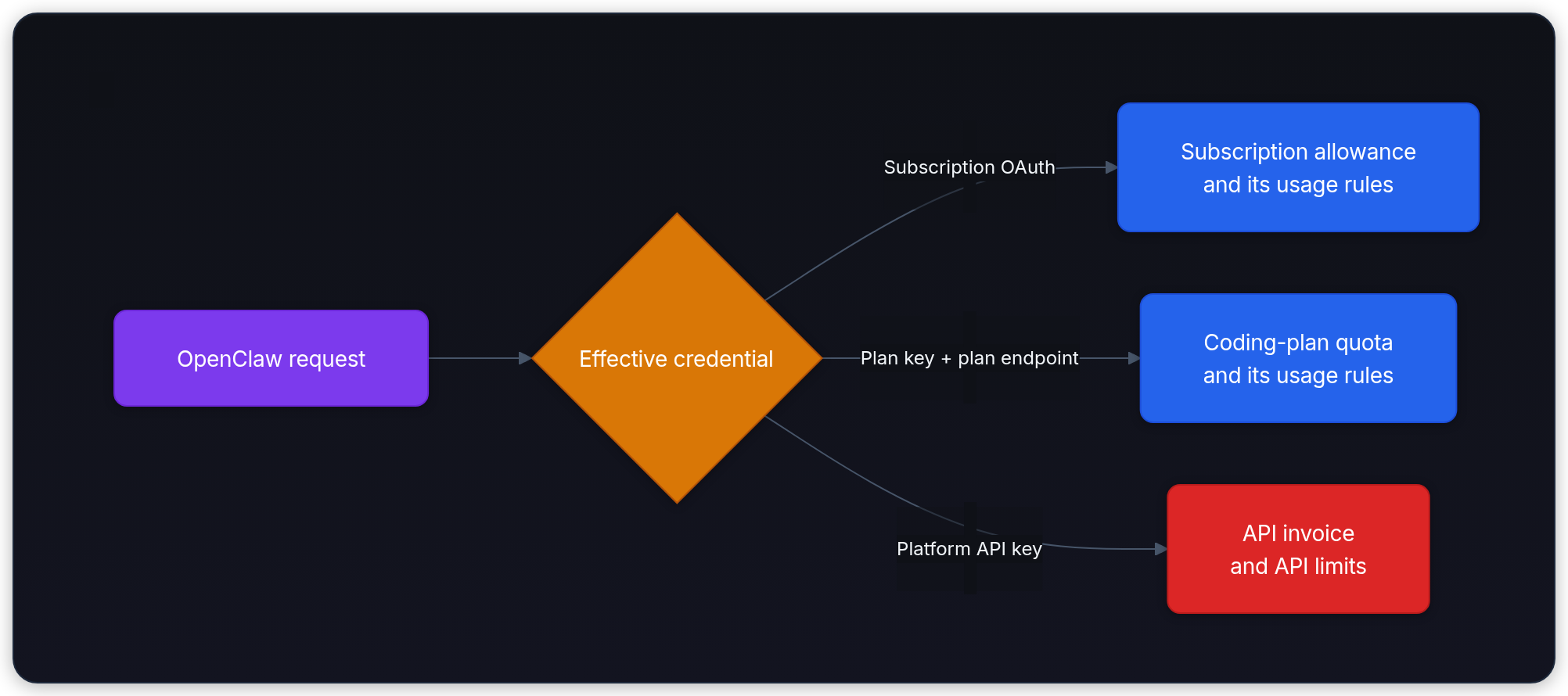
These are alternatives, not automatic stages. Some subscriptions also sell extra credits. OpenAI's ChatGPT credits extend the ChatGPT/Codex meter, not a Platform API balance.[4] MiniMax's Subscription Key uses Token Plan quota and eligible purchased Credits; a standard API key uses pay-as-you-go billing. Its purchased Credits are priced at 1,000 per dollar and can fund eligible overflow.[3][5]
QwenCloud Personal Edition requires both its dedicated sk-sp-... key and the matching Token Plan endpoint. For OpenAI-compatible clients, the documented Base URL is https://token-plan.maas.qwencloudapi.com/compatible-mode/v1. A general key, different billing endpoint, or unsupported model can explain unexpected pay-as-you-go charges.[11][12] The same principle applies to backups: adding a paid API credential may change the invoice even when the selected model stays unchanged.
Calculate one request, then count the whole task
A user task can contain multiple model requests, tool calls, retries, and a final verification pass. QwenCloud Personal Credits consumption depends on model, token usage, thinking mode, and tool calls, so one task has no fixed conversion to Credits.[2]
Use this illustrative single-request receipt:
- 20,000 uncached input tokens
- 10,000 cache-read input tokens
- 4,000 billed output tokens
The input total is 30,000, not 40,000. Cached input is a subset of total input in many usage reports; don't charge it twice. Here the categories are already separated. Identical text can tokenize differently across models, so equal token counts illustrate the meters, not identical task performance. Billed output can include reasoning tokens, not just the text shown to the user.
Direct API dollars
The current standard, short-context GPT-5.6 Sol rates are $4 per million uncached input tokens, $0.40 per million cached input tokens, and $20 per million output tokens.[8] That makes this request:
This assumes no separately charged cache writes, hosted tools, regional uplift, or faster service tier. The pricing table lists cache writes separately. Prompts above 272K input tokens use higher rates for the full request, not just the excess. Sol's promotional pricing is documented as available at least through November 21, 2026; recheck before making a longer-term budget.[8][13]
A task making ten requests with this same usage would cost $1.64 in model charges. A hundred such tasks would cost $164, not $16.40. Real agent requests usually vary as context and output grow, so sum their actual receipts rather than multiplying the first call blindly.
Subscription credits
Z.AI's GLM-5.3 standard credit multipliers are 6.9 for uncached input, 1.7 for cache reads, and 24 for output, divided by 10,000 tokens. The same illustrative counts consume 25.1 credits. These credits aren't dollars or OpenAI tokens.[6]
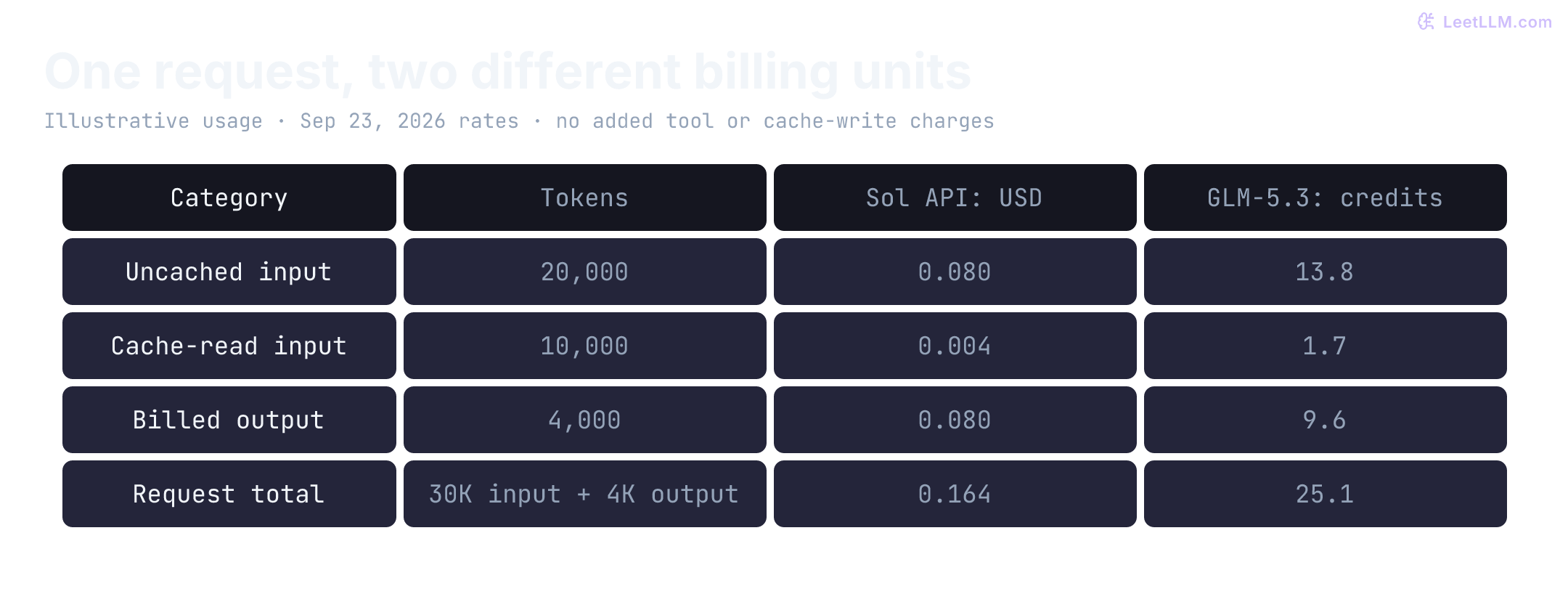
With an untouched 2,000-credit window, at most 79 complete requests of this shape fit at the standard rate: 80 would require 2,008 credits. Other use and tool charges reduce that number; a task containing ten requests isn't one of those 79 requests. Z.AI discounts model credits by half outside its weekday 14:00 to 18:00 Singapore-time peak period. Its September 25 to October 7 all-day discount and separate Flash campaign are temporary benefits, excluded from this standard-rate calculation. A price discount doesn't guarantee a shorter queue.[6][7]
Before running this offline calculator, predict the two totals and whether 80 requests fit the window. Its inputs are the separated token counts and dated rates above; its output checks request cost, ten-request task cost, and whole requests within a credit balance. Run it with Node.js; no credentials or provider calls are needed.
const tokens = { uncached: 20_000, cached: 10_000, output: 4_000 };
const usd = (tokens.uncached * 4 + tokens.cached * 0.40 + tokens.output * 20) / 1e6;
const credits = (tokens.uncached * 6.9 + tokens.cached * 1.7 + tokens.output * 24) / 1e4;
const requestsPerTask = 10;
console.log({
  usdPerRequest: usd.toFixed(3),
  usdPerTask: (usd * requestsPerTask).toFixed(2),
  creditsPerRequest: credits.toFixed(1),
  wholeRequestsInWindow: Math.floor(2000 / credits),
});
Expected output:
{
  usdPerRequest: '0.164',
  usdPerTask: '1.64',
  creditsPerRequest: '25.1',
  wholeRequestsInWindow: 79
}
The floor counts complete requests, so a small remaining balance doesn't fund an eightieth request. Change requestsPerTask to inspect task cost without changing either per-request meter.
MiniMax's console reports a shared resource bar rather than a stable token-to-task conversion. Don't invent one from this example.[3] LLM Cost Engineering explains how cache hits, reasoning output, and retries change the full cost.
Check the exact plan and model route
A provider catalog can contain models that the selected subscription doesn't cover. Pin an exact supported model and record the endpoint, auth profile, plugin version, and OpenClaw version with it.
| Path | Documented route or setup detail | Boundary to verify |
|---|---|---|
| OpenAI subscription or API | Explicitly selected openai/gpt-5.6-sol when available in the account catalog | Credential type and effective runtime, not merely the openai prefix.[9] |
| MiniMax Coding Plan OAuth | minimax-portal/MiniMax-M3 | Standard API-key setups instead use minimax/*; verify the key's billing product.[14] |
| QwenCloud Token Plan Personal | Its dedicated Base URL accepts exact allowlisted IDs such as qwen3.7-plus | Follow the Personal Edition setup guide. OpenClaw's qwen-api-key path targets legacy Coding Plan; its qwen-token-plan onboarding documents Team Edition endpoints.[11][2][15] |
| Z.AI Coding Plan | External @openclaw/zai-provider plugin; zai/glm-5.3 | Global Coding Plan onboarding is zai-coding-global, not the general API endpoint.[16] |
QwenCloud Personal's current allowlist includes selected Qwen, GLM, and DeepSeek text models alongside multimodal models. Don't copy Kimi or MiniMax IDs from the historical Coding Plan or Team Edition list into a Personal configuration. OpenClaw's published Team Edition setup and QwenCloud's Personal quickstart document different Base URLs; confirm the guide matches the edition bought rather than changing only the key. No live Personal integration was tested for this article.[2][11][15]
The current QwenCloud OpenClaw Personal sample also pairs its OpenAI-compatible URL with api: "anthropic-messages", while the Personal quickstart publishes separate URLs for those protocols. Resolve that mismatch against the selected client's protocol before copying the configuration. Its sample disables Gateway authentication, so don't apply that setting to a shared or remotely exposed Gateway.[17][11]
Z.AI currently lists GLM-5.3 and GLM-5.3-Flash; older 5.2/5.1 requests route to 5.3, while 4.7 routes to Flash. An old configured name therefore may not identify the model that actually answers.[6]
Use the linked provider guides for current onboarding rather than running every setup path. After configuring one path, inspect it before making a live request:
openclaw models status --json
openclaw models list
openclaw config get agents.defaults.model --json
openclaw models auth list
Validation scope: these commands were checked against current documentation; no configured Gateway was run. Catalog visibility isn't proof of execution readiness. models status --probe makes real requests, may consume quota, and has additional state-directory requirements. Read the CLI's probe instructions before running it against an installation.[18]
Respond to the failure you actually received
Quota exhaustion, temporary rate limiting, queue delay, and budget exhaustion need different responses. An hourly concurrency error isn't necessarily the same as an exhausted monthly allowance.
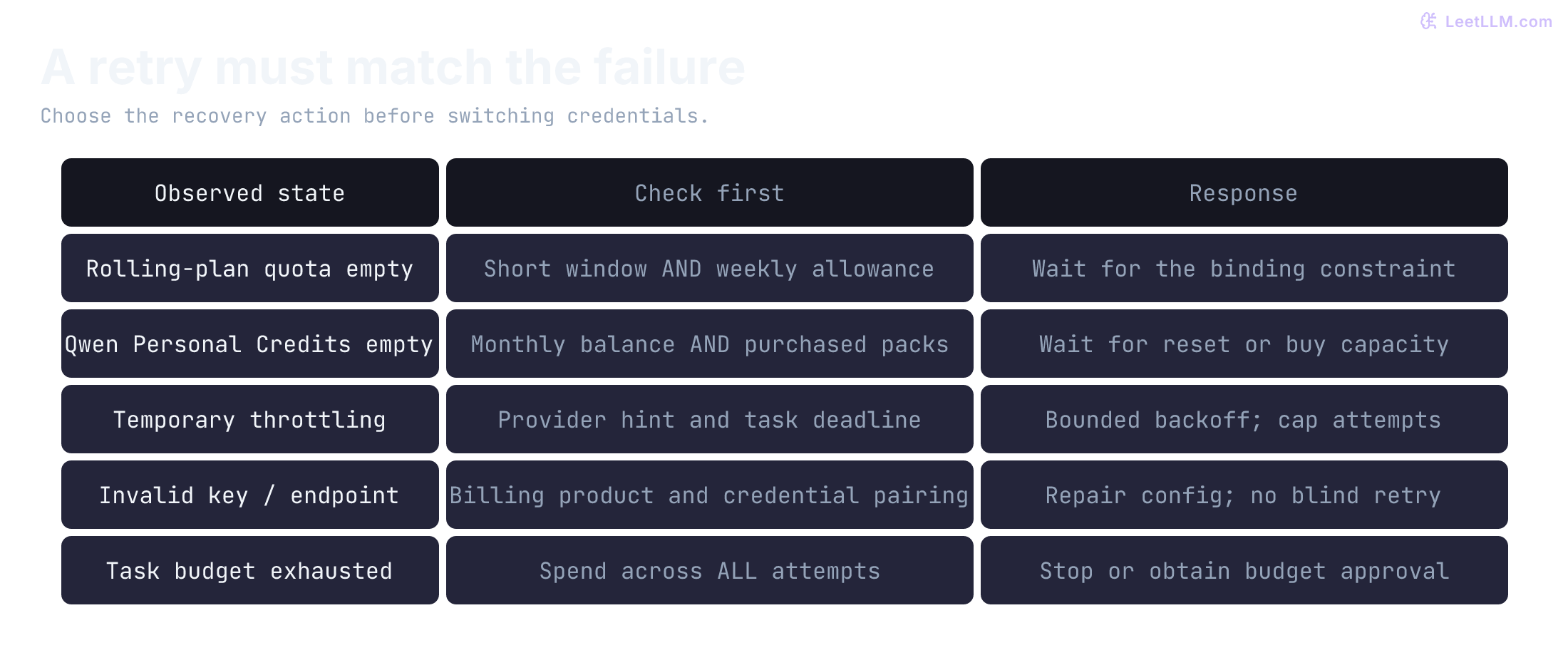
QwenCloud Personal removed its weekly quota on September 22, 2026. Monthly Credits reset per subscription month, unused quota doesn't roll over, and purchased Credit Packs can be consumed after the base quota. Once both are exhausted, service pauses without automatic provider-side pay-as-you-go fallback.[2][12] That doesn't prevent your own OpenClaw configuration from selecting a different paid credential or provider.
MiniMax's rolling five-hour quota can recover while its weekly constraint still blocks work.[5] Z.AI explicitly assigns OpenClaw secondary, best-effort scheduling under load.[7] Neither a subscription nor a direct API key promises unlimited concurrency or uninterrupted service.
OpenClaw can rotate auth profiles within a provider before advancing to configured fallback models. Its current documentation makes explicit user-selected session models strict, but a preferred auth profile can still rotate among eligible same-provider profiles. Pinning a model is not a spending cap. Fallback applies to the current turn; group and channel conversations can suppress visible fallback notices while retaining events.[19]
Make paid fallback an explicit decision
Before adding a backup, verify its workload eligibility, data-processing policy, model coverage, and budget. A metered model isn't automatically stronger, and a difficult task doesn't by itself authorize more spending or broader tool access.
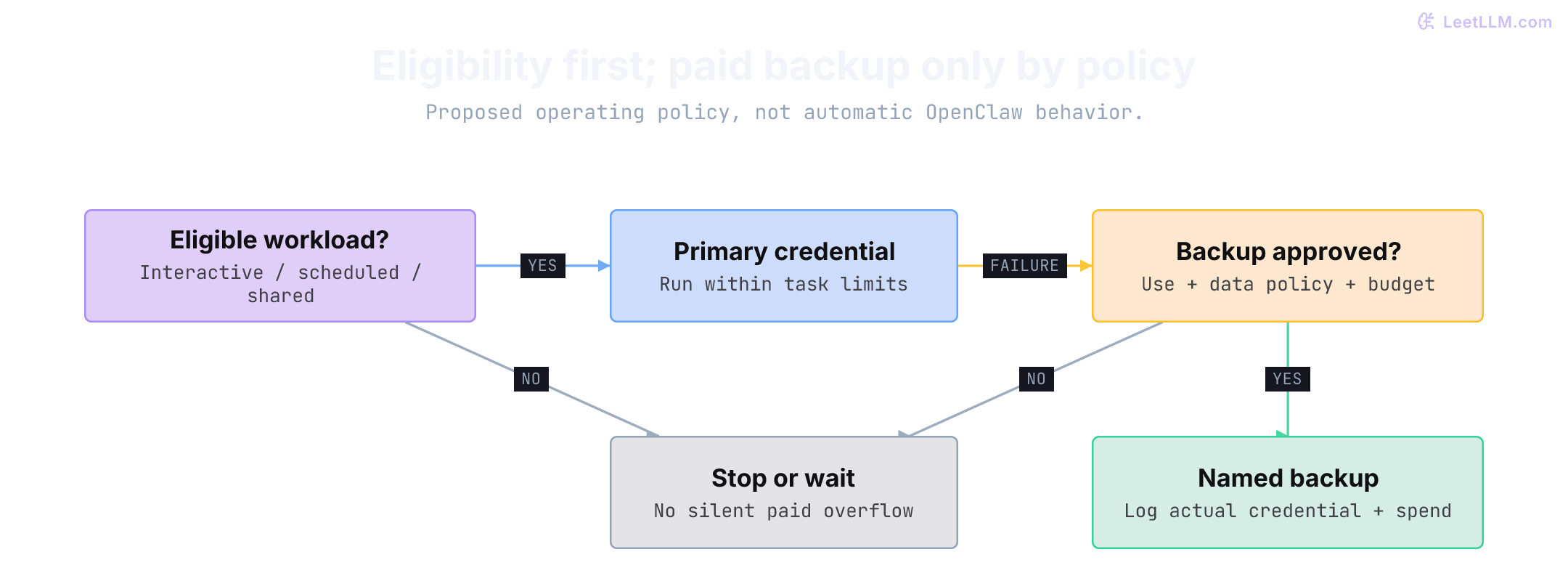
Use a task budget that includes all attempts, and stop when the budget or deadline is exhausted. A dashboard estimate or alert isn't an enforced hard cap. If a tool timed out after opening a pull request, check whether the write succeeded before retrying; otherwise a model fallback can duplicate the action. Agent Failure & Recovery covers that distinction.
Pilot a few representative tasks on the same starting state. Record requests per task, billed token categories, quota before and after, queue time, retries, final outcome, and reviewer time. Include rejected attempts when calculating cost per accepted result. For a subscription, state whether you're reporting incremental cash spend or an allocated share of the monthly fee. This is the evidence needed to justify another plan, not a vendor's advertised agent count.
Secure the Gateway before leaving it running
OpenClaw's security model supports one trust boundary per Gateway: one operator or mutually trusting teammates, not adversarial tenants sharing an agent. Tool-enabled users share delegated authority. Inspect the effective sandbox, execution host, approvals, channel allowlists, and plugin permissions; a self-hosted process is not automatically isolated.[20]
Run openclaw security audit after configuration or exposure changes. Restrict host mounts and secrets, keep untrusted channels away from privileged tools, and use separate operating-system or host boundaries where users don't trust each other. Hosted inference still sends selected prompts and tool results to the provider. Training exclusions are not the same as zero retention or local processing.[20][21]
Start with one eligible credential. Reuse an existing subscription only when its allowed use and measured capacity fit. Consider MiniMax for interactive MiniMax work, QwenCloud when the chosen edition's exact allowlist fits, or Z.AI when GLM results and best-effort scheduling meet your needs. Use an API product deliberately for suitable metered workloads. Add a backup only after a named, measured failure justifies it. No universal winner follows from the monthly prices alone.