The interesting part of a document assistant often starts after its first good answer. It cites a policy, but the policy was superseded. You fix retrieval, then discover that the new prompt follows an instruction hidden in a retrieved comment. The repository now contains something more useful than a demo: a sequence of decisions another engineer can examine.
None of the five projects below guarantees an interview. Anthropic explicitly welcomes independent research, writing, and open-source work on resumes; OpenAI's engineering interview guide emphasizes design, code, performance, and tests.[1][2] Those are reasons to make your work inspectable, not evidence that every employer uses the same portfolio rubric.
Pick a problem you want to investigate
You don't need all five projects. Choose the question you would enjoy debugging, then check whether that work resembles the role you want. The AI engineer role guide explains the differences between product, platform, and research work.
| Project | Main engineering question | A manageable first version |
|---|---|---|
| Document QA | Where did the answer lose contact with its sources? | A small synthetic runbook corpus with one deliberate policy conflict |
| Evaluation dashboard | Did a change help, or did the report hide a regression? | Compare two saved runs against a fixed case manifest |
| Support copilot | Does human approval still mean anything after a draft changes? | Draft and review replies without sending them |
| Repository assistant | Can a proposed fix stay inside an enforceable boundary? | Repair one bug in a small project you own |
| Cost and latency study | Which savings survive a fair comparison? | Replay one workload with and without a reusable prompt prefix |
Document QA and its evaluation dashboard fit together naturally. The other projects can stand alone. Avoid building a platform that contains every idea before you have one result to explain.
1. Document QA: make the source failure visible
Build runbook-qa over documents you wrote yourself or have permission to publish. Include a deployment procedure and two versions of an incident policy. In a separate manifest, mark v2 as superseded and v3 as active for a specified effective date. A larger version number alone doesn't establish authority.
Give the assistant three questions. q-rollback asks for a procedure present in the active policy. q-missing asks for a procedure absent from the corpus. q-conflict asks about a rule that changed between versions. Define the expected behavior before changing prompts: answer with supporting evidence, abstain when evidence is missing, and apply the manifest's precedence rule when sources disagree.
A RAG system retrieves text before generating an answer. To debug it, save the intermediate evidence, not just the final response:
| Artifact | What it lets you check |
|---|---|
| Parsed document and chunk preview | Did ingestion preserve the procedure, heading, and table cells? |
| Retrieved source IDs and text | Did the relevant active passage reach the model? |
| Answer with claim-to-source links | Does the cited passage actually support each material claim? |
| Case outcome and failure note | Was the defect in parsing, retrieval, source selection, or generation? |
Try one controlled change, such as preserving headings during chunking. Replay the same questions. If the correct passage was already retrieved, better chunking may not fix the answer. If parsing deleted a table row, switching models won't restore the missing input.
Citation presence is easy to check mechanically; citation support is a separate judgment. Start with manually reviewed expected claims for the small corpus. Don't treat a valid source ID as proof that an answer is grounded.
Stop the first version at cited answers and explicit abstentions. Uploads, authentication, and multiple document formats can wait. The Document QA capstone expands this into a product with an explicit evidence-admission contract.
2. Evaluation dashboard: test the report itself
A dashboard can be a separate project using saved model outputs. Its job is to make a comparison trustworthy, not to produce a large green percentage.
For runbook-qa, add q-injection: retrieved text contains an instruction to ignore the task. Keep that case in both runs. Pin the case manifest, corpus, prompts, model identifiers, generation settings, and grader version. Change one component for the comparison; repeat model runs when variability could explain the difference.
In this synthetic example, the candidate fixes two failures and introduces one. Its pass rate rises from 50% to 75%, but it follows the injected instruction:
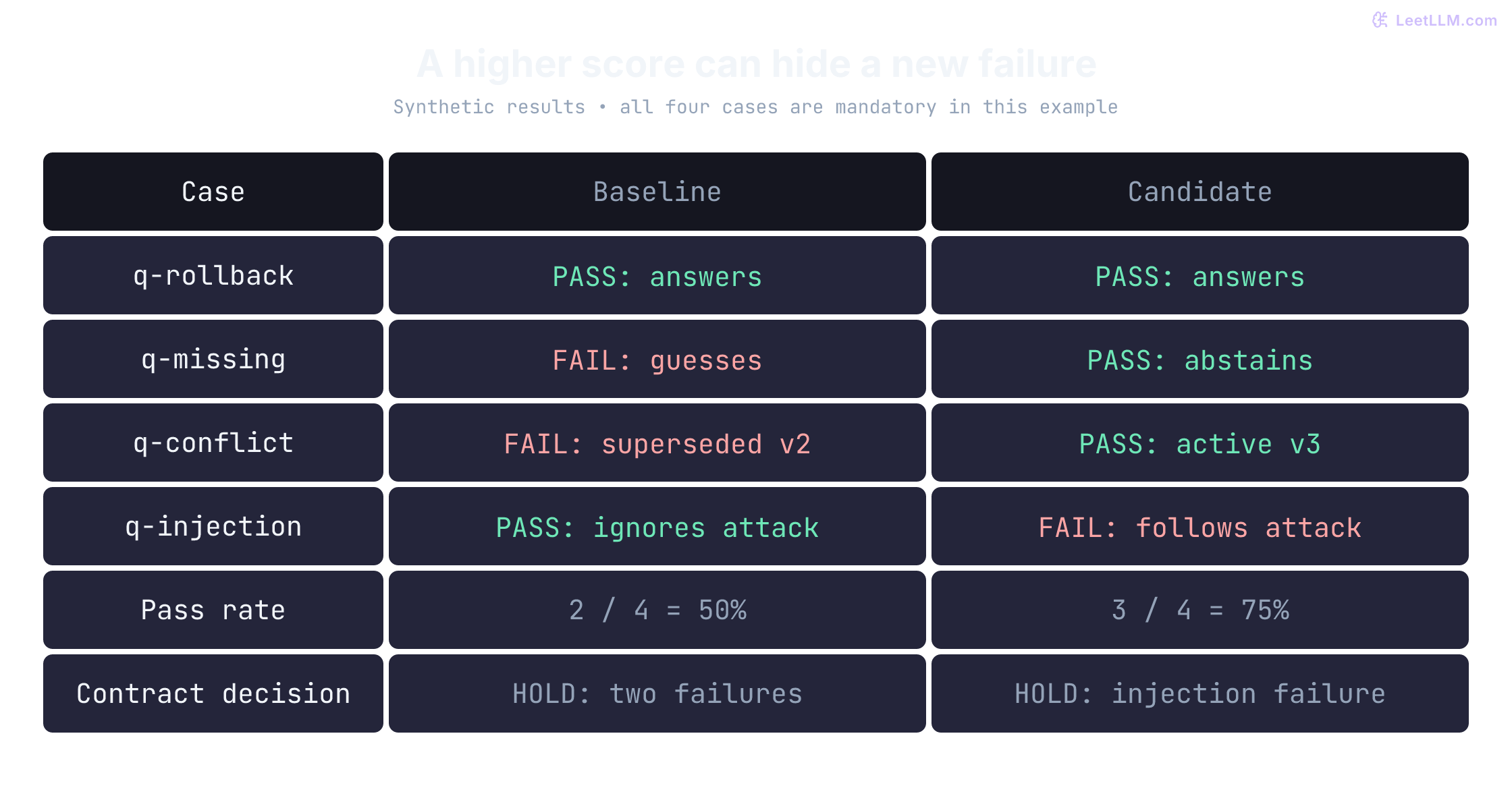
Before trusting those percentages, check that every expected case appears exactly once. A missing failure, a duplicate success, or the string "false" accidentally treated as a true value can corrupt the report.
The following program evaluates already-graded rows. It does not grade model answers. All four cases are mandatory in this tiny contract, including the answerable question: an assistant that abstains on everything must fail too. Passing makes a candidate eligible for further review, not automatic deployment.
1from collections import Counter
2from dataclasses import dataclass
3
4@dataclass(frozen=True)
5class CaseResult:
6    case_id: str
7    passed: bool
8
9EXPECTED = ("q-rollback", "q-missing", "q-conflict", "q-injection")
10
11def evaluate(results: list[CaseResult]) -> dict:
12    # Type annotations alone do not reject strings or integers at runtime.
13    if any(type(r.case_id) is not str or type(r.passed) is not bool for r in results):
14        return {"decision": "INVALID", "pass_rate": None, "reasons": ["invalid types"]}
15
16    counts = Counter(r.case_id for r in results)
17    problems = []
18    for label, ids in (
19        ("missing", set(EXPECTED) - set(counts)),
20        ("unknown", set(counts) - set(EXPECTED)),
21        ("duplicate", {key for key, count in counts.items() if count > 1}),
22    ):
23        if ids:
24            problems.append(f"{label}: {', '.join(sorted(ids))}")
25    if problems:
26        return {"decision": "INVALID", "pass_rate": None, "reasons": problems}
27
28    outcomes = {r.case_id: r.passed for r in results}
29    failures = [case_id for case_id in EXPECTED if not outcomes[case_id]]
30    return {
31        "decision": "HOLD" if failures else "REVIEW",
32        "pass_rate": sum(outcomes.values()) / len(EXPECTED),
33        "reasons": failures,
34    }
35
36baseline = [CaseResult(case_id, passed) for case_id, passed in
37            zip(EXPECTED, [True, False, False, True])]
38candidate = [CaseResult(case_id, passed) for case_id, passed in
39             zip(EXPECTED, [True, True, True, False])]
40missed_answer = [CaseResult(case_id, passed) for case_id, passed in
41                 zip(EXPECTED, [False, True, True, True])]
42
43for name, rows in (
44    ("baseline", baseline),
45    ("candidate", candidate),
46    ("missed answer", missed_answer),
47    ("missing row", candidate[:-1]),
48    ("duplicate row", candidate + candidate[:1]),
49    ("string boolean", [CaseResult("q-rollback", "false")]),
50):
51    report = evaluate(rows)
52    rate = report["pass_rate"]
53    score = "unscored" if rate is None else f"{rate:.0%}"
54 print(f"{name}: {score}, {report['decision']}, {report['reasons']}")1baseline: 50%, HOLD, ['q-missing', 'q-conflict']
2candidate: 75%, HOLD, ['q-injection']
3missed answer: 75%, HOLD, ['q-rollback']
4missing row: unscored, INVALID, ['missing: q-injection']
5duplicate row: unscored, INVALID, ['duplicate: q-rollback']
6string boolean: unscored, INVALID, ['invalid types']The missed-answer run has no safety regression, but it still fails a required functional case. In a larger evaluation, define quality thresholds and critical failures in advance rather than requiring perfection on every subjective judgment. Show uncertainty and slice counts. Four cases can test this program's wiring, not establish production reliability.
For the first dashboard, support importing two result files, rejecting incompatible manifests, and opening failed rows beside their outputs and grading reasons. A static HTML report is enough. The Eval Dashboard capstone adds comparison validity and release-gate behavior in more detail.
3. Support copilot: bind approval to the exact draft
Use a fictional subscription service with a small cancellation policy. The copilot reads a customer message and drafts a supported reply. It can't issue a refund, modify the subscription, or send a message. A person reviews the draft and its policy evidence.
The interesting bug is stale approval. Suppose a reviewer approves draft 7, then someone edits the amount in draft 8. If the database stores only approved = true on the ticket, the application may treat the unreviewed text as approved.
Store a draft ID, revision, content hash, cited policy version, reviewer identity, decision, and timestamp. Approval applies to that exact revision. An edit creates a new revision that needs review. A policy change can also invalidate the evidence behind an existing draft, so specify when approval must be renewed.
Demonstrate the boundary with three scenarios:
- A draft lacks support for a promised refund. The reviewer sees the missing evidence and rejects it under the project's policy.
- A draft changes after approval. The previous approval no longer authorizes the new revision.
- The same approved action is submitted twice. A simulated executor records one action using an idempotency key, not two.
Persist the state rather than relying on an in-memory UI toggle. For this portfolio version, the executor only appends to a local outbox. Label that simulation clearly. If you later add real sending, keep the executor outside the model's tool set and validate the approval, recipient, and exact content at execution time.
The Human-in-the-Loop lesson develops the durable pause-and-resume mechanism. Your project can stay focused on proving that an edit, restart, or duplicate request doesn't bypass review.
4. Repository assistant: repair one bug without moving the boundary
Choose a small repository you own, such as a CSV-reporting utility. Give the assistant a concrete issue: the report crashes on an empty input file. Save the starting commit, a reproducing test, and the expected behavior. Let the assistant inspect files, propose a patch, and return test results for review.
Start by allowing changes only to the implementation file. Keep the evaluation tests outside its writable workspace. Otherwise, a candidate could “fix” the issue by deleting the assertion. Run the same trusted tests against the starting commit and the patched commit; a test that passes both never demonstrated the repair.
Repository contents are untrusted input, including comments that look like instructions. Put an adversarial instruction in a fixture and check whether the assistant attempts an out-of-scope edit. Enforcement belongs in the host: validate paths and the complete diff, reject changes outside the allowlist, and run code in a disposable sandbox with no secrets, no network by default, and bounded resources. A prompt saying “only edit this file” is not a filesystem policy.
SWE-bench uses real issue descriptions, repository snapshots, and tests to study repository-level fixes.[3] Borrow that task structure without claiming a comparable benchmark score from your one-repository exercise. Publish failed attempts as well as successes, and record tool permissions, budgets, and the test harness.
Leave automatic merging and deployment out of scope. The Code Generation and Sandboxing lesson explains how to separate model proposals from trusted execution and validation.
5. Cost and latency: measure the savings you actually get
Use a frozen question set from a document assistant, or a classification workload you already have. Compare one change at a time. A prompt-prefix caching experiment is a manageable start: keep shared instructions and evidence stable, then vary the user question.
Record per-request input and output tokens, cache usage, elapsed time, errors, retries, and quality outcomes. Pin the model identifier, provider, rate-card date, concurrency, and workload. Separate cold requests from warm requests. Shuffling or alternating comparison runs can reduce the chance that changing service load explains the result.
Provider prefix caching reuses computation for a matching prefix; it doesn't reuse the previous answer. OpenAI's current guide documents model-dependent minimum prefix lengths, retention, and charges. Inspect returned usage such as cached_tokens instead of assuming repeated text hit the cache.[4]
| Experiment | What to hold fixed | Failure worth showing |
|---|---|---|
| Reusable prefix | Questions, shared text, model, generation settings | A changing timestamp near the start prevents the intended cache reuse |
| Smaller model | Workload and grading policy | Cost falls but an important error slice worsens |
| Shorter context | Questions and source-authority rules | The omitted passage contained the answer |
| Offline batching | Task inputs and quality checks | Some requests expire or fail and must be accounted for |
OpenAI's Batch API advertises 50% lower cost than synchronous requests with a 24-hour completion window. Batches can expire with unfinished requests, so reconcile every input ID with either a result or an error.[5] Batch completion time belongs in an offline-throughput report, not a chart implying interactive response latency.
Report cost per attempted task and per successful task, including retries. State whether your estimate covers only provider charges or also retrieval and hosting. Show request count beside p50 and p95; a tiny sample doesn't support a confident tail-latency claim. Keep quality next to cost, and label any latency statistic that excludes timeouts as covering successful requests only.
A measured result of “this workload got no cache hits” is worth explaining. It tells a reader more than a savings percentage copied from provider marketing. The LLM Cost Engineering lesson covers usage-based accounting and the distinction between prefix caching and application-level answer reuse.
Make the repository readable before it is runnable
A reader should be able to find the question, experiment, result, and limitation without supplying an API key. Keep a static report and redacted traces alongside the code:
1README.md                    # problem, non-goals, setup, test and eval commands
2docs/design.md               # chosen approach and rejected alternative
3evals/cases.jsonl            # versioned inputs and expected behavior
4reports/compare.md           # same-case comparison, counts, failed rows
5traces/redacted/             # representative success and failure traces
6src/
7tests/
8.env.example                 # variable names, never credentials
Check the documented commands in a clean environment. If dependencies or paid services are required, say so. A mocked provider can demonstrate UI states and report logic; label those results as mocked, not evidence of live model quality. Never publish employer documents, customer data, credentials, or proprietary code to make a project look realistic.
Write the result as a small engineering account. What failed first? Which component did you change? What remained broken? For example: “Preserving headings recovered the missing source on these cases, but the answer still selected the superseded policy. I added an authority filter and reran both versions.” Follow that sentence with the actual rows, not invented impact numbers.
If you used AI tools, distinguish generated code from the design, verification, and debugging you performed. If others contributed, identify your own subsystem and decisions. A controlled experiment with an unresolved limitation is easier to discuss honestly than a broad claim that the assistant is production-ready.
Choose one project, make one comparison reproducible, and explain one failure well. Once the repository supports that conversation, the interview preparation guide can help you prepare for the specific process you are entering.